Generect vs QuickEmailVerification: Which Tool Wins in 2026
One builds lead lists, the other cleans them. Here is the honest breakdown of Generect vs QuickEmailVerification — coverage, accuracy, pricing models, and which one your outbound stack actually needs first.
Generect vs QuickEmailVerification is a common shortlist. It is also a mismatch. One tool finds new leads. The other checks the emails you already have. Here is how to pick.
TL;DR
- They are not the same category. Generect is a lead-sourcing platform. It searches companies and people, pulls LinkedIn-derived contact data, and ships it through an API. QuickEmailVerification is a validation service. It tells you whether an address you already own will bounce.
- Generect vs QuickEmailVerification is really a "what do I buy first" question. If your list is empty, a verifier has nothing to check. If your list is stale, a finder alone will still burn your domain.
- The pricing models differ. Generect sells recurring seats and credits for data access. QuickEmailVerification sells pay-as-you-go verification credits. On the PAYG plan those credits never expire.
- Accuracy means two different things here. For Generect it means "is this the right person and the right email pattern." For QuickEmailVerification it means "will this SMTP handshake succeed."
- One stack that does both — find, verify, catch-all check, enrich — removes the handoff work between two vendors. That is where a tool like Tomba Email Finder fits.
Generect vs QuickEmailVerification: what does each tool do?#
Short version: Generect fills the top of your list. QuickEmailVerification protects the bottom of it.
Generect is a B2B lead generation platform. It is built around search and API access. You set a target — industry, headcount, geography, job title, technology. It returns company and contact records, including work emails. The selling point is API-first delivery and LinkedIn-derived audiences. That suits teams that build their own pipelines instead of clicking through a UI. Agencies, RevOps engineers, and product teams use it most.
QuickEmailVerification does one job. It takes email addresses you already own and grades them. The checks cover syntax, domain and MX records, disposable addresses, role accounts (info@, sales@), catch-all domains, and a live mailbox probe. You upload a CSV or call the API. You get back four buckets: deliverable, undeliverable, unknown, and accept-all. The service has been around for years. It sits alongside ZeroBounce, NeverBounce, and Bouncer.
So the honest framing of Generect vs QuickEmailVerification is not "which is better." It is "which gap in your outbound machine is bleeding the most right now."

Generect vs QuickEmailVerification: do they actually compete?#
Only at the edges. Here is where each tool sits in a normal outbound workflow.
- Define the ICP — firmographic filters, technographics, hiring signals. Generect territory. QuickEmailVerification has nothing here.
- Source the contacts — names, titles, company domains, work emails, sometimes LinkedIn URLs. Generect territory. This is its core product.
- Verify the addresses — strip hard bounces, disposables, role accounts, and traps before they hit your sending domain. QuickEmailVerification territory. Generect runs some checks of its own. It is not a standalone verifier with a documented bounce guarantee.
- Enrich and dedupe — merge sources, resolve conflicting records, fill missing fields, drop duplicates. Both tools touch this lightly. Neither owns it.
- Send and monitor — sequencing, reply handling, email deliverability monitoring. Neither tool does this. You need a sending platform.
The overlap is step 3, and it is thin. Generect will not tell you that a mailbox was shut off last Tuesday. QuickEmailVerification will not tell you who the new VP of Engineering at a 200-person fintech is. Treating Generect vs QuickEmailVerification as a straight swap is the most common buying mistake we see.
Generect vs QuickEmailVerification: feature by feature#

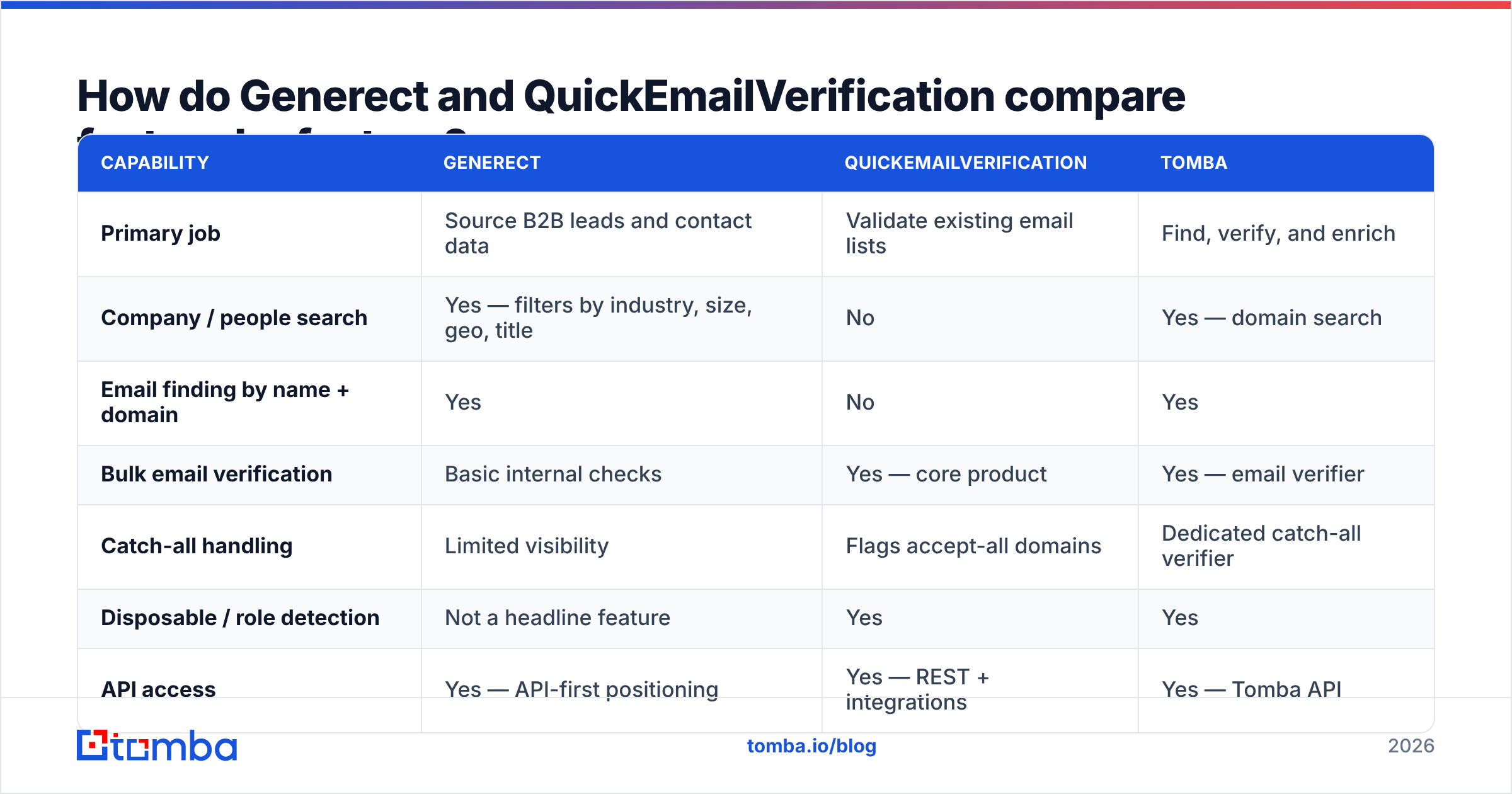
| Capability | Generect | QuickEmailVerification | Tomba |
|---|---|---|---|
| Primary job | Source B2B leads and contact data | Validate existing email lists | Find, verify, and enrich |
| Company / people search | Yes — filters by industry, size, geo, title | No | Yes — domain search |
| Email finding by name + domain | Yes | No | Yes |
| Bulk email verification | Basic internal checks | Yes — core product | Yes — email verifier |
| Catch-all handling | Limited visibility | Flags accept-all domains | Dedicated catch-all verifier |
| Disposable / role detection | Not a headline feature | Yes | Yes |
| API access | Yes — API-first positioning | Yes — REST + integrations | Yes — Tomba API |
| LinkedIn-derived data | Yes, a core differentiator | No | Yes — LinkedIn finder |
| Phone numbers | Partial, plan-dependent | No | Yes — phone finder |
| Spreadsheet add-ons | Limited | CSV upload | Google Sheets, Excel, Airtable |
| Best for | Building lists from scratch | Cleaning lists you already own | Doing both in one workflow |
Two things stand out in that grid.
First, the feature sets barely overlap. Draw a Venn diagram and the shared middle holds two items: "has an API" and "touches email addresses." That is it.
Second, the two gaps cost you differently. Buy only Generect and you send to a list with an unknown bounce rate. A 6–8% bounce rate on a cold domain is enough to trigger throttling at Google and Microsoft. Buy only QuickEmailVerification and you get a very clean list of whatever you scraped by hand. One gap risks your infrastructure. The other just caps your volume.
Generect vs QuickEmailVerification pricing: what does each cost?#
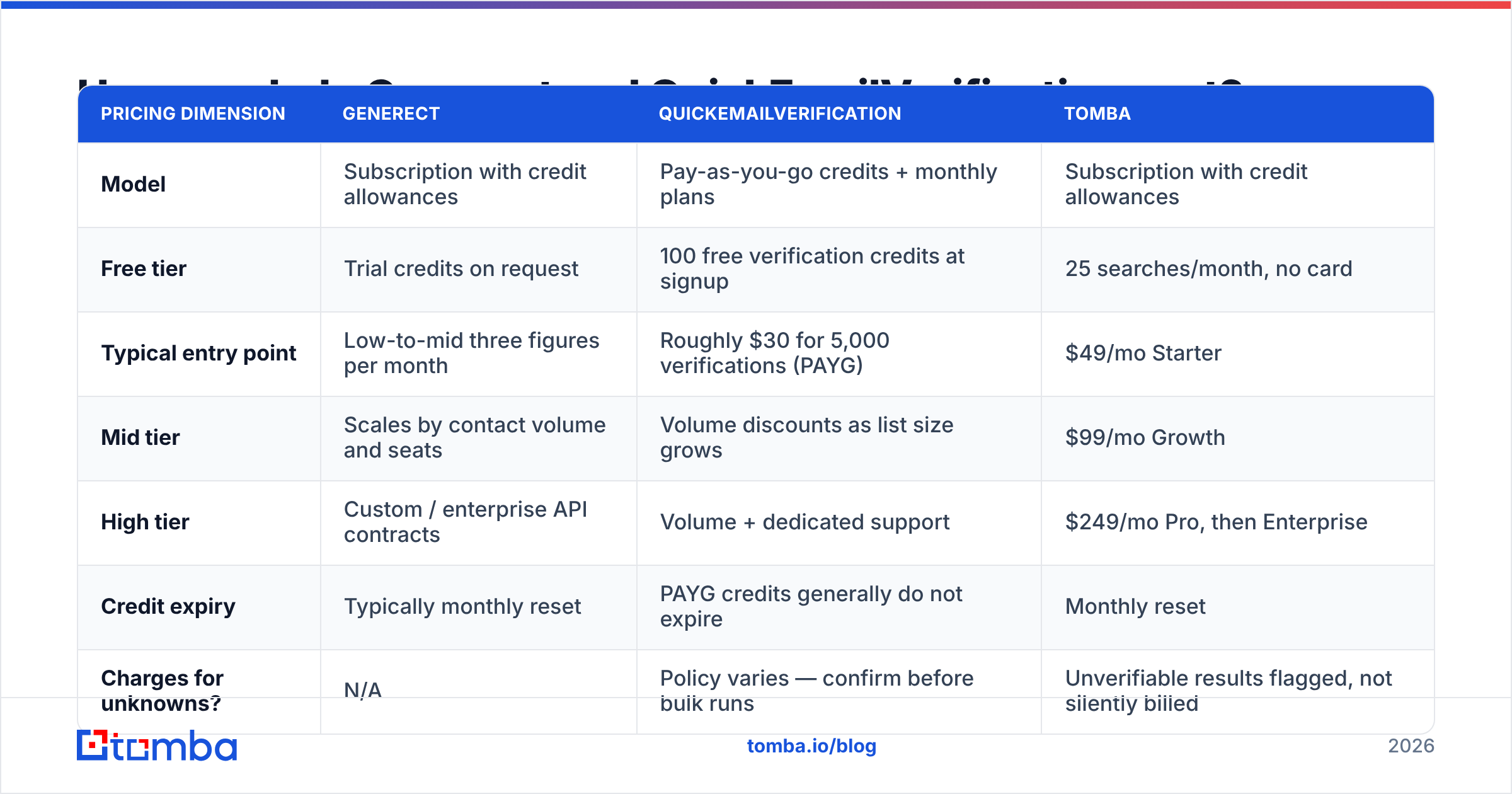
Both vendors change their tiers often. Treat the numbers below as the shape of the model, not a quote. Check the live pricing page before you commit.
| Pricing dimension | Generect | QuickEmailVerification | Tomba |
|---|---|---|---|
| Model | Subscription with credit allowances | Pay-as-you-go credits + monthly plans | Subscription with credit allowances |
| Free tier | Trial credits on request | 100 free verification credits at signup | 25 searches/month, no card |
| Typical entry point | Low-to-mid three figures per month | Roughly $30 for 5,000 verifications (PAYG) | $49/mo Starter |
| Mid tier | Scales by contact volume and seats | Volume discounts as list size grows | $99/mo Growth |
| High tier | Custom / enterprise API contracts | Volume + dedicated support | $249/mo Pro, then Enterprise |
| Credit expiry | Typically monthly reset | PAYG credits generally do not expire | Monthly reset |
| Charges for unknowns? | N/A | Policy varies — confirm before bulk runs | Unverifiable results flagged, not silently billed |
The structure matters more than the sticker price. Pay-as-you-go verification is cheaper if you clean a list four times a year. A subscription wins if you verify all the time. Re-checking your CRM every month is one example, and any serious revenue operations team should be doing it.
For sourcing, the math flips. Lead data is priced on volume and freshness. Buying it in bursts costs more per record than committing to a plan. Need only 300 contacts a quarter? A full sourcing subscription is dead weight. A per-search tool or a lower tier fits better. Run the credit math against Tomba pricing before you sign anything annual.
Generect vs QuickEmailVerification: which one is more accurate?#
This is where the comparison gets slippery. The two vendors measure accuracy on different axes.

Generect asks: is this the right person, at the right company, with the right address format? It fails on stale job titles, on people who left six months ago, and on guessed email patterns that no mail server ever confirmed. Tools built on LinkedIn data are strong on names and titles. LinkedIn profiles update faster than any other public source. They are weaker on the email itself. LinkedIn does not show work emails, so the address has to be derived, matched, or bought elsewhere.
QuickEmailVerification asks: will this address accept mail today? It fails on catch-all domains, where the server accepts everything and a "valid" result proves nothing. Greylisting trips it up too. So does Microsoft 365, which hides SMTP responses on purpose to defeat verification probes. Any verifier that claims near-perfect accuracy on catch-all domains deserves a hard look. Physics does not allow it without a second signal.
What that means in practice:
- A "valid" verdict on a catch-all domain is not a green light. Segment those addresses. Send to them at low volume, or run them through a dedicated catch-all finder that reads signals beyond the SMTP handshake.
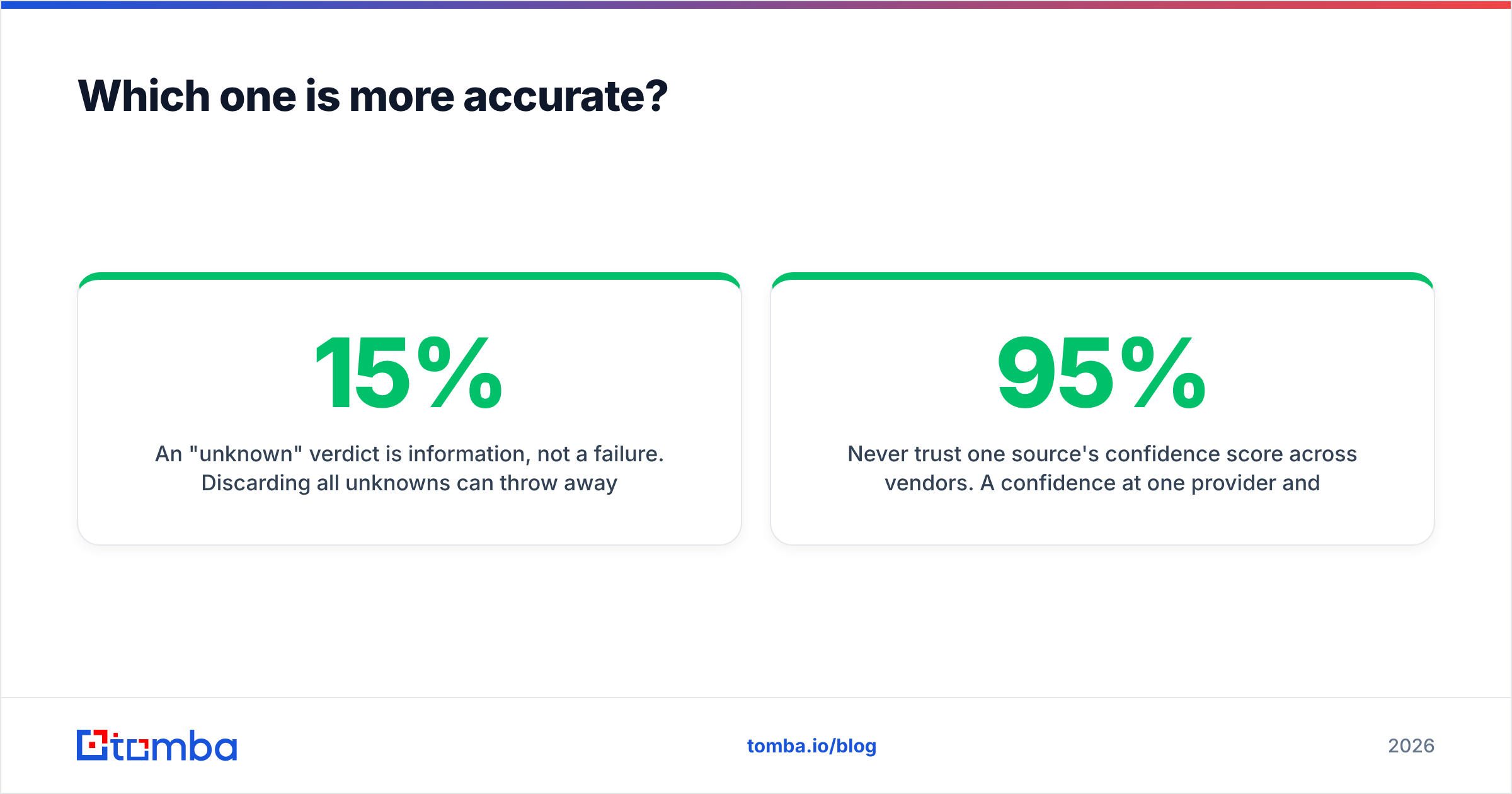
- An "unknown" verdict is information, not a failure. Dumping every unknown can cost you 10–15% of a good enterprise list. Test-send to a small slice instead.
- Freshness beats validation. A clean email for someone who changed jobs is still a bounce and a wasted touch. Re-source every quarter instead of re-verifying an aging list forever.
- Confidence scores do not travel. 95% at one vendor and 95% at another are not the same number. Each is built from different evidence.
User reviews on G2 help you spot patterns: slow support, billing surprises, credit expiry. They are useless for accuracy benchmarks. Settle Generect vs QuickEmailVerification with your own test instead. Take 200 addresses you know are live. Split them. Score both tools on false positives and false negatives. It takes an afternoon and ends the argument for good.
Who should choose Generect?#
Pick Generect if your bottleneck is finding people you do not have yet. It fits best when you want that data delivered by API.
Good fits:
- Agencies running outbound for many clients. They need a fresh ICP every week without rebuilding a scraping stack.
- Engineering-led GTM teams. They want lead data in their own database, not a UI export.
- Teams targeting LinkedIn-visible roles — sales, marketing, HR, and ops leaders at tech companies. That is where LinkedIn identity data is strongest.
Weak fits:
- Anyone whose main pain is bounce rate. A sourcing tool is not a verifier.
- Verticals that are thin on LinkedIn: local trades, parts of manufacturing, much of the public sector, non-English SMB markets.
- Buyers who need a real free tier before they spend.
Who should choose QuickEmailVerification?#
Pick QuickEmailVerification if your bottleneck is a list you already own and do not trust.
Good fits:
- Marketing teams moving to a new ESP. Mailchimp, HubSpot, and Klaviyo all charge by contact. Cleaning before you migrate pays for itself.
- Anyone who bought or inherited a list. Run a hygiene pass before it touches your sending domain.
- Occasional cleaners. Non-expiring pay-as-you-go credits beat a monthly commitment.
Weak fits:
- Teams that need net-new contacts. There is nothing here for you.
- Real-time signup checks at high volume. Latency and rate limits matter more than bulk throughput, so benchmark the API first.
- Teams that want verification, enrichment, and phone data on one contract.

What if you need both — is a combined tool better?#
Usually yes, for one dull reason: handoff cost.
Run two vendors and you own the glue. You export from the sourcing tool. You reformat for the verifier. You upload, wait, download, re-merge, dedupe, and push to your CRM. Every step is a place where columns get mangled, duplicates multiply, and a dead record slips into a live sequence. Multiply that by the campaigns you run each month. The "cheaper" two-vendor stack starts costing real operator hours.
A combined stack closes the loop. With Tomba the sequence is short. Run a domain search to pull every public address at a target company. Use the email finder for named prospects. Verification runs on the same record through the email verifier. Catch-all addresses get their own handling. Then data enrichment fills in titles and company details before the record lands in HubSpot or Salesforce. One credit pool. One API key. One export format.
That said, be honest about when a suite is not the answer:
- You are locked into a sourcing contract. Buy the best standalone verifier and move on.
- Your list is 2 million records from a decade of webinars. That is a bulk-hygiene job priced per check, not a finder job.
- You need one very specific data type, such as mobile numbers for a calling team. Buy the specialist, not the suite.
For everyone else — 500 to 5,000 cold touches a month, two to five people in sales — one vendor with both halves is the easier answer. Run the numbers on your own volume. If you pay two subscriptions plus operator time to shuttle CSVs between them, the case makes itself.
Frequently asked questions#
Can Generect replace an email verifier? Not reliably. Sourcing platforms check a record when they create it. A record found in January may be dead by June. Verification is a point-in-time check, so run it close to send time.
Can QuickEmailVerification find emails? No. It only grades addresses you supply. To build an address from a name and a domain, you need a finder. For one-off guesses, a free email permutator works — then verify the result.
Is Generect vs QuickEmailVerification even a fair comparison? Only as a budget question. The two tools sit at different steps of the same workflow. Most teams end up needing both jobs done.
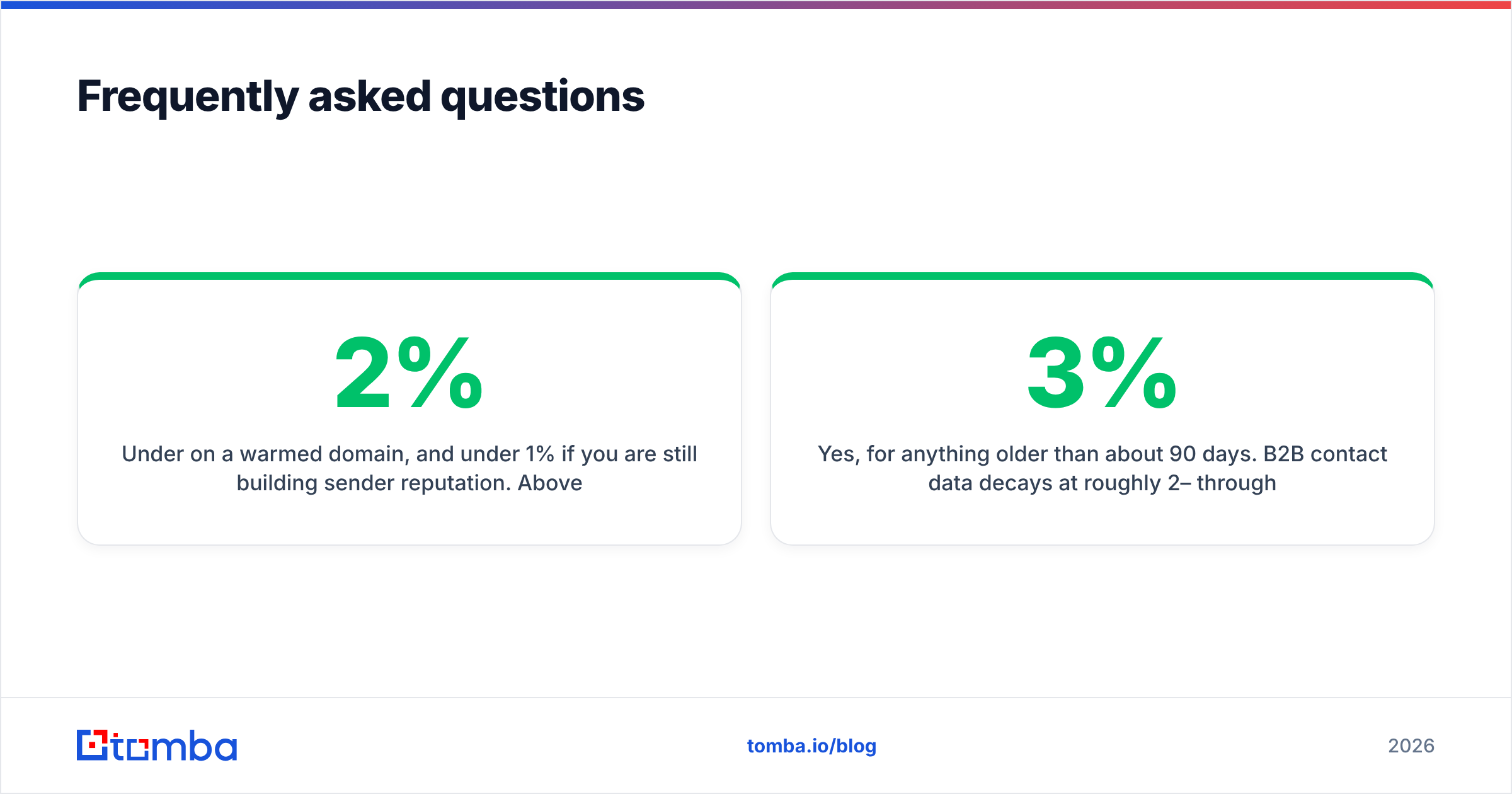
What bounce rate should I target? Under 2% on a warmed domain. Under 1% while you are still building sender reputation. Above 5%, mailbox providers start throttling you. Watch your sender reputation alongside bounce rate. The two move together.
Do I still need verification if my source says the emails are verified? Yes, for anything older than about 90 days. B2B contact data decays 2–3% a month from job changes alone.
Getting the sourcing half right#
The verdict on Generect vs QuickEmailVerification: they answer different questions. The one you need first depends on whether your list is empty or dirty. Dirty? Buy verification credits and clean it this week. Empty? No amount of verification will help you.
If you are starting from empty — and most people reading a comparison like this are — start with Tomba Email Finder. Find work emails by name, company, or domain. Verification arrives on the same record, not in a second vendor's dashboard. Export straight into your CRM. The free tier gives you 25 searches a month with no card. That is enough to test accuracy against your own known-good list before you spend a cent.
Related guides#
Ready to find emails that actually work?
Join 150,000+ professionals who stopped guessing and started sending. Free credits on signup — no credit card required.
Get the Tomba newsletter
Practical outbound tactics and product updates — once every two weeks.
About the author