Generect vs Salesgenie (2026): Which B2B Data Tool Wins?
Generect sells fresh LinkedIn-native lead data through an API. Salesgenie sells a decades-old US business and consumer database with phones and mailing addresses. They solve different problems — here's which one fits your motion, and what each really costs.
Generect vs Salesgenie is less a fair fight than a fork in the road. One sells fresh, API-delivered lead data. The other sells a huge US business file built over decades. This guide shows which side of the fork fits your team, and what each one really costs.
TL;DR
Generect is an API-first lead data tool. It pulls people and companies from LinkedIn-shaped sources and returns work emails in near real time. Best for agencies, SaaS teams, and outbound crews that live in code.
Salesgenie is Data Axle's self-serve app on top of a large, old US business and consumer file. You get phone numbers, mailing addresses, and a light CRM. Best for local sales, insurance, and home services.
They are not real rivals. Generect vs Salesgenie is a choice between modern tech-buyer outbound and US small-business coverage.
Pricing style differs more than price. Generect meters the API. Salesgenie sells seats, often on a yearly plan.
If you only need verified work emails for a list you already have, Tomba Email Finder does that one job for less than either entry plan.
Generect vs Salesgenie: What Each Tool Actually Is#
They come from two different eras of B2B data. Every design choice shows it.
Generect (generect.com) is a data layer, not a seat-based app. Its promise is freshness. Instead of serving a database refreshed once a quarter, it looks people and companies up close to query time. You get clean records back: name, title, company, LinkedIn URL, work email, and company details. There is a UI, but the API is the point. Agencies white-label it. Product teams build on it.
Salesgenie (salesgenie.com) is the small-business app from Data Axle, once known as Infogroup. Under it sits a compiled US business file. Tens of millions of records come from public filings, directories, utility hookups, and a phone-check team. A consumer file adds household data on top.
Salesgenie wraps all of that in a search builder. You filter by area, industry code, staff count, revenue, or credit score. Then you export the list or work it inside the built-in CRM, which ships with a dialer and mail merge.
One is a pipe. The other is a filing cabinet with a search box.
That gap predicts the rest: who buys each one, what it costs, and where it lets you down.
Generect vs Salesgenie: The Head-to-Head Table#
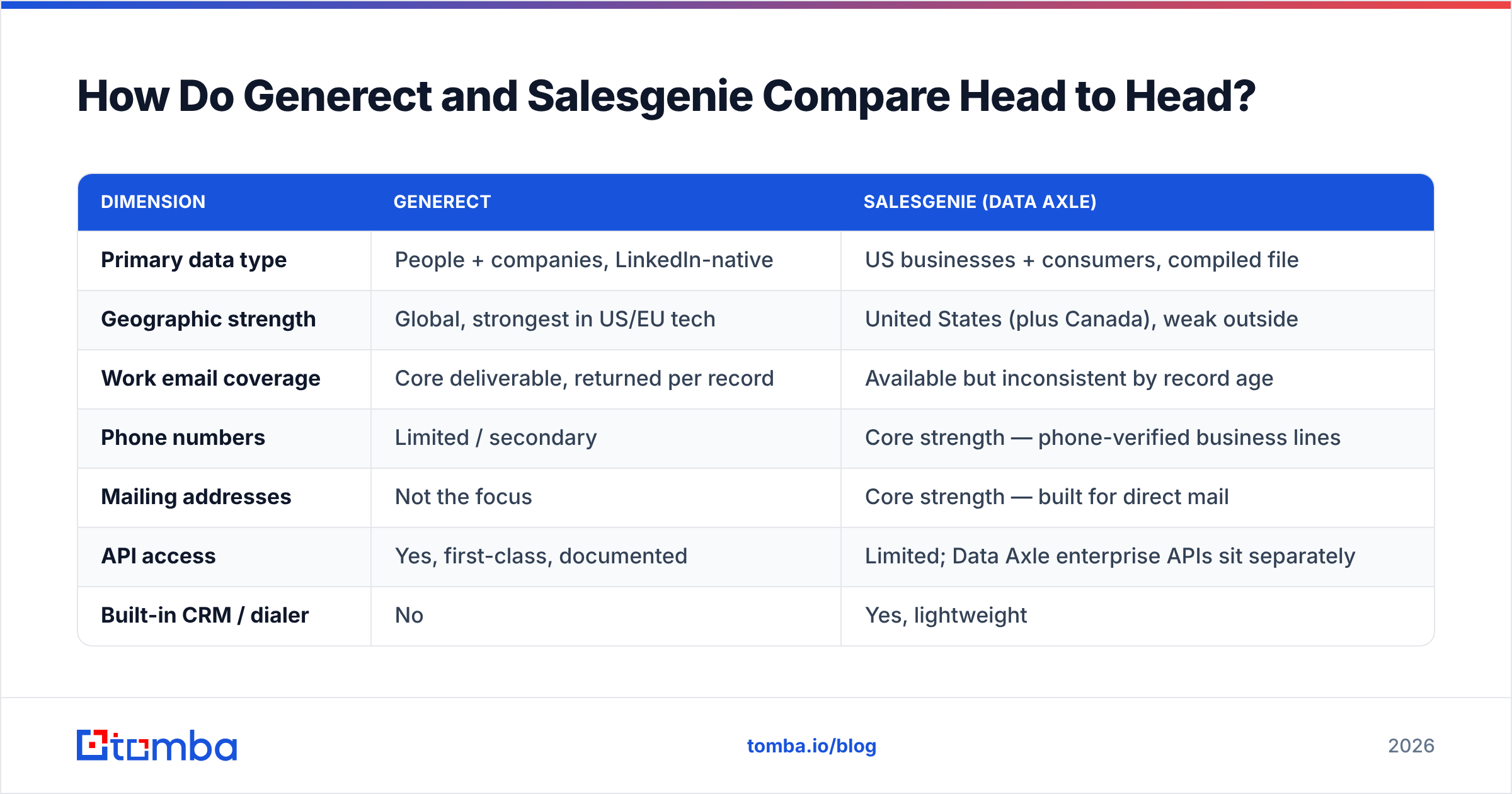
Here is the side-by-side. Treat the numbers as directional. Both vendors negotiate, and neither posts a full rate card.
| Dimension | Generect | Salesgenie (Data Axle) |
|---|---|---|
| Primary data type | People + companies, LinkedIn-native | US businesses + consumers, compiled file |
| Geographic strength | Global, strongest in US/EU tech | United States (plus Canada), weak outside |
| Work email coverage | Core deliverable, returned per record | Available but inconsistent by record age |
| Phone numbers | Limited / secondary | Core strength — phone-verified business lines |
| Mailing addresses | Not the focus | Core strength — built for direct mail |
| API access | Yes, first-class, documented | Limited; Data Axle enterprise APIs sit separately |
| Built-in CRM / dialer | No | Yes, lightweight |
| Ideal buyer | Agencies, SaaS, technical outbound teams | Local SMB sales, insurance, home services, franchises |
| Contract style | Custom / metered, quote-driven | Subscription, commonly annual, seat-based |
| Free entry point | Trial / sample on request | Demo-gated trial |
| Data recency model | Near real-time resolution | Periodic compile + verification cycles |
The row that settles most deals is geographic strength. Do you sell to Europe or APAC? Then Salesgenie is out before you reach pricing. Do you sell HVAC loans in three Ohio counties? Then Generect will return almost nothing, because those shops are not on LinkedIn.
Generect vs Salesgenie: Which Has Better Data Accuracy?#
Neither wins outright. They are accurate about different things.
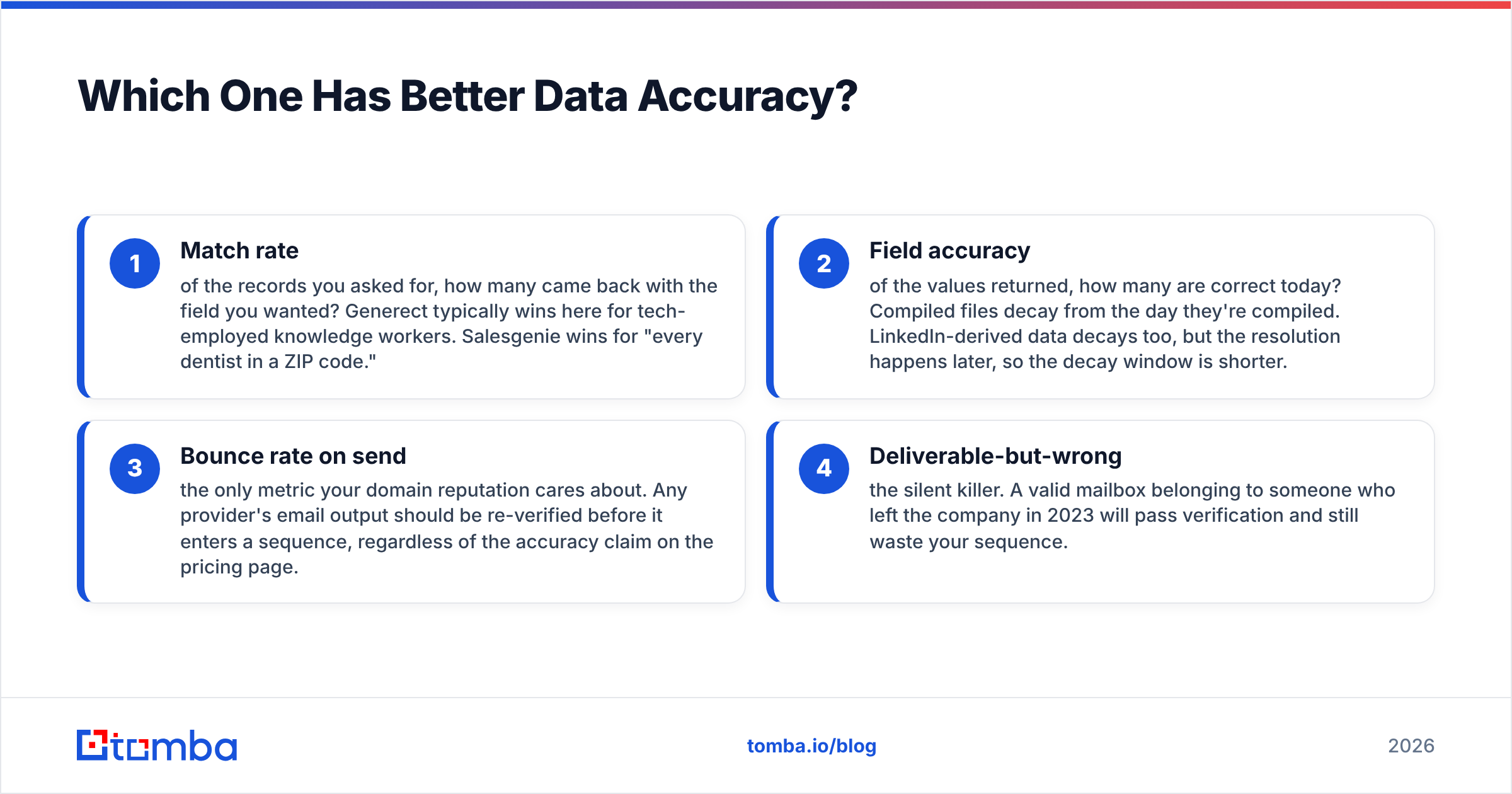
Accuracy is not one number. It splits into four measures, and each vendor quotes the one that flatters it.
Match rate. Of the records you asked for, how many came back filled in? Generect wins for tech job titles. Salesgenie wins for "every dentist in a ZIP code."
Field accuracy. Of the values returned, how many are still true today? A compiled file starts to decay the day it is built. LinkedIn data decays too, but it is pulled later, so the gap is shorter.
Bounce rate on send. This is the only number your domain reputation cares about. Re-check every email before it enters a sequence, whatever the vendor claims.
Deliverable but wrong. This is the quiet killer. A live mailbox from someone who left in 2023 will pass any check and still waste your send.
That last one explains why old databases feel worse than their stated accuracy. The record is real. The mailbox works. The human is gone.

The fix is the same either way: treat every source as raw input. Run exports through an email verifier before they touch your sending domain. Send accept-all domains to a catch-all verifier instead of guessing. If a vendor's records clear that gate at a high rate, you have your answer. Better still, it is an answer measured on your ICP, not on someone else's benchmark.
Practical test: pull 200 records from each vendor for the same ICP. Verify all 400 through a neutral third-party tool. Compare the survival rate and the cost per surviving record. That number is the real price, not the one on the pricing page.
Generect vs Salesgenie Pricing: What Each One Costs#
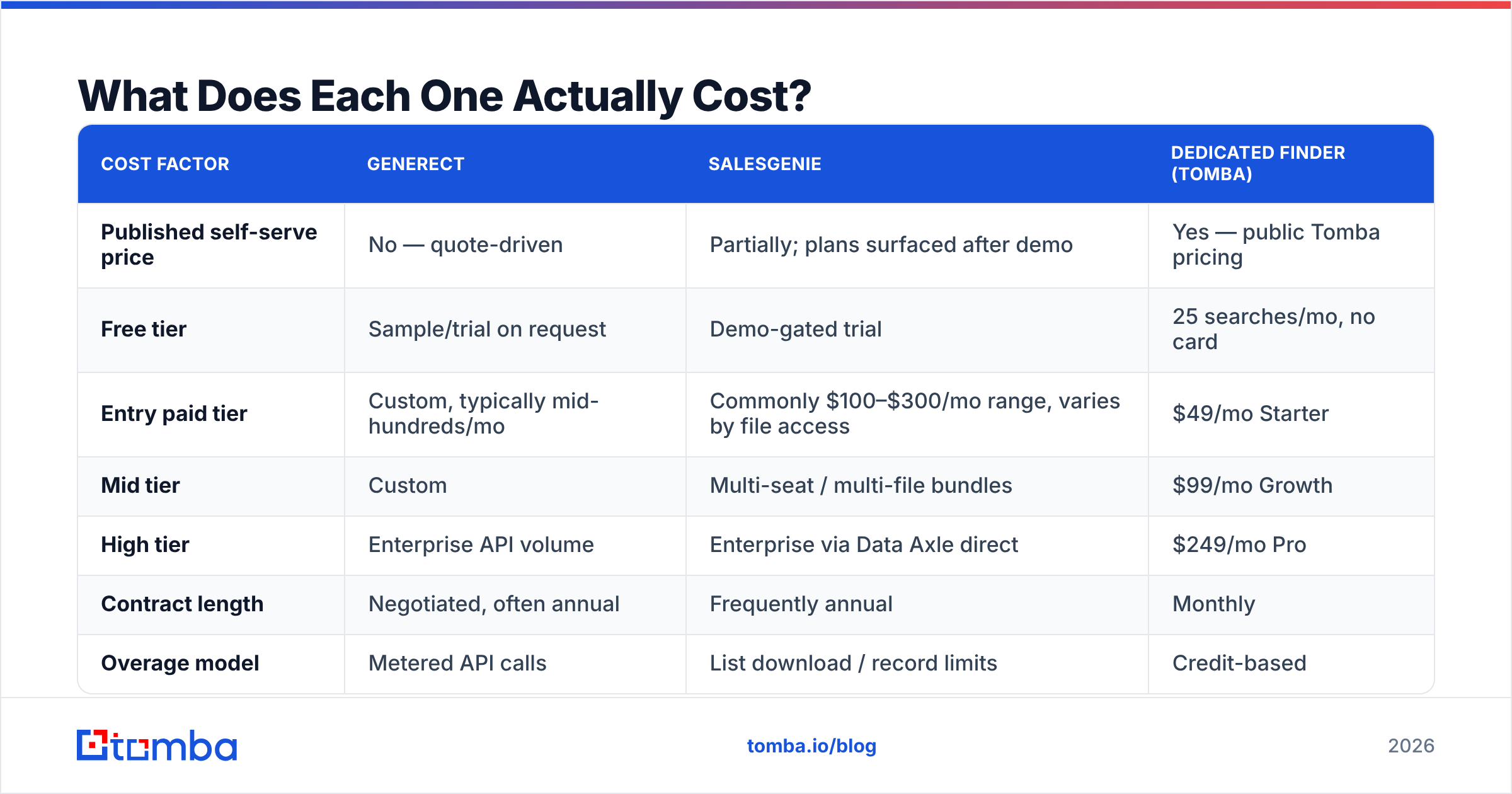
This is the awkward part. Both vendors send you to a sales call instead of a checkout.
| Cost factor | Generect | Salesgenie | Dedicated finder (Tomba) |
|---|---|---|---|
| Published self-serve price | No — quote-driven | Partially; plans surfaced after demo | Yes — public Tomba pricing |
| Free tier | Sample/trial on request | Demo-gated trial | 25 searches/mo, no card |
| Entry paid tier | Custom, typically mid-hundreds/mo | Commonly $100–$300/mo range, varies by file access | $49/mo Starter |
| Mid tier | Custom | Multi-seat / multi-file bundles | $99/mo Growth |
| High tier | Enterprise API volume | Enterprise via Data Axle direct | $249/mo Pro |
| Contract length | Negotiated, often annual | Frequently annual | Monthly |
| Overage model | Metered API calls | List download / record limits | Credit-based |
| API included at entry | Yes | No | Yes |
Price two things with care before you sign.
First: the annual commitment. Salesgenie assumes you will work the same territory all year. That fits a roofing company. It does not fit a startup that will change its ICP twice before Q3. Ask if the plan auto-renews. Ask when the cancellation window closes. Ask whether unused records roll over. Get the answers in the order form, not on the sales call.
Second: the word "records." Every list vendor bills a slightly different unit — a search, an export, a download, a unique record, or a second download of a record you already own. The gap between "10,000 records" and "10,000 downloads" can be 3x in real spend.
Compare that to per-credit tools. A search is a search, and the price sits on a page you can read without booking a call. Neither model is always better. Large buyers often prefer a negotiated deal with an SLA. Just know which one you are walking into.
Who Should Choose Generect?#
Pick Generect when three or more of these are true:
- You need an API, not a UI. Your enrichment runs inside a workflow, a product feature, or an internal tool. Seat licenses are friction you do not want.
- Your ICP is on LinkedIn. Think SaaS, agencies, fintech, and pro services. If your buyer keeps a profile, live lookups beat an old file.
- You sell outside the US. Compiled US files fall off a cliff at the border. Global reach is the reason to be here.
- Freshness beats breadth. You would rather have 400 current records than 4,000 of unknown vintage.
- You are an agency reselling data. White-label list building is a workflow Generect is built for.
Skip it when your prospects are plumbers, restaurants, dental practices, or corner shops. Those businesses exist. They just are not on LinkedIn in any useful way.
Who Should Choose Salesgenie?#
Pick Salesgenie when:
- Your territory is a map, not a filter. "Every business with 10–50 staff within 25 miles" is a Salesgenie query. It is not a Generect query.
- You dial and you mail. Checked phone numbers and real mailing addresses are the compiled-file edge, and it is a real one.
- You need consumer data too. Insurance, mortgage, and home services often need household targeting. Data Axle is one of the few clean sources for it.
- You want one place for everything. The list-to-CRM-to-dialer loop suits a two-person team with no ops help.
- You are buying trust for compliance. Data Axle is an old, auditable vendor with documented sourcing, which matters in regulated markets.
Skip it if you run high-volume cold email to tech buyers. It is the wrong tool, and the annual deal makes that mistake pricey.
Where Do Both Tools Fall Short?#
Every honest versus post needs this part. Here is what neither vendor leads with.
Neither is a verification specialist. Both return emails. Neither is built as a checking engine with SMTP-level, catch-all-aware logic. You still need a second line item.
Both are quote-gated. You cannot test either one in fifteen minutes on a Tuesday. That is a real cost when five vendors are in play.
Coverage cliffs stay hidden until you hit them. Generect thins out for small firms off LinkedIn. Salesgenie thins out past the US border. Build your own list of hard records, because the demo data will never show the cliff.
Compliance rules vary by region. Handling EU personal data? Ask both vendors for their GDPR paperwork and opt-out process. Get the DPA before you buy, not after.
Neither replaces CRM hygiene. Data decays in your system at roughly 2–3% a month, whatever the source. Buying better data with no refresh plan just resets the clock once.
On that last point, the fix is a refresh schedule, not a yearly re-purchase. Running your records back through a data enrichment step each quarter is usually cheaper than buying a new list and importing duplicates.
What Are the Best Generect and Salesgenie Alternatives?#
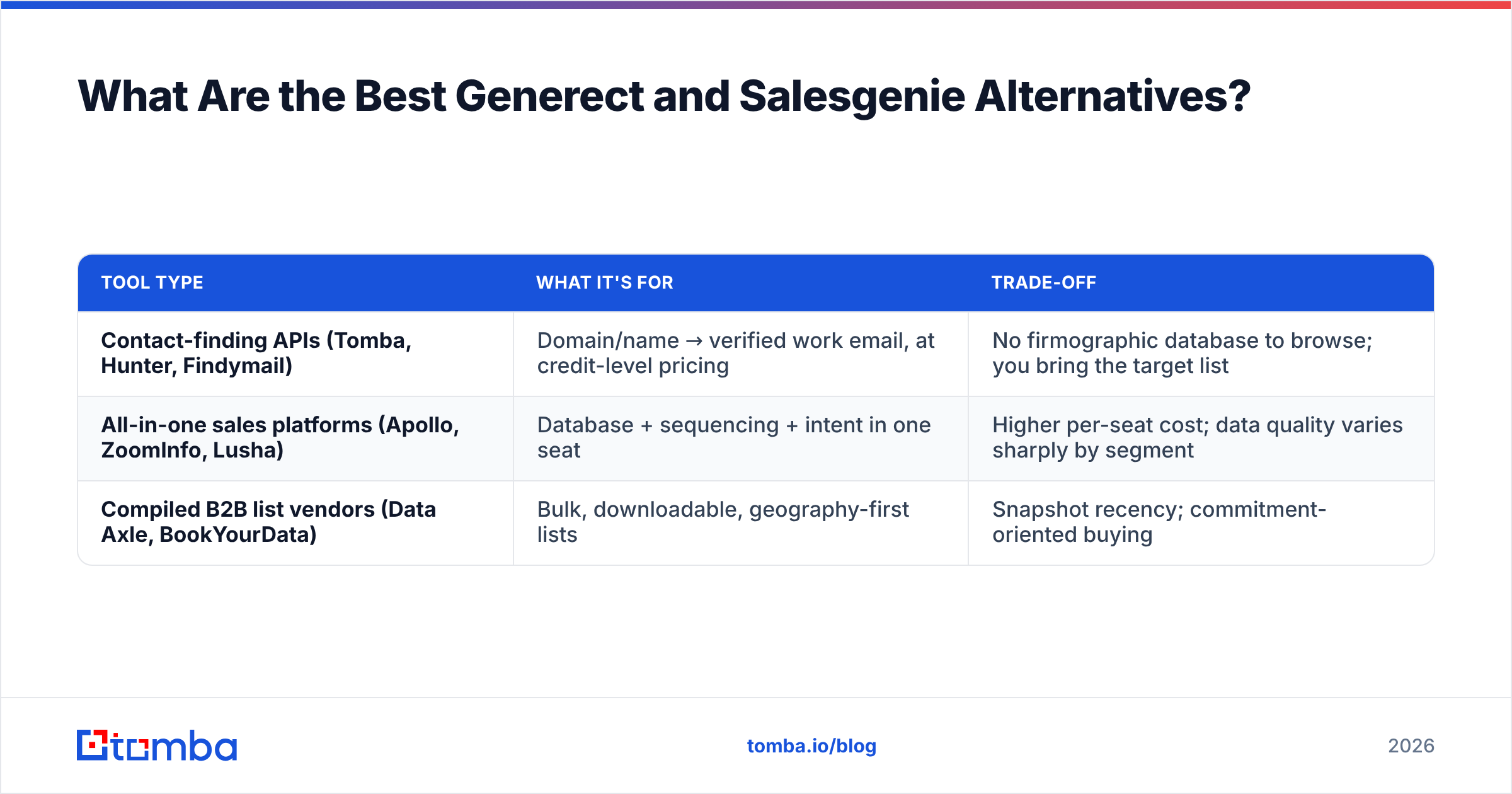
If neither shape fits, the market splits into three lanes.
| Tool type | What it's for | Trade-off |
|---|---|---|
| Contact-finding APIs (Tomba, Hunter, Findymail) | Domain/name → verified work email, at credit-level pricing | No firmographic database to browse; you bring the target list |
| All-in-one sales platforms (Apollo, ZoomInfo, Lusha) | Database + sequencing + intent in one seat | Higher per-seat cost; data quality varies sharply by segment |
| Compiled B2B list vendors (Data Axle, BookYourData) | Bulk, downloadable, geography-first lists | Snapshot recency; commitment-oriented buying |
BookYourData sits in that third lane. It is a solid pick when you want a plain, pay-as-you-go bulk list with no annual deal, which is a very different buying trip from most compiled-file vendors.

The first lane deserves more attention than it usually gets. Many teams weighing Generect vs Salesgenie do not need a database at all. They need to turn a list they already have into deliverable work emails. That list came from a conference, a scraped directory, a LinkedIn export, or a webinar sign-up sheet.
That is a different and cheaper product. A bulk email finder plus domain search covers the job at $49–$99/mo, with no annual deal to sign. Peer reviews on G2 are a fair sanity check on which lane a vendor really sits in.
How Should You Test Either Tool Before You Commit?#
Run this four-step trial. It takes about a week, and it has saved teams five-figure mistakes.
Write your ICP as a query, not a paragraph. Titles, company size, area, industry codes. If you cannot say it in filters, no vendor can fill it.
Build a 100-record "hard list" by hand. Include your worst cases: non-English firms, tiny shops, fresh job changes. Ask each vendor to match it. That match rate predicts live performance.
Verify everything yourself. Push both outputs through the same third-party tool. Compare cost per deliverable record, not list price.
Price the exit. Ask for cancellation terms in writing before you ask for a discount. A vendor who dodges that question is telling you something.
Do that, and the Generect vs Salesgenie question usually answers itself by step two.
Generect vs Salesgenie: The Bottom Line#
Generect wins if your buyers are on LinkedIn, you need global reach, and you want an API. Salesgenie wins if your buyers are US small businesses you plan to call or mail, and you want one tool instead of a stack. Both are legitimate. They were simply built for different eras of selling.
And if what you really need is the narrow job in the middle — turning names and domains into verified work emails at a price you can read on a webpage — start with the Tomba Email Finder. The free tier gives you 25 searches a month, with no card and no demo call. Starter is $49/mo, and the same API that powers the app powers your workflow from day one. Test it against your hard list before you sign anyone's annual contract.
Related guides#
Ready to find emails that actually work?
Join 150,000+ professionals who stopped guessing and started sending. Free credits on signup — no credit card required.
Get the Tomba newsletter
Practical outbound tactics and product updates — once every two weeks.
About the author