Generect vs Spherescout: B2B Lead Data Compared (2026)
Generect sells API-first LinkedIn-sourced lead data. Spherescout targets lean prospecting teams. Here is how the two actually compare on coverage, verification, pricing, and workflow fit in 2026 — plus when neither is the right buy.
TL;DR
- Generect is the more established of the two: API-first B2B lead data sourced heavily from LinkedIn-style company and people graphs, sold on volume-based quotes rather than a public self-serve price ladder.
- Spherescout positions itself at the lighter end — a prospecting/scouting workflow for small teams who want lists and contact details without a data-engineering project. Public documentation is thin, so verify every claim (and every price) directly with the vendor before you commit.
- The real decision is not "which brand is better" — it is API-first enrichment vs list-download prospecting. Pick the shape of the workflow first, then the vendor.
- Neither tool removes the need for independent verification. Any provider's "valid" flag is a claim about their pipeline, not about your send.
- If you mostly need accurate work emails by domain and name, with an API, a free tier, and $49/mo entry pricing, a dedicated email finder is usually cheaper than either platform.
What are Generect and Spherescout?#
Generect is a B2B lead-generation data provider built around programmatic access. Its pitch is that you should not have to click through a UI to build lists: you send search parameters — industry, headcount, geography, job title, seniority — and get back structured company and contact records, including work emails, through an API or a delivered dataset. Its public positioning leans on LinkedIn-derived search logic, which is why teams that already live in Sales Navigator find the filter vocabulary familiar. You can read their current claims on the official Generect site.
Spherescout sits in the lighter, self-serve tier of the same market: find companies that match a profile, pull the people inside them, get contact details, export. That category — lead scouting tools for small outbound teams — is crowded, and Spherescout's public footprint is small compared with the incumbents tracked on G2's lead intelligence category. Treat the numbers in any vendor deck (including this one's summaries) as starting points to test, not as facts.
Here is the honest framing: Generect is a data supply decision. Spherescout is a workflow decision. Confusing the two is how teams end up paying for a platform they use at 10% capacity.
How do Generect and Spherescout compare head-to-head?#
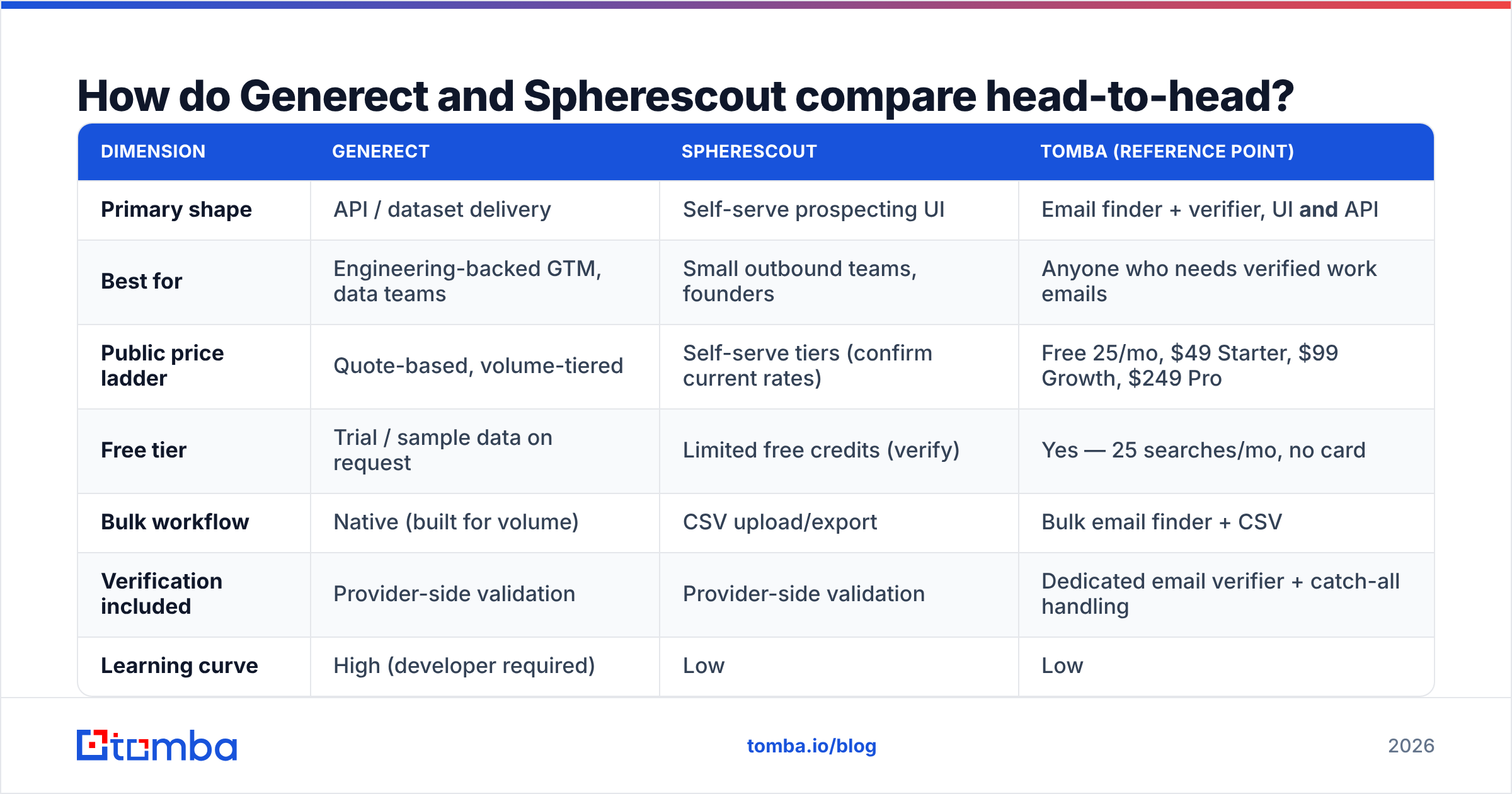
| Dimension | Generect | Spherescout | Tomba (reference point) |
|---|---|---|---|
| Primary shape | API / dataset delivery | Self-serve prospecting UI | Email finder + verifier, UI and API |
| Best for | Engineering-backed GTM, data teams | Small outbound teams, founders | Anyone who needs verified work emails |
| Public price ladder | Quote-based, volume-tiered | Self-serve tiers (confirm current rates) | Free 25/mo, $49 Starter, $99 Growth, $249 Pro |
| Free tier | Trial / sample data on request | Limited free credits (verify) | Yes — 25 searches/mo, no card |
| Bulk workflow | Native (built for volume) | CSV upload/export | Bulk email finder + CSV |
| Verification included | Provider-side validation | Provider-side validation | Dedicated email verifier + catch-all handling |
| Learning curve | High (developer required) | Low | Low |
| Typical failure mode | Overbuying volume you never use | Coverage gaps in niche geos | Fewer firmographic filters than a full data platform |
Two things fall out of that table.
First, Generect is not a tool you evaluate in an afternoon. If nobody on your team can write a script that consumes an endpoint and writes rows into your CRM, most of what you're paying for stays boxed. Quote-based pricing also means your cost depends on how well you negotiate and how accurately you forecast volume — get the forecast wrong and you've prepaid for records you never pull.
Second, Spherescout's advantage is time-to-first-list, and that advantage disappears the moment your volume outgrows manual exports. A tool that saves a rep two hours a week at 300 contacts/month saves nothing at 30,000.


Which one has more accurate contact data?#
Accuracy is the only metric that survives contact with a real campaign, and it is the one both vendors describe with the least precision.

Three distinctions matter more than any headline percentage:
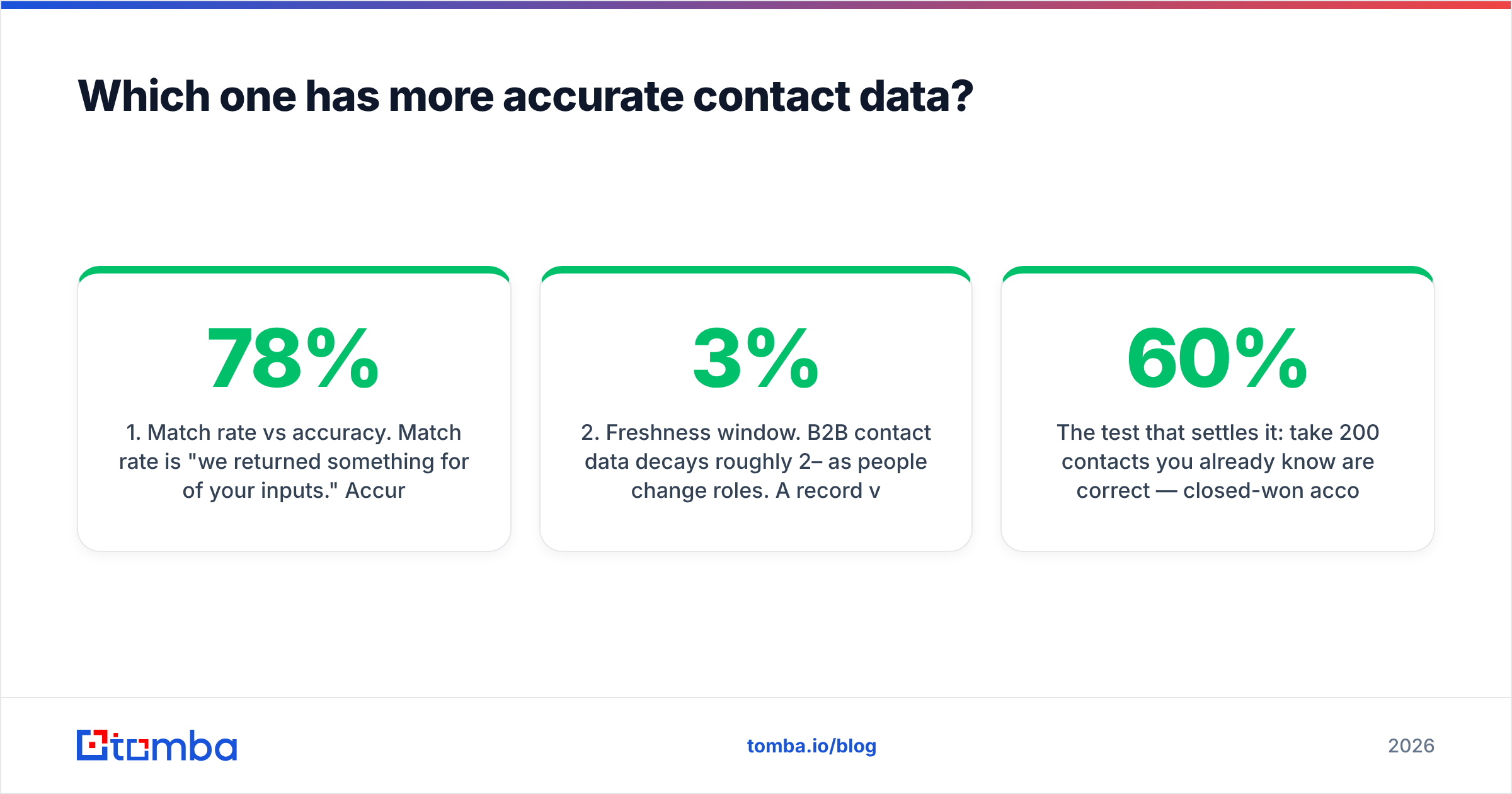
- Match rate vs accuracy. Match rate is "we returned something for 78% of your inputs." Accuracy is "the something we returned was correct." A provider can post a beautiful match rate by guessing patterns aggressively — and hand you a bounce problem.
- Freshness window. B2B contact data decays roughly 2–3% per month as people change roles. A record verified 14 months ago is a coin flip. Ask both vendors when each record was last re-validated, not when it was first collected.
- Catch-all handling. A large share of enterprise domains accept every address at the SMTP layer, so nothing bounces and nothing is confirmed. Providers that silently mark these "valid" are transferring risk to your sender reputation. This is exactly why a catch-all verifier exists as a separate step.
The test that settles it: take 200 contacts you already know are correct — closed-won accounts, people who have replied to you, colleagues at partner companies — and run them through each tool as a blind sample. Score three columns: found, correct, wrong. Wrong is the expensive column. A tool with a 60% find rate and near-zero wrong answers beats an 85% find rate with 12% garbage, every time, because bounces damage sender reputation in a way that missing contacts never do.
How do they price, and what actually costs you money?#
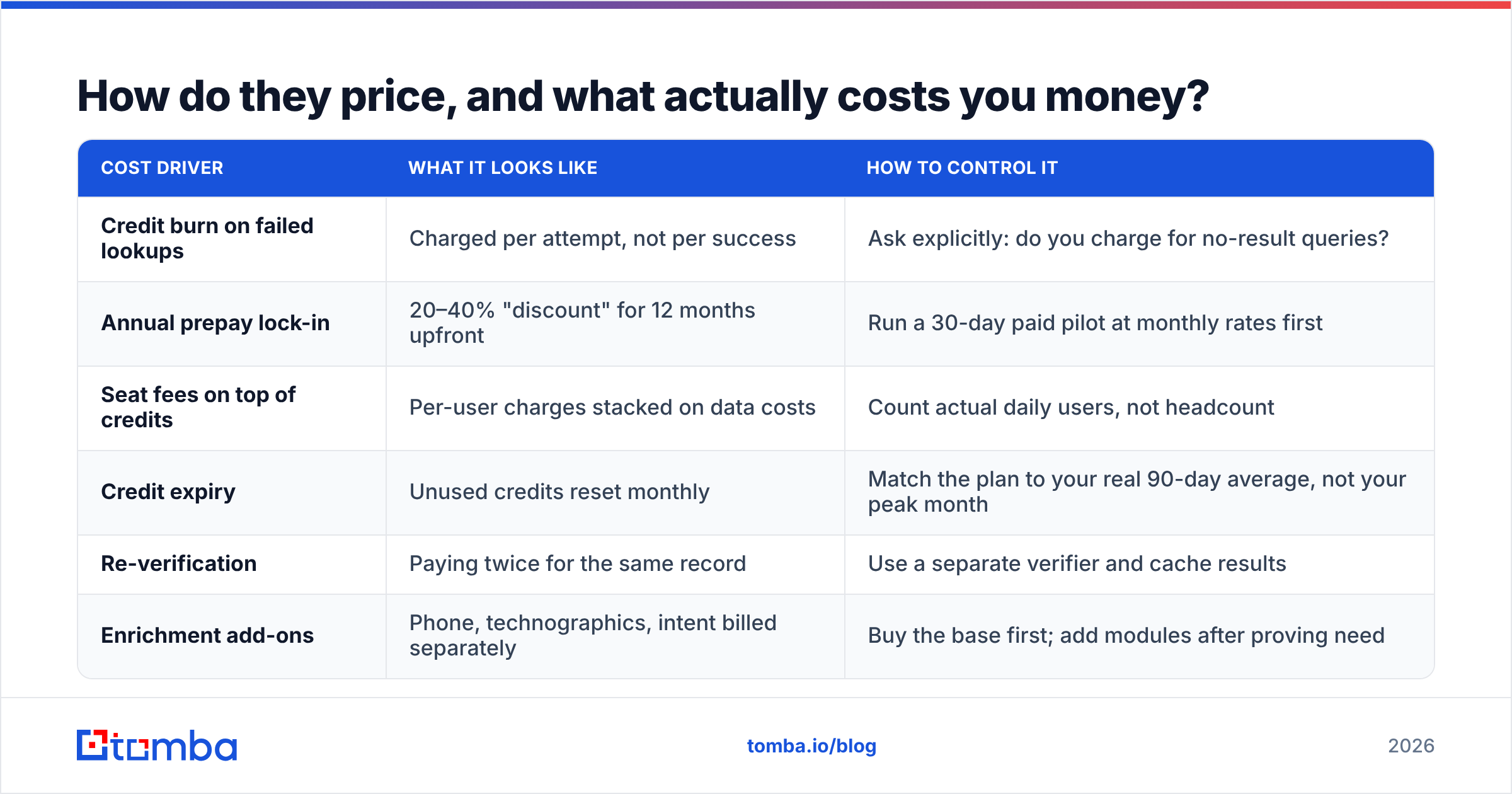
Both vendors' list prices are the smaller half of the story. Here is where the money actually leaks:
| Cost driver | What it looks like | How to control it |
|---|---|---|
| Credit burn on failed lookups | Charged per attempt, not per success | Ask explicitly: do you charge for no-result queries? |
| Annual prepay lock-in | 20–40% "discount" for 12 months upfront | Run a 30-day paid pilot at monthly rates first |
| Seat fees on top of credits | Per-user charges stacked on data costs | Count actual daily users, not headcount |
| Credit expiry | Unused credits reset monthly | Match the plan to your real 90-day average, not your peak month |
| Re-verification | Paying twice for the same record | Use a separate verifier and cache results |
| Enrichment add-ons | Phone, technographics, intent billed separately | Buy the base first; add modules after proving need |
For calibration, transparent self-serve pricing in this category looks like Tomba's pricing: a free tier at 25 searches/month, Starter at $49/mo, Growth at $99/mo, Pro at $249/mo, and custom Enterprise. You can compute cost-per-verified-contact before you talk to anyone. With quote-based vendors, you cannot — which is the point of quote-based pricing.
A useful rule: if you cannot compute your cost per verified contact in under two minutes, you are not ready to sign.
Is an API-first workflow better than a list-download workflow?#
Not universally — it depends on where the work happens. Think of it like grocery shopping: a list-download tool is going to the store yourself, and an API is a standing delivery order. The delivery order is obviously better once you're feeding a family every week. It's overkill for one dinner.
- Choose API-first when enrichment is continuous. Inbound signups, form fills, CRM records going stale — these arrive every day and should be enriched without a human in the loop. That's what an email finder API is for.
- Choose list-download when campaigns are episodic. Four ICP-specific campaigns a quarter, 500 contacts each, built by one person? A UI plus CSV export is faster and cheaper than any integration project.
- Choose both when you have volume and variety. Most teams past ~$5M ARR end up with an API for the always-on path and a UI for ad-hoc research.
- Choose neither when your ICP is tiny. If your total addressable market is 400 companies, you do not need a data platform. You need a spreadsheet, a domain search, and discipline.
- Never choose based on the demo. Demos are run on the vendor's best-covered segment. Yours may not be it.
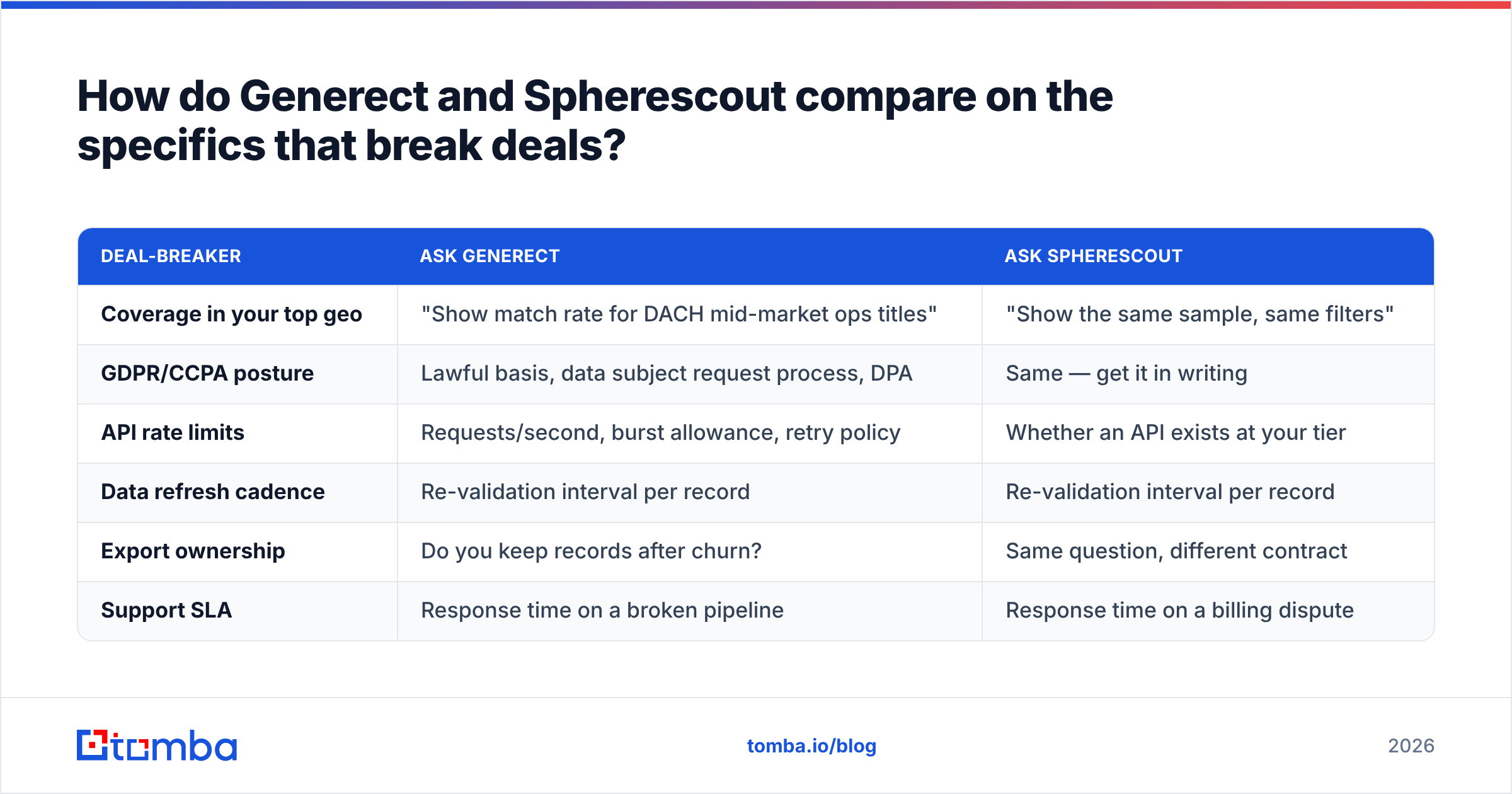
How do Generect and Spherescout compare on the specifics that break deals?#

| Deal-breaker | Ask Generect | Ask Spherescout |
|---|---|---|
| Coverage in your top geo | "Show match rate for DACH mid-market ops titles" | "Show the same sample, same filters" |
| GDPR/CCPA posture | Lawful basis, data subject request process, DPA | Same — get it in writing |
| API rate limits | Requests/second, burst allowance, retry policy | Whether an API exists at your tier |
| Data refresh cadence | Re-validation interval per record | Re-validation interval per record |
| Export ownership | Do you keep records after churn? | Same question, different contract |
| Support SLA | Response time on a broken pipeline | Response time on a billing dispute |
The GDPR question is not a formality. If you are prospecting into the EU, your provider's lawful basis for processing becomes your compliance problem the moment a data subject request lands. Ask for the DPA before the trial, not after. Vendors that hesitate are telling you something.

Who should pick which?#
Pick Generect if: you have engineering capacity, you need programmatic access to firmographic + contact data at volume, your ICP filters map cleanly to LinkedIn-style taxonomy, and you can negotiate a volume contract without overcommitting. Its natural buyer is a RevOps or data team building an internal enrichment layer, not a rep building a list on Tuesday afternoon.
Pick Spherescout if: you are a small team, your monthly contact needs are in the hundreds not the tens of thousands, and you value a working list today over a perfect pipeline next quarter. Verify current pricing, current coverage in your geography, and export rights directly — the public information is thinner than for larger vendors, and thin public information is a reason to test harder, not a reason to dismiss.
Pick neither if: your actual bottleneck is finding and confirming work email addresses for people you have already identified. That is a narrower problem than either platform solves, and narrow tools are cheaper. Peers worth benchmarking in that lane include specialists like BookYourData for pre-built verified B2B lists, plus dedicated finder-and-verifier stacks. Buying a full data platform to solve an email-lookup problem is like buying a van to move one box.
Where does Tomba fit in this comparison?#
Honestly: Tomba is not a full firmographic data platform, and if you need intent signals, technographic filters, and a 200-attribute company graph, it is not the tool.
What it does do is the specific job most outbound teams actually get stuck on — turning a name and a domain into a verified, deliverable work email — with pricing you can read off a page. The email finder handles name-plus-domain lookups; domain search returns the addresses and patterns for a company; the email verifier checks syntax, MX, SMTP, and catch-all status independently of whoever supplied the record. That last point matters even if you buy from Generect or Spherescout: an independent verification pass on purchased data is cheap insurance against a reputation problem that takes weeks to repair.
There is also a free tier — 25 searches a month — which means you can run the blind-sample accuracy test described above against your own known-good contacts before spending anything.
How do you run a fair 7-day bake-off?#
- Day 1 — Build the control set. 200 contacts you can verify independently. Mix seniority, company size, and at least two geographies.
- Day 2 — Run all candidates blind. Same inputs, same day, no filter tweaking between tools.
- Day 3 — Score three columns. Found / correct / wrong. Weight "wrong" at 3x, because that's roughly what a bounce costs you in deliverability terms.
- Day 4 — Verify independently. Push every returned address through a neutral verifier. Note how many "valid" records fail.
- Day 5 — Test the edges. Catch-all domains, generic role addresses, recently-changed jobs, non-English company names.
- Day 6 — Price the real workflow. Cost per correct, verified contact — not per credit, not per seat.
- Day 7 — Test support. Send both vendors a hard question. Time the response. You are buying a relationship, not a dataset.
Any vendor that refuses a blind sample test has answered your question.
The bottom line#
Generect wins on programmatic scale and fits teams with engineering behind their GTM motion. Spherescout wins on simplicity for small teams that need lists more than infrastructure — provided its coverage holds up in your specific segment, which you must test rather than assume. Neither absolves you of verifying data before you send.
If the job in front of you is narrower than "build a data platform" — you know who you want to reach, you just need their real email address — start with the Tomba Email Finder. Free tier is 25 searches a month, Starter is $49/mo, and the same lookups are available through the API, Chrome extension, Google Sheets, and bulk upload. Run your control set through it this week, score it against whatever quote lands in your inbox, and let the numbers pick the vendor.
Related guides#
Ready to find emails that actually work?
Join 150,000+ professionals who stopped guessing and started sending. Free credits on signup — no credit card required.
Get the Tomba newsletter
Practical outbound tactics and product updates — once every two weeks.
About the author