Generect vs Tomba (2026): Which B2B Data Tool Wins?
Generect leans on LinkedIn-native lead lists and real-time scraping. Tomba leans on verified email discovery and a developer-grade API. Here's the honest breakdown of pricing, accuracy, and which one fits your outbound motion.
Generect vs Tomba is a choice between two jobs. One builds lead lists from LinkedIn. The other finds and verifies email addresses. This guide compares both on price, data quality, and API depth, so you can pick before you spend a credit.
TL;DR
- Generect is built around LinkedIn-native lead generation — it pulls lists from Sales Navigator searches and returns contacts in real time, which makes it strong for teams whose entire ICP lives on LinkedIn.
- Tomba is built around verified email discovery — domain search, email finder, verifier, catch-all handling, and an API that developers actually want to build on. Free tier is 25 searches/mo; paid starts at $49/mo.
- If your workflow is "export a Sales Nav list, enrich, send," Generect fits naturally. If your workflow is "I have domains or names and need deliverable emails at scale," Tomba is the cheaper, more accurate path.
Two more things to know before you compare plans:
- Neither tool is a full sales engagement platform. Both feed one — you still need a sender (Instantly, Smartlead, Salesloft) on top.
- The real decision comes down to three things: where your list originates, how much you care about bounce rate, and whether you need programmatic access.
What Are Generect and Tomba, Exactly?#
Generect is a LinkedIn-centric lead generation platform. Its core promise is that you paste a LinkedIn or Sales Navigator search URL and it returns a structured list of leads — names, titles, companies, and contact data — scraped and enriched on demand rather than served from a stale static database. It also exposes an API for pulling leads and companies programmatically.
Tomba is an email intelligence platform. The center of gravity is the email finder: give it a name plus a domain, or just a domain, and it returns professional email addresses with a confidence score and the sources it found them in. Around that sit the email verifier, domain search, catch-all verification, phone finder, and enrichment.
The distinction matters more than the feature lists suggest. Generect answers "who should I contact?" Tomba answers "what is their actual, deliverable email address?" Plenty of teams need both — but if you're choosing one, you're really choosing which of those two questions is your bottleneck.
Think of it like building a house. Generect is the surveyor who tells you which lots are for sale. Tomba is the plumber who makes sure water actually reaches the tap. Hiring the wrong one first is how outbound programs stall.
Generect vs Tomba: How Do the Features Compare?#
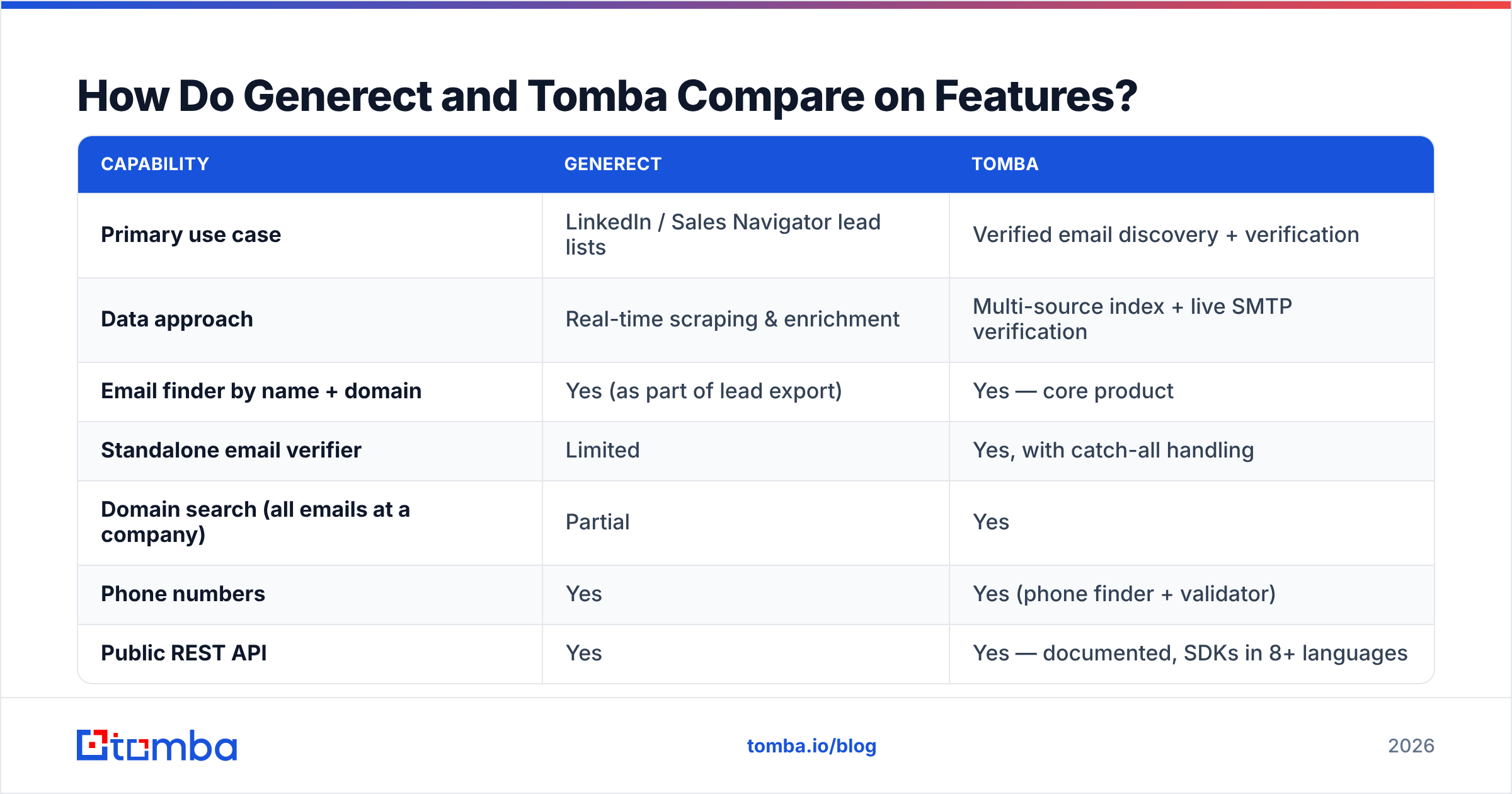
| Capability | Generect | Tomba |
|---|---|---|
| Primary use case | LinkedIn / Sales Navigator lead lists | Verified email discovery + verification |
| Data approach | Real-time scraping & enrichment | Multi-source index + live SMTP verification |
| Email finder by name + domain | Yes (as part of lead export) | Yes — core product |
| Standalone email verifier | Limited | Yes, with catch-all handling |
| Domain search (all emails at a company) | Partial | Yes |
| Phone numbers | Yes | Yes (phone finder + validator) |
| Public REST API | Yes | Yes — documented, SDKs in 8+ languages |
| Chrome extension | Yes | Yes |
| Spreadsheet add-ins | Limited | Google Sheets, Excel, Airtable |
| Bulk processing | Yes (list-based) | Yes (bulk email finder) |
| Free tier | Trial-based | 25 searches/mo, no card |
| Entry paid price | Custom / quote-driven | $49/mo (Starter) |
Two things jump out of that table.
First, Generect's strength is list origination. Say your ICP is a Sales Navigator filter set — "VP Marketing, 50–200 employees, SaaS, US". Generect turns that filter into a usable list without you touching an export button. That is genuinely useful, and a pure email-finder does not replicate it.
Second, Tomba's strength is the verification layer and the API surface. The Tomba API is designed for engineers: rate limits are documented, responses include confidence scores and source URLs, and there are official SDKs plus a CLI and an MCP server. If you're wiring enrichment into a product, a CRM sync, or an internal data pipeline, that difference compounds fast.
Which One Has Better Data Accuracy?#
Accuracy is the only metric that survives contact with a real campaign. Everything else is a preference.

Here is the honest framing. Vendor-published accuracy numbers mean very little on their own.
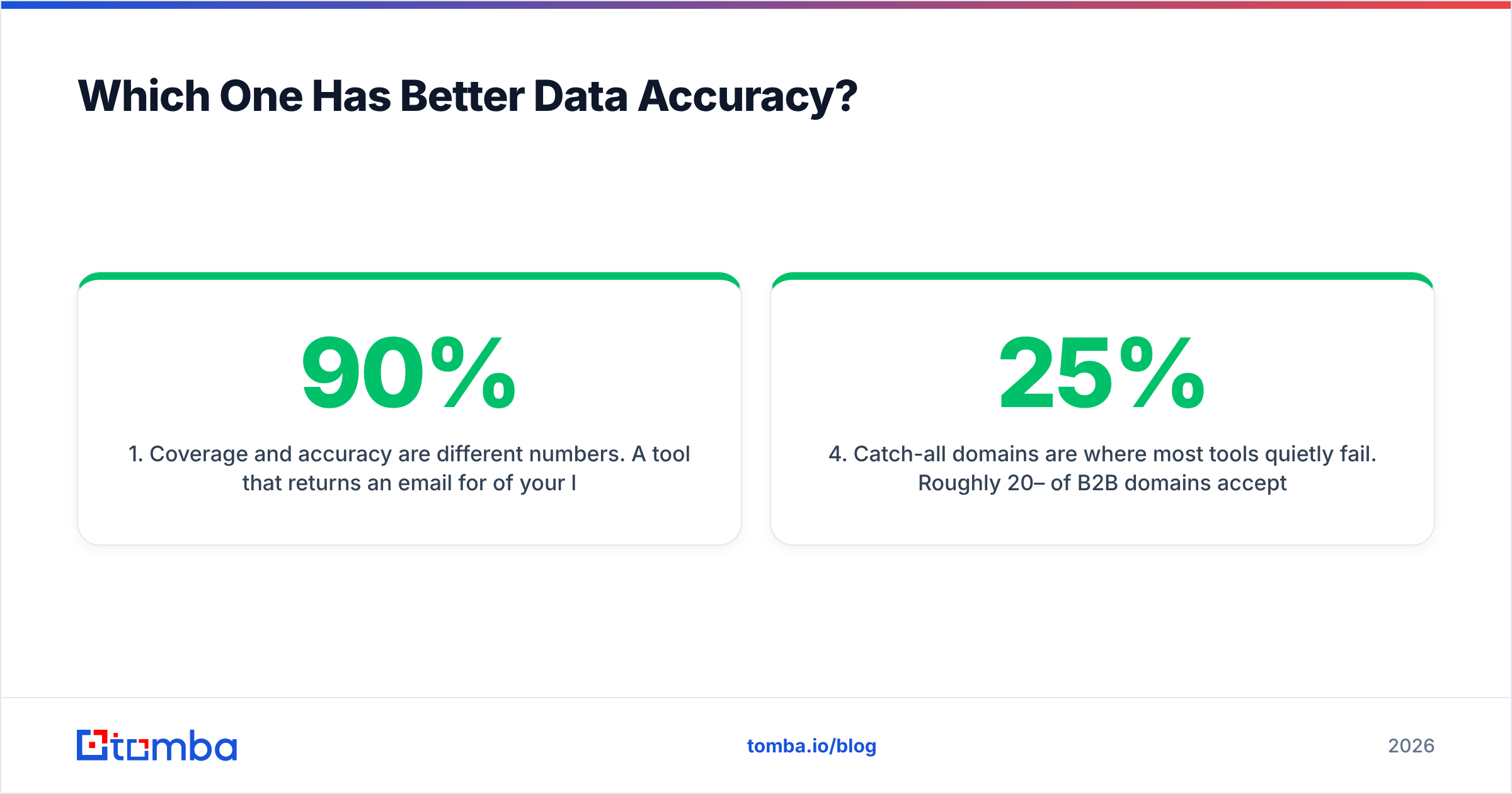
- Coverage and accuracy are different numbers. One tool returns an email for 90% of your list, but is right 70% of the time. Another returns 60% and is right 96%. The second one wins. Always compute both.
- Real-time scraping gets fresher job titles. This is Generect's structural advantage. A profile updated last week reflects last week's role. Index-based tools can lag on job changes.
- Real-time scraping does not guarantee deliverable emails. LinkedIn does not expose work emails. Any tool sourcing from LinkedIn still infers the email from pattern matching plus verification. So the verification engine sets your bounce rate, not the scraper.
Two more points decide most head-to-head tests:
- Catch-all domains are where most tools quietly fail. Roughly 20–25% of B2B domains accept all mail, so standard SMTP checks return "unknown." Tomba's catch-all verifier handles this class explicitly instead of dumping them into a risky bucket.
- Test on your own list, not a demo list. Take 200 contacts you already have confirmed emails for. Run both tools blind and score them. It takes an afternoon, and it beats every review article — this one included.
Google's own sender guidelines set a hard spam-complaint threshold for bulk senders. Bounce rate is the fastest way to burn a domain. If you send more than a few hundred emails a week, verification quality is not a nice-to-have. It decides whether your domain still works next quarter.
How Does Pricing Compare?#
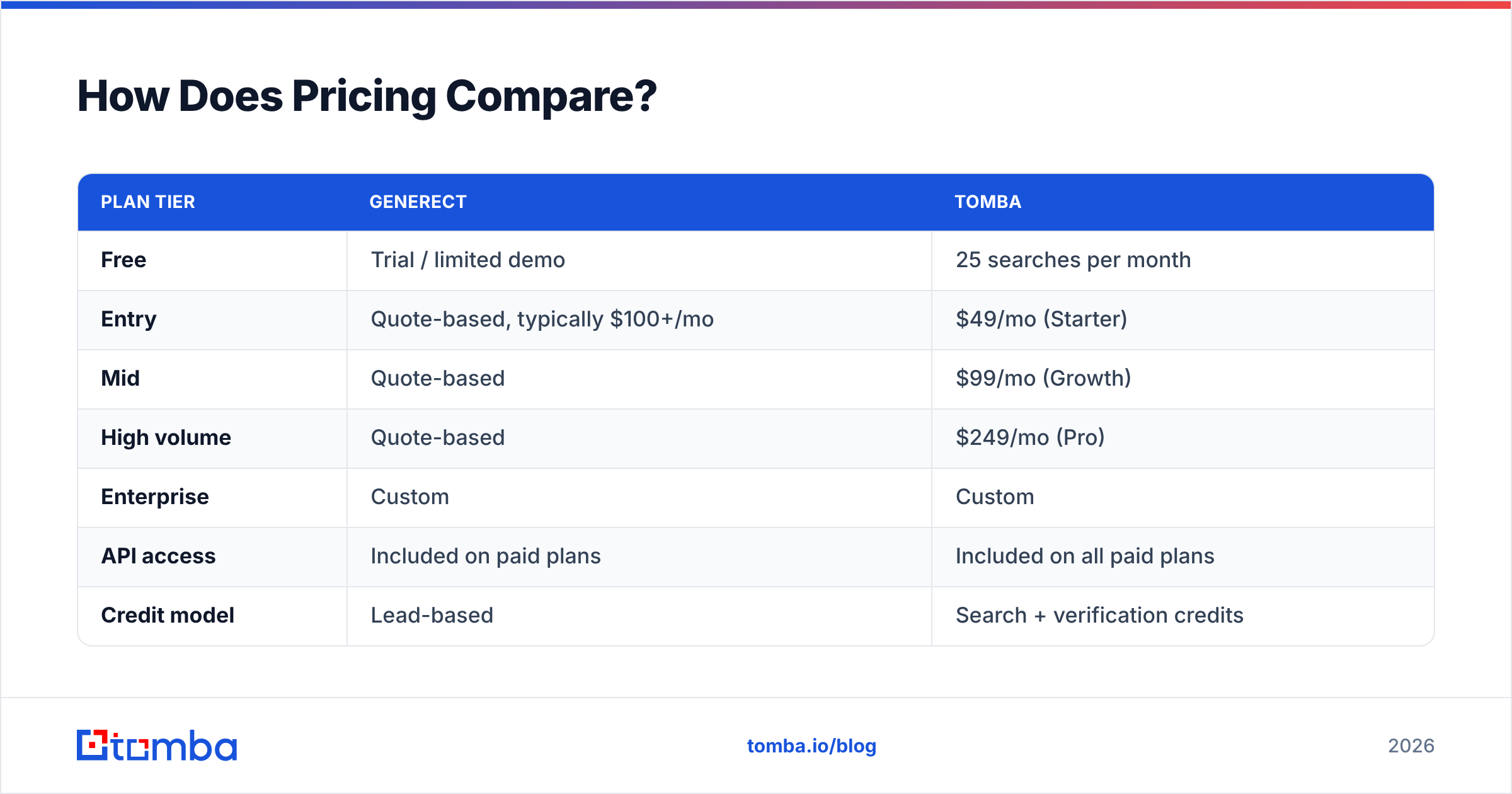
| Plan tier | Generect | Tomba |
|---|---|---|
| Free | Trial / limited demo | 25 searches per month |
| Entry | Quote-based, typically $100+/mo | $49/mo (Starter) |
| Mid | Quote-based | $99/mo (Growth) |
| High volume | Quote-based | $249/mo (Pro) |
| Enterprise | Custom | Custom |
| API access | Included on paid plans | Included on all paid plans |
| Credit model | Lead-based | Search + verification credits |
Generect vs Tomba pricing splits along a familiar line: quotes versus published tiers.
Generect runs closer to a quote-driven model. That is normal for scraping-heavy platforms, since cost scales with how much live retrieval you do. It works for a funded team with a defined seat count. It works less well if you want to try something on Tuesday without a sales call.
Tomba publishes flat tiers. You can see the full Tomba pricing breakdown, but the shape is: $49 to start, $99 when you're running consistent outbound, $249 when you're enriching at volume or powering a product feature.
The practical question isn't "which sticker price is lower" — it's cost per usable contact. A $49 plan that returns 500 verified, deliverable emails beats a $150 plan that returns 900 contacts of which 300 bounce. Run the division before you sign anything.

Which Should You Choose for Your Use Case?#
Choose Generect if:
- Your entire ICP is definable as a Sales Navigator search and you want that pipeline automated.
- You care more about fresh job titles and company signals than about email verification depth.
- You have budget flexibility and don't mind a quote-based contract.
- Your team lives in LinkedIn-first outbound (InMail, connection requests, social touches) with email as a secondary channel.
Choose Tomba if:
- You start from domains, company lists, or CRM records rather than LinkedIn URLs.
- Bounce rate is a live problem and you need email verification built into the same tool.
- You need a real API for a product integration, internal pipeline, or automated enrichment job.
- You want to start at $49/mo and scale predictably without a procurement cycle.
- You need coverage beyond LinkedIn — authors, catch-all domains, reverse lookups, phone data.
Use both if you're running a serious multichannel program: Generect for list origination from LinkedIn, Tomba for verification and email enrichment before anything hits your sender. That combination is more common than either vendor's marketing suggests, and it's usually cheaper than paying one platform to be mediocre at both jobs.

What Do the Alternatives Look Like?#
Neither tool exists in a vacuum. Worth knowing where the rest of the market sits before you commit:
- Apollo.io — the everything-platform play: database, sequencer, dialer, basic CRM. Enormous contact count, variable accuracy, and you pay for modules you may never open. Good if you want one bill; frustrating if you want best-in-class at any single job. See Apollo alternatives for the detailed breakdown.
- BookYourData — a strong option when you want to buy pre-built, verified B2B lists rather than run discovery yourself. Their accuracy guarantee is one of the more explicit in the category, and for teams that prefer purchasing a targeted list over building one, it's a legitimate shortcut.
- Clearbit (now part of HubSpot) — enrichment-first, built for firmographic data on inbound traffic rather than outbound prospecting. Different job entirely.
- ZoomInfo — the enterprise default, priced accordingly. Excellent direct-dial coverage, annual contracts, and a floor most SMB teams can't clear.
You can sanity-check any of these against real user reviews on G2 or Capterra — filter to reviews from companies your size, since a 12-person startup and a 4,000-person enterprise are describing entirely different products under the same name.
How Do You Actually Run the Comparison?#
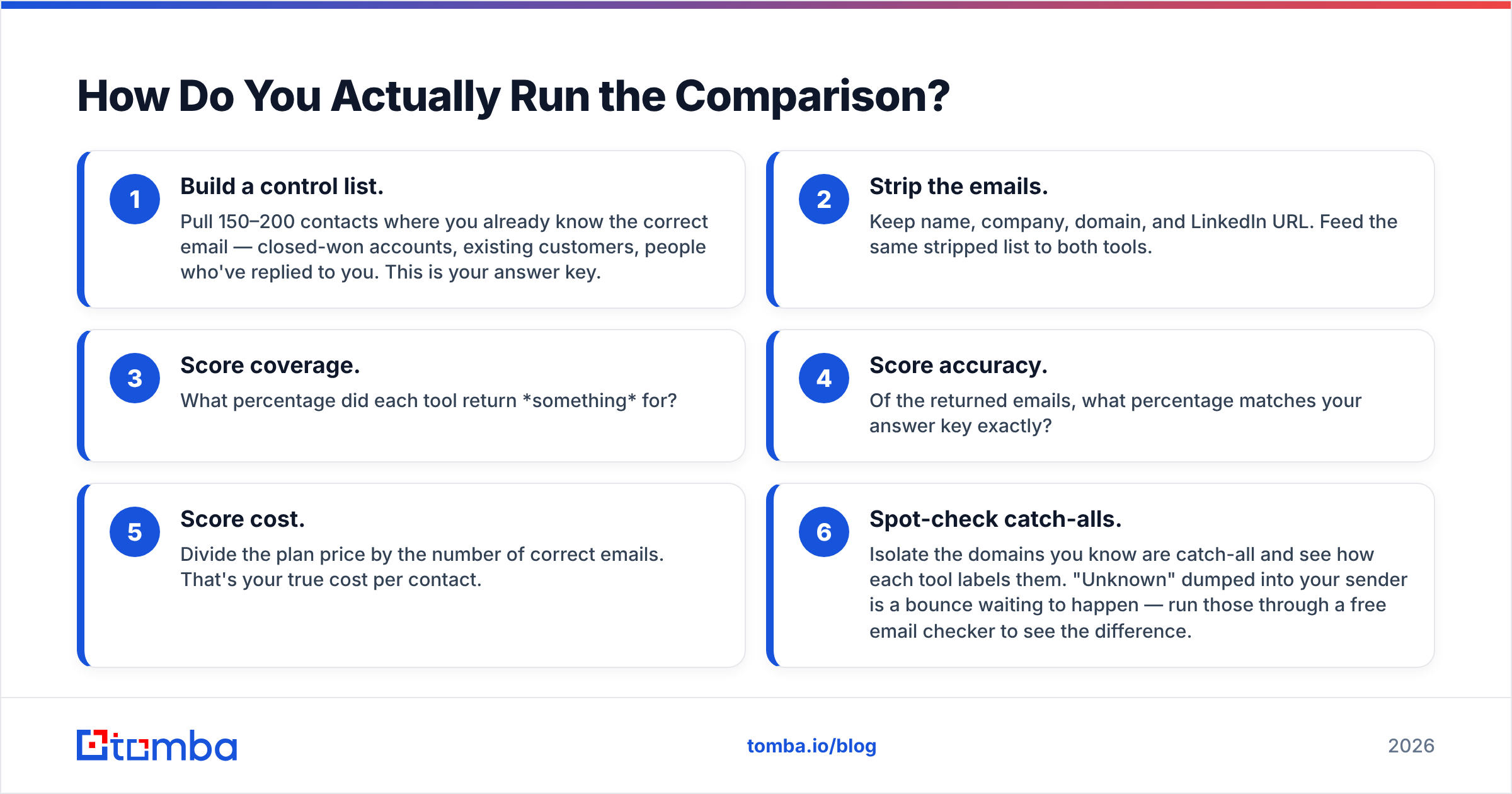
Don't take anyone's word for it, including this post. Here's a two-hour test that produces real numbers:
- Build a control list. Pull 150–200 contacts where you already know the correct email — closed-won accounts, existing customers, people who've replied to you. This is your answer key.
- Strip the emails. Keep name, company, domain, and LinkedIn URL. Feed the same stripped list to both tools.
- Score coverage. What percentage did each tool return something for?
- Score accuracy. Of the returned emails, what percentage matches your answer key exactly?
- Score cost. Divide the plan price by the number of correct emails. That's your true cost per contact.
- Spot-check catch-alls. Isolate the domains you know are catch-all and see how each tool labels them. "Unknown" dumped into your sender is a bounce waiting to happen — run those through a free email checker to see the difference.
Most teams skip this and buy on demo vibes. The teams with sub-2% bounce rates almost universally did some version of it.
Frequently Asked Questions#
Is Generect a direct Tomba competitor? Partially. They overlap on contact discovery but their centers of gravity differ — Generect is LinkedIn-list-first, Tomba is verified-email-first. Many teams run both.
Does Tomba work without LinkedIn? Yes. Tomba's index is built from public web sources, so you can find emails from a domain alone, an author byline, or a company name. LinkedIn is one input, not the foundation.
Which is better for developers? Tomba, clearly. Documented REST API, official SDKs, CLI, MCP server, and confidence scores with source attribution in every response. If enrichment is going into a codebase, that's the difference between a two-hour integration and a two-week one.
What about GDPR and compliance? Both operate under B2B legitimate-interest frameworks in the EU. Whichever you pick, keep suppression lists current and honor opt-outs immediately — the tool doesn't carry your compliance obligations, you do.
Can I migrate my existing list between tools? Yes. Both export CSV. The more useful migration is running your existing list through a verifier first — most lists older than six months have 15–25% decay.
The Bottom Line#
Generect vs Tomba is not a tie. It depends on where your outbound actually breaks.
Generect is a good tool for a specific shape of team: LinkedIn-native, list-driven, comfortable with a quote-based contract. If that's you, it earns its place.
But if your bottleneck is deliverability — if you're watching bounce rates climb, chasing catch-all domains, or trying to wire enrichment into an actual product — the verification layer is where your money should go. That's the job Tomba was built for, and it starts at $49/mo with a free tier you can test today without talking to anyone.
Start with the Tomba Email Finder: drop in a domain or a name, see the confidence score and the sources behind every result, and run your own 200-contact accuracy test before you commit a cent. The free 25 searches are enough to know whether the data holds up against your list — which is the only benchmark that matters.
Related guides#
Ready to find emails that actually work?
Join 150,000+ professionals who stopped guessing and started sending. Free credits on signup — no credit card required.
Get the Tomba newsletter
Practical outbound tactics and product updates — once every two weeks.
About the author