Generect vs Verifyemail.io: Which B2B Email Tool Wins in 2026?
Generect builds lead lists. Verifyemail.io cleans them. They solve different halves of the same problem — here's how they compare on data, accuracy, API design, and cost, plus when one tool can replace both.
Generect vs Verifyemail.io is a comparison most buyers get wrong, and the mistake is expensive. One tool finds contacts. The other checks them. Here is what each one does, what it costs, and when a single tool can cover both jobs.
TL;DR
- Generect and Verifyemail.io are not really competitors. Generect is a lead-data and LinkedIn-sourcing platform. Verifyemail.io is a dedicated email verification service. One fills your list, the other protects your domain.
- If you already have contact data and your bounce rate is climbing, Verifyemail.io is the cheaper, narrower fix.
- If you have nobody to email yet, verification is useless. You need a sourcing layer like Generect first.
- Running both means two vendors, two credit systems, two API keys, and a manual handoff between them.
- A combined platform (Tomba, Hunter, Dropcontact and similar) folds find-then-verify into one call. That is usually cheaper below ~50k contacts a month.
Generect vs Verifyemail.io: what is the real difference?#
Start with the honest framing: comparing these two is like comparing a fishing boat to a fish scaler. Both belong in the same kitchen, but neither replaces the other.
Generect (generect.com) is a B2B lead-generation data provider. Its pitch is real-time lead sourcing: pulling company and people data, including LinkedIn-derived profiles, and returning it through an API or a UI. You go to Generect when you need net-new contacts, such as a list of Series-A fintech CTOs in Germany, or every RevOps manager at companies using Salesforce.
Verifyemail.io (verifyemail.io) is an email validation service. It takes an address you already have and tells you whether the mailbox exists, whether the domain accepts mail, and whether it is a role account, a disposable address, or a catch-all. It does not find anything. It grades what you feed it.
That one distinction drives every other difference: pricing model, API shape, accuracy metric, and where each tool sits in your workflow.
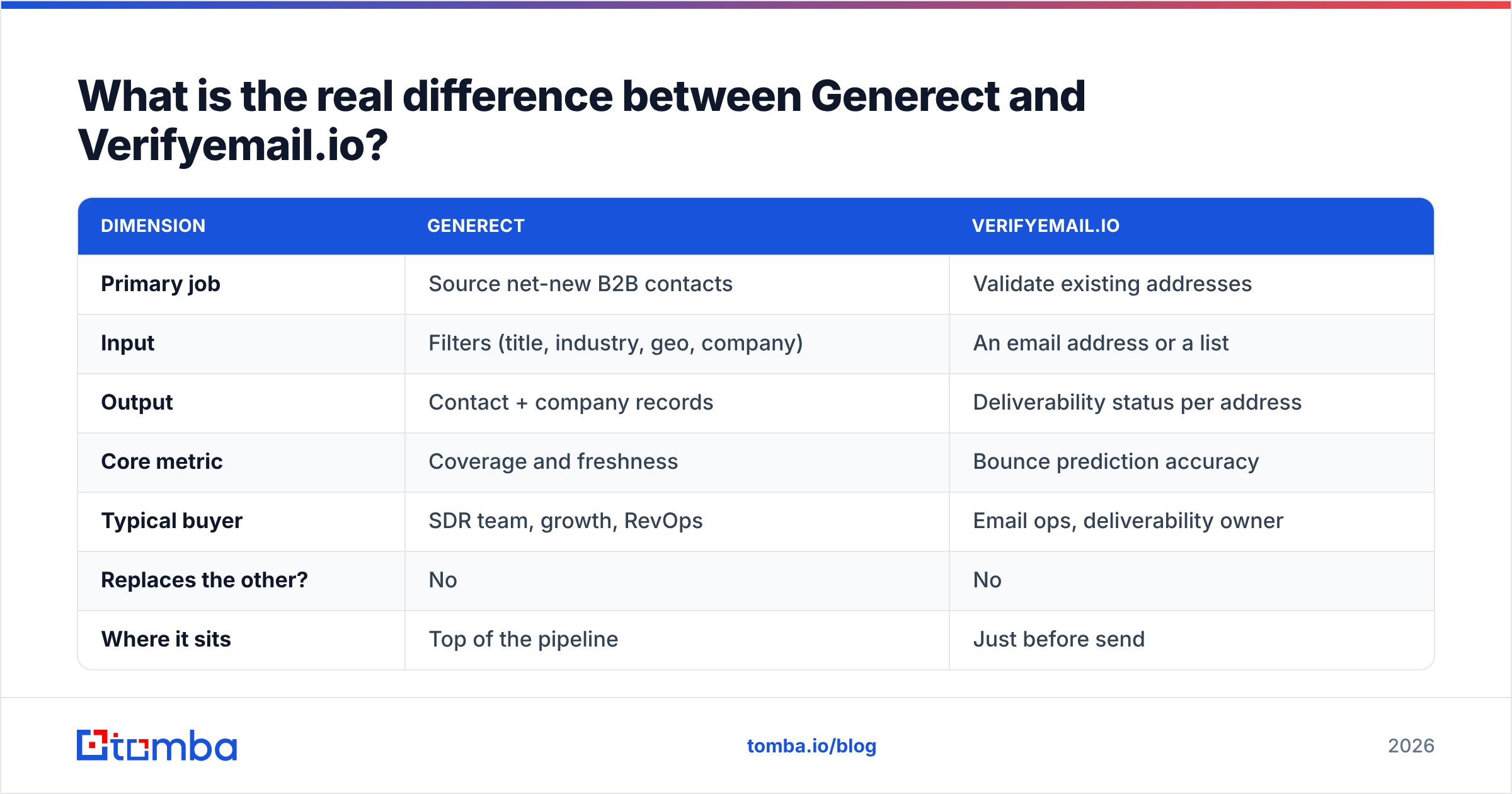
| Dimension | Generect | Verifyemail.io |
|---|---|---|
| Primary job | Source net-new B2B contacts | Validate existing addresses |
| Input | Filters (title, industry, geo, company) | An email address or a list |
| Output | Contact + company records | Deliverability status per address |
| Core metric | Coverage and freshness | Bounce prediction accuracy |
| Typical buyer | SDR team, growth, RevOps | Email ops, deliverability owner |
| Replaces the other? | No | No |
| Where it sits | Top of the pipeline | Just before send |
What does Generect actually do well?#
Generect pulls data in real time instead of serving a frozen snapshot. Most B2B databases sell you a static index that was crawled months ago. Job changes rot that index by 2-3% a month. After a year, a third of your list is wrong. Tools that query live sources at request time are a little slower per call, but the records come back much fresher.
What you should evaluate:
- Coverage in your ICP, not overall. A vendor claiming 700M profiles is meaningless if only 4,000 of them match "Head of Procurement, DACH, 200-1,000 employees." Run your actual filter set during the trial and count the usable rows.
- Email fill rate. Sourcing platforms often return a profile with no email attached. Ask what percentage of returned records include a professional email, not just a name and a company.
- API ergonomics. If you are wiring this into a Clay table, an n8n workflow, or your own enrichment service, rate limits and response-time consistency matter more than the UI.
- Compliance posture. LinkedIn-derived data carries GDPR and terms-of-service considerations. Ask for the vendor's legal basis for processing and their opt-out handling in writing.
- Credit refunds. Do you get a credit back when a returned email hard-bounces? Vendors that refund are quietly telling you they trust their own data.
The gap in a sourcing-only tool shows up the first time you send: the emails are found, not proven. Most sourcing vendors run a light syntax and MX check and call it validated. That is not the same as SMTP-level verification, and your bounce rate will say so.

Is Verifyemail.io accurate enough to protect your domain?#
Verification accuracy is the only number that matters here. It is also measurable in a way sourcing coverage is not: send a known list and count the bounces the tool failed to predict.
Any credible verifier runs the same layered checks:
- Syntax and RFC compliance — catches typos and malformed addresses. Trivial, and every tool passes.
- Domain and MX records — confirms the domain can receive mail at all. Also table stakes.
- Disposable and role detection — flags
info@,sales@, and burner domains. Useful for list hygiene scoring, not deliverability itself. - SMTP mailbox probe — the real test. It opens a conversation with the receiving server and asks whether that specific mailbox exists.
- Catch-all handling — the hard part. On a catch-all domain the server says yes to everything, so a naive verifier returns "valid" for addresses that will bounce.
Catch-all is where verifiers split apart. Roughly 15-25% of B2B domains are set up as catch-all. A tool that labels them all "unknown" has handed the decision back to you. Better tools return a probabilistic verdict instead, based on pattern history, past send outcomes, and secondary signals. That saves you from two bad outcomes: burning your domain, or discarding a quarter of your list. If catch-all domains are common in your ICP, test a dedicated catch-all verifier against whatever your vendor returns.

One warning: "99% accuracy" claims are usually measured on a clean test set that is mostly Google Workspace. Your list is not that. Run a 1,000-address sample through any tool you are testing, send to it, then compare predicted bounces to real ones. That number is the accuracy you are buying, not the one on the homepage. Microsoft 365 domains reject SMTP probes hard, so give Outlook addresses their own test slice.
Generect vs Verifyemail.io: how does the pricing compare?#
Both vendors publish credit-based pricing, and both revise it periodically. Check the live pricing pages before you commit, because the shape of the plan matters more than the sticker.
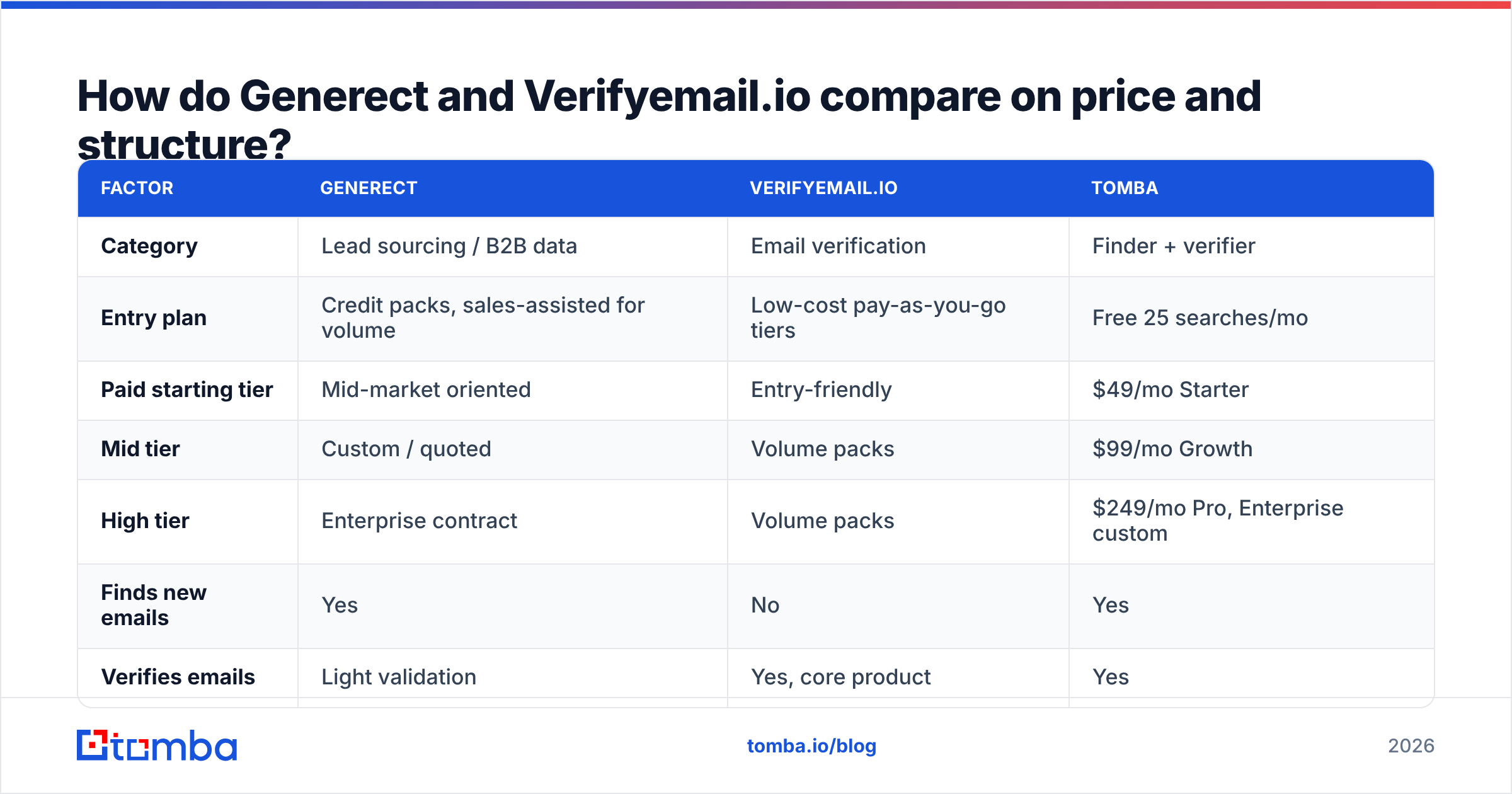
| Factor | Generect | Verifyemail.io | Tomba |
|---|---|---|---|
| Category | Lead sourcing / B2B data | Email verification | Finder + verifier |
| Entry plan | Credit packs, sales-assisted for volume | Low-cost pay-as-you-go tiers | Free 25 searches/mo |
| Paid starting tier | Mid-market oriented | Entry-friendly | $49/mo Starter |
| Mid tier | Custom / quoted | Volume packs | $99/mo Growth |
| High tier | Enterprise contract | Volume packs | $249/mo Pro, Enterprise custom |
| Finds new emails | Yes | No | Yes |
| Verifies emails | Light validation | Yes, core product | Yes |
| Public API | Yes | Yes | Yes |
| Bulk CSV upload | Yes | Yes | Yes |
| Free tier to test | Trial-based | Free credits | 25 searches/mo, no card |

Two structural notes matter more than the numbers:
Credit accounting differs. A sourcing platform usually charges per returned record, whether or not it includes an email. A verifier charges per address checked, including the ones it returns as "unknown." Ask both vendors what happens on a null or unknown result. That single policy can swing your real cost by 20-30%.
Annual lock-in. Sourcing vendors push annual contracts because their unit economics depend on it. Verification vendors mostly sell credits that do not expire. If you are early and your volume is hard to predict, non-expiring credits are worth a premium.
Do you need both tools, or one that does both?#
Here is the workflow if you run them separately:
- Query Generect with your ICP filters, export contacts.
- Strip the rows with no email.
- Push the remaining addresses to Verifyemail.io.
- Wait for the batch, download results.
- Filter to valid, decide what to do with catch-all and unknown.
- Import the survivors into your sequencer or CRM.
Six steps, two vendors, two invoices, and a weekly CSV round-trip that someone has to own. Plenty of teams run exactly this, and it works. But it only pays off when each tool is truly best-in-class for your need, and when your volume is high enough that specialization earns its keep.

Below roughly 50,000 contacts a month, the integrated approach usually wins on both cost and overhead. A combined platform finds and verifies in a single API call. A contact that fails verification never burns a downstream credit and never lands in your CRM.
That is the design behind Tomba. The email finder turns a name plus a domain into an address. The email verifier runs SMTP-level checks on that result. Both share one Tomba API and one credit pool. Tomba pricing starts free at 25 searches per month, then $49/mo Starter, $99/mo Growth, and $249/mo Pro, with Enterprise quoted.
Where Tomba does not compete with Generect: broad ICP discovery. If your requirement is "give me every VP of Engineering in Nordic SaaS companies that raised in the last 18 months," a sourcing-and-signals platform is built for that query. Tomba's model is domain-first. You bring the company or the person, and it returns the contact. Different entry point, and worth being clear about.
Which one should you choose in 2026?#
Match the tool to the bottleneck, not to the review score.
Choose Generect if: your problem is an empty pipeline. You need net-new contacts in a defined ICP, you value freshness over price, and you have the engineering time to consume an API. Budget separately for verification. Do not assume the returned emails are send-ready.
Choose Verifyemail.io if: your problem is bounces. You already have lists from your CRM, past events, inbound signups, or another data vendor, and your bounce rate is above 3%. A dedicated verifier is the cheapest deliverability insurance you can buy. It is also the right first purchase if your sender reputation is already damaged.
Choose a combined platform if: you are a small or mid-size outbound team that needs both jobs done and does not want to run a two-vendor pipeline. This is most teams under $10M ARR.
Choose all three if: you run outbound at real scale and have separate owners for sourcing and deliverability. At that point specialization beats consolidation. Just make sure someone owns the seam between them.
What should you actually test before buying?#
Do not buy on the comparison table, including this one. Run a controlled bake-off:
- Build one 500-row test set from your real ICP, with known-good and known-bad addresses seeded in.
- Run it through every candidate on the same day, so domain state is constant.
- Send a small real campaign to the addresses each tool marked valid, from a warmed secondary domain.
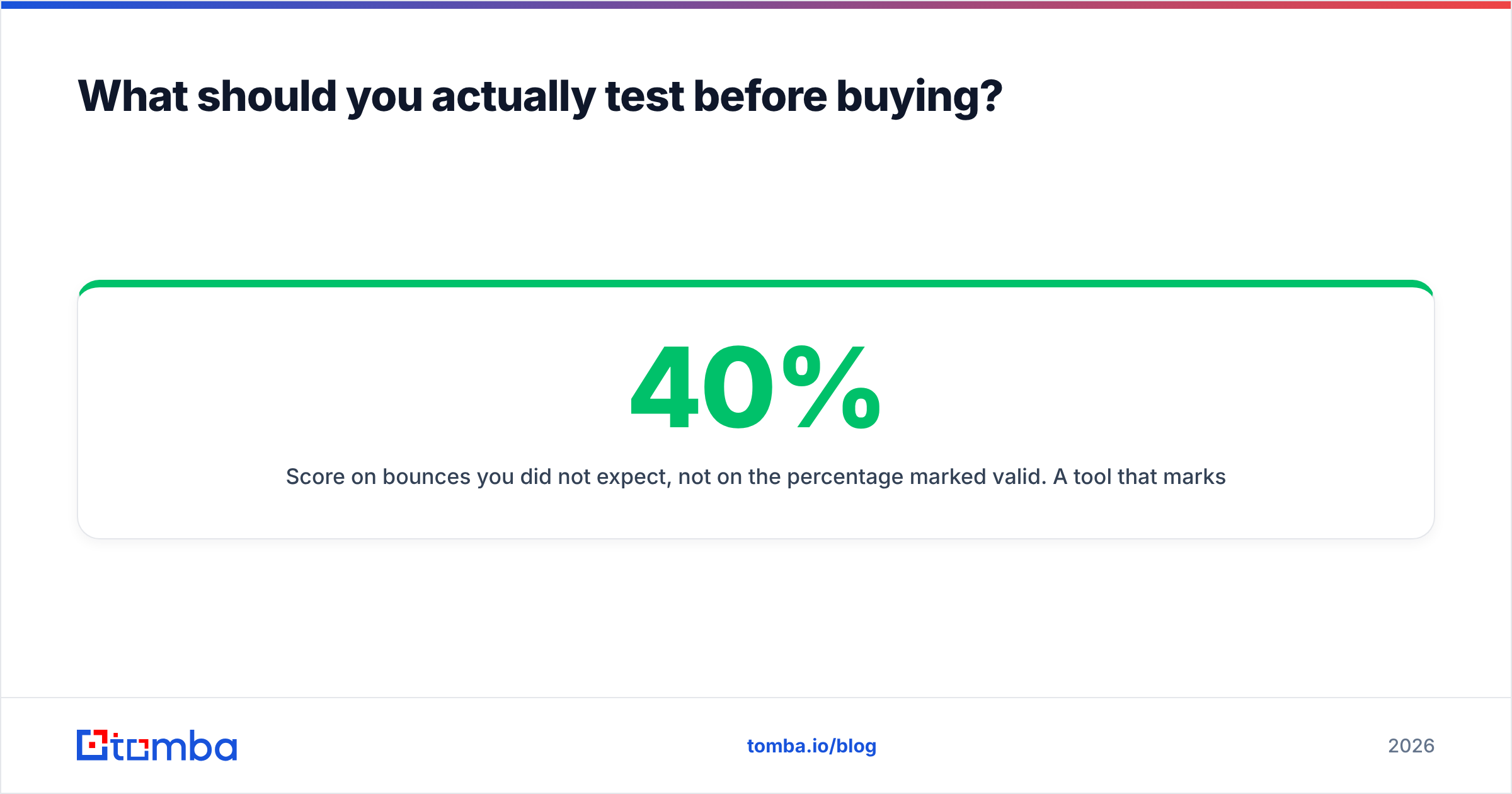
- Score on bounces you did not expect, not on the share marked valid. A tool that marks 40% valid with a 0.4% bounce rate beats one marking 80% valid with a 6% bounce rate, every time.
- Check the catch-all slice separately. That is where vendors diverge most, and where your money leaks.
Also check the boring things. Does the vendor sign a DPA? Where is the data processed? Can you delete records on request? Buyer reviews on G2 help you spot support and billing complaints that never show up in a trial. And if you are unsure whether a domain even accepts mail properly, the SMTP spec explains why "unknown" is sometimes the only honest answer a verifier can give.
The short verdict#
Generect vs Verifyemail.io has a simple answer: they are complements, not substitutes. Generect answers "who should I email?" Verifyemail.io answers "will this email land?" Buying one and expecting it to do the other job is the most common and most expensive mistake in this category.
If you want both answers from one system, with a free tier to test first, start with the Tomba Email Finder. Search by domain, name, or company, get an SMTP-verified result in the same response, and pull it into your stack through the API, the Chrome extension, or a bulk upload. Twenty-five searches a month cost nothing. That is enough to run the bake-off above and decide on your own data instead of anyone's marketing page.
Related guides#
Ready to find emails that actually work?
Join 150,000+ professionals who stopped guessing and started sending. Free credits on signup — no credit card required.
Get the Tomba newsletter
Practical outbound tactics and product updates — once every two weeks.
About the author