Generect vs Zintlr (2026): Which B2B Data Tool Wins?
Generect sells API-first lead data. Zintlr sells contact data plus personality intelligence. We compare coverage, accuracy, pricing models and API depth — and name the better fit for each type of outbound team.
TL;DR
- Generect is API-first B2B lead data: you query a company or a LinkedIn profile, it returns structured contact records. It's built for engineers and RevOps teams piping data into a warehouse or a sequencer.
- Zintlr is a contact database plus "personality intelligence" — it layers behavioural/DISC-style profiles on top of emails and phone numbers, aimed at reps who want a talk-track before the first touch.
- Neither is primarily an accuracy-first email finder. If your bounce rate is the problem, a dedicated finder + verifier stack usually beats both on cost per deliverable email.
- Pricing on both sides is quote-heavy and moves often. Assume you'll be on a call before you see a real number, and assume annual commitment pressure.
- Our pick: Generect if you're building automated pipelines, Zintlr if you're a small SDR team that sells on rapport. Neither if you just need clean emails at volume.
What is Generect and who is it built for?#
Generect positions itself as a B2B lead-generation data provider with an API at the centre rather than a UI. The core promise is programmatic access: hit an endpoint with a company domain, a LinkedIn company URL, or a person's profile, and get back structured records — names, titles, work emails, company firmographics.
That design decision shapes everything else. Generect is a good fit when:
- You already have a system of record (warehouse, CRM, internal app) and want data pushed into it, not another dashboard your reps have to log into.
- Your prospecting motion starts from LinkedIn search URLs or company lists rather than from browsing a database UI.
- You have someone who can write and maintain the integration, or you're wiring it through a middleware layer.
It's the opposite of a "sit down and browse 200 million contacts" experience. If nobody on your team wants to touch an API key, that's a real friction cost you should price in.
What is Zintlr and what makes it different?#
Zintlr is a B2B database with a twist: alongside standard contact and company data, it markets personality intelligence — inferred behavioural profiles for a prospect, so a rep can adjust tone, pacing and framing before the first call or email.
Strip the marketing and there are two products bundled together:
- A contact database — emails, phone numbers, titles, company data, searchable by the usual filters, with a browser extension for on-page lookups.
- A personality layer — profile-level inferences about how a person likes to be sold to.
Whether layer two is worth paying for depends entirely on your motion. For a six-figure enterprise deal with four calls before a proposal, a rapport hint might be worth something. For a 2,000-prospect cold email campaign, it's a field nobody reads.
Be honest with yourself about which one you run. Buying personality data for a volume motion is one of the most common ways teams overpay for prospecting tools.

Generect vs Zintlr: how do they actually compare?#
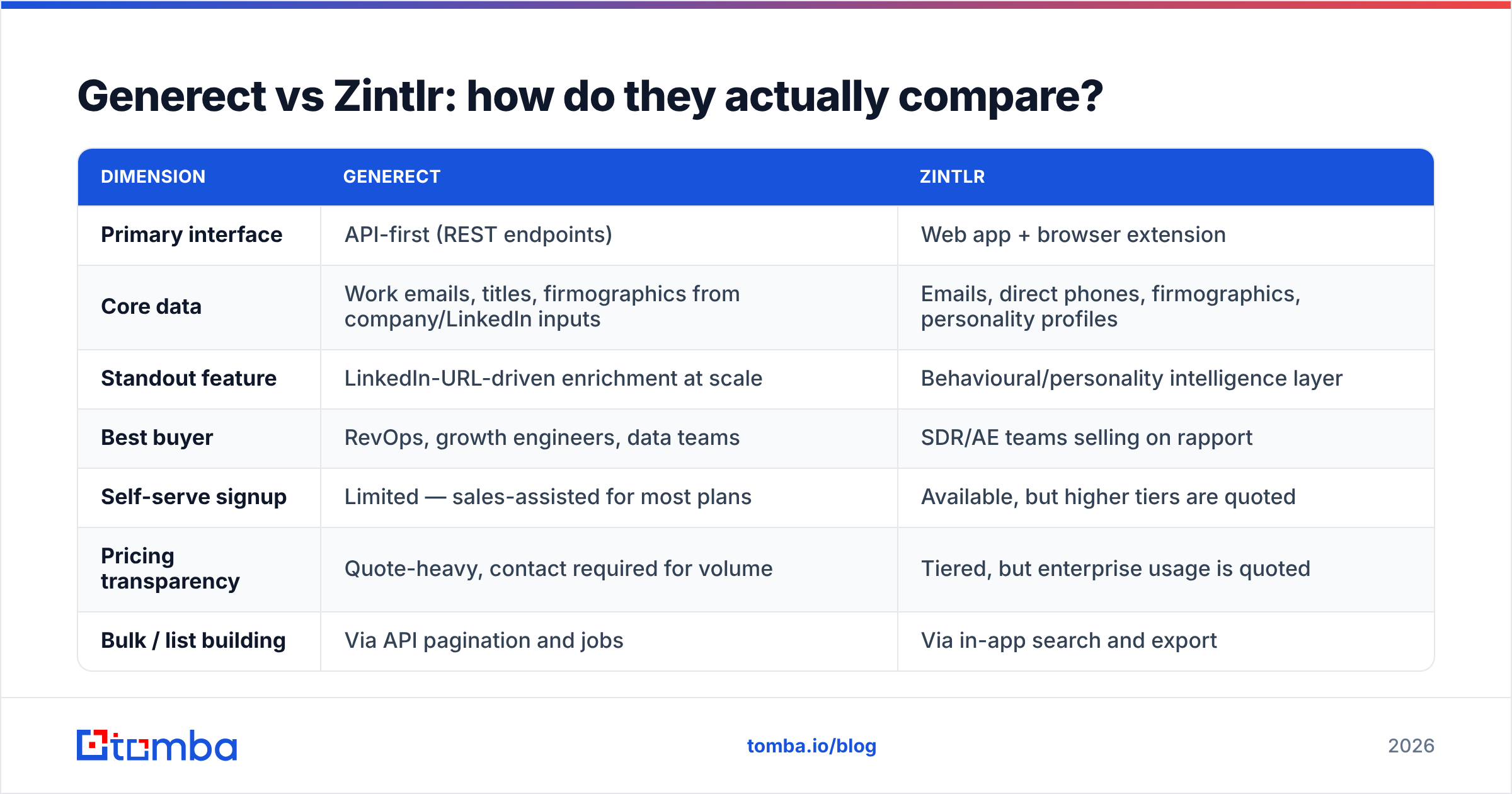
Here's the head-to-head on the dimensions that change your monthly bill and your reply rate.
| Dimension | Generect | Zintlr |
|---|---|---|
| Primary interface | API-first (REST endpoints) | Web app + browser extension |
| Core data | Work emails, titles, firmographics from company/LinkedIn inputs | Emails, direct phones, firmographics, personality profiles |
| Standout feature | LinkedIn-URL-driven enrichment at scale | Behavioural/personality intelligence layer |
| Best buyer | RevOps, growth engineers, data teams | SDR/AE teams selling on rapport |
| Self-serve signup | Limited — sales-assisted for most plans | Available, but higher tiers are quoted |
| Pricing transparency | Quote-heavy, contact required for volume | Tiered, but enterprise usage is quoted |
| Bulk / list building | Via API pagination and jobs | Via in-app search and export |
| Verification included | Limited — treat output as needing verification | Limited — treat output as needing verification |
| Learning curve | High (dev required) | Low (point and click) |
Two things stand out.
First, neither tool removes the verification step. Both return emails sourced from patterns, public data and third-party feeds. Both will hand you addresses that no longer resolve — because employees leave, domains migrate to catch-all, and MX records change. Any vendor that tells you verification is unnecessary is selling you a future bounce problem.
Second, the pricing models don't compare cleanly. Generect's API model tends to price on request volume; Zintlr's tends to price on seats plus credits. A per-seat tool gets expensive when five reps each need occasional access. A per-request tool gets expensive when a nightly enrichment job re-queries records you already have.
Which one has better email accuracy?#
Honest answer: nobody publishes an audited number you should trust, including us — so run your own test.
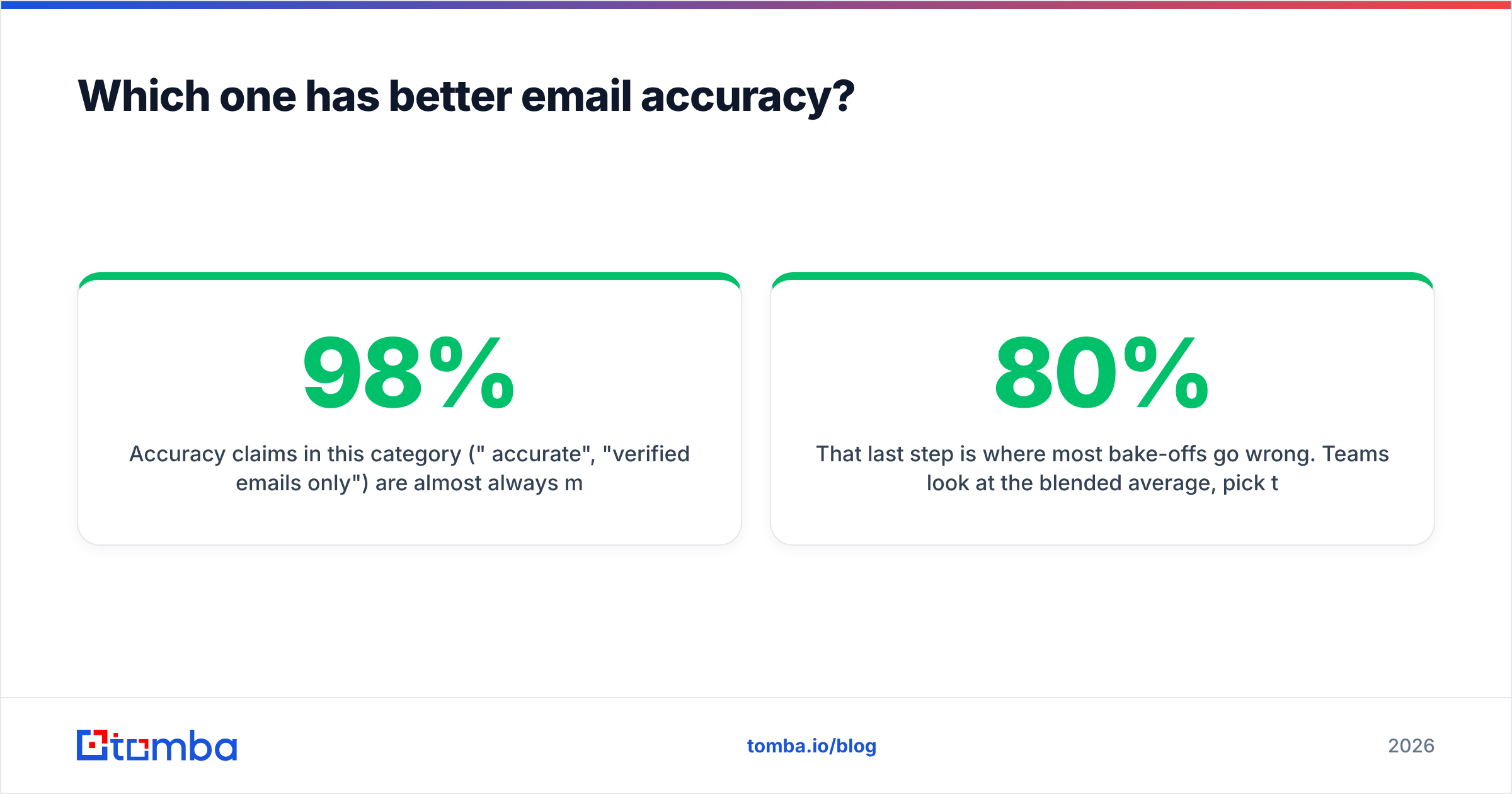
Accuracy claims in this category ("98% accurate", "verified emails only") are almost always measured on a vendor-chosen sample, in a vendor-chosen way, at an unstated point in time. Two vendors can both be telling the truth and still give you wildly different bounce rates on your ICP, because coverage is lumpy: strong on US SaaS mid-market, thin on European manufacturing, near-useless on sub-20-person agencies.

Here's a test protocol that takes an afternoon and settles the argument:
- Pull 200 accounts that match your real ICP — not a clean list, your actual pipeline shape, including the awkward ones.
- Run the same 200 through each tool and record: rows returned, emails returned, phones returned.
- Verify every returned email independently with a third-party email verifier so the vendor isn't grading its own homework.
- Compute cost per verified-deliverable email, not cost per credit. This is the only number that matters.
- Segment the results by company size and region. You'll usually find one tool wins your core segment decisively.
That last step is where most bake-offs go wrong. Teams look at the blended average, pick the winner, and never notice that Tool A was 80% on 200+ headcount and 30% on the sub-50 segment that makes up most of their list.
What do Generect and Zintlr cost in 2026?#
Both vendors move their published pricing, and both push volume buyers to a call — so treat any number you read in a blog post (this one included) as a starting point to verify, not a quote.
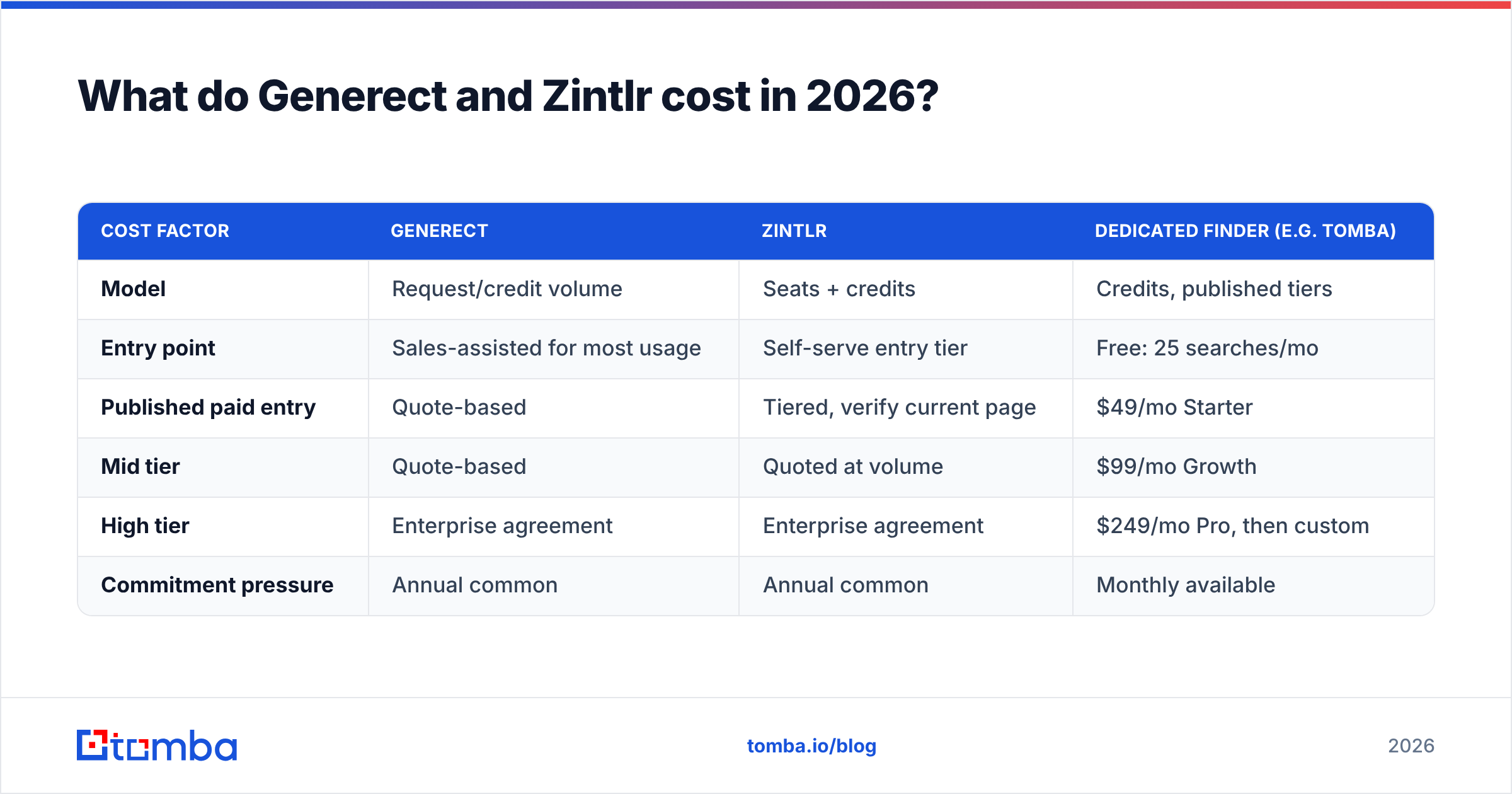
What you can plan around are the shapes:
| Cost factor | Generect | Zintlr | Dedicated finder (e.g. Tomba) |
|---|---|---|---|
| Model | Request/credit volume | Seats + credits | Credits, published tiers |
| Entry point | Sales-assisted for most usage | Self-serve entry tier | Free: 25 searches/mo |
| Published paid entry | Quote-based | Tiered, verify current page | $49/mo Starter |
| Mid tier | Quote-based | Quoted at volume | $99/mo Growth |
| High tier | Enterprise agreement | Enterprise agreement | $249/mo Pro, then custom |
| Commitment pressure | Annual common | Annual common | Monthly available |
The pattern to watch is annual commitment on unproven data quality. A 12-month contract signed before you've measured cost-per-deliverable-email on your own ICP is how teams end up paying for coverage they don't use. If a vendor won't do a paid pilot month, that's information.

You can see how a transparent, monthly model looks on the Tomba pricing page — not because price alone decides this, but because having a public number to benchmark against makes the quoted vendors easier to negotiate with.
Who should choose Generect?#
Pick Generect if three or more of these are true:
- You have engineering capacity. Someone owns the integration and can handle rate limits, retries and schema changes without filing a ticket with your CTO.
- Your inputs are LinkedIn URLs or domains. Generect's model fits enrichment-from-identifier much better than exploratory browsing.
- You enrich continuously, not in bursts. API pricing rewards steady, deduplicated request volume and punishes redundant re-queries — so build a cache.
- You don't need a UI. Your reps live in the CRM; data appears there and nobody asks where it came from.
- You're comfortable with quote-based procurement. You have the patience for a call and the leverage to negotiate.
Skip it if your team's prospecting workflow is a rep with a browser extension and a spreadsheet. You'll pay for architecture you never use.
Who should choose Zintlr?#
Pick Zintlr if:
- You sell relationship-led deals. Multi-touch, multi-call cycles where a read on someone's communication style genuinely changes your approach.
- You need direct phone numbers. If your motion is cold calling heavy, phone coverage may matter more to you than email volume.
- Your team is non-technical. A searchable UI and an extension beats an API your team will never call.
- You're a small team. Seat-based pricing works in your favour at two or three users and against you at fifteen.
Skip it if you're running high-volume cold email. The personality layer is the expensive part of the product, and a 3,000-prospect sequence doesn't consume it.
Where does a dedicated email finder fit into this?#
This is the part most comparison posts leave out: "lead database" and "email finder" are different products that overlap badly.
A database sells you breadth — a big pile of records you filter down. An email finder sells you resolution — given a name and a domain you already care about, return the correct, currently-deliverable address. Teams that buy the first when they needed the second end up with big lists and bad bounce rates.

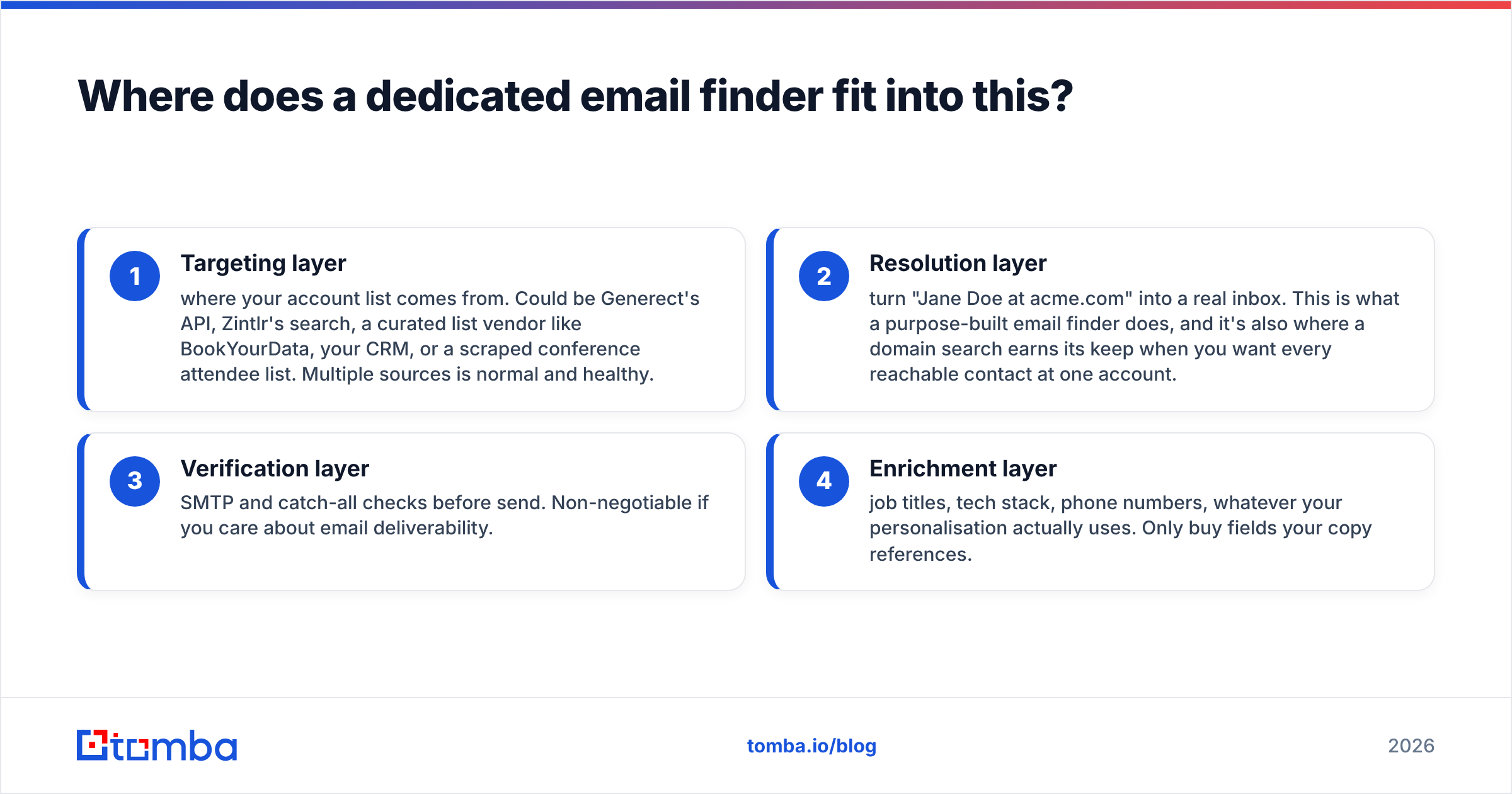
A practical stack for most outbound teams in 2026 looks like:
- Targeting layer — where your account list comes from. Could be Generect's API, Zintlr's search, a curated list vendor like BookYourData, your CRM, or a scraped conference attendee list. Multiple sources is normal and healthy.
- Resolution layer — turn "Jane Doe at acme.com" into a real inbox. This is what a purpose-built email finder does, and it's also where a domain search earns its keep when you want every reachable contact at one account.
- Verification layer — SMTP and catch-all checks before send. Non-negotiable if you care about email deliverability.
- Enrichment layer — job titles, tech stack, phone numbers, whatever your personalisation actually uses. Only buy fields your copy references.
Splitting these lets you swap one vendor without ripping out the whole stack. Buying one platform that does all four is convenient right up until the coverage on layer two disappoints and you're 8 months into a 12-month contract.
If you want a sanity check on any of these vendors before you commit, G2 reviews filtered to your company size are more useful than the aggregate score — a tool that's excellent for 500-person orgs and mediocre for 10-person orgs shows a flat 4.4 either way.
How should you run the decision?#
Give yourself one week and a rule you won't break: no annual contract before a measured pilot.
- Day 1–2: Build the 200-account ICP test list. Freeze it. Both vendors get the identical input.
- Day 3: Run both tools. Log rows returned, fields populated, and time spent by a human.
- Day 4: Verify every email through an independent verifier. Record hard bounces, catch-alls and unknowns separately — catch-all domains aren't failures, they're a different risk class.
- Day 5: Calculate cost per verified email, segmented by company size and region.
- Day 6–7: Send a small real campaign — 100 contacts per source. Reply rate is the only metric that survives contact with reality.
If the two tools land within 10% of each other, pick on workflow fit, not data. The one your reps will actually use every day beats the one that won a spreadsheet by a rounding error.
The verdict#
Generect wins for API-first, engineering-supported enrichment pipelines where data lands in your systems automatically and no rep ever sees a vendor UI.
Zintlr wins for small, relationship-led sales teams that want phone numbers plus a conversational edge, and who value a point-and-click workflow over programmatic control.
Neither wins if your actual problem is "we have the account list, we just can't get clean, current, deliverable email addresses at a predictable price." That's a resolution problem, not a database problem, and buying a broader database rarely fixes it.
If that last line describes you, start with the narrow tool rather than the broad one. Tomba's Email Finder is built for exactly that job — give it a name and a domain, or a whole company domain, and get back addresses with confidence scoring and verification in the same pipeline. The free tier gives you 25 searches a month to run against your own ICP before you spend anything, and paid plans start at $49/mo with no annual lock-in. Run it head to head with whatever quote Generect or Zintlr sends you, compare on cost per deliverable email, and let the numbers pick the winner.
Related guides#
Ready to find emails that actually work?
Join 150,000+ professionals who stopped guessing and started sending. Free credits on signup — no credit card required.
Get the Tomba newsletter
Practical outbound tactics and product updates — once every two weeks.
About the author