Gentle Reminder Email for No Response: 2026 Playbook
Most replies come from the follow-up, not the first send. Here's how to write a gentle reminder email for no response that gets answered without sounding needy, plus timing, templates, and the mistakes that kill reply rates.
TL;DR
- A gentle reminder email for no response should add a new reason to reply — never just "bumping this to the top of your inbox."
- Send follow-up #1 on day 3, #2 on day 6-7, #3 on day 12. Three touches capture most of the realistic upside; past five you're mostly harvesting unsubscribes.
- Reply-to-first-email rates hover in the single digits for cold outbound. Follow-ups routinely double total replies on the same list.
- Keep it under 75 words, one ask, one question mark, no attachments, and thread it under the original message so context is one scroll away.
- Silence is usually a routing problem, not a rejection problem. Verify the address before you assume you were ignored.
Why Do People Ignore Your First Email?#
Start with the uncomfortable possibility: your email may never have arrived.
Before you blame your copy, rule out the three mechanical failures that produce identical symptoms to "they're not interested":
- The address was wrong. Guessed patterns like
first.last@fail constantly at companies that useflast@or first-name-only. A bounce is loud; a silent drop to a catch-all domain is not. - The message landed in spam or Promotions. Missing SPF/DKIM alignment, a cold domain, or a link-heavy signature can route you out of the primary inbox entirely.
- It arrived and was triaged. The recipient opened it, decided it required more than eight seconds of thought, and moved on. This is the most common outcome and the one follow-ups are built for.
Only the third case is a copy problem. The first two are data and infrastructure problems, and no amount of polite reminder language fixes them. If you're sending reminders into a list you never validated, you're measuring your writing against noise. Run the list through an email verifier first, then judge your follow-ups.
The framing matters because it changes your tone. If you assume you were rejected, you write defensively — apologizing, hedging, over-explaining. If you assume you were triaged, you write like a colleague who knows the other person is busy. The second tone gets replies.

What Is a Gentle Reminder Email for No Response?#
A gentle reminder email for no response is a short follow-up sent after an unanswered message that re-surfaces the request without pressure, guilt, or repetition.
The word "gentle" does real work here. It signals three constraints:
- No implied obligation. You are not owed a reply. Phrases like "I haven't heard back from you" and "as per my last email" quietly assign fault, and people who feel accused go quieter, not louder.
- No repetition. Restating your original pitch in different words tells the reader their first decision was correct. A follow-up should contain something the first email didn't.
- No escalation ladder. Each touch stays at the same emotional temperature. Reminders that get progressively sharper read as desperation by touch three.
The practical definition: a follow-up that makes replying cheaper than ignoring. That's the whole mechanic. Every choice below — length, timing, subject line, the ask — serves that one goal.
The four components that matter#
- Context anchor — one clause reminding them who you are and what the original was about. Not a paragraph. One clause.
- New value — the thing that wasn't in email #1: a case study, a relevant news item, a shorter version of the offer, a resource they can use whether or not they buy.
- A single low-friction ask — one question, answerable in a sentence. "Is this worth 15 minutes?" beats "Let me know your thoughts on the below and we can find time that works."
- A clean exit — permission to say no. Counterintuitively, this raises reply rates because it removes the social cost of declining.
When Should You Send a Reminder Email?#
Three days after the original, then widen the gaps.
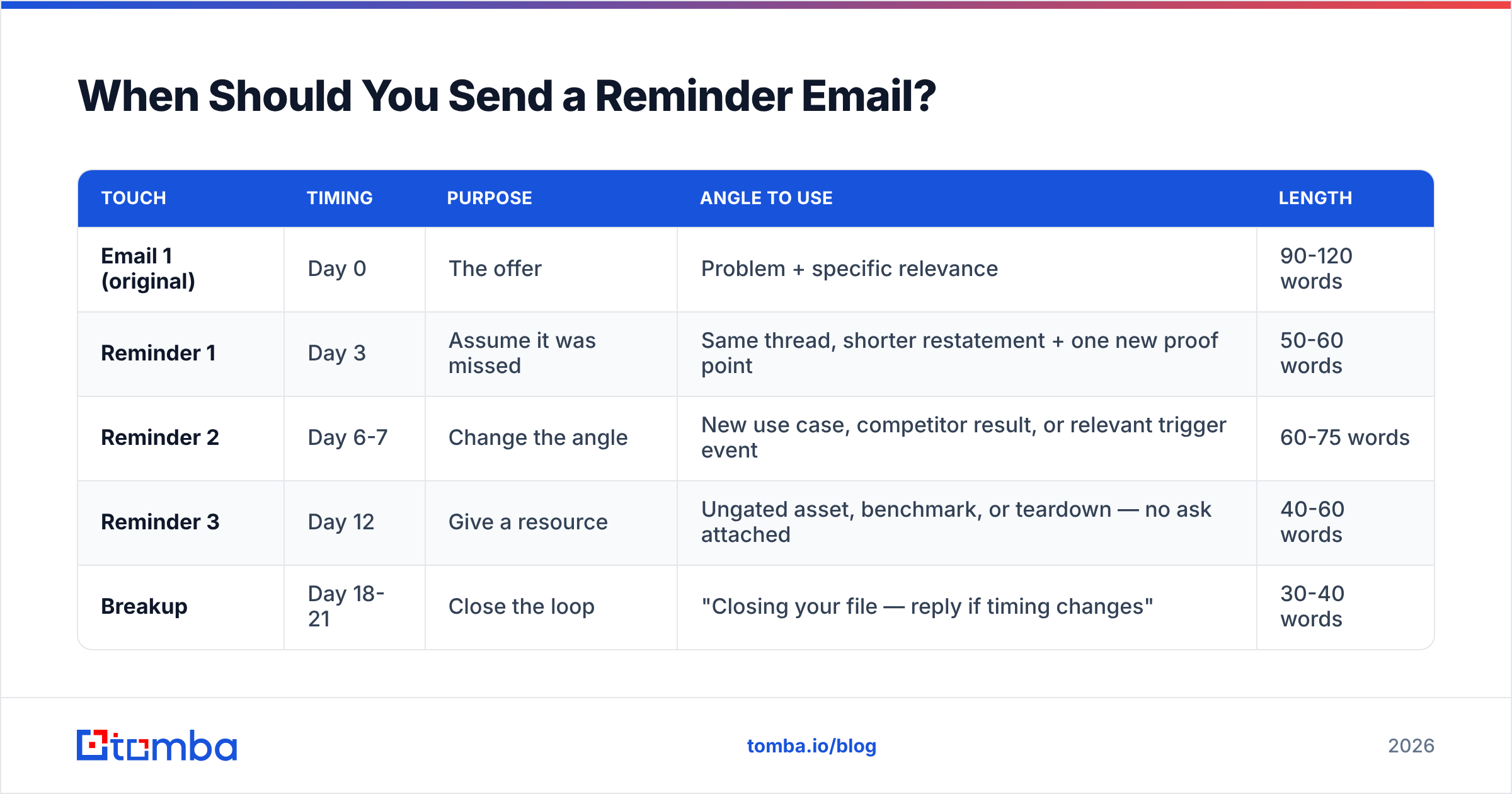
Here's the cadence that holds up across most B2B contexts, along with what each touch should actually contain:
| Touch | Timing | Purpose | Angle to use | Length |
|---|---|---|---|---|
| Email 1 (original) | Day 0 | The offer | Problem + specific relevance | 90-120 words |
| Reminder 1 | Day 3 | Assume it was missed | Same thread, shorter restatement + one new proof point | 50-60 words |
| Reminder 2 | Day 6-7 | Change the angle | New use case, competitor result, or relevant trigger event | 60-75 words |
| Reminder 3 | Day 12 | Give a resource | Ungated asset, benchmark, or teardown — no ask attached | 40-60 words |
| Breakup | Day 18-21 | Close the loop | "Closing your file — reply if timing changes" | 30-40 words |
A few timing rules that survive contact with real inboxes:
- Never follow up within 24 hours. It reads as surveillance, especially if you're using open tracking. Day 3 is the floor.
- Widen the intervals as you go. 3 → 4 → 5 → 6 days. Constant-interval sequences feel automated because they are.
- Tuesday through Thursday, mid-morning local time. Monday mornings are triage; Friday afternoons are write-offs. If your tool can send in the recipient's timezone, use it.
- Reset on any human signal. An out-of-office, a "circling back next quarter," a forward to a colleague — all of these should pause the automated sequence and move the thread to manual handling.
- Stop at 4-5 touches. Marginal reply rates collapse after touch three, and the complaint rate does not.
The bigger point: cadence is a floor, not a strategy. A well-timed sequence of four identical "just checking in" emails still fails. Timing buys you attention; the content decides what happens next.
Should You Reply in the Same Thread or Start Fresh?#
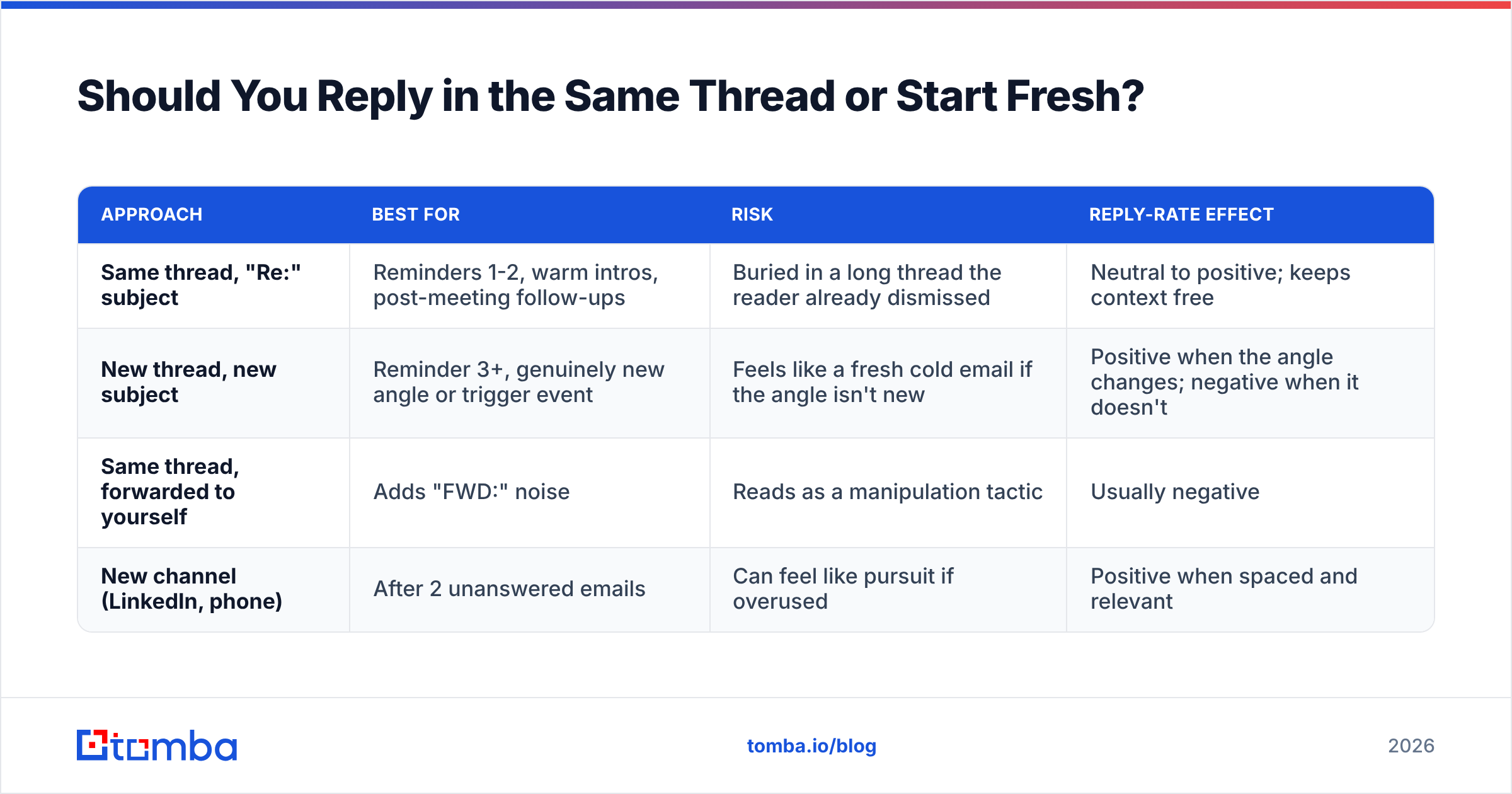
Reply in the same thread for the first two reminders, then consider a fresh thread with a new subject line for touch three.
Threading has a real advantage: the recipient sees the original message directly beneath yours, so your context anchor can be one line instead of a paragraph. It also signals continuity rather than a fresh cold pitch.
The tradeoff is that a thread the recipient has already ignored twice carries accumulated "I decided about this" weight. By touch three, a new subject line and a genuinely different angle can reset that. Do not resend the same pitch with a new subject — that's a workaround for the inbox, not for the human.
| Approach | Best for | Risk | Reply-rate effect |
|---|---|---|---|
| Same thread, "Re:" subject | Reminders 1-2, warm intros, post-meeting follow-ups | Buried in a long thread the reader already dismissed | Neutral to positive; keeps context free |
| New thread, new subject | Reminder 3+, genuinely new angle or trigger event | Feels like a fresh cold email if the angle isn't new | Positive when the angle changes; negative when it doesn't |
| Same thread, forwarded to yourself | Adds "FWD:" noise | Reads as a manipulation tactic | Usually negative |
| New channel (LinkedIn, phone) | After 2 unanswered emails | Can feel like pursuit if overused | Positive when spaced and relevant |
Multichannel deserves a note. Pairing email with a LinkedIn touch or a call generally lifts total response, but only if the channels carry different content. Sending the identical paragraph on LinkedIn that you sent by email is the same email twice, and it reads that way. If you're layering channels, LinkedIn outreach should reference something the email didn't.

What Does a Good Reminder Email Actually Look Like?#
Short, specific, and carrying something new. Here are four templates matched to common situations — adapt the specifics, keep the structure.
Template 1 — The missed-it assumption (Day 3, same thread)
Subject: Re: [original subject]
Hi [Name] — figured this landed at a busy moment.
Short version: [one-line offer]. [Similar company] used it to [specific outcome with a number].
Worth 15 minutes, or is this not a priority right now?
[Your name]
Why it works: it gives them an explicit "not a priority" option, which is easier to send than silence, and either answer is useful to you.
Template 2 — The new angle (Day 6-7)
Subject: Re: [original subject]
Hi [Name], one thing I left out.
Most [role] teams I talk to are stuck on [specific problem], not [problem you originally pitched]. If that's closer to your situation, [one-sentence relevance].
Happy to send the two-page breakdown either way — want it?
[Your name]
Why it works: the ask is for permission to send something free, not for a meeting. Yes costs nothing.
Template 3 — The value drop (Day 12)
Subject: [Specific resource] for [their company]
Hi [Name] — no ask here.
We benchmarked [X] across [N] companies in [their industry]. [One surprising finding.] Full data: [link].
Use it however's helpful.
[Your name]
Why it works: it's the only email in the sequence with no request, which makes it the most memorable one.
Template 4 — The breakup (Day 18-21)
Subject: Re: [original subject]
Hi [Name] — closing this out on my side so I stop cluttering your inbox.
If [problem] moves up the list later this year, reply here and I'll pick it back up.
[Your name]
Why it works: breakup emails frequently outperform every touch before them, because loss aversion is real and because the reader finally has a reason to act.
Three lines to delete from every draft: "Just following up," "Per my last email," and "I wanted to reach out." The first is filler, the second is passive-aggressive, and the third describes what you're doing instead of doing it. If you're workshopping subject lines, run a few variants through a subject line tester before committing a whole sequence to one.
How Do Reminder Emails Compare to Other Re-Engagement Plays?#
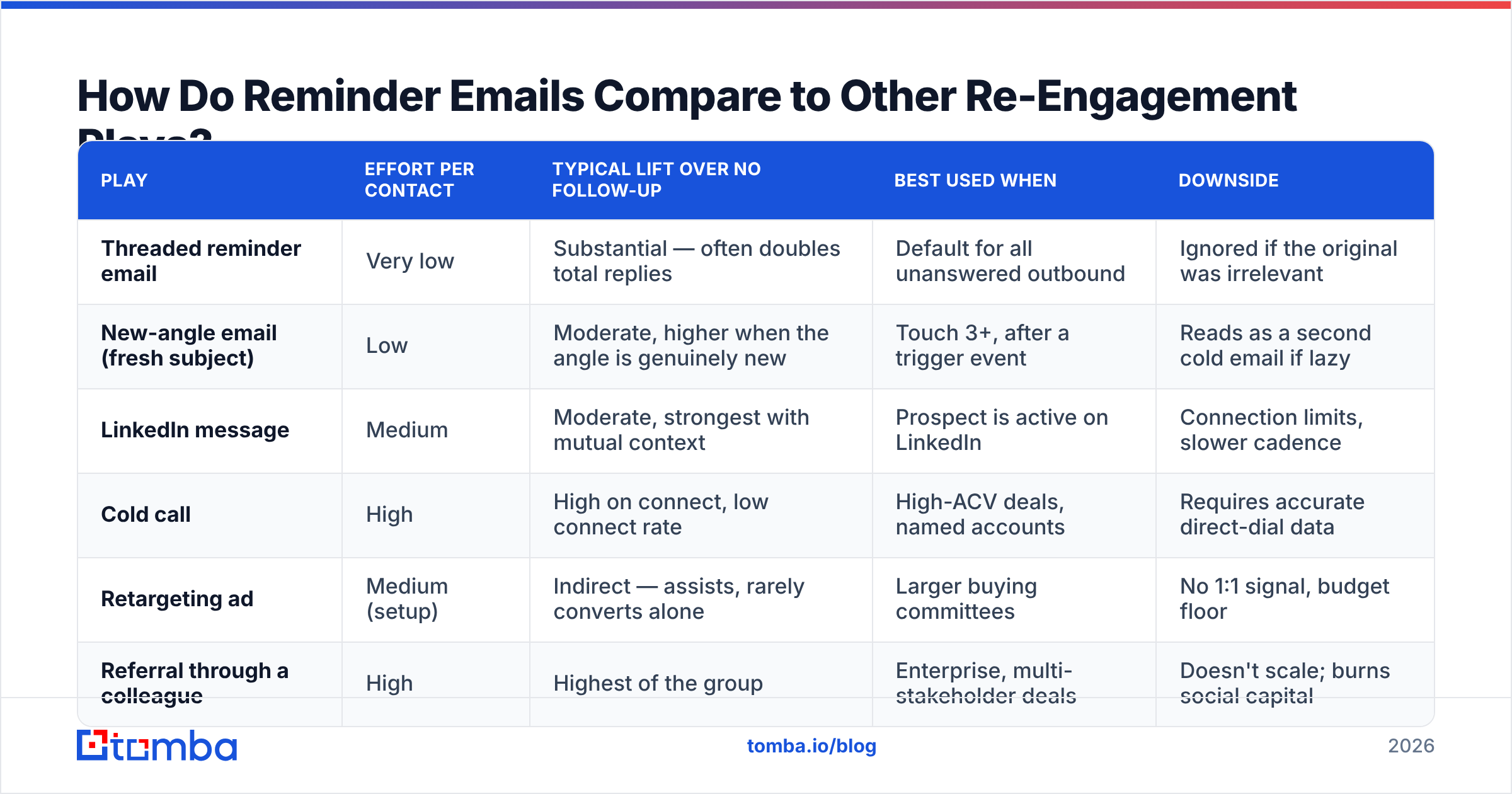
Email reminders are the cheapest option, not always the most effective one. Here's the honest comparison:
| Play | Effort per contact | Typical lift over no follow-up | Best used when | Downside |
|---|---|---|---|---|
| Threaded reminder email | Very low | Substantial — often doubles total replies | Default for all unanswered outbound | Ignored if the original was irrelevant |
| New-angle email (fresh subject) | Low | Moderate, higher when the angle is genuinely new | Touch 3+, after a trigger event | Reads as a second cold email if lazy |
| LinkedIn message | Medium | Moderate, strongest with mutual context | Prospect is active on LinkedIn | Connection limits, slower cadence |
| Cold call | High | High on connect, low connect rate | High-ACV deals, named accounts | Requires accurate direct-dial data |
| Retargeting ad | Medium (setup) | Indirect — assists, rarely converts alone | Larger buying committees | No 1:1 signal, budget floor |
| Referral through a colleague | High | Highest of the group | Enterprise, multi-stakeholder deals | Doesn't scale; burns social capital |
If you're layering phone into an email sequence, the constraint is data quality, not willingness. Direct dials decay faster than email addresses, and a sequence that calls the wrong number twice looks worse than one that never called. A phone finder that returns verified direct numbers is what makes the multichannel version worth running.
What Kills Reply Rates on Follow-Ups?#
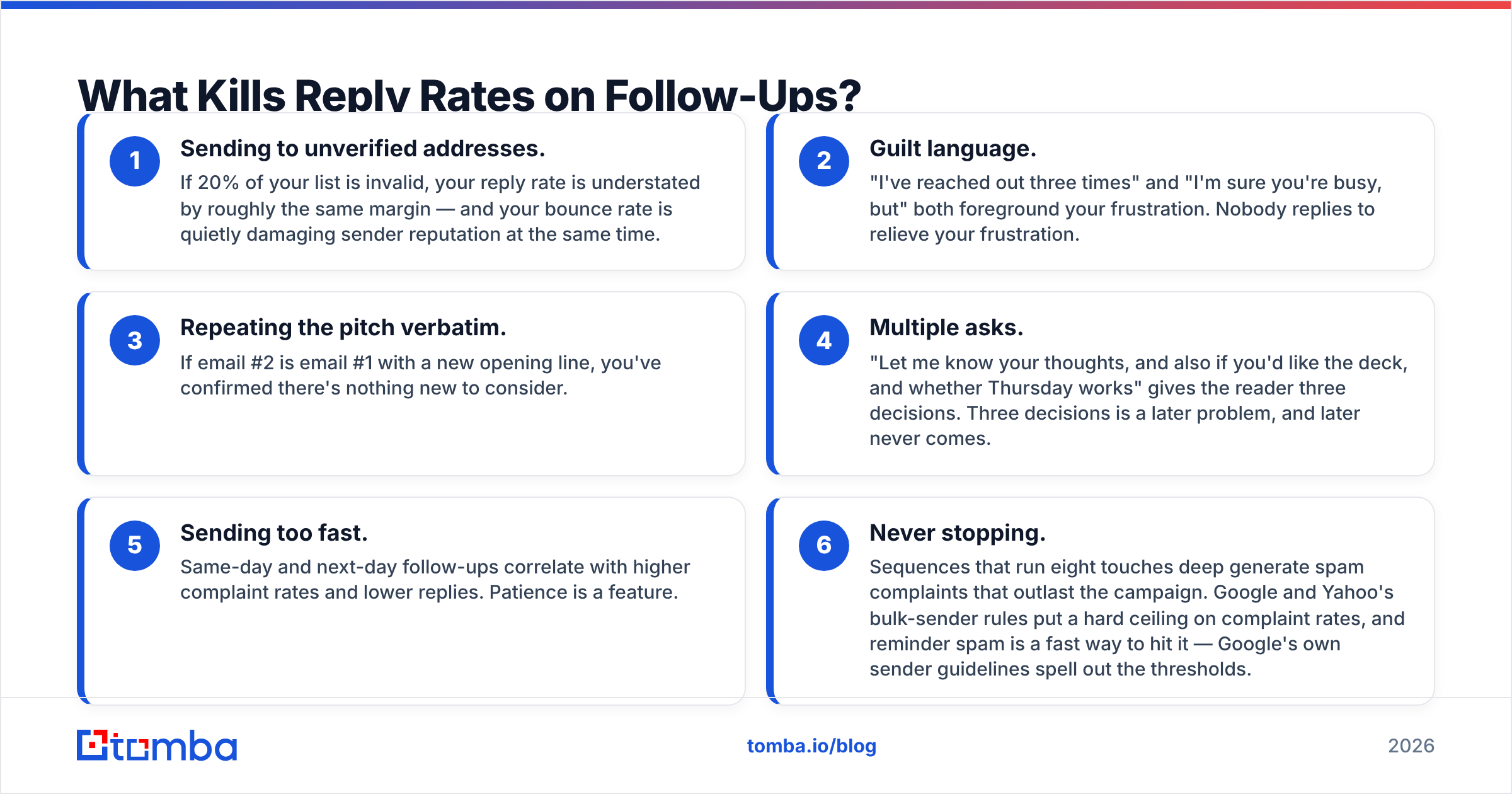
Six failure modes account for most dead sequences:
- Sending to unverified addresses. If 20% of your list is invalid, your reply rate is understated by roughly the same margin — and your bounce rate is quietly damaging sender reputation at the same time.
- Guilt language. "I've reached out three times" and "I'm sure you're busy, but" both foreground your frustration. Nobody replies to relieve your frustration.
- Repeating the pitch verbatim. If email #2 is email #1 with a new opening line, you've confirmed there's nothing new to consider.
- Multiple asks. "Let me know your thoughts, and also if you'd like the deck, and whether Thursday works" gives the reader three decisions. Three decisions is a later problem, and later never comes.
- Sending too fast. Same-day and next-day follow-ups correlate with higher complaint rates and lower replies. Patience is a feature.
- Never stopping. Sequences that run eight touches deep generate spam complaints that outlast the campaign. Google and Yahoo's bulk-sender rules put a hard ceiling on complaint rates, and reminder spam is a fast way to hit it — Google's own sender guidelines spell out the thresholds.
The data hygiene point deserves emphasis because it's the one most teams skip. Reply rate is a ratio, and the denominator is only meaningful if every address in it is real and reachable. Teams that clean lists before sequencing consistently report follow-up performance that looks better — not because the copy improved, but because the measurement finally reflects human behavior. Catch-all domains are the trickiest case, since they accept everything and confirm nothing; a dedicated catch-all verifier is the only reliable way to separate real mailboxes from black holes on those domains.
How Do You Measure Whether Your Reminders Are Working?#
Track four numbers, per touch, not per campaign:
- Reply rate by touch position. If touch 2 outperforms touch 1, your original email is the weak link. If touch 1 dominates and everything after is flat, your follow-ups lack new content.
- Positive vs. total reply split. "Not interested" is a reply. Counting it as success hides a targeting problem.
- Bounce and complaint rate. Rising complaints across touches means your cadence is too aggressive for the list.
- Time-to-reply distribution. If most replies land 48-72 hours after each send, your intervals are roughly right. If they cluster immediately after touch 3, your first two touches are being skipped entirely.
Independent review data on outreach tooling is worth cross-checking here — G2's sales engagement category gives you a sense of which platforms buyers actually rate for sequencing and reporting versus which just ship features. And if you're benchmarking against published averages, treat them as loose reference points; segment, seniority, and industry move the numbers more than copy does.
One structural improvement worth more than any template: shrink the list. A 200-contact list with verified addresses, researched context, and genuinely differentiated follow-ups will beat a 2,000-contact blast running the same four templates. The reminder email is a multiplier on relevance — it can't manufacture it.
Where Should You Start?#
Fix the data first, then the cadence, then the copy. In that order, because each layer depends on the one below it.
Concretely: pull a clean contact list, confirm every address resolves to a real mailbox, set a 3/7/12-day cadence, and write three follow-ups where each one contains something the previous didn't. That's the whole system. Everything else is refinement.
If step one is the bottleneck — and for most teams it is — the Tomba Email Finder resolves verified business addresses by name and domain, so your reminders reach an actual inbox instead of a routing black hole. The free tier covers 25 searches a month for testing your assumptions; paid plans start at $49/mo on Starter and $99/mo on Growth, with full Tomba pricing published rather than quote-gated. Verify the list, then let your follow-ups be judged on their merits.
Related guides#
Ready to find emails that actually work?
Join 150,000+ professionals who stopped guessing and started sending. Free credits on signup — no credit card required.
Get the Tomba newsletter
Practical outbound tactics and product updates — once every two weeks.
About the author