How to Get Email Address With Domain Name: 2026 Guide
Five real ways to turn a company domain into a verified inbox — pattern logic, free tools, paid finders, APIs — plus the accuracy and cost trade-offs nobody publishes.
TL;DR
- A domain name is enough to find work emails, because 90%+ of companies use one repeatable naming pattern across the whole org.
- Five methods work: manual pattern guessing, free web scrapers, browser extensions, dedicated domain search tools, and APIs. Only the last two survive at scale.
- Guessing gets you roughly 40–60% deliverability. Pattern detection plus SMTP verification pushes that past 95%.
- Catch-all domains are the silent budget killer — they accept everything at the SMTP layer, so you need a separate catch-all check, not a standard verifier.
- Budget honestly: free tiers cover 25–50 lookups a month. Real prospecting starts around $49/mo.
What does "get email address with domain name" actually mean?#
It means starting with something you already have — stripe.com, notion.so, a URL from a LinkedIn profile — and ending with a specific, deliverable inbox like sarah.chen@stripe.com.
Think of a company domain like an apartment building address. You know the building. You know a person lives there. What you don't know is the apartment number — and every building numbers its units differently. Some use floor-plus-unit, some use sequential digits, some use letters. Email domains work the same way: the building is public, the numbering scheme is consistent internally, and once you crack the scheme you can address anyone inside.
There are two distinct jobs hiding under this one phrase, and mixing them up is why people get bad results:
- Domain-wide discovery — "show me every email on this domain." You want a list of contacts at a company you're targeting.
- Person-specific resolution — "I have a first name, last name, and domain. Give me the exact address."
Different tools are good at different jobs. A domain search enumerates known addresses on a domain. An email finder resolves a specific human. Most workflows need both, in that order.
How do email patterns work at company domains?#
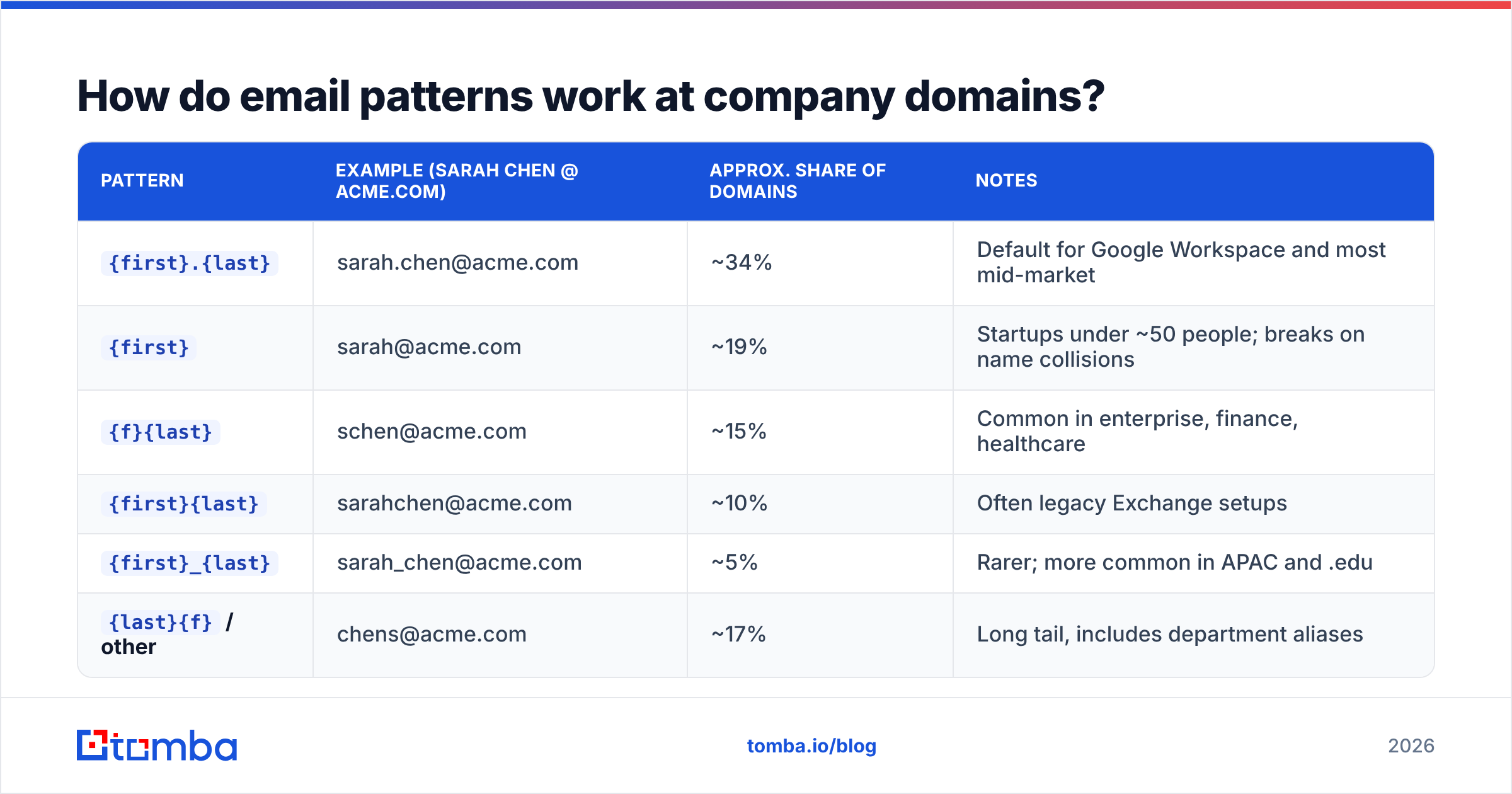
Every organization picks a naming convention when they set up their mail server, and it almost never changes. According to aggregate data across millions of business domains, a handful of patterns account for the overwhelming majority of all corporate addresses.
| Pattern | Example (Sarah Chen @ acme.com) | Approx. share of domains | Notes |
|---|---|---|---|
{first}.{last} |
sarah.chen@acme.com | ~34% | Default for Google Workspace and most mid-market |
{first} |
sarah@acme.com | ~19% | Startups under ~50 people; breaks on name collisions |
{f}{last} |
schen@acme.com | ~15% | Common in enterprise, finance, healthcare |
{first}{last} |
sarahchen@acme.com | ~10% | Often legacy Exchange setups |
{first}_{last} |
sarah_chen@acme.com | ~5% | Rarer; more common in APAC and .edu |
{last}{f} / other |
chens@acme.com | ~17% | Long tail, includes department aliases |
Two practical consequences fall out of this table.
First, if you know one confirmed address on a domain, you can derive most of the others. Find press@ or a single named employee on the company blog and you've likely unlocked the pattern for the entire org. That's the whole logic behind an email permutator — generate all plausible variants, then filter.
Second, the long tail is where guessing fails. That 17% "other" bucket includes middle initials, hyphenated surnames, regional subdomains (@uk.acme.com), post-acquisition legacy domains, and personal aliases. Guessing handles the top four patterns fine. It falls apart everywhere else — and "everywhere else" is one in five of your prospects.
What are the 5 ways to get an email address from a domain name?#
Ranked from cheapest-and-worst to most reliable:
Manual pattern guessing. Take the domain, generate the six common permutations, send to all of them, and let bounces sort it out. Cost: zero. Real cost: your sender reputation. Every hard bounce is a signal to inbox providers that you're not a legitimate sender, and a 20% bounce rate on a new domain will get you filtered inside a week.
Free web scraping. Search
site:acme.com "@acme.com"in Google, check the team page, scrape the press kit, read PDFs. This works surprisingly well for small companies with public-facing staff. It scales to about ten prospects before it becomes a full-time job. An email extractor speeds up the parsing step once you've got the raw page text.Browser extensions. You're on a company site or a LinkedIn profile, you click the extension, and it surfaces addresses in context. Best for reactive, one-at-a-time research while you're already browsing. Weak for building a list of 500 accounts.
Dedicated domain search tools. You paste a domain, the tool returns every address it knows plus the detected pattern, seniority, and department. This is the workhorse method — one query returns 10–200 contacts with confidence scores attached.
APIs and bulk uploads. You have 5,000 domains in a spreadsheet and you need emails for all of them. A bulk email finder or a direct API call handles this in one job instead of 5,000 manual searches. This is the only method that works when finding emails is a system, not a task.

Methods 1 and 2 are free and honest about it. Methods 4 and 5 cost money and pay for themselves the moment your bounce rate matters — which is the moment you send more than a handful of emails a day.
Which method gives the most accurate results?#
Accuracy in this space means one specific thing: the percentage of returned addresses that accept mail without bouncing. Everything else is marketing.

Three things separate an accurate result from a plausible one:
Pattern confidence, not pattern guessing. A good tool doesn't just apply the most common pattern. It looks at addresses it has already confirmed on that specific domain and infers the local rule. A domain where 40 known addresses all follow
{f}{last}gets a high-confidence prediction. A domain with two known addresses gets a lower one — and the tool should tell you which situation you're in.Live SMTP verification. Before returning an address, the provider opens a connection to the receiving mail server and asks whether that mailbox exists — without actually delivering a message. This is the single biggest accuracy lever. A finder that skips it is selling you permutations with a confidence badge glued on. Run anything you're unsure about through an email verifier before it enters a sequence.
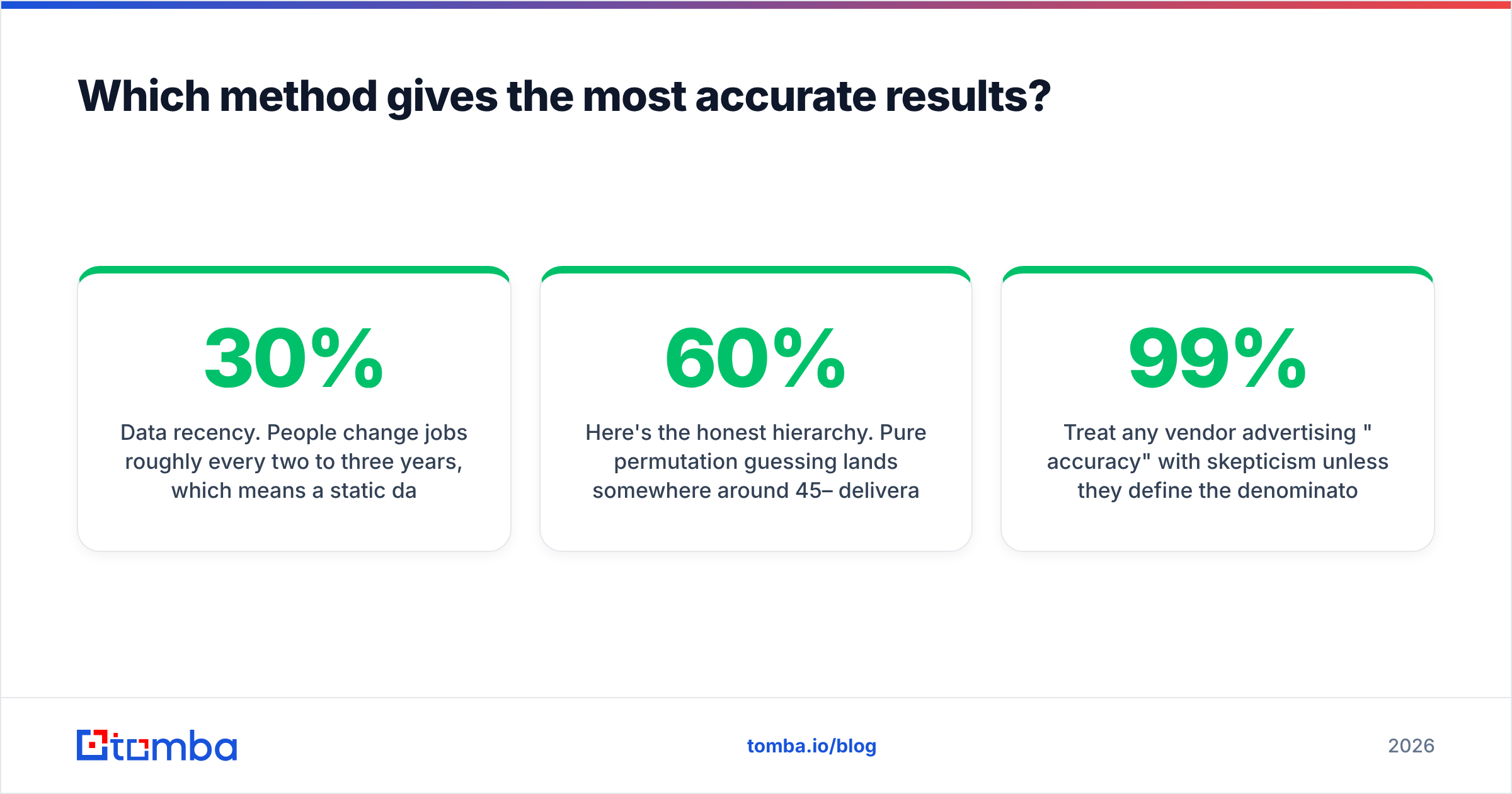
Data recency. People change jobs roughly every two to three years, which means a static database decays around 25–30% annually. A result sourced from a 2023 crawl is a coin flip in 2026. Ask any vendor how often they re-verify, not just how many records they hold. Tomba publishes its data sources for exactly this reason.
Here's the honest hierarchy. Pure permutation guessing lands somewhere around 45–60% deliverability. Pattern detection without verification gets you to roughly 75–85%. Pattern detection plus live SMTP verification, with catch-all handling, is where 95%+ claims become defensible.
Treat any vendor advertising "99% accuracy" with skepticism unless they define the denominator. Ninety-nine percent of returned results being valid is a very different claim from finding 99% of the people you searched for. Coverage and accuracy trade against each other — a tool can hit near-perfect accuracy by simply refusing to return anything it isn't certain about, which looks great on a landing page and leaves you with an empty list.
How do the leading tools compare?#

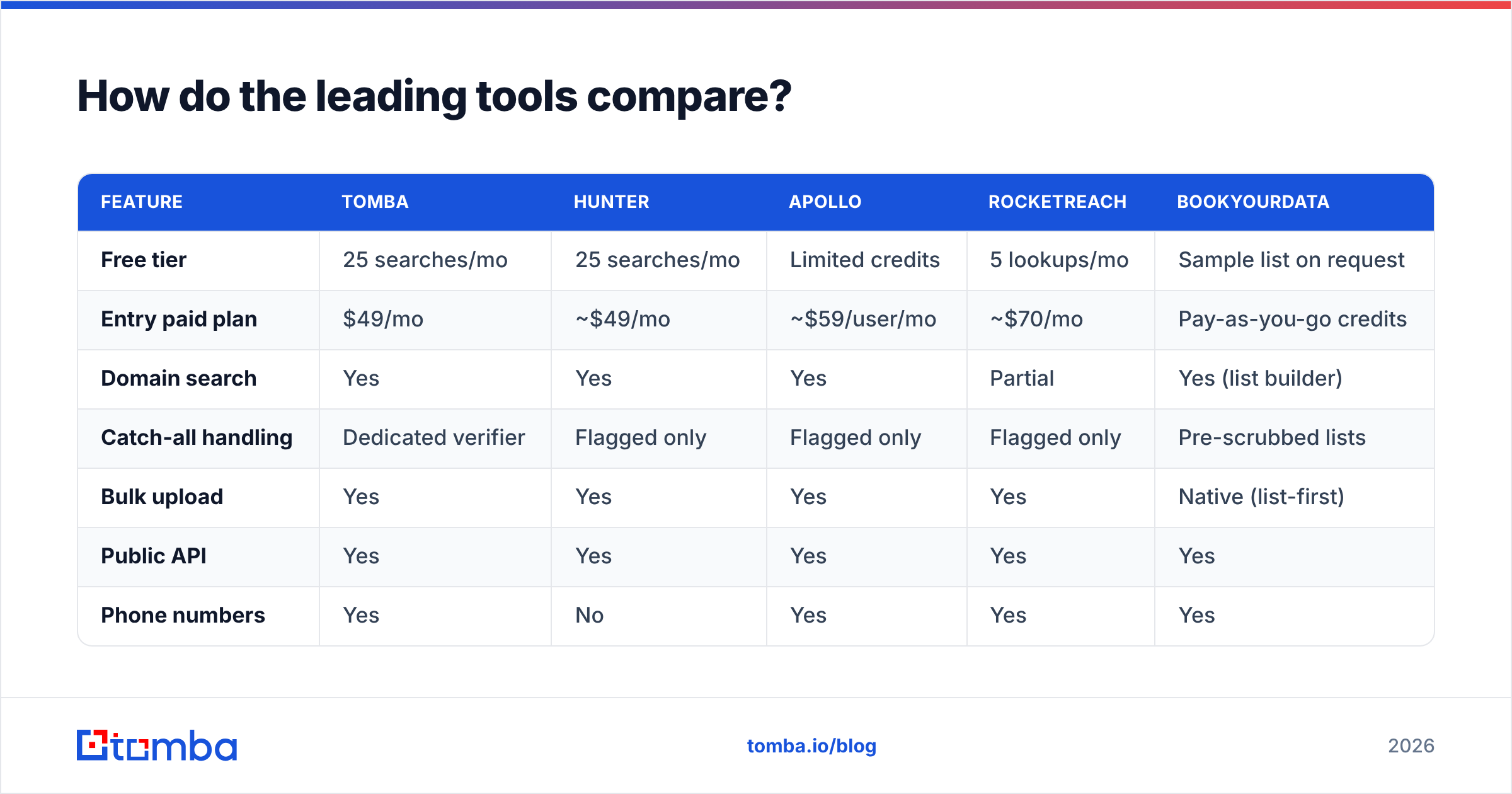
| Feature | Tomba | Hunter | Apollo | RocketReach | BookYourData |
|---|---|---|---|---|---|
| Free tier | 25 searches/mo | 25 searches/mo | Limited credits | 5 lookups/mo | Sample list on request |
| Entry paid plan | $49/mo | ~$49/mo | ~$59/user/mo | ~$70/mo | Pay-as-you-go credits |
| Domain search | Yes | Yes | Yes | Partial | Yes (list builder) |
| Catch-all handling | Dedicated verifier | Flagged only | Flagged only | Flagged only | Pre-scrubbed lists |
| Bulk upload | Yes | Yes | Yes | Yes | Native (list-first) |
| Public API | Yes | Yes | Yes | Yes | Yes |
| Phone numbers | Yes | No | Yes | Yes | Yes |
| Best for | Domain-first prospecting + API workflows | Simple domain lookups | All-in-one sequencing | Recruiter-style people search | Buying pre-built verified lists |
Prices reflect published list rates at time of writing and change often — check each vendor directly. For Tomba specifically, the ladder runs Free (25 searches/mo), Starter $49/mo, Growth $99/mo, Pro $249/mo, and Enterprise custom; full details are on the Tomba pricing page.
The genuine differentiators are narrower than the marketing suggests:
- If you work domain-first — "here are 300 target accounts, find me the right people" — a domain search tool with strong pattern inference wins.
- If you work person-first — "here's a name from a conference list" — a finder with good name resolution and a LinkedIn finder matters more.
- If you want a list handed to you rather than built, a data vendor like BookYourData is a legitimately different product category: you're buying curated, pre-verified records instead of running lookups yourself. That's a reasonable trade if your bottleneck is time rather than budget.
- If you're building a product or an internal system, the email finder API is the only thing that matters, and you should compare rate limits and response latency, not UI screenshots.
How do you verify an address before you send?#
Finding is half the job. The other half is proving the address will accept mail — and doing it before the message leaves your server, not after.

A practical verification sequence:
- Syntax check. Malformed addresses, typo'd TLDs (
gmial.com), and stray characters. Cheap, instant, catches maybe 2% of junk. - Domain and MX record check. Does the domain resolve, and does it actually publish mail exchange records? A domain with no MX record cannot receive mail, period. This kills dead and parked domains before you spend a verification credit.
- Disposable and role-account filtering. Flag
info@,sales@,noreply@, and temporary-mailbox providers. Role accounts don't bounce — they just don't convert, and they inflate your complaint rate. - SMTP handshake. Connect to the mail server, issue
RCPT TO, read the response code, disconnect without sending. A 250 means the mailbox exists. A 550 means it doesn't. - Catch-all detection. Test a deliberately fake address on the same domain. If the server also accepts
xkcd-nonsense-9182@acme.com, the domain is catch-all and step 4 told you nothing.
Steps 1–4 are standard across every serious provider. Step 5 is where tools diverge sharply, and it's the one that costs you money when it's missing.
What about catch-all domains?#
Catch-all domains are configured to accept mail addressed to any username, then sort it out internally. Roughly 15–20% of business domains run this way, and the share is higher among enterprises and agencies.
The problem: a standard verifier returns "valid" for every address on a catch-all domain, including ones that don't exist. You get a clean-looking list that bounces in production.
Three ways to handle it:
- Skip them. Safest, and you lose a fifth of your addressable market.
- Send anyway, in a separate segment. Isolate catch-all addresses in their own sending pool so their bounce rate doesn't contaminate your main domain's sender reputation.
- Use a dedicated catch-all check. Tools that cross-reference pattern confidence, historical engagement, and secondary signals can give you a probability rather than a useless "valid." A catch-all verifier exists specifically for this, and it's the difference between a 20% bounce segment and a 5% one.
Whichever you choose, choose deliberately. The default behavior — treating catch-all as valid — is the single most common cause of a campaign that looked fine in the spreadsheet and cratered on send.
How do you do this at scale without wrecking deliverability?#
Volume changes the rules. At ten emails a day, a bad address is an annoyance. At a thousand, it's an inbox-placement problem that takes weeks to unwind.
A workable production pipeline looks like this:
- Ingest domains. From your CRM, a scraped list, an intent tool, or your website's visitor data.
- Enrich to contacts. Run domain search to get named people, or run person-plus-domain lookups if you already have names. Push results straight into your stack with a HubSpot integration or via Zapier so nothing lives in a spreadsheet.
- Verify everything, including things the finder marked valid. Verification credits are cheaper than reputation repair.
- Segment by confidence. High-confidence verified addresses go to your primary sending domain. Catch-all and medium-confidence addresses go to a secondary domain.
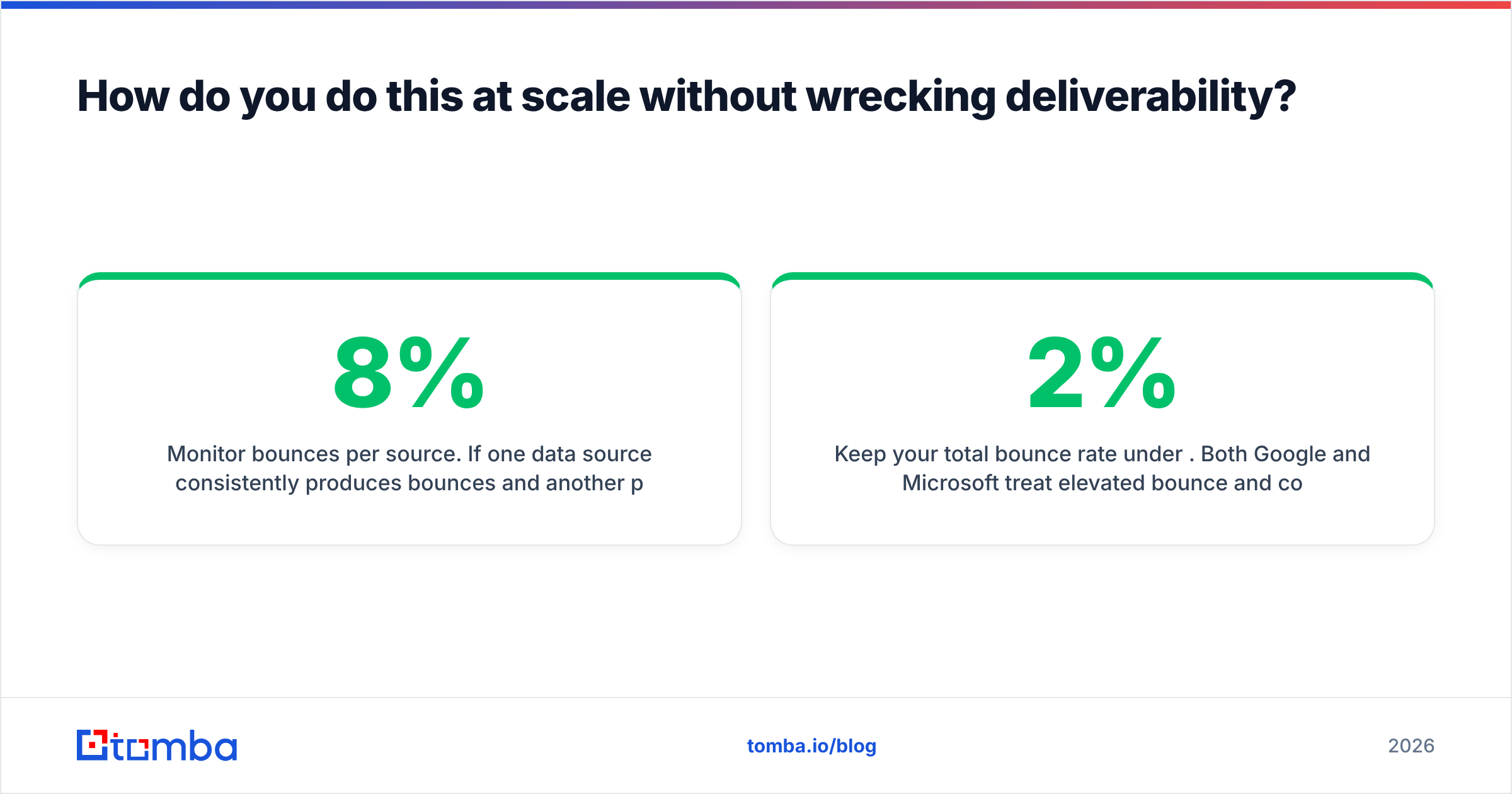
- Monitor bounces per source. If one data source consistently produces 8% bounces and another produces 1.5%, that's an actionable fact, and you'll only see it if you tag by source.
- Re-verify quarterly. A list you built in January is measurably worse in April.
Keep your total bounce rate under 2%. Both Google and Microsoft treat elevated bounce and complaint rates as spam signals, and the tolerance has tightened considerably since the 2024 bulk-sender requirements. Good email deliverability starts at the data layer, not in the copy.
Is finding emails by domain legal?#
Short answer: in most jurisdictions, finding and using business contact data for B2B outreach is legal, but the rules are real and vary by region.
- GDPR (EU/UK). Business email addresses are personal data. You need a lawful basis — legitimate interest is commonly used for B2B outreach — plus transparency about where you got the data and an easy opt-out in every message.
- CAN-SPAM (US). No opt-in required for commercial email, but you must include a physical address, an honest subject line, and a working unsubscribe that you honor within ten business days.
- CASL (Canada). Stricter. Generally requires express or implied consent before sending commercial electronic messages.
Practical guardrails that keep you on the right side of all three: target business addresses at business domains only, never scrape personal inboxes, honor unsubscribes immediately and permanently, and keep a record of your data source per contact. Any reputable vendor should be able to tell you the provenance of a record — if they can't, that's your answer. The G2 email verification category is a reasonable starting point for reading how vendors describe their compliance posture, and the Wikipedia entry on email addresses covers the underlying standards if you want the technical grounding.
Where should you start?#
If you're doing this occasionally, start free. Twenty-five searches a month is enough to test whether a tool's pattern detection actually works on the domains you care about — which is the only benchmark that matters. Run ten domains you already know the answer for, and count how many come back right.
If you're doing this weekly, you need pattern inference plus verification in one pass, and you need it hooked into wherever your contacts live.
If you're doing this programmatically, skip the UI comparison entirely and evaluate the API: response time, rate limits, batch endpoints, and whether verification is bundled or billed separately.
Start with the Tomba Email Finder — paste a domain, get the detected pattern and every known address on it, verified in the same request. The free tier covers 25 searches a month with no card, which is enough to check the accuracy claim against your own target list before you pay anyone anything.
Related guides#
// get started
Find, verify and enrich your first contacts today
Start on the free plan with 25 searches a month, then scale when your team is ready.
Free plan · No credit card required · GDPR & CCPA
// about the author