GetAccept Pricing Reviews Pros and Cons: 2026 Breakdown
A neutral breakdown of GetAccept pricing, reviews, pros and cons in 2026 — what each seat really costs, which features sit behind Enterprise, where reviewers push back, and when a cheaper stack beats it.
Short answer: GetAccept earns its price when deals stall after the proposal. It is hard to justify when your pipeline is thin. This guide breaks down GetAccept pricing reviews pros and cons for 2026 — what a seat really costs, what buyers praise, what they gripe about, and how it compares to PandaDoc, Proposify, and DocuSign.
TL;DR
- GetAccept is a digital sales room (DSR) plus e-signature platform. It is priced per user, per month, so cost scales with headcount, not with deal volume.
- Public list pricing has sat in the $25/user/mo (e-sign tier) to $49/user/mo (full sales-room tier) range, with Enterprise quoted on request. Those headline numbers assume annual billing. Monthly costs more.
- Reviewers praise the video-in-proposal experience, tracking analytics, and CRM sync. The recurring complaints are per-seat cost at scale, template and editor friction, and features gated behind Enterprise.
- GetAccept is strong if your bottleneck is late-stage, such as proposals stalling or buyers going dark. It does nothing for an empty top of funnel.
- Before you buy seats, price out the whole stack. A DSR only earns its keep if you already have verified contacts and enough qualified opportunities to fill it.
What is GetAccept, and who actually buys it?#
GetAccept sells the last mile of a B2B deal. Instead of emailing a PDF and hoping, you send a branded microsite. This "digital sales room" holds the proposal, a personal video, pricing, a mutual action plan, chat, and the signature block in one link. You also get analytics: who opened it, which page they lingered on, and how many people they forwarded it to.
The typical buyer is a mid-market SaaS or services team. Think 30–90 day sales cycles, 5 to 50 reps, and deals that go quiet after the pricing talk. If your average contract value is $8,000 or more and your proposal-to-close rate is under 30%, the math on a DSR gets interesting fast.
The typical buyer who regrets it is a team that bought GetAccept hoping it would fix pipeline volume. It won't. It compresses and rescues deals that already exist.
Here is the honest split of what GetAccept replaces versus what it does not touch:
- Replaces e-signature tools — DocuSign, Adobe Sign, HelloSign for standard sales contracts.
- Replaces proposal software — Proposify, Qwilr, and the "PDF in a Google Drive folder" workflow.
- Replaces deal-room hacks — the shared Notion page, the Loom link, the follow-up spreadsheet.
- Does not replace your CRM — it syncs to HubSpot, Salesforce, and Pipedrive. It is not a system of record.
- Does not replace prospecting data — no contact database, no email finding, no verification.
- Does not replace your sequencer — cold outbound still lives in Instantly, Smartlead, Outreach, or wherever you run it.

What does GetAccept pricing look like in 2026?#
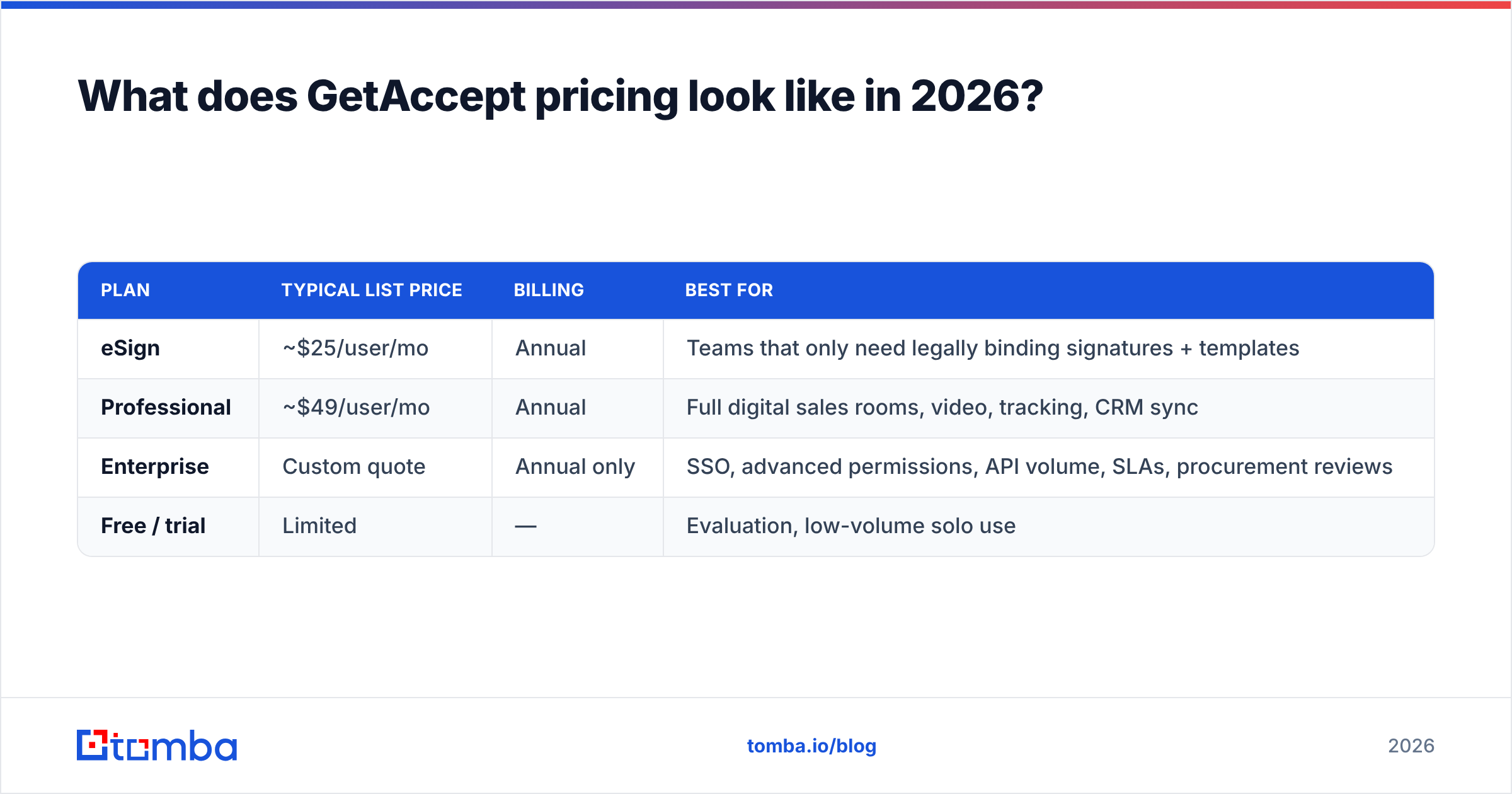
GetAccept publishes tiered per-user pricing, and the headline number already includes the annual-billing discount. At the time of writing, the structure looks like this. Always confirm current numbers on the official GetAccept pricing page, because DSR vendors reprice more often than most categories.
| Plan | Typical list price | Billing | Best for |
|---|---|---|---|
| eSign | ~$25/user/mo | Annual | Teams that only need legally binding signatures + templates |
| Professional | ~$49/user/mo | Annual | Full digital sales rooms, video, tracking, CRM sync |
| Enterprise | Custom quote | Annual only | SSO, advanced permissions, API volume, SLAs, procurement reviews |
| Free / trial | Limited | — | Evaluation, low-volume solo use |
Three things to internalize before you budget:
- Monthly billing costs more. The advertised $25 and $49 figures assume you commit for a year. Month-to-month usually carries a 20–25% premium, which is standard for the category.
- There is usually a seat minimum. Vendors in this space commonly require 3 to 5 seats on paid tiers. A two-person team paying "$49" is often really paying $147–$245.
- Enterprise is a conversation, not a price. SSO/SAML, granular roles, higher API limits, and dedicated support all live there. If your security review requires SSO, assume you are an Enterprise buyer no matter your headcount.
What is the real annual cost?#
Run the number the way procurement will. A 10-rep team on Professional at $49/user/mo, billed annually, is $5,880/year. Add two sales-ops seats and you are at $7,056. Add Enterprise for SSO and the multiplier is usually 1.5–2x the Professional rate, so budget $9,000–$14,000 for the same team.
That is not outrageous for a tool that touches every closed-won deal. It is outrageous if half those seats are SDRs who never send a proposal. That is the single most common overspend in DSR contracts. Buy seats for closers, not for the whole org chart.
What do GetAccept reviews actually say?#
Review scores on G2 and Capterra sit around 4.5 out of 5 across several hundred reviews. But averages hide the pattern. When you read the actual text, the same themes repeat.
What reviewers praise:
- The video intro inside the proposal. This is the feature people name unprompted. A 45-second walkthrough attached to the pricing page measurably lifts engagement.
- Tracking granularity. Knowing that the CFO opened page 4 twice at 9pm changes your follow-up from "just checking in" to something useful.
- CRM sync quality. Users describe the HubSpot and Salesforce integrations as reliable rather than aspirational, which is not a given in this category.
- Speed to first send. Most teams report sending a real proposal within a day of onboarding.
What reviewers complain about:
- Per-seat cost as the team grows. The most common negative review theme, by a wide margin.
- Template and editor friction. Brand-compliant templates take longer to build than expected, and the editor is described as fiddly for complex layouts.
- Feature gating. Users on lower tiers regularly find that a needed capability sits one tier up.
- Reporting depth. Fine for deal-level tracking, thinner for pipeline-wide analytics. Most teams still pull reporting from the CRM.
The fair reading: GetAccept delivers what it advertises. The friction is commercial (price and tiers) plus editor ergonomics, not reliability.
What are the pros and cons of GetAccept?#
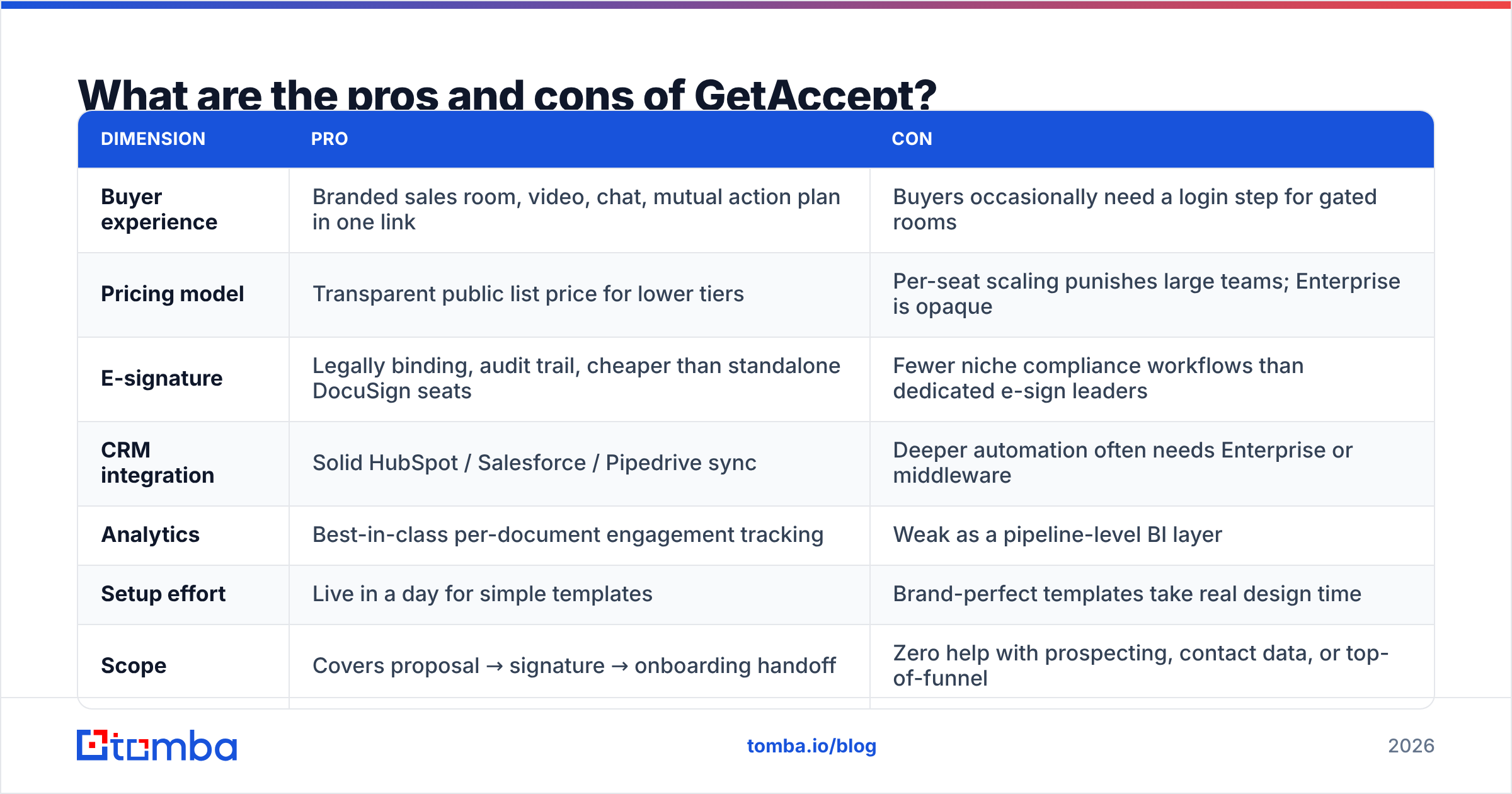
Here is how GetAccept pricing reviews pros and cons stack up, one dimension at a time.
| Dimension | Pro | Con |
|---|---|---|
| Buyer experience | Branded sales room, video, chat, mutual action plan in one link | Buyers occasionally need a login step for gated rooms |
| Pricing model | Transparent public list price for lower tiers | Per-seat scaling punishes large teams; Enterprise is opaque |
| E-signature | Legally binding, audit trail, cheaper than standalone DocuSign seats | Fewer niche compliance workflows than dedicated e-sign leaders |
| CRM integration | Solid HubSpot / Salesforce / Pipedrive sync | Deeper automation often needs Enterprise or middleware |
| Analytics | Best-in-class per-document engagement tracking | Weak as a pipeline-level BI layer |
| Setup effort | Live in a day for simple templates | Brand-perfect templates take real design time |
| Scope | Covers proposal → signature → onboarding handoff | Zero help with prospecting, contact data, or top-of-funnel |
That last row is the one teams underweight. GetAccept is a conversion-rate tool. If you send 12 proposals a quarter, a 10% lift is roughly one extra deal. If the real problem is that you only have 12 proposals to send, the ROI case collapses no matter how good the product is.
How does GetAccept compare to PandaDoc, Proposify, and DocuSign?#
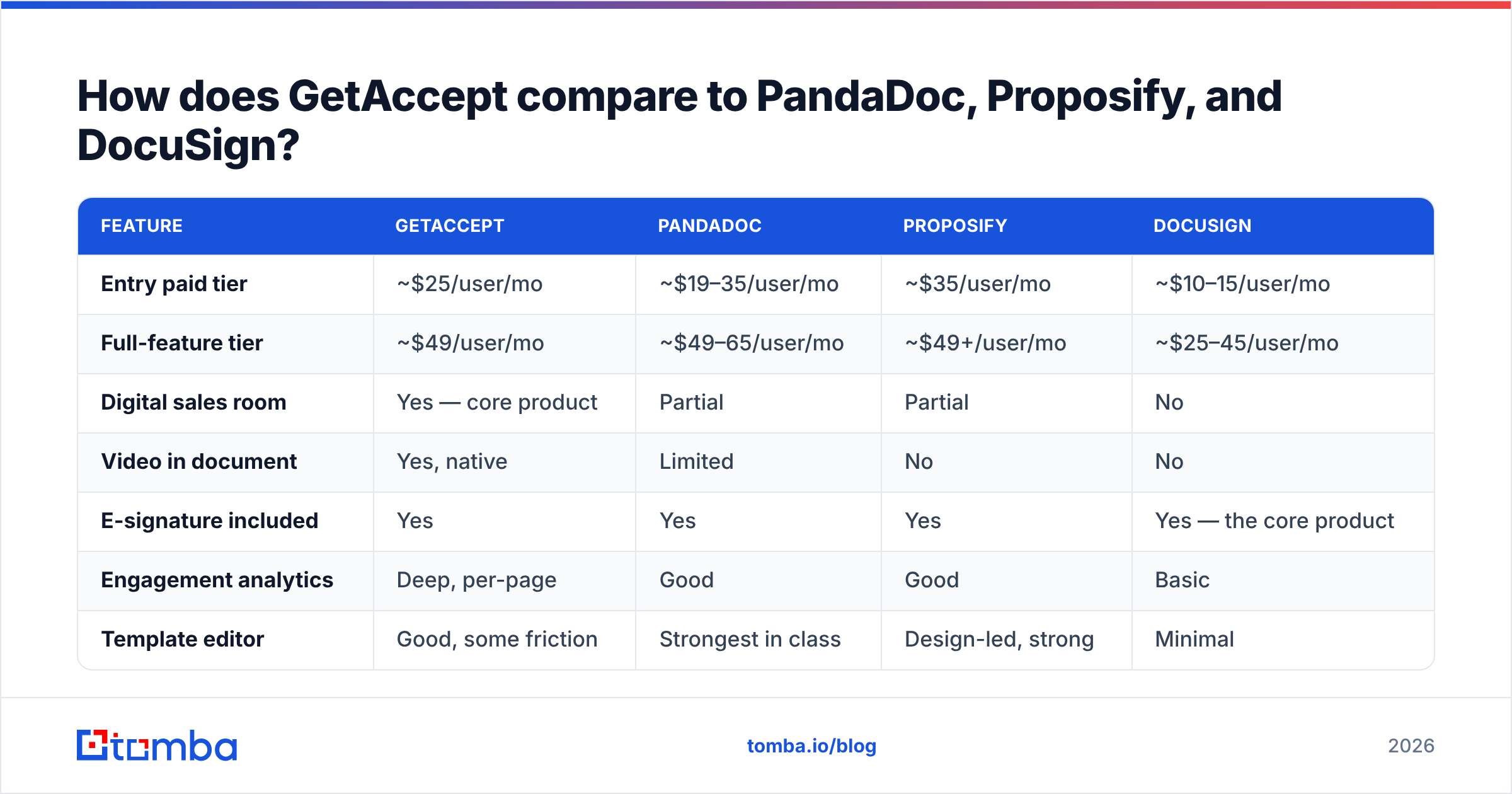
This is the shortlist most buyers actually evaluate. Prices below are public list rates at the time of writing, and you should verify them on each vendor's own page. PandaDoc's pricing in particular has changed tiers more than once.
| Feature | GetAccept | PandaDoc | Proposify | DocuSign |
|---|---|---|---|---|
| Entry paid tier | ~$25/user/mo | ~$19–35/user/mo | ~$35/user/mo | ~$10–15/user/mo |
| Full-feature tier | ~$49/user/mo | ~$49–65/user/mo | ~$49+/user/mo | ~$25–45/user/mo |
| Digital sales room | Yes — core product | Partial | Partial | No |
| Video in document | Yes, native | Limited | No | No |
| E-signature included | Yes | Yes | Yes | Yes — the core product |
| Engagement analytics | Deep, per-page | Good | Good | Basic |
| Template editor | Good, some friction | Strongest in class | Design-led, strong | Minimal |
| CRM sync depth | Strong | Strong | Moderate | Strong (Salesforce) |
| Best fit | Mid-market SaaS closers | Doc-heavy teams, contracts + quotes | Agencies, design-led proposals | Pure signature volume |
How to choose in one line each: pick GetAccept if the selling happens inside the document. Pick PandaDoc if you generate a high volume of structured quotes and contracts. Pick Proposify if brand-perfect design is the differentiator. Pick DocuSign if you just need signatures and nothing else.

Is GetAccept worth it for your team?#
Run these five checks before you sign an annual contract:
- Count real proposal senders. If fewer than half your reps send proposals, buy seats only for the ones who do. This single decision often cuts the quote by 40%.
- Measure your current proposal-to-close rate. Below 25%, a DSR has room to help. Above 45%, your bottleneck is upstream and the lift will be marginal.
- Check your SSO requirement early. If IT mandates SAML, you are pricing Enterprise, not Professional. Get that quote before you fall in love with the demo.
- Ask about seat minimums and mid-term seat reductions. Most annual contracts let you add seats freely and remove them only at renewal. Model the downside.
- Price the whole stack, not the tool. DSR + CRM + sequencer + data. If the data layer is missing, the DSR sits idle.
- Negotiate on volume and timing. End-of-quarter multi-year deals in this category regularly close 15–30% under list.
What do you need in place before a digital sales room pays off?#
A sales room is the finish line. It only matters if runners reach it.
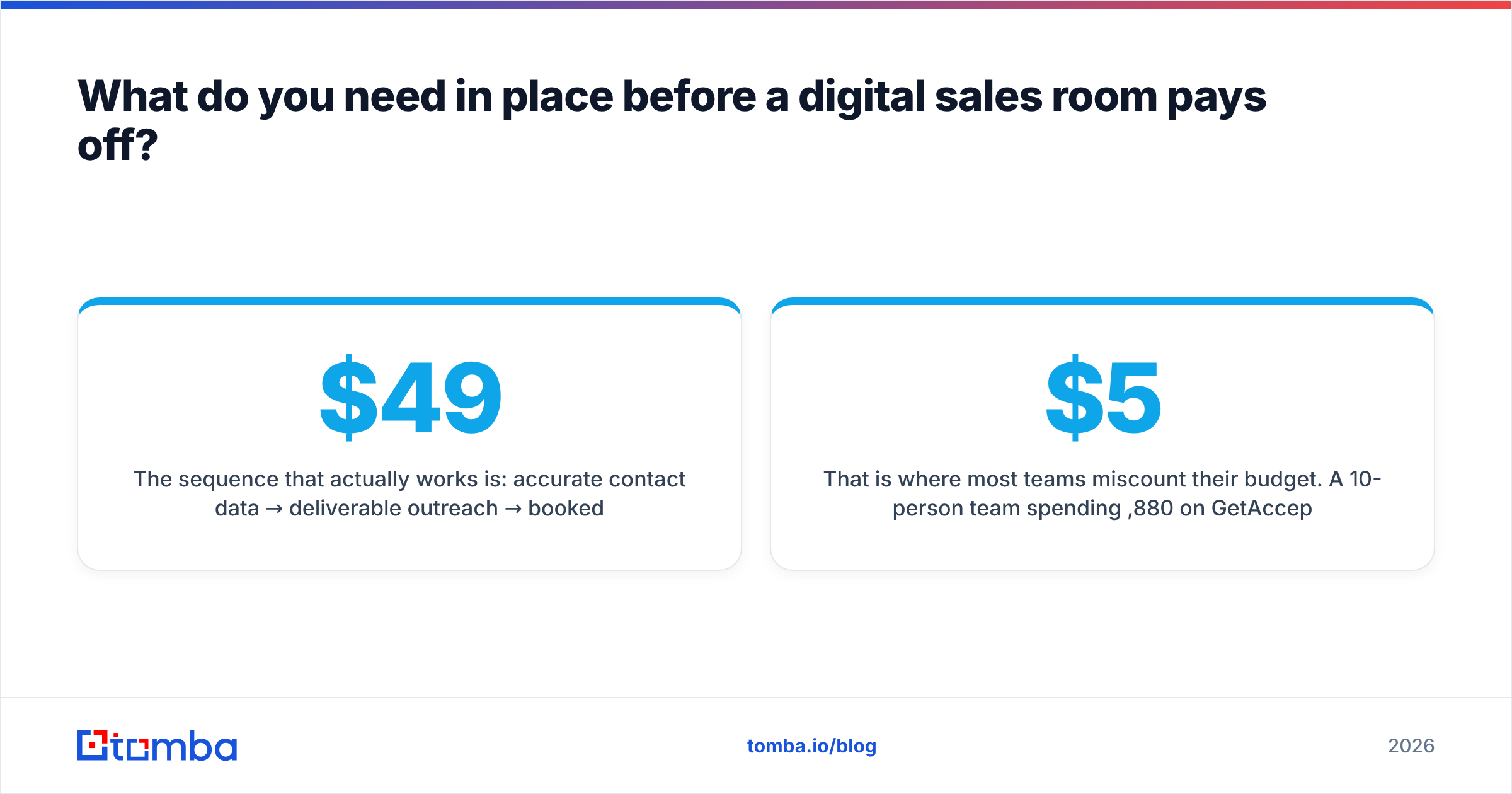
The sequence that works is simple: accurate contact data → deliverable outreach → booked meetings → qualified opportunities → proposal → signature. GetAccept owns the last two steps. If steps one and two are broken, you are paying $49 per seat per month for a very elegant waiting room.
That is where most teams miscount their budget. Say a 10-person team spends $5,880/year on GetAccept. Then it sources prospect emails from a scraped list with a 35% bounce rate. The priority is inverted. Fix the input first:
- Use an email finder to get verified work addresses for the accounts you actually want, rather than buying a bulk list you have to clean anyway.
- Run every address through an email verifier before it enters a sequence. Bounces damage sender reputation, and a burned domain costs far more than any software seat.
- Map full org charts with domain search so your sales room gets shared with the buying committee, not one champion who then leaves.
- Push clean records straight into your CRM via the HubSpot integration so reps never manually retype a contact.
Do that, and the GetAccept renewal conversation becomes easy. You have enough deals in flight that a few points of conversion lift pays the invoice several times over.
Frequently asked questions about GetAccept pricing#
Does GetAccept have a free plan? There is a free/trial entry point with limited sending volume and features. It is enough to evaluate the interface and send a handful of documents, not enough to run a team on.
Is GetAccept cheaper than DocuSign? Per seat, no. DocuSign's basic signature tiers are cheaper. GetAccept is cheaper per outcome if you would otherwise buy both a signature tool and a proposal tool, because it collapses two line items into one.
Are there hidden costs? Not hidden, but easy to miss: monthly-billing premiums, seat minimums, the Enterprise jump for SSO, and the internal design hours to build good templates. Budget the last one. It is real work, and it is the most commonly underestimated cost in the whole purchase.
Can I reduce seats mid-contract? Usually not until renewal. Start conservative and add seats as adoption proves out.
Does GetAccept help with lead generation? No. It has no contact database, no email finding, and no verification. You bring the pipeline; it helps you close it.
GetAccept pricing reviews pros and cons: the verdict#
GetAccept is a well-built, fairly priced digital sales room with genuinely differentiated video and tracking. The pros are real: better buyer experience, faster signatures, and follow-up you can aim. The cons are just as real: per-seat economics that get uncomfortable past 20 reps, template work that takes longer than the demo suggests, and an Enterprise wall in front of SSO.
Buy it if your deals stall at the proposal stage. Skip it, for now, if your problem is that not enough deals reach that stage at all.
If that second sentence describes you, start upstream. Tomba's Email Finder gets you verified, deliverable contacts at the companies on your target list. The free tier covers 25 searches a month, and paid plans start at $49/mo on Tomba pricing — flat, not per seat, so the cost does not climb every time you hire. Fill the pipeline first. Then decide how much a sales room is worth to you.
Related guides#
// get started
Find, verify and enrich your first contacts today
Start on the free plan with 25 searches a month, then scale when your team is ready.
Free plan · No credit card required · GDPR & CCPA
// about the author