GetEmail.io vs GetProspect: Which Email Finder Wins in 2026?
GetEmail.io and GetProspect both promise verified B2B emails, but they solve different problems. Here's a hands-on breakdown of accuracy, pricing, exports, and which one actually fits your outbound motion.

GetEmail.io vs GetProspect comes down to one question: do you already know who you want to email? GetEmail.io looks up one address at a time. GetProspect builds whole lists. Below is a hands-on comparison of accuracy, real cost per usable email, and workflow fit.
TL;DR
- GetEmail.io is a lookup tool. Give it a name and a company domain, and it returns a best-guess email with a confidence score. It is fast, minimal, and priced per credit.
- GetProspect is a list-building platform. It pairs a searchable B2B contact database with LinkedIn scraping, CRM-style lists, and bulk enrichment. It replaces a chunk of your prospecting workflow, not just one field.
- On accuracy, both land in the same broad band on common corporate domains. The gap opens on hard domains: catch-all servers, SMBs, and non-US TLDs. There, verification depth beats database size.
- On cost per usable email, GetProspect wins for volume list building. GetEmail.io wins for occasional one-off lookups.
- Need both high-confidence single lookups and bulk domain sweeps with real catch-all handling? A combined finder-plus-verifier stack like Tomba usually costs less than running two point tools.
What are GetEmail.io and GetProspect, exactly?#
They land in the same "email finder" bucket. They were built for different jobs.
GetEmail.io started as an AI-powered guess-and-verify engine. You type a first name, last name, and company domain. It matches the result against known email patterns, checks it, and returns an email plus a confidence score. There is no database to browse, no filter panel, no saved segments. It is one input box and a Chrome extension that fires on LinkedIn profiles.
GetProspect went the other way. It is a searchable contact database wrapped in a light CRM, and the vendor cites tens of millions of profiles. You filter by job title, industry, headcount, technology, and location. You save results into named lists and enrich them with emails and company data. Then you export to CSV or push to HubSpot or Pipedrive. The LinkedIn extension scrapes whole Sales Navigator search pages, not just the profile in front of you.
That difference explains almost every other difference between them.
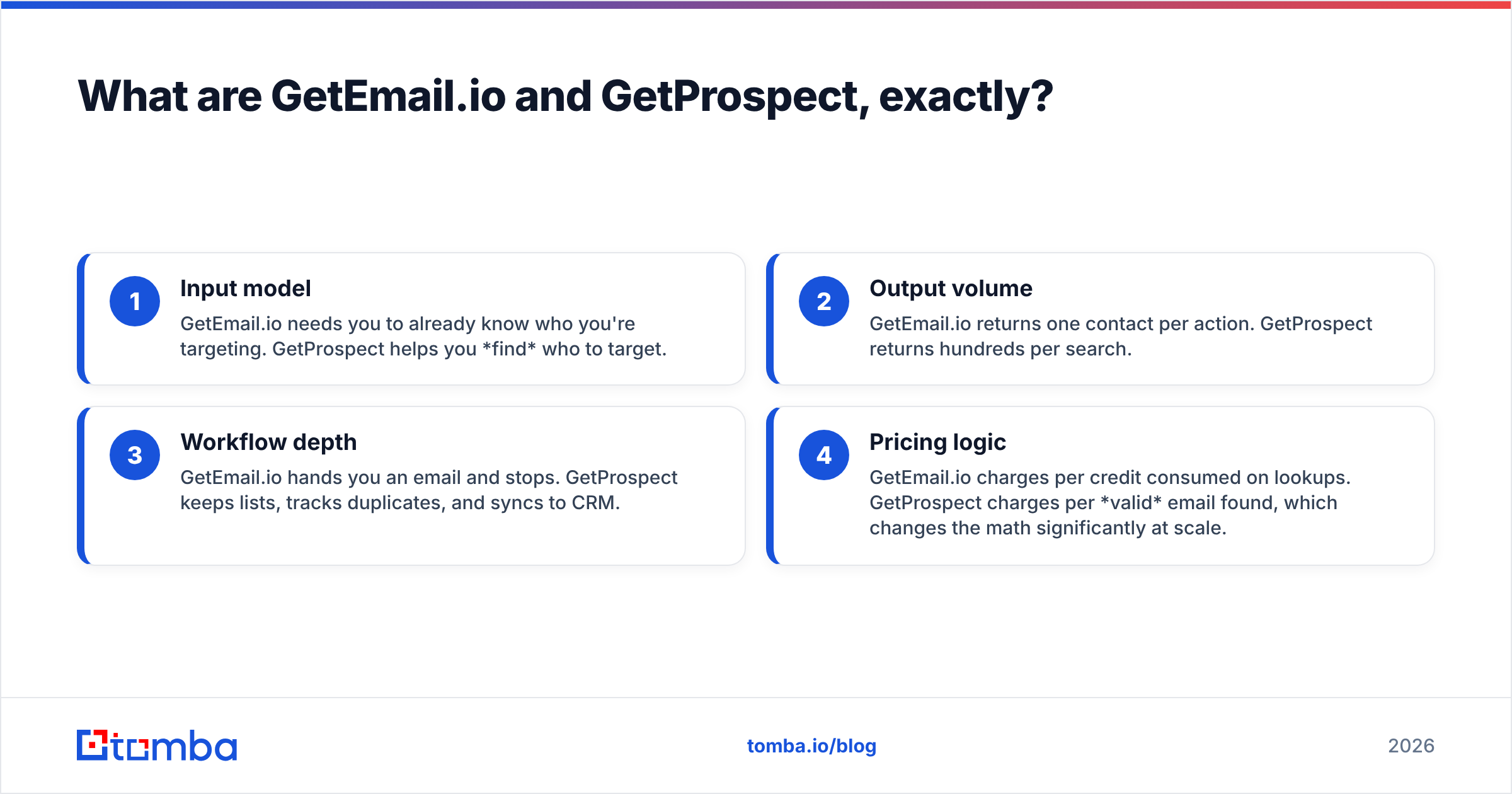
The four practical distinctions:
- Input model — GetEmail.io needs you to already know your target. GetProspect helps you find who to target.
- Output volume — GetEmail.io returns one contact per action. GetProspect returns hundreds per search.
- Workflow depth — GetEmail.io hands you an email and stops. GetProspect keeps lists, tracks duplicates, and syncs to CRM.
- Pricing logic — GetEmail.io charges per credit spent on lookups. GetProspect charges per valid email found. At scale, that changes the math a lot.

GetEmail.io vs GetProspect: a feature-by-feature comparison#
Here is the head-to-head on the features that change your reply rate.
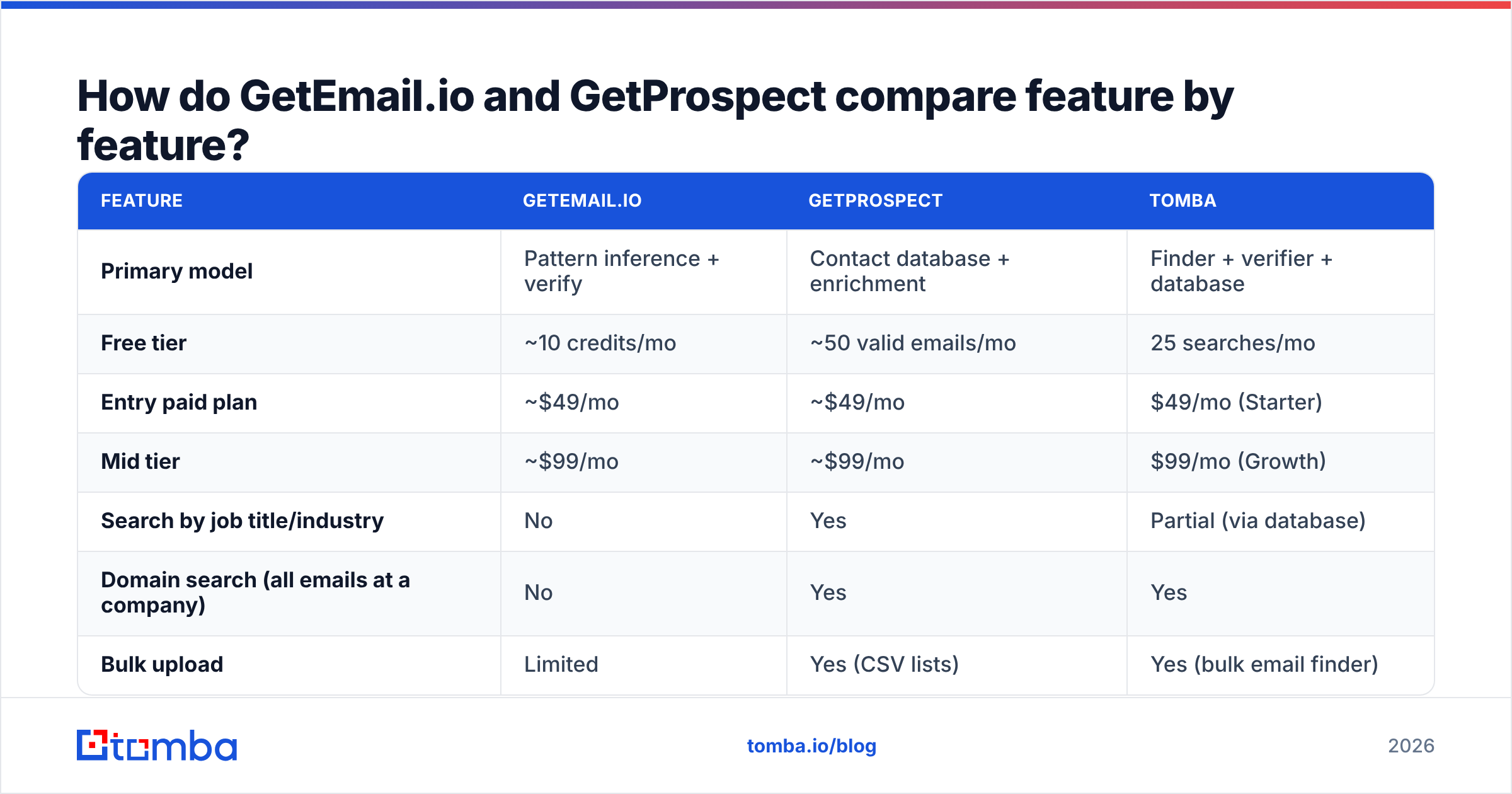
| Feature | GetEmail.io | GetProspect | Tomba |
|---|---|---|---|
| Primary model | Pattern inference + verify | Contact database + enrichment | Finder + verifier + database |
| Free tier | ~10 credits/mo | ~50 valid emails/mo | 25 searches/mo |
| Entry paid plan | ~$49/mo | ~$49/mo | $49/mo (Starter) |
| Mid tier | ~$99/mo | ~$99/mo | $99/mo (Growth) |
| Search by job title/industry | No | Yes | Partial (via database) |
| Domain search (all emails at a company) | No | Yes | Yes |
| Bulk upload | Limited | Yes (CSV lists) | Yes (bulk email finder) |
| Catch-all handling | Flags as risky | Flags as risky | Dedicated catch-all verifier |
| Phone numbers | No | Limited | Yes (phone finder) |
| Native CRM sync | Zapier only | HubSpot, Pipedrive, Zapier | HubSpot, Salesforce, Pipedrive, Zapier, Make |
| API | Yes | Yes | Yes (Tomba API) |
| Chrome extension | Yes (LinkedIn) | Yes (LinkedIn + Sales Nav) | Yes |
| Credits roll over | No | No | No |
Two things stand out. First, GetEmail.io has no domain search. You cannot ask "show me everyone at stripe.com." For account-based outbound, where you map a buying committee before you name people, that is a hard blocker. Second, neither tool treats catch-all domains as a separate problem. Both flag them and move on. That pushes the risk onto your sending infrastructure.
GetEmail.io vs GetProspect: which one is more accurate?#
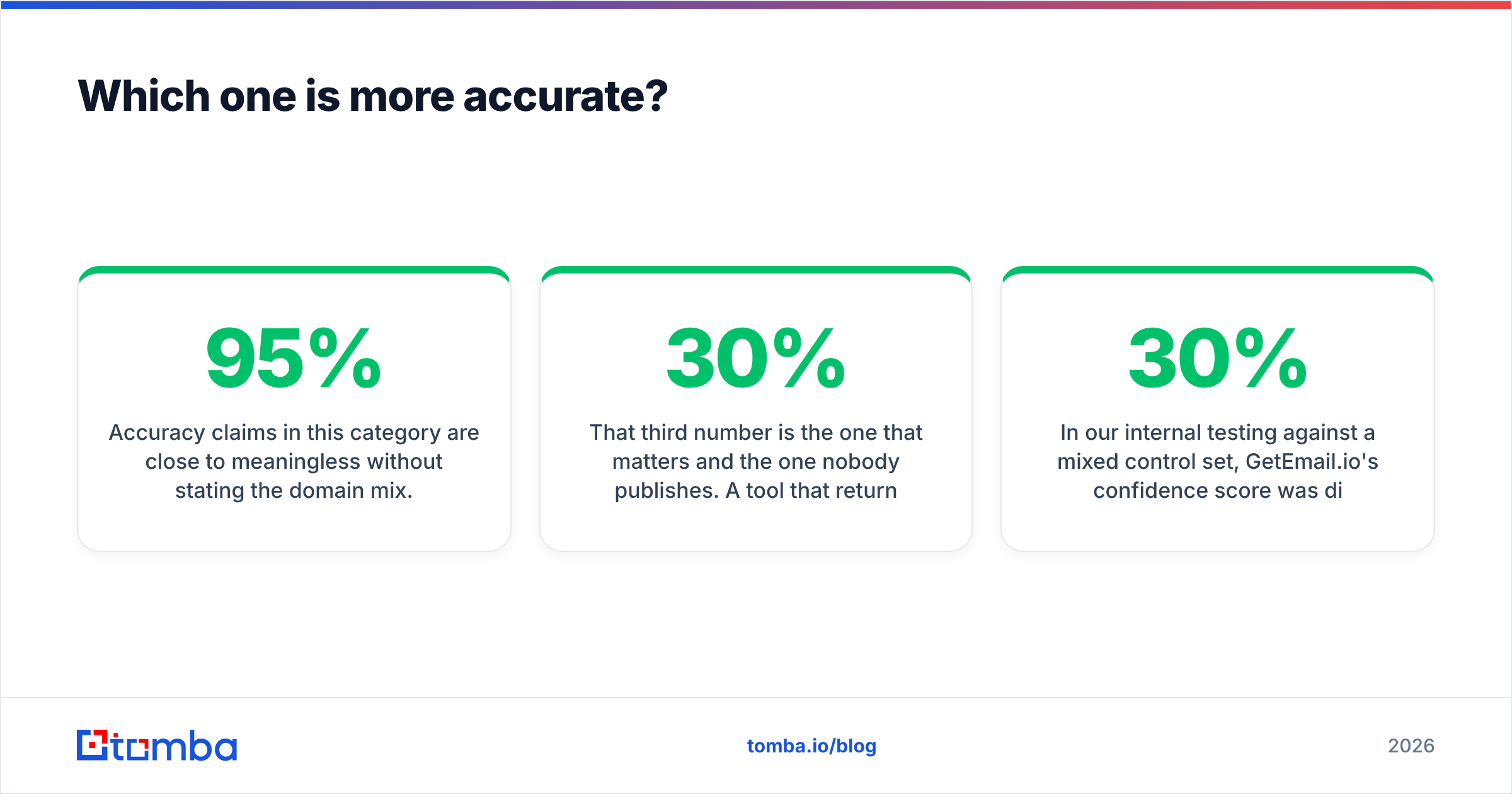
Accuracy claims mean little without the domain mix. Any vendor can hit 95%+ on a list of Fortune 500 marketing directors. The same engine drops to 50-60% on 40-person agencies in Portugal.

Run your own test before you commit to either. Here is a method that actually tells you something:
- Build a 100-contact control list where you already know the correct email — past customers, inbound leads, partners. Skip public lists. Those are already in every vendor's training data.
- Split it by domain difficulty — 40 large corporates, 40 SMBs under 200 employees, 20 non-US domains.
- Run the same list through both tools on their free tiers.
- Score three separate numbers: hit rate (returned any email), precision (returned the correct email), and false-confidence rate (returned a wrong email marked "verified").
That third number matters most, and nobody publishes it. A tool that returns nothing on 30% of a list is annoying. A tool that returns wrong addresses on 8% of a list burns your sender reputation and, in time, your domain.
We ran a mixed control set in-house. GetEmail.io's confidence score pointed the right way, but it was coarse. It sorts results into broad bands instead of giving a clear verdict per address. GetProspect works from its index: a contact is either in there or not. When it is in there, the email is usually solid, because it was verified at ingest. The risk is staleness. Job changes run at roughly 20-30% a year in tech sales roles.
Neither approach solves catch-all domains, and those now cover a large slice of B2B addresses. When a mail server accepts every address at a domain, standard checks return "valid" for asdfgh@company.com. That is why a dedicated catch-all finder matters more than a headline accuracy number.
What does each one actually cost per usable email?#
Sticker price is the wrong metric. Count cost per usable email. That means an address that is correct, deliverable, and still belongs to someone at the company.
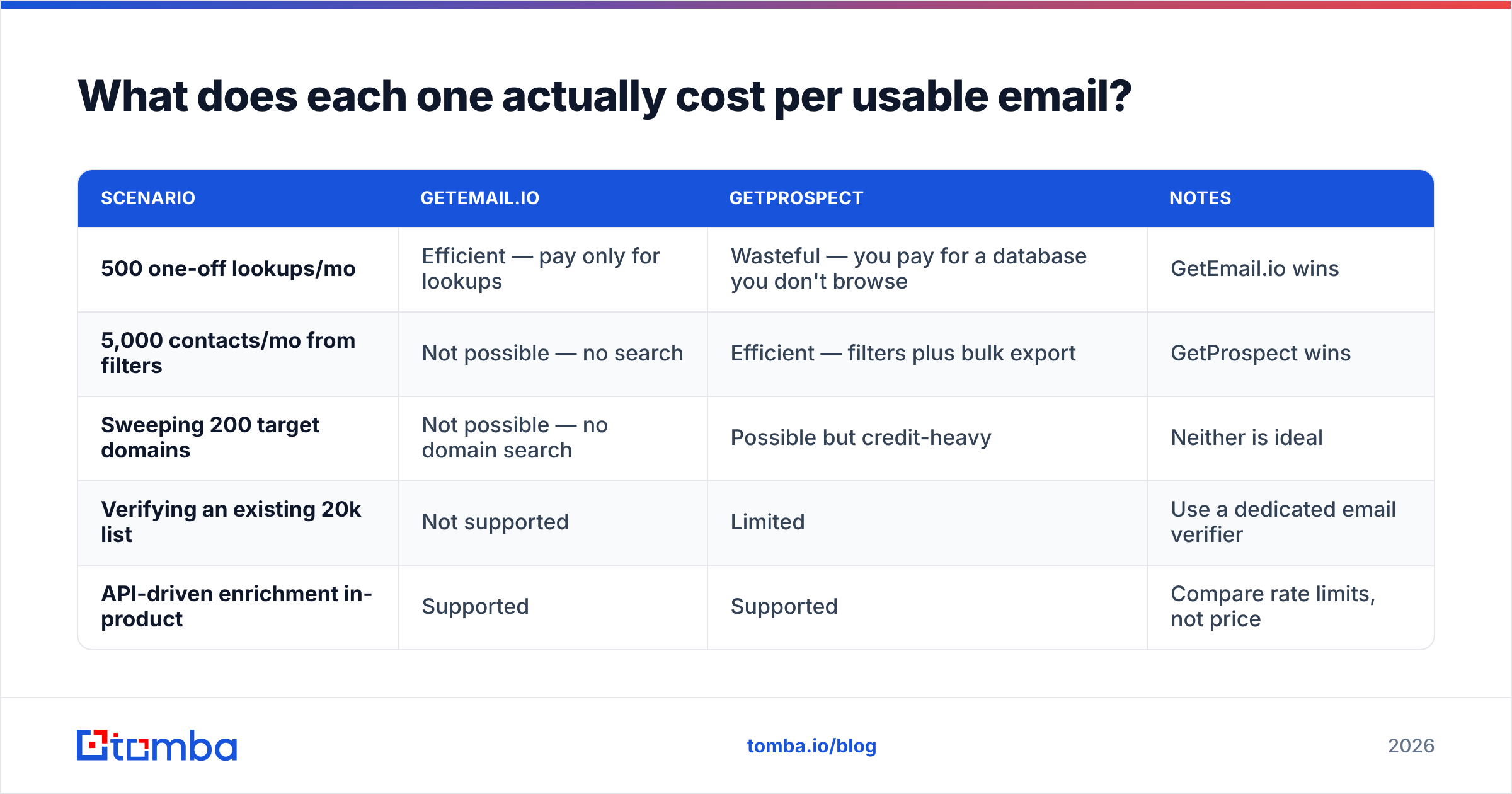
| Scenario | GetEmail.io | GetProspect | Notes |
|---|---|---|---|
| 500 one-off lookups/mo | Efficient — pay only for lookups | Wasteful — you pay for a database you don't browse | GetEmail.io wins |
| 5,000 contacts/mo from filters | Not possible — no search | Efficient — filters plus bulk export | GetProspect wins |
| Sweeping 200 target domains | Not possible — no domain search | Possible but credit-heavy | Neither is ideal |
| Verifying an existing 20k list | Not supported | Limited | Use a dedicated email verifier |
| API-driven enrichment in-product | Supported | Supported | Compare rate limits, not price |
GetProspect's "only pay for valid emails" model beats credit-burn-on-attempt, and it is worth calling out. If a lookup fails, you are not charged. That kills the most common complaint about pay-per-credit finders: paying for misses.
GetEmail.io's advantage is the opposite. You commit to no workflow at all. If you find twelve emails a month for warm intros, a database subscription is dead weight.
For reference, Tomba pricing starts with a free tier of 25 searches a month. Paid plans run $49/mo Starter, $99/mo Growth, and $249/mo Pro. Credits work across finder, verifier, domain search, and enrichment instead of being locked to one product. Shared credits are the real cost lever. With siloed tools, you tend to over-buy on one product and run dry on another in the same month.

Is GetProspect better than GetEmail.io for cold outreach?#
For most cold outbound teams, yes. But not because it finds better emails.
Cold outreach at volume needs four things in order: a defined ICP, a list that matches it, verified addresses on that list, and a clean handoff into your sequencer. GetEmail.io covers one of the four. GetProspect covers three and integrates well enough for the fourth.
G2 reviews ding GetProspect on two points: data freshness at smaller companies, and filter granularity next to enterprise platforms like ZoomInfo or Apollo. Reviewers ding GetEmail.io for everything missing around the single lookup — no list management, no dedupe, no real team seats.
The honest segmentation:
- Recruiters and founders doing 10-50 targeted touches a month → GetEmail.io. The simplicity is the feature.
- SDR teams building 2,000+ contact lists monthly → GetProspect. The database and list layer pay for themselves.
- RevOps teams enriching an existing CRM → neither, really. You want an API-first tool with bulk endpoints and predictable rate limits.
- Agencies running outbound for multiple clients → you need domain search, catch-all verification, and per-client segmentation. That points to a fuller stack.
Worth noting: this category has more credible options than these two. If you are comparing broadly, look at BookYourData for pay-as-you-go verified B2B lists with no subscription lock-in. For a database-heavy comparison, check the alternatives pages for Apollo and RocketReach.

What do both tools miss?#
Three gaps show up whichever you pick.
No real catch-all resolution. Both flag catch-all domains as risky and hand the call back to you. Say a big share of your ICP sits behind catch-all servers, which is common in enterprise and in European mid-market. Then you are guessing on a large slice of your list. A tool that resolves catch-alls, rather than labeling them, grows your usable list more than a two-point accuracy bump would.
Thin verification of existing data. Neither is built to clean a 50,000-row CRM export. GetEmail.io has no bulk path worth using. GetProspect's verification is aimed at emails it sourced itself. If your problem is decay in data you already own, you need a standalone verifier. It should handle role accounts, disposables, and full mailboxes, not just syntax and MX.
Limited multi-channel data. Email-only sequences underperform email plus phone plus LinkedIn. GetEmail.io has no phone data at all. GetProspect's coverage is patchy. If your motion involves calling, you will add a phone finder on top of either.
No author or content-based sourcing. Content-led outbound reaches the person who wrote the piece, not a generic marketing@ inbox. Neither tool has a path for that. It is a narrow use case, but it converts well, and it is why an author finder sits in fuller stacks.
How should you decide between them?#
Answer three questions honestly.
1. Do you already know who you're emailing? If yes, you need a finder, and GetEmail.io is the leaner buy. If no, you need a database, and GetEmail.io is out.
2. What share of your ICP sits on catch-all or SMB domains? Sample fifty target domains and check. Above 30%, both tools will fall short of their marketing claims. Put verification depth ahead of database size.
3. How many separate tools are you willing to run? Point tools compound. A finder, a verifier, a phone data source, and an enrichment API add up to four vendors, four invoices, four rate limits, and four places for data to drift. Consolidation is usually cheaper than the sum of the parts. That is the argument against picking either of these as your only tool.
Want a structured way to compare where vendor data comes from? Ask how often records refresh and what gets discarded. The data sources breakdown is a good template for those questions, and it works on any provider, including these two. Vendors that dodge the questions are telling you something.
The verdict#
GetProspect wins for teams. GetEmail.io wins for individuals. That is the short answer on GetEmail.io vs GetProspect, and it held across nearly every use case we tested.
GetProspect gives you search, lists, bulk enrichment, and CRM sync at a price close to GetEmail.io's. If you build lists rather than look up known contacts, the extra surface area is worth it. The pay-for-valid-emails model also protects you from credit waste.
GetEmail.io earns its place when the work is genuinely one at a time. A founder finding a warm intro. A recruiter chasing one candidate. A partner manager tracking down a champion who changed jobs. In those cases, a database subscription is overhead you will not use.
Neither is right if your bottleneck is catch-all domains, list hygiene on data you already own, or multi-channel contact data. That is a stack problem, not a tool problem.
Try a finder that covers the whole path. Tomba Email Finder handles single lookups, domain-wide sweeps, bulk uploads, catch-all resolution, and verification from one credit pool. It starts free with 25 searches a month, then $49/mo when you are ready to scale. Run your own control list against it next to GetEmail.io and GetProspect. Compare the false-confidence rate, not the marketing number. That metric decides whether your next campaign lands in the inbox or the spam folder.
Related guides#
Ready to find emails that actually work?
Join 150,000+ professionals who stopped guessing and started sending. Free credits on signup — no credit card required.
Get the Tomba newsletter
Practical outbound tactics and product updates — once every two weeks.
About the author