GetProspect vs GMass (2026): Which Tool Should You Use?
GetProspect finds and verifies B2B emails. GMass sends them from Gmail. Here's the honest breakdown of pricing, accuracy, deliverability limits, and which one your outbound stack actually needs.
TL;DR
- GetProspect is a lead database and email finder. GMass is a Gmail-based cold email sender. They solve different halves of the same problem, so "vs" is slightly misleading — but you usually only budget for one first.
- Pick GMass if you already have a clean list, live inside Gmail, and want to send sequences for $25/mo without learning a new platform.
- Pick GetProspect if your bottleneck is finding contacts — it ships a ~200M-contact B2B database with a LinkedIn extension, starting around $49/mo for meaningful volume.
- GMass has no meaningful data layer, and GetProspect's sending features are basic compared to purpose-built sequencers. Most teams end up pairing a finder with a sender.
- If accuracy is your real problem, benchmark the finder separately from the sender. A 92% verified list sent through a mediocre sequencer beats a 70% list sent through a great one.
What are GetProspect and GMass, exactly?#
GetProspect is a B2B contact database with an email finder on top. You search by job title, company size, industry, or location, get a list of people, and pull their work email addresses. Its most-used surface is a Chrome extension that scrapes LinkedIn search results into a list. Think of it as a filing cabinet full of business cards you can query.
GMass is the opposite end of the pipe. It's a Chrome extension that turns Gmail into a mail-merge and cold-email sequencer. You paste a list into Google Sheets, connect it, write a campaign in the Gmail compose window, and GMass handles personalization, throttling, follow-ups, and reply detection. It has been around since 2015 and is one of the few tools that genuinely lives inside Gmail rather than proxying through a separate app.
So the honest framing: GetProspect fills the top of your list, GMass empties it. If you compare them feature-for-feature you'll get a lopsided scorecard in both directions.

How do GetProspect and GMass compare on features and price?#
Here's the head-to-head where the categories actually overlap or matter for budgeting.
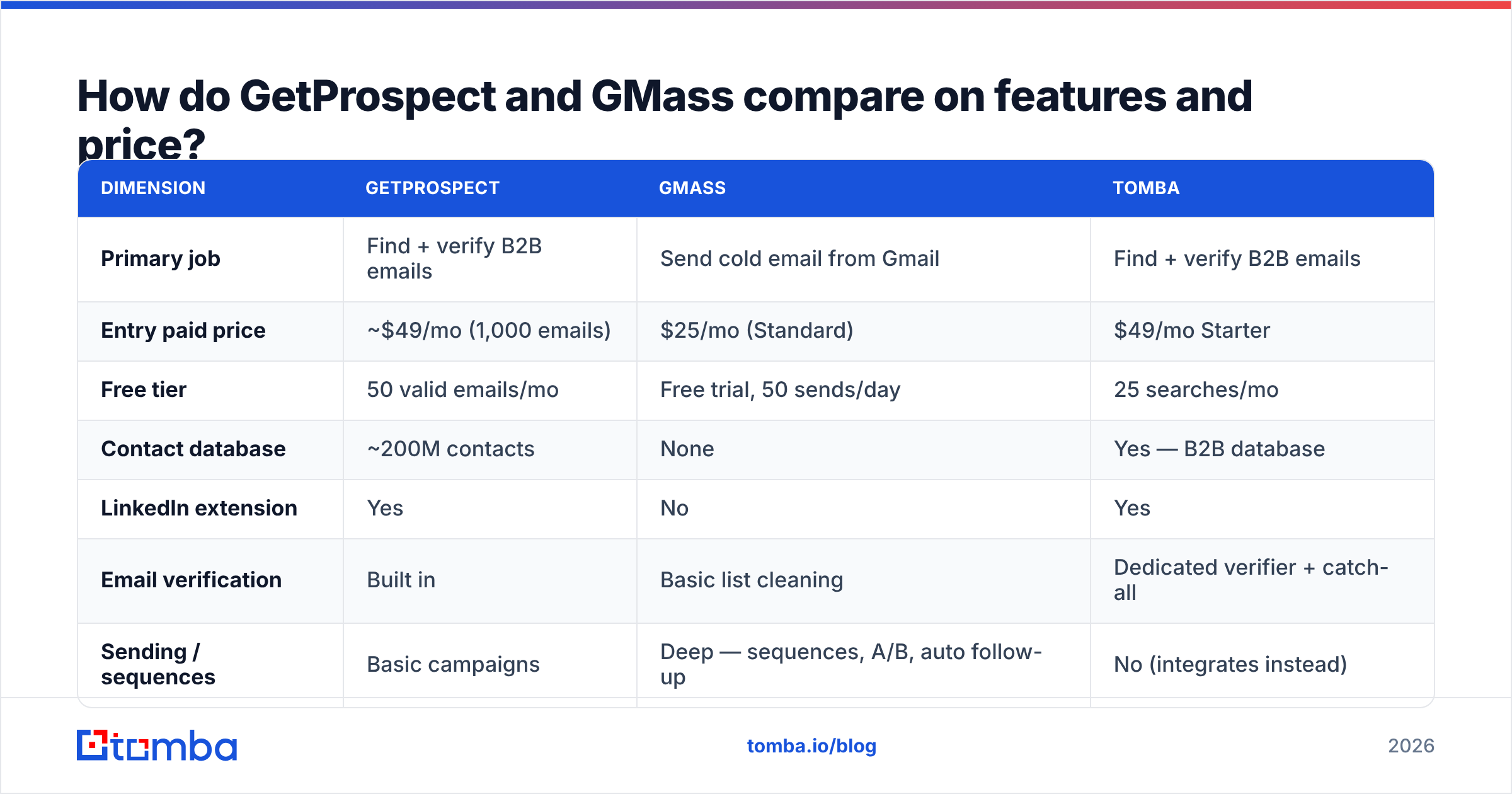
| Dimension | GetProspect | GMass | Tomba |
|---|---|---|---|
| Primary job | Find + verify B2B emails | Send cold email from Gmail | Find + verify B2B emails |
| Entry paid price | ~$49/mo (1,000 emails) | $25/mo (Standard) | $49/mo Starter |
| Free tier | 50 valid emails/mo | Free trial, 50 sends/day | 25 searches/mo |
| Contact database | ~200M contacts | None | Yes — B2B database |
| LinkedIn extension | Yes | No | Yes |
| Email verification | Built in | Basic list cleaning | Dedicated verifier + catch-all |
| Sending / sequences | Basic campaigns | Deep — sequences, A/B, auto follow-up | No (integrates instead) |
| Sending limits | N/A | Bound by Google: ~500/day (personal), 2,000/day (Workspace) | N/A |
| API | Yes | Yes | Yes, plus CLI and MCP |
| Best for | Building lists from scratch | Solo founders and small teams already in Gmail | Accuracy-first list building at scale |
Two things stand out.
First, GMass is cheap because it doesn't buy data. $25/mo buys sending infrastructure grafted onto an inbox you already pay Google for. That's genuinely good value — but it means your list quality is entirely your problem.
Second, GetProspect's headline "free" and low tiers are credit-limited in a way that bites fast. A 1,000-email plan sounds generous until you realize a single ICP search across three job titles at 200 companies can consume most of it, and any bounced or unusable record still cost you the lookup on some plans.
Which one has better data accuracy?#
Only one of them has data, so this is really a question about GetProspect — and about whichever finder you'd pair with GMass.
Accuracy in email finding comes down to three things: how fresh the underlying source is, whether the tool verifies at query time or serves a cached record, and how it handles catch-all domains. Most vendors quote 95%+ accuracy. Independent tests routinely land lower, because vendors measure "syntactically deliverable" while you measure "didn't bounce and reached a human."

GetProspect's data is solid for mid-market and enterprise contacts in North America and Western Europe. It gets thinner on SMB, on non-English markets, and on recently-changed roles — a known weakness of any database that leans heavily on scraped professional profiles. Its built-in verification catches obvious invalids but is less rigorous on catch-all domains, which is where a lot of B2B email actually lives.
That last point matters more than most buyers realize. Roughly one in five B2B domains accepts mail for any address, so a naive verifier marks everything as "valid" and you find out the truth from your bounce report. Running suspect records through a dedicated catch-all verifier before they hit a sender is the single cheapest way to protect your domain.
GMass, for its part, does list cleaning on the fly and will suppress addresses that bounced previously. Useful hygiene, not a substitute for verification. If you feed GMass a scraped list you never verified, GMass will faithfully burn your domain at 500 messages a day.

What are the real limits of each tool?#
Worth knowing before you commit a quarter's budget.
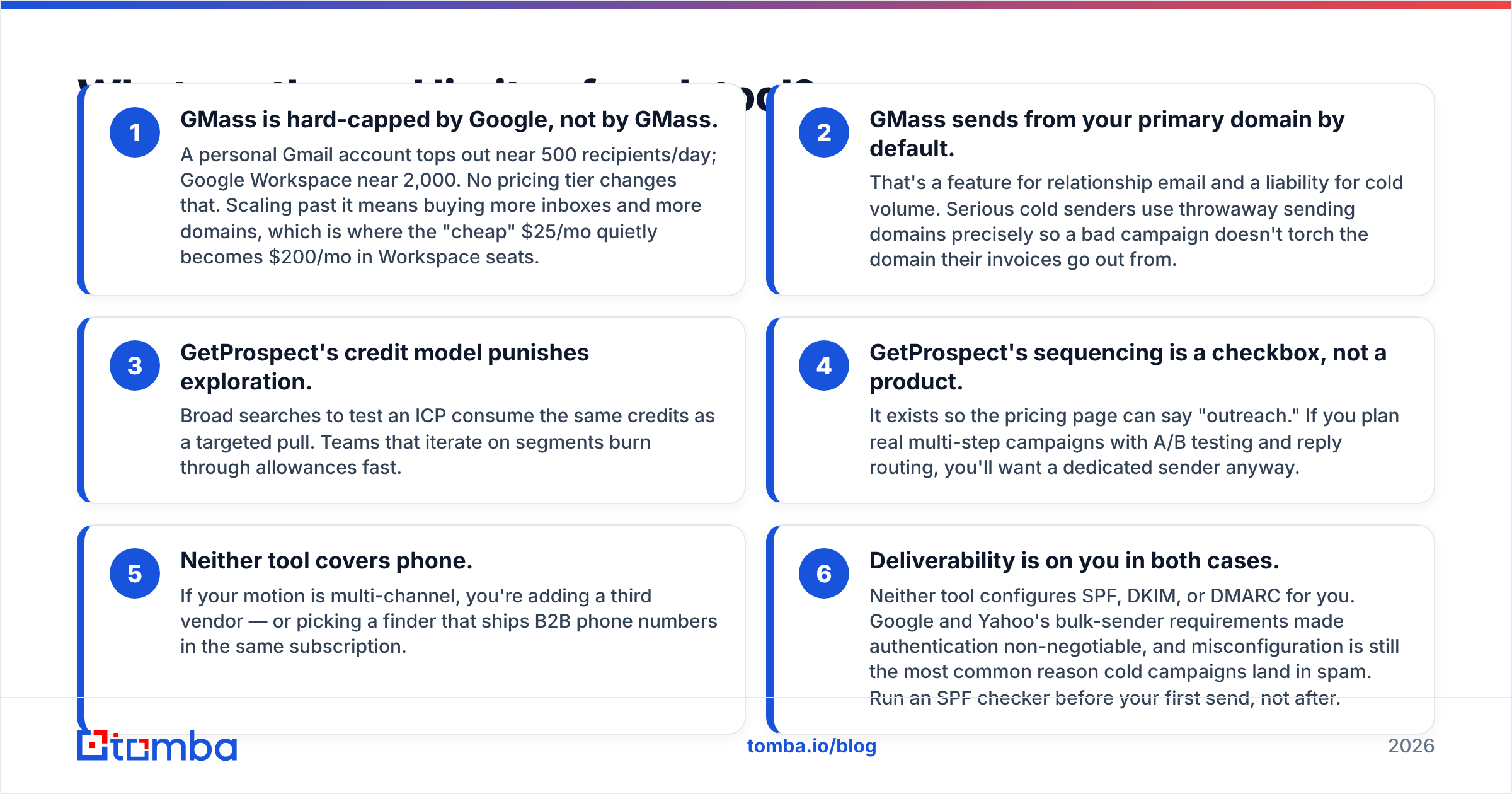
- GMass is hard-capped by Google, not by GMass. A personal Gmail account tops out near 500 recipients/day; Google Workspace near 2,000. No pricing tier changes that. Scaling past it means buying more inboxes and more domains, which is where the "cheap" $25/mo quietly becomes $200/mo in Workspace seats.
- GMass sends from your primary domain by default. That's a feature for relationship email and a liability for cold volume. Serious cold senders use throwaway sending domains precisely so a bad campaign doesn't torch the domain their invoices go out from.
- GetProspect's credit model punishes exploration. Broad searches to test an ICP consume the same credits as a targeted pull. Teams that iterate on segments burn through allowances fast.
- GetProspect's sequencing is a checkbox, not a product. It exists so the pricing page can say "outreach." If you plan real multi-step campaigns with A/B testing and reply routing, you'll want a dedicated sender anyway.
- Neither tool covers phone. If your motion is multi-channel, you're adding a third vendor — or picking a finder that ships B2B phone numbers in the same subscription.
- Deliverability is on you in both cases. Neither tool configures SPF, DKIM, or DMARC for you. Google and Yahoo's bulk-sender requirements made authentication non-negotiable, and misconfiguration is still the most common reason cold campaigns land in spam. Run an SPF checker before your first send, not after.
Is GetProspect better than GMass for cold outreach?#
No — and neither is the reverse. The correct answer for most outbound teams is a finder plus a sender, chosen independently.
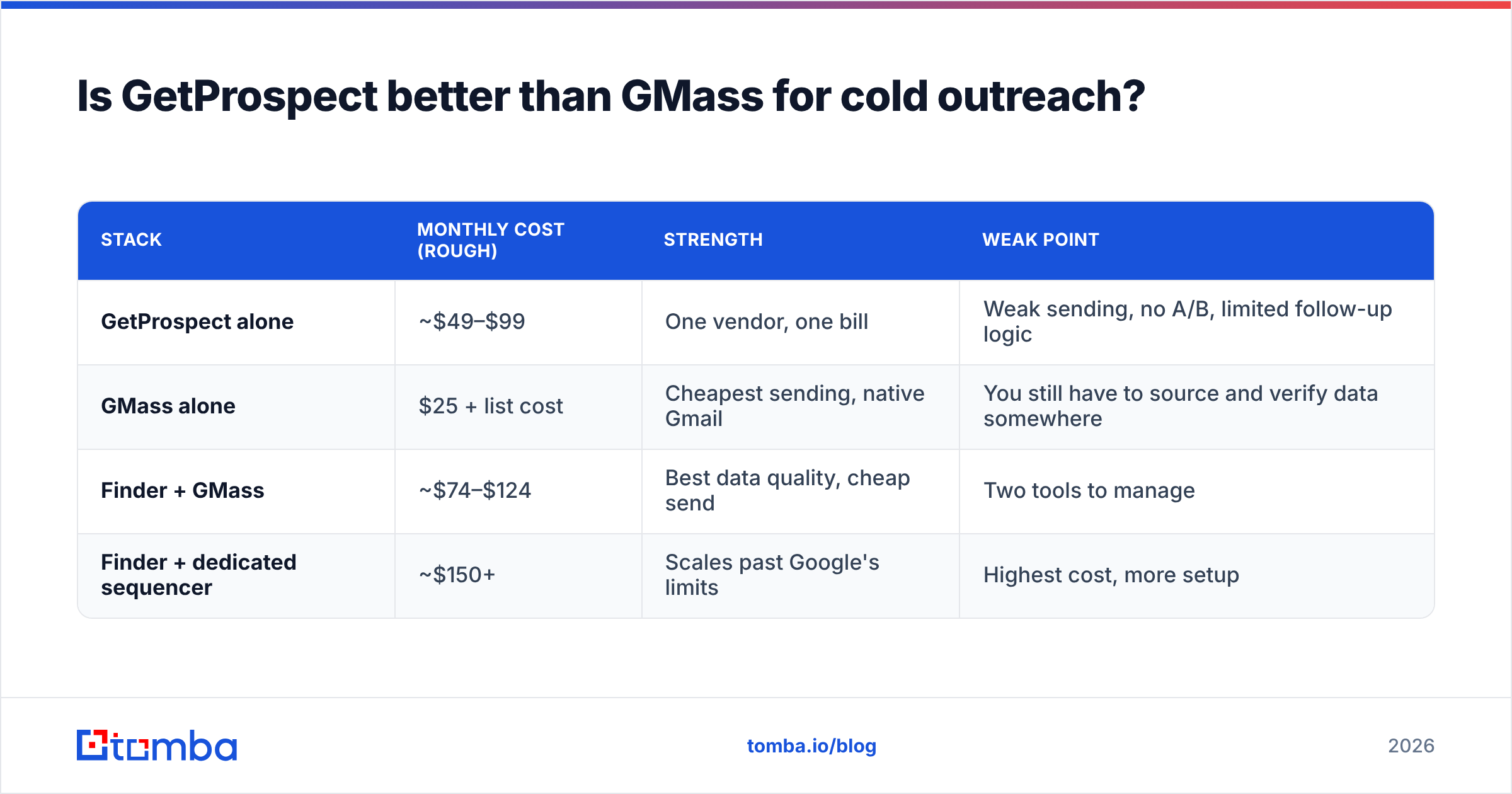
Here's how the three common stacks shake out:
| Stack | Monthly cost (rough) | Strength | Weak point |
|---|---|---|---|
| GetProspect alone | ~$49–$99 | One vendor, one bill | Weak sending, no A/B, limited follow-up logic |
| GMass alone | $25 + list cost | Cheapest sending, native Gmail | You still have to source and verify data somewhere |
| Finder + GMass | ~$74–$124 | Best data quality, cheap send | Two tools to manage |
| Finder + dedicated sequencer | ~$150+ | Scales past Google's limits | Highest cost, more setup |
The "finder + GMass" row is the sweet spot for teams under about 5,000 emails a month. You spend most of your budget on the part that determines whether the campaign works at all — the data — and almost nothing on the part that's essentially SMTP with a UI.
Where does Tomba fit? As the finder half. Tomba's email finder and email verifier run as separate steps so you can verify a list you sourced anywhere — including one you already exported from GetProspect — before it touches GMass. Pricing runs Free (25 searches/mo), Starter $49/mo, Growth $99/mo, Pro $249/mo, with Enterprise custom; see Tomba pricing for current credit allocations. The practical difference against GetProspect is verification depth: catch-all handling and SMTP-level checks are first-class, not an afterthought bundled into the lookup.

It's also worth naming the alternatives honestly. BookYourData is a strong option if you want pay-as-you-go prepaid credits and a bounce guarantee rather than a subscription — a genuinely different commercial model that suits agencies with lumpy demand. Apollo bundles data and sequencing in one platform if you'd rather have a single vendor. There's no single right answer; there's a right answer for your volume and your tolerance for managing tools.
How do you choose between them?#
Answer these four questions in order.
1. What's actually broken right now? If your reply rate is fine but you're out of leads, buy a finder. If your list is fine but you're copy-pasting emails manually, buy GMass. Don't buy the tool that solves the problem you don't have yet.
2. How much do you send per month? Under ~2,000/month, GMass on a Workspace account is enough. Above that, you're into multi-inbox territory and a purpose-built sequencer starts earning its price.
3. How exotic is your ICP? Databases are strong on well-documented mid-market and enterprise, weak on small local businesses, non-English markets, and freshly-promoted people. If your ICP is exotic, prioritize a tool with real-time lookup and domain search over a large static database — you'll get better coverage than any headline contact count suggests.
4. Do you have deliverability discipline? If you can't answer what your DMARC policy is, fix that before spending anything on either tool. A verified list sent from an unauthenticated domain still lands in spam. G2's buyer reviews across both categories consistently show setup and deliverability, not features, as the deciding factor in whether teams renew — you can browse the sales engagement category on G2 for current sentiment.
What's the verdict?#
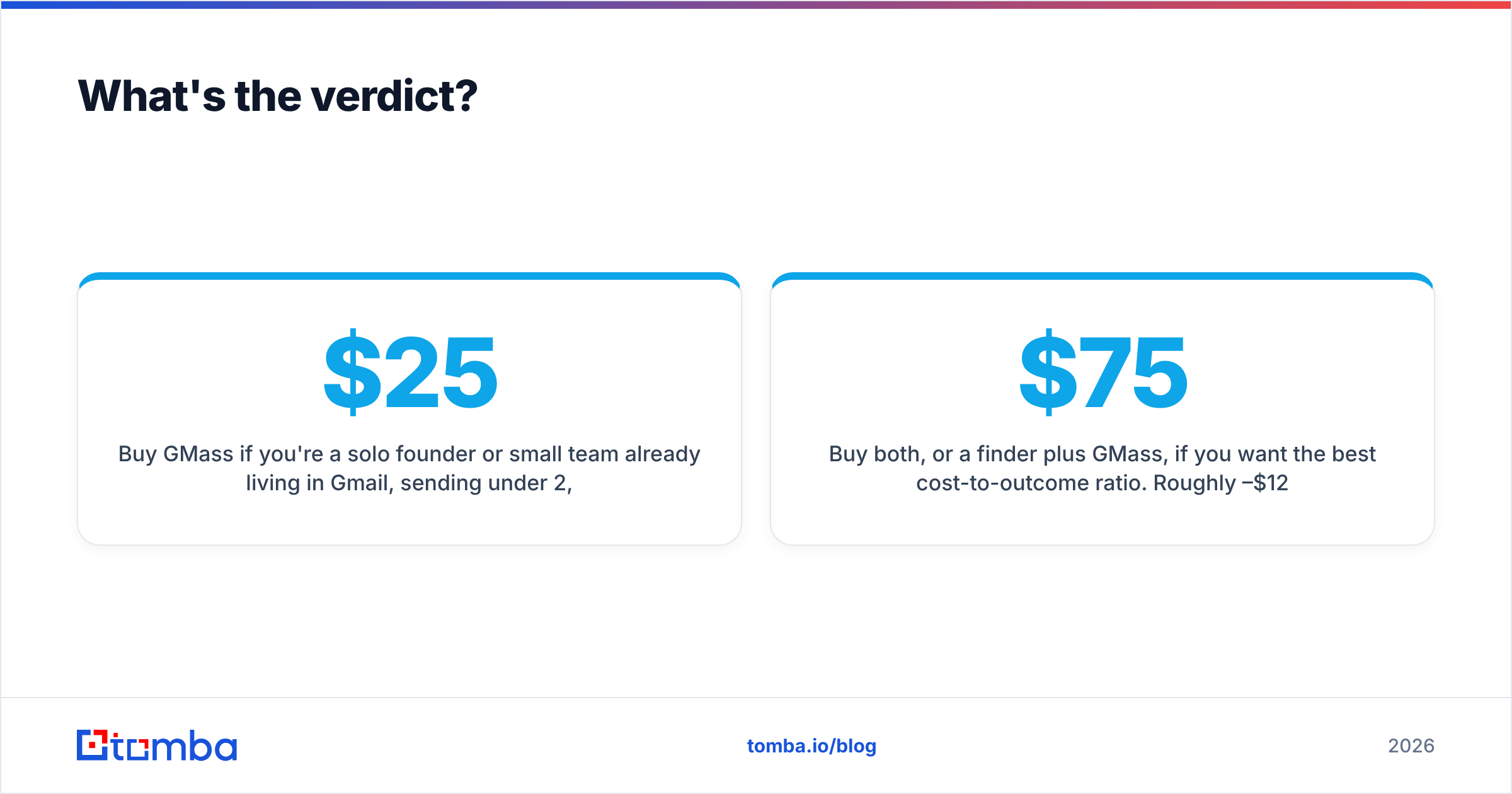
Buy GMass if you're a solo founder or small team already living in Gmail, sending under 2,000 emails a month, with a list you trust. At $25/mo it's the best value in cold email sending, full stop. Its limits are Google's limits, and for most early-stage outbound, Google's limits are plenty.
Buy GetProspect if list-building is your bottleneck and you want a database plus LinkedIn extraction in one subscription. It's a competent finder with reasonable coverage in its core markets. Just don't expect its sequencing to replace a real sender, and budget for a separate verification pass on catch-all domains.
Buy both, or a finder plus GMass, if you want the best cost-to-outcome ratio. Roughly $75–$125/month gets you good data and good sending, which is the combination that actually produces meetings.
The mistake to avoid is treating a sender as a data strategy. GMass will happily send 500 unverified emails a day until your domain reputation is unrecoverable. Whatever finder you choose, verify before you send — every time, no exceptions.
Start with the data layer. If your list quality is the thing holding your campaigns back, run a batch through the Tomba Email Finder on the free tier (25 searches/month, no card) and compare the bounce rate against your current source. Then pair it with GMass, a dedicated sequencer, or whatever sending stack you already trust — the finder and the sender were never meant to be the same purchase.
Related guides#
Ready to find emails that actually work?
Join 150,000+ professionals who stopped guessing and started sending. Free credits on signup — no credit card required.
Get the Tomba newsletter
Practical outbound tactics and product updates — once every two weeks.
About the author