GetProspect vs Kitt AI: Which B2B Prospecting Tool Wins?
GetProspect sells a searchable B2B contact database. Kitt AI sells an autonomous prospecting agent. They solve different halves of the same problem — here is which one actually deserves your budget in 2026.
TL;DR
- GetProspect is a mature B2B contact database plus email finder — you search, filter, export, and own the list. Public pricing, free tier, predictable.
- Kitt AI is positioned as an AI prospecting agent: it researches accounts and drafts outreach for you. Pricing is demo-gated, and the underlying contact data is licensed from third parties rather than built in-house.
- They are not really the same product. One sells data; the other sells decisions about that data. Buying the agent without checking whose data it runs on is how teams end up paying twice.
- If you already have sequencing (Instantly, Smartlead, HubSpot) and just need verified contacts, a dedicated finder like GetProspect or Tomba's email finder is the cheaper, more auditable path.
- Verdict: GetProspect for repeatable list building at a known cost. Kitt AI only if you can validate its data quality on your own ICP during a trial — and only after you've priced the same volume through a plain finder API.
Which "Kitt AI" are we actually comparing?#
Start here, because the name is crowded. "Kitt" and "Kitt.ai" have been attached to several unrelated products over the past decade — including a conversational/voice AI company that was acquired and wound down years ago, and more recently a wave of AI-SDR startups using the same short, car-reference branding.
The product people mean when they type "GetProspect vs Kitt AI" today is the AI prospecting agent category: software that takes an ICP description, finds matching accounts and contacts, researches them, and drafts personalized first-touch emails with minimal human input.
That matters for your evaluation, because AI-SDR tools almost never own their contact data. They resell or aggregate it. So when you compare against GetProspect, you are comparing:
- A data vendor (GetProspect) against
- A workflow layer that buys data from vendors (the AI agent)
Once you see it that way, the real question stops being "which tool is better" and becomes "am I paying for data, for automation, or accidentally for both?"
Before you commit to either, confirm exactly what you're buying. Ask the vendor directly, in writing:
- Whose data is this? Named providers, or "proprietary" with no detail? Vague answers are a red flag.
- Is verification included or extra? Some tools return unverified guesses and charge separately to check them.
- Do credits roll over? Monthly-expiring credits inflate your true cost per usable contact.
- Is there an API? If you can't pull contacts programmatically, you're locked into the vendor's UI forever.
- What happens to exported data if you churn? Ownership of exports is a contract question, not a feature question.
- Can you test on your own ICP before paying? Any vendor confident in coverage will let you.
How do GetProspect and Kitt AI compare head to head?#
Here's the practical comparison. Figures reflect publicly listed information at the time of writing — always confirm on the vendor's own page, since prospecting tools reprice frequently.
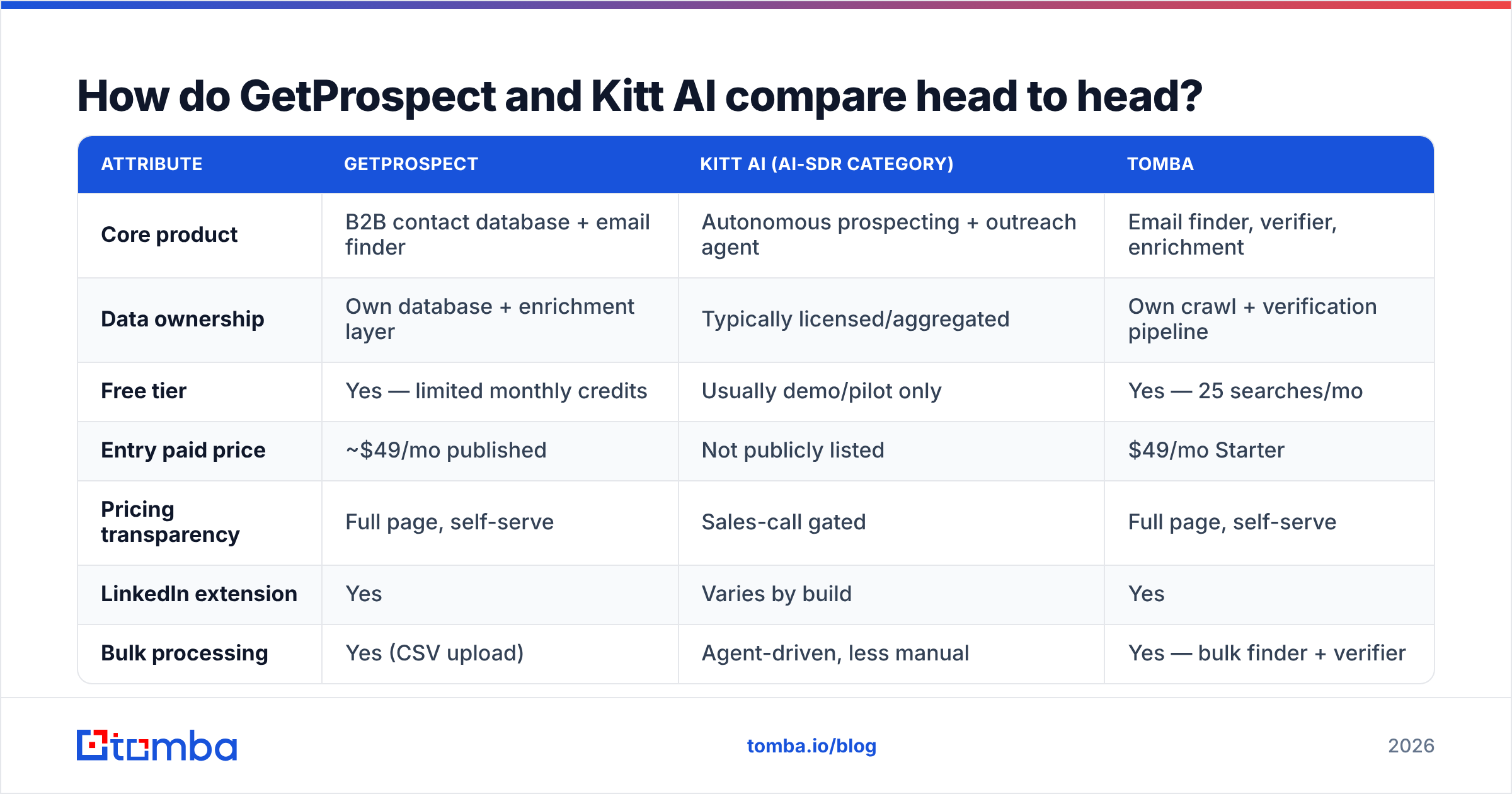
| Attribute | GetProspect | Kitt AI (AI-SDR category) | Tomba |
|---|---|---|---|
| Core product | B2B contact database + email finder | Autonomous prospecting + outreach agent | Email finder, verifier, enrichment |
| Data ownership | Own database + enrichment layer | Typically licensed/aggregated | Own crawl + verification pipeline |
| Free tier | Yes — limited monthly credits | Usually demo/pilot only | Yes — 25 searches/mo |
| Entry paid price | ~$49/mo published | Not publicly listed | $49/mo Starter |
| Pricing transparency | Full page, self-serve | Sales-call gated | Full page, self-serve |
| LinkedIn extension | Yes | Varies by build | Yes |
| Bulk processing | Yes (CSV upload) | Agent-driven, less manual | Yes — bulk finder + verifier |
| Public API | Yes | Often limited/enterprise-only | Yes, documented |
| Writes your emails | No | Yes — that's the pitch | No |
| Best for | Repeatable list building | Small teams with no SDR capacity | Data accuracy + developer workflows |
The row that decides most deals is pricing transparency. A published price page means you can model cost per contact before a sales call. A demo-gated price means the number is a function of how badly they think you need it.

How accurate is the data behind each tool?#
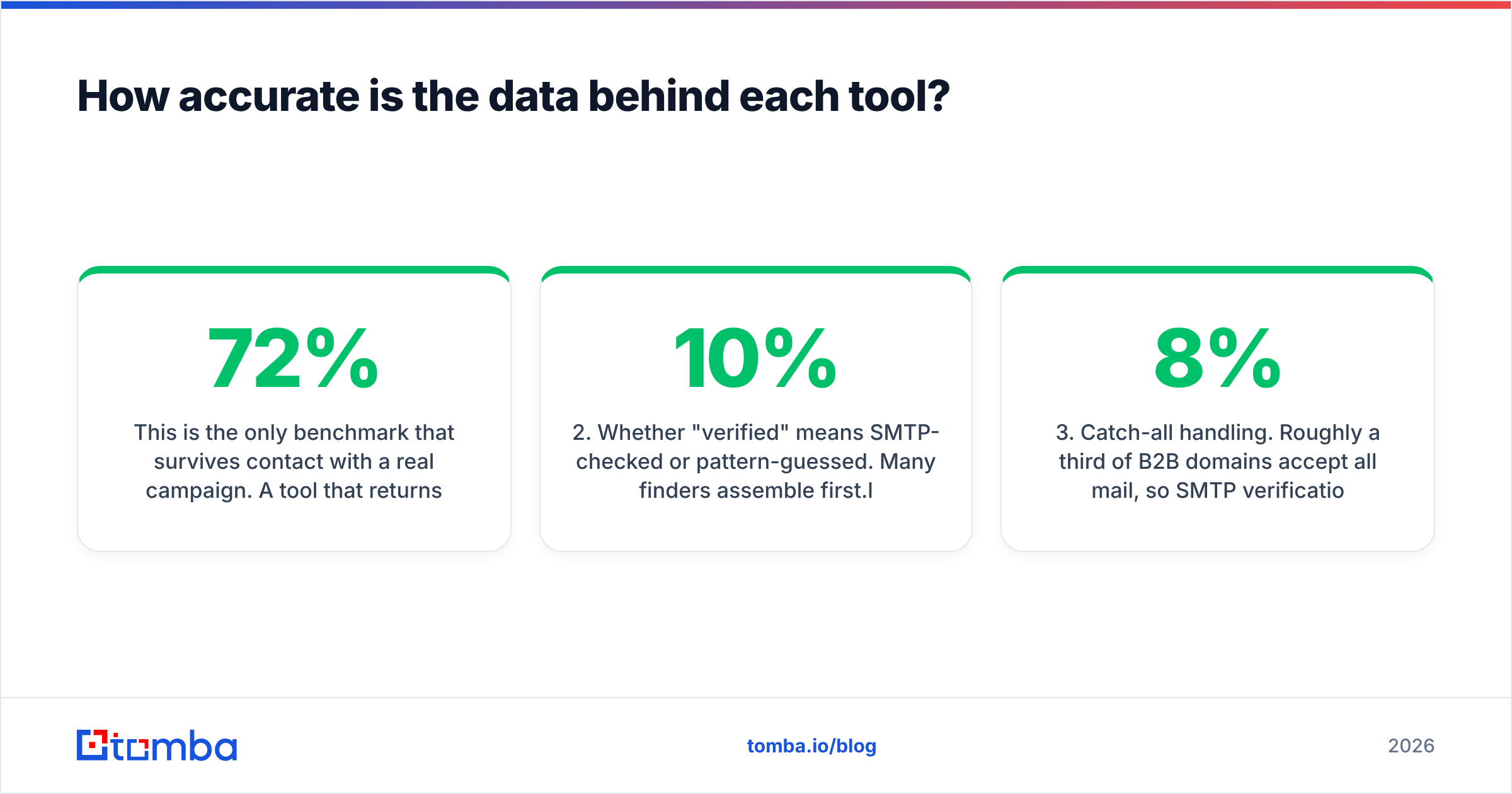
This is the only benchmark that survives contact with a real campaign. A tool that returns 800 addresses at 72% validity is worse than one returning 500 at 96% — the first list burns your domain reputation, and reputation damage costs more than credits.

Three things to check during any trial, regardless of which vendor you're testing:
1. Match rate on your actual ICP, not the vendor's demo list. Coverage is wildly uneven by geography and company size. A tool with excellent US mid-market coverage can return near-nothing for German Mittelstand manufacturers or Southeast Asian SaaS. Take 200 real target companies from your CRM and run them through. That single test tells you more than any G2 score.
2. Whether "verified" means SMTP-checked or pattern-guessed. Many finders assemble first.last@domain.com from a known company pattern and label it "high confidence" without ever pinging the mail server. That's a guess wearing a badge. Run the exported list through an independent email verifier and compare the vendor's confidence flags against reality. If more than 10% of "verified" addresses come back invalid or risky, the label is marketing.
3. Catch-all handling. Roughly a third of B2B domains accept all mail, so SMTP verification returns "unknown" rather than valid or invalid. Weak tools mark these as valid and let you find out the hard way. Strong tools flag them separately so you can decide whether to send. This is the single most common cause of a bounce rate that mysteriously sits at 8% when your provider promised 2%.
For AI-agent tools specifically, add a fourth check: does the agent verify before sending? An autonomous system that finds a contact and immediately emails it — with no verification gate in between — is an automated deliverability problem. Ask where verification sits in the pipeline. If the answer is "our provider handles it," ask which provider.
What does each one actually cost?#
GetProspect publishes a conventional SaaS ladder: a free tier with a small monthly allowance of valid emails, then paid plans starting around $49/mo and scaling roughly with credit volume into the low hundreds per month. Annual billing knocks off a meaningful chunk. Credits generally reset monthly rather than rolling forever, which is standard for the category but worth confirming.
Kitt AI and most AI-SDR tools price differently — often per "seat" of AI, per account researched, or per meeting booked, and almost always behind a demo. The pitch is that you're replacing part of an SDR salary, so the anchor is $60k–$90k rather than $49/mo. That framing isn't dishonest, but it does mean your negotiating position depends entirely on knowing what the raw inputs cost.
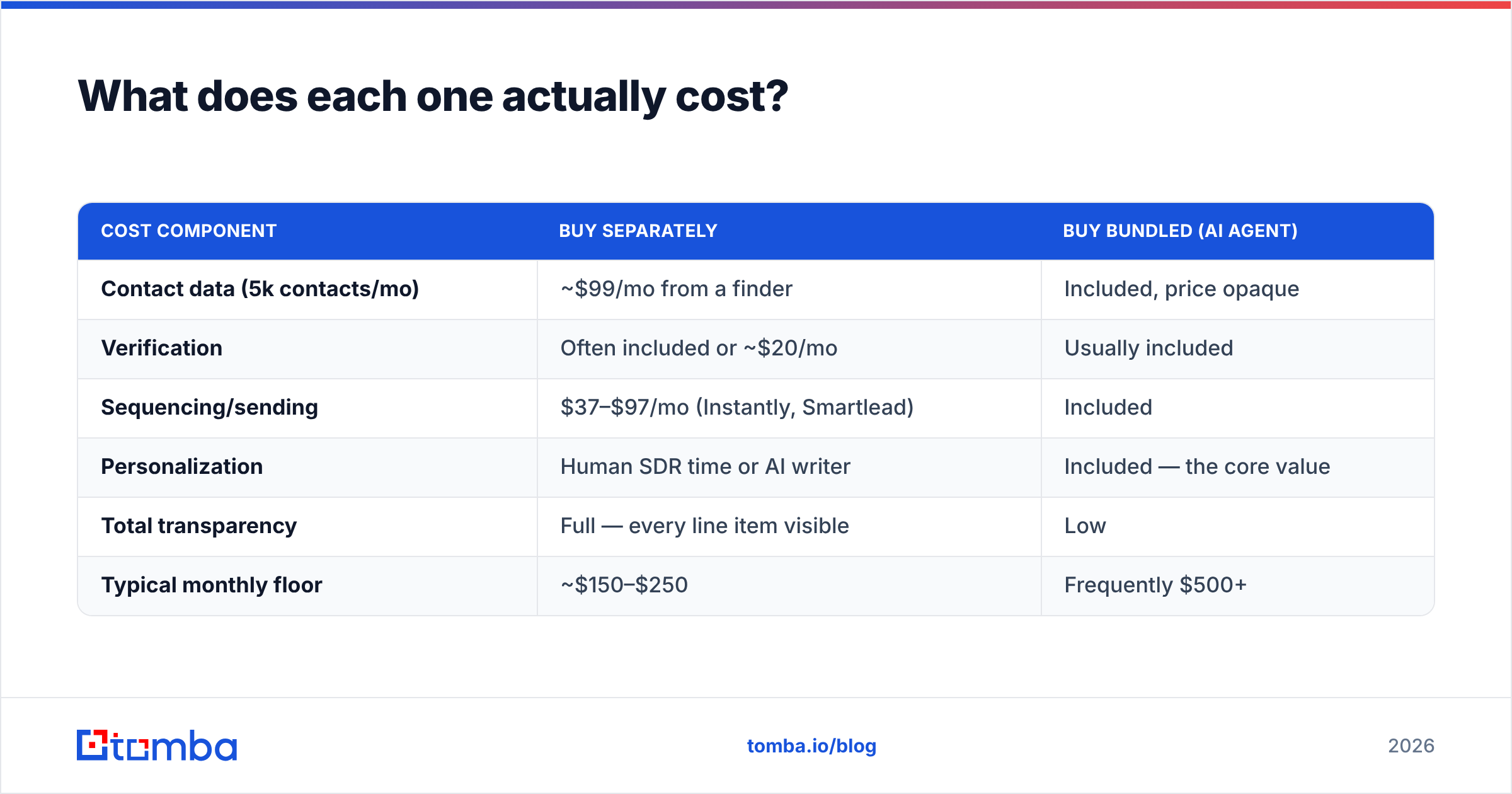
Here's the model that keeps you honest:
| Cost component | Buy separately | Buy bundled (AI agent) |
|---|---|---|
| Contact data (5k contacts/mo) | ~$99/mo from a finder | Included, price opaque |
| Verification | Often included or ~$20/mo | Usually included |
| Sequencing/sending | $37–$97/mo (Instantly, Smartlead) | Included |
| Personalization | Human SDR time or AI writer | Included — the core value |
| Total transparency | Full — every line item visible | Low |
| Typical monthly floor | ~$150–$250 | Frequently $500+ |
The bundle can absolutely be worth it if your bottleneck is human hours, not data. But price the unbundled stack first so you know what premium you're paying for automation. Teams that skip this step routinely discover they're paying $800/mo for data that costs $99/mo plus a GPT wrapper.
For reference, Tomba's pricing sits at the transparent end: Free (25 searches/mo), Starter $49/mo, Growth $99/mo, Pro $249/mo, with Enterprise custom. Same structure as GetProspect — you can model your cost per verified contact before talking to anyone.
Is an AI prospecting agent better than a plain email finder?#
Sometimes. It depends on which constraint is actually binding.
Choose the AI agent when:
- You have no SDR headcount and no realistic path to hiring one this quarter.
- Your ACV is high enough that a handful of extra meetings pays for the tool several times over.
- Your ICP is well-covered by mainstream data providers (US/UK, tech, 50–5,000 employees).
- You genuinely won't build the workflow yourself — an unused $99 tool is more expensive than a used $600 one.
Choose the finder + your own stack when:
- You already run a sequencer and have someone who owns messaging.
- Your ICP is niche, non-English, or otherwise poorly covered — you'll need to test multiple data sources anyway.
- You need contacts inside your own systems via API, not trapped in a vendor UI.
- Compliance requires you to know exactly where each record came from.
The second group is larger than vendor marketing suggests. AI-drafted first-touch emails have gotten measurably better, but they've also gotten measurably more recognizable — buyers now pattern-match "I saw your recent post about..." within half a second. The differentiator in 2026 isn't automated personalization. It's reaching a real inbox with a relevant, specific reason to reply, which is a data and targeting problem before it's a copywriting problem.

What are the alternatives to both?#
Neither tool is the only option in its lane, and it's worth knowing the shape of the market before you sign anything. G2's lead intelligence category is a reasonable starting map, though remember review volume correlates with marketing budget more than with data quality.
Practical alternatives by job to be done:
- You want to buy verified lists outright, no subscription mechanics. BookYourData is a solid, well-regarded option here — pay per record, download, done. Good fit when your buying is project-based rather than continuous.
- You want an all-in-one platform with sequencing built in. Apollo covers the widest surface area, though data quality varies by segment; see our take on Apollo alternatives for the trade-offs.
- You want the best cost-per-verified-contact with API access. This is where dedicated finders win. Tomba, Findymail, and Hunter all compete on match rate and price rather than feature breadth.
- You want to enrich a list you already have. Skip finders entirely and use a data enrichment endpoint against your existing CRM records — usually far cheaper than re-sourcing contacts you already own.

One structural note: the more of your stack you buy from a single vendor, the harder it becomes to fix the one part that's underperforming. If your AI agent's data is weak, you can't swap just the data. If your finder's data is weak, you swap the finder in an afternoon. Modularity has a real, if unglamorous, cost advantage — and it's the same reason HubSpot's own guidance on sales tooling leans toward integrating best-of-breed sources into a CRM of record rather than betting everything on one box.
So which should you pick?#
Pick GetProspect if you want a known price, a searchable database, a working LinkedIn extension, and full control over what gets sent. It's the boring, dependable choice, and boring is underrated when your bounce rate is on the line.
Pick Kitt AI — or any AI-SDR agent — only after you've done two things: verified its data quality against your own account list during a trial, and priced the equivalent unbundled stack. If it clears both bars and you have no SDR capacity, the automation premium is defensible.
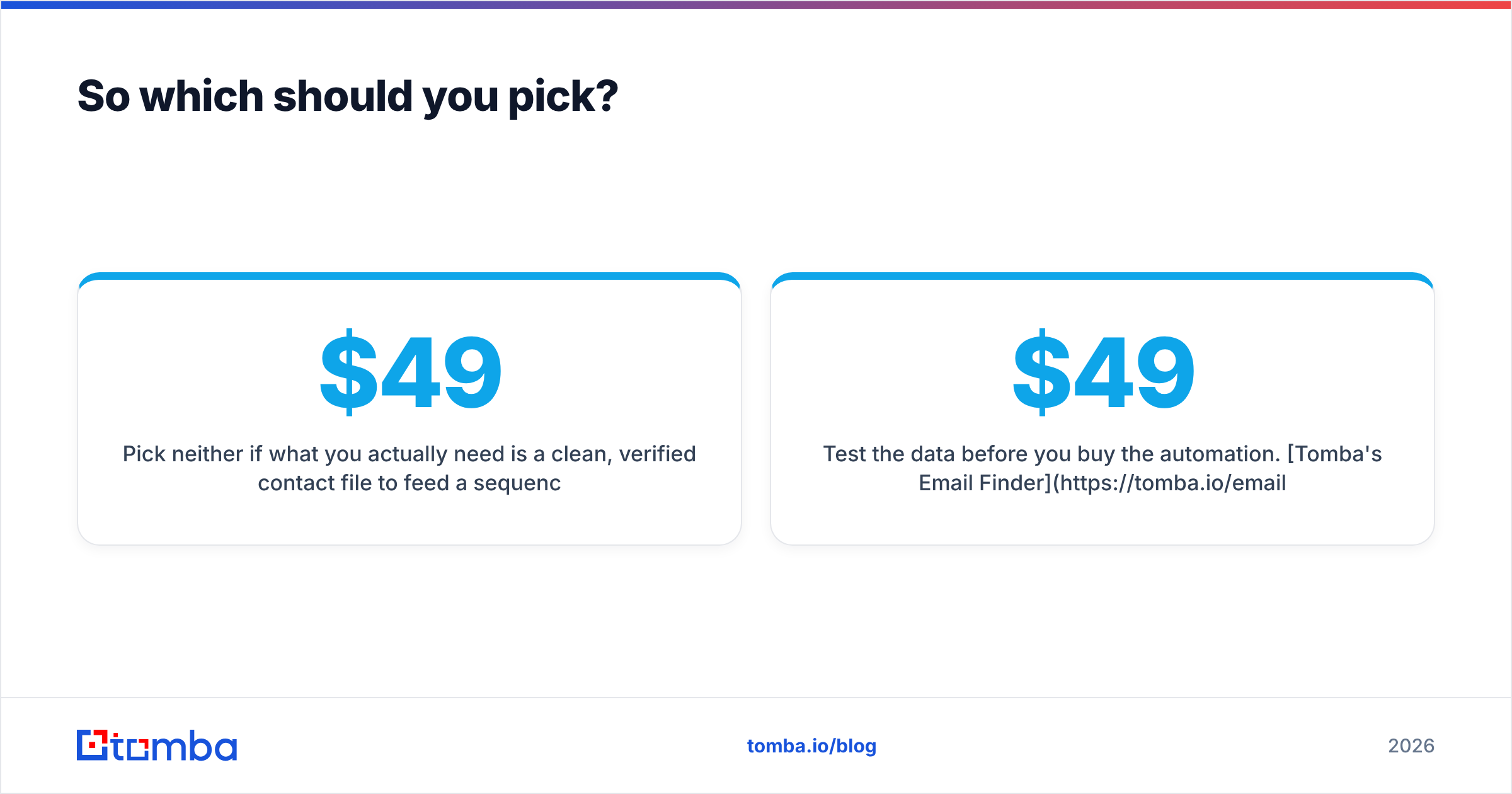
Pick neither if what you actually need is a clean, verified contact file to feed a sequencer you already pay for. That's a $49–$99/mo problem, not a $600/mo one.
Whatever you land on, hold the vendor to one standard: every address you send to should be verified, and every catch-all should be flagged, before it enters a sequence. Tools that skip that step aren't saving you money — they're deferring the cost to your sender reputation, where it compounds.
Test the data before you buy the automation. Tomba's Email Finder gives you 25 free searches a month — no card, no demo call — so you can run your real target accounts through it and compare match rates against whatever GetProspect or an AI agent returns for the same list. Verification and catch-all detection are built in, results export to CSV or come straight through the Tomba API, and paid plans start at $49/mo with no seat minimums. Run the test on your own ICP, then decide what the automation layer is really worth.
Related guides#
Ready to find emails that actually work?
Join 150,000+ professionals who stopped guessing and started sending. Free credits on signup — no credit card required.
Get the Tomba newsletter
Practical outbound tactics and product updates — once every two weeks.
About the author