GetProspect vs LeadFuze: Which B2B Lead Tool Wins in 2026?
GetProspect and LeadFuze both promise clean B2B contact data, but they solve different problems. Here's the honest breakdown of pricing, accuracy, list building, and which one fits your outbound motion.

TL;DR
- GetProspect is a LinkedIn-first email finder with a Chrome extension and a decent B2B database. Best if your prospecting starts inside Sales Navigator.
- LeadFuze is a list-builder with "Fuzebot" automation that adds new matching leads to your lists on autopilot. Best if you want a hands-off, always-on list.
- Pricing diverges fast: GetProspect starts cheap with a usable free tier; LeadFuze's entry plan is meaningfully more expensive per lead once you scale.
- Neither ships a strong standalone verification layer. Both push you toward a second tool for bounce control.
- If your bottleneck is accuracy and API access rather than list discovery, a dedicated finder-plus-verifier stack (Tomba, for example) usually costs less and bounces less.
What are GetProspect and LeadFuze, exactly?#
They get lumped together because both sell "B2B leads," but the products were built around different starting points.
GetProspect began as an email finder. You give it a name and a company domain, or you run its extension across a LinkedIn search page, and it returns work email addresses. Over time it added a searchable contact database, CRM-ish list management, and a light email-sending feature. The center of gravity is still the LinkedIn workflow.
LeadFuze began as a list-building engine. You define an ideal customer profile — role, industry, headcount, tech stack, hiring signals — and it returns matching people with contact details. Its signature feature is Fuzebot, which keeps searching after you leave and drips newly matching leads into your list. It's less "look up this person" and more "keep my pipeline of names full."
That distinction drives everything else: pricing model, data freshness, and who each tool actually suits.
How do GetProspect and LeadFuze compare on features and price?#
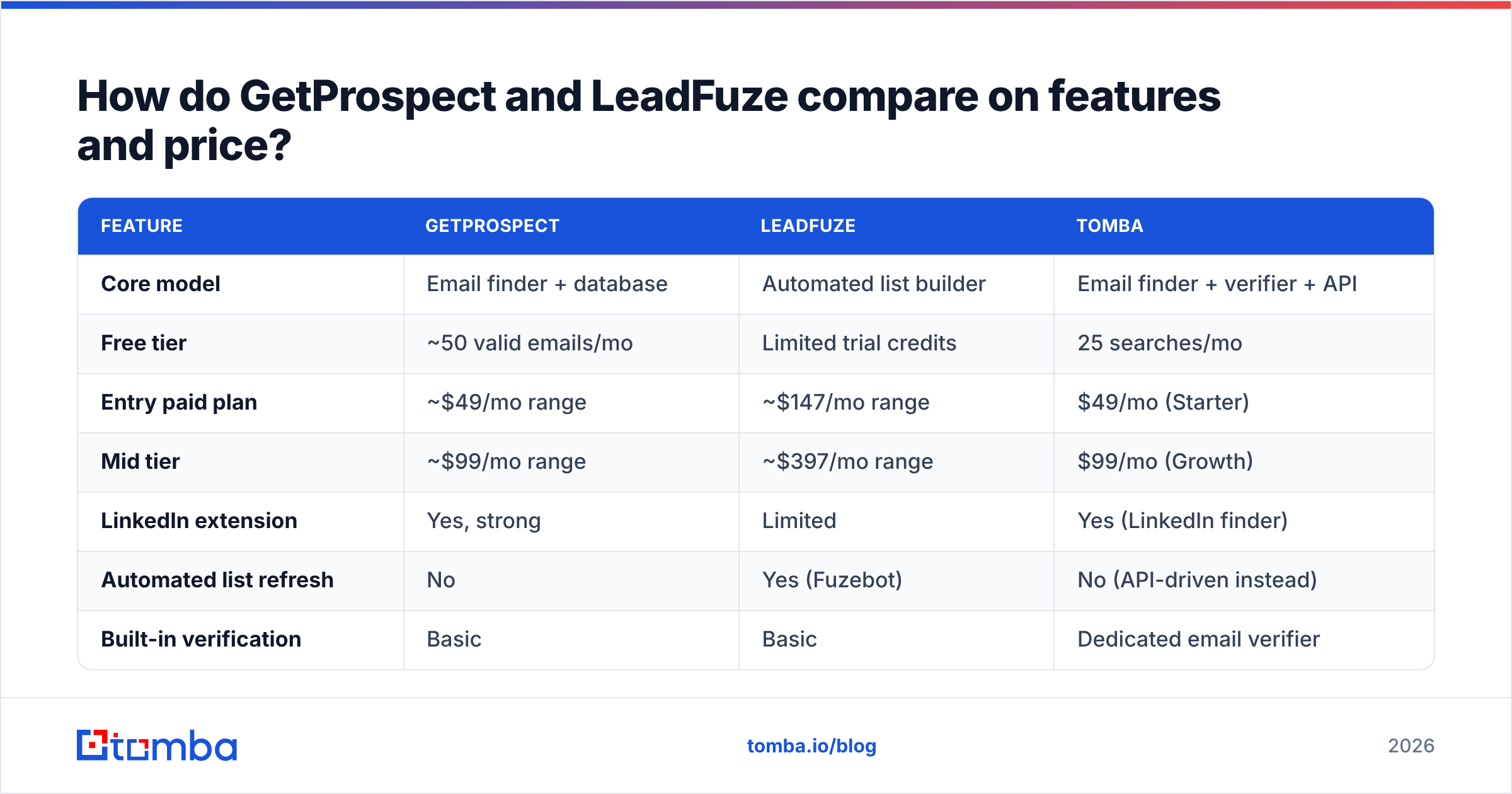
Pricing on both platforms moves, and both run promotions, so treat these as directional and confirm on their own pages before you buy. The structural differences matter more than the exact dollar figures.
| Feature | GetProspect | LeadFuze | Tomba |
|---|---|---|---|
| Core model | Email finder + database | Automated list builder | Email finder + verifier + API |
| Free tier | ~50 valid emails/mo | Limited trial credits | 25 searches/mo |
| Entry paid plan | ~$49/mo range | ~$147/mo range | $49/mo (Starter) |
| Mid tier | ~$99/mo range | ~$397/mo range | $99/mo (Growth) |
| LinkedIn extension | Yes, strong | Limited | Yes (LinkedIn finder) |
| Automated list refresh | No | Yes (Fuzebot) | No (API-driven instead) |
| Built-in verification | Basic | Basic | Dedicated email verifier |
| Catch-all handling | Weak | Weak | Dedicated catch-all verifier |
| Phone numbers | Limited | Yes on higher tiers | Yes |
| Public API | Yes | Yes | Yes, documented + CLI + MCP |
| Best for | LinkedIn-led SDRs | Set-and-forget list building | Accuracy-first outbound + devs |
Two things jump out.
First, the price gap at the entry point is large. LeadFuze's starting plan sits roughly 3x above GetProspect's. That's not arbitrary — you're paying for the automated discovery engine, not just lookups. But if you don't use Fuzebot, you're paying for a feature you ignore.
Second, neither treats verification as a first-class product. Both include a "we checked it" flag. Neither gives you granular states like accept-all, role-based, disposable, or greylisted with a confidence score. That's the gap that eats your sender reputation later.

Which tool has better data accuracy?#
Honest answer: it depends on your segment, and anyone quoting a single accuracy number is selling you something.
Here's what holds up across most independent testing and user reports on G2:
GetProspect performs well on:
- North American and European tech companies with public LinkedIn footprints
- Standard email patterns (first.last@, f.last@, first@) at companies with 50-5,000 employees
- Named lookups where you already have a person and a domain
It struggles on:
- Catch-all domains, where it tends to return a guess marked "valid"
- Very small companies with no crawlable email presence
- Non-English-speaking markets outside Western Europe
LeadFuze performs well on:
- Breadth — its filters surface companies you wouldn't have thought to search
- Enrichment fields beyond email (headcount, revenue estimates, tech stack)
- Phone coverage on upper tiers
It struggles on:
- Freshness on auto-added leads. Fuzebot's convenience is also its risk. Leads added six weeks ago may have changed jobs, and nothing re-verifies them at send time.
- Bounce rates on catch-all-heavy industries (agencies, consultancies, education)
The pattern is consistent across both: discovery accuracy and deliverability accuracy are different problems. A tool can be right that someone works at a company and still hand you an address that bounces because the mailbox was deprovisioned last month.
That's why the operationally boring answer is the correct one — verify at send time, not at export time. Whatever tool builds your list, run the list through a dedicated verifier the day you load it into your sequencer. A bulk verify pass costs pennies per hundred addresses and routinely strips 8-15% of a 60-day-old list.
Is GetProspect better than LeadFuze for your team?#
Skip the generic verdict. Match the tool to the motion.
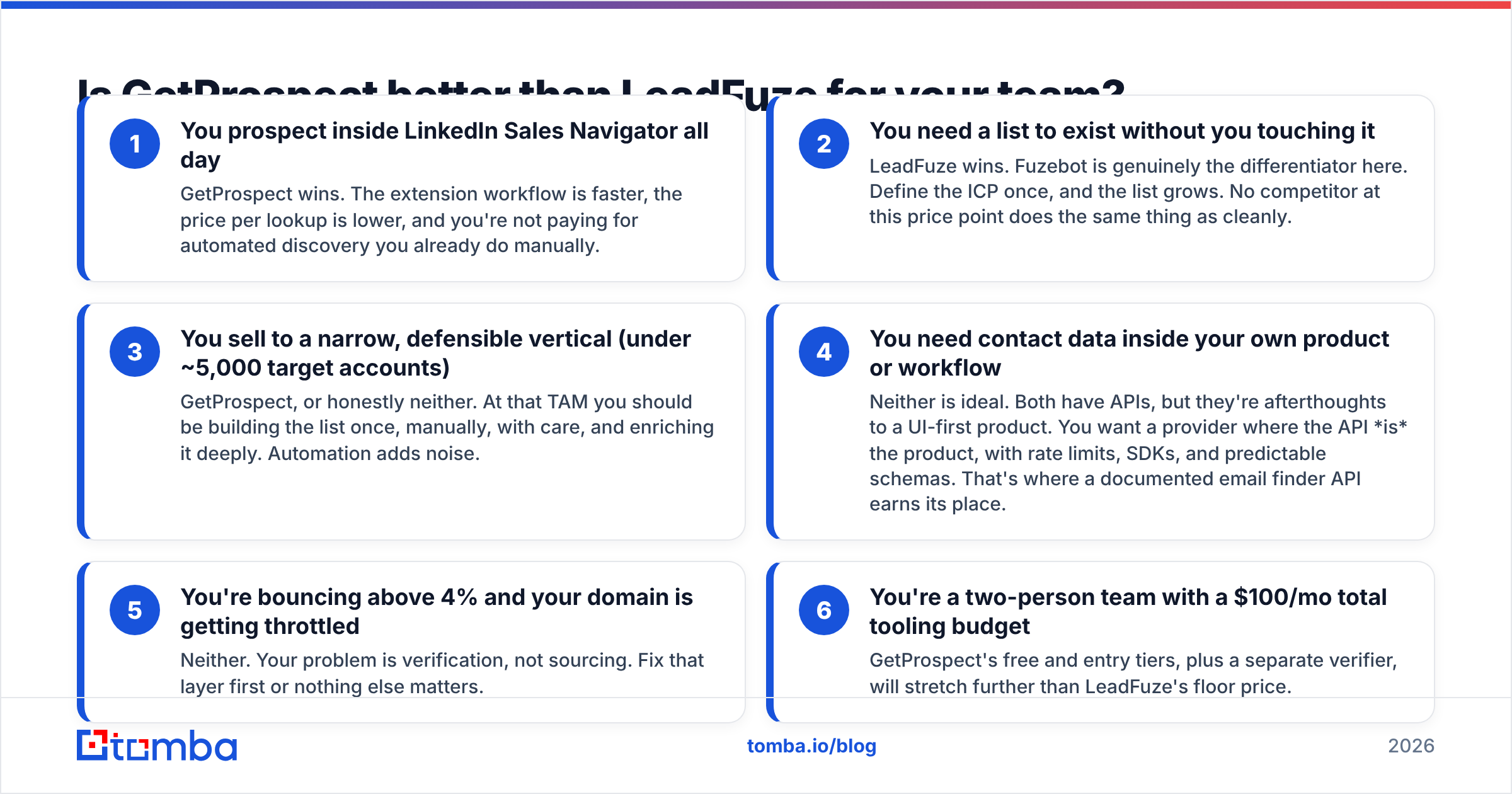
You prospect inside LinkedIn Sales Navigator all day — GetProspect wins. The extension workflow is faster, the price per lookup is lower, and you're not paying for automated discovery you already do manually.
You need a list to exist without you touching it — LeadFuze wins. Fuzebot is genuinely the differentiator here. Define the ICP once, and the list grows. No competitor at this price point does the same thing as cleanly.
You sell to a narrow, defensible vertical (under ~5,000 target accounts) — GetProspect, or honestly neither. At that TAM you should be building the list once, manually, with care, and enriching it deeply. Automation adds noise.
You need contact data inside your own product or workflow — Neither is ideal. Both have APIs, but they're afterthoughts to a UI-first product. You want a provider where the API is the product, with rate limits, SDKs, and predictable schemas. That's where a documented email finder API earns its place.
You're bouncing above 4% and your domain is getting throttled — Neither. Your problem is verification, not sourcing. Fix that layer first or nothing else matters.
You're a two-person team with a $100/mo total tooling budget — GetProspect's free and entry tiers, plus a separate verifier, will stretch further than LeadFuze's floor price.
What do both tools get wrong about catch-all domains?#
This is where most B2B email budgets quietly leak.
A catch-all (or accept-all) domain accepts mail to any address at that domain during the SMTP handshake, then decides later whether to deliver or silently drop it. Roughly a quarter to a third of B2B domains are configured this way — more in agencies, law firms, and universities.
Both GetProspect and LeadFuze handle this the same way: they mark the address as valid-ish and move on. From their side that's defensible — the SMTP server did say yes. From your side it's a landmine, because a "valid" catch-all address that doesn't map to a real mailbox produces a hard bounce or, worse, a spam-trap hit.
What actually works:
- Pattern confirmation. If you know the domain's format is
first.last@from three confirmed sends, a fourth guess at that pattern is a reasonable bet. If you've never confirmed a pattern there, it isn't. - Multi-source corroboration. An address that appears in a crawled signature, a GitHub commit, and a press release is real. One derived purely from a permutation is not.
- Isolating catch-alls into a separate sequence with a smaller daily volume and a warmed secondary domain, so a bad batch doesn't poison your primary.
Tools like a catch-all verifier exist specifically to run this logic instead of shrugging. Neither GetProspect nor LeadFuze ships an equivalent. If catch-alls are a big share of your target list, that gap outweighs almost every other feature comparison on this page.

What are the real alternatives to both?#
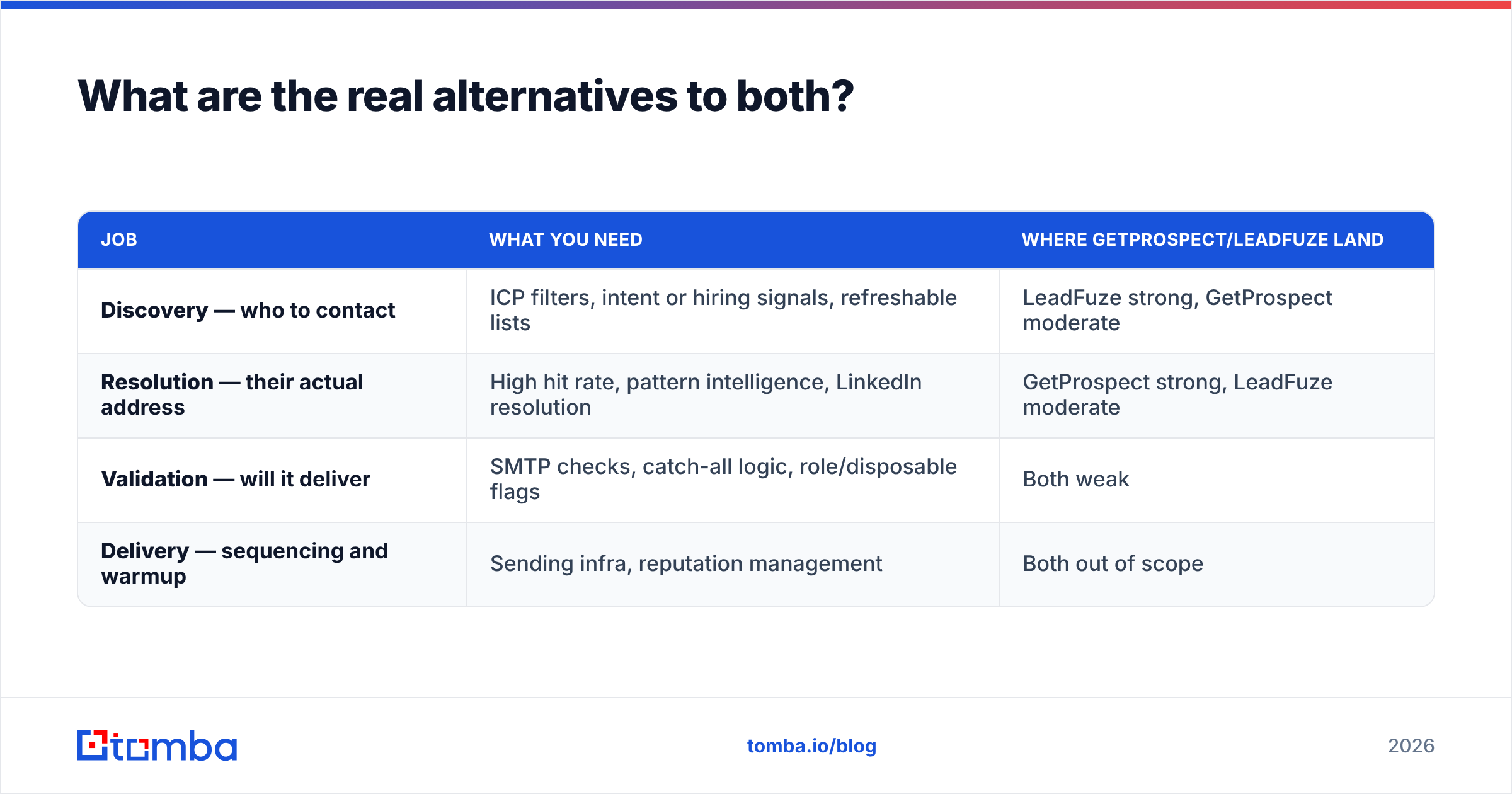
The GetProspect-vs-LeadFuze framing assumes you need one tool for everything. You usually don't. Most effective outbound stacks split three jobs across two or three providers:
| Job | What you need | Where GetProspect/LeadFuze land |
|---|---|---|
| Discovery — who to contact | ICP filters, intent or hiring signals, refreshable lists | LeadFuze strong, GetProspect moderate |
| Resolution — their actual address | High hit rate, pattern intelligence, LinkedIn resolution | GetProspect strong, LeadFuze moderate |
| Validation — will it deliver | SMTP checks, catch-all logic, role/disposable flags | Both weak |
| Delivery — sequencing and warmup | Sending infra, reputation management | Both out of scope |
Worth knowing about in each lane:
- Apollo bundles discovery, resolution, and sequencing, at the cost of data quality complaints at scale. See the Apollo alternative breakdown for the tradeoffs.
- BookYourData takes a different route — pay-as-you-go, human-checked lists with a bounce guarantee. If you'd rather buy a clean list than run a subscription, it's a legitimately good fit and priced honestly.
- ZoomInfo / Cognism for enterprise-grade firmographics and compliance coverage. Budget accordingly.
- Tomba for the resolution and validation lanes specifically — domain search, named lookups, verification, and enrichment behind one API, with Starter at $49/mo and a free tier for testing. It doesn't try to be your sequencer or your ICP discovery engine.
The stack that works for most teams under 20 SDRs: one discovery source, one resolution-plus-verification provider, one sequencer. Trying to make a single vendor do all four jobs is how you end up paying enterprise prices for mediocre data.
How should you actually test them before buying?#
Don't trust anyone's accuracy chart, including this one. Run a controlled bake-off. It takes about an hour.
- Build a 100-row ground-truth list. Pull people you already have confirmed, deliverable addresses for — past customers, webinar attendees, anyone who's replied to you. Strip the emails.
- Run the same 100 rows through each tool. Same names, same domains, same day.
- Score three numbers, not one: hit rate (how many returned anything), precision (how many matched your known-good address), and catch-all share (how many came back flagged accept-all).
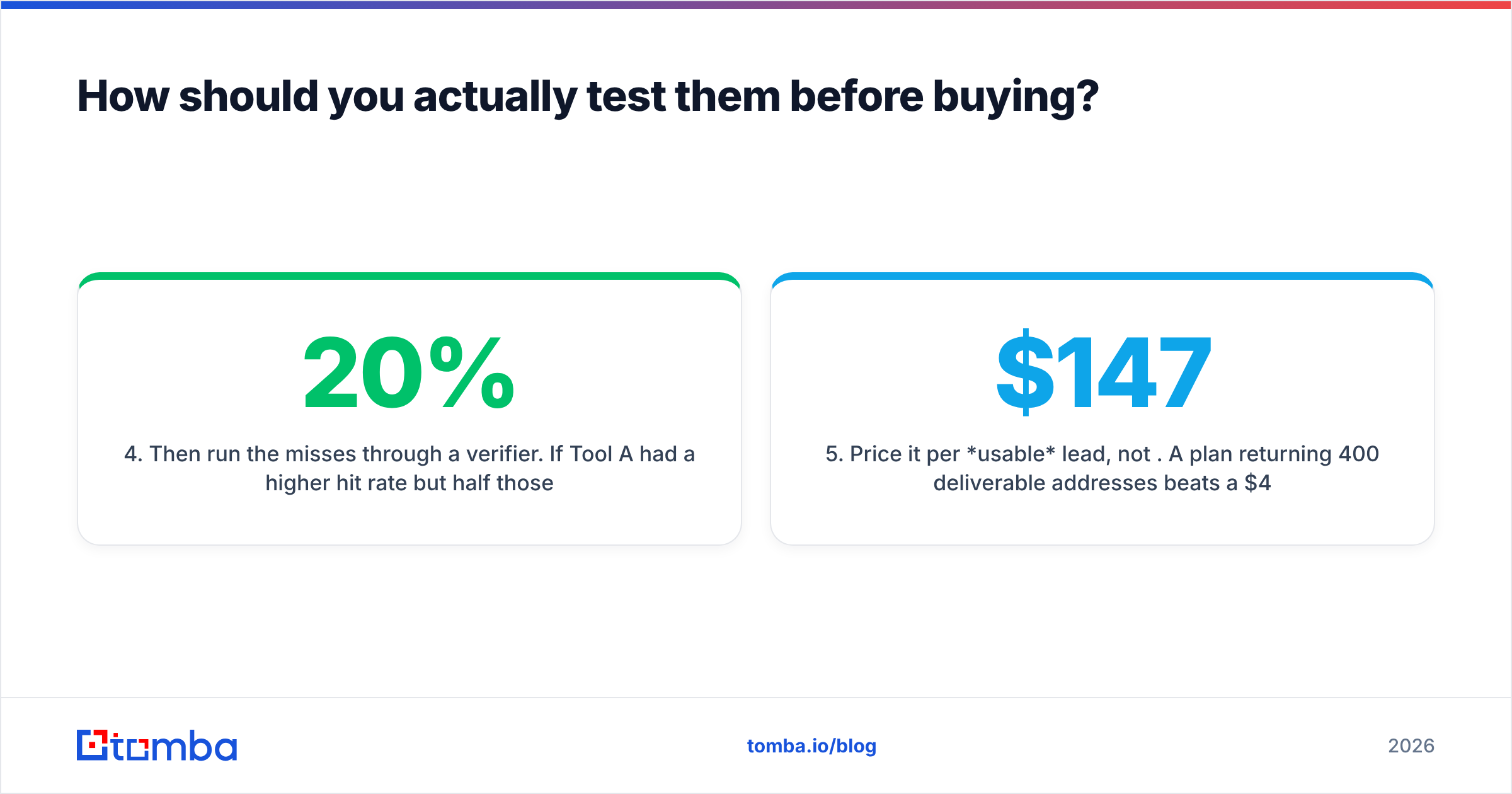
- Then run the misses through a verifier. If Tool A had a 20% higher hit rate but half those extras are unverifiable catch-alls, its real advantage is much smaller than the marketing suggests.
- Price it per usable lead, not per credit. A $147 plan returning 400 deliverable addresses beats a $49 plan returning 90.
- Test your worst segment, not your best. Everyone finds emails at 500-person US SaaS companies. Test German mid-market manufacturers or 12-person agencies — that's where providers separate.
Most teams that run this test discover the winner isn't the tool with the biggest database. It's the one whose "valid" flag actually means valid. Cross-checking a sample with a free email checker before you commit budget takes minutes and has saved plenty of teams from a bad annual contract.
The verdict#
Pick GetProspect if your prospecting is LinkedIn-native, your budget is tight, and you want lookups rather than lists. It's the better value per contact at the low end.
Pick LeadFuze if list-building is your actual bottleneck, you have the budget for its floor price, and Fuzebot's automation replaces real human hours. Just re-verify anything Fuzebot added more than three weeks ago.
Pick neither — or rather, pick a different layer — if your bounce rate is the number keeping you up. No amount of discovery filtering fixes a validation problem, and both tools treat validation as a checkbox rather than a product.
Whatever you land on, split the job. Discovery and delivery are different problems, and the vendor that's excellent at one is rarely excellent at both.
Ready to fix the accuracy half of the equation? The Tomba Email Finder resolves work addresses from a name and domain, flags catch-alls instead of pretending they're clean, and exposes everything through a documented API, a Chrome extension, and Google Sheets. Start on the free tier with 25 searches, or check Tomba pricing — Starter runs $49/mo — and run it head-to-head against whatever you're using now on your own ground-truth list.
Related guides#
Ready to find emails that actually work?
Join 150,000+ professionals who stopped guessing and started sending. Free credits on signup — no credit card required.
Get the Tomba newsletter
Practical outbound tactics and product updates — once every two weeks.
About the author