GetProspect vs LeadIQ: Which B2B Email Tool Wins in 2026?
GetProspect sells volume and a 200M-contact database. LeadIQ sells LinkedIn-native capture and CRM hygiene. We compared accuracy, pricing, credits, and workflow fit to find where each one actually earns its seat.
TL;DR
- GetProspect is a database-first prospecting tool: ~200M contacts, filterable list building, bulk enrichment, and a Chrome extension. Entry paid plan starts around $49/mo for 1,000 emails.
- LeadIQ is a workflow-first capture tool: it lives on LinkedIn Sales Navigator, pushes contacts into Salesforce/HubSpot/Outreach in one click, and adds Scribe AI for message drafting. Entry paid plan is roughly $45/user/mo, with real seat costs landing far higher on Pro.
- Credits work differently and that's the whole story. GetProspect charges per email revealed; LeadIQ charges per contact exported and meters mobile numbers separately.
- Accuracy is comparable on tech/SaaS domains, both weaken on SMB, non-English, and catch-all domains. Neither replaces a dedicated verifier before you send.
- Pick GetProspect if you build lists by filter and send at volume. Pick LeadIQ if reps prospect inside LinkedIn and CRM hygiene is the bottleneck. If you mainly need accurate emails via API at a predictable price, a dedicated email finder is usually cheaper than either.
Most "GetProspect vs LeadIQ" comparisons list features side by side and declare a tie. That's useless, because these two tools are not really competing for the same job. One builds lists. The other captures contacts a rep is already looking at. Buying the wrong one doesn't just cost money — it forces your team into a prospecting motion they don't run.
Here's how they actually differ, where each breaks, and what the real cost per usable email looks like.
What is GetProspect and who is it for?#
GetProspect is a B2B contact database with a list-building UI on top. You filter by job title, industry, headcount, location, technology, and revenue, then reveal emails from the resulting set. It ships a Chrome extension that pulls contacts off LinkedIn search results and company pages, plus bulk enrichment from a CSV of names and domains.
The product's center of gravity is volume. GetProspect wants you to build a 5,000-contact list on Monday and hand it to a sequencer on Tuesday. Its exports are clean, its filters are deep enough for most ICP definitions, and it does not require your reps to change how they work — one person can operate it for the whole team.
Where it gets uncomfortable:
- Credit burn on bad filters. A sloppy filter set reveals emails you'll never use, and revealed credits don't come back.
- Database staleness on SMB. Coverage is strong on tech companies with public web presence and thinner on regional, non-English, and sub-50-employee firms.
- No native sequencing. You're exporting to Instantly, Smartlead, Lemlist, or your CRM anyway.
- Verification is included but shallow. Catch-all domains come back as "risky" or "accept-all," and you still need a decision on whether to send.
What is LeadIQ and who is it for?#
LeadIQ starts from the opposite end: the rep. Its Chrome extension overlays LinkedIn and Sales Navigator, and when a rep finds someone worth contacting, one click captures the contact, enriches it, checks it against existing CRM records to prevent duplicates, and pushes it into Salesforce, HubSpot, Outreach, or Salesloft with the right fields mapped.
That CRM-hygiene layer is LeadIQ's genuine differentiator. Anyone who has run RevOps knows the real cost of prospecting tools isn't the license — it's the 8,000 duplicate contact records a team creates in a quarter. LeadIQ's dedupe-on-capture and its "Refresh" data-hygiene product exist because that problem is expensive.
LeadIQ also ships Scribe, an AI message composer that drafts personalized openers from the prospect's profile, recent posts, and company signals. It's a decent first draft generator, not a replacement for a rep who read the account.
Where LeadIQ gets uncomfortable:
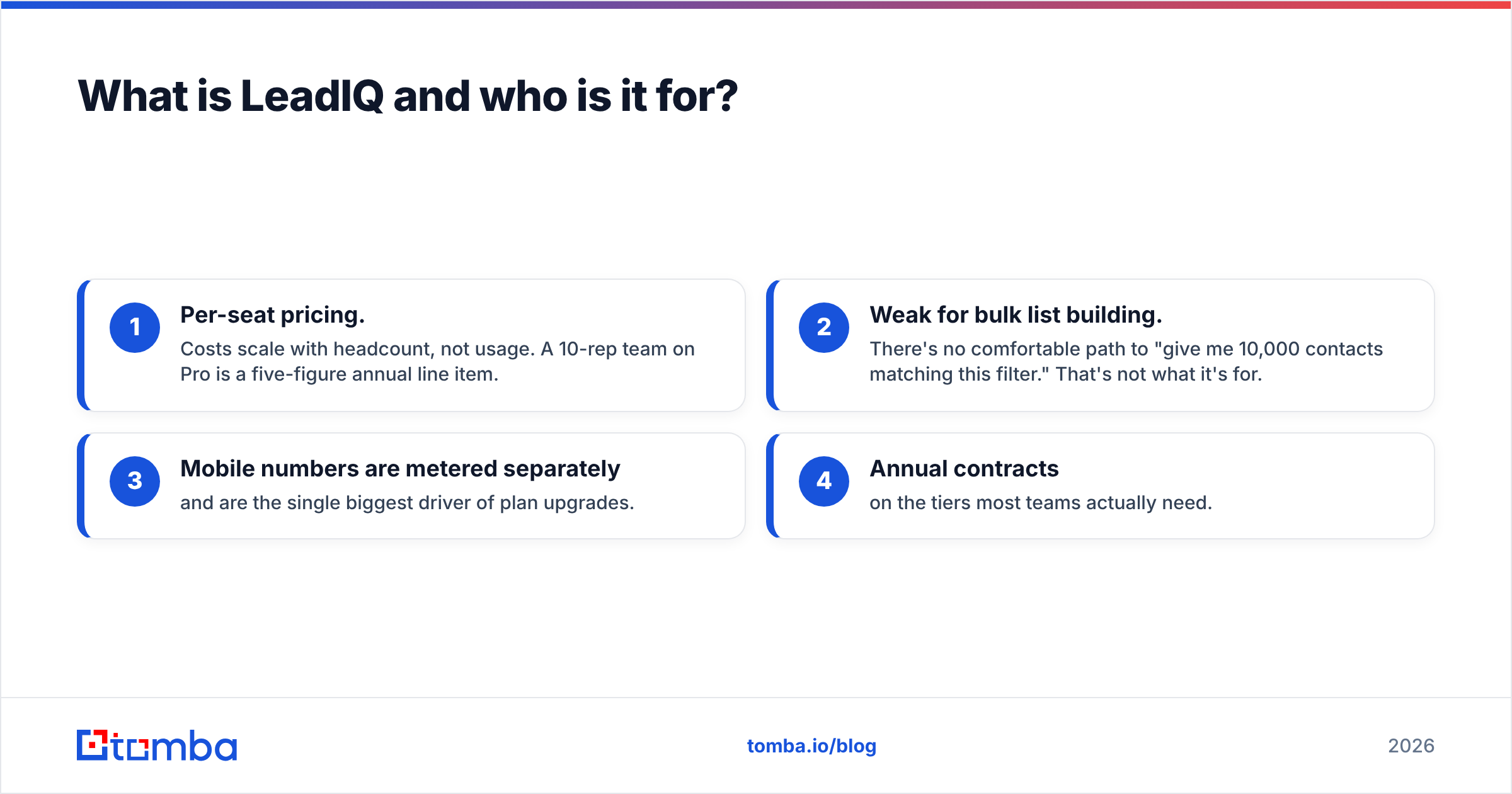
- Per-seat pricing. Costs scale with headcount, not usage. A 10-rep team on Pro is a five-figure annual line item.
- Weak for bulk list building. There's no comfortable path to "give me 10,000 contacts matching this filter." That's not what it's for.
- Mobile numbers are metered separately and are the single biggest driver of plan upgrades.
- Annual contracts on the tiers most teams actually need.

GetProspect vs LeadIQ: how do they compare on features and price?#
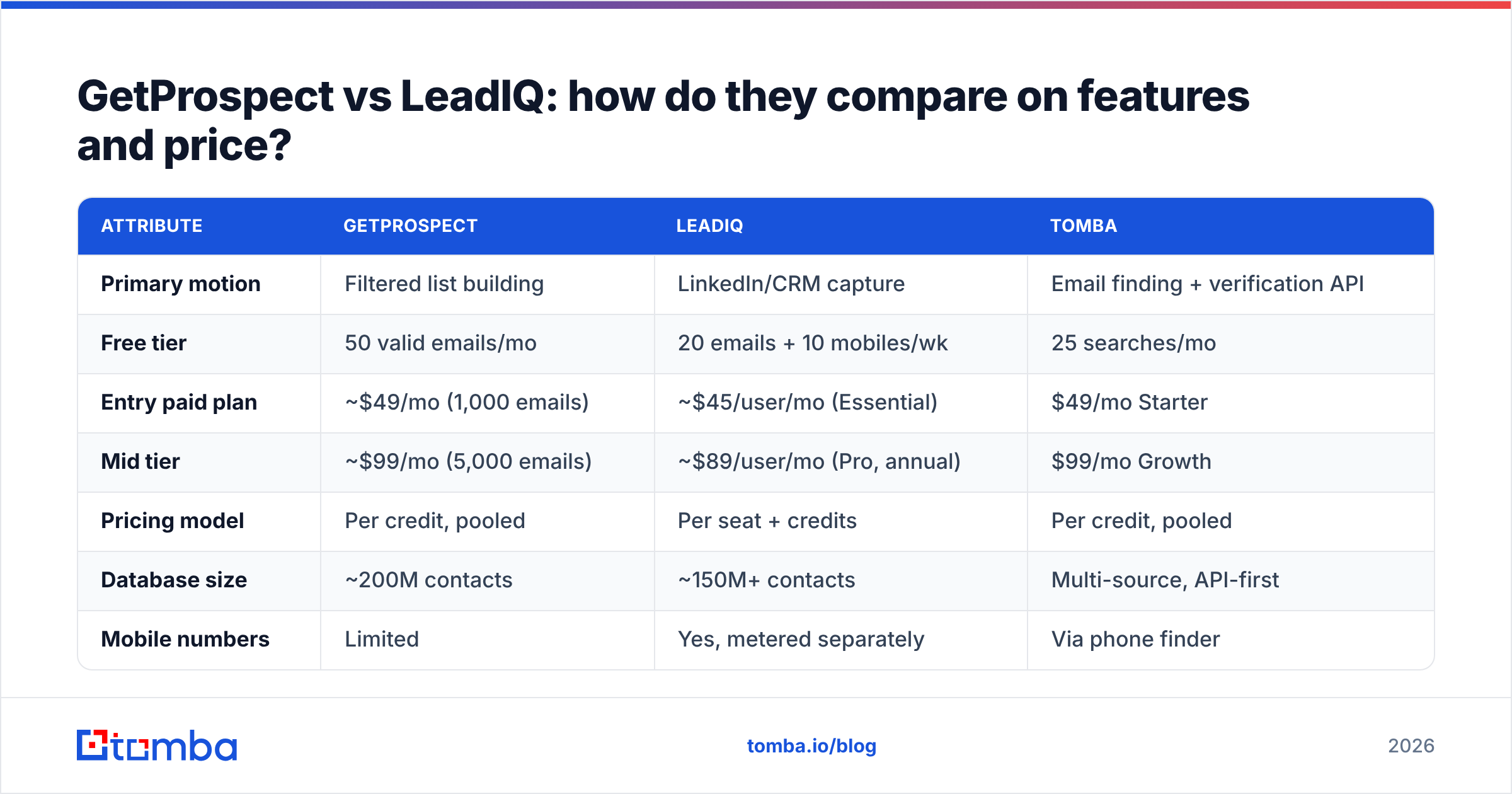
| Attribute | GetProspect | LeadIQ | Tomba |
|---|---|---|---|
| Primary motion | Filtered list building | LinkedIn/CRM capture | Email finding + verification API |
| Free tier | 50 valid emails/mo | 20 emails + 10 mobiles/wk | 25 searches/mo |
| Entry paid plan | ~$49/mo (1,000 emails) | ~$45/user/mo (Essential) | $49/mo Starter |
| Mid tier | ~$99/mo (5,000 emails) | ~$89/user/mo (Pro, annual) | $99/mo Growth |
| Pricing model | Per credit, pooled | Per seat + credits | Per credit, pooled |
| Database size | ~200M contacts | ~150M+ contacts | Multi-source, API-first |
| Mobile numbers | Limited | Yes, metered separately | Via phone finder |
| CRM dedupe on capture | No | Yes (core feature) | Via integrations |
| Bulk CSV enrichment | Yes | Limited | Yes, bulk email finder |
| Native AI writing | No | Yes (Scribe) | No (separate tools) |
| Public API | Yes | Yes | Yes, email finder API |
| Catch-all handling | Flags as risky | Flags as risky | Dedicated catch-all verifier |
| Contract | Monthly available | Annual on most tiers | Monthly available |
Two things jump out.
First, the pricing models aren't comparable at the sticker level. GetProspect's $49 buys credits any number of people can spend. LeadIQ's $45 buys one seat. For a solo founder those look identical. For a six-person SDR team, GetProspect stays at $99/mo while LeadIQ crosses $500/mo before a single mobile number is pulled.
Second, the feature gaps are intentional. LeadIQ doesn't do bulk lists because bulk lists produce the duplicate-record mess it's built to prevent. GetProspect doesn't do CRM dedupe because its users export to a sequencer, not a CRM. Neither is a missing feature. They're different bets on how outbound gets done.
Which one has better email accuracy?#
Neither vendor's marketing number should be taken at face value. Both publish accuracy claims in the 90-97% range, and both measure it on the subset of contacts they're confident about — which is circular. The number that matters is coverage-adjusted accuracy: of 1,000 target contacts, how many did you get a deliverable address for?
From repeated tests across list types, the pattern holds:
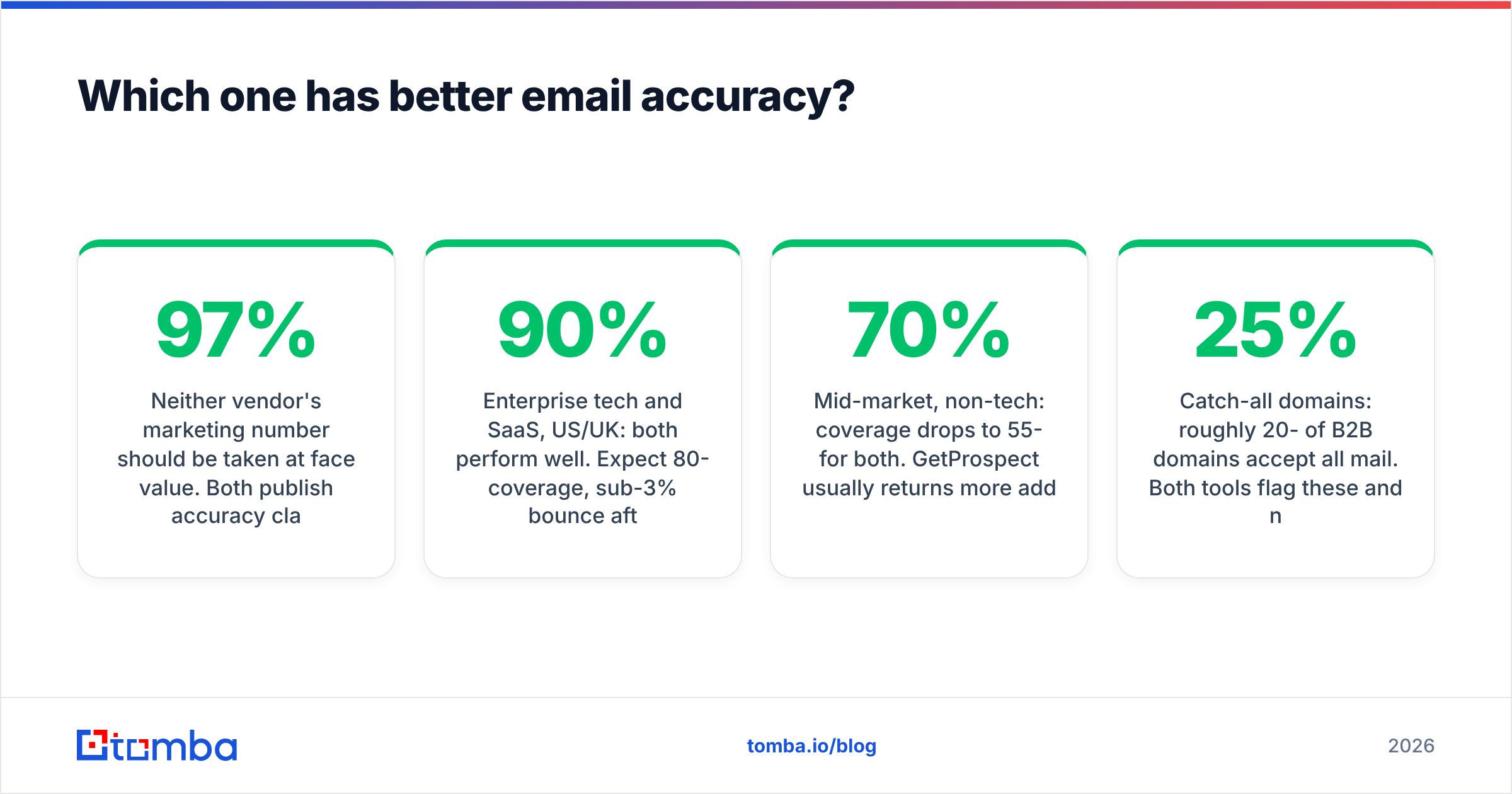
- Enterprise tech and SaaS, US/UK: both perform well. Expect 80-90% coverage, sub-3% bounce after verification.
- Mid-market, non-tech: coverage drops to 55-70% for both. GetProspect usually returns more addresses; a higher share of them are pattern guesses.
- SMB and regional (DACH, LATAM, APAC): both degrade sharply. This is where you'll feel the credit burn.
- Catch-all domains: roughly 20-25% of B2B domains accept all mail. Both tools flag these and neither resolves them. That's a real gap — a flagged catch-all is a coin flip, and a bounce on a catch-all still damages your sender reputation.
The practical takeaway: whichever tool you pick, run the export through a dedicated email verifier before it touches a sequencer. Bundled verification inside a prospecting tool optimizes for "don't waste the user's credit," not "don't burn the user's domain." Those are different objectives.
If your bounce rate sits above 3%, the problem is almost never the sequencer. It's that you trusted a "valid" flag from the same system that had a commercial incentive to charge you for the contact.
What does each tool actually cost per usable email?#
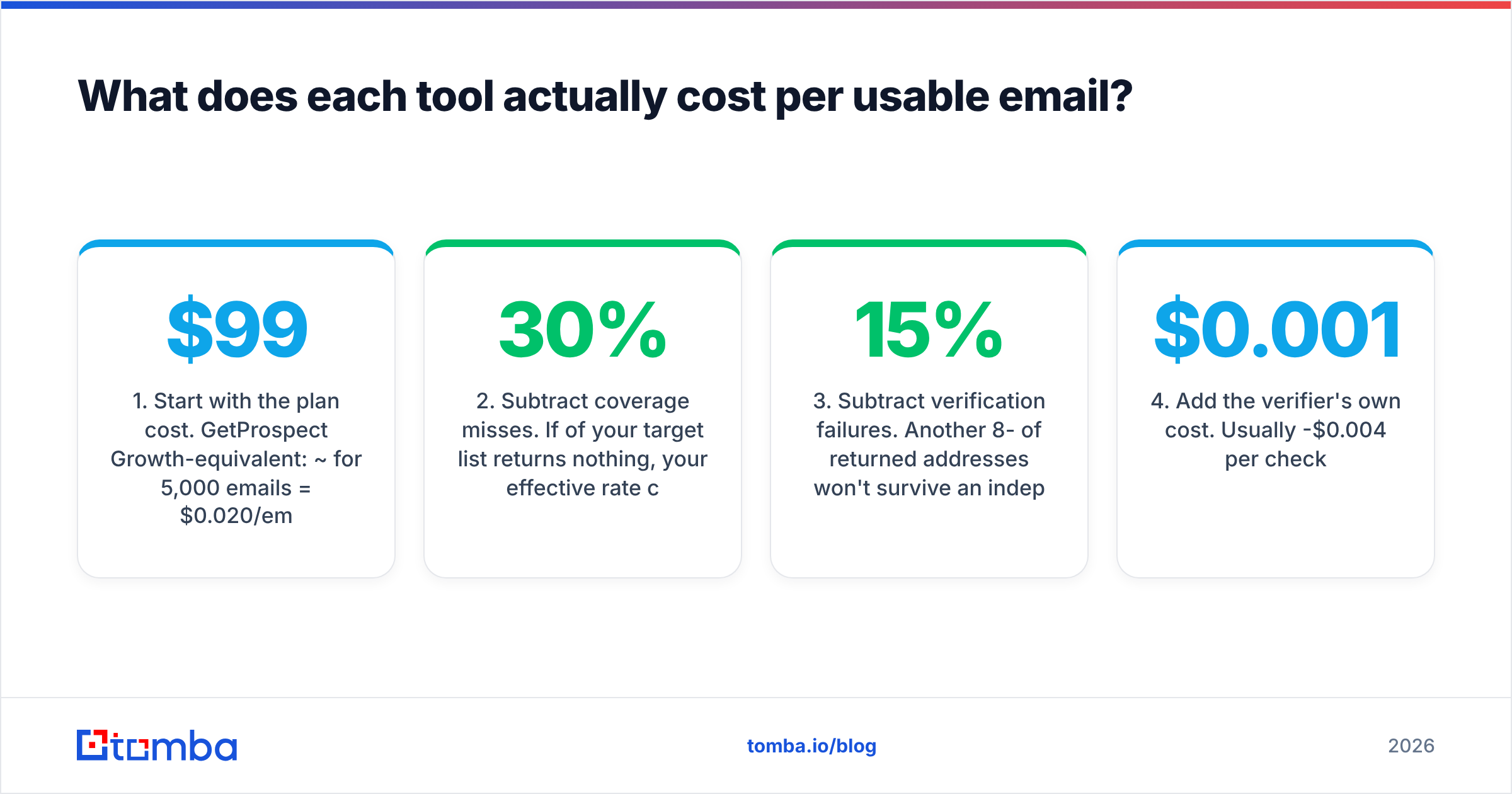
Sticker price is the wrong unit. Cost per verified, deliverable, ICP-matching email is the right one. Work it backwards:
- Start with the plan cost. GetProspect Growth-equivalent: ~$99/mo for 5,000 emails = $0.020/email. LeadIQ Pro for 4 reps: ~$356/mo for a shared credit pool that's typically far smaller.
- Subtract coverage misses. If 30% of your target list returns nothing, your effective rate climbs ~43%.
- Subtract verification failures. Another 8-15% of returned addresses won't survive an independent verifier.
- Add the verifier's own cost. Usually $0.001-$0.004 per check.
- Add the hidden one: the reply-rate cost of sending to a stale contact who left the company 14 months ago. Neither vendor prices this, and it's the biggest number on the list.
Run that math and GetProspect's $0.020 nominal often lands near $0.032-$0.038 real. LeadIQ's per-seat model lands wherever your headcount puts it — cheap at 2 reps, punishing at 12.
There's a third path most teams skip: skip the seat model and the list-builder UI entirely, hit an API with the names and domains you already have, and pay only for resolved addresses. That's the model Tomba runs — Free tier at 25 searches/mo, Starter $49/mo, Growth $99/mo, Pro $249/mo, with pooled credits and no per-seat charge. Full Tomba pricing is public, which is itself a differentiator in a category where "contact sales" is the default answer.

When should you choose GetProspect over LeadIQ?#
Choose GetProspect when:
- You build lists by filter, not by browsing. Your ICP is a query, not a set of named accounts.
- One person owns prospecting data for the team. Pooled credits beat per-seat licensing by a wide margin.
- Volume is the strategy. You're sending thousands of touches monthly through a dedicated sequencer.
- You want month-to-month. No annual commitment required to get a workable tier.
- Budget is tight and headcount is growing. Adding a rep costs you nothing.
Choose LeadIQ when:
- Reps prospect inside LinkedIn Sales Navigator and you want zero context-switching.
- CRM data quality is a named problem. Dedupe-on-capture and Refresh are worth real money if your Salesforce instance is a landfill.
- You run named-account, ABM-style outbound where 40 well-researched contacts beat 4,000 filtered ones.
- Mobile numbers matter to your motion — LeadIQ's phone coverage is a genuine strength for teams that actually call.
- You want AI drafting in the same surface as capture, and Scribe's output clears your quality bar.
For context on where these sit against the broader market, G2's lead intelligence category is the least-bad public source for user-reported comparisons, and both vendors' own docs (getprospect.com, leadiq.com) are clearer on limits than their landing pages suggest. If you're already deep in a CRM, HubSpot's data-quality documentation is a useful sanity check on how much dedupe tooling you actually need before you pay for it.
What are the best GetProspect and LeadIQ alternatives?#
Neither tool is the only option, and the category has more useful variety than the two-way comparison implies:
- Apollo.io — database plus sequencing plus dialer in one seat. Broadest feature surface, most inconsistent data quality. Worth evaluating if you want fewer vendors; see the Apollo alternative breakdown for where it falls short.
- BookYourData — pay-as-you-go B2B lists with a 95%+ accuracy guarantee and no subscription lock-in. Strong fit when you want a one-off list without committing to a monthly seat, and the credit-refund policy on bounces is more generous than most.
- RocketReach — deep individual lookups, weaker bulk workflows. Good complement, poor primary. Compare via the RocketReach alternative rundown.
- Tomba — API-first email finding and verification with pooled credits, domain search, catch-all handling, and a genuinely usable free tier. Best fit when you already know your accounts and need addresses, not another UI.
- Clay — orchestration layer that calls many of the above. Powerful, expensive, and only worth it if you have someone to operate it.
The honest framing: GetProspect and LeadIQ both bundle data with a workflow. If the workflow they impose matches yours, the bundle is a bargain. If it doesn't, you're paying for a UI you'll fight, and you'd be better served buying data through an API and building the workflow you want.
What's the verdict?#
GetProspect wins on cost efficiency for volume outbound. Pooled credits, monthly billing, deep filters, and a database that holds up on tech accounts. It's the better default for small teams running high-volume sequences.
LeadIQ wins on rep workflow and CRM hygiene. If your team lives in Sales Navigator and your CRM is drowning in duplicates, LeadIQ solves problems GetProspect doesn't acknowledge. The per-seat cost is real, and so is the value at teams under about eight reps.
Both lose to a dedicated finder-plus-verifier stack if your bottleneck is simply "get me deliverable addresses for these 3,000 people, via API, without a per-seat tax." That's a different purchase, and it's usually cheaper than either.
Run all three in parallel on the same 200-contact sample list. Export, verify with an independent tool, and count what survives. Two hours of testing beats two quarters of a contract you regret.
Start with the data layer, not the UI. If your outbound plan depends on reaching the right people rather than on a particular list-building interface, test the Tomba Email Finder on your next target account list. Free tier gives you 25 searches a month with no card, Starter is $49/mo with pooled credits your whole team can spend, and every result comes with a confidence score and source attribution so you know what you're sending to before you send it. Pair it with the built-in verifier, hit the API from your existing workflow, and skip the seat tax entirely.
Related guides#
Ready to find emails that actually work?
Join 150,000+ professionals who stopped guessing and started sending. Free credits on signup — no credit card required.
Get the Tomba newsletter
Practical outbound tactics and product updates — once every two weeks.
About the author