GetProspect vs LeadsForge (2026): Which Lead Tool Wins?
GetProspect is a LinkedIn-first email finder. LeadsForge is an AI search agent that builds lists from a plain-English prompt. Here is how they compare on data accuracy, credit models, and real monthly cost — plus where each one breaks down.
TL;DR
- GetProspect is a LinkedIn-first email finder with a browser extension, a large B2B database, and a spreadsheet-style CRM baked in. It is the safer pick if your prospecting starts on LinkedIn Sales Navigator.
- LeadsForge is an AI list-builder: you describe your ICP in a sentence, it returns a contact list. It is faster to a first list and much weaker when you need to audit why a record was included.
- Neither tool wins on raw email accuracy alone. The deciding factors are credit mechanics, verification depth, and whether you need an API in your stack.
- If your workflow is API-driven or you need per-record verification you can defend to a deliverability team, a dedicated finder-plus-verifier stack (Tomba, for example, at $49/mo with a 25-search free tier) usually costs less per usable contact.
- Run both on the same 100-company list before committing. The differences show up in bounce rate, not in the marketing site.
What is GetProspect and what is LeadsForge?#
They solve the same business problem — get contact data for people you want to email — from two different directions.
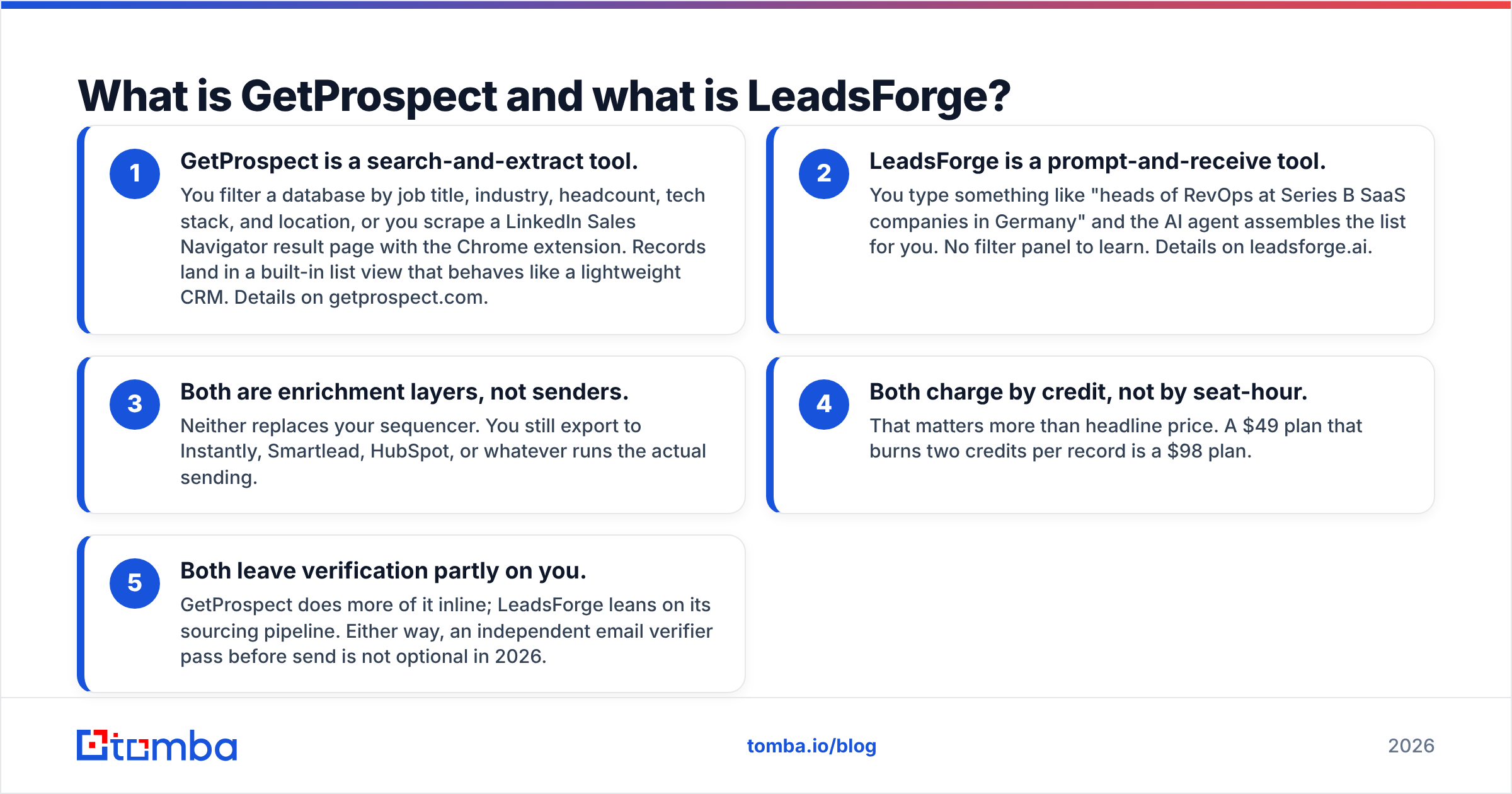
- GetProspect is a search-and-extract tool. You filter a database by job title, industry, headcount, tech stack, and location, or you scrape a LinkedIn Sales Navigator result page with the Chrome extension. Records land in a built-in list view that behaves like a lightweight CRM. Details on getprospect.com.
- LeadsForge is a prompt-and-receive tool. You type something like "heads of RevOps at Series B SaaS companies in Germany" and the AI agent assembles the list for you. No filter panel to learn. Details on leadsforge.ai.
- Both are enrichment layers, not senders. Neither replaces your sequencer. You still export to Instantly, Smartlead, HubSpot, or whatever runs the actual sending.
- Both charge by credit, not by seat-hour. That matters more than headline price. A $49 plan that burns two credits per record is a $98 plan.
- Both leave verification partly on you. GetProspect does more of it inline; LeadsForge leans on its sourcing pipeline. Either way, an independent email verifier pass before send is not optional in 2026.
The mental model: GetProspect is a well-organised warehouse where you walk the aisles yourself. LeadsForge is a personal shopper who brings you a basket. The warehouse is slower but you can see every label. The shopper is faster but you have to trust the picks.

How do GetProspect and LeadsForge compare feature by feature?#
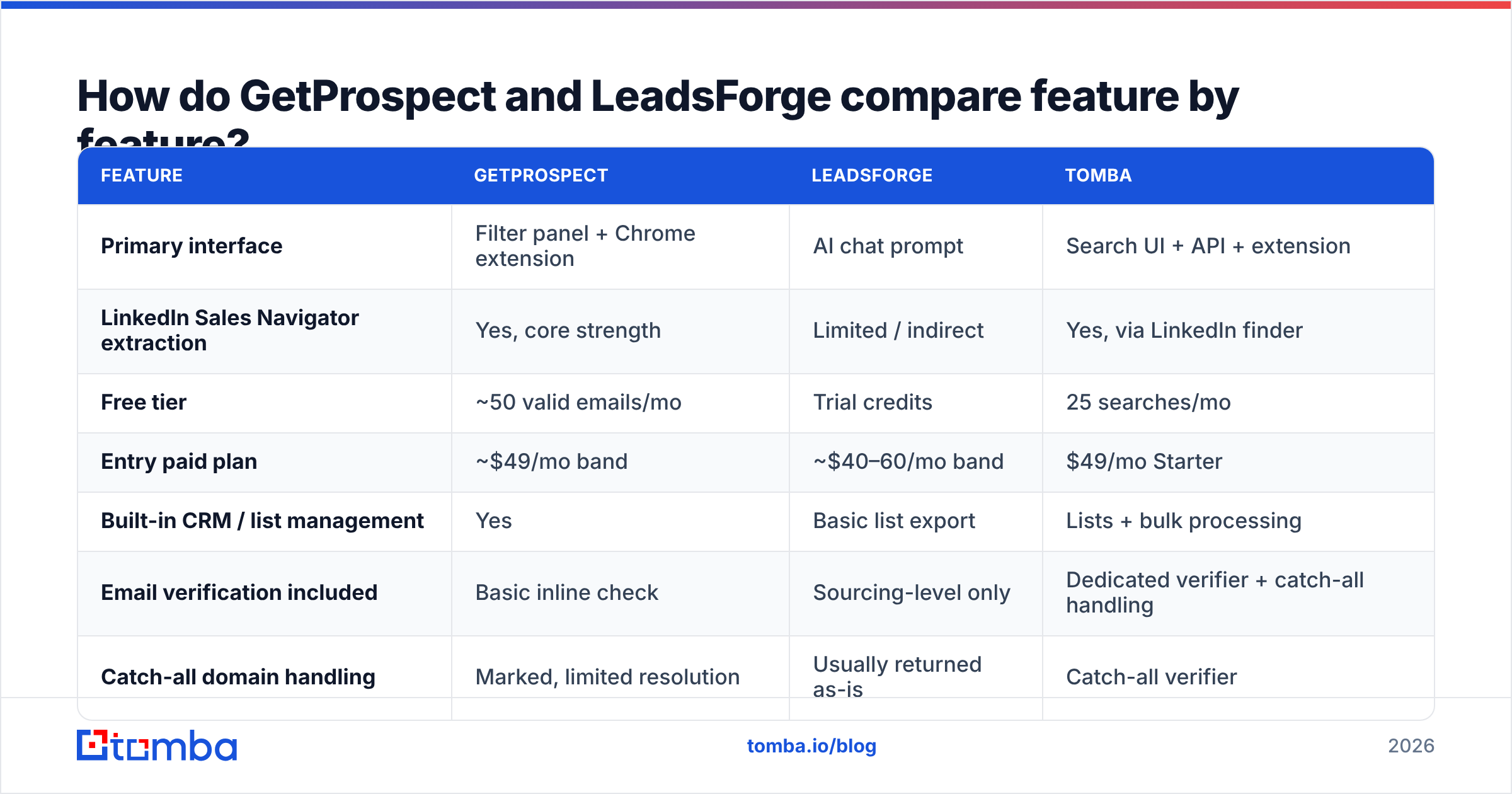
Here is the head-to-head on the attributes that actually change your workflow. Treat pricing as directional — both vendors adjust tiers, so confirm on their pricing pages before you buy.
| Feature | GetProspect | LeadsForge | Tomba |
|---|---|---|---|
| Primary interface | Filter panel + Chrome extension | AI chat prompt | Search UI + API + extension |
| LinkedIn Sales Navigator extraction | Yes, core strength | Limited / indirect | Yes, via LinkedIn finder |
| Free tier | ~50 valid emails/mo | Trial credits | 25 searches/mo |
| Entry paid plan | ~$49/mo band | ~$40–60/mo band | $49/mo Starter |
| Built-in CRM / list management | Yes | Basic list export | Lists + bulk processing |
| Email verification included | Basic inline check | Sourcing-level only | Dedicated verifier + catch-all handling |
| Catch-all domain handling | Marked, limited resolution | Usually returned as-is | Catch-all verifier |
| Public API | Yes | Limited | Full REST API + CLI + MCP |
| Phone numbers | Add-on / limited | Limited | Phone finder |
| Best for | LinkedIn-led SDR teams | Fast first lists, non-technical founders | API/automation-led GTM teams |

The table hides one important asymmetry. GetProspect's value is highest when you already know exactly who you want and can express it as filters. LeadsForge's value is highest when you don't — when the ICP is still fuzzy and you want to see what a plausible list even looks like. Those are different stages of the same motion, which is why some teams end up paying for both and then quietly cancelling one after 90 days.
Which one has better email accuracy?#
Accuracy is where "GetProspect vs LeadsForge" stops being a feature checklist and starts costing money.
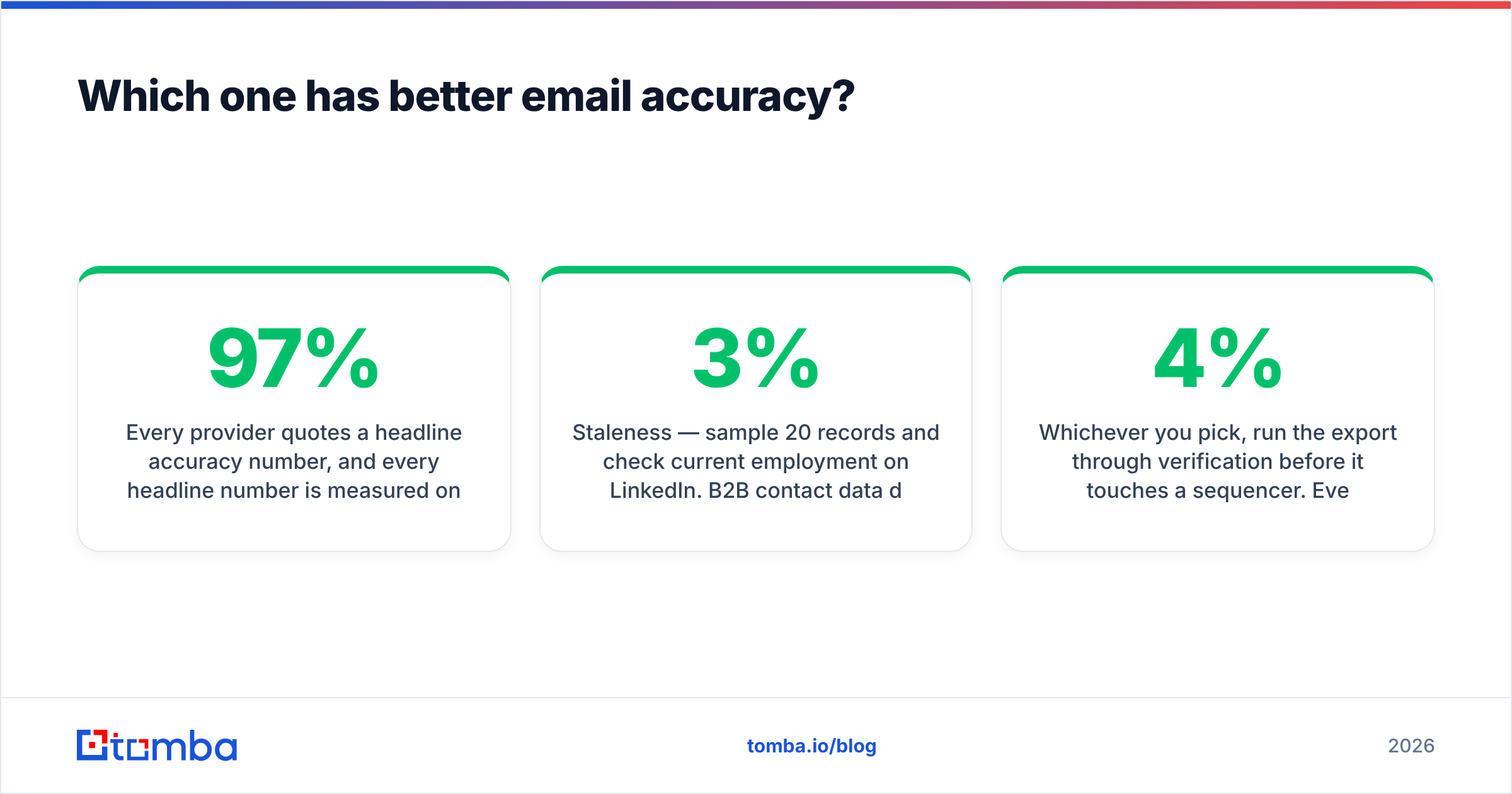
Every provider quotes a headline accuracy number, and every headline number is measured on the subset of records the provider chose to return. That is the trick: a tool that only returns high-confidence records can claim 97% accuracy while leaving half your list uncovered. A tool with broad coverage and 88% accuracy may hand you more usable contacts in absolute terms. Coverage and accuracy trade off against each other, and no vendor publishes both on the same denominator.

What to measure yourself, on a sample of 200 companies you actually care about:
- Hit rate — of 200 target contacts, how many did the tool return an email for at all?
- Bounce rate on send — the only number that matters to your sender reputation.
- Catch-all share — records the tool returns but cannot confirm. GetProspect flags these; AI-assembled lists often don't distinguish them clearly. A catch-all is not a valid email, it is an unanswered question.
- Role-account share — how many
info@,sales@,contact@addresses padded the list? These inflate hit rate and depress reply rate. - Staleness — sample 20 records and check current employment on LinkedIn. B2B contact data decays roughly 2-3% per month; a database refreshed quarterly is meaningfully worse than one refreshed continuously.
In our experience with AI-first list builders generally, the failure mode is not fabricated addresses — it is confident inclusion of stale records. The agent found a person who genuinely held that title, at that company, eighteen months ago. GetProspect's filter-based approach makes staleness more visible because you can see the source record and last-updated signal. That transparency is worth real money when your domain reputation is on the line.
Whichever you pick, run the export through verification before it touches a sequencer. Even a 4% bounce rate on a 5,000-address campaign is 200 hard bounces, which is enough to get a fresh domain throttled by Google's bulk-sender rules.
How does pricing actually compare?#
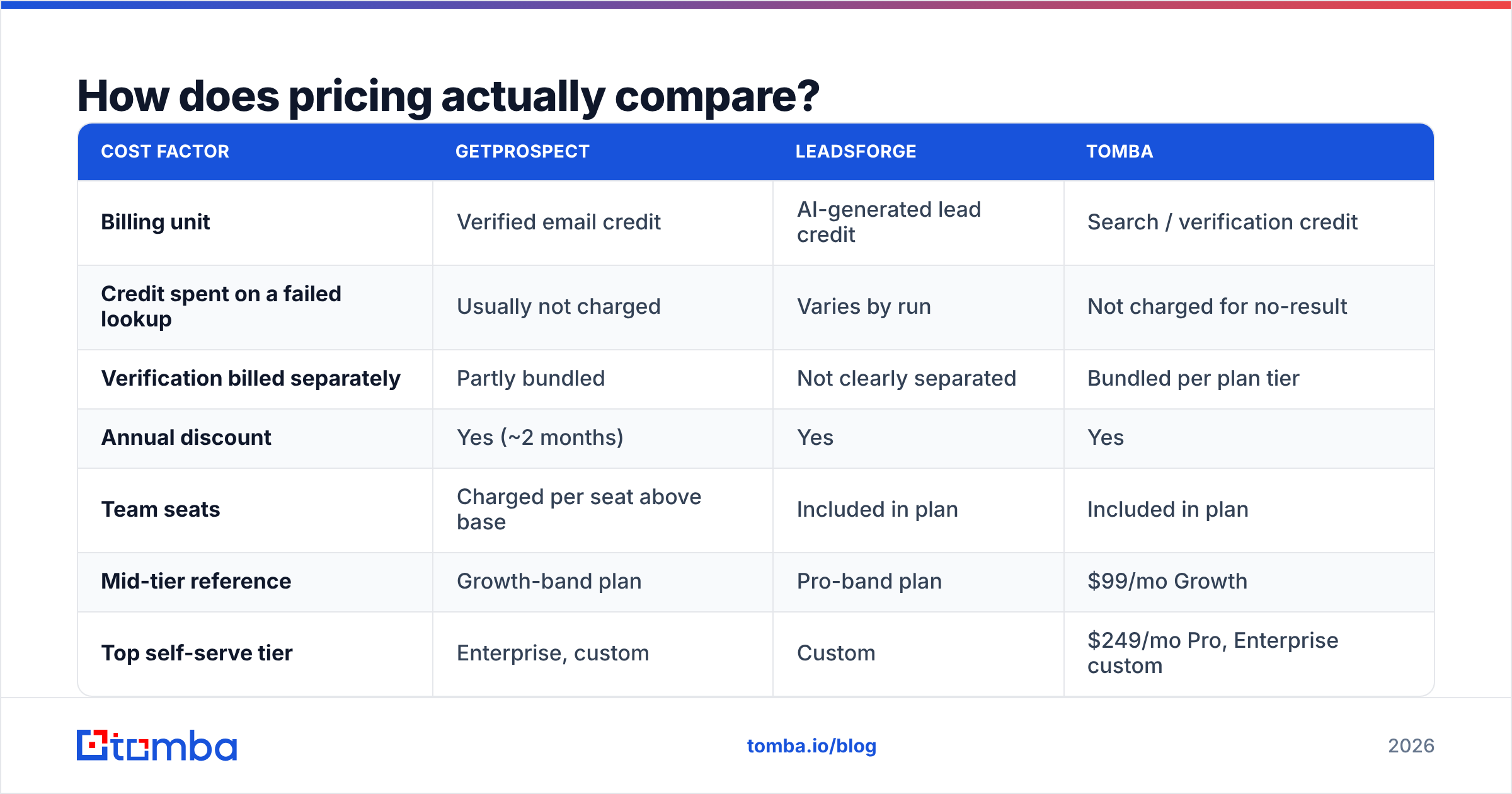
Headline prices are close enough to be a wash. The gap is in what a credit buys.
| Cost factor | GetProspect | LeadsForge | Tomba |
|---|---|---|---|
| Billing unit | Verified email credit | AI-generated lead credit | Search / verification credit |
| Credit spent on a failed lookup | Usually not charged | Varies by run | Not charged for no-result |
| Verification billed separately | Partly bundled | Not clearly separated | Bundled per plan tier |
| Annual discount | Yes (~2 months) | Yes | Yes |
| Team seats | Charged per seat above base | Included in plan | Included in plan |
| Mid-tier reference | Growth-band plan | Pro-band plan | $99/mo Growth |
| Top self-serve tier | Enterprise, custom | Custom | $249/mo Pro, Enterprise custom |
Three cost traps to check before you sign anything:
- Seat fees. A $49 base plan for a four-person SDR team can land at $150+/mo once seats are added. Ask directly.
- Credit rollover. Non-rolling credits punish lumpy prospecting. Most teams do not build lists evenly across the month.
- Double-charging for verification. If a tool charges one credit to find an address and another to verify it, your real cost per usable contact is double the sticker rate. Compare on cost-per-verified-contact, not cost-per-credit.
For reference on the third-party side, Tomba pricing runs Free (25 searches/mo), Starter $49/mo, Growth $99/mo, and Pro $249/mo, with verification included in tier rather than billed as a separate meter. That structure is easier to forecast, which matters more than a $10 difference in list price when finance asks what outbound data costs per quarter.
Which should you choose for your team?#
Choose GetProspect if:
- Your prospecting genuinely starts inside LinkedIn Sales Navigator and the extension workflow is the point.
- You want list management and light CRM behaviour in the same tool, without another Airtable base.
- You need to explain to a manager exactly where each record came from.
- Your team is comfortable building filter queries and iterating on them.
Choose LeadsForge if:
- You are a founder or a small team without a dedicated SDR, and speed to first list beats precision.
- Your ICP is still being discovered and you want to explore segments conversationally.
- You do not need an API and you do not plan to automate list-building on a schedule.
- You accept that you will verify everything downstream anyway.
Choose a dedicated finder-plus-verifier stack if:
- Your enrichment runs from code, a workflow tool, or an AI agent rather than a UI. That is an API question, and API depth is the clearest structural difference between these categories.
- You need catch-all resolution rather than catch-all flagging.
- You want data enrichment on records you already own, not just net-new list building.
- You are already sourcing lists from elsewhere — a database like BookYourData, an event attendee export, an inbound form — and need a reliable verification and enrichment layer on top rather than another list source.
One pragmatic pattern that works well: use whichever tool has the better discovery interface for your brain (filters or prompts), then route every export through a single verification and enrichment endpoint so you have one consistent quality bar across sources. That decouples "where leads come from" from "how good the data is," and it means switching list vendors later costs you nothing.
What do reviewers say about each tool?#
Read reviews for pattern, not for score. Both tools sit in crowded categories on G2, where scores cluster between 4.2 and 4.6 and tell you almost nothing.
The recurring themes worth noting:
- GetProspect draws consistent praise for the extension and criticism for credit consumption on low-yield searches. Support responsiveness is generally rated well.
- LeadsForge draws praise for onboarding speed and criticism for limited control when the AI's interpretation of your ICP misses. Users describe re-prompting several times to narrow a list.
- Both draw the same complaint every data vendor draws: some records are out of date. This is a category problem, not a vendor problem, and it is why verification is a separate step rather than a checkbox.
If you want a broader field, review the landscape of Apollo alternatives and RocketReach alternatives before locking in — the two tools in this comparison sit in a category with a dozen credible options, and the "obvious" choice is often the one nobody in your evaluation shortlisted.
What is the verdict on GetProspect vs LeadsForge?#
GetProspect wins on control; LeadsForge wins on speed.
If you run a structured outbound motion with defined ICPs and LinkedIn-based sourcing, GetProspect is the more defensible choice — you can see your filters, audit your records, and reproduce a list next quarter. If you are early, exploratory, and staffed thin, LeadsForge gets you to a working list in an afternoon, and that has real value when the alternative is no list at all.
Neither removes the verification step. Both will hand you catch-all domains, role accounts, and the occasional job-changer, and both will happily let you push that straight into a sequencer.
If your bottleneck is not "which list tool" but "how do I get reliable, verified addresses into my stack without a UI in the loop," start with the Tomba Email Finder. The free tier gives you 25 searches a month to benchmark against whatever GetProspect or LeadsForge returns on the same accounts, verification is included rather than metered separately, and the same lookups are available through the API, CLI, and MCP server when you are ready to automate. Run the same 100 companies through all three, compare bounce rates after one campaign, and let your own data settle the argument.
Related guides#
Ready to find emails that actually work?
Join 150,000+ professionals who stopped guessing and started sending. Free credits on signup — no credit card required.
Get the Tomba newsletter
Practical outbound tactics and product updates — once every two weeks.
About the author