GetProspect vs Mail Merge for Gmail: Which Do You Need?
GetProspect finds the contacts. Mail merge for Gmail sends to them. Most teams compare the two as rivals and end up buying the wrong half of their outbound stack — here is how to pick.
TL;DR
- GetProspect and mail merge for Gmail are not competitors. One builds the list, the other sends to it. Comparing them head-to-head is like comparing a supplier to a delivery van.
- If your problem is "I don't have enough good contacts," you need a data tool. If your problem is "I have 400 contacts in a spreadsheet and no way to email them personally," you need a mail merge.
- Gmail mail merge tools (YAMM, GMass, native multi-send) are cheap — often $25–$50 per user — but inherit Gmail's hard sending caps and give you zero data quality control.
- GetProspect gives you contacts plus light sending, but you pay database prices for a sequencer that most teams outgrow.
- The cheapest correct stack for under-50-person teams: a dedicated finder/verifier for data, a Gmail mail merge for sending, and a bounce rate under 2% before you press send.
What are you actually comparing here?#
Start with the honest answer: these two things sit at different points in the same pipeline.
Outbound email has four stages — source, verify, send, measure. GetProspect lives mostly in stages one and two. Mail merge for Gmail lives entirely in stage three. The reason people compare them at all is that both categories have crept toward the middle: GetProspect bolted on email campaigns, and mail merge tools like GMass bolted on scraping and list building.
That creep is why buyers get confused, and why so many teams end up paying twice for the same weak capability. So the useful question is not "which is better." It's "which half of my stack is actually broken?"
If you sent 500 emails last month and 140 bounced, no mail merge on earth fixes that. If you have 2,000 pristine verified contacts sitting in a Google Sheet and you're pasting them into Gmail one at a time, no database fixes that either.

What is GetProspect and what does it do well?#
GetProspect is a B2B contact database and email finder. You search by company, job title, industry, headcount, or location, and it returns work email addresses with company data attached. It also offers a LinkedIn Chrome extension, bulk CSV enrichment, and — more recently — basic email sequences.
What it genuinely does well:
- Filtered database search. You can build a list of "VP Marketing at 50–200 person SaaS companies in Germany" without knowing a single name first. That's a real capability a mail merge tool has no answer for.
- LinkedIn extension workflow. Browse a LinkedIn search, click, capture. For SDRs living inside Sales Navigator, this is the daily driver.
- Bulk enrichment. Upload a CSV of names and domains, get emails back. Standard for the category, and it works.
- A usable free tier. Enough credits to test whether the data covers your target market before you spend anything.
Where it gets thinner: coverage varies hard by region and company size. Enterprise North American contacts are well covered; sub-20-person European agencies, less so. And the sending side is a checkbox feature — it exists, but it isn't why anyone buys the product.
Every database in this category has the same structural weakness, by the way. Records decay at roughly 25–30% per year as people change jobs, so a "verified" contact pulled in January can be dead by June. That's not a GetProspect flaw, it's physics. It's also why a separate email verifier run immediately before send is not optional — regardless of which database you buy from.
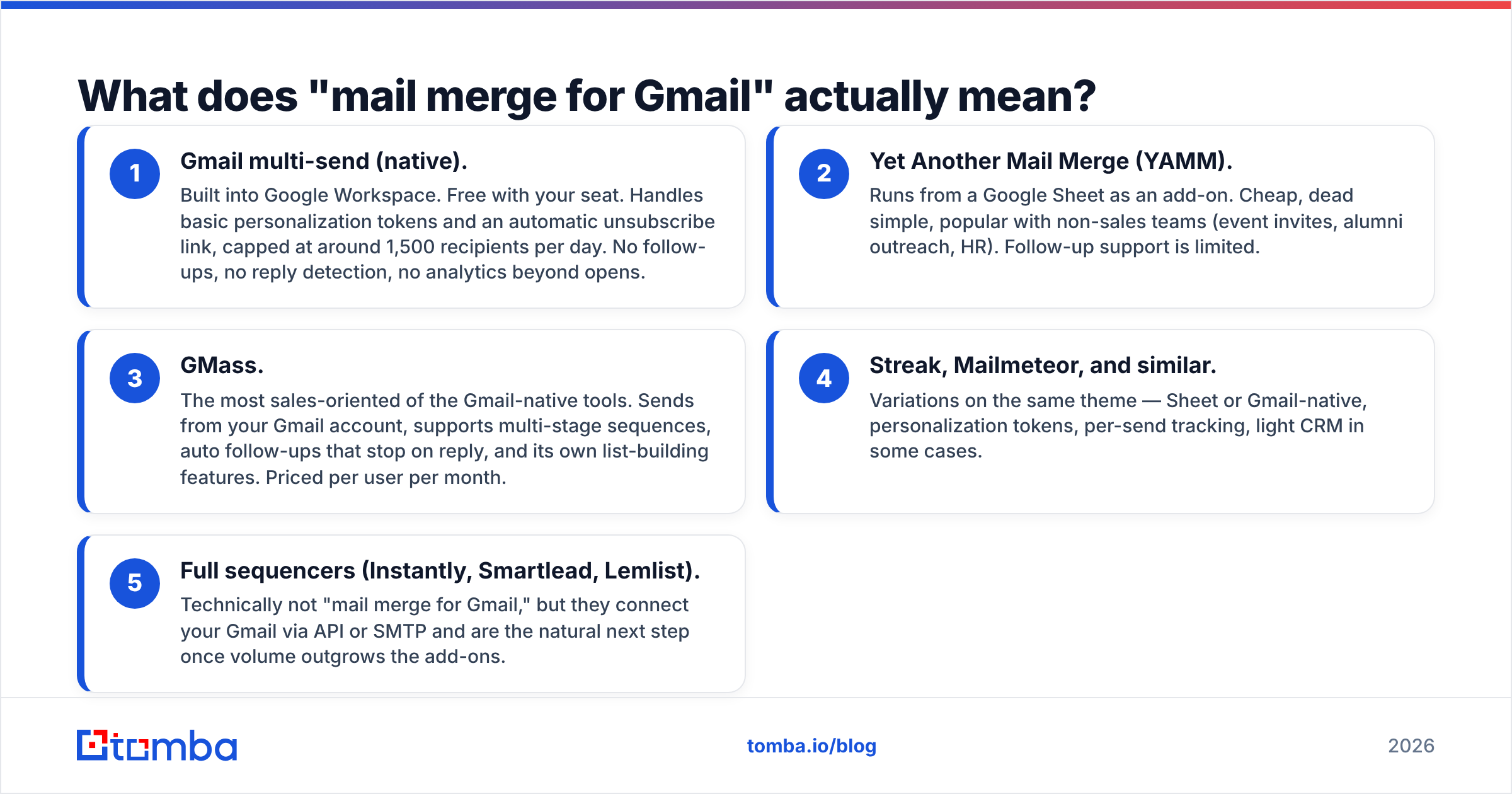
What does "mail merge for Gmail" actually mean?#
"Mail merge for Gmail" is a category, not a product, and the options behave very differently. Here's what's actually in it:
- Gmail multi-send (native). Built into Google Workspace. Free with your seat. Handles basic personalization tokens and an automatic unsubscribe link, capped at around 1,500 recipients per day. No follow-ups, no reply detection, no analytics beyond opens.
- Yet Another Mail Merge (YAMM). Runs from a Google Sheet as an add-on. Cheap, dead simple, popular with non-sales teams (event invites, alumni outreach, HR). Follow-up support is limited.
- GMass. The most sales-oriented of the Gmail-native tools. Sends from your Gmail account, supports multi-stage sequences, auto follow-ups that stop on reply, and its own list-building features. Priced per user per month.
- Streak, Mailmeteor, and similar. Variations on the same theme — Sheet or Gmail-native, personalization tokens, per-send tracking, light CRM in some cases.
- Full sequencers (Instantly, Smartlead, Lemlist). Technically not "mail merge for Gmail," but they connect your Gmail via API or SMTP and are the natural next step once volume outgrows the add-ons.
The shared trait: they all send through your Gmail account. That's the whole value proposition — deliverability inherited from a real, warmed inbox rather than a shared marketing IP — and simultaneously the whole limitation, because Google's daily caps apply no matter what the vendor's marketing says. Workspace accounts sit at roughly 2,000 external recipients per day, consumer Gmail far lower. A tool cannot exceed a limit that Google enforces upstream.
GetProspect vs mail merge for Gmail: how do they actually compare?#
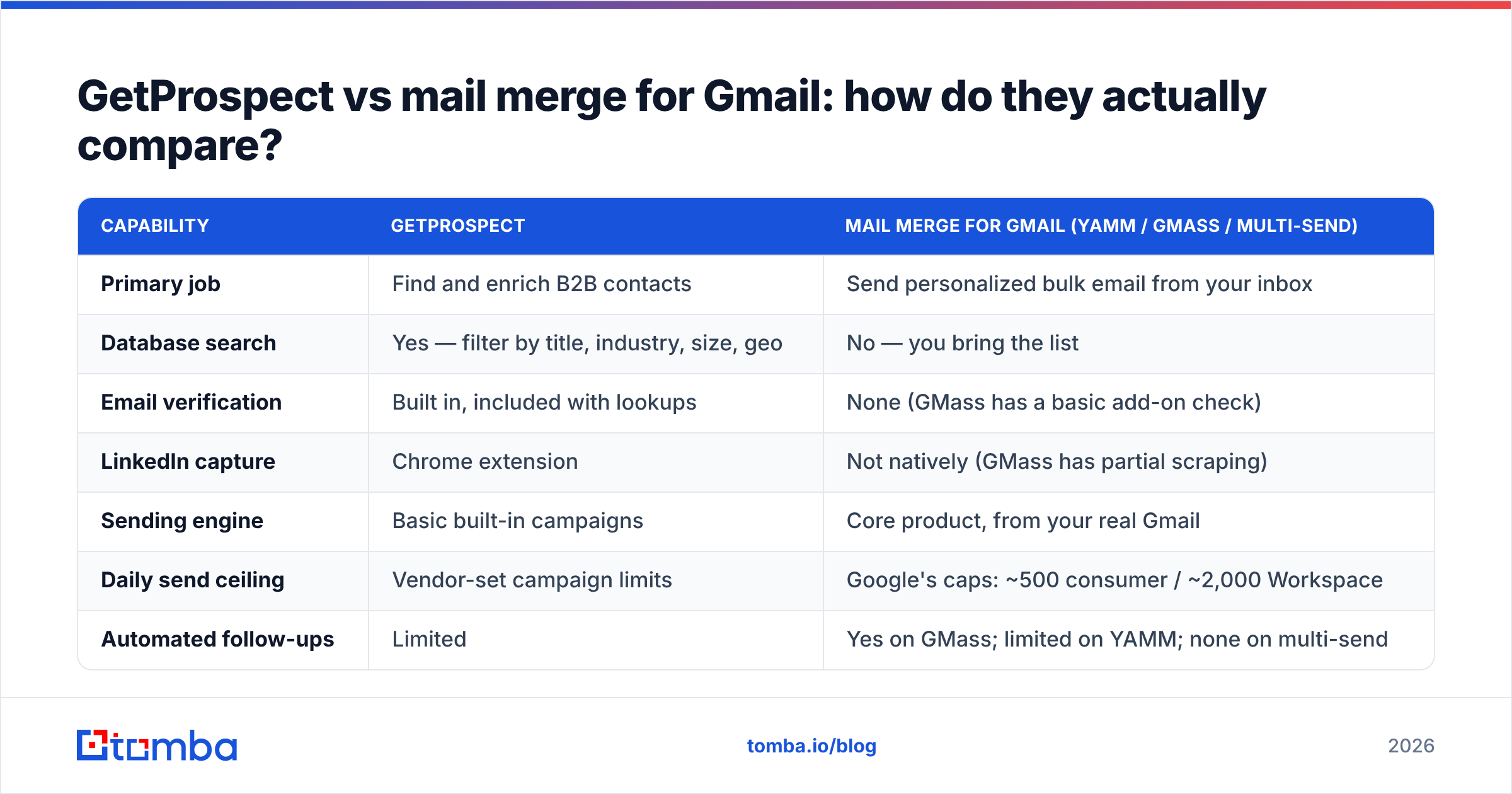
| Capability | GetProspect | Mail merge for Gmail (YAMM / GMass / multi-send) |
|---|---|---|
| Primary job | Find and enrich B2B contacts | Send personalized bulk email from your inbox |
| Database search | Yes — filter by title, industry, size, geo | No — you bring the list |
| Email verification | Built in, included with lookups | None (GMass has a basic add-on check) |
| LinkedIn capture | Chrome extension | Not natively (GMass has partial scraping) |
| Sending engine | Basic built-in campaigns | Core product, from your real Gmail |
| Daily send ceiling | Vendor-set campaign limits | Google's caps: ~500 consumer / ~2,000 Workspace |
| Automated follow-ups | Limited | Yes on GMass; limited on YAMM; none on multi-send |
| Typical entry price | Free tier, then roughly $49/mo and up | Free (multi-send) to ~$25–$50/user/mo |
| Best for | Building a target list from scratch | Mailing a list you already own |
| Worst at | Being your long-term sequencer | Telling you if an address is real |
Read that table as a division of labor, not a scoreboard. The only row where they truly overlap — sending — is the row where both are mediocre compared to a purpose-built sequencer.
Which one should you buy first?#
Buy based on which side of your funnel is actually leaking. Four common situations:
- You're a solo founder with 300 hand-picked target accounts. Buy the mail merge. You already know who to contact; you need personalization at volume and follow-ups that stop when someone replies. Verify the list first with a free email checker, then send.
- You're an SDR with a quota and no list. You need data first. A sequencer with an empty list is a $50/month text editor.
- You're a marketing team running event invites or newsletters to known contacts. Mail merge, every time. YAMM or native multi-send, done in an afternoon. Do not buy a contact database for this.
- You're a 5–20 person sales team past 3,000 sends/month. Buy both, separately, and pick a real sequencer over the Gmail add-on. You've outgrown the caps and you need reply attribution.
The failure mode worth naming: buying a database, discovering the built-in sender is weak, buying a sequencer three months later, and now paying for two overlapping subscriptions while using half of each. Decide the architecture up front.
Where does each option break at scale?#
GetProspect breaks on coverage and freshness. Any single-vendor database has holes. When your ICP shifts — new geography, smaller companies, a niche vertical — hit rates drop and you find out the hard way, mid-quarter. The fix is either a second data source or an API-based finder you can query on demand instead of pulling static exports. This is exactly what an email finder API is for: enrich at the moment of send, not three months before it.
Mail merge for Gmail breaks on three things at once:
- Volume ceilings. Around 2,000/day on Workspace, and realistically you should stay well under that per inbox to protect sender reputation. Scaling means more inboxes and more domains, which the add-ons don't manage for you.
- Bounce blindness. These tools send what you give them. A list with 12% invalid addresses will torch your domain reputation, and you'll get no warning until Google starts filtering you.
- Reply and thread handling. Native multi-send has no reply detection at all. If you mail 800 people and 40 reply, you're sorting them manually.
That second bullet is where most Gmail mail merge campaigns quietly die. Google's own bulk sender guidance treats spam complaints and invalid recipients as reputation signals; cross the threshold and delivery degrades across your whole domain, not just the campaign. Reviews on G2 for every tool in this category say some version of the same thing — great until the list quality slips.

How do the real costs compare?#
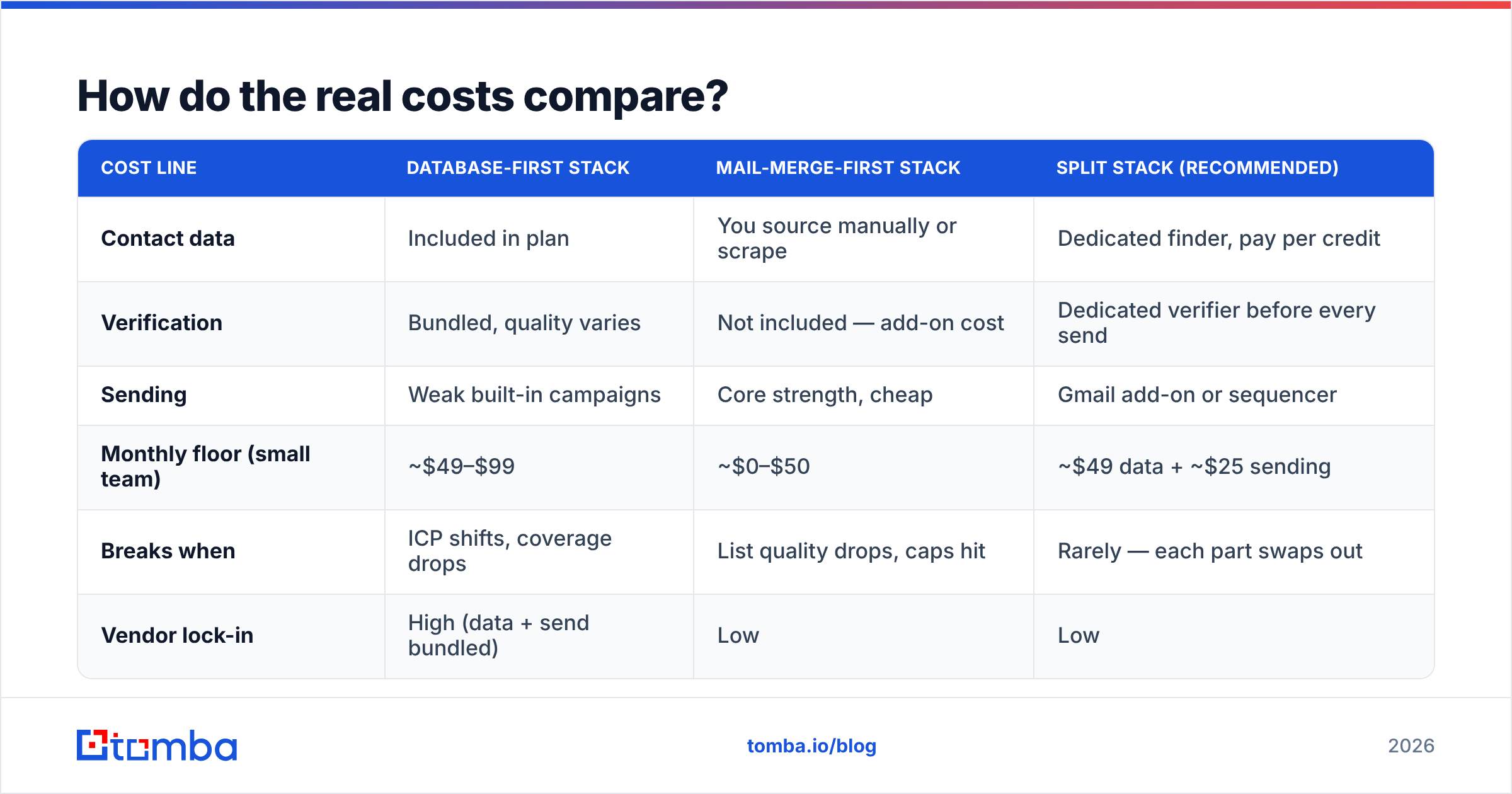
| Cost line | Database-first stack | Mail-merge-first stack | Split stack (recommended) |
|---|---|---|---|
| Contact data | Included in plan | You source manually or scrape | Dedicated finder, pay per credit |
| Verification | Bundled, quality varies | Not included — add-on cost | Dedicated verifier before every send |
| Sending | Weak built-in campaigns | Core strength, cheap | Gmail add-on or sequencer |
| Monthly floor (small team) | ~$49–$99 | ~$0–$50 | ~$49 data + ~$25 sending |
| Breaks when | ICP shifts, coverage drops | List quality drops, caps hit | Rarely — each part swaps out |
| Vendor lock-in | High (data + send bundled) | Low | Low |
The split stack usually wins on total cost, not just flexibility, because you stop paying database prices for sequencing features you don't use. For reference, Tomba pricing starts free at 25 searches/month, then $49/mo Starter, $99/mo Growth, and $249/mo Pro — sized for the data half only, which lets you spend the rest of the budget on a sender you actually like.
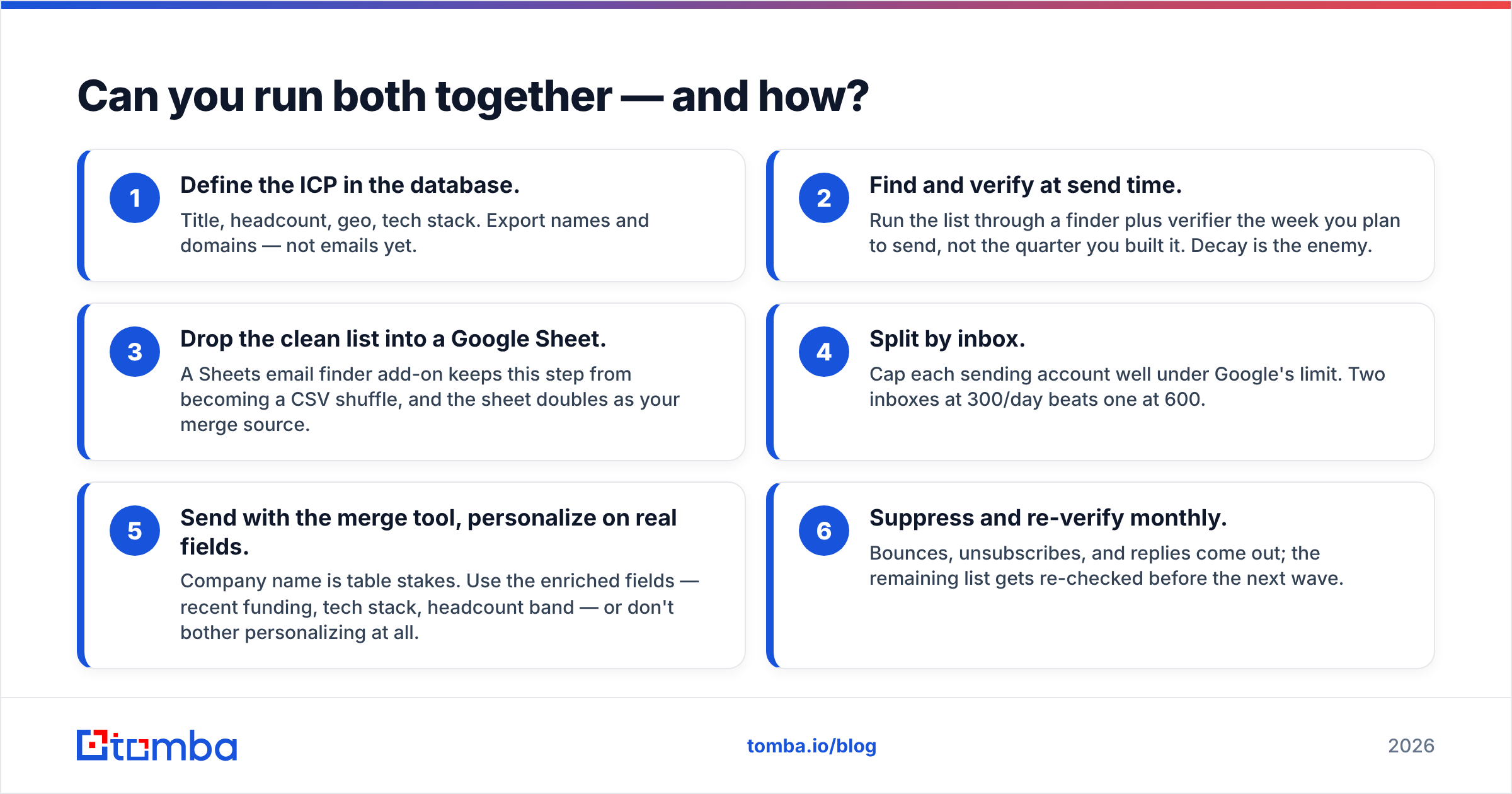
Can you run both together — and how?#
Yes, and this is what most functional outbound teams end up doing. A workable pipeline:
- Define the ICP in the database. Title, headcount, geo, tech stack. Export names and domains — not emails yet.
- Find and verify at send time. Run the list through a finder plus verifier the week you plan to send, not the quarter you built it. Decay is the enemy.
- Drop the clean list into a Google Sheet. A Sheets email finder add-on keeps this step from becoming a CSV shuffle, and the sheet doubles as your merge source.
- Split by inbox. Cap each sending account well under Google's limit. Two inboxes at 300/day beats one at 600.
- Send with the merge tool, personalize on real fields. Company name is table stakes. Use the enriched fields — recent funding, tech stack, headcount band — or don't bother personalizing at all.
- Suppress and re-verify monthly. Bounces, unsubscribes, and replies come out; the remaining list gets re-checked before the next wave.
Step two is where most of the ROI hides. A bounce rate under 2% is the difference between a campaign that lands in the primary tab and one that gets throttled by week three.
What about data accuracy — how do you actually check it?#
Don't trust anyone's headline accuracy number, including ours. Run the same test on every vendor you're evaluating:
- Take 100 contacts you already know are valid — customers, past leads, your own team's alumni network.
- Feed the names and domains to each tool.
- Score three things: hit rate (how many returned an address), precision (how many matched the address you already had), and catch-all handling (does the tool flag ambiguous domains honestly, or return a guess as "valid"?).
That third one separates serious data vendors from pattern generators. A large share of B2B domains accept all mail, so any tool can claim a hit by guessing first.last@ and calling it verified. Honest tools tell you it's a catch-all and let you decide; a catch-all verifier resolves the ones that can be resolved and marks the rest as risky rather than pretending.
Run that 100-contact test before you commit to an annual plan. It takes an hour and it's the only accuracy benchmark that reflects your market.
The verdict: which wins?#
Neither, because they were never in the same race. Here's the practical call:
- Need contacts? Buy a data tool. GetProspect is a reasonable option, especially if LinkedIn capture is your daily workflow and your ICP sits in well-covered markets.
- Need to send? Buy a Gmail mail merge. GMass for sales sequences, YAMM or native multi-send for simple broadcasts. Both are cheap and both work.
- Need both? Keep them separate. Bundled stacks feel tidy on the invoice and cost you flexibility everywhere else.
The one non-negotiable in either direction: verify before you send. Deliverability problems compound, and a domain reputation takes months to rebuild.
If the data half is what's broken, start with the Tomba Email Finder. Search by domain, name, or company, get verification built into the same call, and export straight into whatever Gmail merge tool you already use. The free tier gives you 25 searches a month — enough to run the 100-contact accuracy test above and decide with your own numbers instead of ours.
Related guides#
Ready to find emails that actually work?
Join 150,000+ professionals who stopped guessing and started sending. Free credits on signup — no credit card required.
Get the Tomba newsletter
Practical outbound tactics and product updates — once every two weeks.
About the author