GetProspect vs MyEmailVerifier: Which One Do You Need?
GetProspect finds B2B emails, MyEmailVerifier cleans them. They solve different halves of the same problem. Here is how they compare on accuracy, pricing, and when a single tool is enough.
TL;DR
- GetProspect is a lead database and email finder. MyEmailVerifier is a standalone email verification service. They are not direct competitors, and comparing them head-to-head only makes sense once you know which half of the pipeline is broken.
- If your list is empty, you need a finder. If your list is full but bouncing, you need a verifier. Buying the wrong one wastes money and does nothing for your reply rate.
- GetProspect's value is its contact database plus a LinkedIn extension. MyEmailVerifier's value is cheap, high-throughput, pay-as-you-go list cleaning with no monthly commitment.
- Running both means two vendors, two credit systems, and two places where data quality can silently degrade between export and import.
- A single platform that finds and verifies (with catch-all handling built in) removes the handoff entirely, which is where most bounce problems actually start.
What is GetProspect and what does it actually do?#
GetProspect is a B2B contact database with an email-finding layer on top. You search by company, job title, industry, headcount, or location, and it returns work email addresses plus firmographic fields. Its most-used surface is the Chrome extension that pulls contacts off LinkedIn search results and profiles into a list you can export or push to a CRM.
The core promise is discovery. You start with a target account or an ICP filter and end with rows that contain names, titles, companies, and email addresses. GetProspect does run its own validity checks on the emails it returns, and it labels them (valid, risky/accept-all, invalid) so you can filter before export. That built-in check is real, but it is a byproduct of finding, not a dedicated verification engine.
Where GetProspect gets thin is exactly where every database gets thin: long-tail companies, non-English markets, recently changed roles, and domains that accept every address. If a contact is not in the index, no amount of filtering conjures them.
What is MyEmailVerifier and what does it actually do?#
MyEmailVerifier does one thing: it takes a list of email addresses you already have and tells you which ones are safe to send to. Upload a CSV, or hit the API, and you get back statuses like deliverable, undeliverable, catch-all/accept-all, role-based, disposable, and unknown.
It performs syntax checks, MX record lookups, SMTP handshakes, disposable-domain matching, role-account detection, and greylisting handling. Its selling point is pricing: pay-as-you-go credits with no forced subscription, which makes it easy to clean a one-off list of 50,000 addresses without signing an annual contract.
What it will never do is give you an address you do not have. Verification is a filter, not a source.

How do GetProspect and MyEmailVerifier compare side by side?#
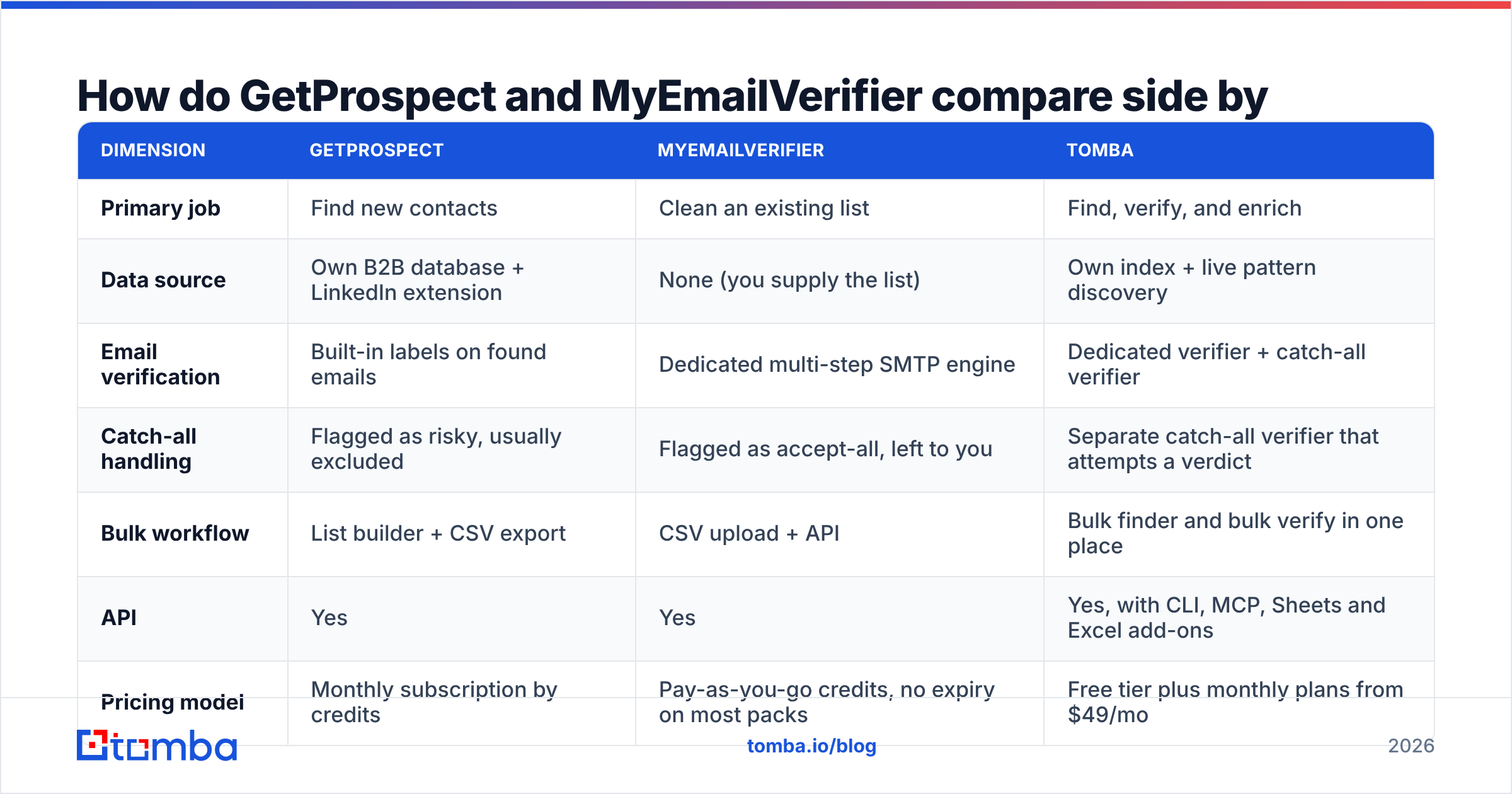
The clean way to look at this is by job to be done, not by feature checklist.
| Dimension | GetProspect | MyEmailVerifier | Tomba |
|---|---|---|---|
| Primary job | Find new contacts | Clean an existing list | Find, verify, and enrich |
| Data source | Own B2B database + LinkedIn extension | None (you supply the list) | Own index + live pattern discovery |
| Email verification | Built-in labels on found emails | Dedicated multi-step SMTP engine | Dedicated verifier + catch-all verifier |
| Catch-all handling | Flagged as risky, usually excluded | Flagged as accept-all, left to you | Separate catch-all verifier that attempts a verdict |
| Bulk workflow | List builder + CSV export | CSV upload + API | Bulk finder and bulk verify in one place |
| API | Yes | Yes | Yes, with CLI, MCP, Sheets and Excel add-ons |
| Pricing model | Monthly subscription by credits | Pay-as-you-go credits, no expiry on most packs | Free tier plus monthly plans from $49/mo |
| Free entry point | Limited free monthly credits | Free trial credits | 25 searches/month free |
| Best for | Building lists from scratch | Cleaning purchased or aging lists | Teams that want one pipeline end to end |
Read that table as a fork in the road. GetProspect and MyEmailVerifier sit on opposite ends of the same workflow. Buying either one alone leaves half the pipeline unowned.
Which one is more accurate?#
This is the wrong question phrased two ways, so answer it as two questions.
Finder accuracy means: of the emails a tool returns, how many actually exist and reach a human? That is GetProspect's metric. Database-driven finders live and die on index freshness. B2B contact data decays roughly 2 to 2.5 percent per month as people change jobs, which means a record that was perfect in January is materially unreliable by summer. Vendors that only refresh from static scrapes fall behind fastest.
Verifier accuracy means: of the addresses a tool marks deliverable, how many actually deliver, and how many good addresses does it wrongly kill? That is MyEmailVerifier's metric. Any competent SMTP verifier clears 95 percent-plus on clean, non-catch-all domains. The separation between average and excellent shows up on the hard cases: Google Workspace and Microsoft 365 tenants that reject probing, greylisting servers, and accept-all domains.

Catch-all domains are the real dividing line. Somewhere between 15 and 25 percent of B2B domains accept every address at the SMTP layer, which means a plain handshake cannot prove anything. Most verifiers return "accept-all" and hand the decision back to you. That is honest, but it is not useful — those contacts are frequently your best accounts, and dropping them silently shrinks your addressable market.
This is why a dedicated catch-all verifier matters more than another decimal point on the headline accuracy claim. Recovering a quarter of your list is worth more than a marginal improvement on the easy 75 percent.
One more accuracy trap: verifying an address does not mean it will land in the inbox. Verification confirms the mailbox exists. Whether your message reaches the primary tab depends on email deliverability factors like authentication, domain reputation, and sending volume. Cleaning your list is a prerequisite, not a guarantee.
How does pricing compare for a real workflow?#
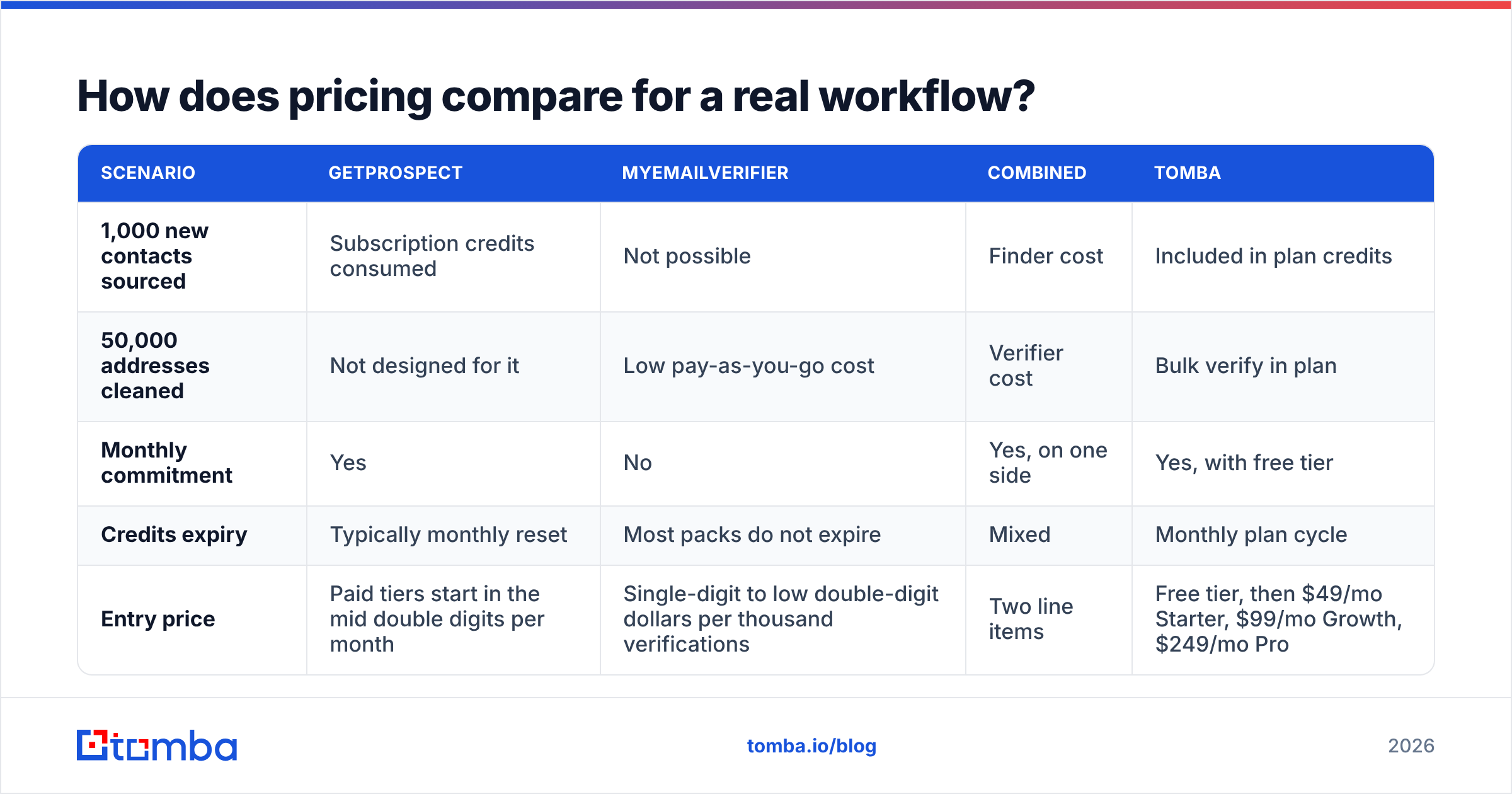
Compare on cost per usable contact, not cost per credit. A cheap credit that returns a risky address is not cheap.
| Scenario | GetProspect | MyEmailVerifier | Combined | Tomba |
|---|---|---|---|---|
| 1,000 new contacts sourced | Subscription credits consumed | Not possible | Finder cost | Included in plan credits |
| 50,000 addresses cleaned | Not designed for it | Low pay-as-you-go cost | Verifier cost | Bulk verify in plan |
| Monthly commitment | Yes | No | Yes, on one side | Yes, with free tier |
| Credits expiry | Typically monthly reset | Most packs do not expire | Mixed | Monthly plan cycle |
| Entry price | Paid tiers start in the mid double digits per month | Single-digit to low double-digit dollars per thousand verifications | Two line items | Free tier, then $49/mo Starter, $99/mo Growth, $249/mo Pro |
Pricing on all three moves, so check the vendor pages before you commit — Tomba pricing is public, and both GetProspect and MyEmailVerifier publish current rates on their own sites.
The hidden cost in the two-vendor setup is not the invoice. It is the handoff. Export a GetProspect list, upload it to MyEmailVerifier, download the cleaned file, re-map columns, re-import to your sequencer. Every step is a place to lose fields, duplicate rows, or send to the un-cleaned version by accident. Teams running 5,000 contacts a month typically burn several hours on this shuffle, and the failure mode is silent.
When should you pick GetProspect?#
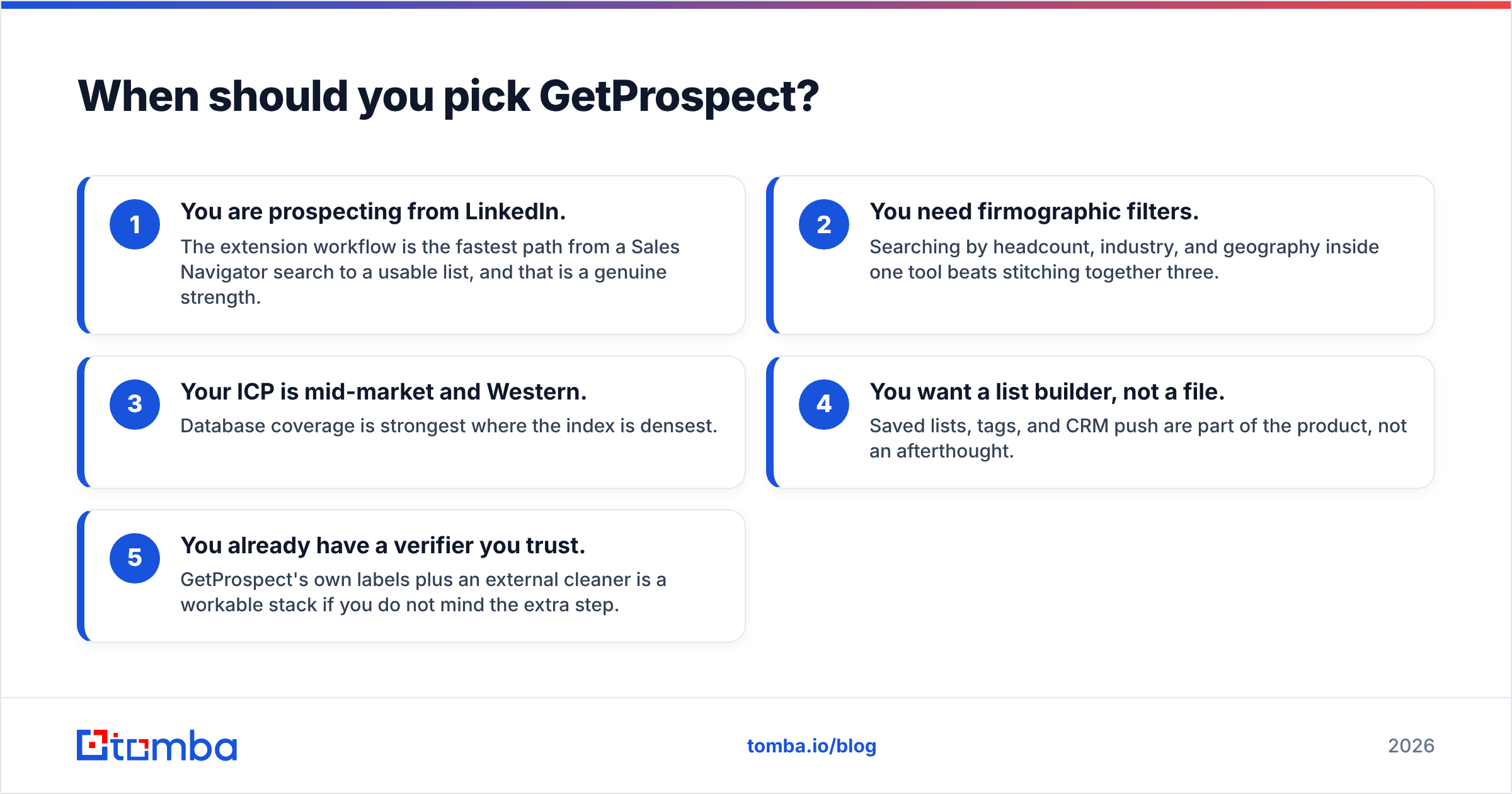
Pick GetProspect when sourcing is your bottleneck.
- You are prospecting from LinkedIn. The extension workflow is the fastest path from a Sales Navigator search to a usable list, and that is a genuine strength.
- You need firmographic filters. Searching by headcount, industry, and geography inside one tool beats stitching together three.
- Your ICP is mid-market and Western. Database coverage is strongest where the index is densest.
- You want a list builder, not a file. Saved lists, tags, and CRM push are part of the product, not an afterthought.
- You already have a verifier you trust. GetProspect's own labels plus an external cleaner is a workable stack if you do not mind the extra step.
When should you pick MyEmailVerifier?#
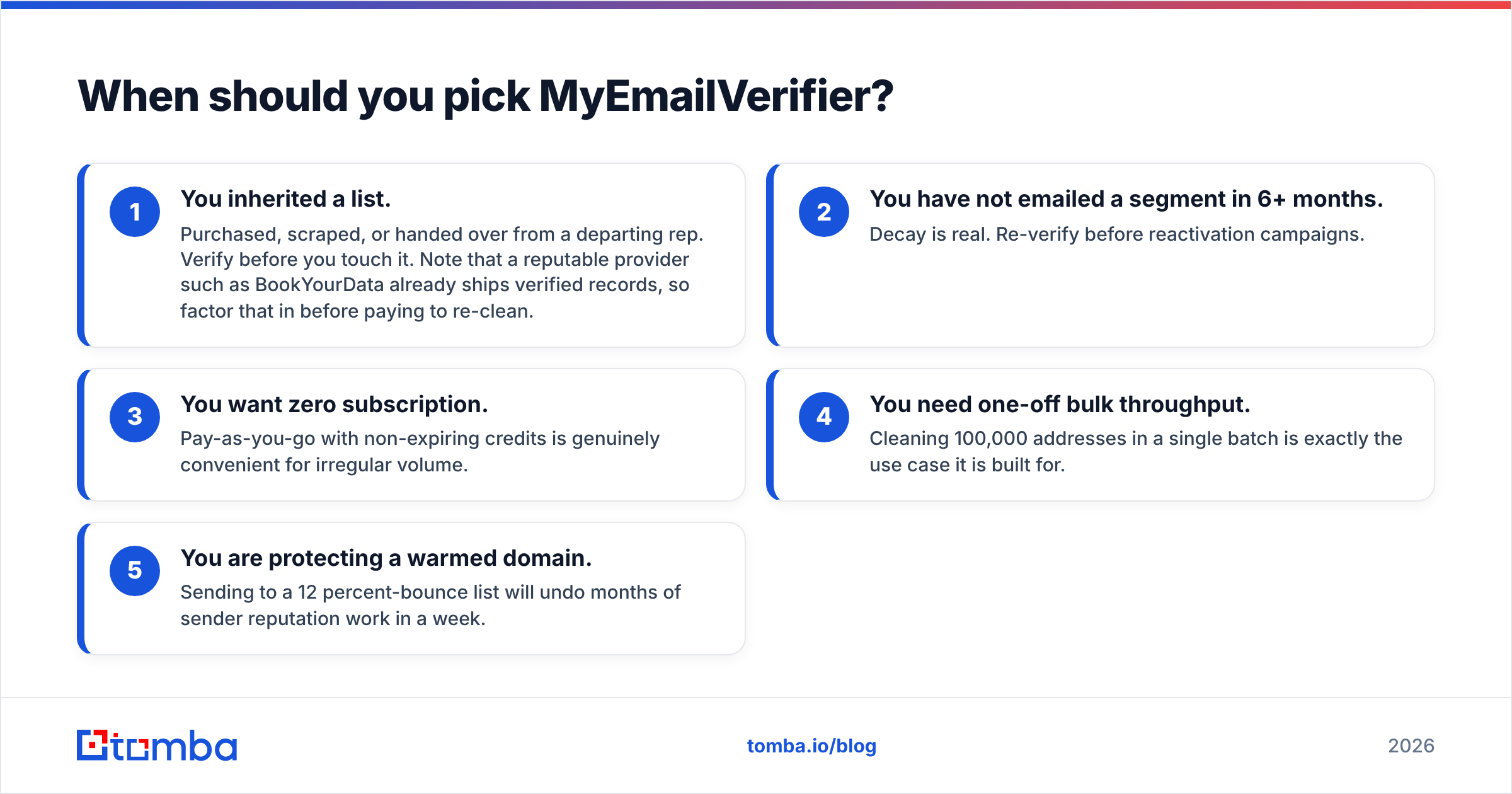
Pick MyEmailVerifier when your list already exists and it is bouncing.
- You inherited a list. Purchased, scraped, or handed over from a departing rep. Verify before you touch it. Note that a reputable provider such as BookYourData already ships verified records, so factor that in before paying to re-clean.
- You have not emailed a segment in 6+ months. Decay is real. Re-verify before reactivation campaigns.
- You want zero subscription. Pay-as-you-go with non-expiring credits is genuinely convenient for irregular volume.
- You need one-off bulk throughput. Cleaning 100,000 addresses in a single batch is exactly the use case it is built for.
- You are protecting a warmed domain. Sending to a 12 percent-bounce list will undo months of sender reputation work in a week.

Do you actually need both tools?#
You need both functions. You do not necessarily need both vendors.
Every outbound pipeline has the same four stages: identify the account, find the contact, verify the address, send. GetProspect owns stage two. MyEmailVerifier owns stage three. Nobody owns the seam between them, which is where most bounce problems are actually created — an address found in March, exported in April, verified in May, and sent in June is three months of decay stacked on top of each other.
Consolidating removes the seam. Tomba's email finder returns an address and runs it through the same verification layer that powers the standalone email verifier, so the confidence score you see is current at the moment of the search, not at the moment of the last index refresh. If you work in batches, bulk email finder and bulk verification run against the same credit pool, which kills the CSV shuffle entirely.
That is not a claim that consolidation beats best-of-breed on every axis. If you clean a million addresses a quarter and never source a single one, a dedicated pay-as-you-go verifier is cheaper per unit and you should use it. The consolidation argument applies to the much more common case: a team of 2 to 20 reps who source a few thousand contacts a month and need them clean on arrival.

How should you test before committing?#
Run the same 100 contacts through every option you are considering. Do not trust marketing claims, including the ones in this post.
- Build a control set. Pick 100 contacts from your real ICP, including 20 from small or non-Western companies and 20 from domains you know are catch-all.
- Score coverage first. How many addresses did each tool return at all? A tool with 92 percent accuracy on 40 percent coverage loses to one with 88 percent on 75 percent coverage.
- Score the catch-all bucket separately. Count how many "accept-all" results each tool refuses to resolve. That number is your hidden list shrinkage.
- Send a small real batch. 50 addresses, from a warmed domain, and read the actual bounce report. SMTP verdicts and inbox reality are not the same thing.
- Price it on the whole workflow. Add finder cost, verifier cost, and the hours spent moving files between them.
Independent review sites like G2 are useful for spotting recurring support and billing complaints, but ignore aggregate star ratings for accuracy claims — reviewers rarely run controlled tests.
What's the verdict?#
GetProspect wins if you need contacts you do not have. It is a legitimate list-building tool with a strong LinkedIn workflow, and its built-in labels are good enough that some teams never add a second verifier.
MyEmailVerifier wins if you need to clean a list you already own, especially at volume, especially without a subscription. It is well-priced for what it does and it does not pretend to be a database.
Neither wins if you were hoping one tool covers the whole job. They cover adjacent halves, and the gap between them is where decay, mis-mapped CSVs, and unresolved catch-alls quietly cost you replies.
If you would rather own the whole pipeline in one place, start with the Tomba Email Finder. The free tier gives you 25 searches a month with verification included, so you can run your own 100-contact control test before spending anything. If coverage on your ICP holds up, Starter is $49/mo and the same credits cover finding, verifying, catch-all checks, and enrichment — one vendor, one credit pool, no CSV shuffle between the tool that finds and the tool that cleans.
Related guides#
Ready to find emails that actually work?
Join 150,000+ professionals who stopped guessing and started sending. Free credits on signup — no credit card required.
Get the Tomba newsletter
Practical outbound tactics and product updates — once every two weeks.
About the author