GetProspect vs NinjaPear: Honest 2026 Feature Comparison
GetProspect is the established LinkedIn-first email finder; NinjaPear is the cheaper newcomer. We compare coverage, verification, pricing math and API depth — plus where each one quietly costs you money.
GetProspect vs NinjaPear comes down to one question: which tool hands you more usable emails per dollar? One is the established LinkedIn-first finder. The other is the cheap newcomer. Here is the short version.
TL;DR
- GetProspect is the mature, LinkedIn-first pick. You get a Chrome extension, a list manager, and a documented API. It fits reps who prospect one profile at a time.
- NinjaPear is lighter and cheaper. It wins on entry price. It says far less about data sources, verification, and admin controls.
- Credits are not what you actually pay. Cost per verified email is the real number. It often runs 2-4x the sticker rate.
- If you work by API, in bulk, or inside a CRM, both tools feel narrow. That is where Tomba fits.
- Rule of thumb: GetProspect for LinkedIn work, NinjaPear for a cheap solo test, a full platform past a few thousand contacts a month.
What are GetProspect and NinjaPear?#
GetProspect is a B2B email finder built around LinkedIn. You install the extension. You run a LinkedIn or Sales Navigator search. It pulls contacts into lists with company, title, and email attached. The tool has been around long enough to gather real reviews on G2's lead intelligence category. Plans and API docs are public at getprospect.com.
NinjaPear is newer and smaller. The pitch is simple: paste a name and a domain, get an email back, pay less. Bulk uploads work too. Much less is public about how it sources and checks data. That is a fair thing to weigh, not a knock. Confirm plans, credit rules, and verification on the vendor site before you spend.
One honest note up front. These two products are not documented to the same depth. GetProspect has years of public reviews. NinjaPear has a thin public record. Where I cannot verify a number, this post says so.
GetProspect vs NinjaPear: how do they compare at a glance?#
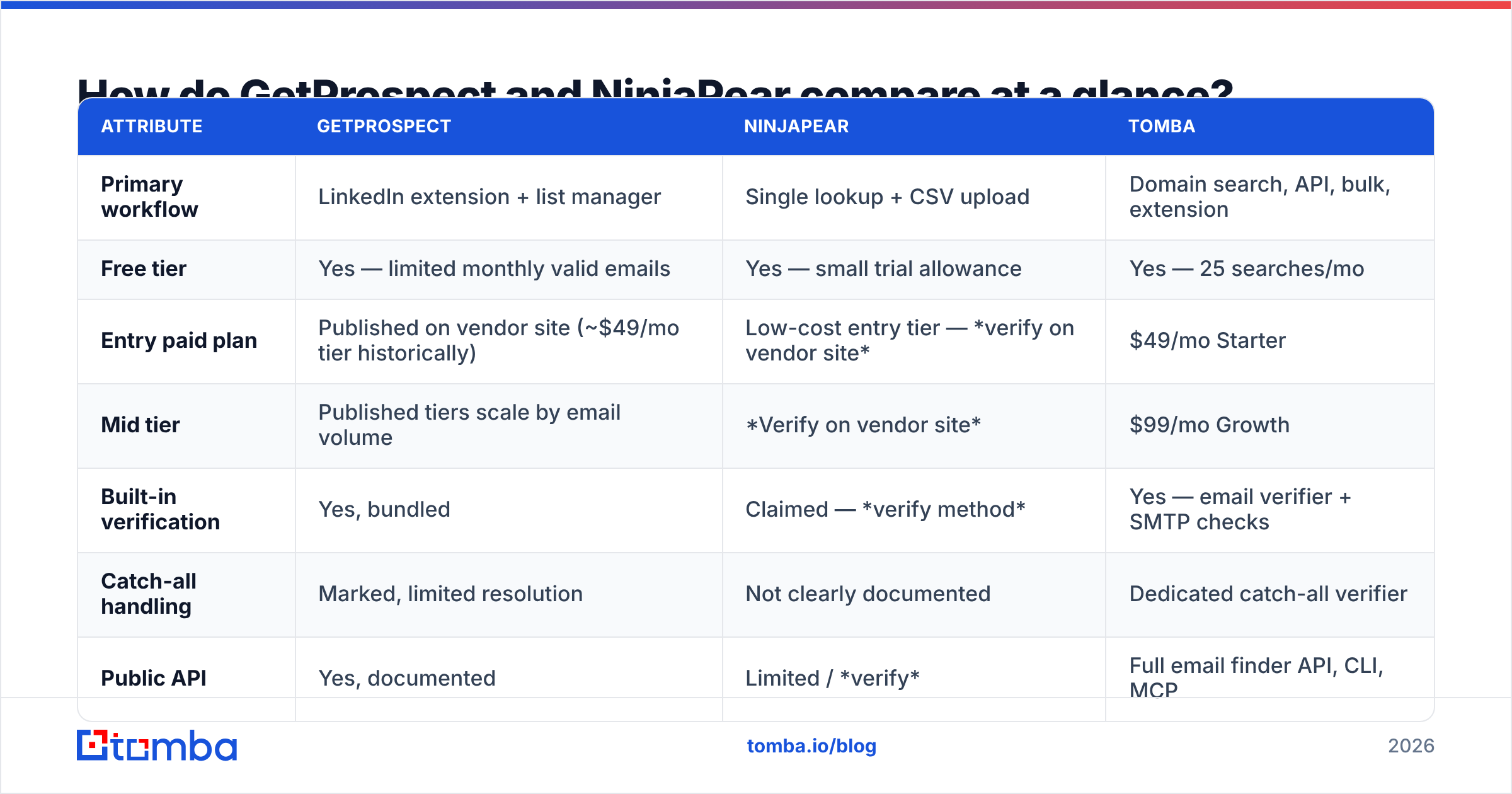
Here is the head-to-head on the things that change your day. Cells marked verify on vendor site are ones where public docs are too thin to quote.
| Attribute | GetProspect | NinjaPear | Tomba |
|---|---|---|---|
| Primary workflow | LinkedIn extension + list manager | Single lookup + CSV upload | Domain search, API, bulk, extension |
| Free tier | Yes — limited monthly valid emails | Yes — small trial allowance | Yes — 25 searches/mo |
| Entry paid plan | Published on vendor site (~$49/mo tier historically) | Low-cost entry tier — verify on vendor site | $49/mo Starter |
| Mid tier | Published tiers scale by email volume | Verify on vendor site | $99/mo Growth |
| Built-in verification | Yes, bundled | Claimed — verify method | Yes — email verifier + SMTP checks |
| Catch-all handling | Marked, limited resolution | Not clearly documented | Dedicated catch-all verifier |
| Public API | Yes, documented | Limited / verify | Full email finder API, CLI, MCP |
| Bulk processing | CSV upload | CSV upload | Bulk email finder + async jobs |
| Native integrations | HubSpot, Zapier, others | Few | HubSpot, Salesforce, Pipedrive, Zapier, Make, Sheets |
| Phone numbers | No | No | Yes, separate module |
| Best for | LinkedIn-first SDRs | Solo founders on tight budgets | API/bulk-driven GTM teams |
The pattern is familiar. GetProspect is broader and more accountable. NinjaPear is cheaper, and it trades depth for price.
GetProspect vs NinjaPear: which finds more valid emails?#
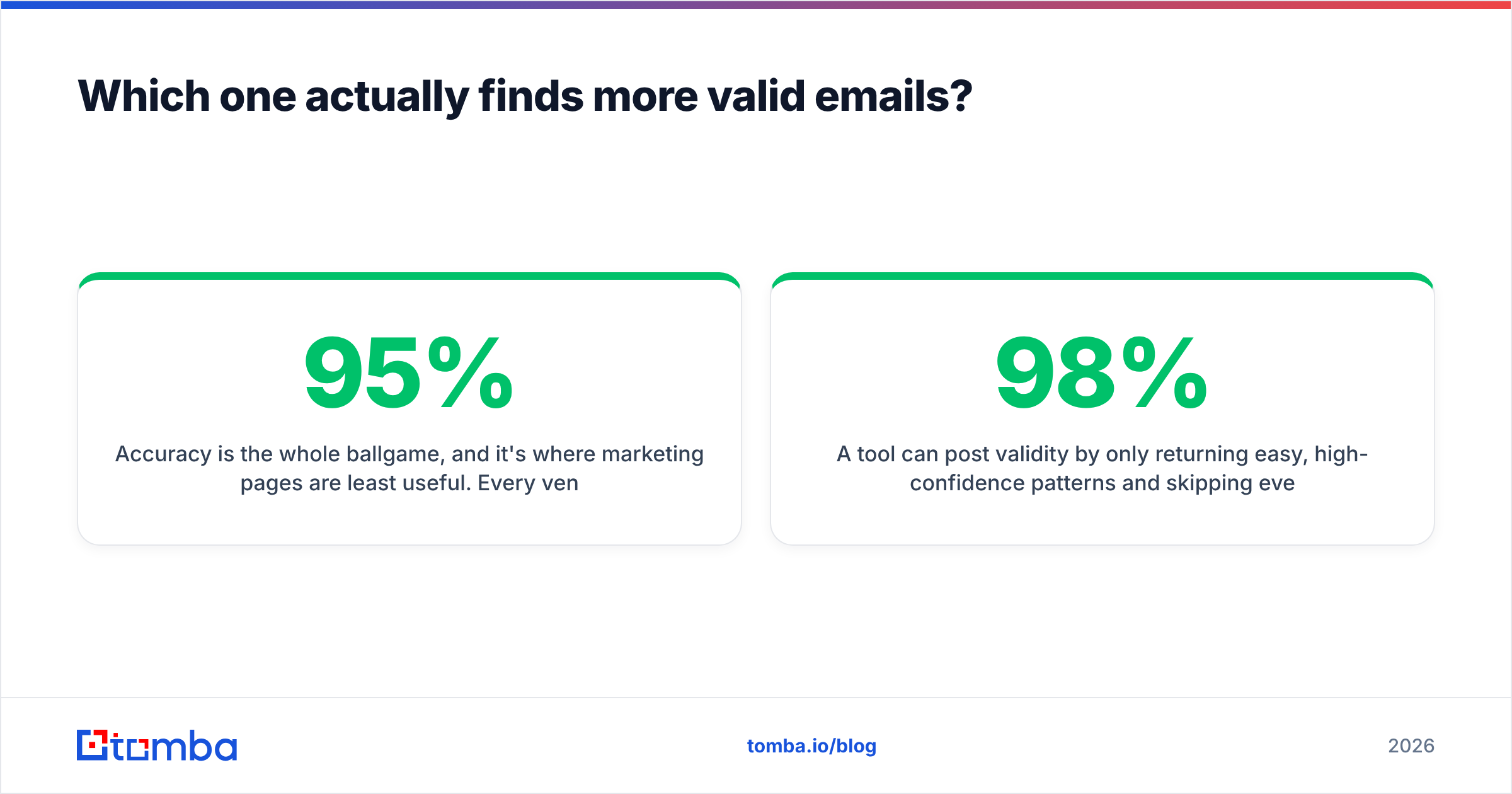
Accuracy is the whole game. Marketing pages help least here. Every vendor claims 95% or better. That number usually describes the emails they chose to return. It does not describe how much of your list they can solve.
Two numbers matter, and they pull against each other:
- Hit rate (coverage) — of 1,000 target contacts, how many get an address at all?
- Validity rate (accuracy) — of the addresses returned, how many accept mail?
A tool can post 98% validity by returning only the easy, high-confidence patterns. You are left with a 40% hit rate and 600 dead ends. Another tool answers for almost everyone at 85% coverage and bounces on one in five. Neither headline tells you the cost per usable contact.

In practice, GetProspect's records tend to be current on title and company. The profile is the source of truth, so you catch job changes fast. The weakness is shared by every LinkedIn-first tool. If someone is quiet on LinkedIn, or the company uses an odd email format, coverage drops.
NinjaPear leans on pattern-and-verify. It infers the company format, builds candidates, then tests them. That works well at mid-market firms with clean formats. It works poorly at large firms with legacy or random addresses. Results also swing with how strict the check step is.

How to test this yourself in 30 minutes, before you pay anyone:
- Build a 100-row control list from your real ICP. Skip famous brands. Mix company sizes, and add one enterprise domain.
- Run the list through each free tier — GetProspect's allowance, NinjaPear's trial, and Tomba's 25 free searches.
- Record coverage apart from validity. Two columns. No blending.
- Check the winners with a neutral third party so no tool grades its own homework. A standalone email verifier or a free email checker does the job.
- Divide plan cost by verified results, not by credits used.
That last step is where most comparisons fall apart. Run it before the trial ends.
What do you really pay per usable email?#
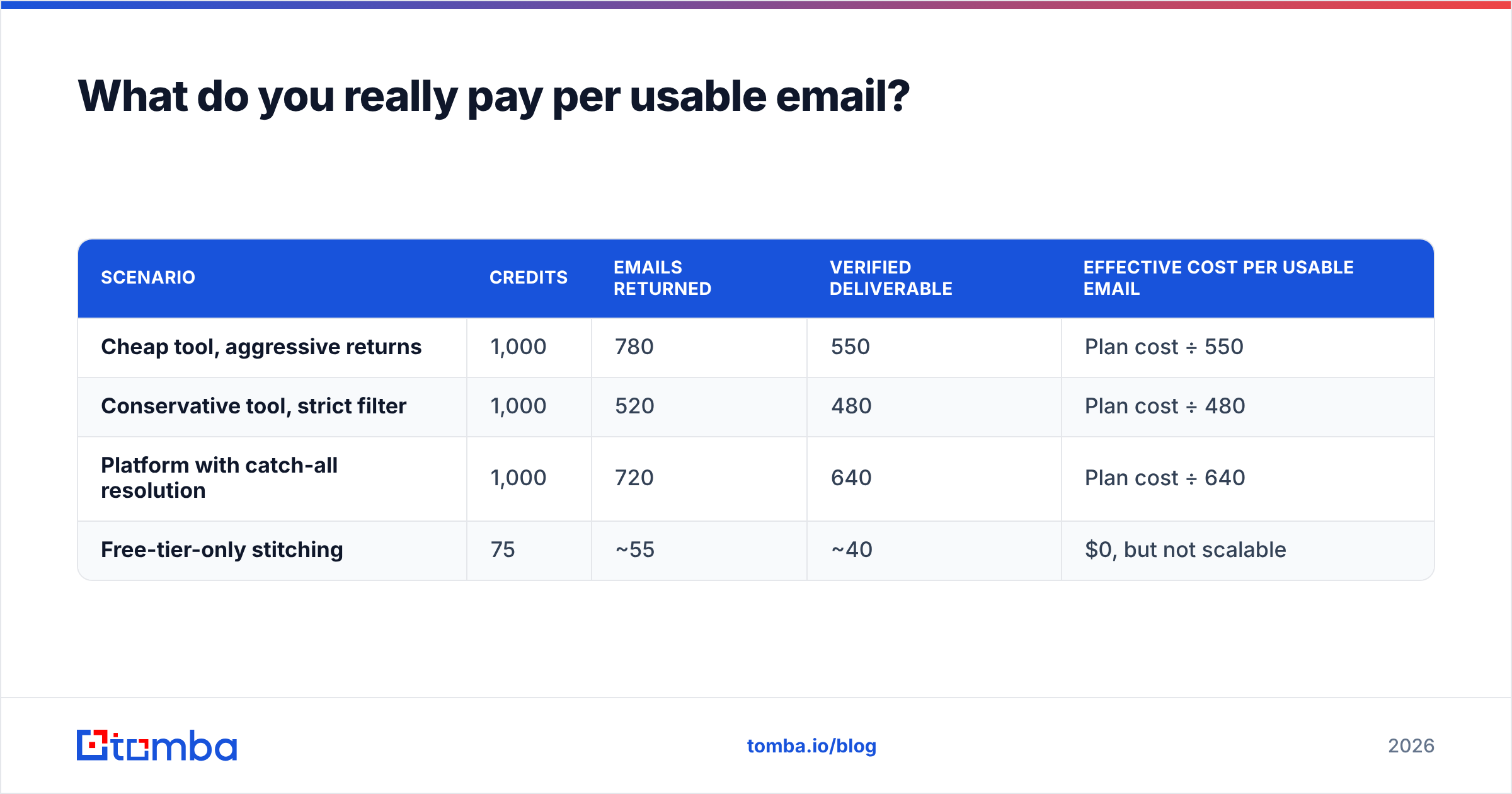
Credits are a marketing unit. Usable contacts are a business unit. Here is the math on a 1,000-credit month. The assumptions are conservative, so swap in your own test data.
| Scenario | Credits | Emails returned | Verified deliverable | Effective cost per usable email |
|---|---|---|---|---|
| Cheap tool, aggressive returns | 1,000 | 780 | 550 | Plan cost ÷ 550 |
| Conservative tool, strict filter | 1,000 | 520 | 480 | Plan cost ÷ 480 |
| Platform with catch-all resolution | 1,000 | 720 | 640 | Plan cost ÷ 640 |
| Free-tier-only stitching | 75 | ~55 | ~40 | $0, but not scalable |
The GetProspect vs NinjaPear price gap looks large on the pricing page. It shrinks once you divide by verified results.
A $20 plan that yields 550 usable emails costs about $0.036 each. A $49 plan that yields 640 costs about $0.077 each. The cheap plan wins that math. Then count what the extra 90 bounces do to your domain. Past roughly 3-4%, bounces start to hurt your sender reputation. That damage costs far more than credits. HubSpot's sales research has made this point for years. Deliverability compounds, in both directions.
Check two billing details with both vendors first:
- Are failed lookups charged? Some tools bill every query. Others bill only successful returns. This alone can move real cost by 30%.
- Do credits roll over? Ask what happens if you downgrade mid-cycle. An annual lock-in on an unproven hit rate is a bad month-one trade.
Tomba's tiers are public: Free (25 searches a month), Starter $49, Growth $99, Pro $249, and custom Enterprise. The pricing page gives you a third data point for the same math.
How do the two workflows actually differ day to day?#
This part decides whether a tool survives past week two.
- GetProspect: browse, then capture. You live inside LinkedIn. Search, scroll, capture, tag into a list, then export or push to the CRM. It is fast for one rep doing manual research. It is a poor backend for automation.
- NinjaPear: look up, then download. It is a utility, not a workspace. You bring the names and domains. It returns emails. You take the CSV somewhere else. Fewer features to learn, and no pretence of being a CRM.
The third option is not a browser tool at all.
- Platform: query, then automate. In steady state you never open a UI. A job hits the API when a form fills or a CRM record lands empty. Domain search returns every address found at a company in one call. The data enrichment endpoint fills the rest of the record.
- Hybrid reality. Most teams run two of these. A rep uses an extension for named accounts. RevOps runs an API job for inbound and CRM hygiene.

One question breaks the tie. Does a human pick which contacts to look up, or does a system? Human-picked means extension-first, and GetProspect is the stronger of the two. System-picked means API-first, and both tools become a bottleneck.
Does either tool handle verification and catch-all domains properly?#
Verification is where the marketing gap is widest. Three different things get called "verified":
- Syntax and MX check — the domain exists and can receive mail. Cheap, and close to meaningless as a quality signal.
- SMTP handshake — the mail server is asked whether the mailbox exists. Reliable when the server answers honestly.
- Catch-all resolution — the server accepts everything, so the handshake tells you nothing. Solving these needs pattern scoring or historical send data.
Catch-all domains are 15-20% of B2B, and they cluster in enterprise. Those are the accounts with the biggest deals. GetProspect flags catch-alls and leaves the call to you. NinjaPear's handling is not documented. Test it with two or three known catch-all domains during the trial.
Tomba treats this as its own problem, with a dedicated catch-all finder. Instead of returning "unknown" and billing you anyway, it scores confidence. You decide whether the address is worth a send slot.
Run a spam checker and confirm your SPF record before you scale. A perfect list on a broken domain still lands in spam.
Where does Tomba fit in this comparison?#
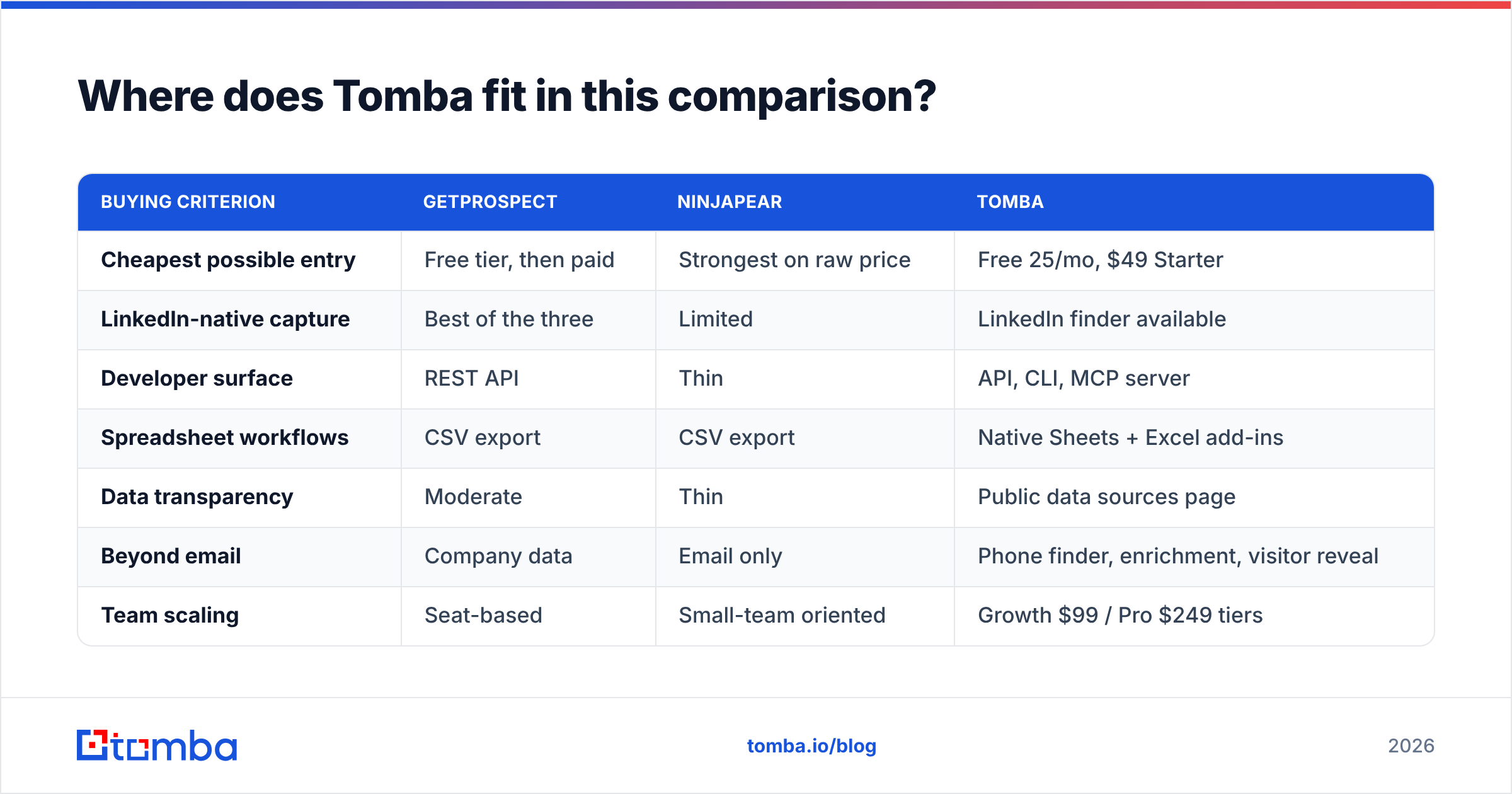
Straight answer. Tomba is the wrong pick if your whole job is scrolling LinkedIn and saving profiles. GetProspect's extension is built for that, and it is good at it. Tomba fits when the bottleneck moves from finding contacts to using them.

| Buying criterion | GetProspect | NinjaPear | Tomba |
|---|---|---|---|
| Cheapest possible entry | Free tier, then paid | Strongest on raw price | Free 25/mo, $49 Starter |
| LinkedIn-native capture | Best of the three | Limited | LinkedIn finder available |
| Developer surface | REST API | Thin | API, CLI, MCP server |
| Spreadsheet workflows | CSV export | CSV export | Native Sheets + Excel add-ins |
| Data transparency | Moderate | Thin | Public data sources page |
| Beyond email | Company data | Email only | Phone finder, enrichment, visitor reveal |
| Team scaling | Seat-based | Small-team oriented | Growth $99 / Pro $249 tiers |
Two more honest notes. First, if you need bought lists instead of live lookups, a database vendor like BookYourData solves a different problem well. It is not really a rival to either tool here. Second, if you already run Apollo or a similar all-in-one, the comparison you want is an Apollo alternative review, not this one.
Which should you choose in 2026?#
- Choose GetProspect if your reps prospect by hand on LinkedIn. You want lists and contact management in one place. You value a long public track record over the lowest sticker price.
- Choose NinjaPear if you are solo or a pair, you run a few hundred lookups a month, and price is the binding constraint. Test catch-all behaviour and failed-lookup billing first.
If neither fits, the answer is usually not a third extension.
- Choose a full data platform if systems trigger your lookups, you need verification and enrichment on one key, or a bounce spike has already burned you.
- Choose two tools if the extension workflow and the automated workflow have different owners. That is common above 10 reps, and it is not a planning failure.
Whatever you pick, decide with your own 100-row control list. Vendor benchmarks are marketing. Your ICP is the only test set that predicts your results.
Ready to test the API-first path?#
If your GetProspect vs NinjaPear shortlist keeps stalling on "the extension is fine, but I cannot automate it," start with the Tomba Email Finder. The free tier gives you 25 searches a month. That is enough to run a control list against whatever the other two returned. You will see the coverage and validity gap on your own accounts. One key covers verification, domain search, catch-all scoring, and enrichment. Run the numbers, then pick.
Related guides#
Ready to find emails that actually work?
Join 150,000+ professionals who stopped guessing and started sending. Free credits on signup — no credit card required.
Get the Tomba newsletter
Practical outbound tactics and product updates — once every two weeks.
About the author