GetProspect vs QuickMail: Which One Do You Actually Need?
GetProspect finds the addresses. QuickMail sends to them. Comparing them head-to-head only makes sense once you know which half of your outbound stack is actually broken — here's how to tell, plus 2026 pricing.
TL;DR
- GetProspect is a contact database and email finder. QuickMail is a cold email sending and sequencing platform. They overlap by maybe 10%, and most "GetProspect vs QuickMail" searches are really "which half of my outbound stack is broken?"
- If your reply rate is fine but your list is thin or bouncing, you have a data problem — that's GetProspect's lane (or a dedicated email finder).
- If your list is solid but messages land in spam or you're juggling five inboxes by hand, you have a sending problem — that's QuickMail's lane, and it's genuinely good at it.
- Running both costs roughly $100–$180/month at the entry tiers. Running one and hoping it covers the other costs you a domain reputation.
- The cheapest real fix for most teams: a high-accuracy finder + verifier feeding a deliverability-first sender. Below is the actual math.
What are GetProspect and QuickMail, exactly?#
They're not competitors. They're neighbors.
GetProspect is a B2B contact database with a LinkedIn Chrome extension bolted on the front. You filter by job title, company size, industry, and geography; it returns names with work email addresses. It also does bulk enrichment from a CSV of names and domains. The output is a list.
QuickMail is a cold email sending platform. You import a list, build a multi-step sequence, attach several sending inboxes, and it rotates sends across them, warms them up, detects replies, and pauses threads when someone responds. The output is conversations.
Feeding one into the other is the normal workflow. Choosing between them is like choosing between a fuel pump and an engine.
So the useful question isn't "which is better." It's: which constraint is currently capping your pipeline?
Why is comparing GetProspect vs QuickMail a category error?#
Because they fail in completely different ways, and the symptoms are easy to misdiagnose. Run through this before you spend a dollar:
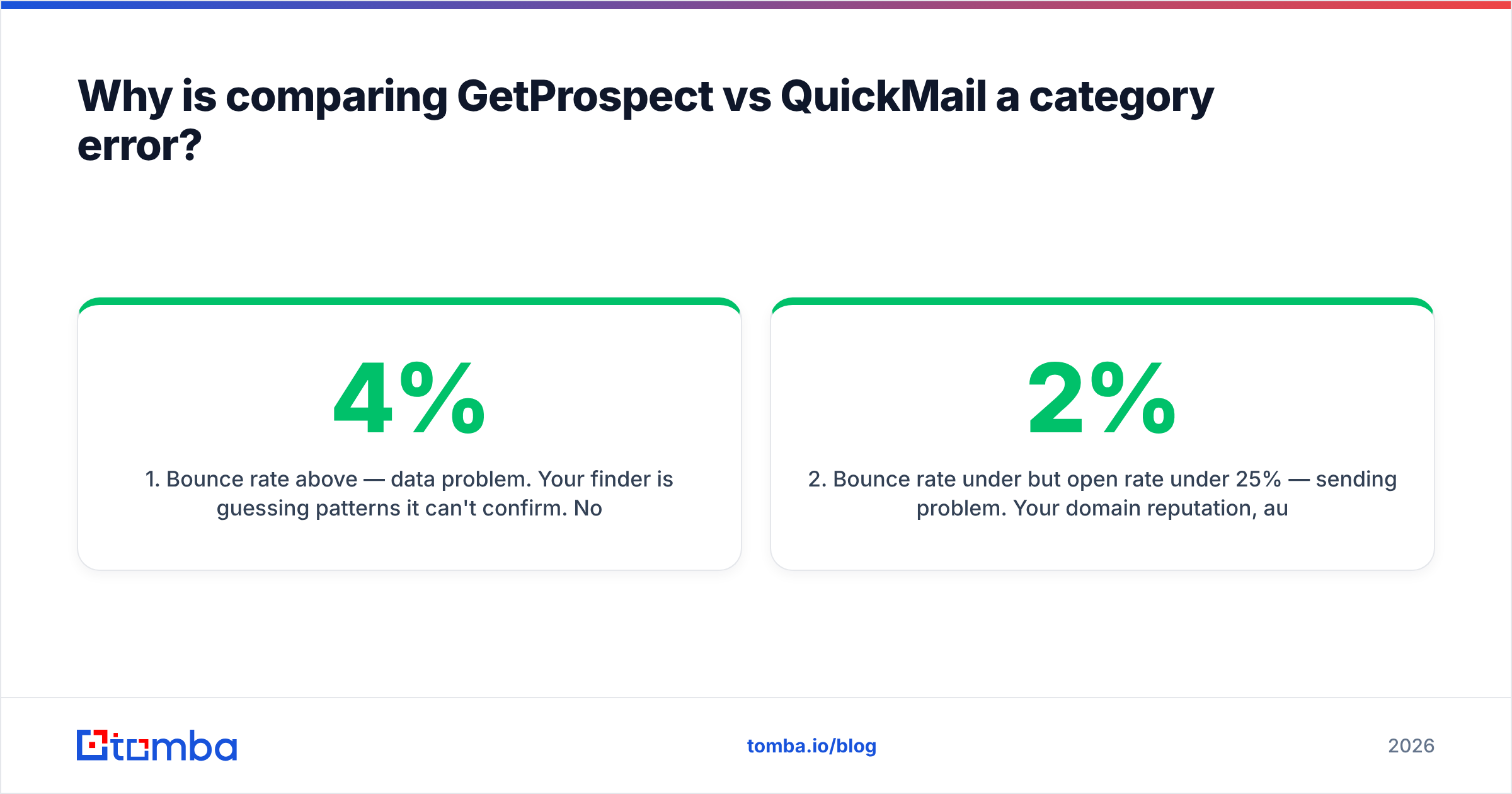
- Bounce rate above 4% — data problem. Your finder is guessing patterns it can't confirm. No sending platform fixes this; QuickMail will happily deliver your bad addresses straight into a spam trap.
- Bounce rate under 2% but open rate under 25% — sending problem. Your domain reputation, authentication, or send volume is off. GetProspect can't help; you need inbox rotation, warmup, and an SPF record that actually validates.
- Good opens, near-zero replies — copy problem. Neither tool solves this. Rewrite your first line.
- You can't find enough contacts to fill a sequence — coverage problem. This is where database size and match rate matter, and where you compare finders against each other rather than against senders.
- Everything works but nothing scales past 200 emails/day — infrastructure problem. You need more inboxes and rotation, not more data.
Only #1 and #4 point at GetProspect. Only #2 and #5 point at QuickMail. If you're in #3, save your money.
How do GetProspect and QuickMail compare feature by feature?#
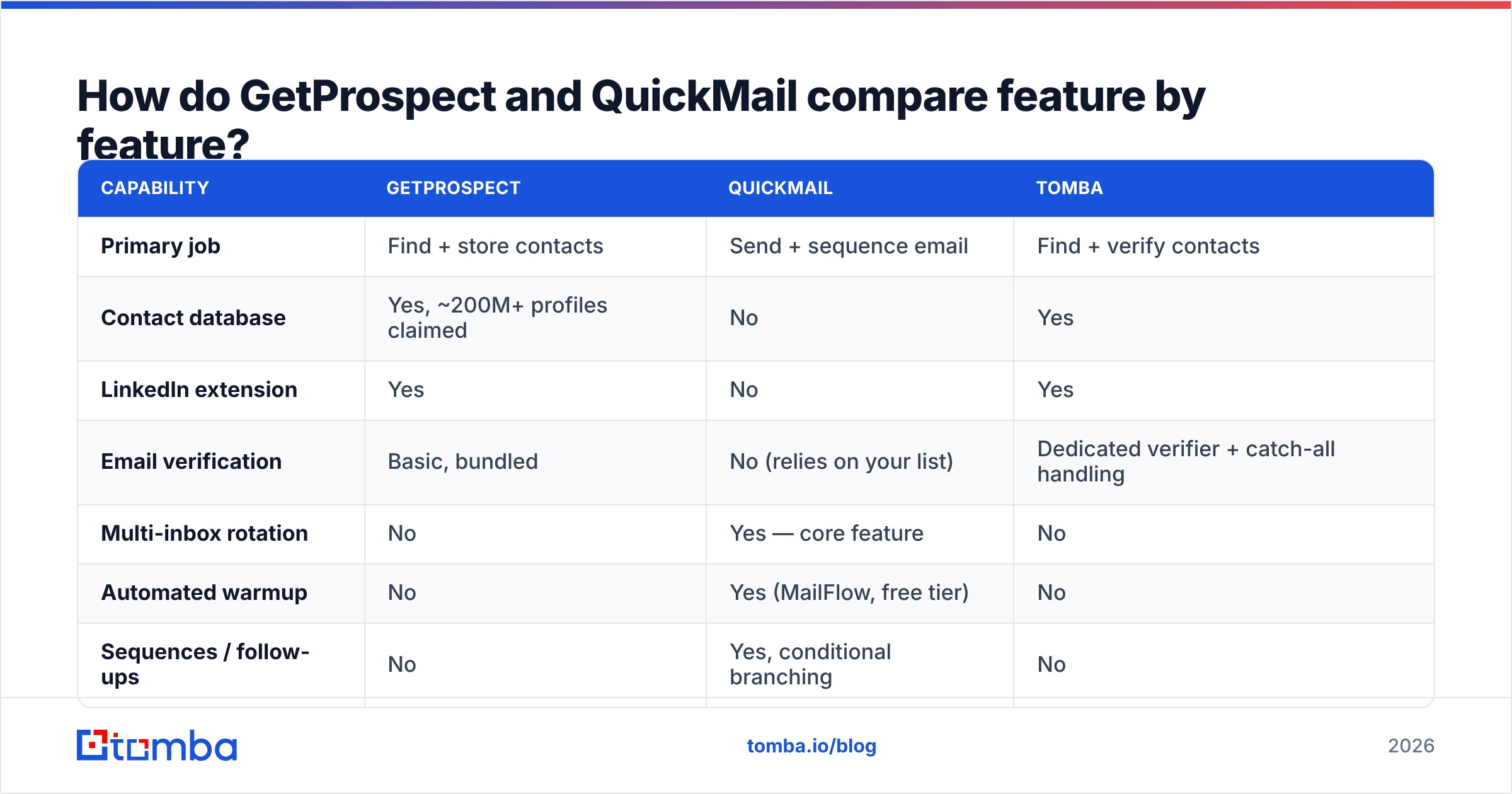
Here's the honest side-by-side, with a dedicated finder in the third column so you can see what "specialist" looks like on the data side.
| Capability | GetProspect | QuickMail | Tomba |
|---|---|---|---|
| Primary job | Find + store contacts | Send + sequence email | Find + verify contacts |
| Contact database | Yes, ~200M+ profiles claimed | No | Yes |
| LinkedIn extension | Yes | No | Yes |
| Email verification | Basic, bundled | No (relies on your list) | Dedicated verifier + catch-all handling |
| Multi-inbox rotation | No | Yes — core feature | No |
| Automated warmup | No | Yes (MailFlow, free tier) | No |
| Sequences / follow-ups | No | Yes, conditional branching | No |
| Reply detection | No | Yes | No |
| Native CRM sync | HubSpot, Pipedrive | HubSpot, Pipedrive, Salesforce | HubSpot, Salesforce, Pipedrive, Zapier |
| API access | Yes | Yes | Yes, full REST |
| Entry paid price | ~$49/mo | ~$49/mo | $49/mo |
| Free tier | 50 emails/mo | 14-day trial | 25 searches/mo |
Two things jump out. First, there is almost no row where both tools compete — the overlap is limited to CRM sync and API access. Second, GetProspect's verification is bundled, not specialized. That distinction matters more than it sounds, and it's the next section.

How accurate is GetProspect's data in practice?#
Accurate enough for mid-market SaaS targets in North America and Western Europe. Noticeably thinner for SMBs, non-English domains, and anyone whose company doesn't publish a predictable email pattern.
The mechanic behind every database-style finder is the same: it stores a pattern per domain (first.last@, finitial+last@), applies it to a name, then does an SMTP-level check where the server allows one. When the domain accepts everything — a catch-all — the check returns "valid" for an address that may not exist. That's where most of the hidden bounce risk lives, and roughly one in five B2B domains is catch-all.
This is why bundled verification is a trap. A finder that grades its own homework has an incentive to call ambiguous results "valid," because deliverable-rate is its marketing number. Running the export through an independent email verifier — and a real catch-all verifier for the ambiguous 20% — typically strips 5–12% of a fresh GetProspect export. Those are the addresses that would have burned your domain in QuickMail.
Practical rule: never send a list you haven't verified with a tool that didn't find it. It costs a fraction of a cent per address and it protects the asset you can't buy back — your sender reputation.
If you're pulling contacts straight from Sales Navigator rather than a filtered database search, a LinkedIn finder plus bulk verification does the same job with fewer steps and no seat-based database subscription.
Is QuickMail's deliverability actually better than the alternatives?#
Yes, and it's the main reason to pick it over the dozen cheaper sequencers.
QuickMail's design assumptions are deliverability-first rather than volume-first. Inbox rotation is native, not an upsell — you attach five mailboxes to one campaign and it distributes sends so no single mailbox looks like a machine. MailFlow, its warmup product, is free and runs continuously rather than as a one-time ramp. Reply detection is aggressive about pausing sequences, which keeps you out of the "I already said no" complaint loop that generates spam reports.
The trade-offs are real:
- The UI is dated. It's functional, not delightful. Teams coming from a modern sequencer will notice.
- No built-in contact data. You bring your own list, always. That's the whole reason this comparison exists.
- LinkedIn and calling are absent. It's an email tool. Multichannel sequences mean bolting on another platform.
- Agency pricing scales by inbox count, which gets expensive fast if you're managing many client domains.
None of that is disqualifying. QuickMail is a specialist that knows it's a specialist — which, in a market full of all-in-one platforms that are mediocre at six things, is a defensible position. Its G2 profile reflects that: high marks on deliverability and support, lower marks on interface polish.
What does each one cost in 2026?#
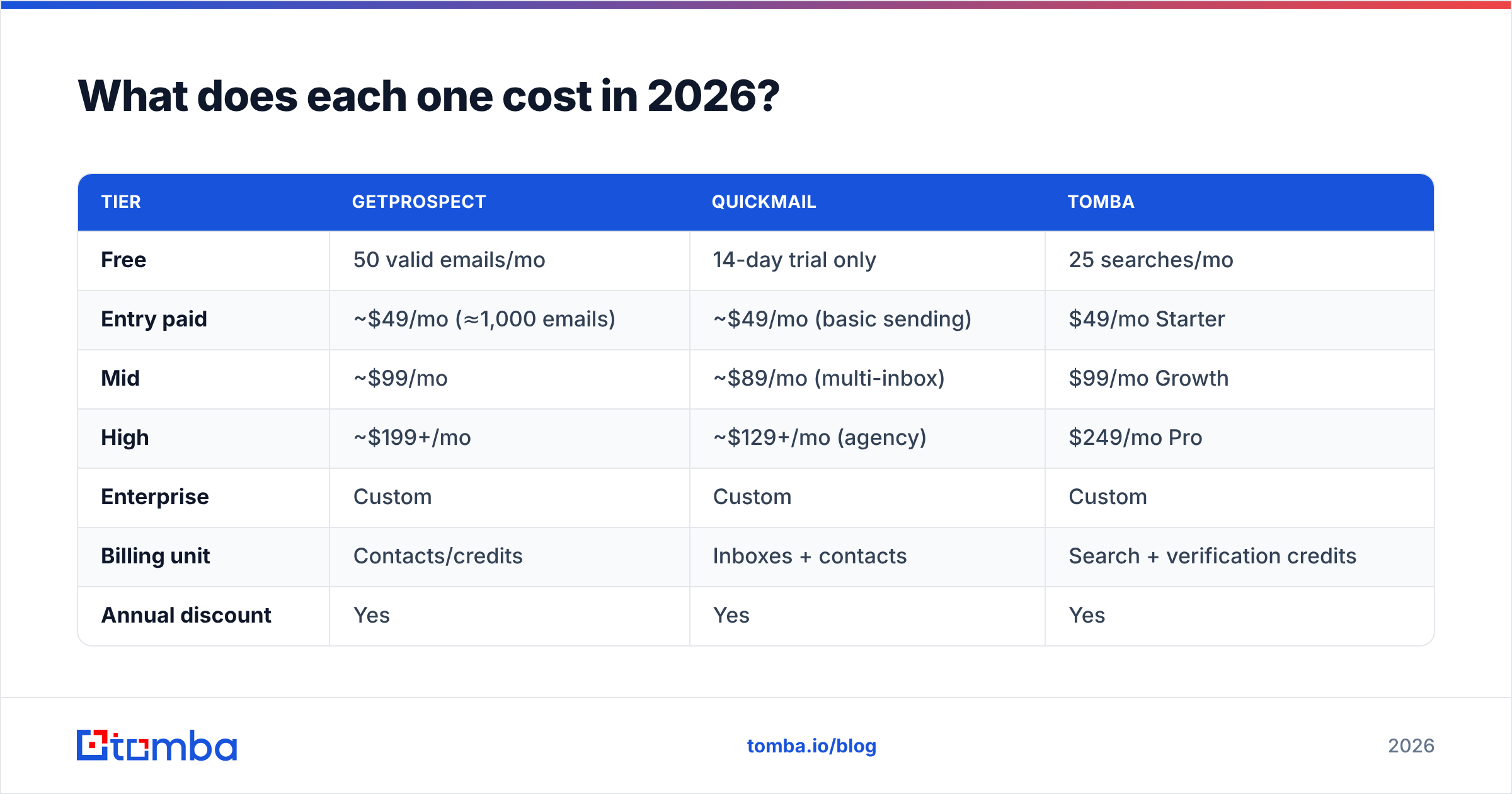
Published list prices move, so verify on the vendor's own page before you commit. As of this writing, the entry-level shape looks like this:
| Tier | GetProspect | QuickMail | Tomba |
|---|---|---|---|
| Free | 50 valid emails/mo | 14-day trial only | 25 searches/mo |
| Entry paid | ~$49/mo (≈1,000 emails) | ~$49/mo (basic sending) | $49/mo Starter |
| Mid | ~$99/mo | ~$89/mo (multi-inbox) | $99/mo Growth |
| High | ~$199+/mo | ~$129+/mo (agency) | $249/mo Pro |
| Enterprise | Custom | Custom | Custom |
| Billing unit | Contacts/credits | Inboxes + contacts | Search + verification credits |
| Annual discount | Yes | Yes | Yes |
The realistic combined bill for a two-SDR team is $100–$180/month — one finder, one sender, both at entry or mid tier. Anyone quoting you a single-tool number for full outbound coverage is either selling an all-in-one with weak data or an all-in-one with weak sending. There is currently no product that is genuinely excellent at both.
Compare that against Tomba pricing if you're evaluating the data half separately — same $49 entry point, but credits are spent on finding and verification rather than on a stored-contact quota you may never fully use.
Can you use GetProspect and QuickMail together?#
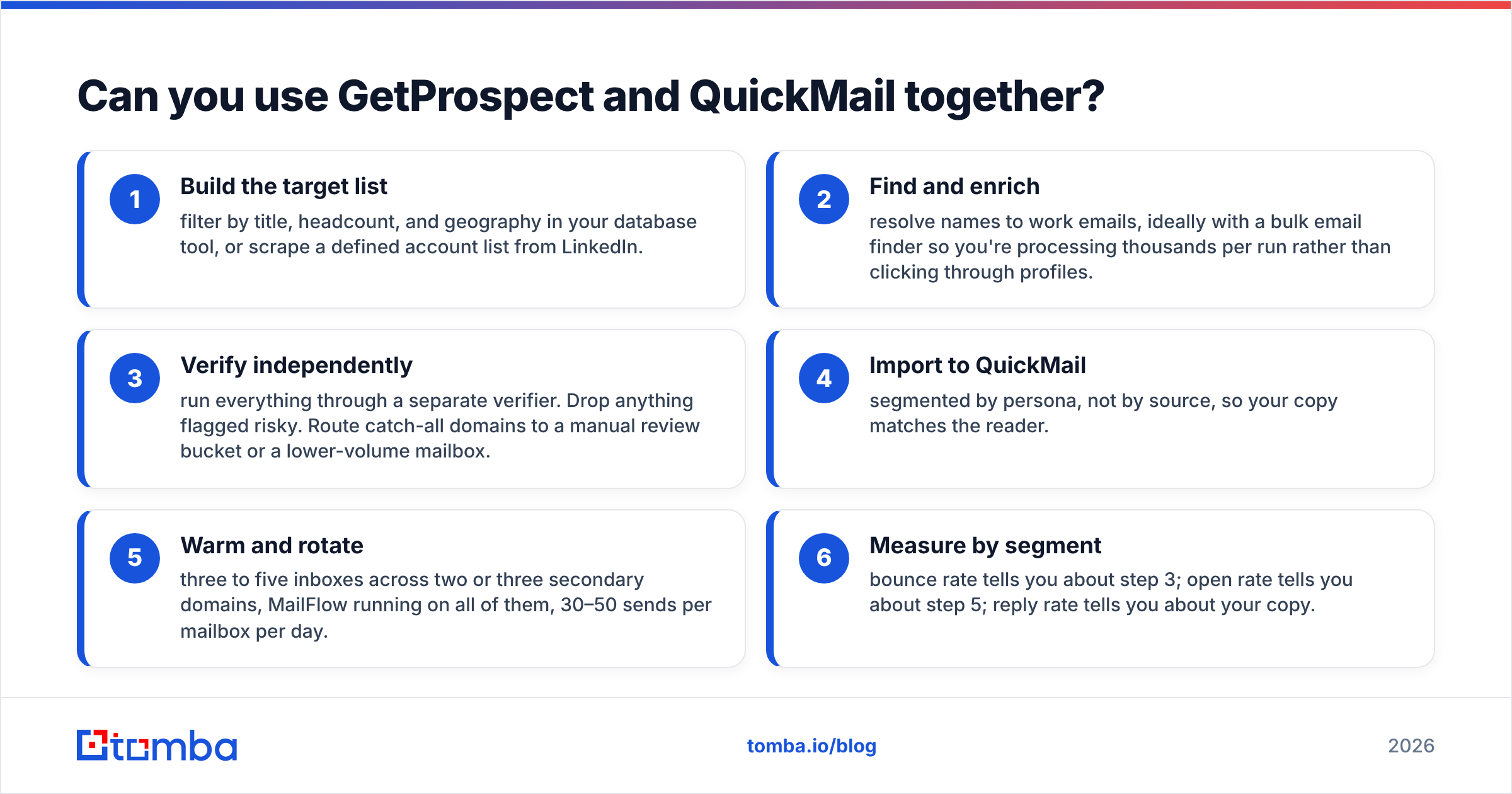
Yes, and that's the intended architecture. The clean version of the workflow:
- Build the target list — filter by title, headcount, and geography in your database tool, or scrape a defined account list from LinkedIn.
- Find and enrich — resolve names to work emails, ideally with a bulk email finder so you're processing thousands per run rather than clicking through profiles.
- Verify independently — run everything through a separate verifier. Drop anything flagged risky. Route catch-all domains to a manual review bucket or a lower-volume mailbox.
- Import to QuickMail — segmented by persona, not by source, so your copy matches the reader.
- Warm and rotate — three to five inboxes across two or three secondary domains, MailFlow running on all of them, 30–50 sends per mailbox per day.
- Measure by segment — bounce rate tells you about step 3; open rate tells you about step 5; reply rate tells you about your copy.
Most broken outbound stacks skip step 3 entirely. They pay for a finder, pay for a sender, and never insert the twenty-cent quality gate between them. Then they blame the sending platform when Gmail starts foldering their mail.
Which one should you buy first?#
Buy the sender first if you already have a list you trust — an export from your CRM, a conference attendee list, inbound signups you never followed up on. You don't need more contacts; you need to reach the ones you have without torching a domain. QuickMail earns its price here immediately.
Buy the finder first if you have clear ICP criteria and no contacts. Sending infrastructure with nothing to send is an expensive idle subscription. Start with data, validate that the segment replies at all using a handful of manual sends, then automate.
Buy neither if your problem is copy or offer. Two hundred manually written emails will tell you more about product-market fit than twenty thousand automated ones, and cost nothing.
For most teams reading a GetProspect vs QuickMail comparison, the honest answer is that you'll end up with both — the only question is sequencing, and it should follow whichever constraint is binding today.
Where does Tomba fit in this comparison?#
On the data side, as a direct alternative to GetProspect rather than to QuickMail.
The difference in philosophy is credits versus contacts. Database tools bill you for stored records; Tomba bills you for the operations you actually run — finding, verifying, enriching. If your ICP is narrow (say, 3,000 accounts in a specific vertical), a stored-contact quota you'll never exhaust is dead weight. If you're running broad prospecting across many verticals, a large browsable database earns its keep.
Where Tomba is measurably stronger is the verification layer, because it isn't an afterthought bundled into a finder — catch-all handling, SMTP-level checks, and bulk verification are first-class products with their own APIs. That's the exact gap between "found an address" and "safe to send," and it's the gap that determines whether QuickMail's deliverability engineering actually pays off for you.
Neither tool replaces QuickMail. Nothing in the data category does.
The verdict#
GetProspect and QuickMail aren't rivals — they're two halves of one system, and the "versus" framing mostly reveals that outbound tooling categories are badly labeled. Pick the one that fixes your current bottleneck, add the other when the first stops being the constraint, and put an independent verification step between them no matter which you buy.
If the data half is what's failing you — thin coverage, bounces above 4%, catch-all domains you can't grade — start with the Tomba Email Finder. The free tier gives you 25 searches a month to test match rate against your real ICP before spending anything, and paid plans start at $49/month with verification credits included rather than sold separately. Find the address, prove it's deliverable, then let QuickMail do what it's genuinely good at.
Related guides#
Ready to find emails that actually work?
Join 150,000+ professionals who stopped guessing and started sending. Free credits on signup — no credit card required.
Get the Tomba newsletter
Practical outbound tactics and product updates — once every two weeks.
About the author