GetProspect vs Rebump: Which B2B Sales Tool Wins in 2026?
GetProspect finds the emails. Rebump chases the follow-ups. They solve opposite halves of the same outbound problem — here's which one your pipeline actually needs first, and what a single-stack alternative costs.
TL;DR
- GetProspect and Rebump are not competitors. GetProspect is a B2B email finder and lead database; Rebump is a Gmail follow-up automation extension. Comparing them is comparing a drill to a hammer.
- If your pipeline is starving for contacts, you need a finder (GetProspect, Tomba, or similar). If you already have contacts but replies are dying after email one, you need follow-up automation (Rebump).
- Rebump is cheap and narrow: roughly $5–$25/mo per user, Gmail-only, no data, no verification, no sequencing analytics beyond basics.
- GetProspect is a LinkedIn-centric finder with a free tier (50 valid emails/mo) and paid plans starting around $49/mo — solid on LinkedIn workflows, weaker on API depth and catch-all handling.
- Most teams end up paying for both plus a verifier. A consolidated stack — finder + verifier + enrichment + API in one — usually costs less than three point tools stitched together.
What are GetProspect and Rebump, actually?#
Short answer: they sit at opposite ends of the outbound pipeline.
GetProspect is a lead generation platform built around a LinkedIn Chrome extension and a B2B contact database. You search LinkedIn (or filter their database by title, industry, headcount, location, tech stack), and GetProspect returns work email addresses, sometimes phone numbers, and firmographic fields. Its center of gravity is prospect discovery — turning a company or a person into a reachable contact.
Rebump does none of that. Rebump is a Gmail and Google Workspace extension that automatically sends follow-up emails when a recipient doesn't reply. You write your first email, toggle Rebump on, and it drips pre-set follow-ups on a schedule you configure until someone responds. Then it stops. That's the whole product, and it's deliberately narrow.
So the real question behind "GetProspect vs Rebump" is usually: which gap in my outbound is costing me more money right now — not enough contacts, or not enough follow-through?
Data from most cold email benchmarks says follow-ups matter enormously — a large share of replies arrive on email two through four. But you cannot follow up with contacts you don't have, and you cannot follow up profitably to addresses that bounce. Sequence matters: fix data first, then cadence.

How do GetProspect and Rebump compare feature by feature?#
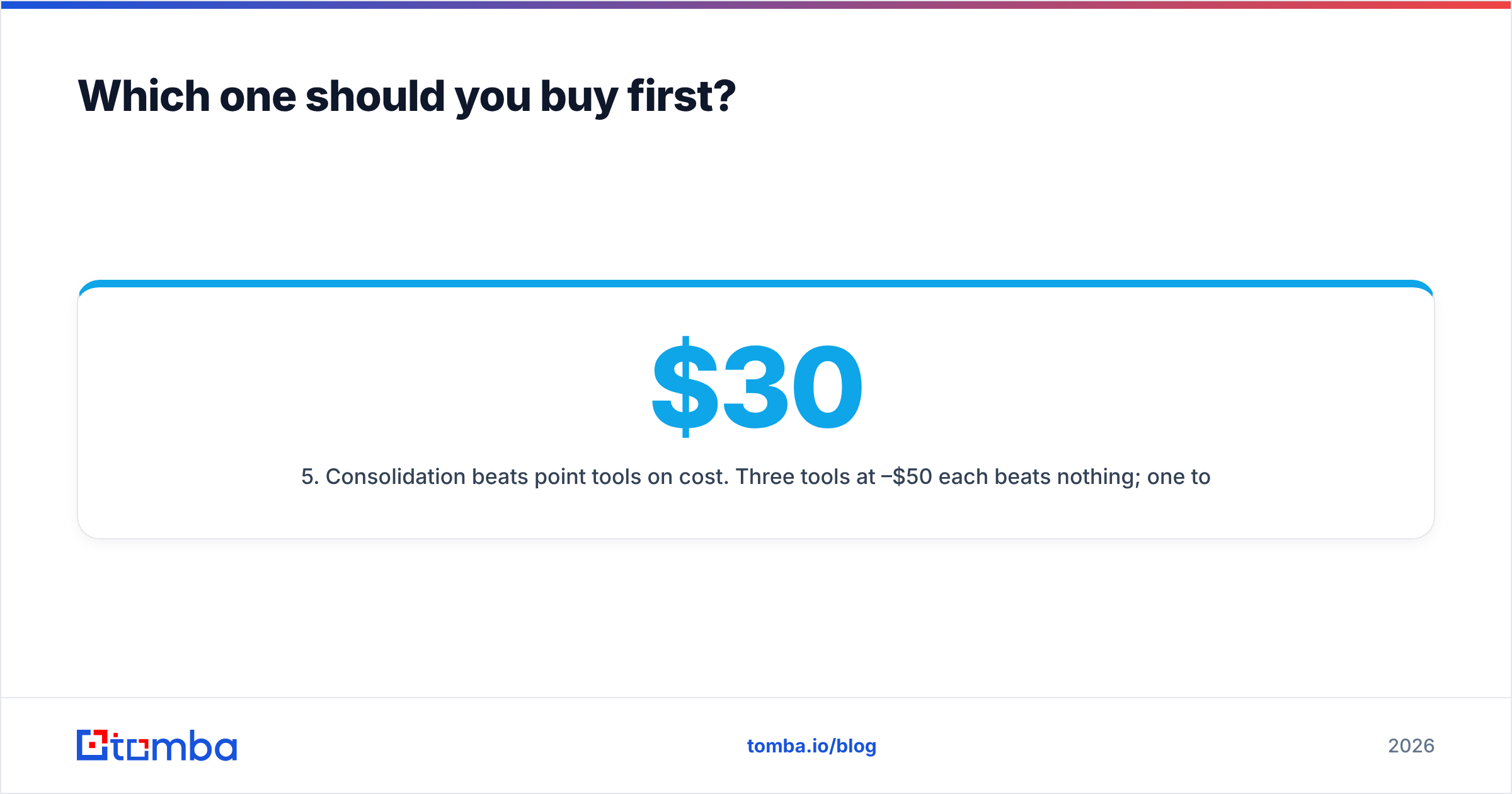
Here's the honest side-by-side, with a consolidated-stack column so you can see what you'd actually be replacing.
| Feature | GetProspect | Rebump | Tomba |
|---|---|---|---|
| Primary job | Find B2B emails from LinkedIn + database | Auto follow-up inside Gmail | Find + verify + enrich contacts |
| Free tier | 50 valid emails/mo | Free trial only | 25 searches/mo |
| Entry paid price | ~$49/mo | ~$5–$25/mo per user | $49/mo Starter |
| Mid tier | ~$99–$149/mo | Flat per-seat | $99/mo Growth |
| Email verification | Basic, bundled | None | Dedicated verifier + catch-all |
| Domain-level search | Yes | No | Yes |
| Phone numbers | Limited | No | Yes (phone finder) |
| Follow-up sending | No | Yes (Gmail only) | No (integrates with senders) |
| API access | Limited on lower tiers | None | Full REST API on all paid tiers |
| CRM sync | HubSpot, Pipedrive, Zapier | None native | HubSpot, Salesforce, Pipedrive, Zapier, Make |
| Works outside Gmail | N/A | No | N/A |
| Best for | LinkedIn-first prospecting | Solo reps living in Gmail | Data layer for the whole GTM stack |
Two things jump out of that table.
First, Rebump has no data layer at all. It is a sending-behavior tool. If you buy Rebump expecting leads, you bought the wrong thing.
Second, GetProspect has no sending layer. It hands you a CSV or a CRM sync and stops. If you buy GetProspect expecting sequences, you also bought the wrong thing.
Which one should you buy first?#
Buy the finder first. Here's the reasoning, in the order it actually plays out:
- No contacts means no campaign. Rebump's follow-up engine has nothing to chew on without a list. A finder like GetProspect or a dedicated email finder is the upstream dependency.
- Bad data poisons follow-ups. Rebump will happily send four follow-ups to an address that bounced on send one. Every one of those attempts damages your sender reputation. A verifier upstream is not optional once you're sending at volume.
- Follow-up automation is easy to replicate cheaply. Most sequencers — Instantly, Saleshandy, Reply.io, even a basic Gmail scheduler — include auto-follow-up. Rebump's value is that it's dead simple and lives inside Gmail, not that the capability is rare.
- Data quality is hard to replicate. You cannot script your way to accurate work emails at scale. That's the part worth paying for.
- Consolidation beats point tools on cost. Three tools at $30–$50 each beats nothing; one tool at $49–$99 that covers finding, verifying, and enriching usually wins on both price and admin overhead.
If you already have a healthy list and your only symptom is "prospects go quiet after the first touch," then Rebump — or the follow-up feature inside whatever sequencer you already pay for — is the cheaper fix. Don't buy a database to solve a cadence problem.
Is GetProspect accurate enough for cold outreach?#
Mostly yes, with caveats that matter at volume.
GetProspect's strength is its LinkedIn workflow. Install the extension, run a Sales Navigator search, and pull contacts in bulk. For SDRs whose ICP is defined by job title and company size, that's a fast path from segment to list.
The caveats:
- Catch-all domains. A large slice of B2B domains accept all mail at the SMTP layer, which makes standard verification return "unknown." Tools differ wildly in how they handle this. Some mark catch-alls as valid (inflating accuracy claims and your bounce rate); some drop them entirely (shrinking your usable list). If your ICP skews enterprise, run catch-alls through a dedicated catch-all verifier rather than trusting a bundled score.
- Credit accounting. Watch how "valid emails" versus "searches" are counted. A plan that advertises 1,000 credits but burns one per attempted lookup — hit or miss — is not the same as 1,000 delivered contacts.
- Freshness. Job-change churn in B2B runs roughly 20–30% a year depending on the segment. Any list you exported six months ago is materially decayed. Re-verify before every campaign, not once a quarter.
The practical rule: whatever finder you use, treat its confidence score as an input, not a verdict. Run the export through an independent email verifier before it touches your sending domain. The cost of verification is trivial compared to the cost of a burned domain.

What does Rebump actually do well?#
Credit where it's due: Rebump is one of the least annoying tools in this category because it does one thing and disappears.
What works:
- Zero learning curve. It's a toggle in your Gmail compose window. There's no campaign builder, no CSV mapping, no onboarding call.
- Native Gmail sending. Emails go out from your actual mailbox as normal one-to-one messages — no separate sending infrastructure, no obvious mass-mail fingerprint.
- Auto-stop on reply. The core safety feature works reliably. Once someone replies, the sequence halts.
- Cheap per seat. At the low end it's a rounding error on a sales budget.
What doesn't:
- Gmail only. Outlook users are out. That alone disqualifies it for a large share of enterprise teams.
- No list management. No dedupe, no suppression list, no bounce handling. If you need remove duplicates or a suppression file, that's on you.
- No data. Worth repeating — Rebump does not find, verify, or enrich anything.
- Thin analytics. You get opens and replies. You do not get the kind of per-step, per-variant reporting that lets you actually improve a sequence.
- Scale ceiling. Sending real volume through a single Gmail mailbox will hit Google's limits and, before that, your own deliverability ceiling. Rebump is a tool for 20 thoughtful emails a day, not 2,000.
That last point is the honest framing: Rebump is a personal productivity tool that happens to be used for sales. Treat it as one.
How much do these tools cost in 2026?#
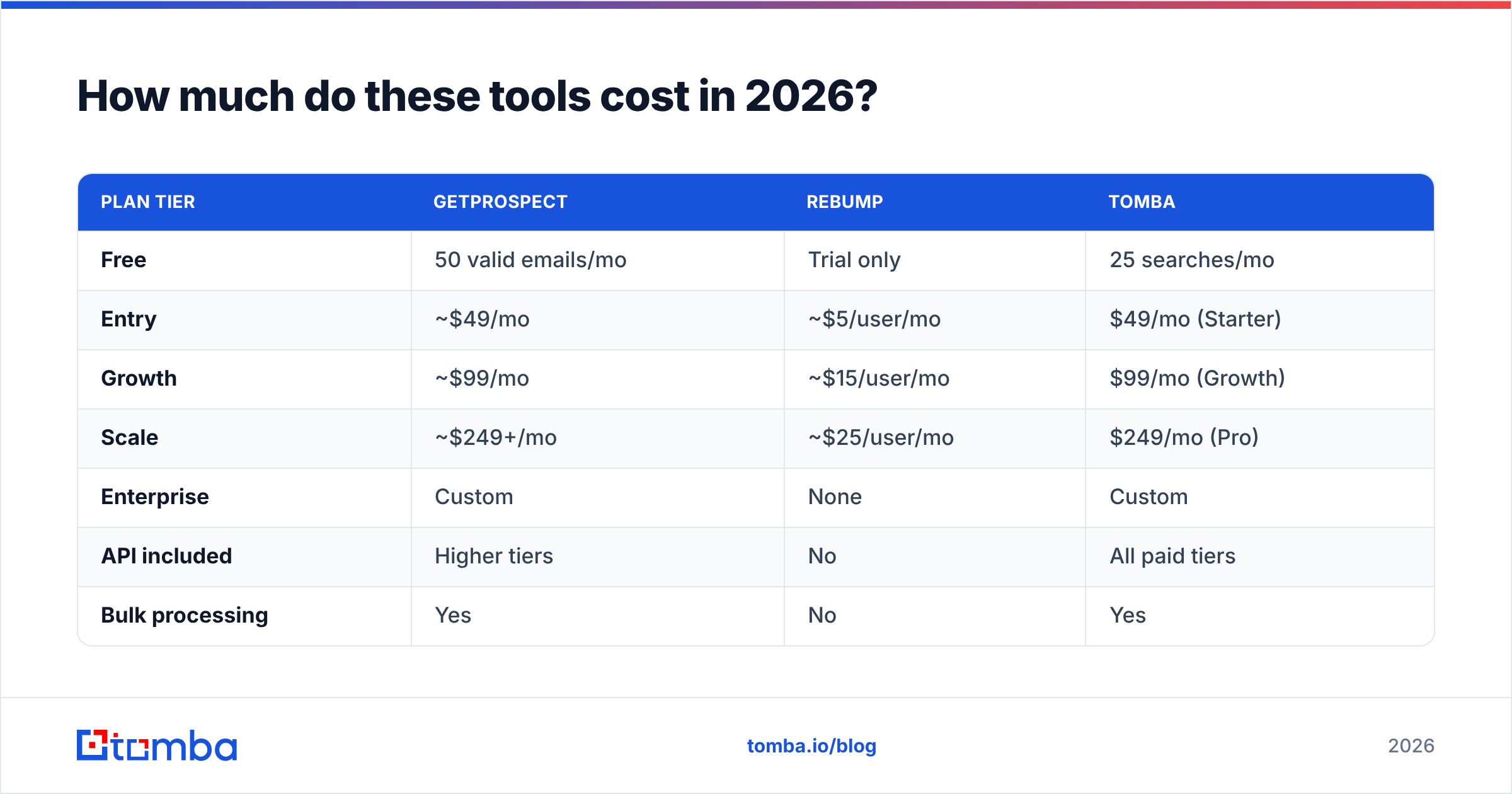
Here's the pricing picture, including what a consolidated alternative runs.
| Plan tier | GetProspect | Rebump | Tomba |
|---|---|---|---|
| Free | 50 valid emails/mo | Trial only | 25 searches/mo |
| Entry | ~$49/mo | ~$5/user/mo | $49/mo (Starter) |
| Growth | ~$99/mo | ~$15/user/mo | $99/mo (Growth) |
| Scale | ~$249+/mo | ~$25/user/mo | $249/mo (Pro) |
| Enterprise | Custom | None | Custom |
| API included | Higher tiers | No | All paid tiers |
| Bulk processing | Yes | No | Yes |
Vendor pricing changes; check the Tomba pricing page and each vendor's own site before you commit. The structural point holds regardless of exact numbers: a follow-up extension is a $10 line item, a contact database is a $50–$250 line item, and the database is where your money and your risk both live.
Run the arithmetic on your own stack. A typical five-person SDR team paying for a finder, a separate verifier, a sequencer, and a Gmail follow-up extension is often spending $400–$700/mo on overlapping capability. Cutting the verifier and the follow-up extension by folding them into tools that already include them is usually the fastest $150/mo you'll ever save.

What are the better alternatives to each?#
If you're evaluating GetProspect (finder category):
- Tomba — email finder, verifier, domain search, catch-all verification, phone finder, and enrichment on one API. Free tier is 25 searches/mo; Starter is $49/mo. Strong fit if you want a data layer rather than a self-contained prospecting app.
- BookYourData — a pay-as-you-go B2B contact database with a strong accuracy guarantee. Genuinely good option if you prefer buying lists outright over credit-metered lookups, and the no-subscription model suits teams with lumpy demand.
- Apollo.io — finder plus sequencer plus dialer in one platform. Broader than GetProspect, heavier to administer. See the Apollo alternative breakdown if you're weighing all-in-one against best-of-breed.
If you're evaluating Rebump (follow-up category):
- Your existing sequencer. Instantly, Saleshandy, Reply.io, Lemlist, and HubSpot Sequences all include auto-follow-up. If you already pay for one, Rebump is redundant.
- HubSpot Sequences — if you're already on HubSpot, the sequencing is bundled and CRM-native. Check the HubSpot integration to push verified contacts straight in.
- Native Gmail templates + schedule send — for genuinely low volume, this costs nothing.
Before you shortlist anything, pull the real user reviews on G2 and cross-check the feature claims against each vendor's own docs. Vendor comparison pages are marketing; review-site filters by company size are closer to signal.

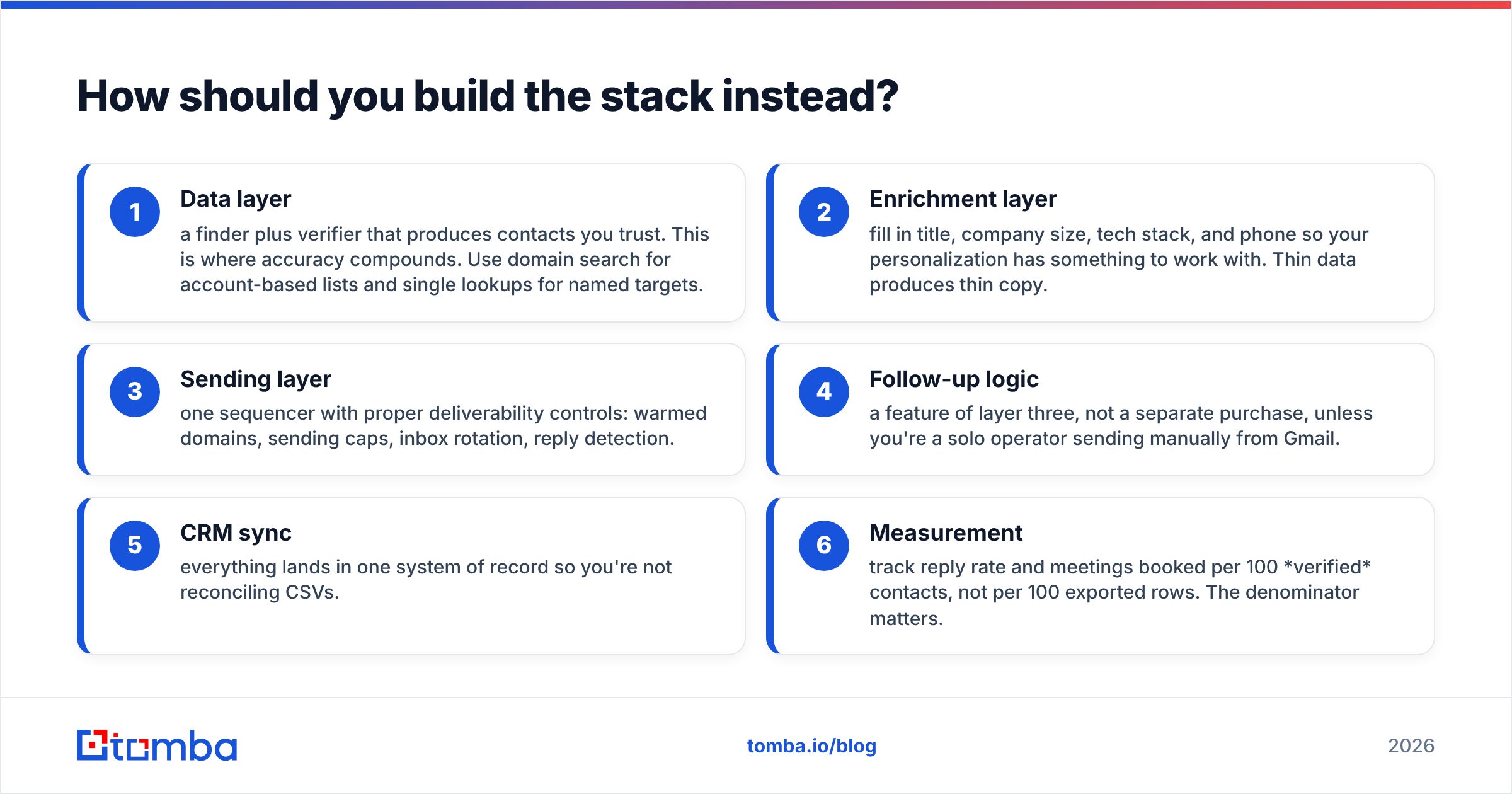
How should you build the stack instead?#
Here's the layered approach that holds up at any team size:
- Data layer — a finder plus verifier that produces contacts you trust. This is where accuracy compounds. Use domain search for account-based lists and single lookups for named targets.
- Enrichment layer — fill in title, company size, tech stack, and phone so your personalization has something to work with. Thin data produces thin copy.
- Sending layer — one sequencer with proper deliverability controls: warmed domains, sending caps, inbox rotation, reply detection.
- Follow-up logic — a feature of layer three, not a separate purchase, unless you're a solo operator sending manually from Gmail.
- CRM sync — everything lands in one system of record so you're not reconciling CSVs.
- Measurement — track reply rate and meetings booked per 100 verified contacts, not per 100 exported rows. The denominator matters.
The teams that get outbound right almost always over-invest in layers one and two and under-invest in tooling for layer four. Follow-ups are a scheduling problem you solve once. Data quality is a problem you solve continuously.
Frequently asked questions#
Can I use GetProspect and Rebump together? Yes, and plenty of solo founders do. Export contacts from GetProspect, import into Gmail, let Rebump handle the cadence. It works up to maybe a few dozen sends a day. Past that, you need real sending infrastructure and a verified list.
Does Rebump hurt deliverability? Not inherently — it sends through your normal Gmail account. The risk is indirect: it will follow up to bad addresses, and repeated bounces from one mailbox degrade your reputation fast. Verify before you send, always.
Is GetProspect's free tier enough to test with? 50 valid emails a month is enough to sanity-check accuracy against contacts you can independently confirm. Do that test with any finder before you pay — pick 20 people whose emails you already know and see how many the tool gets right.
Which is better for enterprise teams? Neither, alone. Enterprise outbound needs API-level data access, SSO, audit trails, and Outlook support. Rebump's Gmail-only scope rules it out; GetProspect's API is limited on lower tiers. Look at platform-grade options with a real email finder API.
The verdict#
GetProspect if you need contacts. Rebump if you need discipline. Neither if you need both — that's a stack decision, not a tool decision.
The mistake most teams make is buying the cheap tool that solves the visible symptom (nobody replies) instead of the expensive one that fixes the root cause (the list is wrong). Follow-ups amplify whatever you feed them. Feed them a verified, enriched, accurate list and follow-ups multiply your results. Feed them a scraped CSV with a 22% bounce rate and follow-ups multiply your damage.
If you're rebuilding the data layer, start with the Tomba Email Finder. Free tier is 25 searches a month — enough to run the 20-contact accuracy test against your own known emails before you spend anything. Starter is $49/mo with the verifier, domain search, catch-all handling, and full API included, so you're not buying three subscriptions to do one job. Test it against whatever you're using now, on your own ICP, and let the bounce rate decide.
Related guides#
Ready to find emails that actually work?
Join 150,000+ professionals who stopped guessing and started sending. Free credits on signup — no credit card required.
Get the Tomba newsletter
Practical outbound tactics and product updates — once every two weeks.
About the author