GetProspect vs Right Inbox: Full 2026 Comparison Guide
One tool builds your list, the other runs your Gmail follow-ups. Here's an honest breakdown of where GetProspect and Right Inbox actually overlap, where they don't, and which one your outbound stack needs first.
TL;DR
- GetProspect and Right Inbox are not really competitors. GetProspect finds and stores B2B contact data; Right Inbox schedules, tracks, and automates the emails you send from Gmail.
- If your problem is "I don't have enough qualified contacts," GetProspect (or a dedicated email finder) is the tool. If your problem is "I forget to follow up," Right Inbox is the tool.
- Right Inbox is dramatically cheaper — single-digit to low-teens dollars per user per month — because it doesn't carry the cost of a contact database.
- Most teams that compare these two end up buying both, or replacing GetProspect with a finder that has a stronger API and verification layer.
- The failure mode nobody talks about: pairing a good sending tool with an unverified list. Bounces kill your domain faster than bad copy ever will.
Why are people comparing GetProspect vs Right Inbox at all?#
Because both show up when you search "Gmail email tool for sales." That's the entire overlap.
Think of outbound like running a restaurant. GetProspect is your supplier — it decides what ingredients arrive at the back door. Right Inbox is the service floor — timing, plating, remembering that table 6 asked for the check. A great supplier with terrible service still loses customers. Great service with rotten ingredients loses them faster.
So the honest version of this comparison isn't "which is better." It's "which layer of your outbound stack is currently broken, and which of these two fixes it."
Let's define both properly before scoring them.
What is GetProspect?#
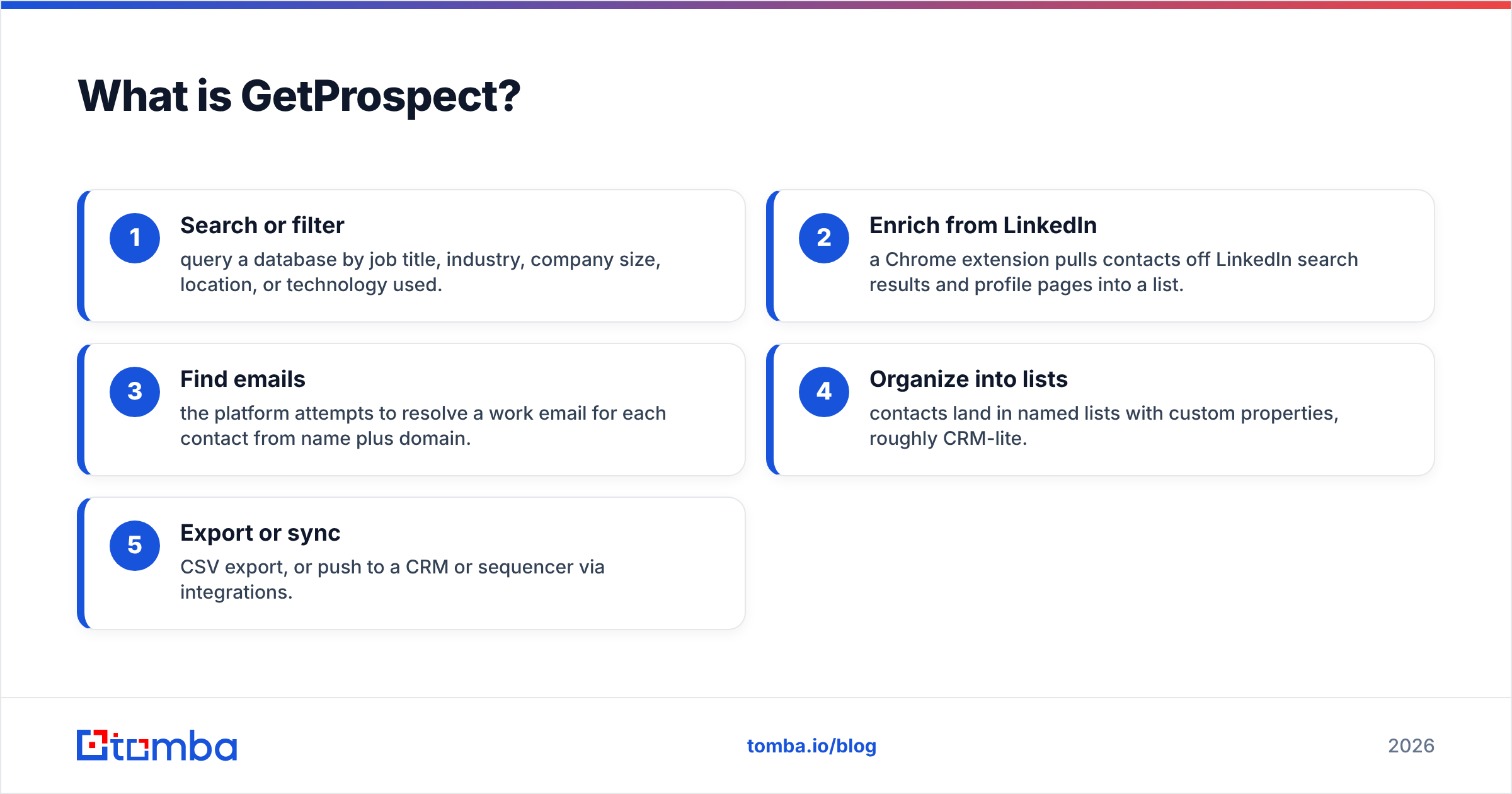
GetProspect is a B2B lead generation platform built around an email finder and a contact database. Its core loop looks like this:
- Search or filter — query a database by job title, industry, company size, location, or technology used.
- Enrich from LinkedIn — a Chrome extension pulls contacts off LinkedIn search results and profile pages into a list.
- Find emails — the platform attempts to resolve a work email for each contact from name plus domain.
- Organize into lists — contacts land in named lists with custom properties, roughly CRM-lite.
- Export or sync — CSV export, or push to a CRM or sequencer via integrations.
The value proposition is breadth: one place to discover, enrich, and store contacts before they enter your sending tool. It has a free tier (a small monthly allowance of valid emails) and paid plans that scale by credits.
What GetProspect does not do: send sequences at scale, warm your domain, or manage your inbox. It hands you a list and steps back.
What is Right Inbox?#
Right Inbox is a Gmail extension. It doesn't have a database, doesn't find emails, and doesn't know who your prospects are. It makes the Gmail you already use behave like a lightweight sales tool.
Its feature set clusters into four jobs:
- Timing — schedule emails to send later, in the recipient's time zone, and set recurring sends for reports or check-ins.
- Follow-up — auto-sequences that stop when someone replies, plus reminders that resurface a thread if nobody responds by day 4.
- Visibility — open and click tracking so you know whether silence means "not interested" or "never saw it."
- Speed — templates, a mail merge for small personalized batches, signature management, and private notes attached to threads.
It's a productivity layer, not a data layer. Which is exactly why the price is a fraction of GetProspect's.

How do GetProspect and Right Inbox compare feature by feature?#
| Capability | GetProspect | Right Inbox | Tomba |
|---|---|---|---|
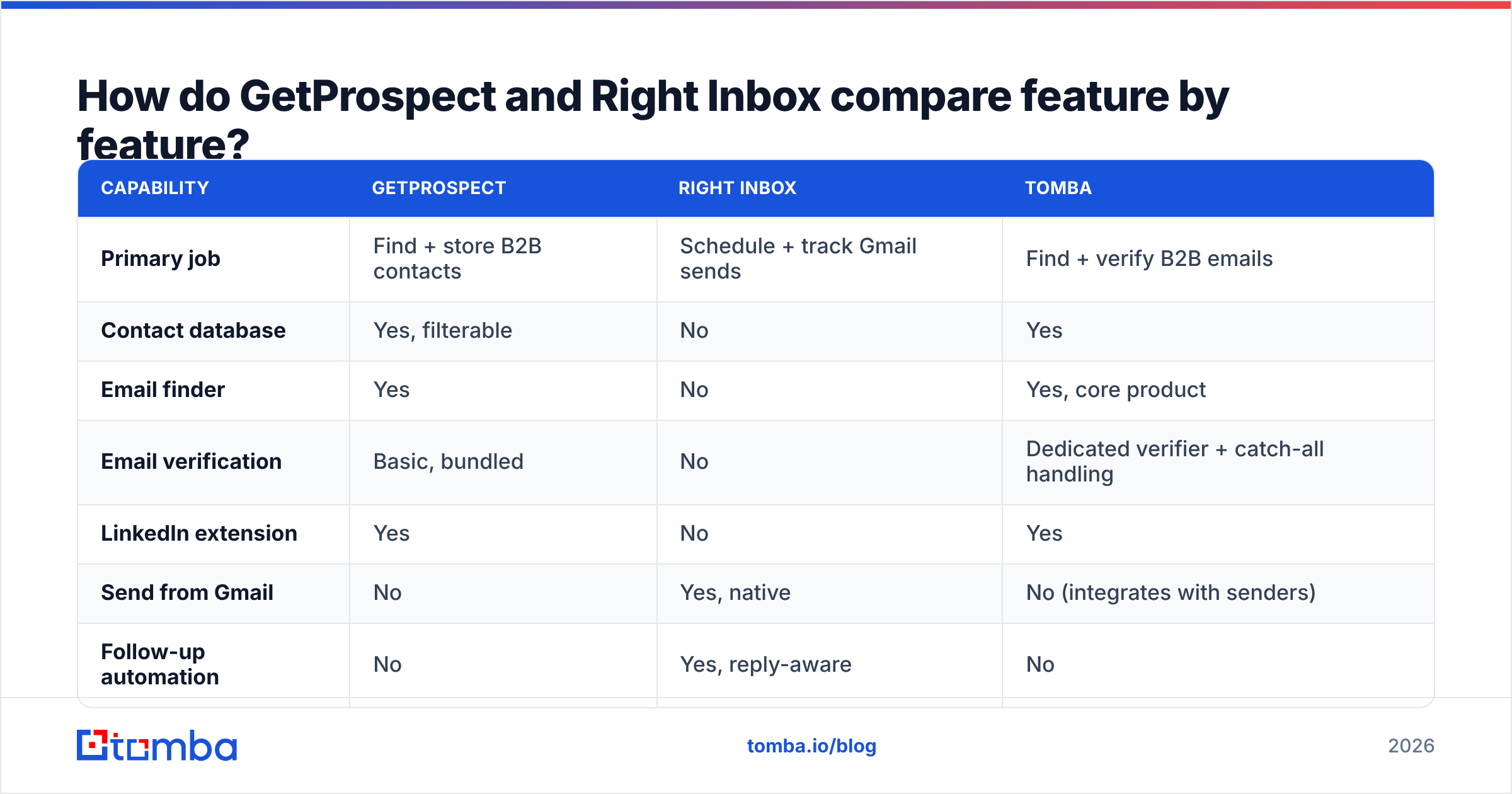
| Primary job | Find + store B2B contacts | Schedule + track Gmail sends | Find + verify B2B emails |
| Contact database | Yes, filterable | No | Yes |
| Email finder | Yes | No | Yes, core product |
| Email verification | Basic, bundled | No | Dedicated verifier + catch-all handling |
| LinkedIn extension | Yes | No | Yes |
| Send from Gmail | No | Yes, native | No (integrates with senders) |
| Follow-up automation | No | Yes, reply-aware | No |
| Open / click tracking | No | Yes | No |
| Public API | Limited | Limited | Full REST API, CLI, MCP |
| Free tier | Small monthly credit allowance | Limited tracked emails/month | 25 searches/mo |
| Typical entry price | Mid double digits per month | Single digits per user/month | $49/mo Starter |
| Best for | Building the list | Working the list | Data accuracy at scale |
Two things jump out of that table.
First, there is exactly one row where they compete — and it's a row where neither is strong. GetProspect's verification is bundled and adequate; Right Inbox has none at all because it assumes your addresses are already good.
Second, the price gap isn't a discount. It reflects genuinely different cost structures. Maintaining a contact database means constant crawling, refreshing, and decay management. A Gmail extension means shipping a browser bundle and running a small backend. Comparing their sticker prices head-to-head is comparing a grocery bill to a dishwasher rental.
Which one should you buy first?#
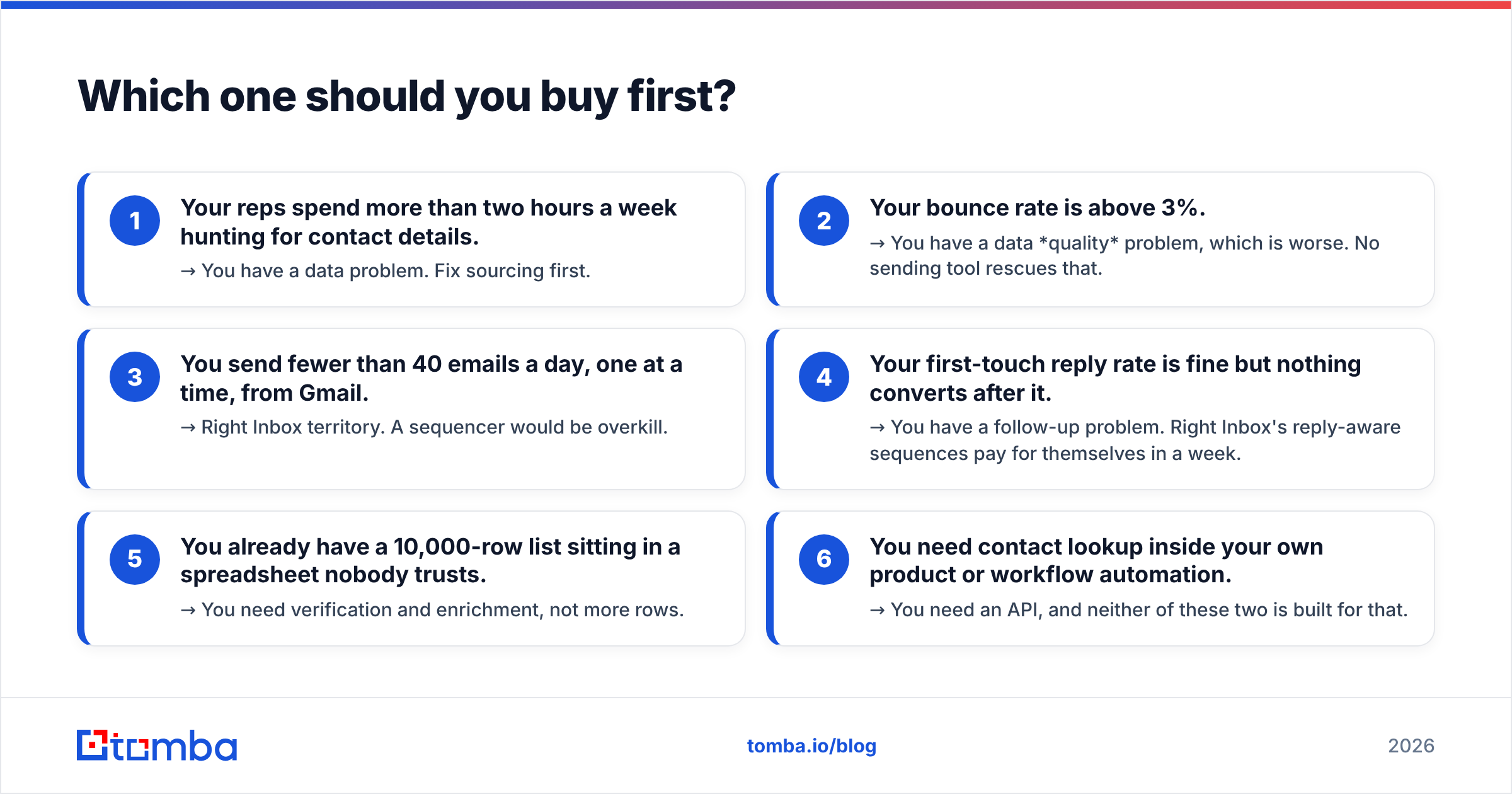
Answer the diagnostic below honestly. Whichever bucket has more checkmarks is the gap you should close this quarter.
- Your reps spend more than two hours a week hunting for contact details. → You have a data problem. Fix sourcing first.
- Your bounce rate is above 3%. → You have a data quality problem, which is worse. No sending tool rescues that.
- You send fewer than 40 emails a day, one at a time, from Gmail. → Right Inbox territory. A sequencer would be overkill.
- Your first-touch reply rate is fine but nothing converts after it. → You have a follow-up problem. Right Inbox's reply-aware sequences pay for themselves in a week.
- You already have a 10,000-row list sitting in a spreadsheet nobody trusts. → You need verification and enrichment, not more rows.
- You need contact lookup inside your own product or workflow automation. → You need an API, and neither of these two is built for that.
Most teams under ten reps land on items 3 and 4 and buy Right Inbox. Most teams above ten reps land on items 1, 2, and 6 — and discover that GetProspect's database is only half the answer.
Is GetProspect accurate enough to skip verification?#
No. And neither is any other single-source finder, including ours — which is why verification is a separate step in every serious stack.
Here's the mechanic that trips people up. B2B contact data decays at roughly 25-30% per year as people change jobs, companies rebrand, and mail servers get reconfigured. A database that was 95% accurate at the moment of crawl is meaningfully worse twelve months later. When a finder returns an address with a "valid" flag, that flag reflects what the pattern and the mail server said at some point — not necessarily today.
There are three tiers of confidence you should insist on:
- Pattern-derived — the tool guessed
first.last@domain.comfrom a known company format. Useful, unproven, and the single largest source of bounces. - SMTP-confirmed — the receiving server acknowledged the mailbox exists. This is the standard you want before adding anyone to a sequence.
- Catch-all — the server accepts everything, so SMTP tells you nothing. These need separate handling; a proper catch-all verifier uses secondary signals rather than shrugging.
If a tool doesn't tell you which tier each address falls into, you're flying blind. Run your export through a dedicated email verifier before it reaches Right Inbox, Instantly, or whatever sends for you. Two cents per address to protect a domain you've spent two years warming is not a difficult trade.

What does the combined stack actually cost?#
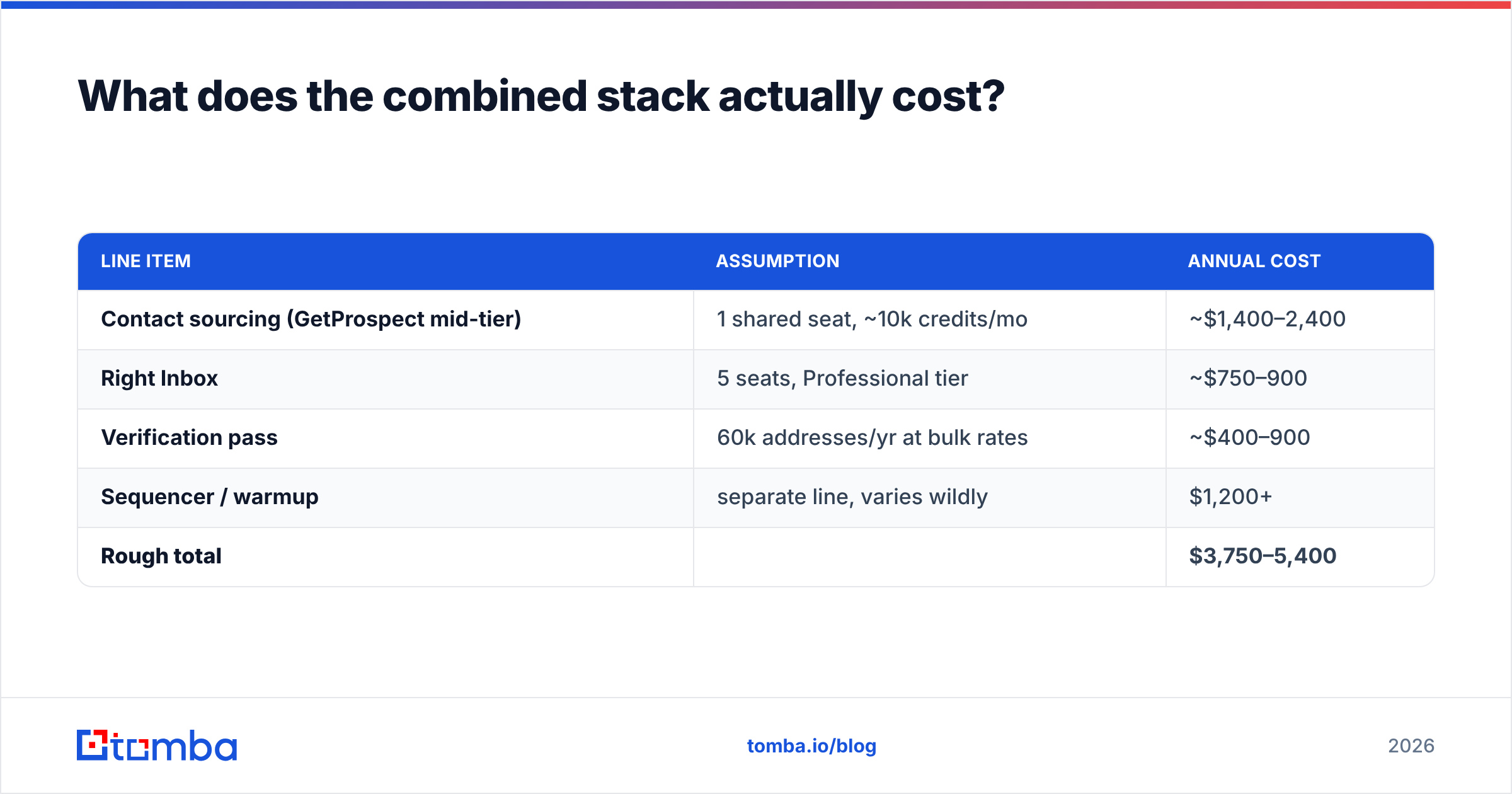
Let's price a realistic five-person SDR team for a year, in round numbers.
| Line item | Assumption | Annual cost |
|---|---|---|
| Contact sourcing (GetProspect mid-tier) | 1 shared seat, ~10k credits/mo | ~$1,400–2,400 |
| Right Inbox | 5 seats, Professional tier | ~$750–900 |
| Verification pass | 60k addresses/yr at bulk rates | ~$400–900 |
| Sequencer / warmup | separate line, varies wildly | $1,200+ |
| Rough total | $3,750–5,400 |
Two takeaways. Right Inbox is the cheapest line in the whole stack, which makes the "GetProspect vs Right Inbox" framing a little absurd — you're weighing a $900 decision against a $2,400 one. And verification, the line most teams cut first, is also the line that protects every other line. Skip it and your $1,200 warmup budget is being spent to repair damage you're actively causing.
For reference, Tomba pricing starts at $49/mo for Starter and $99/mo for Growth, with a free tier of 25 searches per month for testing. Bulk work runs through the bulk email finder rather than burning interactive credits.
Where does Tomba fit in this comparison?#
Tomba replaces the GetProspect half of the stack, not the Right Inbox half. We don't send email, don't track opens, and have no opinion about your Gmail interface. Keep Right Inbox — it's good at what it does.
The differences that matter versus GetProspect:
- Verification is a first-class product, not a checkbox. Finder, verifier, catch-all handling, and phone validation are separate endpoints you can call independently. That matters when you're cleaning a list you bought elsewhere.
- The API is the product surface, not an afterthought. A full REST email finder API, a CLI, and an MCP server mean you can wire lookups into your own onboarding flow, enrichment job, or agent workflow without touching a UI.
- Source transparency. Every result carries the sources it was derived from and a confidence score, so you can set your own threshold instead of trusting a binary "valid" badge.
- Sensible entry pricing. $49/mo Starter, no annual-only lock-in to access the API.
Where GetProspect wins: if you want a single interface that also acts as a lightweight CRM with custom properties and shared lists, and your team lives inside LinkedIn search, GetProspect's workflow is tighter than a pure API-first tool. That's a real preference, not a consolation prize.
Where Right Inbox wins: nothing on this list competes with it. It occupies a niche — making Gmail slightly better for one person sending careful, manual emails — and it owns that niche. Cross-check the current feature sets on G2 before you commit; both vendors ship changes quarterly.
What's the verdict?#
Buy Right Inbox if you send low volume by hand and your losses come from forgetting to follow up. It's inexpensive, installs in two minutes, and the reply-aware sequences alone justify the cost.
Buy GetProspect if you need a self-contained place to discover, store, and organize contacts, and your team's workflow starts in LinkedIn search rather than in a spreadsheet or a script.
Buy neither, in isolation, if you're serious about outbound at volume. The list-building layer and the sending layer are both mandatory, and the verification layer between them is what determines whether any of it works. Order of operations: source, verify, enrich, then send.
One last calibration. If you had to spend the next hour improving exactly one thing, improve the list. Better data raises reply rates on copy you already have. Better copy on a bad list just gets rejected more politely.
Ready to fix the data layer? Start with the Tomba Email Finder — search by domain, name, or company, get confidence-scored results with visible sources, and verify before anything reaches your sequencer. The free tier gives you 25 searches a month to test it against your existing list; if the addresses you already trust come back clean, you've lost nothing. If they don't, you just found the leak.
Related guides#
Ready to find emails that actually work?
Join 150,000+ professionals who stopped guessing and started sending. Free credits on signup — no credit card required.
Get the Tomba newsletter
Practical outbound tactics and product updates — once every two weeks.
About the author