GetProspect vs Sparkle: Which Email Finder Wins in 2026?
GetProspect is the established LinkedIn-first email finder. Sparkle is the newer AI-native challenger. We break down accuracy, pricing, export limits and API access — plus when neither is the right pick.
GetProspect vs Sparkle comes down to one trade-off: control or speed. GetProspect is the mature, LinkedIn-first email finder. Sparkle is the AI-native newcomer. Below we compare accuracy, pricing, export limits and API access — and the case where neither tool is the right buy.
TL;DR
- GetProspect is the mature, LinkedIn-first option. You get a Chrome extension, a large B2B database, a built-in verifier and per-credit pricing. It is the safer default when your prospecting starts on LinkedIn.
- Sparkle is the AI-native challenger. It leans on natural-language search instead of manual list-building. Docs and pricing are thinner, so test it against your own ICP first.
- Accuracy is the whole ballgame. Both tools return "found" emails that include pattern guesses. Skip verification and a 12-15% bounce rate will wreck your domain reputation.
- Neither is a full stack. GetProspect is weak on API-first work at low tiers. Sparkle is weak on auditability. For programmatic enrichment, pick an email finder with a real API.
- Our pick: GetProspect for LinkedIn-heavy SDR teams. Sparkle for solo operators who want speed. A verification-first tool underneath either one.
What are GetProspect and Sparkle, actually?#
They solve the same problem from opposite directions.
GetProspect has been in the email-finding market since 2016. The core loop is simple. Browse LinkedIn, click the extension, pull contacts into a list, export to CSV or your CRM. Behind that sits a contact database in the hundreds of millions plus a built-in verification layer. Everything is credit-metered and visible, so you can see what each contact cost.
Sparkle belongs to the newer cohort of AI-native prospecting tools. Instead of building lists by filter, you describe the account or persona you want and the tool assembles the list. That is faster for exploratory prospecting. The trade-off: you inherit the model's judgment about what counts as a match, and you see less about where a record came from.
The strategic difference in one line: GetProspect optimises for control, Sparkle optimises for speed. The right pick depends on your bottleneck — list-building time or list quality.

GetProspect vs Sparkle: how do features and pricing compare?#
Here is the side-by-side. Vendor pricing changes often, so confirm on the vendor site before you buy.
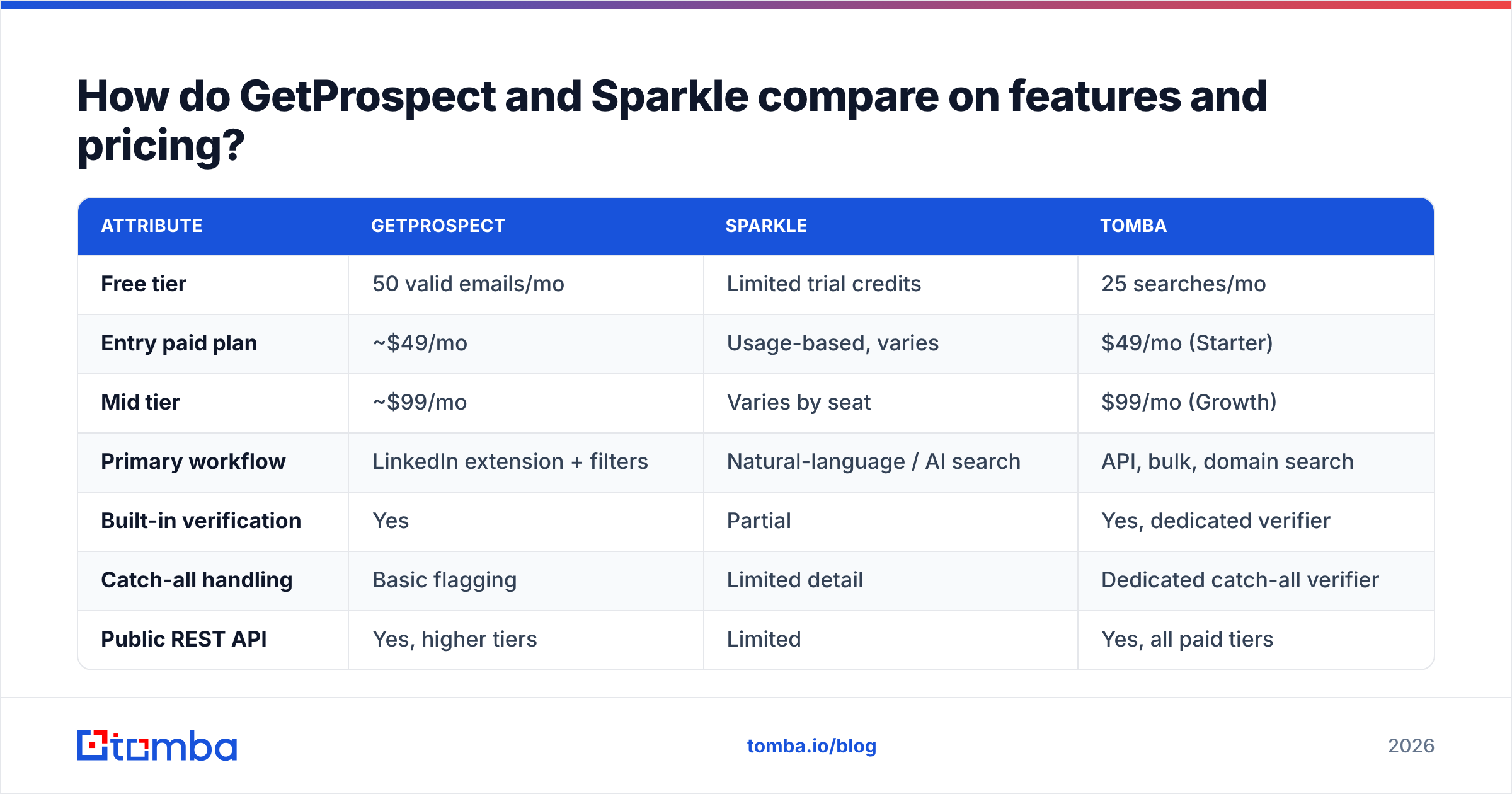
| Attribute | GetProspect | Sparkle | Tomba |
|---|---|---|---|
| Free tier | 50 valid emails/mo | Limited trial credits | 25 searches/mo |
| Entry paid plan | ~$49/mo | Usage-based, varies | $49/mo (Starter) |
| Mid tier | ~$99/mo | Varies by seat | $99/mo (Growth) |
| Primary workflow | LinkedIn extension + filters | Natural-language / AI search | API, bulk, domain search |
| Built-in verification | Yes | Partial | Yes, dedicated verifier |
| Catch-all handling | Basic flagging | Limited detail | Dedicated catch-all verifier |
| Public REST API | Yes, higher tiers | Limited | Yes, all paid tiers |
| Bulk CSV enrichment | Yes | Yes | Yes |
| CRM integrations | HubSpot, Pipedrive, Zapier | Growing set | HubSpot, Salesforce, Pipedrive, Zapier, Make |
| Best for | LinkedIn-first SDR teams | Solo founders, fast exploration | Programmatic + verification-heavy teams |
Two things stand out.
First, the entry price is roughly the same across the market. Around $49 a month buys a starting block of credits almost everywhere. The differentiator is not price per month. It is price per usable contact. A $49 plan that returns 1,000 emails at 82% deliverability is worse value than a $49 plan returning 700 at 97%.
Second, API access is where the tiers diverge sharply. If any part of your workflow is programmatic — enriching form fills, hydrating a CRM nightly, running a scoring model — check which tier unlocks the API first. On some plans it sits three tiers up.

GetProspect vs Sparkle: which tool has better email accuracy?#
This is the only question that moves revenue, so it deserves a precise answer rather than a vendor claim.
Every email finder returns results in three buckets:
- Verified sourced — the address showed up in a real, dated source and passed an SMTP check. Highest confidence, lowest volume.
- Pattern-derived and verified — the tool inferred
first.last@domain.comfrom a known company pattern, then confirmed the mailbox accepts mail. Good confidence. - Pattern-derived, unverified — the tool guessed the format and shipped it. This is where bounces come from, and vendors quietly fold it into the "found" count.
GetProspect is fairly open here. Results carry a validity status, and you can filter exports to valid-only. Sparkle's AI-first interface hides more of this. That is what makes it fast, and what makes it risky at volume. If you cannot tell bucket 2 from bucket 3, you cannot forecast your bounce rate.

The practical rule: the tool that finds the email should not be the only tool that judges it. A second-pass check with an independent email verifier usually strips 8-15% of a raw finder export. That is not a failure of the finder. It is the normal gap between "an address exists in a database" and "a human reads mail there today."
Catch-all domains are the specific trap. A catch-all server accepts every address at the domain, so a naive SMTP check marks asdfgh@company.com valid. Neither GetProspect nor Sparkle resolves this cleanly at entry tiers. A dedicated catch-all verifier uses secondary signals — engagement history, mailbox pattern consistency, MX behaviour — to tell real mailboxes from the accept-everything wall.
Is GetProspect better than Sparkle for LinkedIn prospecting?#
Yes, for most teams — with a caveat.
GetProspect's extension workflow is mature. Run a Sales Navigator search, capture the page, and contacts land in a named list with company, title and email status attached. It handles pagination, dedupes against your existing lists, and pushes to CRM without a CSV in the middle. Years of refinement show.
Sparkle's edge appears earlier in the funnel. If you do not yet know which titles at which companies to target, describing your ideal customer and letting the tool assemble candidates beats building a 14-filter Sales Navigator query. For discovery, that is a real advantage.
The caveat cuts both ways: LinkedIn scraping is a moving target. Extension-based tools depend on a page structure LinkedIn changes without notice, and aggressive capture invites account restrictions. If LinkedIn is your only sourcing channel, you stack single-vendor risk on single-platform risk. A domain search approach — start from a target account list, pull the org chart by domain — removes the platform dependency entirely.

What should you actually evaluate before buying either one?#
Run this checklist against your own data, not the vendor demo. Start with the three criteria that move the number most:
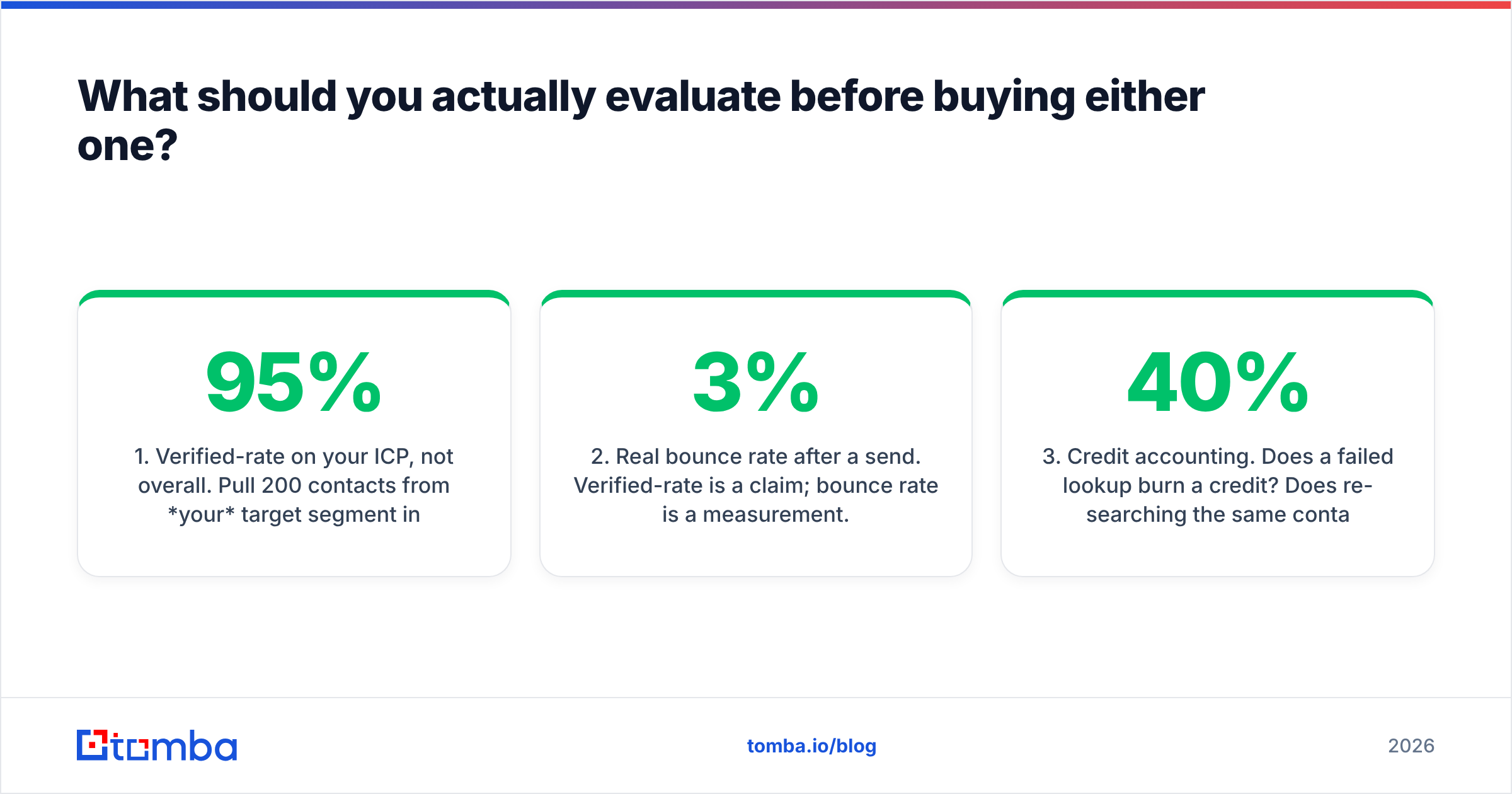
- Verified-rate on your ICP, not overall. Pull 200 contacts from your target segment in both tools. A vendor that hits 95% on US tech and 60% on European manufacturing is only 95% accurate if you sell to US tech.
- Real bounce rate after a send. Verified-rate is a claim. Bounce rate is a measurement. Send 500 addresses from each source through the same infrastructure and compare hard bounces. Anything above 3% is a deliverability problem.
- Credit accounting. Does a failed lookup burn a credit? Does re-searching the same contact charge you twice? Do credits roll over? These details move effective cost by 30-40% and rarely appear in the pricing table.
Then check the three that decide whether you can live with the tool long term:
- Export and ownership terms. Can you export everything, at any tier, in a machine-readable format? Some tools cap monthly exports below your credit allowance and quietly strand data you paid for.
- API depth and rate limits. Not "is there an API" but which tier, what rate limit, bulk endpoints, official SDK. The Tomba API exposes finder, verifier and enrichment endpoints on every paid tier.
- Compliance posture. GDPR and CCPA obligations follow the data, not the vendor. Ask where records are sourced, whether opt-outs propagate, and whether you get a data processing agreement. Vendors that publish their data sources openly are easier to defend in procurement.
If a vendor cannot answer items 3, 4 and 6 in writing, that is your answer.
How do GetProspect and Sparkle fit alongside other tools?#
Neither is a complete outbound stack. Treating either as one is the most common mistake we see.
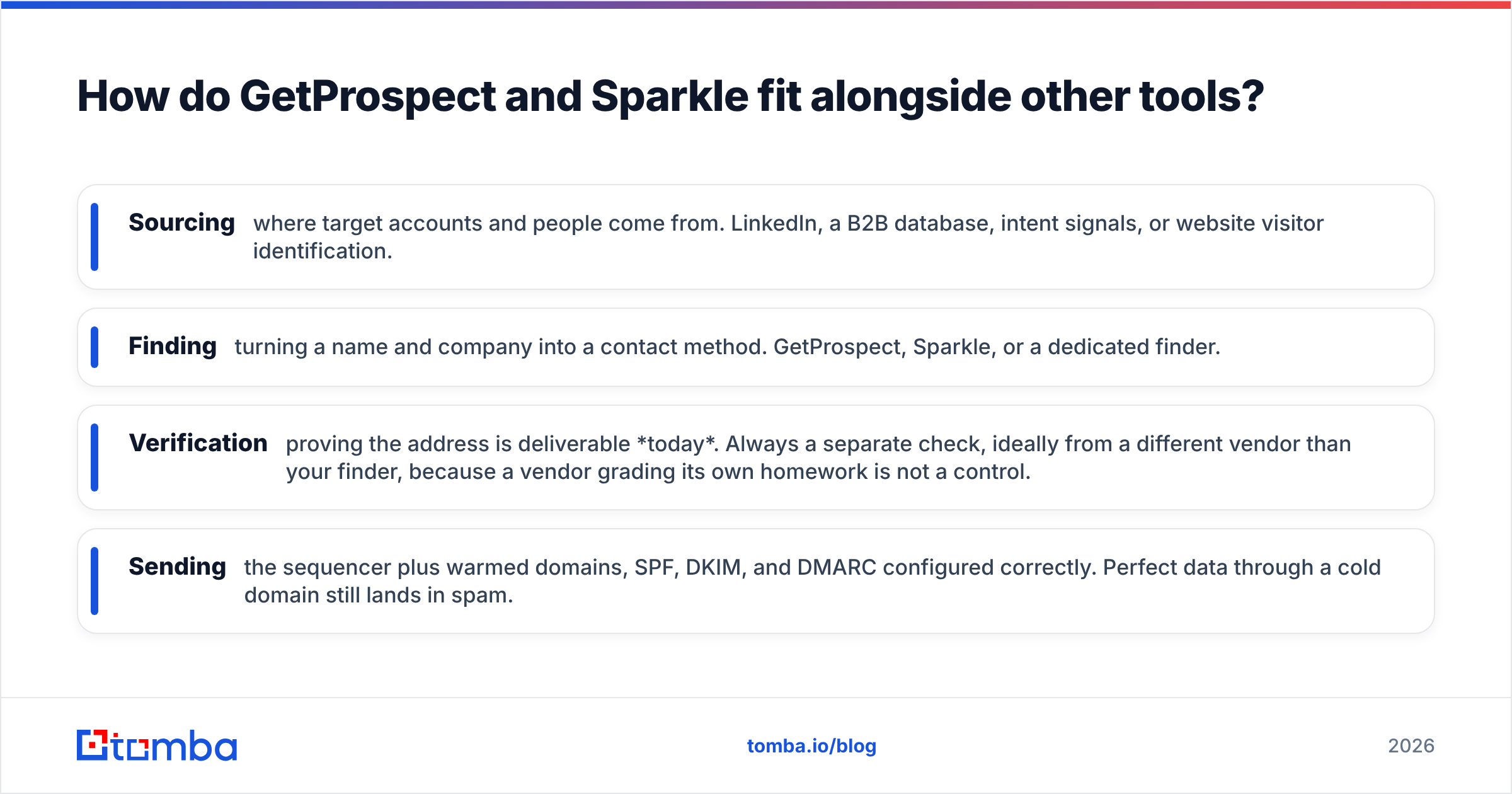
A working 2026 stack has four layers, and the finder is only one of them:
- Sourcing — where target accounts and people come from. LinkedIn, a B2B database, intent signals, or website visitor identification.
- Finding — turning a name and company into a contact method. GetProspect, Sparkle, or a dedicated finder.
- Verification — proving the address is deliverable today. Always a separate check, ideally from another vendor. A vendor grading its own homework is not a control.
- Sending — the sequencer plus warmed domains, with SPF, DKIM and DMARC set up correctly. Perfect data through a cold domain still lands in spam.
Buy one tool and expect it to cover all four, and you end up with a good list and terrible email deliverability, or great infrastructure sending to addresses that stopped existing eighteen months ago.
Worth noting: the category is crowded, and mid-tier tools differ less than the marketing suggests. Skim the lead intelligence category on G2 before you shortlist. It is a cheap way to avoid anchoring on the two tools that happened to retarget you. And if you want to know how SMTP verification works under the hood, the SMTP overview on Wikipedia beats most vendor blogs.
Which one should you choose?#
Match the tool to the constraint that actually limits you. In the GetProspect vs Sparkle decision, that constraint is usually auditability versus speed.
Choose GetProspect if your prospecting lives inside LinkedIn, your SDRs build lists by hand every week, and you want to see what each record cost and where it came from. The extension is the best part of the product, and credit accounting is legible.
Choose Sparkle if you are a founder or solo operator, you are still finding your ICP, and speed of exploration beats auditability. AI-first search removes real friction early on. Verify hard before you send, and re-evaluate once volume passes a few thousand contacts a month.
Choose neither if your workflow is programmatic. If you enrich records in a pipeline, hydrate a CRM on a schedule, or build contact discovery into your own product, you want API-first tooling with per-endpoint pricing and a real SDK.
Choose both, briefly, if you can afford a two-week bake-off. Run the same 200-contact ICP sample through each, verify both outputs independently, send to both, and compare bounce and reply rates. That test costs less than one month of the wrong subscription.
One thing every option shares: the verification layer is not optional. Sender reputation is slow to build and fast to destroy, and a single campaign to an unverified list can set a domain back months.
Ready to test the data layer underneath your stack? Start with the Tomba Email Finder — 25 free searches a month, no card required. SMTP verification and catch-all detection are built into the same call rather than sold as an upsell. Run your real ICP through it alongside whichever tool you are evaluating, compare bounce rates on a live send, and let the numbers pick the winner. Paid plans start at $49/month; see Tomba pricing for full credit allowances and API limits.
Related guides#
Ready to find emails that actually work?
Join 150,000+ professionals who stopped guessing and started sending. Free credits on signup — no credit card required.
Get the Tomba newsletter
Practical outbound tactics and product updates — once every two weeks.
About the author