GetProspect vs VerifiedEmail: Which Tool Wins in 2026?
One tool finds email addresses, the other only tells you if they exist. Here is how GetProspect and VerifiedEmail actually compare on accuracy, pricing, workflow, and where each one quietly costs you pipeline.
GetProspect vs VerifiedEmail is not a like-for-like fight. One tool finds email addresses. The other only tells you whether an address is real. Here is how to choose.
TL;DR
- GetProspect vs VerifiedEmail is not a fair fight: they solve different halves of one problem. GetProspect finds contact data. VerifiedEmail checks whether an address is deliverable.
- If your list is empty, a verifier does nothing for you. If your list is junk, a finder alone will not save your sender reputation.
- GetProspect is strong on LinkedIn-first sourcing and its B2B database. It is weak on catch-all domains, and credits burn fast on misses.
- VerifiedEmail is cheap per check and easy to bolt on. But it adds a second vendor, a second API key, and a second bill.
- The 2026 answer for most teams: one platform that finds and verifies in a single credit pool, so you never pay twice for the same contact.
What do GetProspect and VerifiedEmail actually do?#
GetProspect is a B2B lead-generation platform built around a contact database and a Chrome extension. You search by company, job title, industry, or headcount. You can also run the extension over a LinkedIn search page, and it returns work emails for the profiles it recognizes. Output goes to a built-in CRM-style list view, a CSV, or an integration. You can see the current feature set on the official GetProspect site.
VerifiedEmail sits at the other end of the pipeline. You give it addresses you already have — from a form fill, a purchased list, an old CRM export — and it returns a status: valid, invalid, risky, catch-all, or unknown. It does not source contacts. It has no database of people. Its entire job is reducing bounce rate before you press send.
That distinction matters more than any feature-by-feature scorecard. Buying the wrong one is the most common mistake teams make here. An SDR with no contacts does not need a verifier. A marketer sitting on a 40,000-row list from a 2023 webinar does not need a finder.
GetProspect vs VerifiedEmail: how do they compare feature by feature?#
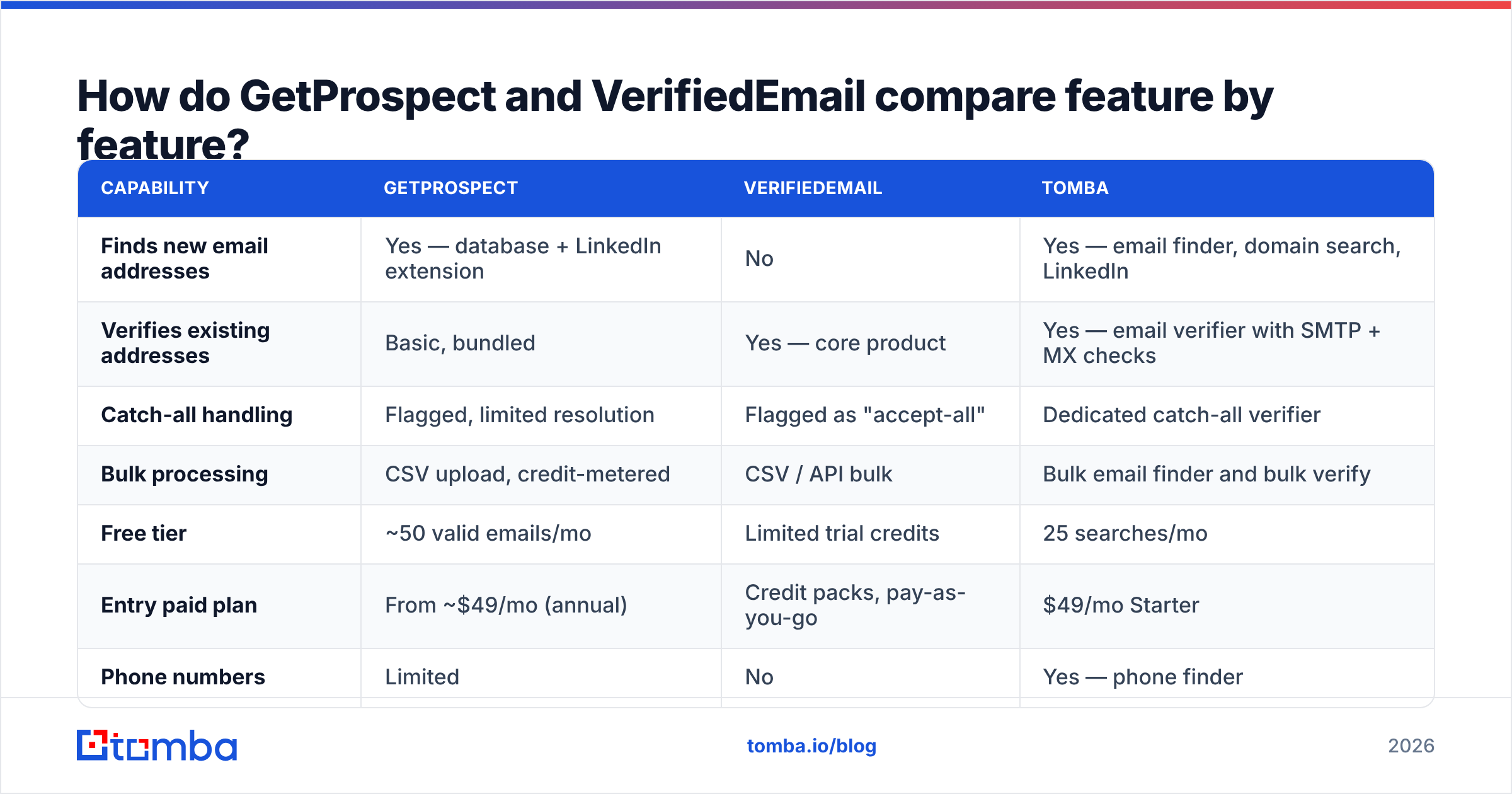
Here is the honest side-by-side, with Tomba included as the both-in-one reference point since it covers each column.
| Capability | GetProspect | VerifiedEmail | Tomba |
|---|---|---|---|
| Finds new email addresses | Yes — database + LinkedIn extension | No | Yes — email finder, domain search, LinkedIn |
| Verifies existing addresses | Basic, bundled | Yes — core product | Yes — email verifier with SMTP + MX checks |
| Catch-all handling | Flagged, limited resolution | Flagged as "accept-all" | Dedicated catch-all verifier |
| Bulk processing | CSV upload, credit-metered | CSV / API bulk | Bulk email finder and bulk verify |
| Free tier | ~50 valid emails/mo | Limited trial credits | 25 searches/mo |
| Entry paid plan | From ~$49/mo (annual) | Credit packs, pay-as-you-go | $49/mo Starter |
| Phone numbers | Limited | No | Yes — phone finder |
| API | Yes | Yes | Yes — REST API, CLI, MCP |
| Best for | Sourcing net-new B2B contacts | Cleaning lists you already own | Teams that need both in one credit pool |
Prices and quotas move. Confirm the current numbers on each vendor's own pricing page before you sign an annual contract. This table reflects publicly listed tiers at the time of writing, not a quote.
Which one is more accurate — and what does "accurate" even mean here?#
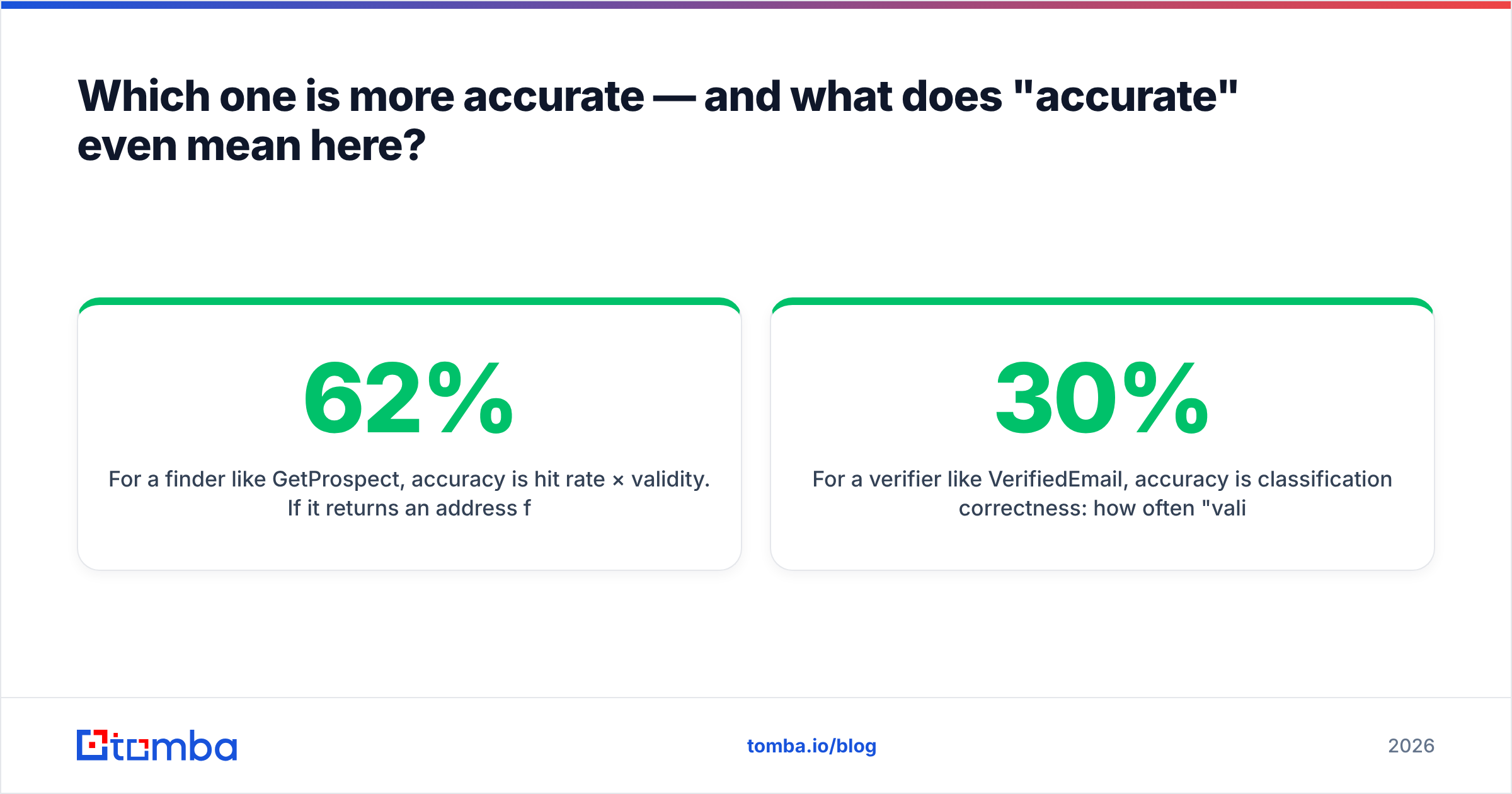
Accuracy means two different things for these two tools, and vendors exploit the ambiguity.
For a finder like GetProspect, accuracy is hit rate × validity. If it returns an address for 62% of your target list and 88% of those actually deliver, your real yield is roughly 55%. Vendors love to publish the second number alone.
For a verifier like VerifiedEmail, accuracy is classification correctness: how often "valid" really lands, and how often "invalid" was a working mailbox behind a paranoid firewall. A verifier that marks 30% of a list "unknown" is not accurate. It just moved the decision back to you.

Three things quietly wreck both numbers in 2026:
- Catch-all domains. Roughly a quarter of business domains now accept every address at the SMTP handshake, so a naive SMTP probe returns "valid" for
asdfgh@company.com. Tools that stop at the handshake inflate their own accuracy stats. - Greylisting and rate limits. Google Workspace and Microsoft 365 throttle verification traffic hard. Cheap verifiers time out, return "unknown", then charge you for the credit anyway.
- Role and alias addresses.
info@,sales@,careers@verify clean and convert at close to zero. A finder that pads its hit rate with role addresses looks great in a benchmark and terrible in a sequence.
When you test either tool, do it the boring way. Pull 200 contacts you already know are real from your own CRM. Run both tools blind, then score them yourself. Vendor benchmarks — including anyone's — are marketing until you reproduce them on your own ICP.
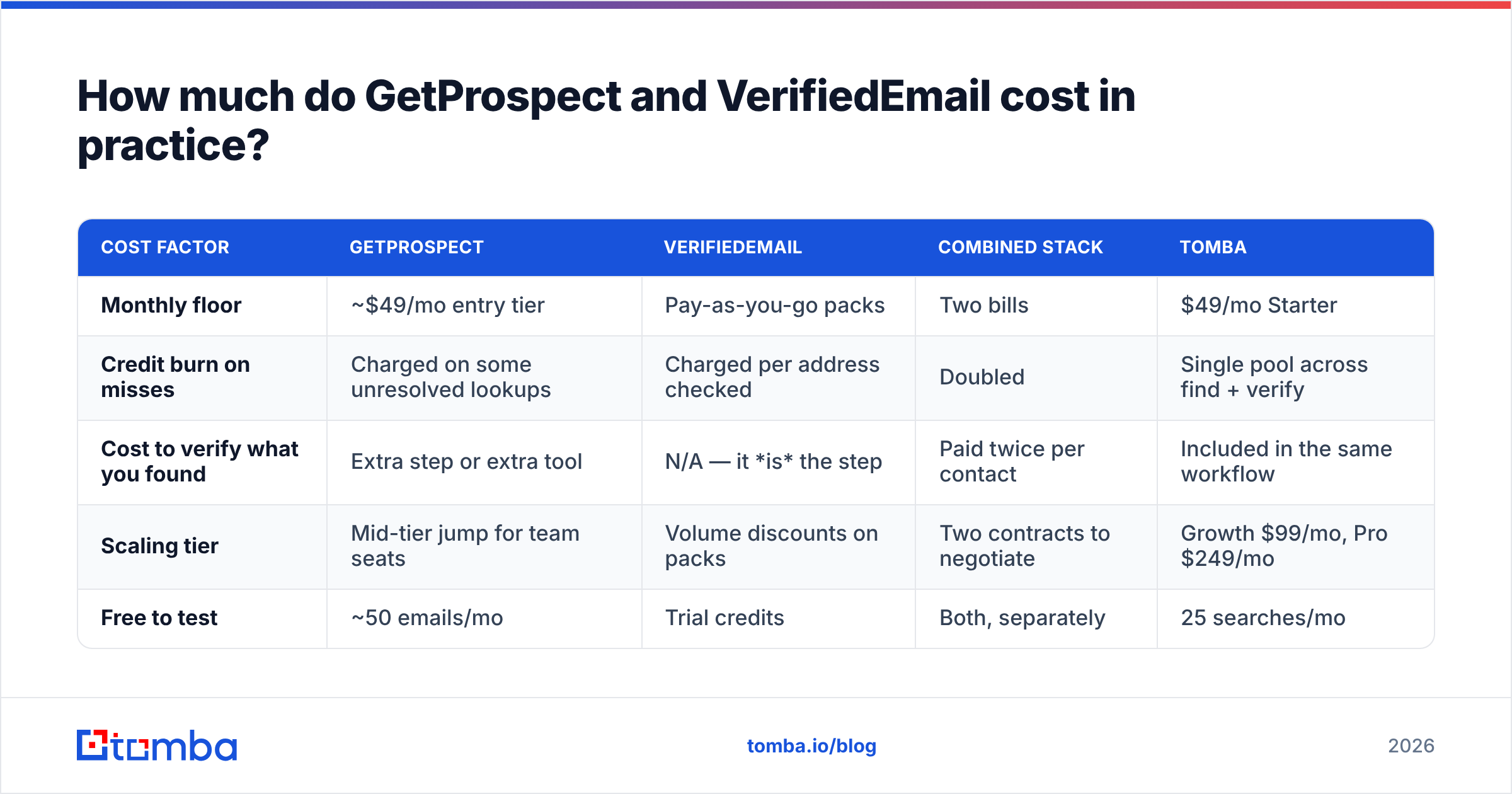
How much do GetProspect and VerifiedEmail cost in practice?#
The sticker price is not the cost. The cost is dollars per usable, replied-to contact.
| Cost factor | GetProspect | VerifiedEmail | Combined stack | Tomba |
|---|---|---|---|---|
| Monthly floor | ~$49/mo entry tier | Pay-as-you-go packs | Two bills | $49/mo Starter |
| Credit burn on misses | Charged on some unresolved lookups | Charged per address checked | Doubled | Single pool across find + verify |
| Cost to verify what you found | Extra step or extra tool | N/A — it is the step | Paid twice per contact | Included in the same workflow |
| Scaling tier | Mid-tier jump for team seats | Volume discounts on packs | Two contracts to negotiate | Growth $99/mo, Pro $249/mo |
| Free to test | ~50 emails/mo | Trial credits | Both, separately | 25 searches/mo |
The trap in the third row is the one nobody budgets for. Find a contact with one vendor, verify it with another, and you pay for that contact twice. You pay a third time in engineering hours when the two systems disagree about what "risky" means. See Tomba pricing for what a single-pool model looks like at each tier.
Do you need a finder, a verifier, or both?#
Work through these in order. Most teams find their answer in the first two.
- You have no list. You know your ICP but not the people. You need a finder. A verifier is useless here.
- You have a list you did not build. Purchased, inherited, or scraped. Verify it before anything touches your sending domain.
- Your list is 18 months old. B2B contact data decays 25–30% a year. Verify to strip the dead rows, then re-find the ones worth keeping.
- You send 2,000+ cold emails a month. You need both, and you need them to run at the moment of discovery.
- You run multiple client domains. You need both, plus per-client separation, an API, and an audit trail.

Is GetProspect's LinkedIn workflow worth the lock-in?#
It is the strongest thing GetProspect has, and it is also the thing that makes it fragile.
The extension model — run a LinkedIn Sales Navigator search, click, pull emails — is genuinely fast for one rep building one list. Where it strains:
- Platform risk. Every extension that reads LinkedIn pages lives at the mercy of LinkedIn's DOM and its terms. Layout changes and anti-scraping updates break these tools periodically, and 2025 was an active year for that.
- It is a single-seat workflow. Handing a 5,000-row target account list to a team of six via browser extension is not a process, it is a group chat.
- No server-side reproducibility. If a lead came in through a browser session, you cannot re-run it programmatically next quarter to check whether the person is still there.
If LinkedIn is your primary sourcing surface, that is a real reason to weigh GetProspect heavily. Just pair it with an API-accessible fallback, so your pipeline is not one Chrome update away from a bad Monday. Tomba's LinkedIn finder covers the same surface with an API behind it. That is the part that matters once you scale past one rep.
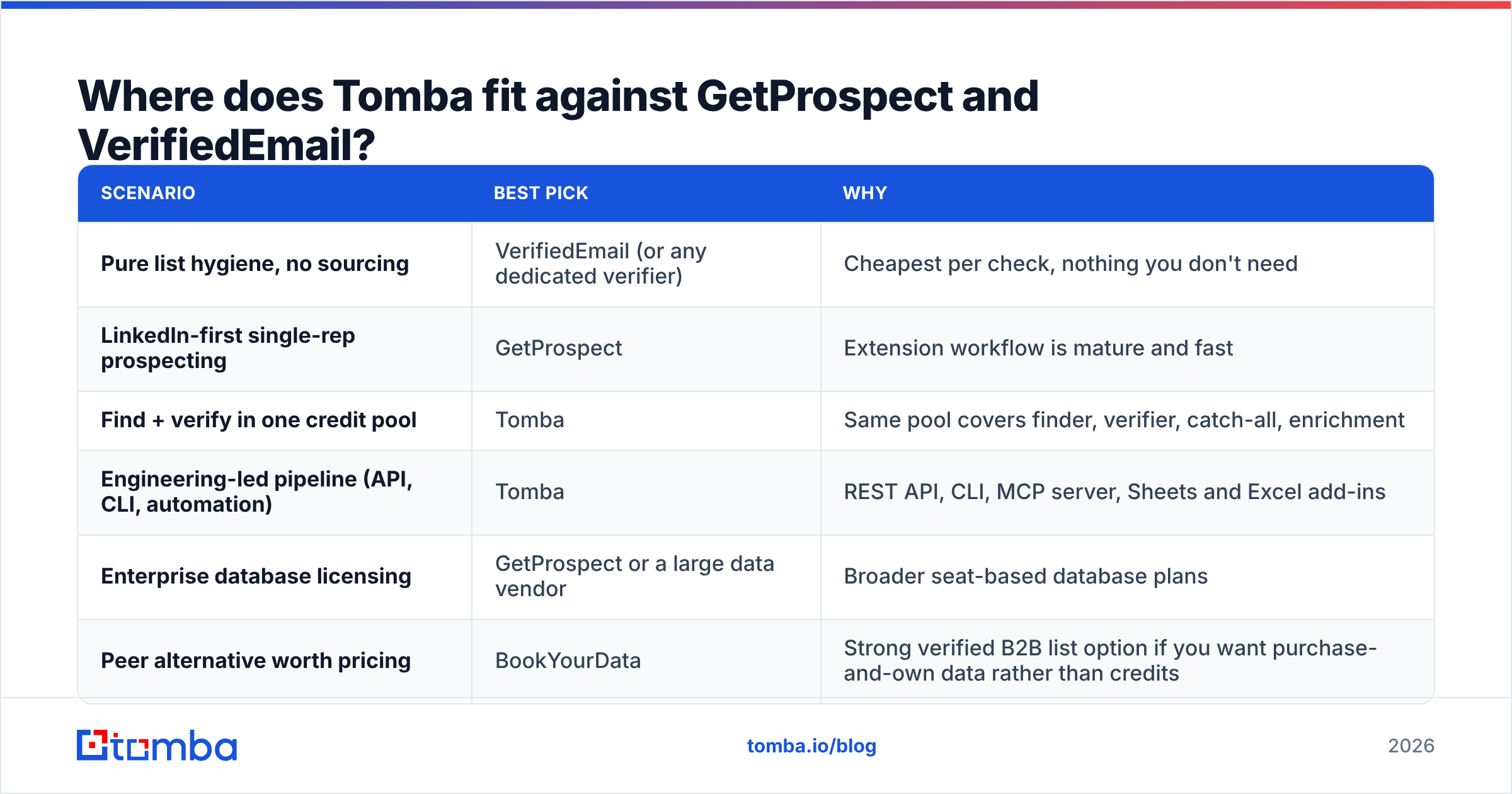
Where does Tomba fit against GetProspect and VerifiedEmail?#
Honestly: Tomba overlaps GetProspect more than it overlaps VerifiedEmail, and it competes with the combination of the two rather than either alone.

| Scenario | Best pick | Why |
|---|---|---|
| Pure list hygiene, no sourcing | VerifiedEmail (or any dedicated verifier) | Cheapest per check, nothing you don't need |
| LinkedIn-first single-rep prospecting | GetProspect | Extension workflow is mature and fast |
| Find + verify in one credit pool | Tomba | Same pool covers finder, verifier, catch-all, enrichment |
| Engineering-led pipeline (API, CLI, automation) | Tomba | REST API, CLI, MCP server, Sheets and Excel add-ins |
| Enterprise database licensing | GetProspect or a large data vendor | Broader seat-based database plans |
| Peer alternative worth pricing | BookYourData | Strong verified B2B list option if you want purchase-and-own data rather than credits |
Where GetProspect wins: database browsing UX and the LinkedIn extension. Where a dedicated verifier wins: per-check price at very high verification volume with no sourcing need. Where a combined platform wins: everything in the middle, which is where most teams actually live.
What should you check before you commit?#
Run this list against whichever tool you shortlist. It takes an afternoon and saves a quarter.
- Test on your own ICP, not the vendor's demo. 200 known-good contacts, blind test, score it yourself.
- Ask how catch-all is handled. "We flag it" is not an answer. "We resolve it via pattern confidence and secondary signals" is.
- Check what happens on a miss. Are you charged a credit when the tool returns nothing? Read the fine print, not the FAQ.
- Test the API before the UI. If the API is thin, you will outgrow the tool the moment you automate.
- Confirm export ownership. Some plans restrict CSV export or cap it below your credit allowance.
- Compare on G2 with recent reviews only. Filter to the last 6 months on G2 — 2023 reviews describe a product that no longer exists.
One more habit worth building: verify at the moment of discovery, not in a monthly batch. Data decays every day, so batch cleaning always means you sent to some stale rows in between. Continuous verification is the difference between a 2% bounce rate and a deliverability incident.
Which one should you actually buy?#
The GetProspect vs VerifiedEmail answer comes down to one question: which half of the job is broken for you right now?
If you only clean lists, buy a verifier and stop reading. VerifiedEmail or any competent dedicated checker will do the job for less than a finder costs.
If you only source from LinkedIn and you are one or two reps, GetProspect is a reasonable pick with a real workflow advantage.
If you do both — and almost every outbound team does — running two vendors means two bills, two definitions of "valid", and paying twice for the same contact. That is the case for consolidating.
Start with the Tomba Email Finder. The free tier gives you 25 searches a month with no card. Every result runs through the same verification layer that powers the standalone verifier, and Starter is $49/mo when you outgrow it. Run it beside whatever you use today on the same 200 contacts. Compare the yield yourself, and let the numbers decide instead of the pricing page.
Related guides#
Ready to find emails that actually work?
Join 150,000+ professionals who stopped guessing and started sending. Free credits on signup — no credit card required.
Get the Tomba newsletter
Practical outbound tactics and product updates — once every two weeks.
About the author