GetProspect vs Webbula 2026: Email Finder vs Data Hygiene
One of these tools finds email addresses you don't have. The other cleans the ones you already do. Here's how GetProspect and Webbula actually differ on data, pricing and accuracy — and which one your team needs first.
TL;DR
- GetProspect vs Webbula is not a fair fight, because the two tools do different jobs. GetProspect finds B2B email addresses you don't have. Webbula cleans lists you already own.
- Is your problem "40 target accounts and no contacts"? Then GetProspect is the right category. Webbula will not help you.
- Is your problem "we bought a list, 9% of it bounces, and our ESP is angry"? Then Webbula is the right category. GetProspect's verifier is a much lighter check.
- Pricing works the opposite way too. GetProspect is self-serve, with a free tier and public monthly plans. Webbula is quote-based, priced per record, with volume minimums.
- Most outbound teams need both jobs done. One API that finds and verifies — like Tomba at $49/mo — usually costs less than two vendors.
GetProspect vs Webbula: what does each tool do?#
Most buyers assume both tools do the same job. They don't.
GetProspect is a B2B prospecting tool. You give it a name and a company, a LinkedIn profile, or a domain. It gives back a work email. It ships a Chrome extension for LinkedIn. It also has a contact database you can filter by job title, industry, headcount, location, and tech stack. Add CSV enrichment and a light CRM layer on top. The point of it all is simple: turn a target list into people you can email.
Webbula cleans data. You give it a list you already have. That might be newsletter sign-ups, form fills, a bought file, or an old CRM export. It tells you which addresses are safe to mail. It flags spam traps, bots, known complainers, and fraud. It can also add postal data, household data, and interests to a bare email. The point here is safety, not growth.
Put simply: GetProspect grows the list. Webbula guards the list. Asking which one is "better" is like asking if a hiring agency beats a background-check firm.
GetProspect vs Webbula, feature by feature#
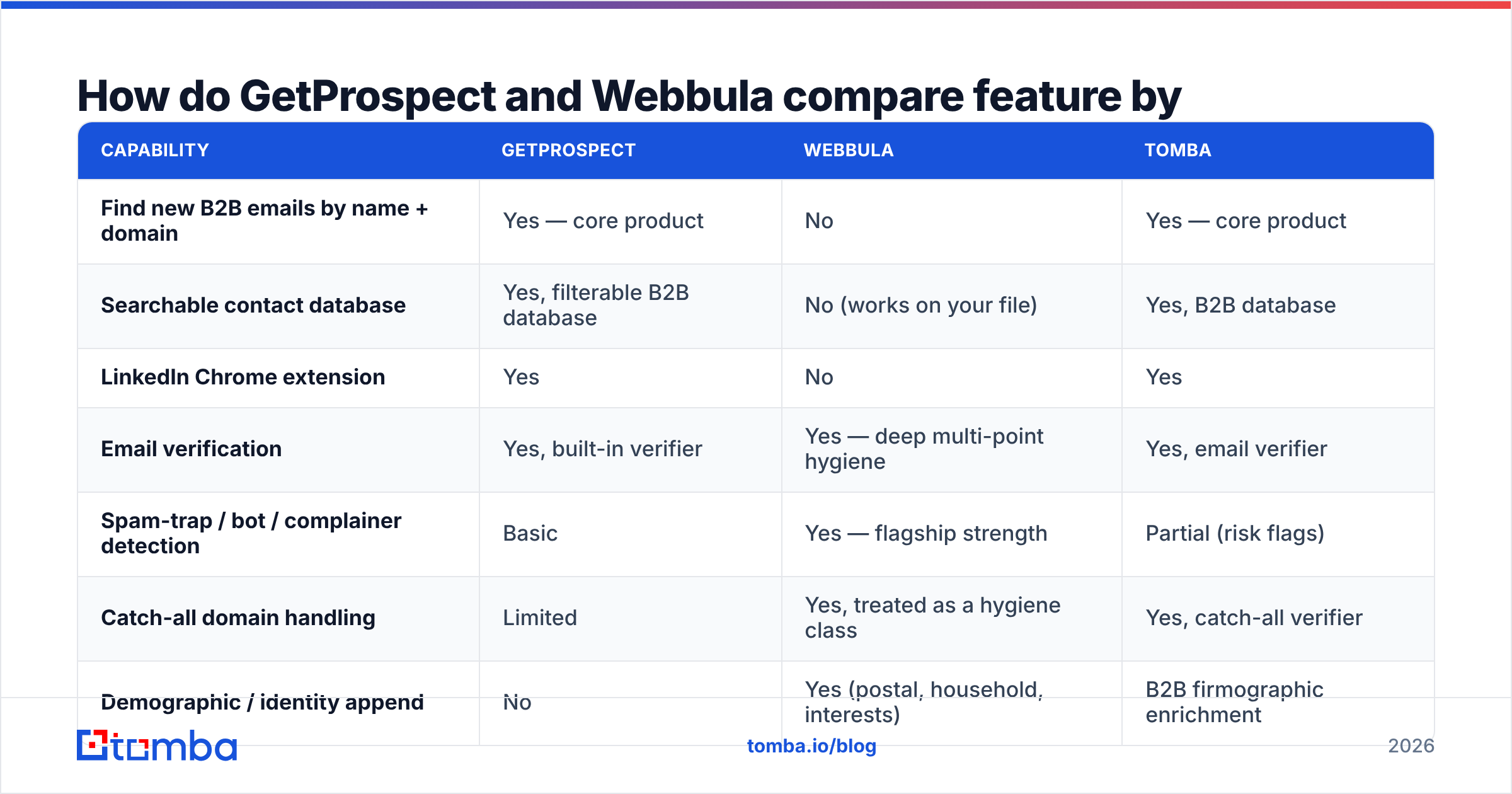
| Capability | GetProspect | Webbula | Tomba |
|---|---|---|---|
| Find new B2B emails by name + domain | Yes — core product | No | Yes — core product |
| Searchable contact database | Yes, filterable B2B database | No (works on your file) | Yes, B2B database |
| LinkedIn Chrome extension | Yes | No | Yes |
| Email verification | Yes, built-in verifier | Yes — deep multi-point hygiene | Yes, email verifier |
| Spam-trap / bot / complainer detection | Basic | Yes — flagship strength | Partial (risk flags) |
| Catch-all domain handling | Limited | Yes, treated as a hygiene class | Yes, catch-all verifier |
| Demographic / identity append | No | Yes (postal, household, interests) | B2B firmographic enrichment |
| B2C list coverage | No — B2B only | Yes, strong B2C focus | No — B2B only |
| Self-serve signup | Yes, free tier | No — sales-led | Yes, free tier |
| Public API | Yes | Yes (enterprise) | Yes, Tomba API |
Read that table as three sets of intent, not a score. GetProspect wins every row about finding people. Webbula wins every row about checking a file you already own. That gap is widest on consumer lists. There, traps and dead addresses do the most harm to your sender reputation.

GetProspect vs Webbula: which one is more accurate?#
"Accuracy" means two different things here. Vendors lean on that gap.
For GetProspect, accuracy means hit quality. Of the emails it returns, how many reach a real person? Finders in this class tend to land between 80% and 95% on large, well-known domains. They drop on small firms, on non-English domains, and on catch-all servers. On a catch-all, the mail server gives no honest answer. GetProspect shows a confidence status for each result. It also doesn't charge for addresses it can't check. That detail matters. Wasted credits are how a cheap finder turns pricey.
For Webbula, accuracy means threat spotting. Of the addresses in your file, which ones are risky? That is a harder, more niche problem. An address can look fine and still be a recycled spam trap. Mail it once and your domain takes the hit. Webbula's pitch: a simple ping test lets those through, and deep hygiene catches them. That claim is fair. If you mail big consumer files, it matters more than a few points of hit rate.

So don't test them against each other. Test GetProspect against other finders: Tomba, Hunter, Apollo, Findymail. Use 200 rows of your real ICP. Then test Webbula against other hygiene vendors: Kickbox, ZeroBounce, BriteVerify. Use a sample of your real list. Mixed tests give you numbers that look sharp and mean nothing.
What does the B2B email data lifecycle look like?#
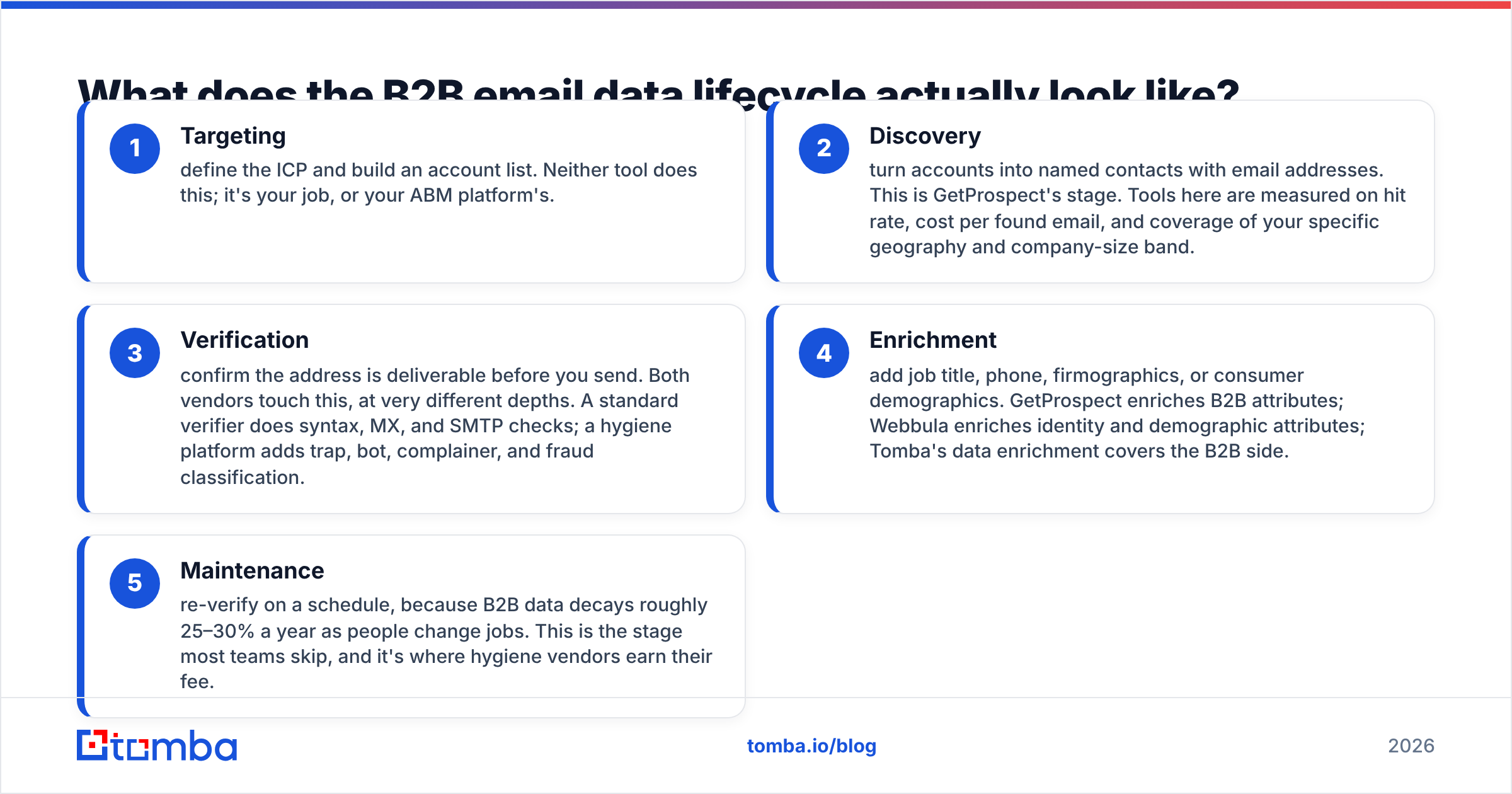
See where each vendor sits and the confusion goes away. There are five stages, and most outbound teams touch all of them:
- Targeting — set your ICP and build an account list. Neither tool does this. That's your job, or your ABM platform's.
- Discovery — turn accounts into named contacts with emails. This is GetProspect's stage. Judge tools here on hit rate, cost per found email, and coverage of your region and company size.
- Verification — check that the address is live before you send. Both vendors do this, at very different depths. A standard verifier checks syntax, MX, and SMTP. A hygiene platform adds trap, bot, complainer, and fraud checks.
- Enrichment — add job title, phone, company data, or consumer data. GetProspect adds B2B fields. Webbula adds identity and demographic fields. Tomba's data enrichment covers the B2B side.
- Maintenance — re-check on a schedule. B2B data goes stale by roughly 25–30% a year as people move jobs. Most teams skip this stage. It's where hygiene vendors earn their fee.
Buy only a finder and your list bloats, decays, and bounces. Buy only hygiene and your list is spotless but flat. You need cover across stages 2 through 5. That is the real GetProspect vs Webbula question.
GetProspect vs Webbula pricing: what will you pay?#
This is where the two split hardest. The buying process differs just as much.
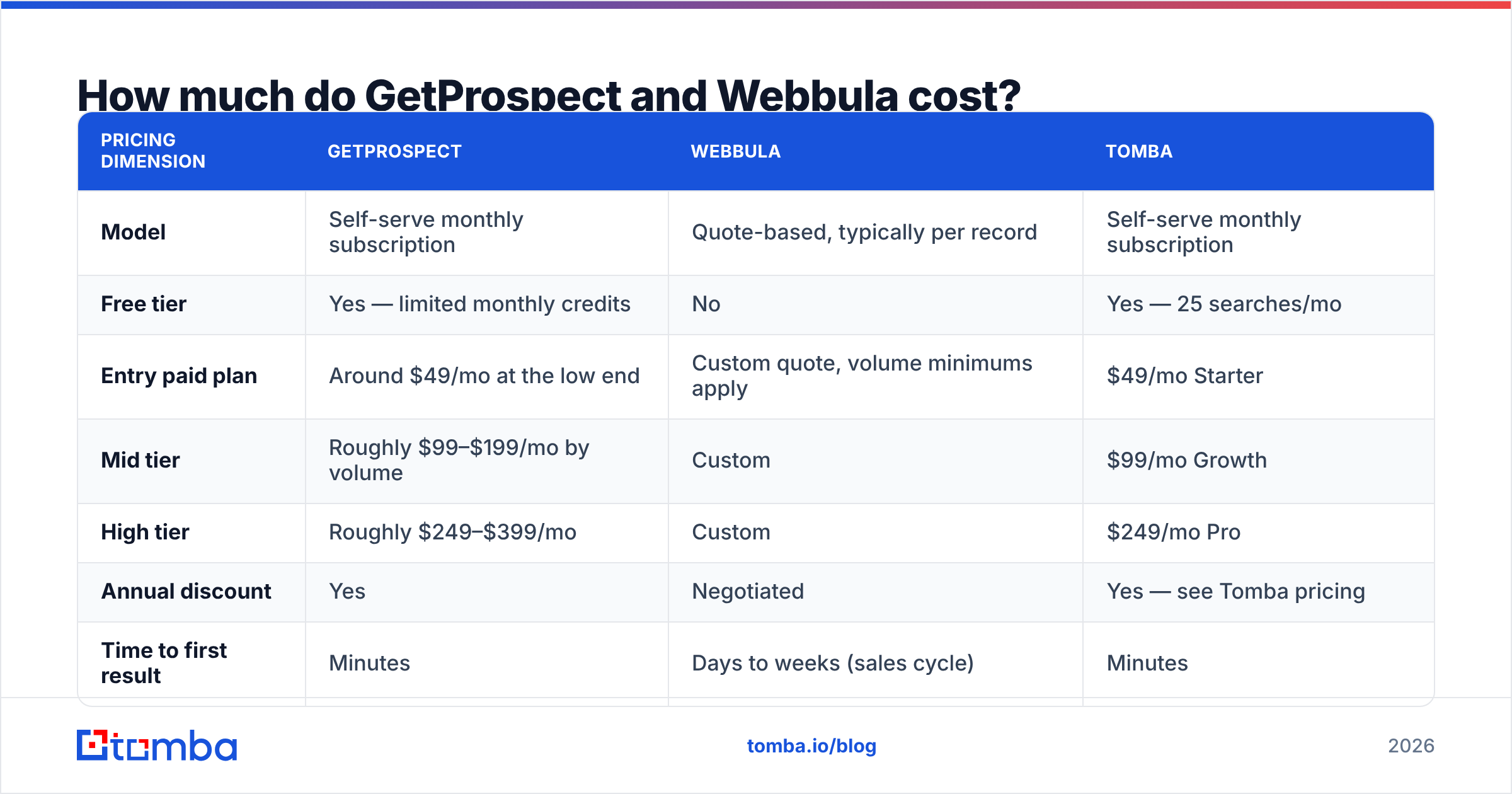
| Pricing dimension | GetProspect | Webbula | Tomba |
|---|---|---|---|
| Model | Self-serve monthly subscription | Quote-based, typically per record | Self-serve monthly subscription |
| Free tier | Yes — limited monthly credits | No | Yes — 25 searches/mo |
| Entry paid plan | Around $49/mo at the low end | Custom quote, volume minimums apply | $49/mo Starter |
| Mid tier | Roughly $99–$199/mo by volume | Custom | $99/mo Growth |
| High tier | Roughly $249–$399/mo | Custom | $249/mo Pro |
| Annual discount | Yes | Negotiated | Yes — see Tomba pricing |
| Time to first result | Minutes | Days to weeks (sales cycle) | Minutes |
Vendor prices move. Treat these figures as a guide and check both pricing pages before you budget. The shape of the deal is stable, though. GetProspect is a card payment an SDR manager can make on a Tuesday. Webbula is a procurement talk with a scoping call, a sample file, and a rate card.
That is not a knock on Webbula. Enterprise hygiene really does need scoping. The price turns on file size, refresh cadence, and which threat modules you switch on. But say you're a five-person startup that needs 2,000 emails this quarter. A sales-led process with volume minimums is a poor fit. You'd spend more time buying than selling.
When should you choose GetProspect?#
Pick GetProspect when your bottleneck is contact volume:
- You're building outbound from zero. No list exists yet. You need names and emails, and you need them from LinkedIn, where your ICP hangs out.
- Your team works account by account. Browse a profile, grab the email, move on. That fits SDR habits better than batch uploads.
- You want a light CRM built in. List management means you don't need a second tool on day one. Small teams feel that.
- Your volumes are modest and steady. Self-serve tiers stay cheap next to enterprise data deals, as long as you stay in band.
Skip it if you need consumer data, deep deliverability forensics, or hundreds of thousands of contacts a month.

When should you choose Webbula?#
Pick Webbula when your bottleneck is list risk:
- You mail large consumer files. B2C hygiene is where trap and bot checks pay for themselves. Simple verifiers fail most often here.
- Your ESP has flagged you. Is Klaviyo, Mailchimp, or your IP provider warning you about complaints? Then you need a clean-up pass, not more contacts.
- You inherited data of unknown origin. Bought lists, merged CRMs, and post-M&A files are exactly what deep hygiene was built for.
- You need demographic append. Turning an email into a household profile runs on a different data supply chain than B2B firmographics. GetProspect doesn't play there.
Skip it if your list is 3,000 B2B contacts you sourced last month. The risk is too small for an enterprise contract. A standard email verifier will catch what matters for far less. One more option: peers like BookYourData sell pre-verified B2B contacts with a bounce guarantee. That's a fair middle ground if you'd rather buy a clean list than build one and then scrub it.
Can one tool replace both?#
Partly. It depends on which half of the problem is bigger for you.
No self-serve tool matches Webbula's consumer threat data. That is a niche business built on private trap networks. If you truly mail millions of consumer addresses, budget for a hygiene vendor and stop hunting for a shortcut.
Most B2B teams don't have that problem. Their real need is smaller. Find work emails. Verify them well, catch-alls included, since that is where most verifiers guess. Add title and company data. Re-check each quarter. That's one workflow. Paying two vendors and shuttling CSVs between them adds cost and delay for no gain in accuracy. For those teams, the GetProspect vs Webbula debate has a third answer.

That's the case for one platform like Tomba. Find email addresses by name or domain. Verify them. Resolve catch-alls with a dedicated catch-all verifier. Run it all in bulk. Call the lot from one Tomba API key instead of two contracts. The free tier gives you 25 searches a month, so you can test hit rate on your own ICP first. Starter is $49/mo.
What should you actually do next?#
Run a real test. Don't trust a marketing page — this one included.
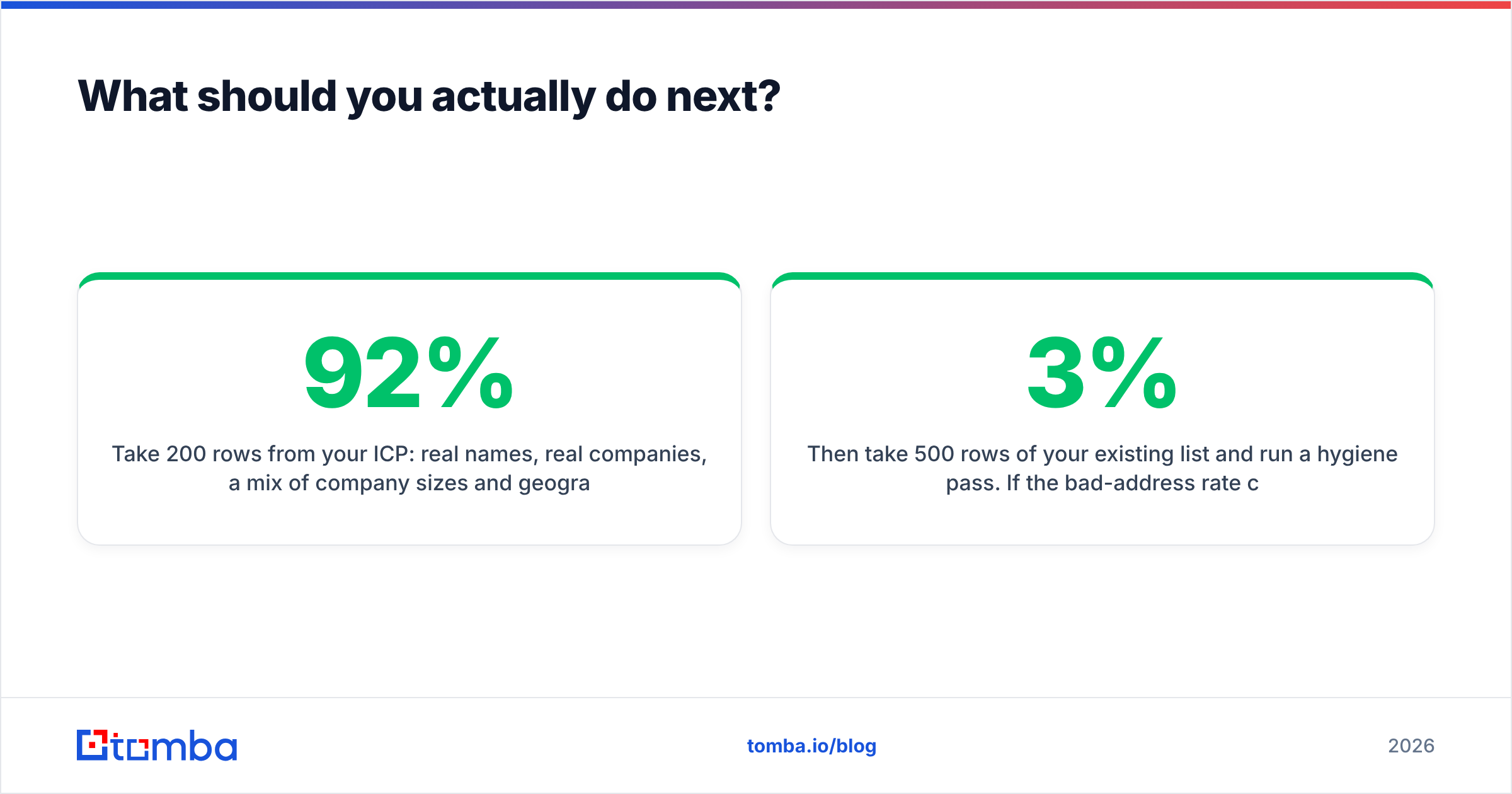
Take 200 rows from your ICP. Use real names and real companies, across a mix of sizes and regions. Run them through GetProspect and one or two rivals. Measure three things: found rate, valid rate, and cost per valid email. That last number is the one that counts. It often reshuffles the leaderboard. A tool with a 92% found rate and a 70% valid rate loses to one at 84% and 95%.
Then take 500 rows of your current list and run a hygiene pass. Does the bad-address rate come back under 3%? Then you have a maintenance problem, not a vendor problem. Set a quarterly re-check and move on. Does it come back over 8%, or show trap hits? Then call a specialist like Webbula before your next campaign.
Two vendors, two jobs, two tests. Don't let a "GetProspect vs Webbula" frame push you into the wrong category.
Start with the half that unblocks revenue. Need contactable people more than a cleaner file? Try the Tomba Email Finder. You get 25 free searches a month, no credit card, and verified results by domain, name, or LinkedIn profile. One API also handles verification and catch-alls, so you won't need a second vendor next quarter.
Related guides#
Ready to find emails that actually work?
Join 150,000+ professionals who stopped guessing and started sending. Free credits on signup — no credit card required.
Get the Tomba newsletter
Practical outbound tactics and product updates — once every two weeks.
About the author