Gigasheet vs Seamless.AI: Which B2B Data Tool Wins in 2026?
Gigasheet cleans and analyzes lists you already own. Seamless.AI sells you new contacts. Here is the honest breakdown of pricing, data quality, and which one your team actually needs in 2026.
Gigasheet vs Seamless.AI is the wrong fight to pick. One tool cleans data you already own. The other sells you data you don't. Here is how to tell which half of the problem you have.
TL;DR
- Gigasheet vs Seamless.AI is not a real head-to-head. Gigasheet is a browser spreadsheet for files too big for Excel. Seamless.AI is a B2B contact database with a Chrome extension. One works on data you have. The other sells data you don't.
- Pick Gigasheet if your problem is a 4-million-row CSV that crashes Excel, messy CRM exports, or dedupe work across several bought lists.
- Pick Seamless.AI if your problem is "I have no contacts." You get a big searchable database. You also have to verify what comes out of it.
- The cost profiles differ sharply. Gigasheet has a usable free tier and per-workspace pricing. Seamless.AI quotes per seat and hides list pricing. That usually means a sales call and an annual contract.
- Many teams buy both when they really want a third thing: an accurate, API-first email finder. A tool like Tomba at $49/mo does the sourcing job without the seat math.
Gigasheet vs Seamless.AI: what does each tool actually do?#
Think of a restaurant. Seamless.AI is the supplier that drops crates of ingredients at your back door. Gigasheet is the prep kitchen where you wash, sort, and bin the bruised produce. Teams that mix the two up pay for both and still complain about bad data.
Gigasheet is a no-code analytics tool that runs in your browser. It looks like a spreadsheet, but a columnar database sits underneath. You upload a file — CSV, JSON, Parquet, a CRM export — and it opens row counts that make Excel hang. You filter, group, join, dedupe, and enrich in a normal grid. No SQL needed.
Seamless.AI is a sales intelligence platform. It runs a large contact database and a Chrome extension. The extension pulls contacts off LinkedIn and company websites. Seamless.AI markets a "real-time search engine" that builds records on demand rather than serving them from a static index alone. Higher tiers add buyer intent, job-change alerts, and a writer tool.
Here's the practical split:
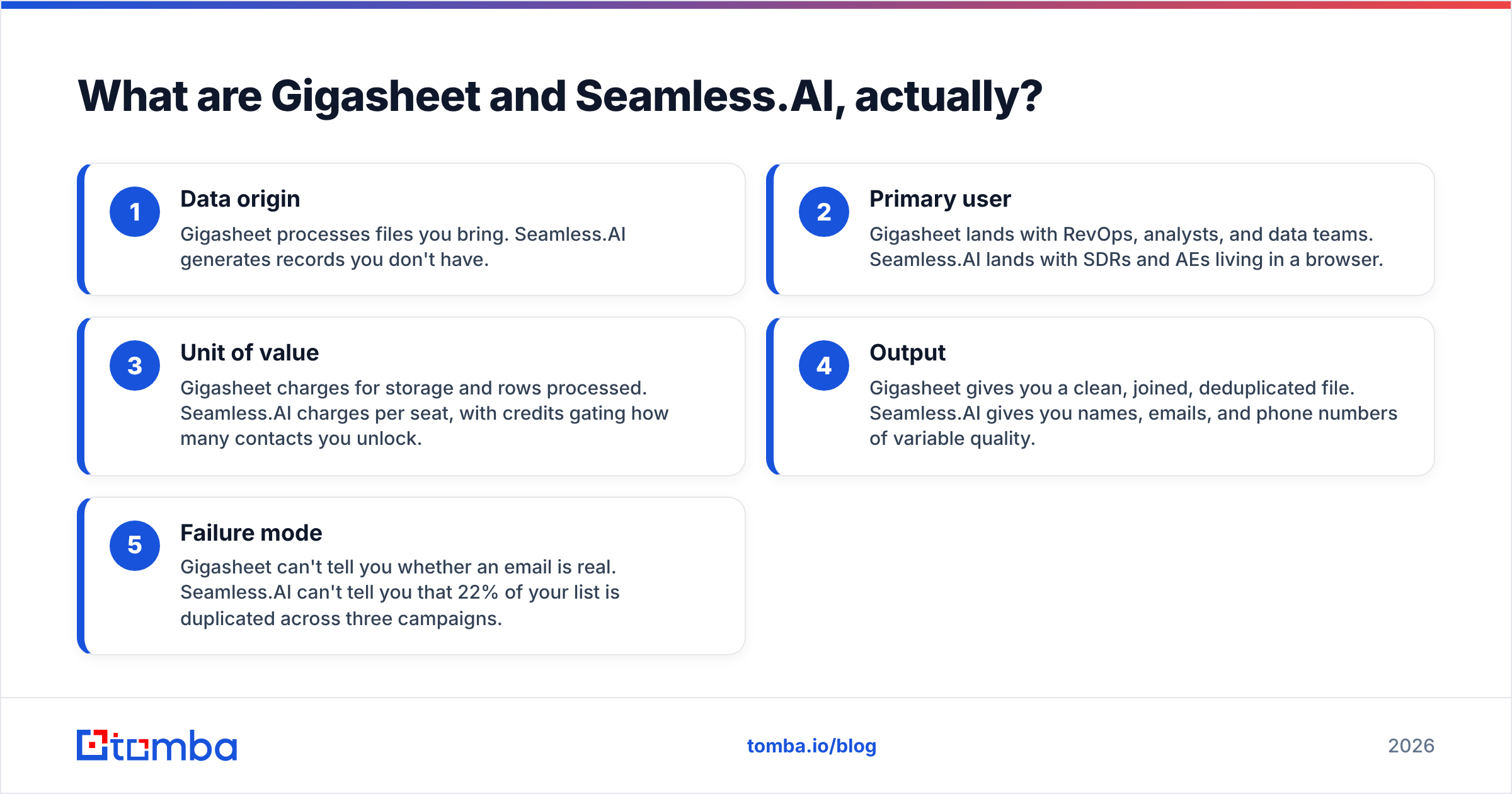
- Data origin — Gigasheet processes files you bring. Seamless.AI builds records you don't have.
- Primary user — Gigasheet suits RevOps, analysts, and data teams. Seamless.AI suits SDRs and AEs who live in a browser.
- Unit of value — Gigasheet charges for storage and rows. Seamless.AI charges per seat, and credits cap how many contacts you unlock.
- Output — Gigasheet hands you a clean, joined, deduplicated file. Seamless.AI hands you names, emails, and phone numbers of mixed quality.
- Failure mode — Gigasheet can't tell you if an email is real. Seamless.AI can't tell you that 22% of your list is duplicated across three campaigns.
Once you see it that way, Gigasheet vs Seamless.AI stops being a versus question. It becomes a sequencing question. Which problem costs you more money right now?

Gigasheet vs Seamless.AI: how do they compare feature by feature?#
The overlap is thin but real. Both touch contact data. Both offer enrichment. Both show up when a founder types "how do I build a lead list" into Google. Here is where they truly split.
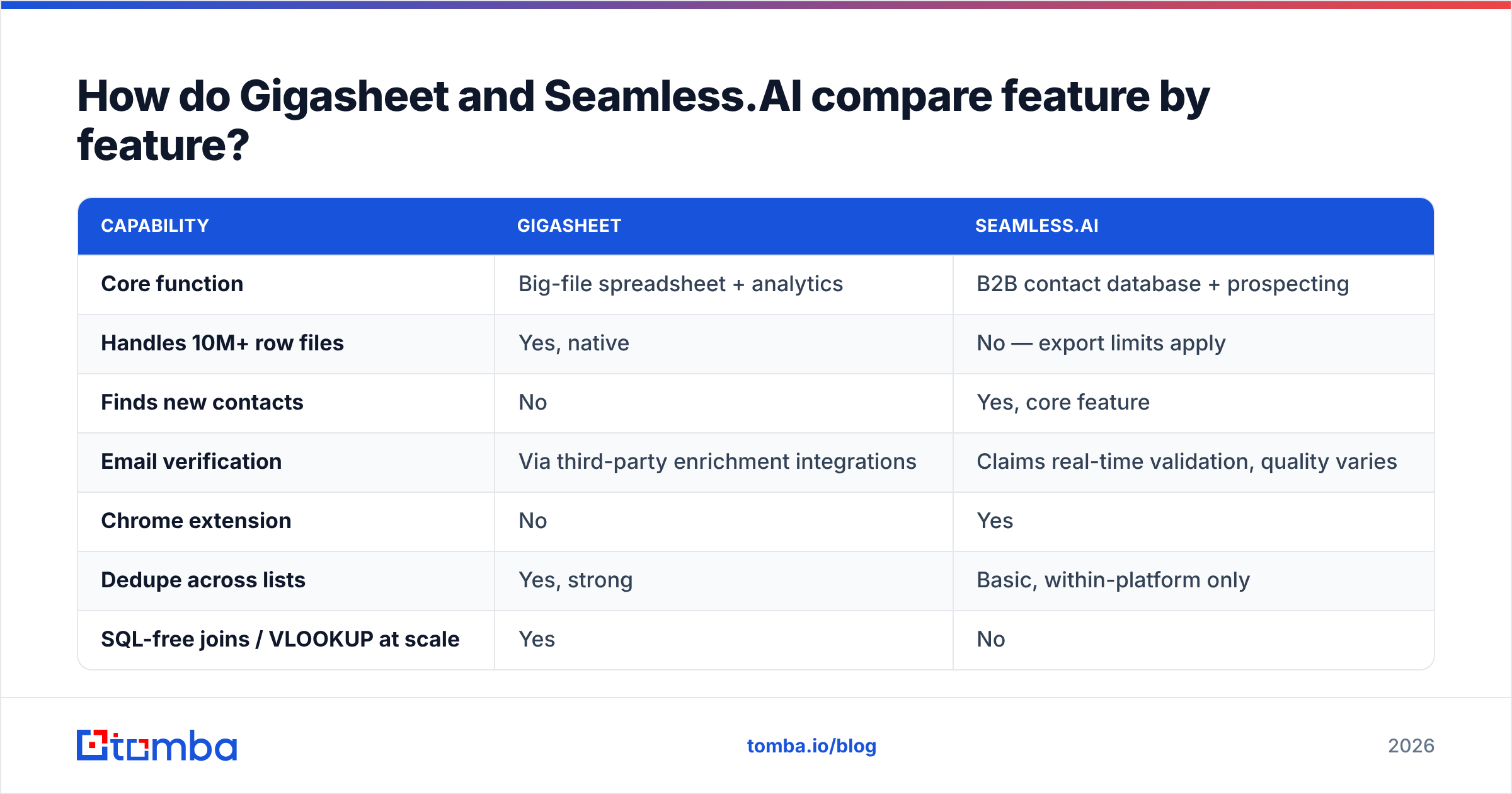
| Capability | Gigasheet | Seamless.AI |
|---|---|---|
| Core function | Big-file spreadsheet + analytics | B2B contact database + prospecting |
| Handles 10M+ row files | Yes, native | No — export limits apply |
| Finds new contacts | No | Yes, core feature |
| Email verification | Via third-party enrichment integrations | Claims real-time validation, quality varies |
| Chrome extension | No | Yes |
| Dedupe across lists | Yes, strong | Basic, within-platform only |
| SQL-free joins / VLOOKUP at scale | Yes | No |
| CRM sync (Salesforce, HubSpot) | Export-based | Native push |
| API access | Yes | Yes, higher tiers |
| Free tier | Yes, meaningful | Trial credits only |
| Best for | Cleaning and analyzing owned data | Sourcing net-new contacts |
Two rows matter more than the rest. First, Gigasheet cannot find you a single new email address. It is a processing layer, not a data vendor. Second, Seamless.AI stalls once your list passes a few hundred thousand rows. Join that list against your CRM and it falls over, because it was never built to be a data warehouse.
Buy Gigasheet and expect leads, and you will be disappointed. Buy Seamless.AI and expect a clean, deduplicated master list, and you will be disappointed too.
Gigasheet vs Seamless.AI pricing: what does each cost in 2026?#
Pricing openness is one of the sharpest contrasts here. Weigh it before you sit through a demo.
Gigasheet publishes its plans. The free tier covers about a gigabyte of data. That is several million rows of typical contact records. Paid tiers scale storage, row limits, and collaboration. Most small teams land in the low-to-mid hundreds per month. Billing is per workspace, not per user, so the cost stays flat as the team grows.
Seamless.AI does not publish list pricing. Buyer reports and review sites cluster around the mid-hundreds to low thousands per user per year. Credits are allocated apart from seats. Expect an annual commitment and a sales call. Also expect the credit allocation, not the seat price, to be the number that squeezes you in month three.
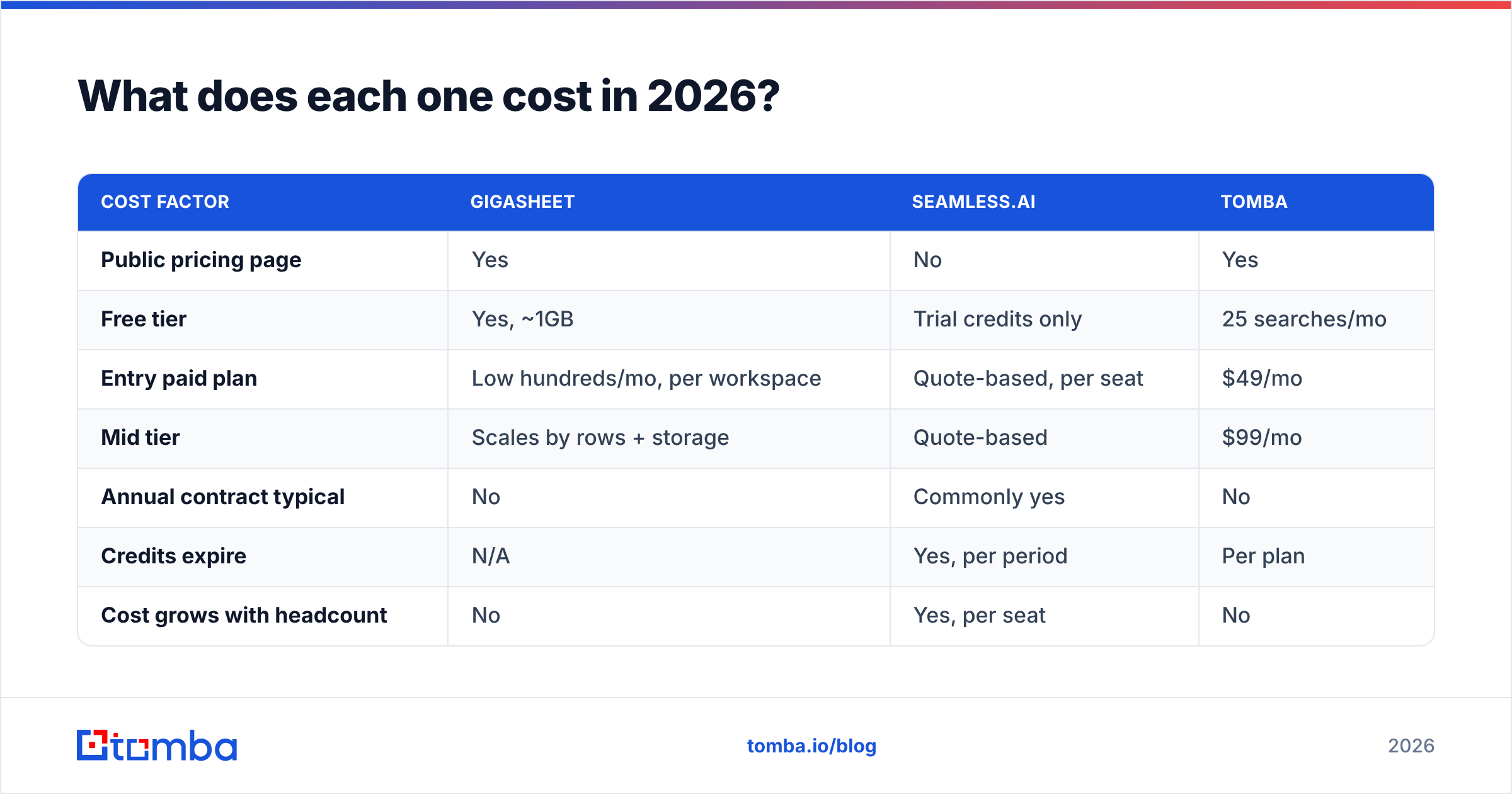
| Cost factor | Gigasheet | Seamless.AI | Tomba |
|---|---|---|---|
| Public pricing page | Yes | No | Yes |
| Free tier | Yes, ~1GB | Trial credits only | 25 searches/mo |
| Entry paid plan | Low hundreds/mo, per workspace | Quote-based, per seat | $49/mo |
| Mid tier | Scales by rows + storage | Quote-based | $99/mo |
| Annual contract typical | No | Commonly yes | No |
| Credits expire | N/A | Yes, per period | Per plan |
| Cost grows with headcount | No | Yes, per seat | No |
The per-seat versus per-workspace split is the one that bites. A five-person SDR team on a seat-priced database pays five times for the same data. Centralize instead: one ops person builds the lists, and reps just work them. Then a workspace or API-priced tool is structurally cheaper. Compare that with Tomba pricing, where credit pools are shared across the account instead of fenced per user.
Which tool wins for building a prospect list?#
Seamless.AI, by default — with a large asterisk on verification.
If you have zero contacts and need volume fast, a database plus a Chrome extension is the shortest path. You search by title and industry. You unlock contacts, push them to your CRM, and start sequencing. Gigasheet offers nothing here, because there is no file to upload yet.
The asterisk is data quality. Review data on G2 shows the same split every time. Users praise volume and ease of use. They flag bounce rates and stale titles as the recurring pain. That is not unique to Seamless.AI. It is the structural weakness of any database that indexes broadly and re-serves records. The wider the net, the staler the tail.
So the honest workflow for anyone buying a bulk database looks like this:
- Source broadly — pull contacts by title, industry, and headcount filters.
- Export before sequencing — never send straight from the platform to your sending tool.
- Verify every address — run the file through a dedicated email verifier to strip invalids, role accounts, and catch-alls.
- Dedupe against your CRM — this is the Gigasheet step. It catches duplicate outreach before it embarrasses you.
- Re-find the gaps — 20-35% of records fail verification. Run those names and domains back through an email finder instead of dumping the account.
Skip step 3 and you pay for a database that quietly damages your sending domain. Skip step 5 and you throw away good accounts because one vendor's record went stale.
Which tool wins for cleaning data you already have?#
Gigasheet, and it isn't close.
This is the job it was built for. A 6-million-row export that Excel refuses to open. Three overlapping bought lists that need a fuzzy dedupe. A CRM extract that needs joining against a suppression file. You do all of it in a grid, with no SQL, no local memory ceiling, and no analyst bottleneck.
Seamless.AI has no real answer here. Its export limits and list management suit reps handling a few thousand contacts. They do not suit ops teams handling a few million.
One caveat: Gigasheet's enrichment leans on connected data sources. It joins and enriches well, but only against data it can reach. If your verification and email-finding layer is weak, Gigasheet gives you a tidy file of wrong addresses. Garbage in, very well-formatted garbage out.

Do you actually need both — or neither?#
The Gigasheet vs Seamless.AI question answers itself once you check two numbers. Open your last outbound campaign. Look at your bounce rate and your duplicate-contact rate.
- Bounce rate above 5% — your sourcing layer is the problem. More spreadsheet tooling won't fix it. You need better contact data and a verification step.
- Duplicates or conflicting outreach above 10% — your processing layer is the problem. A bigger database makes it worse.
- Both high — you have a pipeline problem, not a tool problem. Two annual contracts will not solve it.
Most teams under 20 reps do not need a heavyweight big-data spreadsheet. They need one reliable source of contacts, one verification pass, and a CRM that isn't a swamp.
Gigasheet earns its place once you handle files above a million rows, run multi-source joins, or build your own data products. Seamless.AI earns its place when you need broad, filterable discovery in a market you don't know yet. That means searching by firmographics rather than starting from a known company list.
What are the alternatives worth shortlisting?#
Neither side of Gigasheet vs Seamless.AI is the only answer. The right pick depends on which half of the problem you have.
For sourcing, the field splits in two: database-first and finder-first. Database-first tools (Seamless.AI, Apollo, BookYourData, ZoomInfo) sell access to a pre-built index. They are strong on discovery and weaker on freshness.
BookYourData is worth a look if you want pay-as-you-go list purchases with a bounce guarantee instead of a seat-based subscription. It is a different commercial model, and it suits buyers who purchase now and then. Finder-first tools resolve an email at query time from a name plus a domain. You trade discovery breadth for accuracy on accounts you already target.
Tomba sits in the finder-first camp. Domain search pulls every reachable contact at a company. Bulk email finder runs a list of names and domains in one pass. The Tomba API lets teams wire sourcing into their own stack instead of paying per seat. The free tier is 25 searches a month. Starter is $49/mo, Growth $99/mo, and Pro $249/mo.
For processing, the alternatives to Gigasheet are heavier: a real warehouse plus dbt, or a Python notebook. Both are more powerful. Both need an engineer. Gigasheet's pitch is that a RevOps generalist can do 80% of that work in a browser tab. That pitch holds up.
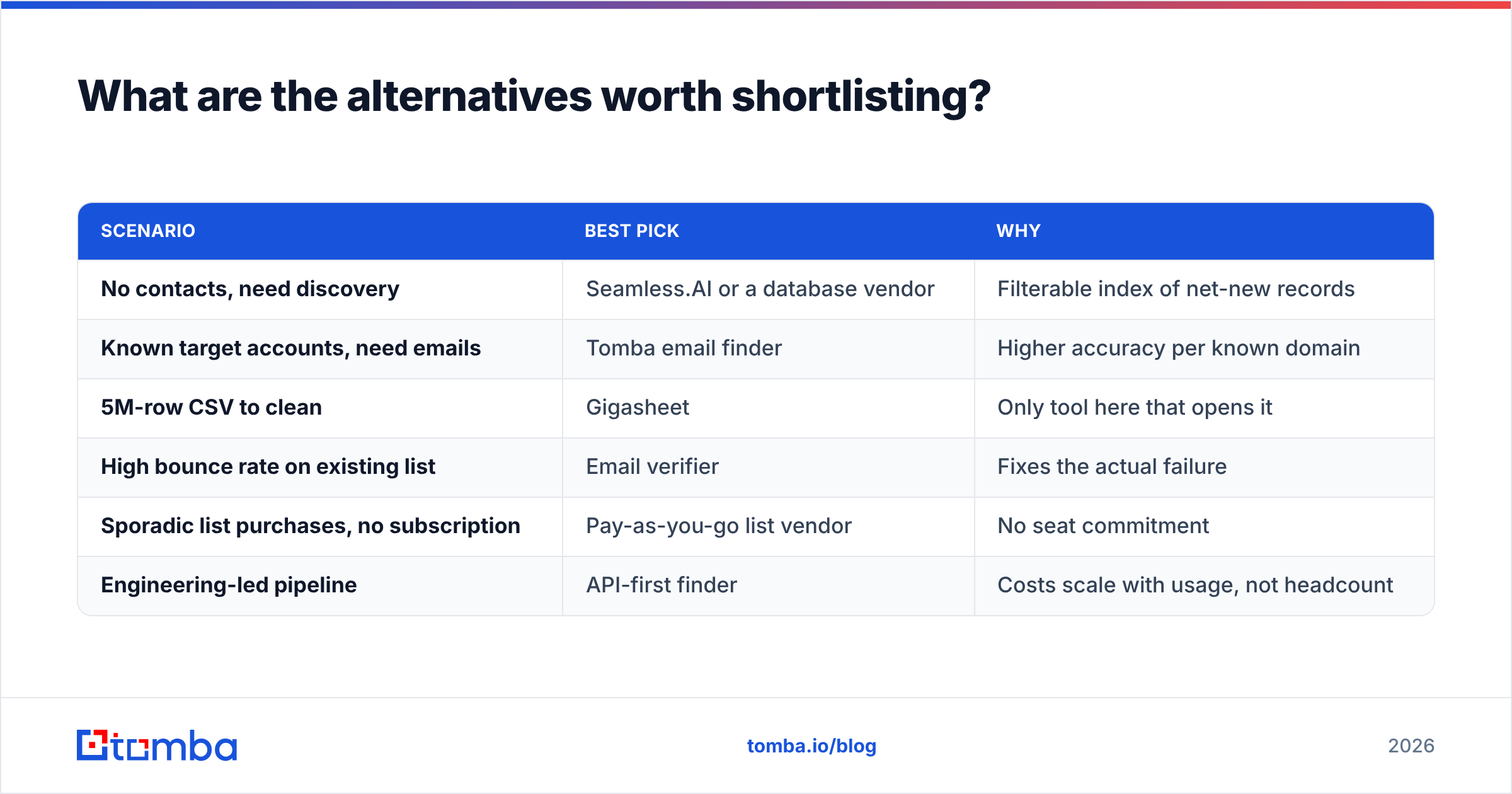
| Scenario | Best pick | Why |
|---|---|---|
| No contacts, need discovery | Seamless.AI or a database vendor | Filterable index of net-new records |
| Known target accounts, need emails | Tomba email finder | Higher accuracy per known domain |
| 5M-row CSV to clean | Gigasheet | Only tool here that opens it |
| High bounce rate on existing list | Email verifier | Fixes the actual failure |
| Sporadic list purchases, no subscription | Pay-as-you-go list vendor | No seat commitment |
| Engineering-led pipeline | API-first finder | Costs scale with usage, not headcount |
Gigasheet vs Seamless.AI: how should you make the final call?#
Answer three questions in order.
What is the bottleneck? If reps sit idle because the list is empty, buy sourcing. If reps burn hours in spreadsheets or email the same person twice, buy processing. Buying the wrong one is the most common way teams waste a data budget.
How does the price scale? Per-seat pricing punishes growth. Per-workspace and per-credit pricing does not. Model the cost at double your current headcount before you sign anything annual.
Can you verify what you buy? Every contact database decays, even the good ones. Roughly 2-3% of records go stale each month as people change jobs. That is physics, not vendor incompetence. Teams with clean sending reputations treat verification as a standing step, not a one-off cleanup.
Still torn? Run a 100-record bake-off. Take 100 target companies. Pull contacts from each tool. Verify every output with a neutral verifier. Then compare valid-email yield and cost per valid contact. That one afternoon will tell you more than any comparison post, including this one.
Ready to fix the sourcing half?#
If your audit points at sourcing, start with the Tomba Email Finder. High bounce rates, thin coverage on target accounts, per-seat pricing you have outgrown — that is the sourcing half. Search by domain, name, or company. Verify addresses in the same workflow. Pull it all through an API or the bulk tool instead of paying per rep. The free tier gives you 25 searches to test against your own list. Starter is $49/mo when you're ready to scale. Bring your worst 100 accounts and see what comes back.
Related guides#
Ready to find emails that actually work?
Join 150,000+ professionals who stopped guessing and started sending. Free credits on signup — no credit card required.
Get the Tomba newsletter
Practical outbound tactics and product updates — once every two weeks.
About the author