GigRadar Alternatives: 8 Upwork Lead Gen Tools Compared
GigRadar automates Upwork bidding well, but connects, seat fees and platform dependency add up fast. Here are 8 alternatives — from cheaper Upwork filters to owning an outbound list you never rent.
TL;DR
- GigRadar is a bidding-automation layer on top of Upwork: it watches new job posts, scores them, and fires AI-written proposals so your agency shows up in the first ten applicants.
- Most teams searching for GigRadar alternatives are not unhappy with the software. They are unhappy with the total cost: seats, plus Upwork Connects, plus the 10% platform fee on every dollar the channel produces.
- The honest comparison is not "GigRadar vs another bidder." It is "rented marketplace pipeline vs owned outbound pipeline," and the right answer for most agencies above $40k/mo is both.
- Cheaper Upwork-only swaps: Vollna, Upwex, or a DIY n8n/Make workflow off Upwork's RSS feeds.
- Owned-pipeline swaps: an email finder plus a sending tool. A verified list built with Tomba Email Finder at $49/mo carries no per-deal fee and stays yours if you ever leave the marketplace.
What is GigRadar, and why are agencies looking for alternatives?#
GigRadar (gigradar.io) is an Upwork automation platform built for agencies that live on the marketplace. You connect your Upwork account, define filters, and it bids for you — around the clock, in seconds, with AI-generated cover letters and Slack notifications when a client replies.
It works. Speed genuinely matters on Upwork; being applicant #3 instead of #30 changes reply rates materially. So the churn you see is rarely about the product being broken.
Three things push agencies to look at GigRadar alternatives:
Stacked costs. You pay a subscription, then Connects for each proposal, then Upwork's cut on every contract the channel produces. A team burning 400 proposals a month is paying for the software three separate times before it counts a single hour of delivery revenue.
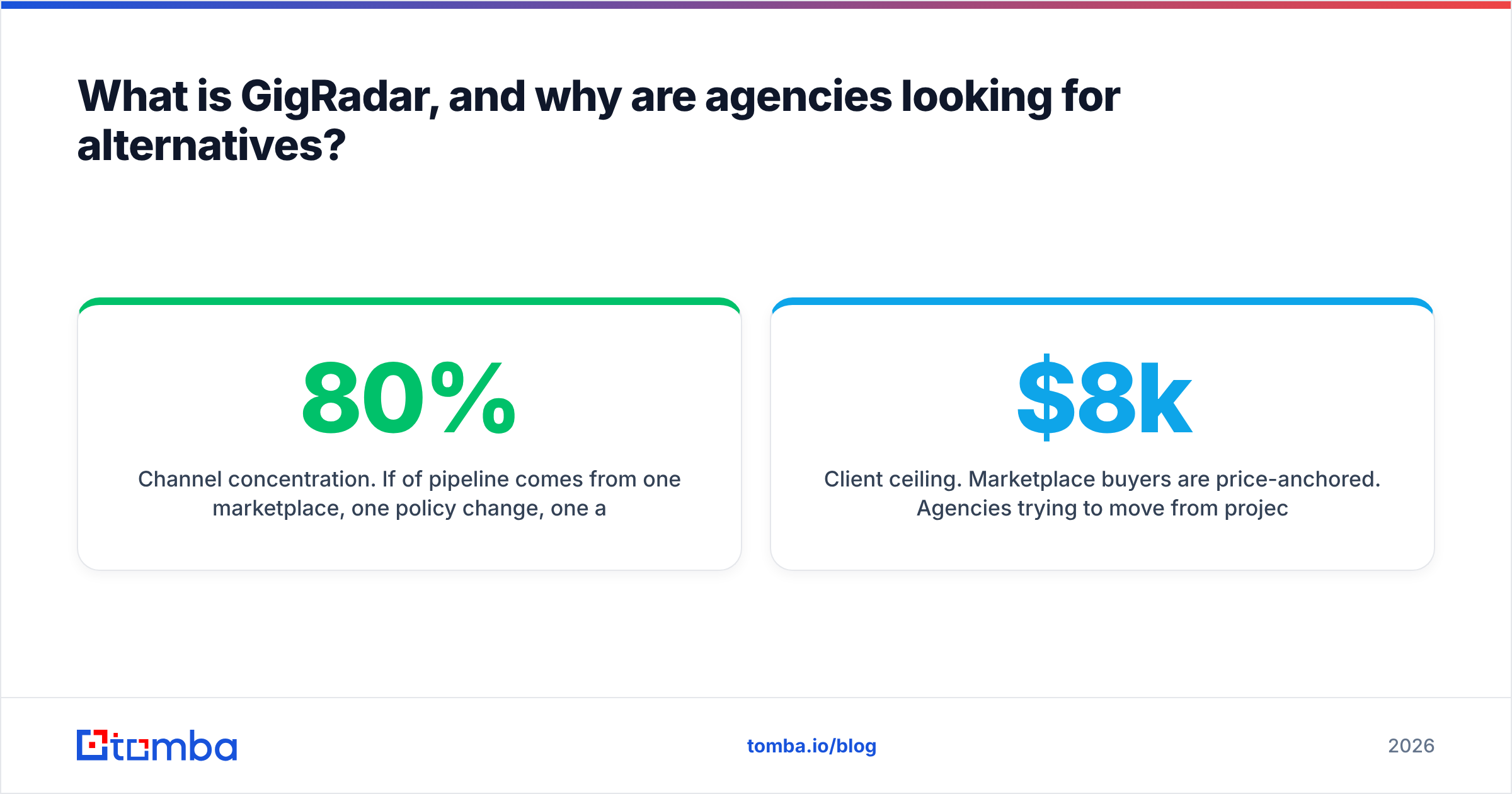
Channel concentration. If 80% of pipeline comes from one marketplace, one policy change, one algorithm tweak, or one suspended account is an existential event, not a bad quarter.
Client ceiling. Marketplace buyers are price-anchored. Agencies trying to move from $8k projects to $60k retainers eventually find the ceiling is the channel, not the pitch.
What does GigRadar actually do that you need to replace?#
Before you shop, split the product into jobs. Any replacement — one tool or four — has to cover these:
- Job discovery and filtering. Real-time monitoring of new Upwork posts, filtered by keyword, budget, client spend history, hire rate, and country. This is the highest-value piece and the easiest to replicate cheaply.
- Speed of response. Proposals delivered within minutes of a post going live. Manual bidding cannot match this; a filtered alert feed plus a disciplined human can get close.
- Proposal generation. AI drafting a cover letter against the job description and your case studies. Commodity in 2026 — any decent LLM workflow does this.
- Connect budgeting. Deciding which jobs deserve boosted bids and which are a waste. Most cheap alternatives ignore this entirely, and it is where teams quietly lose money.
- Reporting and CRM sync. Reply rate, cost per reply, per-filter performance, and a push into your CRM so the pipeline is visible outside one dashboard.
If you only need #1 and #2, you are paying a full automation price for an alert system. That is the single most common reason a switch pays off.
What are the best GigRadar alternatives in 2026?#
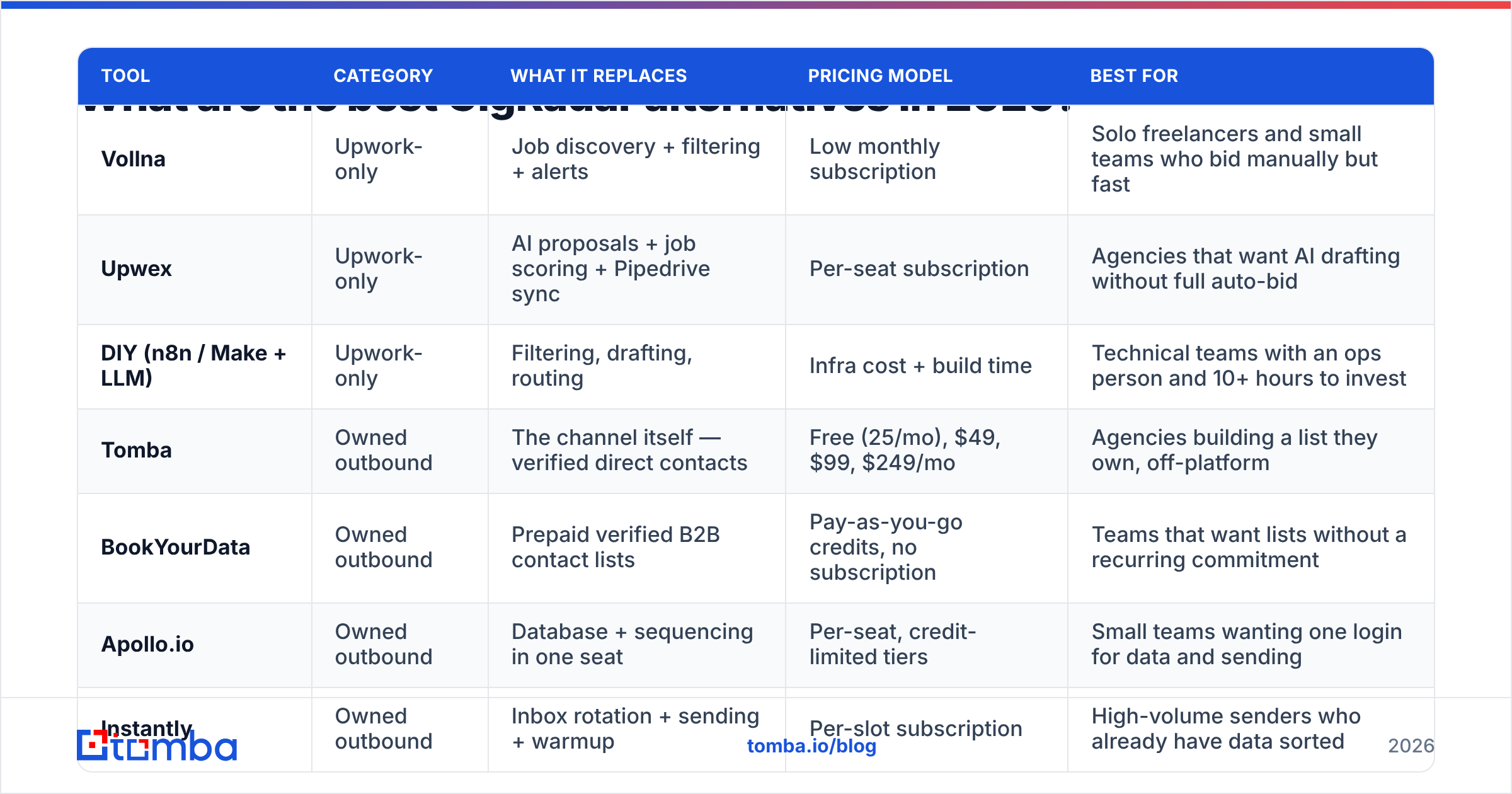
Two categories, and they solve different problems. Pricing models are listed because exact tiers move — verify current numbers on each vendor's site before you commit.
| Tool | Category | What it replaces | Pricing model | Best for |
|---|---|---|---|---|
| Vollna | Upwork-only | Job discovery + filtering + alerts | Low monthly subscription | Solo freelancers and small teams who bid manually but fast |
| Upwex | Upwork-only | AI proposals + job scoring + Pipedrive sync | Per-seat subscription | Agencies that want AI drafting without full auto-bid |
| DIY (n8n / Make + LLM) | Upwork-only | Filtering, drafting, routing | Infra cost + build time | Technical teams with an ops person and 10+ hours to invest |
| Tomba | Owned outbound | The channel itself — verified direct contacts | Free (25/mo), $49, $99, $249/mo | Agencies building a list they own, off-platform |
| BookYourData | Owned outbound | Prepaid verified B2B contact lists | Pay-as-you-go credits, no subscription | Teams that want lists without a recurring commitment |
| Apollo.io | Owned outbound | Database + sequencing in one seat | Per-seat, credit-limited tiers | Small teams wanting one login for data and sending |
| Instantly | Owned outbound | Inbox rotation + sending + warmup | Per-slot subscription | High-volume senders who already have data sorted |
| Clay | Owned outbound | Enrichment orchestration across providers | Credit-based, scales steeply | RevOps-heavy teams running waterfall enrichment |
The two buckets are not competitors. Vollna and Upwex make your marketplace bidding cheaper. Tomba, BookYourData, Apollo, Instantly and Clay make you less dependent on the marketplace at all.
Which GigRadar alternative fits an Upwork-only agency?#
If Upwork is your business model and you have no intention of changing that, stay in bucket one.
Vollna is the pragmatic downgrade. It monitors postings and pushes filtered alerts to Slack, email or Telegram, with client-quality filters like payment verification and average hourly rate paid. You still write and send the proposal yourself. For a two-person agency sending 40–60 targeted bids a month, the math usually beats full auto-bidding because your Connect spend drops when a human is choosing.
Upwex sits in the middle: AI job scoring, AI proposal and reply generation, and CRM sync, without handing over full send authority. Good fit if your objection to GigRadar is "the bot sent 200 proposals and 190 were off-ICP."
DIY on n8n or Make is the option agencies underestimate and then overbuild. Upwork exposes RSS feeds for saved searches. Pipe them into a workflow, score with an LLM against your ICP rules, and post qualifying jobs to a Slack channel with a pre-drafted cover letter. Budget 10–20 hours to build and a few hours a month to maintain. It is genuinely cheaper. It is not free, and if nobody owns it, it rots in six weeks.
None of these fix the 10% fee or the price ceiling. They just make the same channel cost less to work.
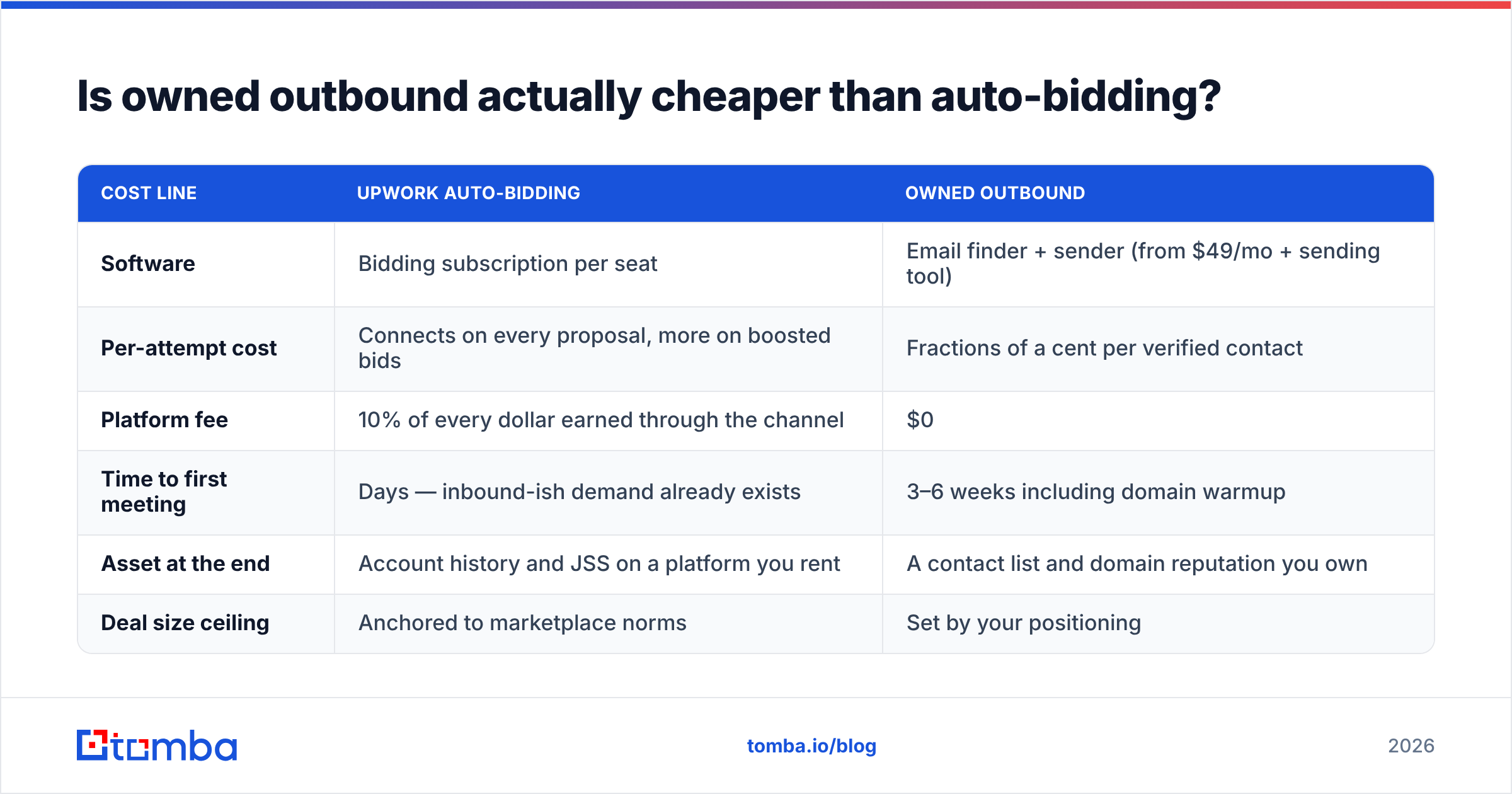
Is owned outbound actually cheaper than auto-bidding?#
Run your own numbers, but here is the structure that matters. Assume an agency chasing 10 qualified discovery calls a month.
| Cost line | Upwork auto-bidding | Owned outbound |
|---|---|---|
| Software | Bidding subscription per seat | Email finder + sender (from $49/mo + sending tool) |
| Per-attempt cost | Connects on every proposal, more on boosted bids | Fractions of a cent per verified contact |
| Platform fee | 10% of every dollar earned through the channel | $0 |
| Time to first meeting | Days — inbound-ish demand already exists | 3–6 weeks including domain warmup |
| Asset at the end | Account history and JSS on a platform you rent | A contact list and domain reputation you own |
| Deal size ceiling | Anchored to marketplace norms | Set by your positioning |
The honest read: auto-bidding wins on speed to first meeting and loses on unit economics at scale. On a $500k/year Upwork run-rate, the platform fee alone is $50k. That funds a full outbound stack, a list, and an SDR, with change left over.
The catch is that outbound has a real ramp. You need domains, warmup, sequences, and clean data before anything lands. Agencies that rip out bidding on day one and expect outbound to backfill it within a month are the ones who end up back on the marketplace by quarter's end. Run both for a quarter, then decide.

How do you build the owned-pipeline side without wasting three months?#
The stack is simpler than the tooling landscape suggests. Four moving parts:
- Target list. Define the companies you actually want, not the ones posting jobs. Use the same ICP filters you were applying to job posts — industry, size, tech stack, geography — and build a company list first, contacts second.
- Contacts. Find decision-maker emails at those companies. A domain search turns a company URL into named contacts with roles and email patterns, which is the reverse of how marketplaces work: you choose the buyer instead of waiting for the buyer to post.
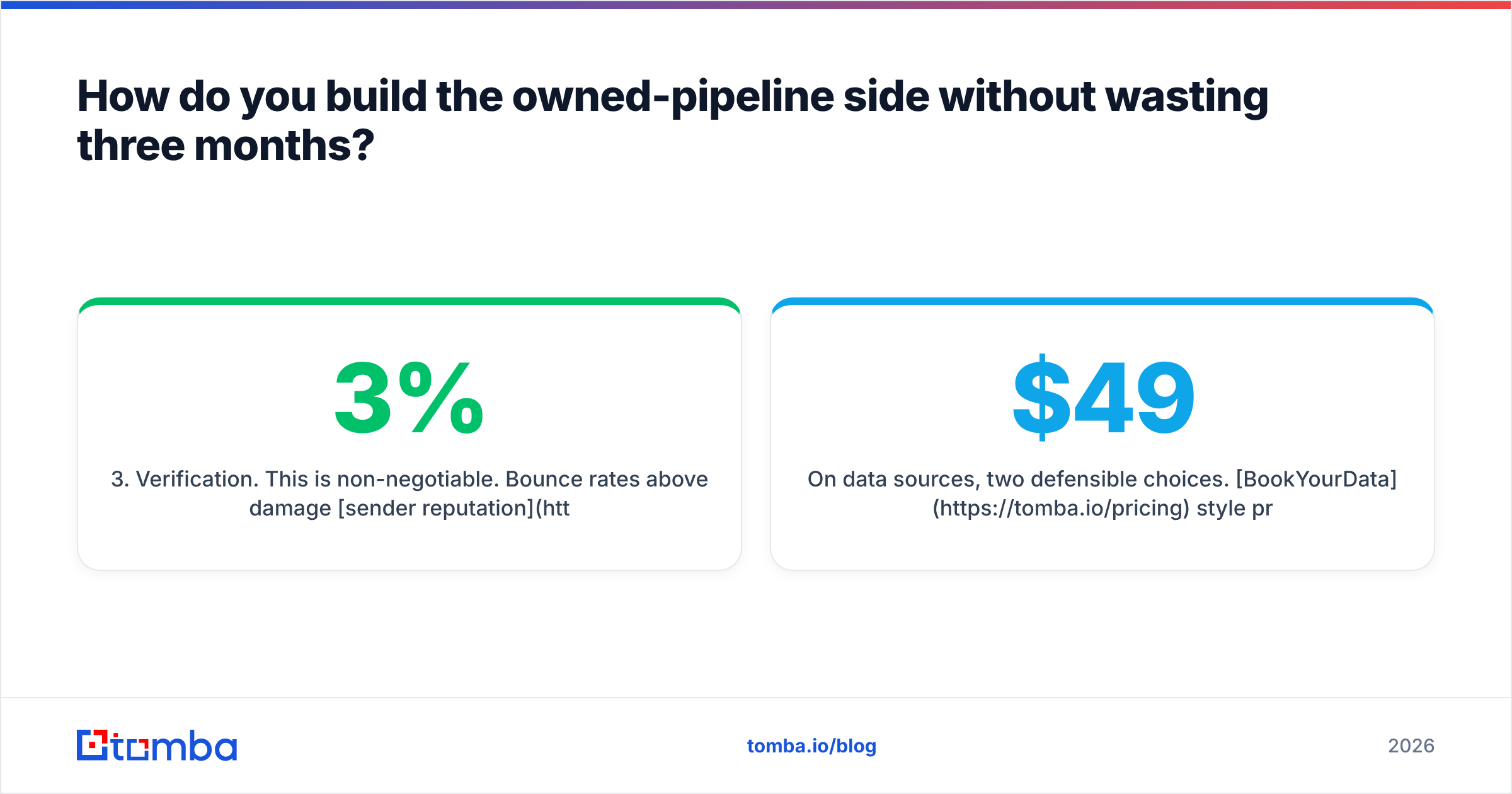
- Verification. This is non-negotiable. Bounce rates above 3% damage sender reputation quickly, and a burned domain costs more than any subscription. Run everything through an email verifier before it enters a sequence, and treat catch-all domains as a separate, lower-confidence segment.
- Sending. Separate domain, proper warmup, small daily volume, personalized first lines. Instantly, Smartlead and Saleshandy all handle inbox rotation competently; the differentiator is your data quality, not the sender.
On data sources, two defensible choices. BookYourData style prepaid credits work well if you want a bulk list once and no recurring bill — you buy 5,000 verified contacts, you own them, done. A subscription finder like Tomba works better when you are enriching continuously: new inbound signups, event attendee lists, or company lists you build weekly. Tomba's tiers run Free (25 searches/mo), Starter $49/mo, Growth $99/mo, Pro $249/mo, so a two-person agency can validate the motion for the price of about 30 Connects.
If you already have a pile of company domains sitting in a spreadsheet from past bidding, the fastest starting point is a bulk email finder run over it. Every client you pitched on Upwork and lost is a company you can now reach directly, at your own price, with no platform cut.
What should you check before you cancel GigRadar?#
Five checks, in order:
- Export your data. Filter configs, proposal templates, and reply history. Reply-rate data by job category is worth more than the tool; it tells you which offers actually convert.
- Measure cost per reply, not cost per proposal. Most teams discover 70% of Connect spend goes to two filters that produce nothing. Fixing that alone may remove the reason to switch.
- Check seat and contract terms. Annual plans and per-connected-account pricing are where the surprise sits. Read your invoice, not the pricing page.
- Verify the alternative covers proposal speed. If your win rate depends on bidding within five minutes, an alert-only tool with a human in the loop will drop it unless someone is genuinely watching Slack.
- Warm the outbound infrastructure first. Buy the domains and start warmup three weeks before you plan to reduce marketplace spend. Cold domains send straight to spam, and you will blame the data.
Read current user reviews on G2 for whichever tool you shortlist — pay attention to reviews from the last six months only, since this category ships fast and 2024 complaints are often already fixed.
Which GigRadar alternative should you pick?#
- Solo freelancer, tight budget: Vollna plus manual bidding. You lose auto-send, you save most of the cost, and your proposals get better.
- Agency happy on Upwork but overspending: Upwex, or fix your filters and stay put. Switching tools rarely fixes a targeting problem.
- Technical team with an ops owner: DIY n8n workflow off Upwork RSS, then reinvest the savings into outbound data.
- Agency hitting the marketplace ceiling: Keep bidding at reduced volume, and build the owned list in parallel. This is the only path to $50k retainers.
- Agency already off-platform: Skip the bidders entirely. Data plus sender plus discipline.
The uncomfortable truth in this category: every one of these tools is a way to get in front of a buyer faster. Auto-bidders do it by watching a marketplace. Outbound does it by watching your ICP. The second list is the one you keep.
Ready to stop renting your pipeline? Start with Tomba Email Finder — find verified decision-maker emails by company domain, name, or role, check them before you send, and export a list that is yours regardless of what any marketplace does next. The free tier gives you 25 searches a month to test your ICP, and Starter is $49/mo when you are ready to scale. See full Tomba pricing to compare against what you are currently paying in Connects and platform fees.
Related guides#
// get started
Find, verify and enrich your first contacts today
Start on the free plan with 25 searches a month, then scale when your team is ready.
Free plan · No credit card required · GDPR & CCPA
// about the author