Global Database Pros and Cons: What B2B Buyers Should Know
Global B2B contact databases promise 200M+ records in one download. Here is the honest math on coverage, decay, compliance exposure, and cost per usable contact — plus when real-time lookup beats a static file.
TL;DR
- A global database gives you scale and speed on day one; it cannot give you freshness, because every record starts decaying the moment it is written.
- The headline number ("250M contacts") is almost never the number that matters. Ask for coverage in your ICP segment, then verify a sample before you sign.
- B2B contact data decays roughly 2-3% per month. A 12-month-old file is typically 25-30% dead even if it was 95% accurate at export.
- Static databases win for TAM sizing, ABM list building, and non-English markets. Real-time lookup wins for accuracy, compliance hygiene, and cost per usable contact.
- The strongest 2026 stack is hybrid: a database for discovery, a verification or lookup layer at send time.
What is a global database in B2B sales?#
A global database is a pre-built, licensed file of business contacts and companies covering many countries at once — typically 100M to 700M records, sold by seat, by credit, or as a flat-file download. You filter by industry, title, headcount, geography, and technology, then export names, emails, phone numbers, and firmographics.
The alternative model is real-time lookup: you supply a name and a domain (or a LinkedIn URL, or just a company), and the system finds and validates the contact at the moment you ask. Tools like the Tomba Email Finder and its domain search sit in this category. Vendors like BookYourData sit firmly in the database category and do it well — verified, downloadable, filterable lists with broad international reach.
Neither model is "better." They fail in different places, and the global database pros and cons only make sense once you know which failure you can afford.
How is a global database actually assembled?#
Understanding the build explains almost every strength and weakness downstream. Most global providers combine five inputs:
- Public web crawling — company sites, team pages, press releases, job boards. Cheap, broad, and stale the moment a page is not updated.
- Licensed third-party feeds — business registries, trade directories, conference attendee lists, publisher opt-in data. Strong in some regions (DACH registries), thin in others.
- Contributory networks — users install an extension or sync a mailbox, and their contacts feed the pool. Enormous volume, and the biggest compliance question mark.
- Pattern inference — the provider knows
first.last@acme.comis the company format, so it generates addresses for every known employee. Fast, and the primary source of plausible-but-wrong records. - Verification passes — SMTP checks, MX checks, bounce feedback loops. Quality here separates a 95% file from a 70% file more than raw sourcing does.
The moment you see step 4 and step 5 as separate stages, the core trade-off becomes obvious: a database's size is driven by inference, and its accuracy is driven by how recently verification ran. Those two forces pull in opposite directions.

What are the real pros of a global database?#
Scale on day one. You do not build a list; you filter one. For TAM analysis, territory planning, or a board deck that needs "there are 41,000 companies matching our ICP in EMEA," nothing else answers in ten minutes.
Discovery of people you cannot name. Real-time lookup requires an input — a name, a domain, a profile. A database lets you ask "who are the RevOps leads at 200-1000 employee logistics firms in Benelux?" when you know none of them. That is a genuinely different capability, not a nicer interface.
International reach. Non-English markets are where good databases earn their price. Crawling a Japanese or Brazilian mid-market company site for a team page often returns nothing; a licensed registry feed returns a record. This is the single most defensible reason to buy.
Firmographic and technographic depth. Revenue bands, funding stage, install base, employee growth. That context drives routing, scoring, and segmentation far beyond an email address. If you run revenue operations, this is often the actual purchase reason.
Predictable, front-loaded cost. One invoice, one export, no per-lookup metering. Finance likes it. So does anyone building a data warehouse.
What are the cons nobody puts on the pricing page?#
Decay is relentless. B2B contact records go stale at roughly 2-3% per month — job changes, domain migrations, layoffs, rebrands. Analysts have tracked this for years and the number barely moves. A file exported in January and used in November is a different asset than the one you bought.
"Verified" has no standard definition. It can mean an MX record exists. It can mean a full SMTP handshake. It can mean "verified in 2024." Ask the vendor two questions: when was this record last verified, and by what method? A missing answer to the first question is more damaging than a weak answer to the second.
Catch-all domains hide the failure. A large share of enterprise domains accept every address at the gateway and bounce internally. Those records pass naive verification and quietly destroy your bounce rate. If your file is heavy on enterprise, you need a catch-all verifier before you send anything.
Coverage is lumpy, not uniform. A 300M-record database might have 90% coverage of US SaaS and 30% of Iberian manufacturing. The average tells you nothing. Always sample your specific slice.
Compliance exposure travels with the file. Under the GDPR, you are a controller the moment you load contacts into your CRM. Legitimate interest can cover B2B outreach, but it requires you to document the source, honor deletion requests, and stop processing on objection. A flat CSV with no provenance column makes that hard to prove.
The credit trap. Many "unlimited" plans cap exports, throttle enrichment, or reset credits monthly without rollover. Read the export limit, not the record count.
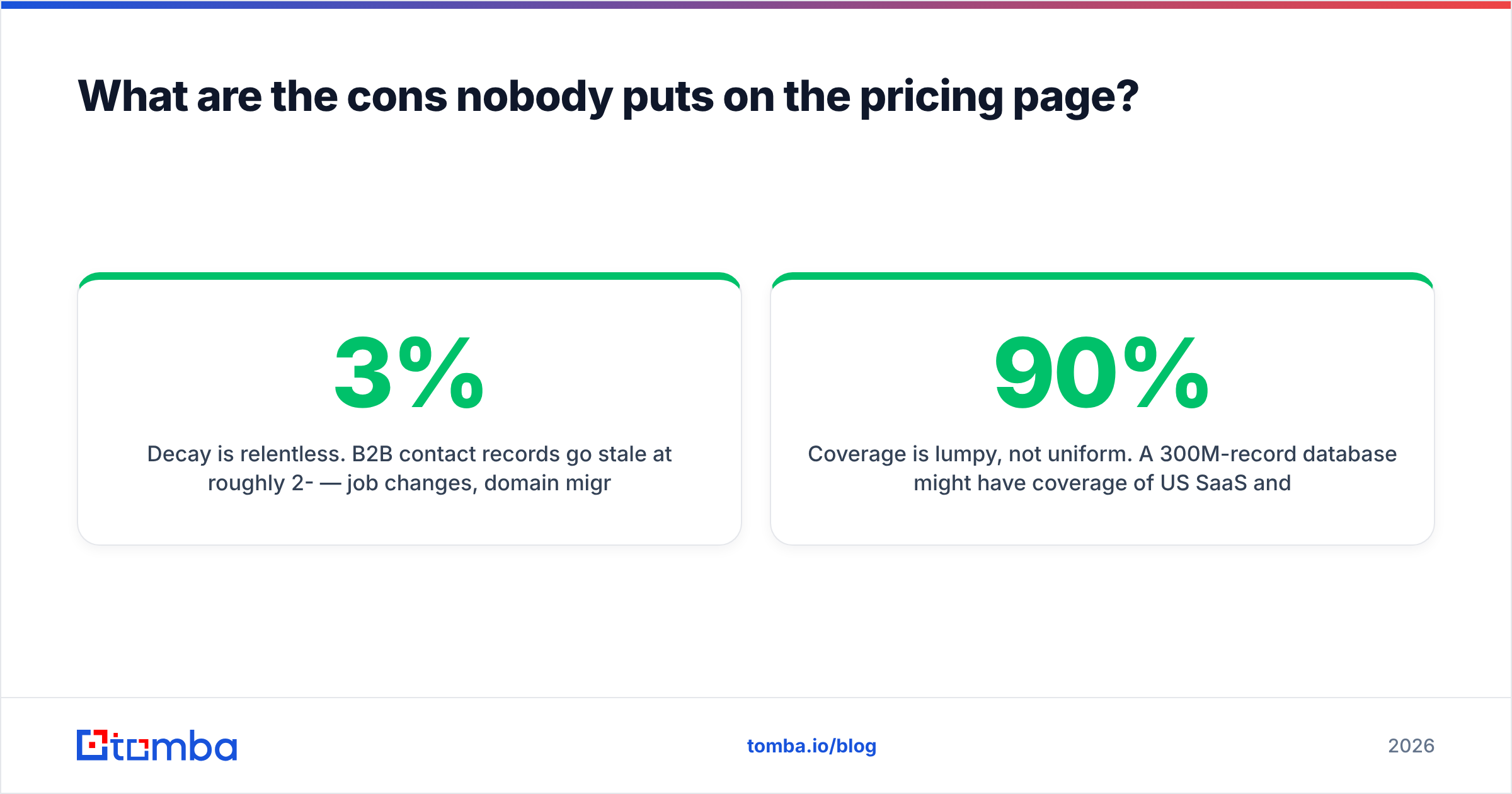
Global database vs real-time lookup: how do they compare?#
| Dimension | Global database | Real-time lookup | Hybrid (database + verify) |
|---|---|---|---|
| Time to first list | Minutes | Hours (needs inputs) | Minutes + a verify pass |
| Typical deliverable accuracy | 70-90%, decaying | 92-98% at query time | 92-97% |
| Discovery without a name | Yes | No | Yes |
| Non-English market depth | Strong | Varies by provider | Strong |
| Firmographic enrichment | Deep | Moderate | Deep |
| Cost model | Flat / per-seat | Per credit | Flat + small verify spend |
| Compliance provenance | Often opaque | Traceable per query | Traceable at verify step |
| Best for | TAM, ABM lists, territory design | 1:1 outbound, high-value accounts | Most outbound teams |
Read that table as a routing rule, not a scoreboard. If your motion is "identify 5,000 accounts and work them over two quarters," the database column wins. If your motion is "our AE named 40 targets this week and needs their contacts to be right," the lookup column wins.
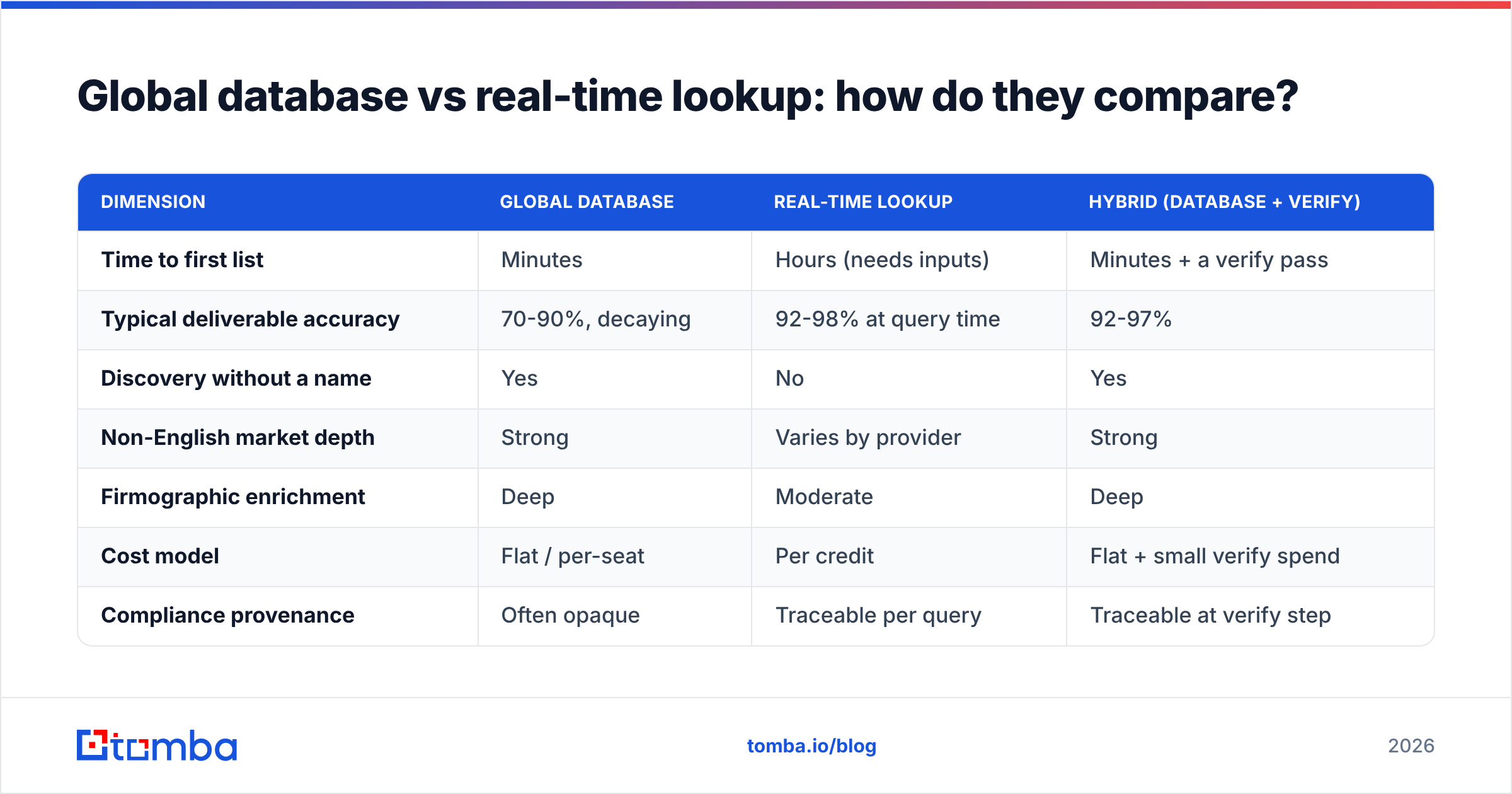
How much accuracy do you actually lose over time?#
Run the arithmetic on your own file rather than trusting a marketing percentage.
| Months since export | Records still valid (95% start) | Records still valid (85% start) |
|---|---|---|
| 0 | 95% | 85% |
| 3 | ~88% | ~79% |
| 6 | ~82% | ~73% |
| 12 | ~69% | ~62% |
| 18 | ~59% | ~53% |
At a 2.5% monthly decay rate, a pristine file is barely two-thirds usable after a year. That is the number that should drive your renewal decision — not the record count on the invoice.
Two practical consequences. First, buy databases on the shortest term that still gets you volume pricing; a three-year license on a static asset is a depreciating purchase. Second, budget for re-verification as a line item, not an afterthought. Running an email verifier pass across a list before each campaign costs a fraction of what a suspended sending domain costs.

What does a global database really cost per usable contact?#
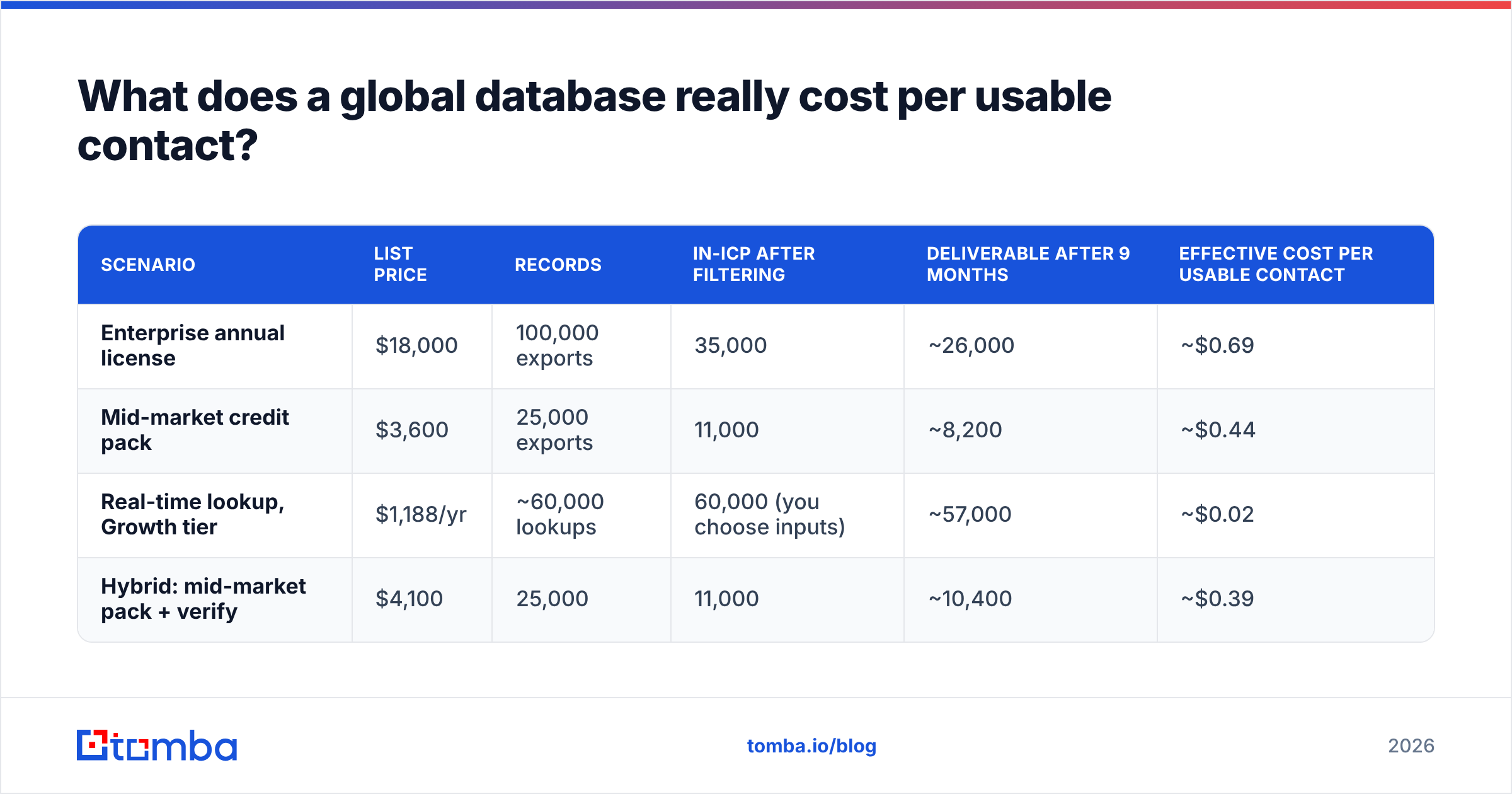
Sticker price per record is the wrong denominator. Use cost per deliverable, in-ICP contact.
| Scenario | List price | Records | In-ICP after filtering | Deliverable after 9 months | Effective cost per usable contact |
|---|---|---|---|---|---|
| Enterprise annual license | $18,000 | 100,000 exports | 35,000 | ~26,000 | ~$0.69 |
| Mid-market credit pack | $3,600 | 25,000 exports | 11,000 | ~8,200 | ~$0.44 |
| Real-time lookup, Growth tier | $1,188/yr | ~60,000 lookups | 60,000 (you choose inputs) | ~57,000 | ~$0.02 |
| Hybrid: mid-market pack + verify | $4,100 | 25,000 | 11,000 | ~10,400 | ~$0.39 |
Those figures are illustrative, but the shape holds across almost every deal we have seen reviewed on G2's lead intelligence category: the database looks cheap per raw record and expensive per usable one, because filtering and decay both bite after the invoice is signed. For reference on the lookup side, Tomba pricing starts with a free tier at 25 searches per month, Starter at $49/mo, Growth at $99/mo, and Pro at $249/mo.
The hybrid row is the interesting one. Adding a verification pass costs a few hundred dollars and recovers thousands of contacts that would otherwise bounce.
Is a global database compliant enough for EU and UK outreach?#
It can be, but the burden sits with you.
- Provenance beats promises. Require a source field per record, or at minimum a documented sourcing methodology you can attach to your records of processing.
- Legitimate interest needs a balancing test. Write it down once. Cold B2B email to a role-relevant contact usually survives it; scraping personal Gmail addresses does not.
- Suppression must be honorable at the record level. If you cannot delete a person from your entire stack in one action, you are exposed.
- Country rules differ from GDPR. Germany's UWG and Canada's CASL are stricter on unsolicited commercial email than GDPR alone implies. A "GDPR-compliant" badge does not cover them.
- Prefer role-based and corporate addresses in strict jurisdictions. They carry meaningfully lower personal-data risk than an inferred individual address.
Vendors that publish their sourcing openly — including database players like BookYourData, which documents its verification approach — make this materially easier than vendors who treat sourcing as a trade secret. Ask before buying, not after a complaint.
Who should buy a global database, and who should skip it?#
Buy it if: you are sizing a market, entering new geographies, running account-based programs that need firmographics, feeding a data warehouse, or building lists in regions where web crawling fails. Also buy it if your team genuinely cannot name their targets yet.
Skip it if: you run low-volume, high-value outbound to accounts you already know; your ICP is concentrated in a handful of verticals you can enumerate; you send from a small number of domains where one bad campaign hurts sender reputation badly; or your budget is tight enough that a five-figure annual license crowds out sequencing and enrichment tooling.
The pragmatic middle: buy the smallest database license that covers your discovery need, then layer real-time verification and lookup on top for anything you actually send to. Use the database to answer who exists. Use lookup to answer how do I reach this person today.
How do you build the hybrid stack in practice?#
- Define the ICP filter first, before you talk to any vendor, so you can request a coverage sample against it.
- Test with 500 records, not 5. Ask for a free sample in your exact segment and run it through independent verification. Measure valid, catch-all, and invalid separately.
- Export narrow, enrich wide. Pull the account list from the database; resolve individual contacts at work time via lookup or bulk email finder runs.
- Re-verify on a schedule — monthly for active sequences, quarterly for the wider CRM.
- Log provenance in your CRM. One text field: source, date acquired, date last verified. It costs nothing and settles both compliance and attribution arguments later.
- Review cost per booked meeting, not per record. That is the only metric that survives contact with a CFO.
Teams that do this stop arguing about which model is superior. They spend database money on discovery, lookup money on precision, and cut the 30% of their file that was never going to convert anyway.
The bottom line#
The global database pros and cons come down to one honest sentence: a database buys you breadth you cannot build, and costs you freshness you cannot fake. Price it on usable contacts, verify before every send, and never let a file older than six months touch your primary sending domain.
If you want the precision half of that stack, start with the Tomba Email Finder. It resolves contacts at the moment you need them, flags catch-all domains before they wreck your bounce rate, and starts free at 25 searches a month — enough to benchmark it against whatever database sample a vendor sends you this week.
Related guides#
Ready to find emails that actually work?
Join 150,000+ professionals who stopped guessing and started sending. Free credits on signup — no credit card required.
Get the Tomba newsletter
Practical outbound tactics and product updates — once every two weeks.
About the author