Global Database Reviews 2026: Accuracy, Pricing & Verdict
An independent look at how global B2B contact databases actually perform in 2026 — coverage outside the US, real match rates, hidden credit costs, and which one fits your motion.
TL;DR
- "Global" in a B2B database's marketing copy almost always means "strong in the US, thin in APAC, legally cautious in the EU." Ask for a country-level coverage breakdown before you sign.
- Database size (200M, 700M, 1B contacts) is the worst possible buying signal. Match rate on your ICP list and verified-email percentage are the only numbers that matter.
- Static databases decay 22-30% per year. Real-time finders re-check on request. Most teams need both — a database for discovery, a finder plus verifier for the send list.
- Pricing traps to watch: credits burned on failed lookups, annual-only contracts, per-seat minimums, and export caps that quietly cripple your list-building.
- Best-fit reading: Tomba ($49/mo Starter) for verified email discovery at API speed, BookYourData for prepaid targeted lists, Apollo for all-in-one prospecting, and ZoomInfo when budget is not the constraint.
What are global database reviews actually reviewing?#
Short answer: they should be reviewing coverage per country, freshness, and match rate — but most of them just rank vendors by marketing claims.
Think of a global contact database like a world atlas printed in 2019. The continents are still where they were, but half the roads have changed, some cities have new names, and the further you get from the publisher's home country, the vaguer the detail. A vendor with 700 million profiles can still fail on 6 of your 10 target accounts in Japan.
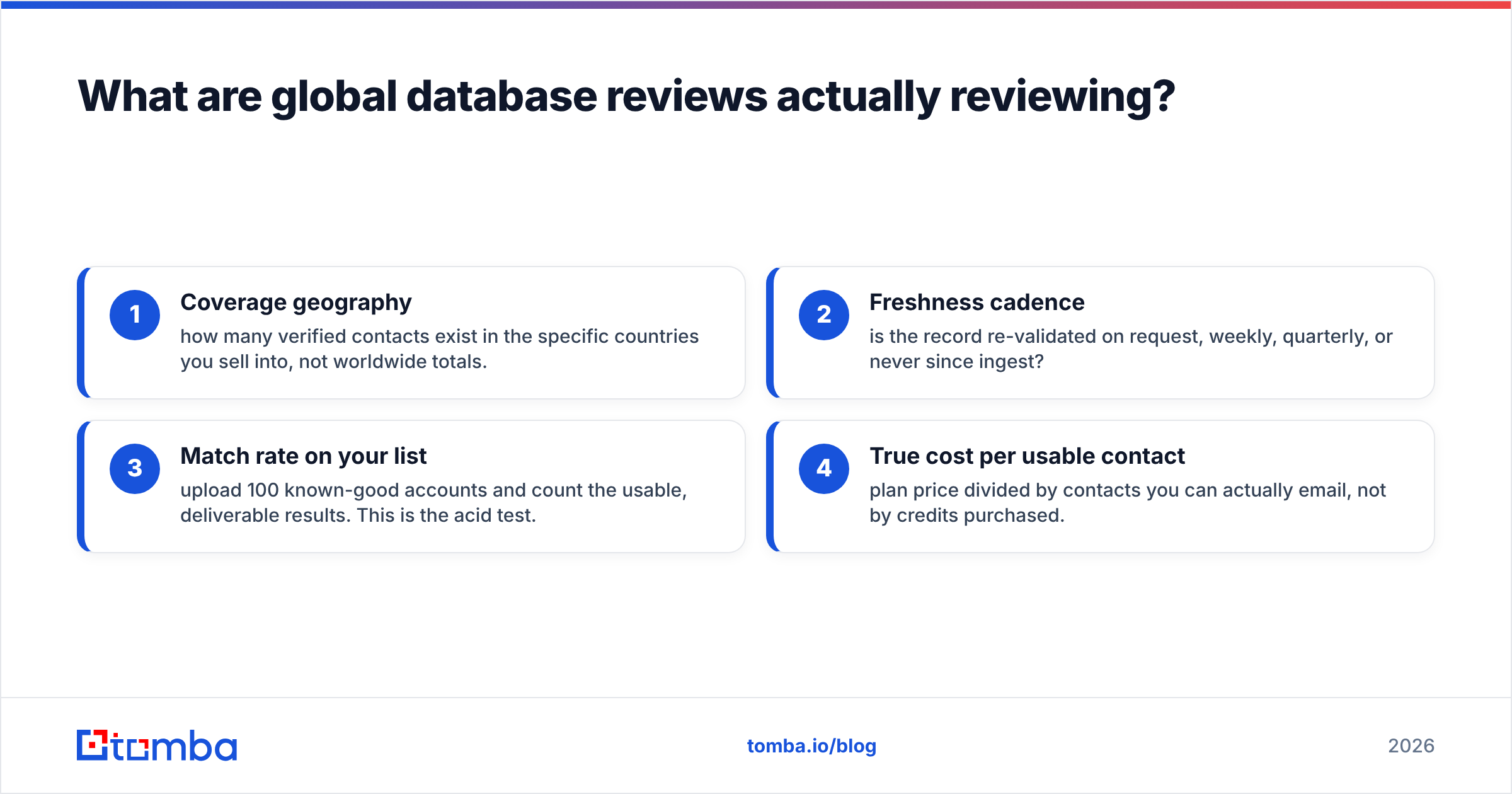
When you read global database reviews — including this one — apply four filters:
- Coverage geography — how many verified contacts exist in the specific countries you sell into, not worldwide totals.
- Freshness cadence — is the record re-validated on request, weekly, quarterly, or never since ingest?
- Match rate on your list — upload 100 known-good accounts and count the usable, deliverable results. This is the acid test.
- True cost per usable contact — plan price divided by contacts you can actually email, not by credits purchased.
Everything else — UI polish, Chrome extensions, AI scoring — is a tie-breaker, not a decision driver.
Why does database size mislead so many buyers?#
Because a record and a usable record are different products.
A "contact record" in a large aggregate database may contain only a name, a job title scraped from a public profile, and a company. That's a lead identifier, not an email address. The vendor still counts it in the headline number. Meanwhile the email you actually need may be inferred from a pattern, never validated, and pointed at a mailbox that closed 14 months ago.
The B2B data industry generally accepts that contact data decays somewhere around 22-30% annually — people change jobs, companies get acquired, domains migrate. Gartner's research on data quality has long tied poor data to material revenue loss, and the mechanism is simple: bad addresses inflate bounce rates, bounce rates damage sender reputation, and damaged reputation suppresses the deliverability of your good emails too.
So the real question is not "how many contacts do you have?" It is "how many of your contacts will still be deliverable on the day I press send?"


How do the major global databases compare in 2026?#
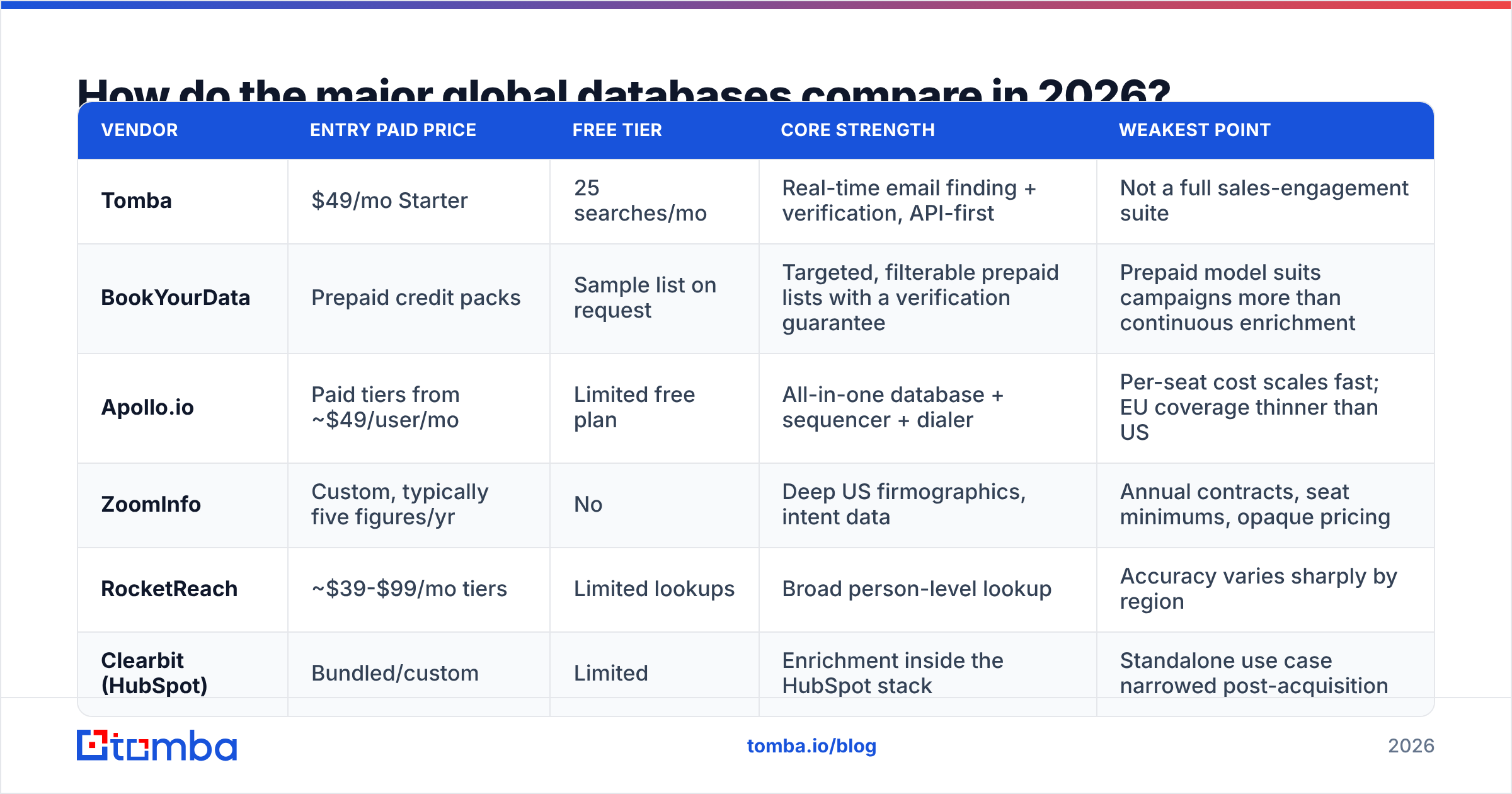
Here is the honest layout. Prices are list prices for the entry paid tier as published by each vendor; enterprise pricing is negotiated and rarely comparable.
| Vendor | Entry paid price | Free tier | Core strength | Weakest point |
|---|---|---|---|---|
| Tomba | $49/mo Starter | 25 searches/mo | Real-time email finding + verification, API-first | Not a full sales-engagement suite |
| BookYourData | Prepaid credit packs | Sample list on request | Targeted, filterable prepaid lists with a verification guarantee | Prepaid model suits campaigns more than continuous enrichment |
| Apollo.io | Paid tiers from ~$49/user/mo | Limited free plan | All-in-one database + sequencer + dialer | Per-seat cost scales fast; EU coverage thinner than US |
| ZoomInfo | Custom, typically five figures/yr | No | Deep US firmographics, intent data | Annual contracts, seat minimums, opaque pricing |
| RocketReach | ~$39-$99/mo tiers | Limited lookups | Broad person-level lookup | Accuracy varies sharply by region |
| Clearbit (HubSpot) | Bundled/custom | Limited | Enrichment inside the HubSpot stack | Standalone use case narrowed post-acquisition |

Two structural notes about that table.
Per-seat versus per-credit changes the math entirely. A $49/user/month tool across a six-person SDR team is $294/month before anyone finds a single email. A credit-based tool at $99/month shared via API across the same team may cost a third of that. Model your team shape, not the sticker price.
Prepaid list vendors solve a different problem. BookYourData and similar providers are strong when you know your segment precisely — "HR directors at 200-1000 employee manufacturers in Germany" — and want a clean, filtered, verified export today rather than a subscription you'll forget to cancel. That's a genuinely different buying motion from continuous enrichment, and it's fair to say neither model is universally better.
Is a static database better than a real-time email finder?#
Neither wins outright. They fail differently, which is why mature teams run both.
- Static databases are built for discovery. You don't know who to target yet, so you filter by industry, headcount, technology, and geography until a list appears. Their weakness is time: the record was true when it was ingested.
- Real-time finders are built for resolution. You already know the person or the company domain, and you need a deliverable address right now. A tool like Tomba's email finder resolves the pattern and checks the mailbox at query time rather than serving a cached row.
- Verification layers are the safety net for both. Running every list — bought, scraped, or found — through an email verifier before import is the single cheapest insurance policy in outbound.
- Catch-all handling is where cheap tools quietly lie. Catch-all domains accept everything at SMTP, so naive verifiers mark them "valid." A dedicated catch-all verifier applies pattern confidence and historical signal instead of shrugging.
The practical workflow: use the database for segmentation, the finder for the actual addresses, and the verifier as the gate before anything touches your sending domain.
What does "global" really mean for coverage and compliance?#
It means different things per region, and the differences are legal, not just technical.
Europe. GDPR treats a work email tied to a named person as personal data. Legitimate interest can support B2B outreach, but you owe transparency, a lawful basis, and a working opt-out. Reputable vendors will tell you their source and honor deletion requests. If a vendor can't explain where a German record came from, that's your answer. Review the vendor's data sources page before you buy — if there isn't one, treat that as a red flag.
North America. The deepest coverage in every major database, and the most competition for the same inboxes. Volume is easy here; differentiation is not.
APAC. Coverage collapses fastest here. Japan and Korea have low public-profile density relative to company count; Southeast Asia has fragmented company registries. Expect match rates well below whatever the vendor's global average claims.
LATAM and MEA. Improving, but firmographic depth (headcount, revenue, tech stack) lags behind contact-level data.
A useful test: pick 25 accounts in your hardest region and run them through every trial you're evaluating. Vendors optimize their demo data for the US. Your trial should not.
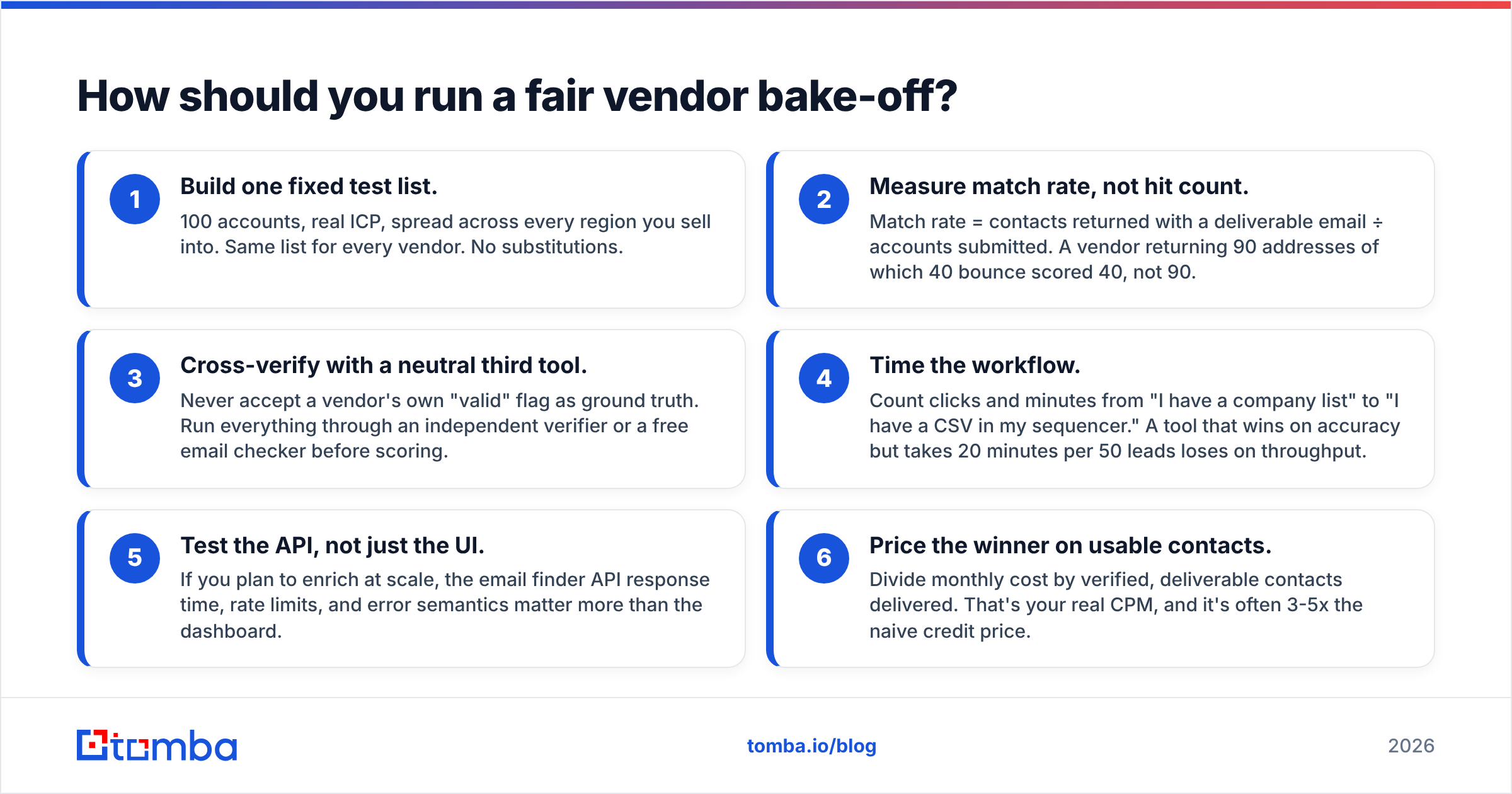
How should you run a fair vendor bake-off?#
Run it like a controlled experiment, not a sales call.
- Build one fixed test list. 100 accounts, real ICP, spread across every region you sell into. Same list for every vendor. No substitutions.
- Measure match rate, not hit count. Match rate = contacts returned with a deliverable email ÷ accounts submitted. A vendor returning 90 addresses of which 40 bounce scored 40, not 90.
- Cross-verify with a neutral third tool. Never accept a vendor's own "valid" flag as ground truth. Run everything through an independent verifier or a free email checker before scoring.
- Time the workflow. Count clicks and minutes from "I have a company list" to "I have a CSV in my sequencer." A tool that wins on accuracy but takes 20 minutes per 50 leads loses on throughput.
- Test the API, not just the UI. If you plan to enrich at scale, the email finder API response time, rate limits, and error semantics matter more than the dashboard.
- Price the winner on usable contacts. Divide monthly cost by verified, deliverable contacts delivered. That's your real CPM, and it's often 3-5x the naive credit price.
Independent buyer review sites like G2 and Capterra are useful for spotting recurring complaints — billing surprises, support latency, cancellation friction — but they're poor at measuring accuracy, because reviewers rarely run controlled tests. Use them for risk signals, not performance data.
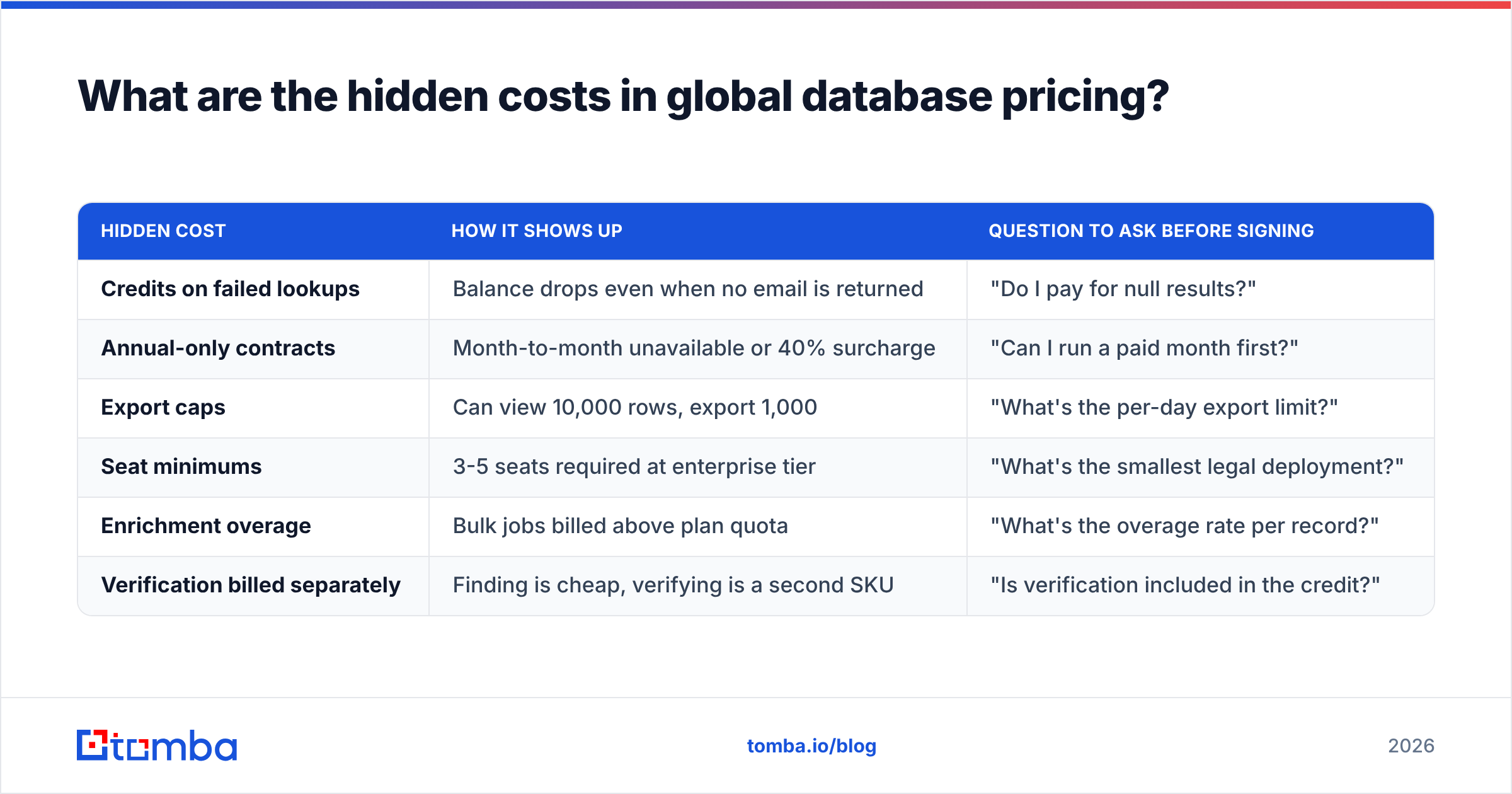
What are the hidden costs in global database pricing?#
The sticker price is rarely the spend.
| Hidden cost | How it shows up | Question to ask before signing |
|---|---|---|
| Credits on failed lookups | Balance drops even when no email is returned | "Do I pay for null results?" |
| Annual-only contracts | Month-to-month unavailable or 40% surcharge | "Can I run a paid month first?" |
| Export caps | Can view 10,000 rows, export 1,000 | "What's the per-day export limit?" |
| Seat minimums | 3-5 seats required at enterprise tier | "What's the smallest legal deployment?" |
| Enrichment overage | Bulk jobs billed above plan quota | "What's the overage rate per record?" |
| Verification billed separately | Finding is cheap, verifying is a second SKU | "Is verification included in the credit?" |
This is where transparent, published pricing earns real trust. You can read Tomba pricing on a public page — Free at 25 searches/mo, Starter $49/mo, Growth $99/mo, Pro $249/mo, Enterprise custom — without booking a call. Vendors that hide pricing behind a demo form are, structurally, pricing you rather than pricing the product.
Which global database should you pick?#
Match the tool to the motion:
- You need verified emails at API speed, embedded in your own workflow. Tomba. The finder, domain search, verifier, and enrichment share one credit pool and one API, and the entry point is $49/mo rather than an annual commitment.
- You need a clean, filtered list for one campaign, right now. A prepaid targeted-list provider like BookYourData. You get exactly the segment you specified with a verification guarantee, and there's no subscription to manage afterward.
- You want database, sequencing, and dialing in one seat. Apollo — accepting that per-seat costs scale with headcount and that non-US coverage is thinner than the marketing suggests.
- You're an enterprise where intent data and firmographic depth justify five figures a year. ZoomInfo, with procurement's eyes open on contract length.
- You're enriching inside HubSpot already. Clearbit's native path is the lowest-friction option, even if standalone flexibility has narrowed.
Most teams under 50 people are best served by the combination rather than the monolith: a lean finder-plus-verifier stack for the daily work, and an occasional prepaid list purchase when they need to enter a new segment fast. That combination usually costs less than one enterprise seat.
What should you do next?#
Run the 100-account bake-off described above before you spend anything meaningful. It takes an afternoon and it will contradict at least one thing you believed from a vendor deck.
When you're ready to test the resolution side, start with the Tomba Email Finder. The free tier gives you 25 searches a month — enough to run a real sample of your ICP and see the match rate on your own accounts rather than someone's benchmark. If the numbers hold up on your list, the $49/mo Starter plan scales it; if they don't, you've lost nothing but an hour. That's the only kind of database review that actually settles the question.
Related guides#
Ready to find emails that actually work?
Join 150,000+ professionals who stopped guessing and started sending. Free credits on signup — no credit card required.
Get the Tomba newsletter
Practical outbound tactics and product updates — once every two weeks.
About the author