Gmail 550 Permanent Failure: Causes, Codes, and Fixes (2026)
A Gmail 550 is a hard rejection, not a hiccup. Here is what each 5.x.x subcode means, why Gmail throws it, and the exact order to fix things before your sending domain gets throttled.
TL;DR
- A Gmail 550 permanent failure is a hard bounce: Gmail's servers evaluated the message and refused it outright. Retrying the same message to the same address will fail again.
- The number after 550 is the part that matters.
550 5.1.1(no such user) is a data problem,550 5.7.1is a policy or reputation problem, and550 5.4.1usually means Google Workspace routing is blocking you. - Roughly a third of the 550s that sales teams see are avoidable list-hygiene failures — dead mailboxes, typo'd domains, and role addresses that were never real.
- Fix in this order: stop the send, classify the subcode, purge the invalid addresses, then repair authentication and reputation. Doing reputation work first while bad addresses are still in the list just burns more sending days.
- Prevention is cheaper than remediation. Verifying before you send keeps your Gmail bounce rate under the 2% band that Google's bulk-sender rules effectively expect.
What does a Gmail 550 permanent failure actually mean?#
A 550 is Gmail saying "no, and don't ask again."
Think of SMTP error codes like a doorman at a building. A 4xx code is the doorman saying "come back in ten minutes, the elevator is stuck" — temporary, retry later. A 5xx code is the doorman saying "this person doesn't live here" or "you're on the banned list." That door is not opening on a retry.
Technically, 550 is a permanent negative completion reply defined in the SMTP specification. Gmail returns it at the point where it has enough information to reject: sometimes during the RCPT TO command (the recipient doesn't exist), sometimes after DATA (the content or the sender failed a policy check). Your sending server converts that rejection into a bounce message — the "Address not found" or "Message blocked" email that lands back in your inbox.
The bounce body almost always contains three useful pieces:
- The numeric subcode —
5.1.1,5.7.1,5.7.26, and so on. This is the actual diagnosis. - The human string — "The email account that you tried to reach does not exist" or "This message does not have authentication information."
- A Google help URL — Google appends a support link keyed to the specific failure. It is worth clicking; the pages are maintained.
Everything else in the bounce is noise. Read the subcode first.
Wait — that image needs a proper reference:

What are the most common Gmail 550 error codes?#
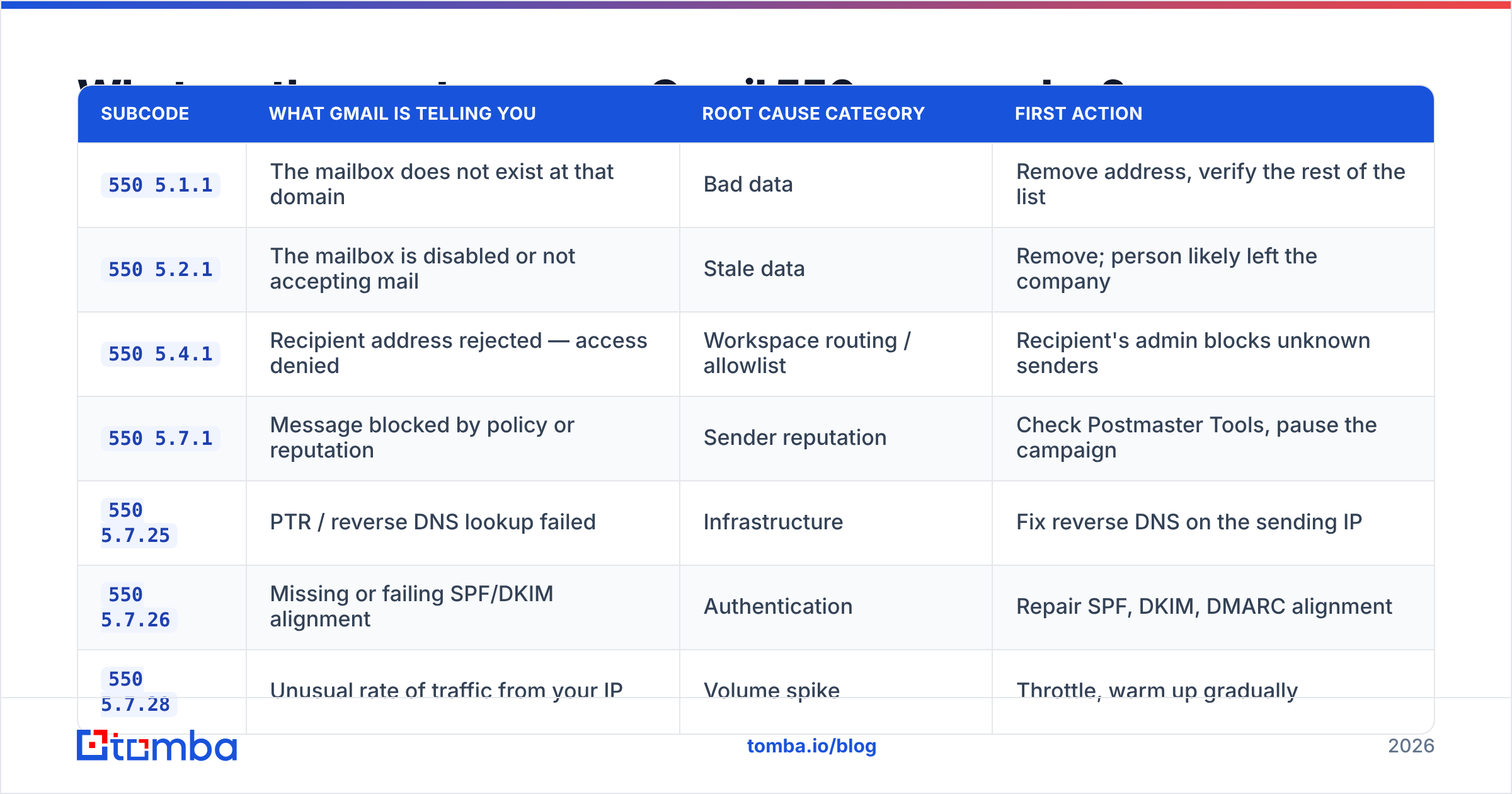
Here is the practical decoder. These are the subcodes that account for the overwhelming majority of Gmail 550 bounces in B2B outbound.
| Subcode | What Gmail is telling you | Root cause category | First action |
|---|---|---|---|
550 5.1.1 |
The mailbox does not exist at that domain | Bad data | Remove address, verify the rest of the list |
550 5.2.1 |
The mailbox is disabled or not accepting mail | Stale data | Remove; person likely left the company |
550 5.4.1 |
Recipient address rejected — access denied | Workspace routing / allowlist | Recipient's admin blocks unknown senders |
550 5.7.1 |
Message blocked by policy or reputation | Sender reputation | Check Postmaster Tools, pause the campaign |
550 5.7.25 |
PTR / reverse DNS lookup failed | Infrastructure | Fix reverse DNS on the sending IP |
550 5.7.26 |
Missing or failing SPF/DKIM alignment | Authentication | Repair SPF, DKIM, DMARC alignment |
550 5.7.28 |
Unusual rate of traffic from your IP | Volume spike | Throttle, warm up gradually |
550-5.7.350 |
Message suspected of being spam by Gmail | Content + reputation | Rewrite copy, reduce links, slow down |
Three of those categories — bad data, authentication, and reputation — cover nearly everything. And they demand completely different fixes, which is why "I'm getting 550s, what do I do" has no single answer.
A useful sanity check: if your 550s are concentrated on 5.1.1 and 5.2.1, you have a list problem. If they're concentrated on 5.7.x, you have a sender problem. If you have both, fix the list first, because a high invalid-address rate is one of the inputs that pushes Gmail toward the 5.7.x rejections in the first place.
Why does Gmail reject a message that worked last month?#
Because Gmail's rejection thresholds are dynamic and your inputs changed. Four things move underneath you:
- The recipient left. B2B email data decays at roughly 2-3% per month as people change jobs, which compounds to a quarter of a list going stale in a year. A list that bounced cleanly in January can throw
5.1.1errors all through the autumn. - Your reputation slid. Gmail scores your domain and IP continuously. A single campaign to an unverified list can move you from "high" to "low" in Google Postmaster Tools within days, and
5.7.1blocks follow. - Google tightened the rules. Since the 2024 bulk-sender requirements, senders above 5,000 messages/day to Gmail must have SPF, DKIM, DMARC, one-click unsubscribe, and a spam-complaint rate under 0.3%. Google's email sender guidelines are the authoritative version and they do get updated.
- The recipient's admin tightened theirs.
5.4.1is often not about you at all — it's a Google Workspace tenant that only accepts mail from approved domains, or has an aggressive gateway in front.
The dangerous pattern is the slow slide: bounce rate creeps from 1% to 4% over six weeks, nobody notices because deliveries still happen, and then a Monday campaign hits a wall of 5.7.1 blocks that takes three weeks of careful sending to unwind.
Is a 550 the same as a soft bounce?#
No, and treating them the same is how lists rot.
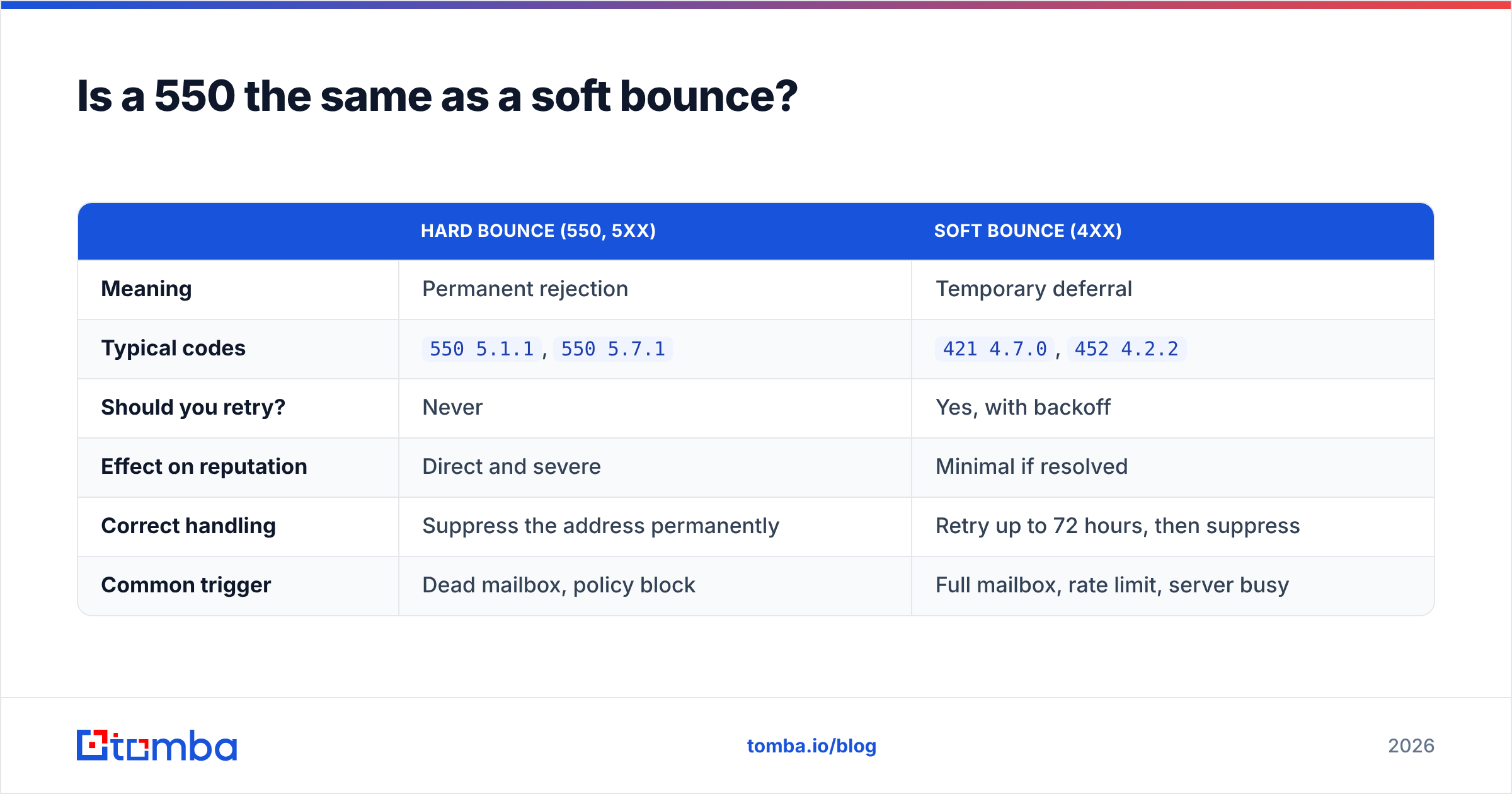
| Hard bounce (550, 5xx) | Soft bounce (4xx) | |
|---|---|---|
| Meaning | Permanent rejection | Temporary deferral |
| Typical codes | 550 5.1.1, 550 5.7.1 |
421 4.7.0, 452 4.2.2 |
| Should you retry? | Never | Yes, with backoff |
| Effect on reputation | Direct and severe | Minimal if resolved |
| Correct handling | Suppress the address permanently | Retry up to 72 hours, then suppress |
| Common trigger | Dead mailbox, policy block | Full mailbox, rate limit, server busy |
Most sending platforms auto-suppress hard bounces. Most homegrown scripts do not — which is how the same dead address gets hit fourteen times across four campaigns, each hit reinforcing to Gmail that you don't clean your data.
One nuance worth knowing: a 550 5.7.1 is technically permanent for that message, but it is not permanent for that recipient. If you fix your authentication and reputation, the same address may accept mail next month. So suppress 5.1.1 and 5.2.1 addresses forever; quarantine 5.7.x addresses and retry them once the underlying sender problem is fixed.
How do you fix a Gmail 550 permanent failure, step by step?#
Work in this order. Skipping ahead wastes sending days.
- Pause the campaign. Every additional message sent into a
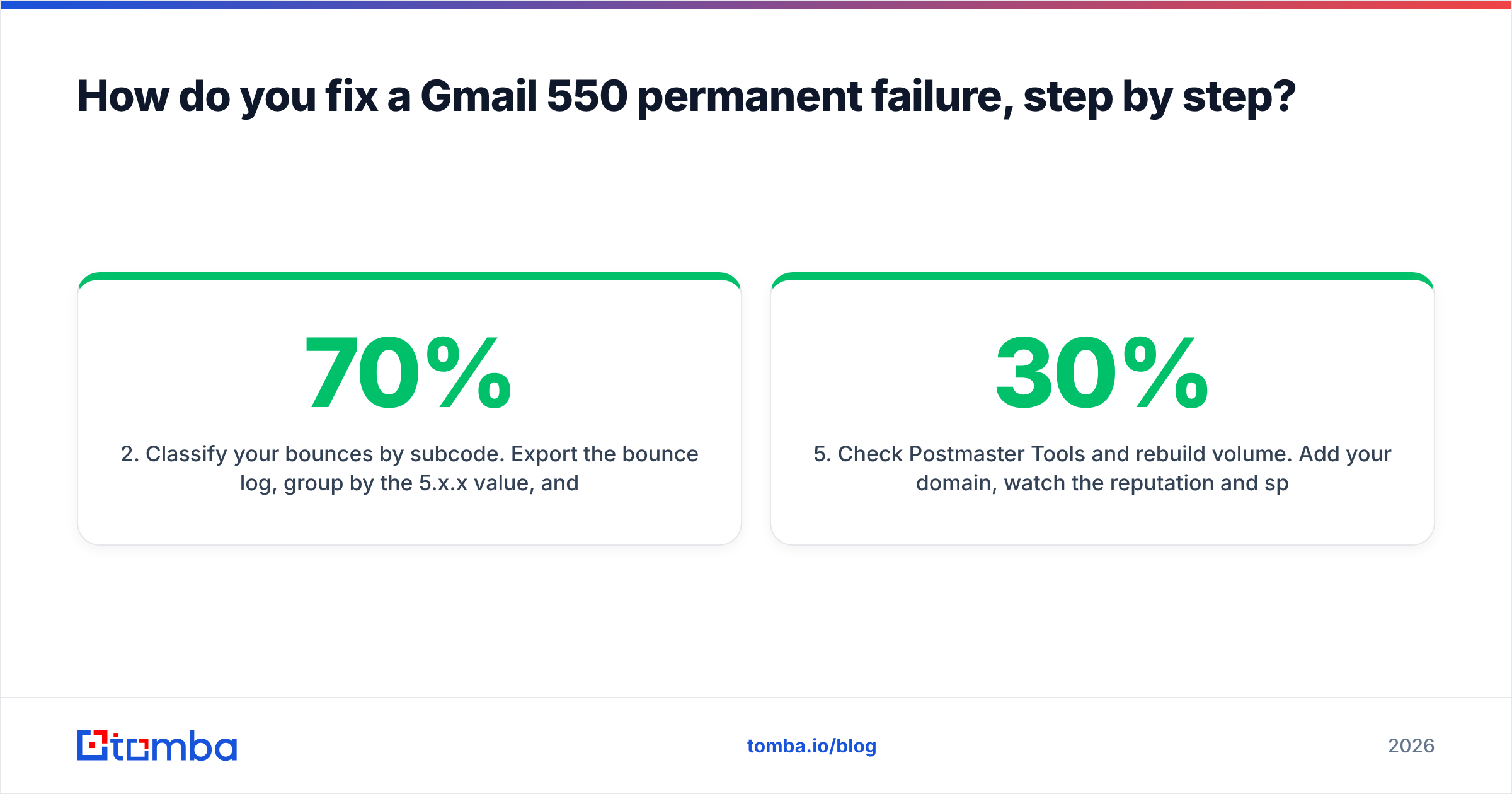
5.7.1block deepens the reputation hole. Stop first, diagnose second. This is the single most common mistake — teams "push through" a bad send and turn a two-day problem into a three-week one. - Classify your bounces by subcode. Export the bounce log, group by the
5.x.xvalue, and count. You need percentages, not anecdotes. If 70% are5.1.1, this is a data cleanup job. If 70% are5.7.26, it's a DNS job that will take an afternoon. - Purge and suppress invalid addresses. Remove every
5.1.1and5.2.1hit from the active list, and add them to a global suppression file that every tool you use reads from. Then run the remaining list through an email verifier — the addresses that haven't bounced yet aren't automatically good, they just haven't been tested. - Repair authentication. Publish or fix SPF (one record, under 10 DNS lookups), enable DKIM signing on the sending domain, and set DMARC to at least
p=nonewith a reporting address. Confirm alignment — SPF and DKIM passing on a domain that doesn't match your From header still fails DMARC. Run your record through an SPF checker before you trust it. - Check Postmaster Tools and rebuild volume. Add your domain, watch the reputation and spam-rate panels, and restart at roughly 20-30% of your previous daily volume, increasing ~20% every two or three days while the graphs stay green.
- Fix the content signals that trigger
5.7.350. Fewer links, no link shorteners, no tracking domain that shares an IP with known spam, plain-text-heavy formatting, and a real unsubscribe path.

How do you stop 550 bounces before they happen?#
Prevention comes down to three habits, and the first one does most of the work.
Verify before you send, not after. A verification pass costs a fraction of a cent per address and catches the 5.1.1 failures before Gmail ever sees them. For large imports, a bulk email finder run that verifies as it enriches is faster than the export-verify-reimport dance.
Handle catch-all domains honestly. A catch-all domain accepts everything at SMTP time, so a naive verifier marks the address "valid" and you find out it's dead only when the bounce arrives days later. Catch-alls are common in enterprise B2B — sometimes 15-25% of a list. A dedicated catch-all verifier uses pattern confidence and secondary signals instead of pretending SMTP gave a real answer. If you can't get a confident result, segment those addresses into a low-volume, high-value cohort rather than mixing them into a bulk blast.
Re-verify on a schedule. Data decay is continuous, so treat verification as maintenance, not a one-time cleanup. Quarterly for cold lists, monthly for anything you mail weekly. And keep an eye on sender reputation as the leading indicator — it moves before the bounce rate does.
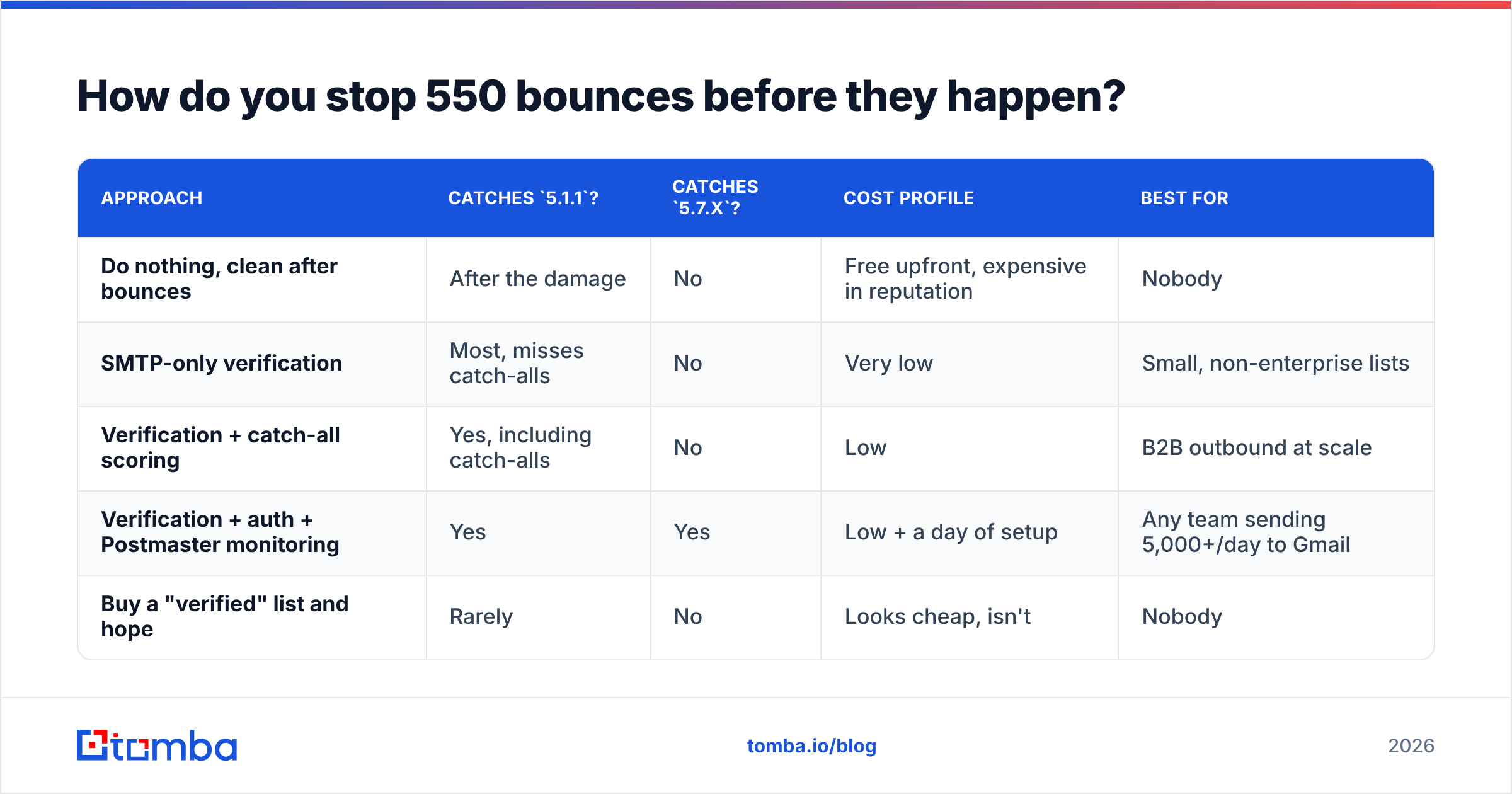
How do the prevention approaches compare?#
| Approach | Catches 5.1.1? |
Catches 5.7.x? |
Cost profile | Best for |
|---|---|---|---|---|
| Do nothing, clean after bounces | After the damage | No | Free upfront, expensive in reputation | Nobody |
| SMTP-only verification | Most, misses catch-alls | No | Very low | Small, non-enterprise lists |
| Verification + catch-all scoring | Yes, including catch-alls | No | Low | B2B outbound at scale |
| Verification + auth + Postmaster monitoring | Yes | Yes | Low + a day of setup | Any team sending 5,000+/day to Gmail |
| Buy a "verified" list and hope | Rarely | No | Looks cheap, isn't | Nobody |
The fourth row is the one that actually holds up. Verification alone stops the data-driven 550s; only authentication and reputation monitoring stop the policy-driven ones.
What about 550 errors that aren't your fault?#
Some are genuinely not fixable from your side, and it's worth recognising them so you stop burning hours.
5.4.1from a locked-down Workspace tenant. The recipient's admin has an allowlist. No amount of DKIM work gets you in. The path is a warm intro, a different channel, or a different contact at the company.- Blocked disposable or parked domains. If the domain has no MX records at all, no email will ever be delivered there. Filter these at import.
- Shared-IP contamination. If you send through a shared pool and a neighbour gets flagged, you inherit the
5.7.1. Moving to a dedicated IP fixes it, but only if you have the volume to warm and sustain one — under about 50,000 messages a month, a well-managed shared pool is usually the better bet.
For the underlying protocol detail, the list of SMTP server return codes is a decent neutral reference when you hit a subcode that isn't in Google's docs.
Frequently asked questions#
Does a single 550 hurt my domain? One does nothing. A pattern does. Gmail evaluates ratios over rolling windows, so a bounce rate that sits under about 2% is background noise, while a 10% spike on a single campaign is a visible event.
Can I retry a 550? No. Retrying a permanent failure adds a failed connection attempt to your record without any chance of delivery. Suppress instead.
How long does it take to recover from 5.7.1 blocks?
Typically two to four weeks of disciplined, low-volume sending to engaged recipients, assuming you fixed the root cause. Recovery is slower than the fall.
Does Gmail tell me why it blocked me? Partially. The subcode and the help link narrow it down, but Gmail deliberately does not expose the full scoring logic. Postmaster Tools is the closest thing to a dashboard.
Is it worth verifying addresses that already delivered once? Yes, on a cadence. Delivered in March says nothing about August. The mailbox may be disabled and the person may have changed employers.
Fix the data layer first#
Most Gmail 550 permanent failures trace back to a list nobody checked. Authentication and reputation matter, and you should fix both — but if you repair DNS while still mailing dead mailboxes, you will be back here in a month with the same bounce report.
Start at the source. Tomba Email Finder returns verified professional addresses with a confidence score attached, so the contacts entering your sequences have already been checked against the failure modes that produce 5.1.1 and 5.2.1 bounces. The free tier covers 25 searches a month if you want to test the accuracy on a segment you already know; paid plans start at $49/mo, and full Tomba pricing is public. Clean inputs, cleaner bounce logs, and a sending domain that stays welcome in Gmail.
Related guides#
// get started
Find, verify and enrich your first contacts today
Start on the free plan with 25 searches a month, then scale when your team is ready.
Free plan · No credit card required · GDPR & CCPA
// about the author