Gmail Allow List: How to Whitelist Senders and Fix Inbox Delivery
A Gmail allow list can rescue legitimate mail from spam — but only if you use the right one. Here is what each Gmail allow list actually controls, where it fails, and what to fix instead.
TL;DR
- A Gmail allow list is not one feature. There are at least four: personal filters, the Workspace admin "Email allowlist" IP list, spam-bypass content compliance rules, and per-user contact trust signals. They do different things and fail differently.
- The consumer-side filter ("Never send it to Spam") is the only allow list an individual Gmail user controls, and it does not apply to anyone else's inbox.
- The Workspace admin IP allowlist tells Gmail to skip IP-based spam scoring for listed IPs. It does not disable content filtering, and misused it can flood your org with spam relayed through a shared IP.
- Allow lists are a receiver-side patch. If you are the sender and you need allow lists to land, your authentication, list hygiene, or content is broken.
- Fix the upstream cause first: authenticate with SPF/DKIM/DMARC, verify addresses before sending, and stop mailing dead or spam-trap contacts.
Someone told you to "add us to your allow list." Your prospect told you their IT team blocks unknown domains. Your Workspace admin added an IP to an allowlist and spam went up, not down. All three of these are the same conversation, and almost nobody involved knows which of Gmail's four allow-list mechanisms is actually in play.
This guide separates them, shows exactly where each one is configured, and — more usefully — explains what an allow list can never fix.
What is a Gmail allow list?#
A Gmail allow list is any rule that tells Gmail to treat mail from a specified sender, domain, or IP address more favorably than default spam filtering would. "Whitelist" is the older term; Google's own documentation now uses "allowlist."
The critical distinction most people miss: allow lists are configured by the recipient, not the sender. You cannot add yourself to someone's Gmail allow list. You can only ask them to add you — which is why "add us to your safe senders list" is the weakest deliverability strategy in existence.
Here are the four mechanisms, in order of how often they're confused:
- Personal Gmail filter — Any Gmail user (free or Workspace) creates a filter matching a sender address or domain, then checks "Never send it to Spam." Scope: that one mailbox only.
- Workspace Email allowlist (IP-based) — A Workspace super admin adds sending IP addresses under Apps → Google Workspace → Gmail → Spam, Phishing and Malware. Gmail then skips IP reputation checks for those IPs across the whole domain.
- Spam bypass via content compliance / Inbound gateway — Admin-created rules that route mail matching specific criteria (sender, header, envelope) past spam classification. More surgical than the IP allowlist.
- Contacts and interaction history — Not a setting at all. Gmail weights mail from people you have emailed before, or who are in your Contacts, more favorably. This is implicit and cannot be configured.
If you take one thing from this section: number 2 is the one that causes production incidents, and number 1 is the one people mean 90% of the time.
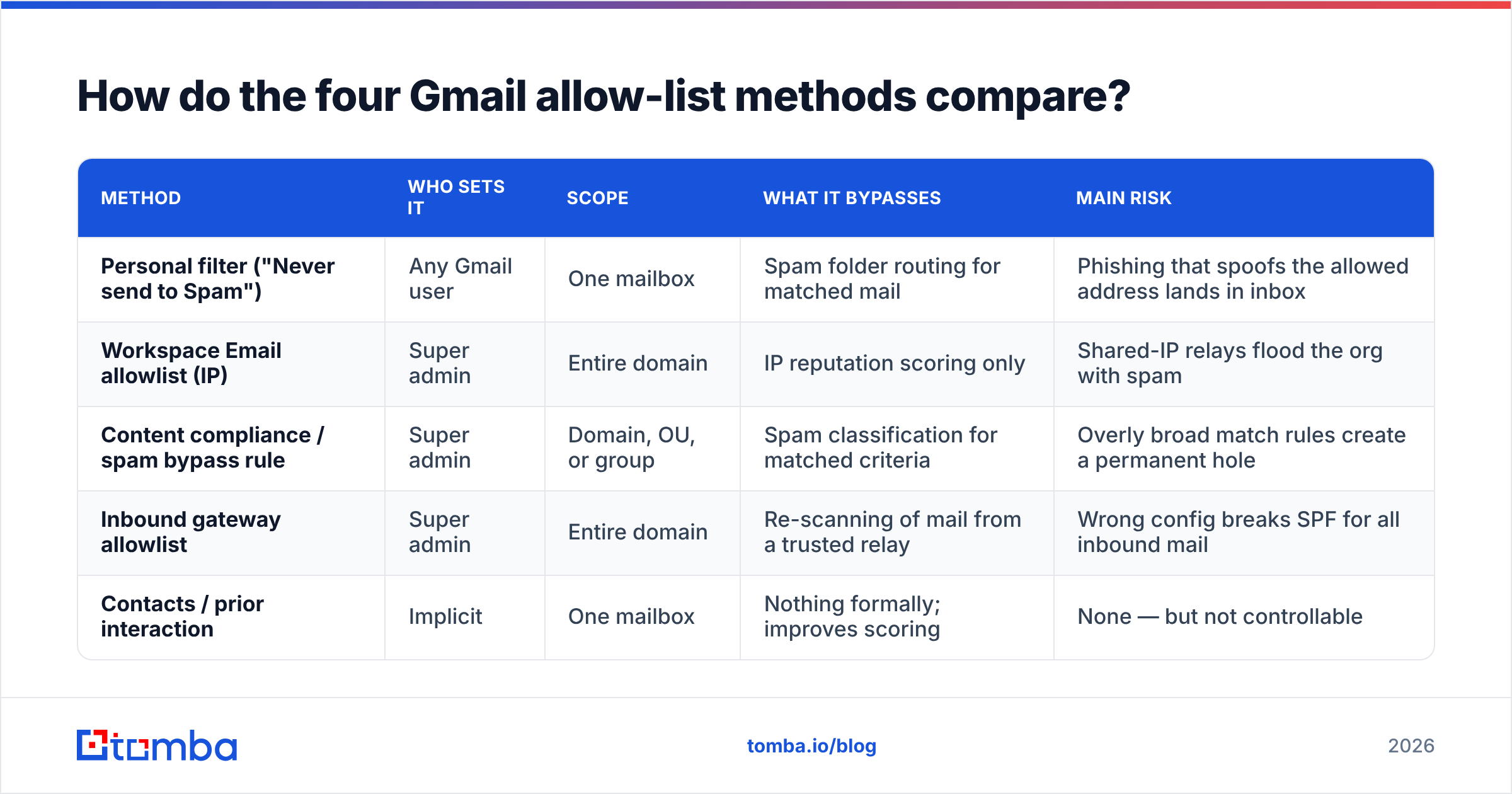
How do the four Gmail allow-list methods compare?#
| Method | Who sets it | Scope | What it bypasses | Main risk |
|---|---|---|---|---|
| Personal filter ("Never send to Spam") | Any Gmail user | One mailbox | Spam folder routing for matched mail | Phishing that spoofs the allowed address lands in inbox |
| Workspace Email allowlist (IP) | Super admin | Entire domain | IP reputation scoring only | Shared-IP relays flood the org with spam |
| Content compliance / spam bypass rule | Super admin | Domain, OU, or group | Spam classification for matched criteria | Overly broad match rules create a permanent hole |
| Inbound gateway allowlist | Super admin | Entire domain | Re-scanning of mail from a trusted relay | Wrong config breaks SPF for all inbound mail |
| Contacts / prior interaction | Implicit | One mailbox | Nothing formally; improves scoring | None — but not controllable |
Notice the pattern: the more powerful the method, the more damage it does when it is wrong. The IP allowlist is the classic footgun. If you allowlist the IP range of a shared ESP or a hosting provider, you have just told Gmail to stop scoring reputation for every other tenant on that infrastructure too.

How do you add a sender to your Gmail allow list as a user?#
This is the five-step version, and it takes about ninety seconds.
- Open Gmail settings — Click the gear icon, then "See all settings."
- Go to Filters and Blocked Addresses — Then click "Create a new filter."
- Enter the sender criteria — Use the full address (
newsletter@example.com) for precision, or@example.comin the From field to trust a whole domain. Domain-wide is broader and riskier. - Check "Never send it to Spam" — Optionally also check "Always mark it as important" and apply a label so the mail is easy to find.
- Rescue what's already in spam — Open the Spam folder, select the messages, and click "Not spam." This trains the classifier in addition to applying your filter.
Two caveats. First, a filter does not override Gmail's malware and phishing blocks — genuinely malicious mail still gets stopped, which is correct behavior. Second, @example.com in the From field matches display-name spoofing loosely in some cases; prefer exact addresses when the sender is consistent.
How does the Workspace admin allow list work?#
The Workspace Email allowlist accepts IP addresses and CIDR ranges only — not domains, not email addresses. That surprises admins constantly. If you want to allow a domain, you need a content compliance rule instead, not the Email allowlist field.
To configure it: Admin console → Apps → Google Workspace → Gmail → Spam, Phishing and Malware → Email allowlist. Add the IPs, save, and wait up to 24 hours for propagation.
What Google explicitly states it does: mail from allowlisted IPs bypasses IP-based spam evaluation. What it does not do:
- It does not bypass content filtering. Message body, links, and attachments are still scanned. A phishing link from an allowlisted IP still gets flagged.
- It does not guarantee inbox placement. User-level filters, DMARC policy failures, and malware detection all still apply.
- It does not fix authentication failures. A message failing DMARC with
p=rejecton the sending domain will still be rejected. - It does not scale safely. Allowlisting a range you do not own is the single most common cause of "we added the allowlist and spam went up" tickets.
The safer alternative for most cases is a content compliance rule scoped to a specific envelope sender with the "Bypass spam filter for this message" action. It targets the actual sender, not everyone who shares their IP block.
Why do legitimate emails end up in Gmail spam anyway?#
Allow lists are a symptom-level fix. If your mail needs one, something upstream is broken. In practice it is almost always one of five things.
- Authentication gaps — Missing or misaligned SPF, DKIM, or DMARC. Since Google and Yahoo's 2024 bulk-sender requirements, any sender pushing over 5,000 messages/day to Gmail needs all three plus one-click unsubscribe. Check your SPF record and confirm DKIM signs with an aligned domain.
- Spam-rate threshold breaches — Google's stated ceiling is 0.30% spam complaints in Postmaster Tools, with 0.10% as the practical target. Cross it and no allow list saves you at scale.
- Bad list hygiene — Bounces and spam traps do more damage than any single content mistake. Sending to addresses you scraped and never validated tanks your domain reputation fast. Running addresses through an email verifier before the first send is the cheapest reputation insurance available.
- Cold-start volume spikes — New domain, no warmup, 2,000 sends on day one. Gmail treats sudden volume from an unknown domain as the signature of a compromised account.
- Content and link reputation — Link shorteners, a single image with no text, mismatched display name and From address, or a domain that appears on a blacklist.
None of those are fixed by a recipient toggling a filter. They are fixed on your side.

Should you ask prospects to add you to their allow list?#
Mostly no — with one narrow exception.
For cold outbound, asking a stranger to allowlist you is absurd. They don't know you, you have no relationship, and the request itself signals "my mail has deliverability problems." It also does nothing for the other 499 people on your list.
For opt-in, transactional, and expected mail, it is reasonable and worth doing. Three cases where the ask genuinely works:
- Post-signup confirmation pages — "Add
noreply@yourdomain.comto your contacts so you don't miss your receipts." High-intent moment, low friction. - Newsletter welcome emails — The first email is your best shot; if it lands, ask for the contact-add there.
- Enterprise onboarding — When an admin is provisioning your tool, a documented IP allowlist request is normal IT procedure and gets actioned.
For everything else, invest the effort in email deliverability fundamentals instead. Your reply rate depends far more on whether the address exists and the person is relevant than on whether they've toggled a filter.
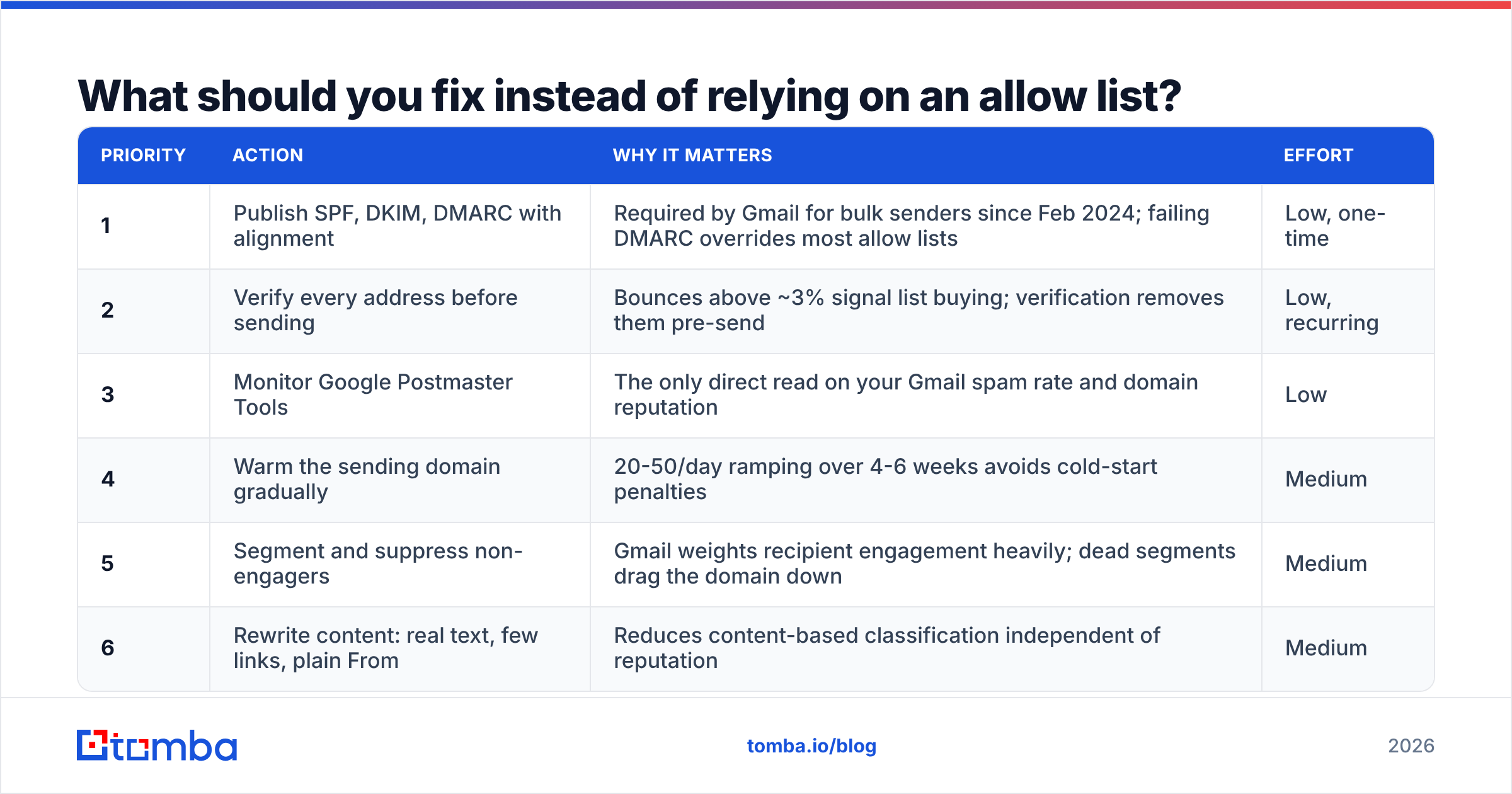
What should you fix instead of relying on an allow list?#
Work down this list in order. Each step compounds the next.
| Priority | Action | Why it matters | Effort |
|---|---|---|---|
| 1 | Publish SPF, DKIM, DMARC with alignment | Required by Gmail for bulk senders since Feb 2024; failing DMARC overrides most allow lists | Low, one-time |
| 2 | Verify every address before sending | Bounces above ~3% signal list buying; verification removes them pre-send | Low, recurring |
| 3 | Monitor Google Postmaster Tools | The only direct read on your Gmail spam rate and domain reputation | Low |
| 4 | Warm the sending domain gradually | 20-50/day ramping over 4-6 weeks avoids cold-start penalties | Medium |
| 5 | Segment and suppress non-engagers | Gmail weights recipient engagement heavily; dead segments drag the domain down | Medium |
| 6 | Rewrite content: real text, few links, plain From | Reduces content-based classification independent of reputation | Medium |
Step 2 is where most B2B teams leak the most. If you build lists from scraped sources or exports, a meaningful share of those addresses are stale, role-based, or outright invalid. Finding the right address in the first place — via domain search against the company you're targeting rather than guessing a pattern — removes the bounce problem before it exists.
Google's own Postmaster Tools documentation is the authoritative reference on how Gmail evaluates senders, and it's worth reading before you touch any allowlist setting. For the broader sender-requirement changes, Google's Email sender guidelines is the canonical source.
What are the risks of a badly configured allow list?#
Four failure modes show up repeatedly in Workspace environments:
- Spoofing amplification — You allowlist
@partner.comby domain in a user filter. An attacker spoofs the display name and From header on a phishing message. Your filter dutifully keeps it out of spam. - Shared-IP contamination — You allowlist the IP range of a marketing platform. That range serves thousands of other senders, including some abusive ones. All of them now bypass IP reputation checks for your entire domain.
- Silent policy conflict — An admin allowlists an IP, but the sending domain publishes
p=rejectDMARC and the mail fails alignment. The mail is still rejected. The admin spends a day debugging a setting that was never the cause. - Permanent-hole drift — A content compliance rule created for a one-off vendor migration in 2023 is never removed. Three years later it is an unmonitored spam bypass nobody remembers creating.
The mitigation for all four is the same: allowlist the narrowest possible criteria, document why each entry exists, and review the list quarterly. Use envelope-sender-specific content compliance rules over blanket IP entries wherever Gmail gives you the option.
Does an allow list help cold outbound at all?#
Practically speaking, no — and treating it as a lever is how teams waste a quarter.
Cold outbound deliverability is decided by three things you control entirely on your side: whether the address is real, whether your sending domain has reputation, and whether your content reads like a human wrote it to one person. An allow list touches none of those.
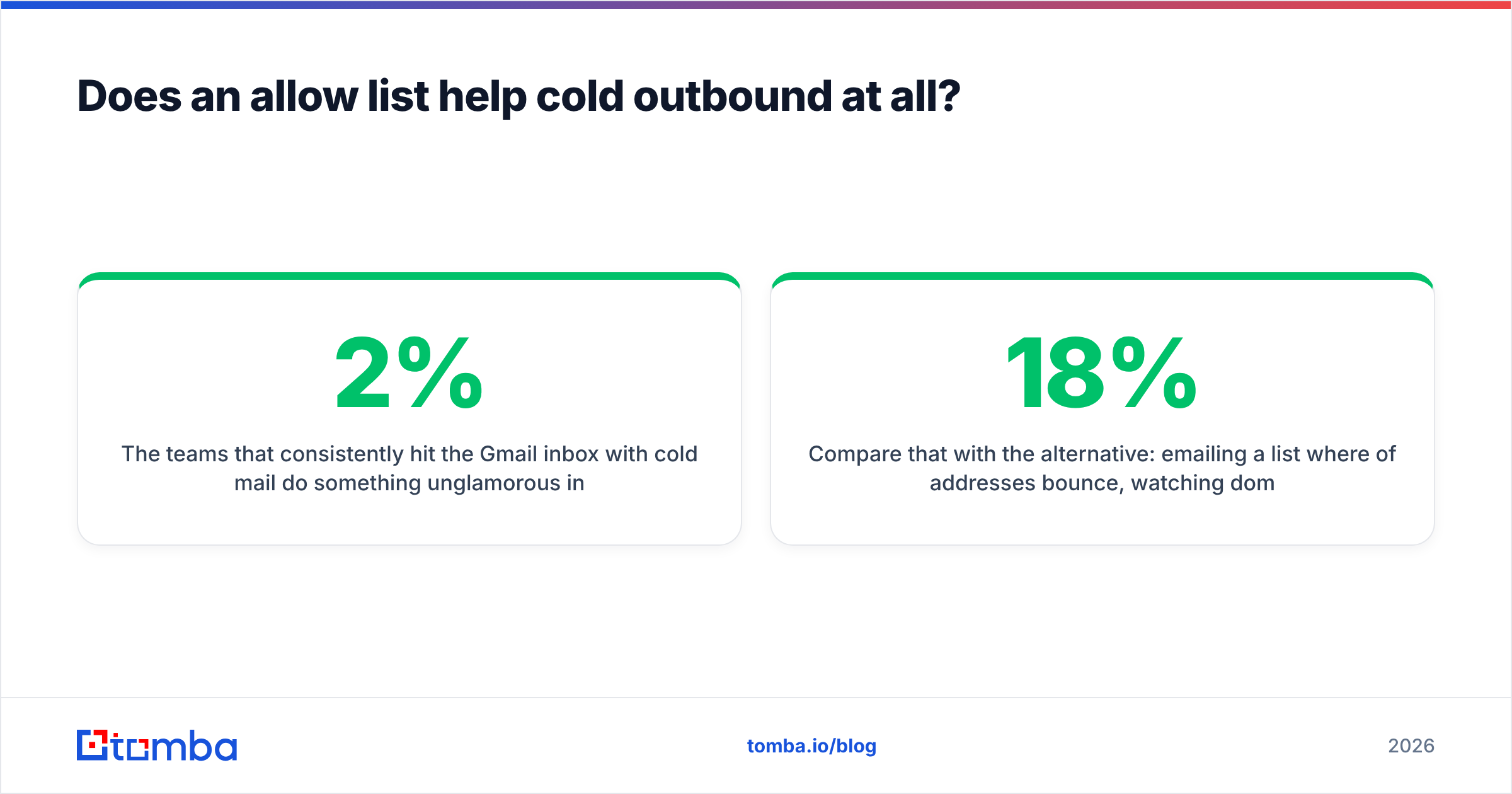
The teams that consistently hit the Gmail inbox with cold mail do something unglamorous instead. They keep bounce rates under 2% by verifying addresses at collection time. They run multiple sending domains at low volume rather than one domain at high volume. They check sender reputation weekly in Postmaster Tools and pull back the moment spam complaints tick toward 0.20%. And they suppress anyone who hasn't opened in 90 days.
Compare that with the alternative: emailing a list where 18% of addresses bounce, watching domain reputation collapse in two weeks, and then asking survivors to add you to their allow list. One of these approaches works.
If you want a sanity check on tool categories in this space, G2's email deliverability category is a reasonable neutral starting point for comparing monitoring and verification vendors.
Which Gmail allow-list method should you use?#
Pick by role:
- You're an individual Gmail user missing mail you want — Create a personal filter with "Never send it to Spam," using the exact sender address. Ninety seconds, zero risk.
- You're a Workspace admin unblocking a specific vendor — Use a content compliance rule scoped to that vendor's envelope sender, not the IP allowlist. Document the entry with a date and owner.
- You're a Workspace admin routing mail through a security gateway — Configure the Inbound gateway properly, including the gateway IPs, so SPF checks evaluate the original sender rather than the relay.
- You're a sender whose mail lands in spam — Do not chase allow lists. Fix authentication, verify your list, warm your domain, and watch Postmaster Tools. Allow lists cannot be your delivery strategy because you don't control them.
The uncomfortable summary: the Gmail allow list is a receiver's tool for a receiver's problem. As a sender, the only allow list that scales is the one you never need.
Get the sending side right first#
Most "Gmail is blocking us" tickets turn out to be list quality, not filtering. Invalid addresses generate hard bounces, hard bounces damage domain reputation, and damaged reputation puts even your best-written mail in spam — where no allow list you don't control can rescue it.
Start by making sure the addresses you send to actually exist and belong to the people you think they do. Tomba Email Finder locates verified professional addresses by name and domain, with confidence scoring on every result, so your list is clean before the first send rather than after the first reputation hit. The free tier covers 25 searches a month; paid plans start at $49/mo, and full Tomba pricing scales through Growth at $99/mo and Pro at $249/mo for teams running volume.
Fix the input, and the allow-list conversation stops happening.
Related guides#
Ready to find emails that actually work?
Join 150,000+ professionals who stopped guessing and started sending. Free credits on signup — no credit card required.
Get the Tomba newsletter
Practical outbound tactics and product updates — once every two weeks.
About the author