Gmail Blacklist Check: How to Diagnose Gmail Spam Issues
Gmail does not publish a blacklist you can look yourself up on. Here's what a Gmail blacklist check really means in 2026, which blocklists matter, how to read Gmail's bounce codes, and how to get delisted fast.
TL;DR
- Gmail does not operate a public blacklist you can look yourself up on. There is no "Gmail blocklist removal form" for domains, no lookup page, no delisting button.
- A useful "Gmail blacklist check" is really three checks: public DNS blocklists (Spamhaus, Barracuda, SORBS), your Google Postmaster Tools reputation, and the exact SMTP bounce string Gmail returned.
- The 5.7.x bounce code tells you almost everything.
550-5.7.1is a reputation block,550-5.7.26is an authentication failure,421-4.7.28is rate limiting — three completely different fixes. - Most "Gmail blacklisted me" cases are self-inflicted: unverified lists, spam-trap hits, a broken DKIM key after a DNS migration, or volume that jumped 10x overnight.
- Recovery takes 2–4 weeks of disciplined sending. There is no shortcut, but list hygiene before you send is close to one.
Does Gmail Actually Have a Blacklist?#
No. And this is the single most important thing to understand before you spend an afternoon searching for a delisting form that does not exist.
Gmail does not maintain a published deny-list of domains or IPs the way Spamhaus does. It runs a continuously-updated reputation model per sending IP and per sending domain, fed by user behavior signals: how often recipients mark you as spam, how often they move your mail out of spam, how many of your sends hit non-existent addresses, whether your authentication passes, and whether your volume pattern looks human or machine-generated.
Think of it like a nightclub with no banned-persons list posted at the door. The bouncer just remembers you. There's no paper to be removed from — you change how you show up, repeatedly, until the memory updates.
That means "Gmail blacklist check" is a search term people use for a problem Gmail describes differently. Google's own bulk sender guidelines never use the word blacklist. They talk about spam rate thresholds, authentication requirements, and one-click unsubscribe. Those are the levers.
What Do People Actually Mean by a Gmail Blacklist Check?#
When someone says their domain is "blacklisted by Gmail," one of four things is true. Diagnosing which one you have is 80% of the work.
- You're on a public DNS blocklist (DNSBL). Spamhaus, Barracuda, SpamCop and others publish IP and domain lists. Gmail uses these as inputs, not as gospel, but a Spamhaus SBL listing will absolutely tank your delivery. This is the only case where a literal lookup-and-delist process exists.
- Your Gmail domain reputation dropped to Low or Bad. Visible only in Google Postmaster Tools, and only if you've verified your domain and send enough volume to register.
- You're being throttled, not blocked. Gmail is deferring your mail with 4.x.x codes because your volume jumped or your IP is new. Mail eventually delivers, slowly, or times out.
- Individual recipients filtered you. No domain-level problem at all — a handful of people hit "report spam" and Gmail applied it narrowly.

The fix path diverges hard after step one. Sending "please remove me from your blacklist" to Gmail support when you're actually failing DKIM wastes a week.
Which Blocklists Actually Affect Gmail Delivery?#
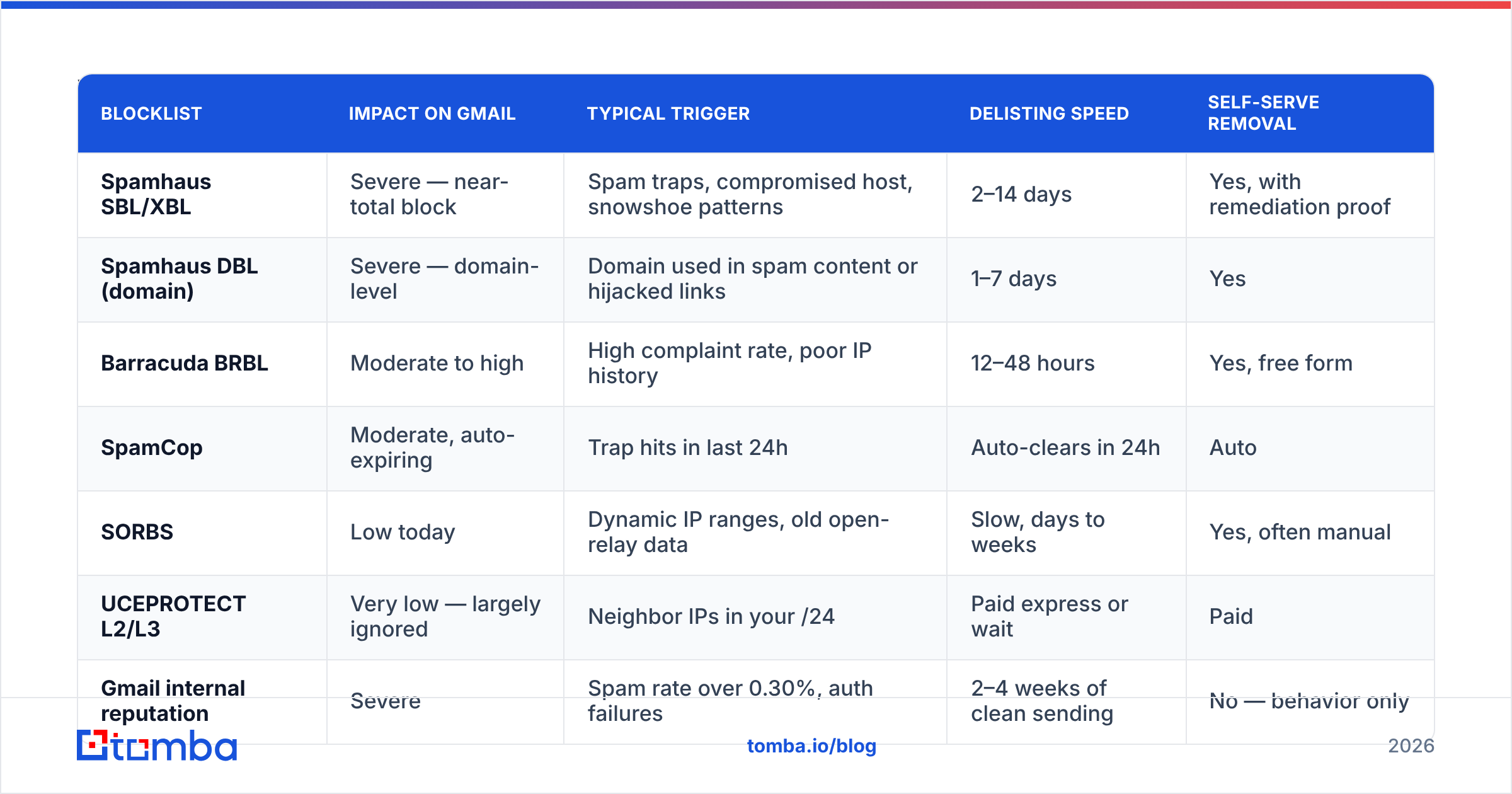
Not all DNSBLs are weighted equally. Some will end your program; some are noise that no major mailbox provider consults anymore. Here's the practical hierarchy in 2026.
| Blocklist | Impact on Gmail | Typical trigger | Delisting speed | Self-serve removal |
|---|---|---|---|---|
| Spamhaus SBL/XBL | Severe — near-total block | Spam traps, compromised host, snowshoe patterns | 2–14 days | Yes, with remediation proof |
| Spamhaus DBL (domain) | Severe — domain-level | Domain used in spam content or hijacked links | 1–7 days | Yes |
| Barracuda BRBL | Moderate to high | High complaint rate, poor IP history | 12–48 hours | Yes, free form |
| SpamCop | Moderate, auto-expiring | Trap hits in last 24h | Auto-clears in 24h | Auto |
| SORBS | Low today | Dynamic IP ranges, old open-relay data | Slow, days to weeks | Yes, often manual |
| UCEPROTECT L2/L3 | Very low — largely ignored | Neighbor IPs in your /24 | Paid express or wait | Paid |
| Gmail internal reputation | Severe | Spam rate over 0.30%, auth failures | 2–4 weeks of clean sending | No — behavior only |
Two rules follow from this table. First, if you're listed only on UCEPROTECT L3, stop panicking — that lists entire ASNs and Gmail effectively ignores it. Second, a Spamhaus listing is an emergency, and the delisting form requires you to have actually fixed the cause; they check.
You can run a multi-list lookup in seconds with a blacklist checker against your sending IP and your domain — check both, because a clean IP with a listed domain still fails.
How Do You Run a Real Gmail Blacklist Check?#
Here's the diagnostic order that resolves fastest. Do them in sequence; each one narrows the next.
- Read the actual bounce string. Not "it went to spam" — the raw SMTP response from your ESP's logs. The 5.7.x sub-code is the diagnosis. Everything downstream depends on it.
- Check the IP and domain against DNSBLs. If you're on a shared ESP IP pool, check the pool IP too, and escalate to your ESP if it's listed — you can't delist an IP you don't control.
- Verify authentication end to end. Confirm SPF, DKIM, and DMARC all pass on a live message, not just that the records exist. A syntactically valid SPF record that exceeds the 10-lookup limit fails silently.
- Open Google Postmaster Tools. Look at Domain Reputation, IP Reputation, Spam Rate, and Authentication tabs across the last 30 days. Find the day the line moved and correlate it with what you shipped that day.
- Audit the list you sent to. Pull the campaign that preceded the drop. What percentage of addresses had never been verified? What was the hard-bounce rate? Above 3% is a red flag; above 5% is the cause.
- Check your unsubscribe and content. Missing List-Unsubscribe headers on bulk mail is now a hard requirement for Gmail, not a nicety. So is a functioning one-click unsubscribe.
Most teams stop after step three, find their SPF is fine, and conclude Gmail is being unfair. Step five is where the answer usually is.
What Do Gmail's Bounce Codes Tell You?#
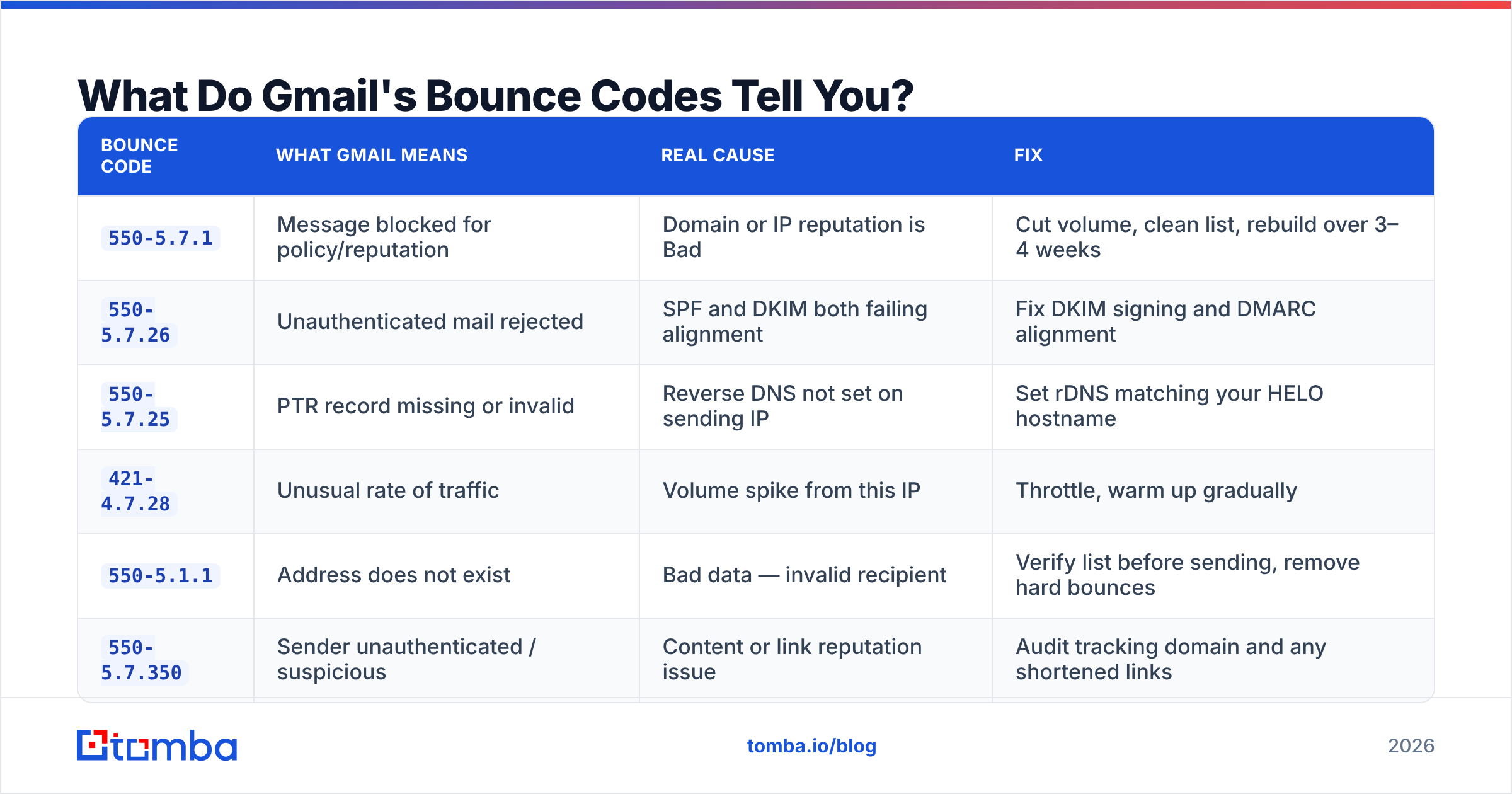
This is the highest-signal artifact you have. Match your bounce string to the row below.
| Bounce code | What Gmail means | Real cause | Fix |
|---|---|---|---|
550-5.7.1 |
Message blocked for policy/reputation | Domain or IP reputation is Bad | Cut volume, clean list, rebuild over 3–4 weeks |
550-5.7.26 |
Unauthenticated mail rejected | SPF and DKIM both failing alignment | Fix DKIM signing and DMARC alignment |
550-5.7.25 |
PTR record missing or invalid | Reverse DNS not set on sending IP | Set rDNS matching your HELO hostname |
421-4.7.28 |
Unusual rate of traffic | Volume spike from this IP | Throttle, warm up gradually |
550-5.1.1 |
Address does not exist | Bad data — invalid recipient | Verify list before sending, remove hard bounces |
550-5.7.350 |
Sender unauthenticated / suspicious | Content or link reputation issue | Audit tracking domain and any shortened links |
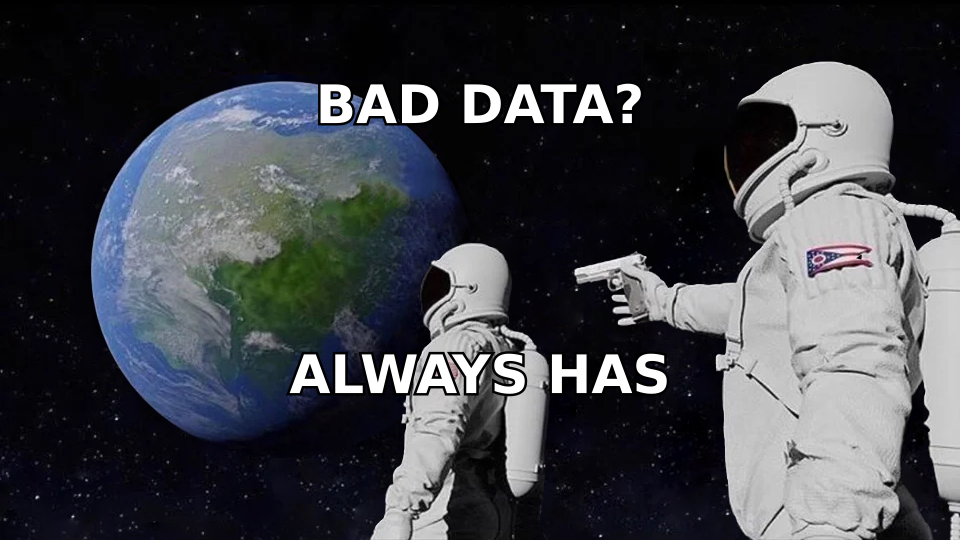
Notice how many of these trace to data quality rather than infrastructure. 550-5.1.1 in bulk is what pushes you toward 550-5.7.1 a week later — a high invalid rate is one of the loudest spam signals Gmail reads, because legitimate senders with permission-based lists don't have 12% of their addresses bouncing.
How Do You Get Delisted and Recover Reputation?#
Split the work by which problem you actually have.
If you're on a DNSBL: Fix the root cause first — patch the compromised host, purge the purchased list segment, close the open relay. Then submit the removal request with a short factual description of the remediation. Spamhaus rejects vague requests and relists fast if the behavior repeats. Spamhaus runs a self-serve lookup and removal center; use it once, not in a loop.
If it's Gmail reputation: There is no form. The recovery protocol is mechanical:
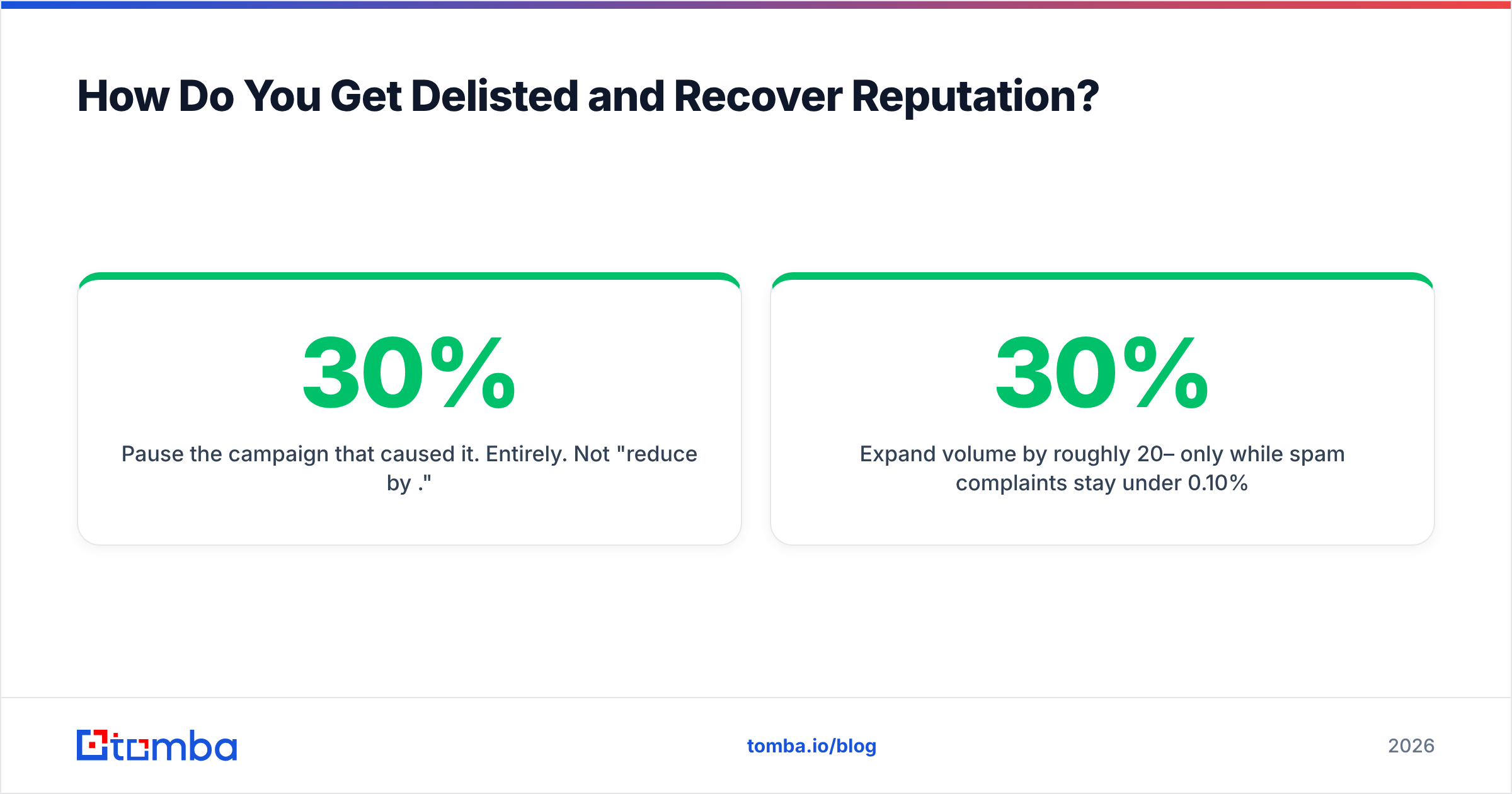
- Pause the campaign that caused it. Entirely. Not "reduce by 30%."
- Segment down to your most engaged recipients only — people who opened or clicked in the last 30 days.
- Send to that segment at low volume for 7–10 days. You are manufacturing positive engagement signals.
- Expand volume by roughly 20–30% per day only while spam complaints stay under 0.10%.
- Watch Postmaster daily. If Domain Reputation moves Bad → Low → Medium, you're on track. If it stalls, your list is still dirty.
Expect 2–4 weeks. Teams that try to speed-run this by switching to a fresh domain usually burn the new domain in ten days, because the underlying list was the problem and the list didn't change.
Which Tools Should You Use for Ongoing Monitoring?#
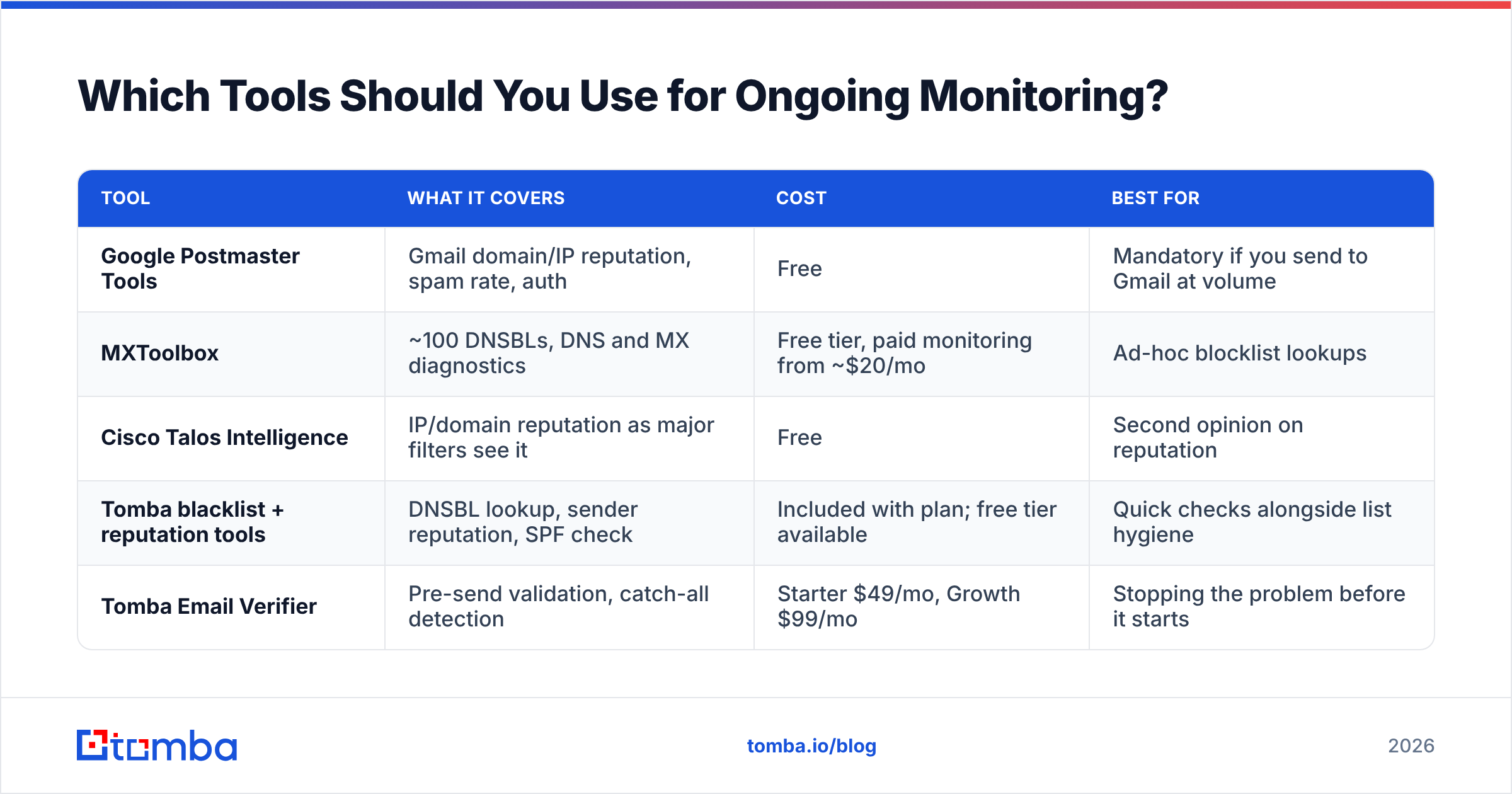
You need three categories covered: blocklist monitoring, Gmail-side reputation, and pre-send data quality. Most stacks over-invest in the first and ignore the third.
| Tool | What it covers | Cost | Best for |
|---|---|---|---|
| Google Postmaster Tools | Gmail domain/IP reputation, spam rate, auth | Free | Mandatory if you send to Gmail at volume |
| MXToolbox | ~100 DNSBLs, DNS and MX diagnostics | Free tier, paid monitoring from ~$20/mo | Ad-hoc blocklist lookups |
| Cisco Talos Intelligence | IP/domain reputation as major filters see it | Free | Second opinion on reputation |
| Tomba blacklist + reputation tools | DNSBL lookup, sender reputation, SPF check | Included with plan; free tier available | Quick checks alongside list hygiene |
| Tomba Email Verifier | Pre-send validation, catch-all detection | Starter $49/mo, Growth $99/mo | Stopping the problem before it starts |
Postmaster Tools is non-negotiable and takes ten minutes to set up via a DNS TXT record. Cross-reference with an independent reputation source — G2's deliverability category is a reasonable place to compare monitoring vendors if you want a fourth opinion, though most of the differentiation there is dashboards, not data.
The one that actually moves the needle is the last row. Running your list through an email verifier before a campaign removes the invalid addresses that generate 550-5.1.1 bounces, which is the input signal that degrades your sender reputation in the first place. Verification is cheap; reputation recovery is four weeks of lost pipeline.
How Do You Prevent This From Happening Again?#
A short standing checklist, applied every campaign:
- Verify every list before send. Target under 2% hard bounce, ideally under 1%. Catch-all domains need separate handling — they accept everything at SMTP and can hide bad addresses.
- Keep spam complaints under 0.10%. Gmail's public threshold is 0.30%, but that's the line where damage is already visible in Postmaster. Treat 0.10% as your ceiling.
- Never buy a list. Purchased data is the fastest route to spam traps, and a single pristine trap hit can trigger a Spamhaus listing.
- Warm new domains and IPs. Two to four weeks, starting at 20–50 sends per day, scaling gradually. Skipping warmup is the second most common cause of
421-4.7.28. - Monitor authentication after every DNS change. DKIM keys break during migrations constantly, and nobody notices until reputation drops.
- Suppress aggressively. Remove hard bounces immediately, and sunset recipients who haven't engaged in 90–180 days. Unengaged contacts drag email deliverability down even when they never complain.
- Use a separate subdomain for cold outbound. Isolate the risk so a bad prospecting campaign doesn't take your transactional mail down with it.
None of this is exotic. It's just consistent, and consistency is what Gmail's model is measuring.
What's the Bottom Line on Gmail Blacklist Checks?#
Stop looking for the list. Read your bounce code, check the public DNSBLs for your IP and domain, open Postmaster Tools, and then look hard at the data you sent to — because in most cases the "blacklist" is Gmail's accurate read of a list that shouldn't have been mailed.
The prevention side is boring and it works: send to addresses that exist, to people who agreed to hear from you, at a volume that grows like a business rather than a botnet.
If your problem traces back to bad contact data — and after you run the diagnostic sequence above, it usually does — fix the source. Tomba Email Finder finds verified professional addresses by domain, name, or company, with verification built into the same workflow, so the list you send tomorrow doesn't become the reputation problem you're debugging next month. Start on the free tier at 25 searches a month and see what your bounce rate does.
Related guides#
Ready to find emails that actually work?
Join 150,000+ professionals who stopped guessing and started sending. Free credits on signup — no credit card required.
Get the Tomba newsletter
Practical outbound tactics and product updates — once every two weeks.
About the author