Gmail Bouncing Back Emails: Causes, Codes, and Fixes (2026)
Gmail bouncing back emails is rarely random. Decode the SMTP codes, separate hard bounces from throttling, and fix the six causes that account for almost every rejection.
TL;DR
- Gmail bouncing back emails almost always falls into one of two buckets: the address does not exist (hard bounce, 550 5.1.1) or Google does not trust your sending (policy/rate rejection, 421 or 550 5.7.x).
- The three-digit SMTP code in the bounce message tells you exactly which one. Read it before you change anything.
- A hard bounce rate above 2% puts your domain reputation at risk. Above 5%, Gmail starts throttling everything you send, including replies to warm threads.
- List hygiene fixes roughly 70% of bounce problems; authentication (SPF, DKIM, DMARC) and volume pacing fix most of the rest.
- Verifying addresses before send is cheaper than repairing a burned domain — a burned domain costs weeks, a verification credit costs a fraction of a cent.
What does it mean when Gmail bounces back your emails?#
A bounce is a refusal receipt. Your mail server handed a message to Gmail's servers, Gmail declined it, and your provider generated a Non-Delivery Report (NDR) explaining why.
Think of it like a courier returning a parcel. The sticker on the box tells you whether the address does not exist, the recipient refused delivery, or the depot was too busy to accept it today. Those are three completely different problems with three completely different fixes — and people routinely apply the wrong one because they only read the word "failed."
Two things make Gmail bounces particularly worth decoding:
- Gmail is the largest single mailbox provider in B2B inboxes. A large share of business domains run on Google Workspace, so Gmail's rules effectively set your deliverability floor.
- Gmail's rejections are informative. Unlike some providers that return a generic 550, Google returns a specific enhanced status code plus a documentation link. Most senders never click it.
Hard bounce or soft bounce — how do you tell the difference?#
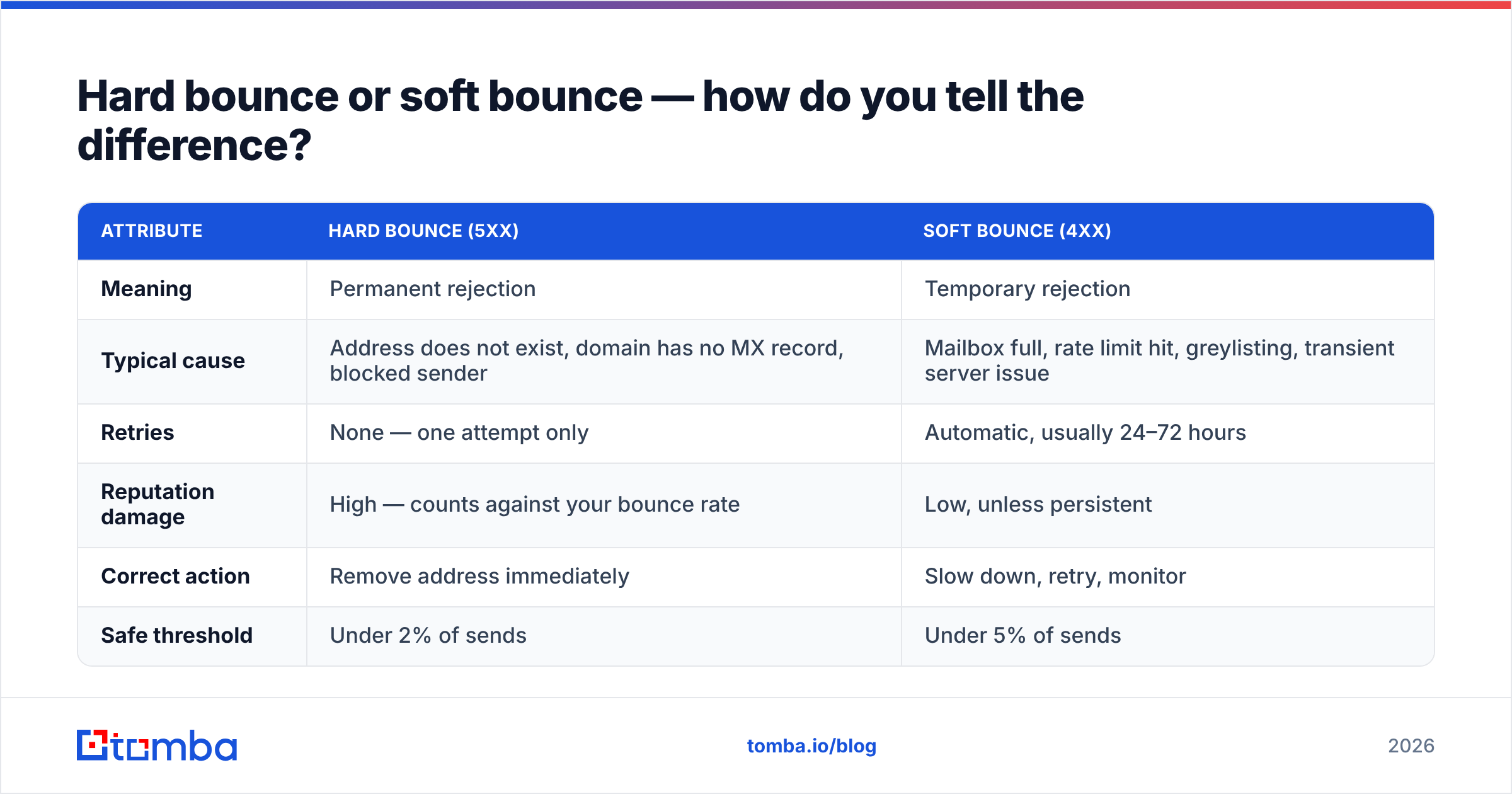
The first digit of the SMTP response is the fork in the road. A 5xx code is permanent. A 4xx code is temporary and your server will retry, usually for 24–72 hours before giving up.
| Attribute | Hard bounce (5xx) | Soft bounce (4xx) |
|---|---|---|
| Meaning | Permanent rejection | Temporary rejection |
| Typical cause | Address does not exist, domain has no MX record, blocked sender | Mailbox full, rate limit hit, greylisting, transient server issue |
| Retries | None — one attempt only | Automatic, usually 24–72 hours |
| Reputation damage | High — counts against your bounce rate | Low, unless persistent |
| Correct action | Remove address immediately | Slow down, retry, monitor |
| Safe threshold | Under 2% of sends | Under 5% of sends |
The trap: many sending platforms lump both into a single "bounced" metric on the dashboard. A 3% bounce rate made of soft bounces means you are sending too fast. The same 3% made of hard bounces means your list is stale. Export the raw bounce log and split them before you diagnose anything.
What do Gmail's bounce codes actually mean?#
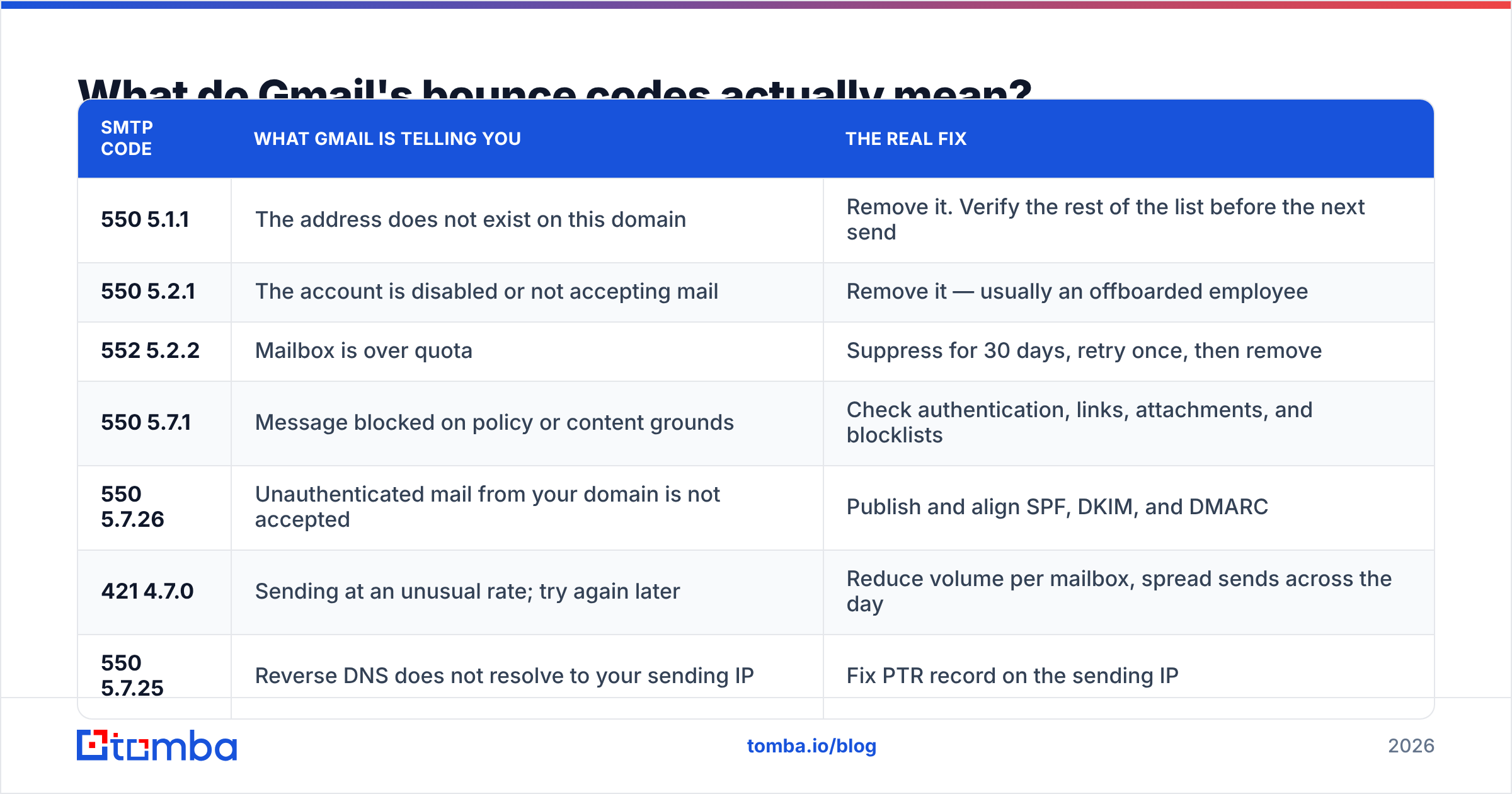
Here are the codes you will actually see, what they mean in plain language, and the fix that works.
| SMTP code | What Gmail is telling you | The real fix |
|---|---|---|
| 550 5.1.1 | The address does not exist on this domain | Remove it. Verify the rest of the list before the next send |
| 550 5.2.1 | The account is disabled or not accepting mail | Remove it — usually an offboarded employee |
| 552 5.2.2 | Mailbox is over quota | Suppress for 30 days, retry once, then remove |
| 550 5.7.1 | Message blocked on policy or content grounds | Check authentication, links, attachments, and blocklists |
| 550 5.7.26 | Unauthenticated mail from your domain is not accepted | Publish and align SPF, DKIM, and DMARC |
| 421 4.7.0 | Sending at an unusual rate; try again later | Reduce volume per mailbox, spread sends across the day |
| 550 5.7.25 | Reverse DNS does not resolve to your sending IP | Fix PTR record on the sending IP |
| 421 4.7.28 | IP or domain is rate-limited for reputation reasons | Pause, warm up, clean the list, rebuild reputation |
Google publishes the full reference in the Workspace SMTP error documentation, and it is worth bookmarking — the enhanced status codes get updated as policy shifts.
One nuance worth internalizing: 5.1.1 is a data problem. Every 5.7.x is a trust problem. You cannot fix a trust problem by cleaning your list, and you cannot fix a data problem by adding DMARC. Sorting your bounce log by that distinction is the single highest-leverage ten minutes in this whole process.

Why is Gmail bouncing back emails that worked last month?#
This is the version of the question people actually ask, because a list that delivered fine in March suddenly falls apart in June. Four things change underneath you:
- B2B data decays at roughly 22–30% per year. People change jobs, companies restructure, aliases get retired. A list built twelve months ago is a quarter wrong today, and every one of those wrong addresses is a fresh 550 5.1.1.
- Google tightened bulk sender requirements. Since 2024, senders pushing volume to Gmail must authenticate with SPF and DKIM, publish a DMARC policy, offer one-click unsubscribe, and keep spam complaints under 0.3%. The current rules live in Google's sender guidelines. Senders who ignored them coasted for a while and then hit a wall.
- Your reputation moved, not your list. Reputation is scored per domain and per IP, and it drifts. One bad campaign to a purchased list can knock a domain from "high" to "bad" in Postmaster Tools within days, and everything after that gets throttled.
- You changed something invisible. A new sending tool, a new subdomain, a new ESP, a tracking-link domain that shares reputation with hundreds of other senders. Any of these can trigger 5.7.1 rejections with no change to your content at all.
The practical takeaway: when bounces spike, ask "what changed on my side in the last 14 days?" before assuming Gmail changed the rules.
How do you fix each bounce cause?#
Work in this order. Each step is cheap relative to the one after it, and skipping ahead wastes effort.
Step 1 — Split the log. Export bounces, group by SMTP code, count each group. If 5.1.1 dominates, this is a list problem. If 5.7.x dominates, it is an authentication or reputation problem. If 421 dominates, it is a volume problem.
Step 2 — Purge and verify. Remove every hard bounce immediately, then run the remaining list through an email verifier before the next campaign. Real-time SMTP validation catches dead mailboxes before Gmail has to tell you about them. For lists over a few thousand rows, a bulk verify pass is faster and cheaper than discovering the failures one send at a time.
Step 3 — Handle catch-all domains honestly. A catch-all domain accepts mail for any address, so a standard verifier returns "unknown" rather than valid or invalid. That is where a lot of silent bounce risk hides. Use a catch-all verifier to score those addresses on pattern confidence rather than guessing, and send to low-confidence catch-alls in a separate, small batch so a bad guess does not contaminate your main send.
Step 4 — Fix authentication. Publish an SPF record, enable DKIM signing on the exact domain in your From header, and set a DMARC policy — start at p=none for monitoring, then move to quarantine. Run a SPF checker against your sending domain and confirm the record resolves in under ten DNS lookups. This one step eliminates every 5.7.26.
Step 5 — Pace the volume. New domains should start at 10–20 emails per mailbox per day and roughly double weekly over four to six weeks. Established domains that just got throttled should cut volume by half for two weeks, then step back up. There is no shortcut here; sender reputation is built from consistent behavior over time.
Step 6 — Watch the instrumentation. Connect your domain to Google Postmaster Tools and check the spam rate, domain reputation, and authentication charts weekly. It is free, it is Gmail's own scoring, and it is the closest thing to seeing your grade before the exam.
What bounce rate is actually acceptable in 2026?#
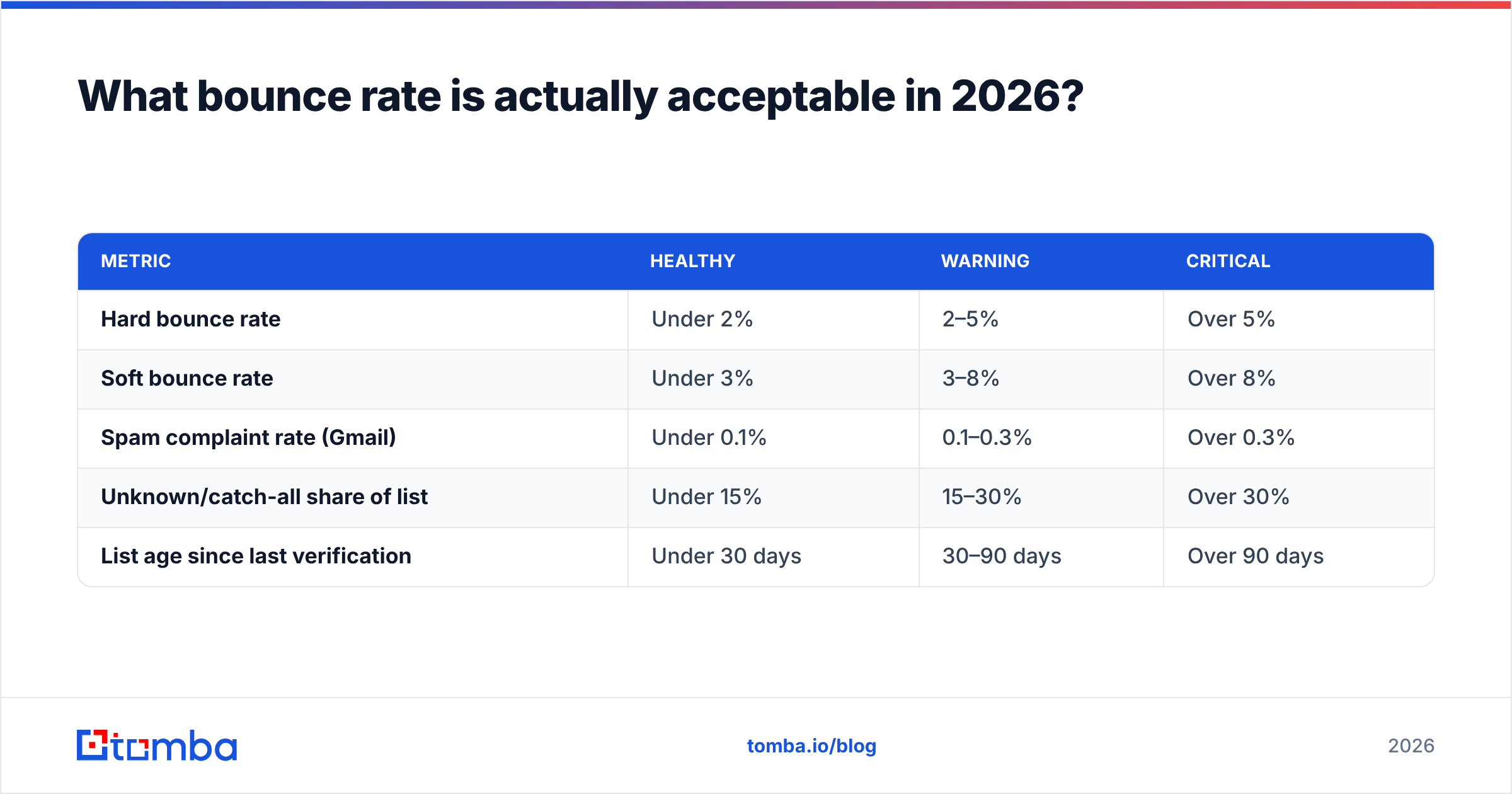
Numbers people should be measuring against, not vibes:
| Metric | Healthy | Warning | Critical |
|---|---|---|---|
| Hard bounce rate | Under 2% | 2–5% | Over 5% |
| Soft bounce rate | Under 3% | 3–8% | Over 8% |
| Spam complaint rate (Gmail) | Under 0.1% | 0.1–0.3% | Over 0.3% |
| Unknown/catch-all share of list | Under 15% | 15–30% | Over 30% |
| List age since last verification | Under 30 days | 30–90 days | Over 90 days |
The 0.3% spam threshold is not a guideline — it is Google's stated enforcement line for bulk senders. Cross it consistently and Gmail will start rejecting or foldering your mail regardless of how clean your bounce rate looks.

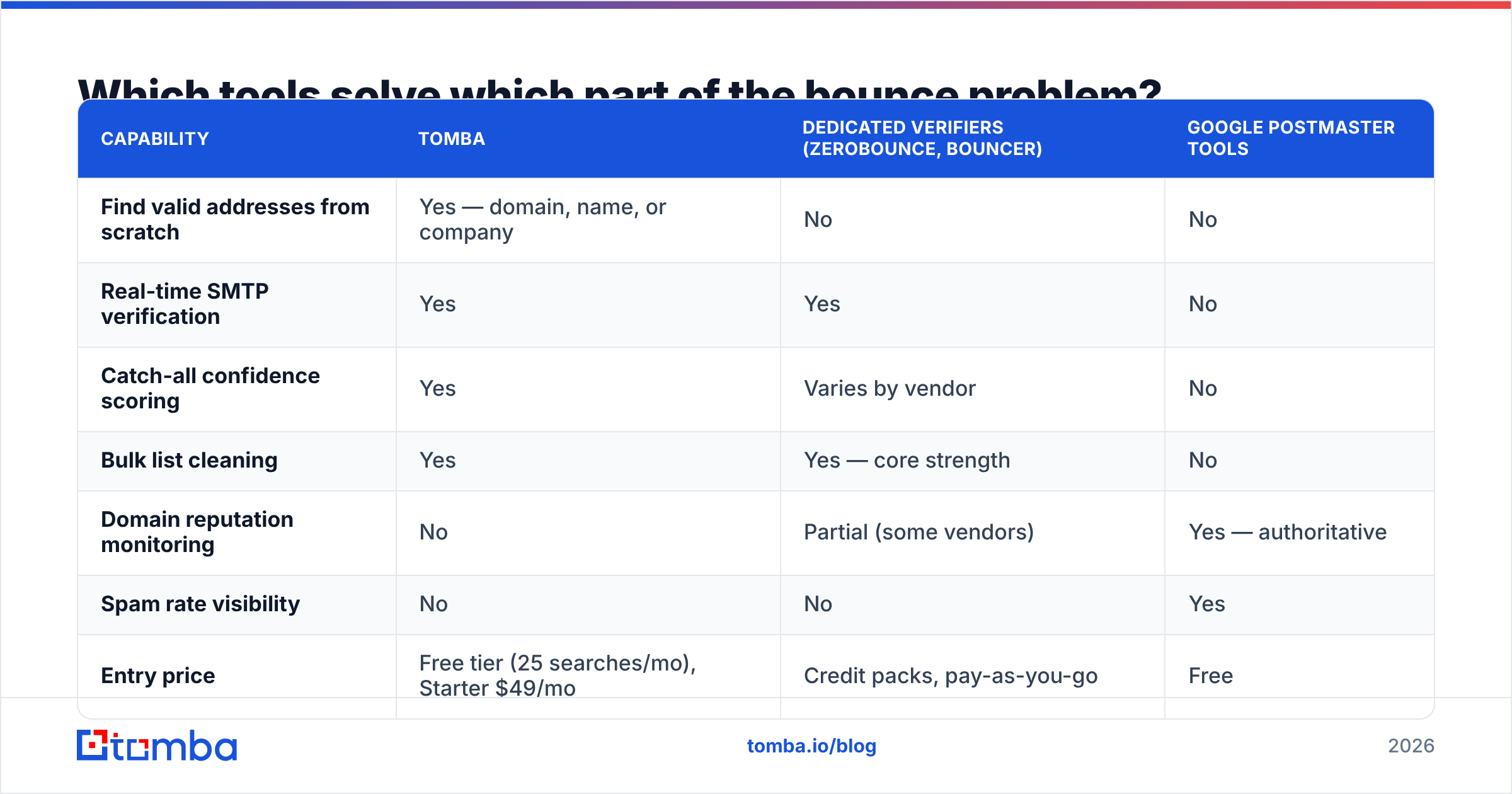
Which tools solve which part of the bounce problem?#
No single tool covers everything. Diagnostics, verification, and sourcing are three separate jobs, and buying the wrong category is how teams end up with a clean list that still gets throttled.
| Capability | Tomba | Dedicated verifiers (ZeroBounce, Bouncer) | Google Postmaster Tools |
|---|---|---|---|
| Find valid addresses from scratch | Yes — domain, name, or company | No | No |
| Real-time SMTP verification | Yes | Yes | No |
| Catch-all confidence scoring | Yes | Varies by vendor | No |
| Bulk list cleaning | Yes | Yes — core strength | No |
| Domain reputation monitoring | No | Partial (some vendors) | Yes — authoritative |
| Spam rate visibility | No | No | Yes |
| Entry price | Free tier (25 searches/mo), Starter $49/mo | Credit packs, pay-as-you-go | Free |
| Best used for | Building and maintaining a clean list | Cleaning a list you already own | Diagnosing why Gmail distrusts you |
The honest read: Postmaster Tools is non-optional and free, so connect it today. A dedicated verifier makes sense if you already own a large legacy list and only need cleaning. If you are building lists continuously — which most outbound teams are — a platform that finds and verifies in the same workflow removes the export-import-reimport loop where stale data creeps back in. Full Tomba pricing sits alongside the free tier if you want to test the verification quality on your own bounced addresses before committing.
If your bounce problem is really a data sourcing problem — you keep buying lists that arrive 30% dead — evaluate providers on documented refresh cadence and bounce guarantees rather than record count. Vendors like BookYourData compete specifically on verified-at-delivery guarantees, which is a reasonable model when you need volume fast and want the bounce risk sitting on the supplier's side of the contract.
How do you prevent Gmail bounces before you hit send?#
Prevention is a checklist, not a project:
- Verify at capture, not at send. Validate addresses when they enter your CRM. A bad record that never lands in the database can never bounce.
- Re-verify anything older than 90 days. Cheap insurance against 22–30% annual decay.
- Never mail a purchased list without verifying it first. "Verified" from a vendor means verified on their date, not yours.
- Send from a subdomain for cold outreach. Keep
mail.yourcompany.comseparate fromyourcompany.comso a bad campaign cannot damage the domain your invoices go out from. - Cap per-mailbox daily volume. Two hundred cold emails per mailbox per day is aggressive in 2026. Fifty is safe. Multiple mailboxes beat one heroic sender.
- Suppress hard bounces globally, immediately. Not per-campaign. A cross-platform suppression list stops the same dead address from bouncing four more times across four tools.
Follow all six and your hard bounce rate should sit comfortably under 1%, which is where Gmail stops paying attention to you in the bad way.
What should you do in the next hour?#
Pull your last 30 days of bounces, group them by SMTP code, and you will know within ten minutes whether you have a data problem or a trust problem. If 5.1.1 dominates, your list is the culprit and no amount of DNS tuning will help. If 5.7.x dominates, stop sending, fix authentication, and wait out the reputation recovery.
Then close the loop on sourcing. Bounces are a symptom of how addresses enter your pipeline, and guessed patterns like firstname.lastname@ are the single biggest generator of 550 5.1.1 in B2B outbound. The Tomba Email Finder returns verified professional addresses by domain, name, or company with a confidence score attached, so the address is validated before it ever reaches your sequencer — and Gmail never has to send you a receipt explaining why it refused delivery. Start on the free tier with 25 searches and run it against the exact addresses that bounced last week. If they come back flagged, you found your problem.
Related guides#
Ready to find emails that actually work?
Join 150,000+ professionals who stopped guessing and started sending. Free credits on signup — no credit card required.
Get the Tomba newsletter
Practical outbound tactics and product updates — once every two weeks.
About the author