Gmail CRM Integration in 2026: Tools, Setup, and Real Costs
Gmail CRM integration promises zero manual data entry, but sync quality varies wildly between tools. Here's how the major options actually compare on logging, enrichment, pricing, and privacy.
TL;DR
- Gmail CRM integration means three different things — BCC forwarding, a browser sidebar, or true two-way API sync — and vendors use the same phrase for all three.
- Native sync (HubSpot, Salesforce Inbox, Pipedrive) logs threads reliably but rarely enriches contacts; you still need a data source to fill in titles, phones, and verified addresses.
- The hidden cost is per-seat: a $99/mo CRM tier times 12 reps is $14k/year before you add an enrichment tool on top.
- Privacy scope matters. Most Gmail add-ons request
gmail.readonlyor broader — check what your CRM stores versus what it merely reads. - The cleanest stack for most SMB teams: native CRM sync for activity logging + an API-based enrichment layer for contact data, not a second inbox plugin.
What Is Gmail CRM Integration, Really?#
Gmail CRM integration is the plumbing that moves email activity and contact data between your inbox and your customer record system without anyone retyping it.
Think of it like a hotel front desk. Every guest interaction — check-in, room service, complaint — should land in one guest file. Without integration, the concierge remembers one thing, housekeeping another, and nobody can answer "what happened with this guest last week?" Gmail is the concierge. Your CRM is the guest file.
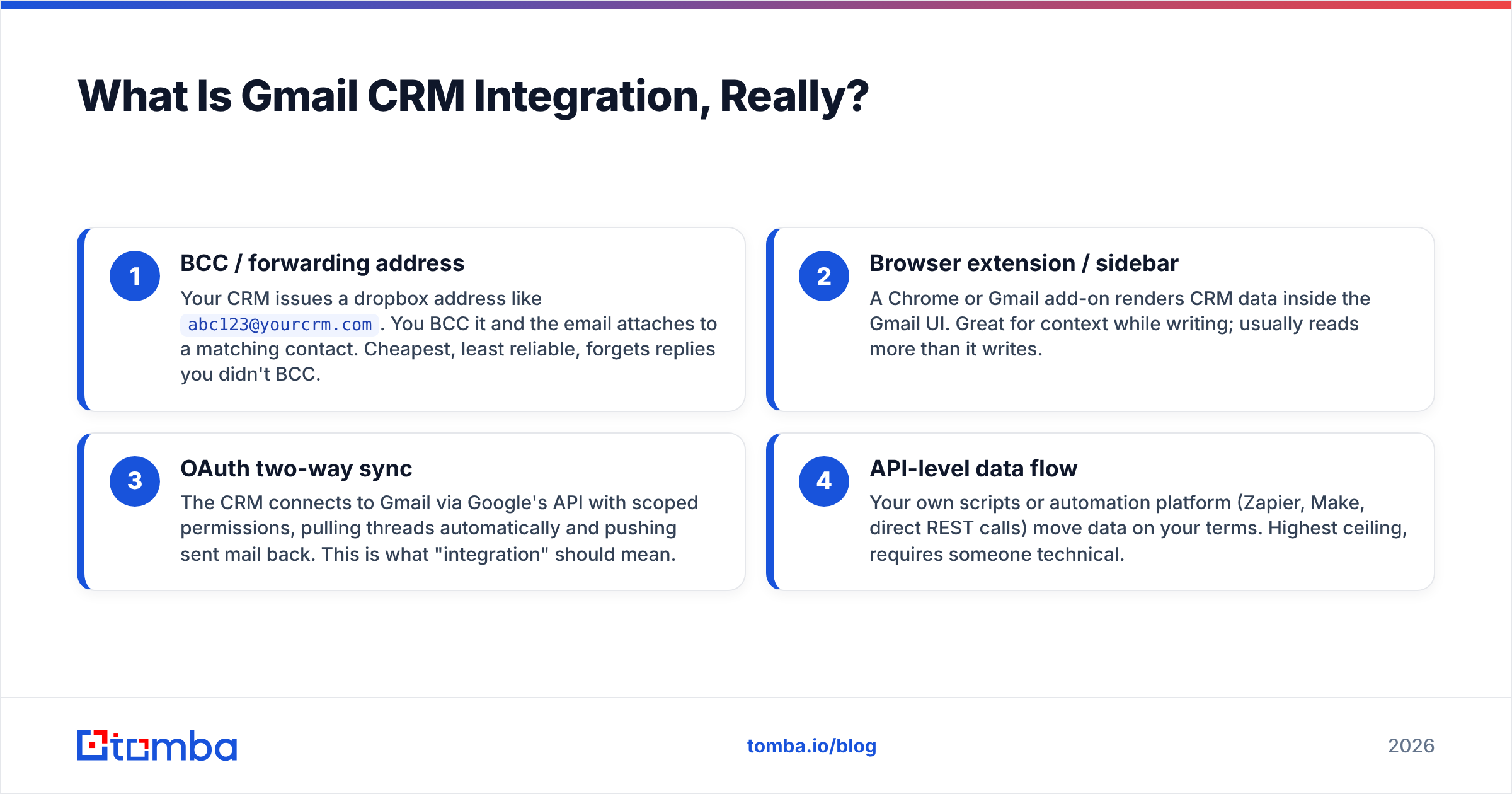
Technically, there are three implementation patterns, and confusing them is where most buying mistakes start:
- BCC / forwarding address — Your CRM issues a dropbox address like
abc123@yourcrm.com. You BCC it and the email attaches to a matching contact. Cheapest, least reliable, forgets replies you didn't BCC. - Browser extension / sidebar — A Chrome or Gmail add-on renders CRM data inside the Gmail UI. Great for context while writing; usually reads more than it writes.
- OAuth two-way sync — The CRM connects to Gmail via Google's API with scoped permissions, pulling threads automatically and pushing sent mail back. This is what "integration" should mean.
- API-level data flow — Your own scripts or automation platform (Zapier, Make, direct REST calls) move data on your terms. Highest ceiling, requires someone technical.
Most teams start at level 1, get frustrated by missing threads, and jump to level 3 within a year.

How Do the Major Gmail CRM Integrations Compare?#
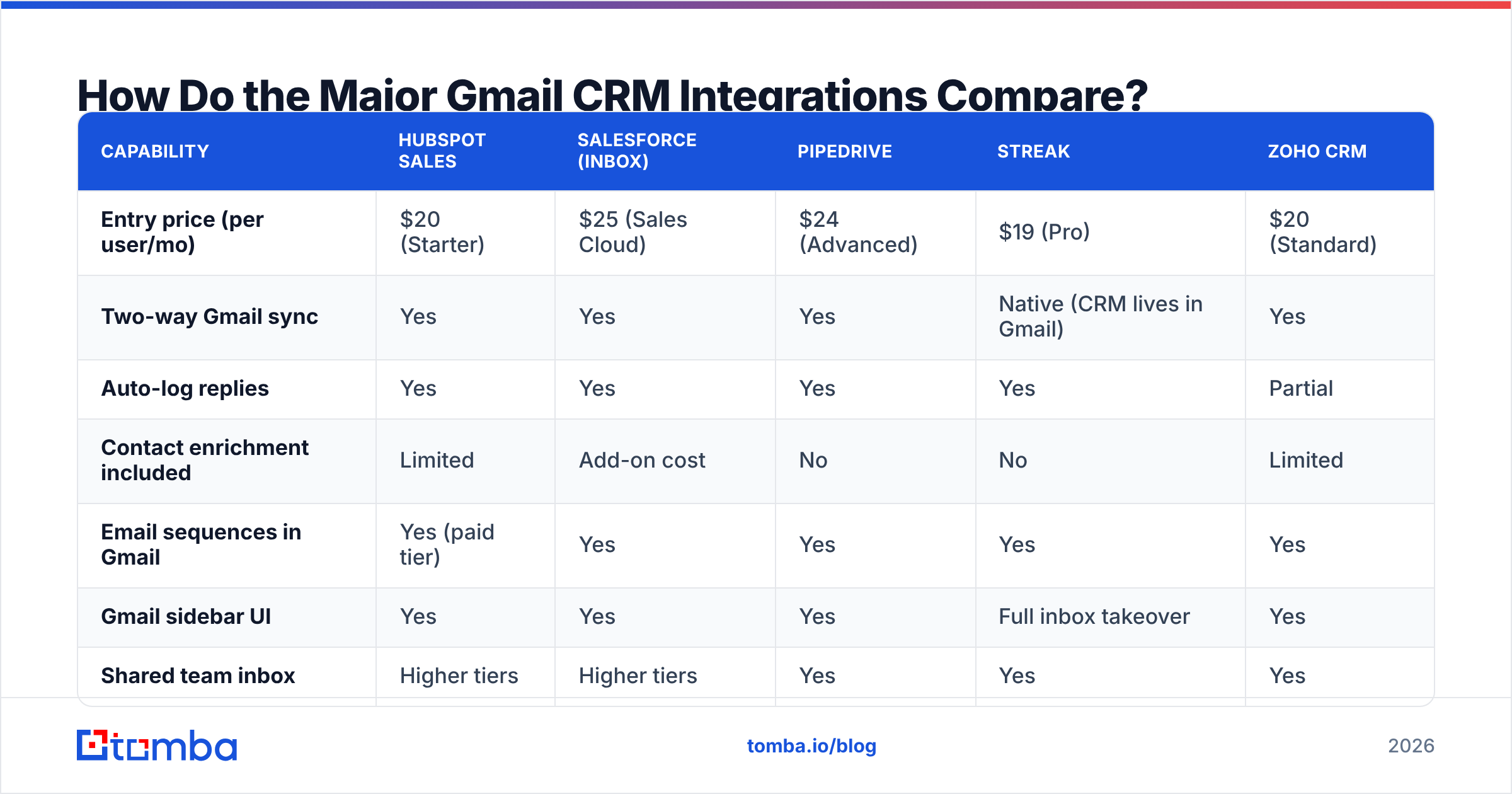
Here's where the practical differences land. Pricing reflects publicly listed entry tiers as of early 2026 — confirm current numbers on each vendor's site before you commit.
| Capability | HubSpot Sales | Salesforce (Inbox) | Pipedrive | Streak | Zoho CRM |
|---|---|---|---|---|---|
| Entry price (per user/mo) | $20 (Starter) | $25 (Sales Cloud) | $24 (Advanced) | $19 (Pro) | $20 (Standard) |
| Two-way Gmail sync | Yes | Yes | Yes | Native (CRM lives in Gmail) | Yes |
| Auto-log replies | Yes | Yes | Yes | Yes | Partial |
| Contact enrichment included | Limited | Add-on cost | No | No | Limited |
| Email sequences in Gmail | Yes (paid tier) | Yes | Yes | Yes | Yes |
| Gmail sidebar UI | Yes | Yes | Yes | Full inbox takeover | Yes |
| Shared team inbox | Higher tiers | Higher tiers | Yes | Yes | Yes |
| Setup time (realistic) | 30–60 min | 2–5 hours | 20–40 min | 10 min | 1–2 hours |
Two patterns jump out.
First, setup time scales with CRM complexity, not with Gmail. The Gmail side of every one of these is the same OAuth handshake. What eats hours is mapping your Salesforce object model or cleaning duplicate records before sync turns on. Budget for the CRM, not the connector.
Second, nobody solves contact data. Every tool in that table logs activity well. None of them reliably tells you the verified email of the VP of Engineering you haven't emailed yet. That's a separate job, and it's why most working stacks pair a CRM connector with an email finder or enrichment API.
Which Gmail CRM Integration Should You Pick?#
Pick by team shape, not feature count.
You're 1–5 people and live in Gmail. Streak or a lightweight Pipedrive setup. Streak literally builds pipelines as Gmail labels, so adoption friction is near zero. The ceiling is low — reporting is thin and it struggles past ~15 users — but you'll be running in an afternoon.
You're 5–30 people with a real sales process. HubSpot or Pipedrive. HubSpot's Gmail extension is the most polished sidebar on the market, and the free CRM tier means you can validate the workflow before paying. Pipedrive wins if your team thinks in deal stages rather than contact records. Both connect cleanly via a Pipedrive integration or HubSpot integration for pushing enriched contacts in.
You're 30+ with existing Salesforce. You don't have a choice, and that's fine. Salesforce's Gmail integration (formerly Lightning for Gmail) works. Just staff the implementation properly — the failure mode is a half-configured sync that logs some threads and silently drops others, which is worse than no sync at all because reps stop trusting the data.
You're technical and want control. Skip the plugin layer. Use Gmail's API plus a Zapier integration or direct calls to move data. You'll write more glue code but you own the mapping logic, and you can inject enrichment at the exact moment a contact is created rather than as a nightly batch.
What Does Gmail CRM Integration Actually Cost?#
More than the sticker, and the gap widens with headcount.
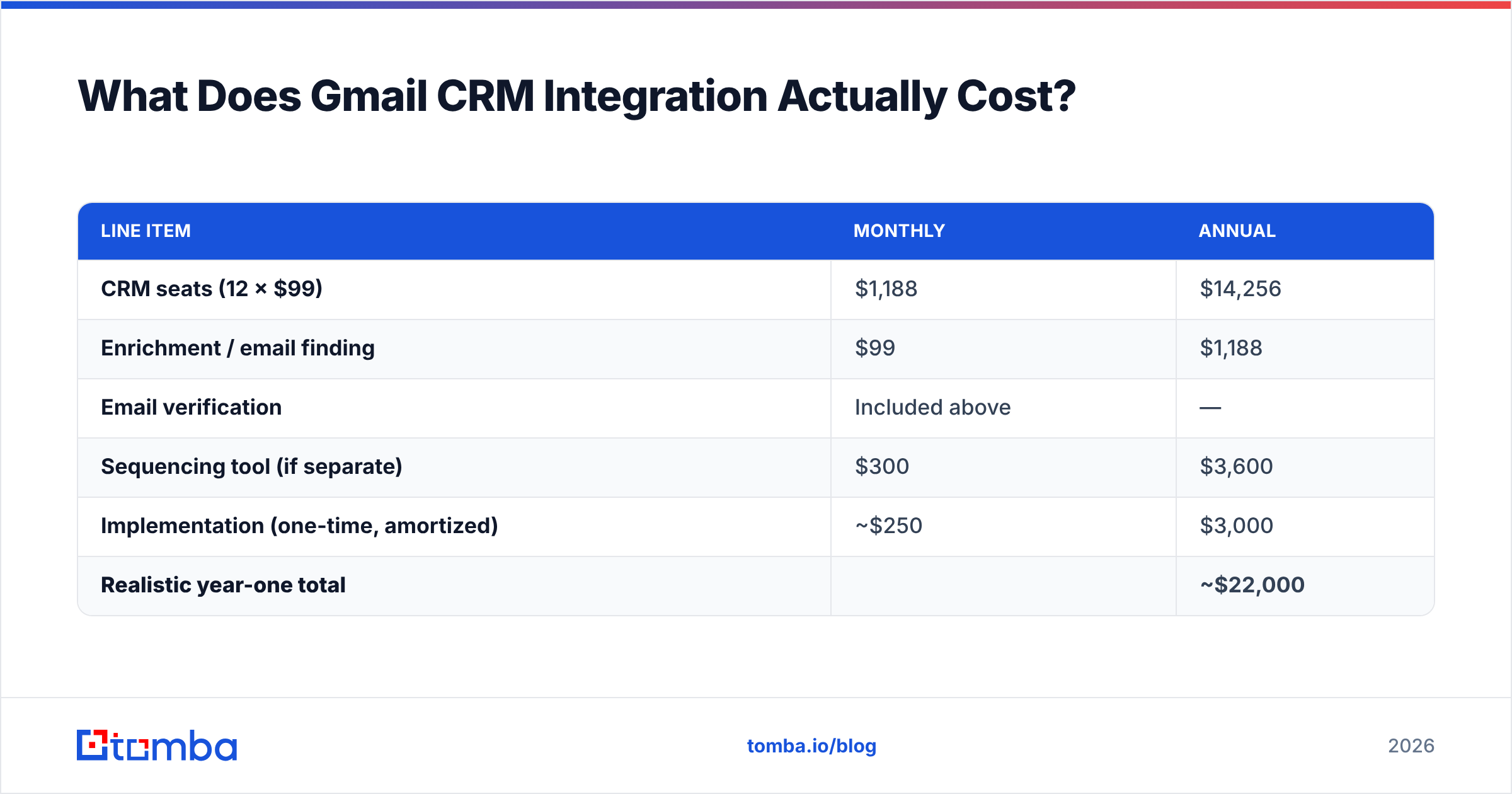
Run the math for a 12-person sales team on a mid-tier CRM at $99/user/mo:
| Line item | Monthly | Annual |
|---|---|---|
| CRM seats (12 × $99) | $1,188 | $14,256 |
| Enrichment / email finding | $99 | $1,188 |
| Email verification | Included above | — |
| Sequencing tool (if separate) | $300 | $3,600 |
| Implementation (one-time, amortized) | ~$250 | $3,000 |
| Realistic year-one total | ~$22,000 |
Three cost traps worth naming:
- Per-seat enrichment. Some vendors charge enrichment per user rather than per credit. With 12 reps, that turns a $99 line into $1,188. Always ask whether credits pool across the team.
- Tier-gating on sync. Two-way sync is frequently locked behind the second or third pricing tier. The advertised $20 entry price often doesn't include the integration you're buying the product for.
- Credit expiry. Monthly credits that don't roll over mean you pay for capacity you never use in slow months.
For reference, Tomba pricing runs a free tier at 25 searches/month, Starter at $49/mo, Growth at $99/mo, and Pro at $249/mo — credits pool across the account rather than per seat, which is the model you want when a two-person research team feeds twelve reps.

How Do You Set It Up Without Breaking Your Data?#
The order matters. Turning on sync against a dirty database duplicates the mess at machine speed.
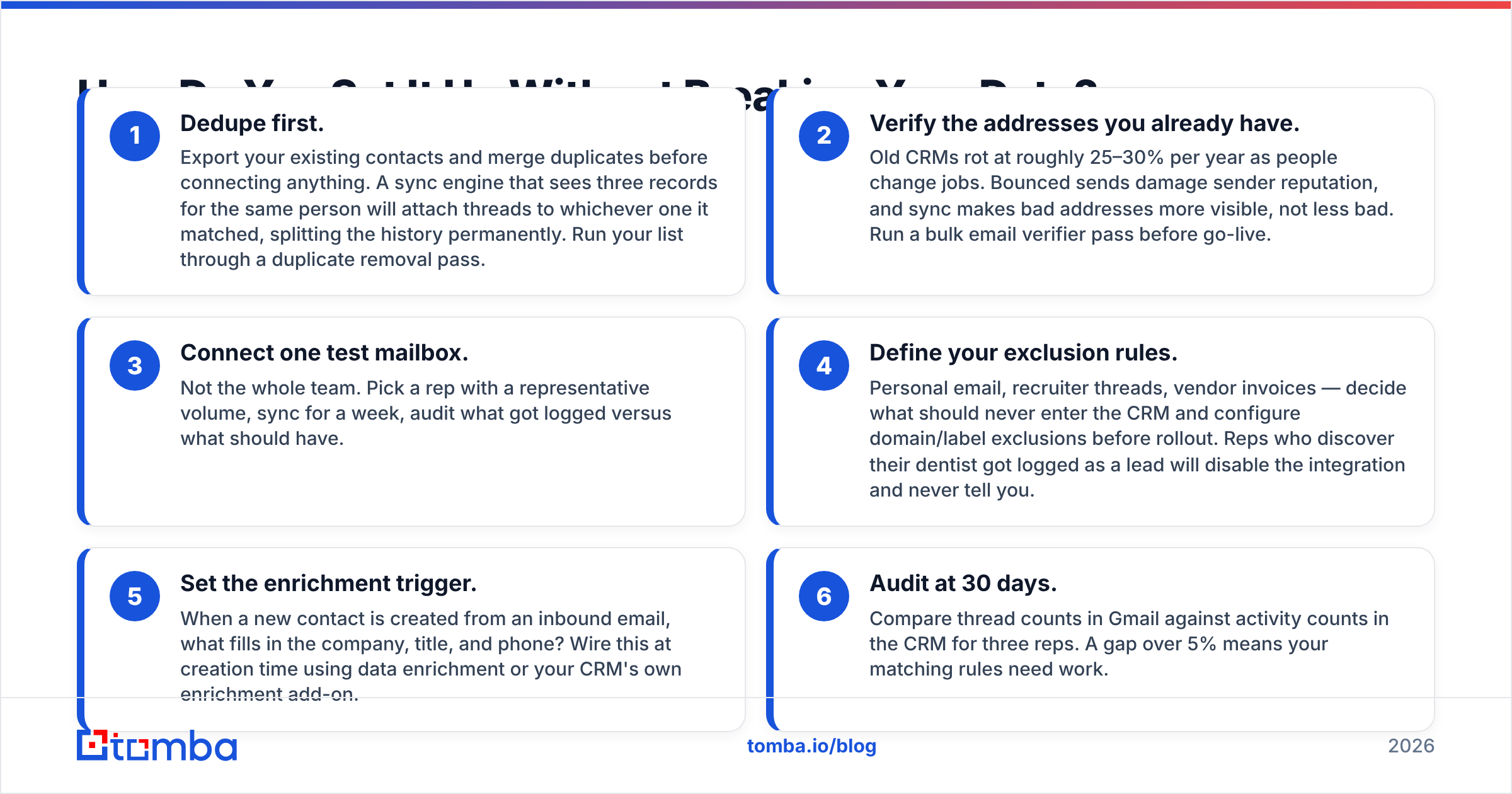
- Dedupe first. Export your existing contacts and merge duplicates before connecting anything. A sync engine that sees three records for the same person will attach threads to whichever one it matched, splitting the history permanently. Run your list through a duplicate removal pass.
- Verify the addresses you already have. Old CRMs rot at roughly 25–30% per year as people change jobs. Bounced sends damage sender reputation, and sync makes bad addresses more visible, not less bad. Run a bulk email verifier pass before go-live.
- Connect one test mailbox. Not the whole team. Pick a rep with a representative volume, sync for a week, audit what got logged versus what should have.
- Define your exclusion rules. Personal email, recruiter threads, vendor invoices — decide what should never enter the CRM and configure domain/label exclusions before rollout. Reps who discover their dentist got logged as a lead will disable the integration and never tell you.
- Set the enrichment trigger. When a new contact is created from an inbound email, what fills in the company, title, and phone? Wire this at creation time using data enrichment or your CRM's own enrichment add-on.
- Audit at 30 days. Compare thread counts in Gmail against activity counts in the CRM for three reps. A gap over 5% means your matching rules need work.
Google's own Workspace admin documentation covers the OAuth scope side, and both HubSpot and Pipedrive publish setup guides worth reading before you click connect.
What About Privacy and OAuth Scopes?#
This is the section most posts skip, and it's the one your security reviewer will ask about.
When a CRM connects to Gmail, it requests OAuth scopes. The common ones:
gmail.readonly— reads all mail, including threads unrelated to sales. Broad.gmail.metadata— headers and labels only, no message bodies. Much tighter, and enough for basic activity logging.gmail.send— lets the tool send as you. Needed for sequences, not for logging.gmail.modify— read, write, labels, delete. The widest common request.
Ask three questions of any vendor:
- Which scopes do you request, and which are optional? Some tools degrade gracefully with metadata-only access. Most don't advertise this.
- What do you store versus what do you read? Reading a message body to extract a signature is different from storing the full body on the vendor's servers indefinitely.
- Are you a Google-verified app? Apps requesting restricted scopes go through a security assessment. Check the OAuth consent screen for the "verified" badge — an unverified app requesting
gmail.modifyis a real risk.
If your organization handles regulated data, gmail.metadata plus manual logging is often the compliant compromise. Slower, defensible.
Does Gmail CRM Integration Actually Improve Response Rates?#
Indirectly, and only if the data flowing in is clean.
Integration doesn't write better emails. What it does is remove the excuse for bad ones. When a rep can see the full prior thread, the last touch date, and the contact's actual role inside Gmail, follow-ups stop repeating what someone already said three weeks ago. That's where the response rate lift comes from — context, not automation.
The counter-case is real though. Teams that integrate and then blast sequences from the same connected mailbox often see deliverability drop. Your CRM's sending happens through your actual Gmail account, which means your domain reputation absorbs every bounce and spam complaint. Verify before you send, keep daily volume sane, and don't treat a connected inbox as a bulk sending platform.
What's the Honest Verdict?#
Gmail CRM integration is table stakes in 2026, but the phrase covers a wide quality range. Native two-way sync from HubSpot, Pipedrive, or Salesforce is mature and worth turning on. Sidebar-only tools are a convenience layer, not a system of record. BCC dropboxes are a stopgap that will lose data.
The gap none of them close is contact data quality. Your CRM will faithfully log every email you send to a stale address. It won't tell you the address is stale, and it won't find the right one. That job belongs to a dedicated finder-and-verifier layer, ideally one with an API so it can run at contact-creation time rather than as a quarterly cleanup project.
Pick the CRM your team will actually open. Wire the Gmail sync properly, with narrow scopes and tested exclusion rules. Then put real data in it.
Feed your Gmail-connected CRM addresses that actually land. The Tomba Email Finder locates verified professional emails by domain, name, or company, and the Tomba API drops enrichment into your CRM at the moment a record is created — no per-seat surcharge, credits pool across the whole team. Start on the free tier at 25 searches a month and see how many of your existing CRM contacts are still reachable.
Related guides#
Ready to find emails that actually work?
Join 150,000+ professionals who stopped guessing and started sending. Free credits on signup — no credit card required.
Get the Tomba newsletter
Practical outbound tactics and product updates — once every two weeks.
About the author