Gmail Email Tracking in 2026: How It Works and What Breaks
Open tracking in Gmail is noisier than most reps admit. Here's how pixels actually work in 2026, which signals still hold up, and how to build a pipeline that doesn't lie to you.
TL;DR
- Gmail email tracking still works technically — a 1x1 pixel loads, you get a ping — but Google Image Proxy has made the timing and count of opens close to worthless for individual-lead scoring.
- Apple Mail Privacy Protection and corporate link scanners inflate open rates by 15-40% depending on your audience. Your "68% open rate" is probably 40% real.
- Click tracking, reply rate, and meeting-booked rate are the only signals that survive privacy filtering intact. Build your reporting on those.
- Link-tracking domains are now a bigger deliverability liability than the pixel itself. A shared or unwarmed tracking domain can cost you inbox placement.
- The highest-leverage fix isn't a better tracker — it's a cleaner list. Bad addresses generate bounces that suppress everything downstream.
What is Gmail email tracking, actually?#
Gmail email tracking is the practice of embedding a tiny, invisible image — a "tracking pixel" — in an outgoing email so that when the recipient's mail client loads that image, your server records an "open." Same idea for links: instead of linking directly to yoursite.com/demo, the tool rewrites it to track.yourdomain.com/abc123, logs the click, then redirects.
Think of it like a doorbell camera on a house. When someone walks up to the door, the camera fires. Useful — until the mail carrier starts pre-walking every doorstep on the street at 6am to check for packages. Now your camera fires constantly and you have no idea which visits were real people.
That's Gmail in 2026. Since 2013, Google has proxied all images through googleusercontent.com. Google fetches, caches, and re-serves the image. This means three things break at once:
- IP address is Google's, not the recipient's. Geo-location from opens is fiction.
- The fetch may happen before the human reads it. Prefetching and caching decouple the open event from actual human attention.
- Repeat opens are unreliable. Once cached, subsequent views may not re-fetch — or a single cache refresh can fire a fresh "open."
Gmail is not alone. Apple's Mail Privacy Protection, on by default since iOS 15, pre-loads every remote image through Apple's relay regardless of whether the user opens the message. If a meaningful share of your list reads mail on an iPhone — and in B2B, it usually is — a chunk of your opens fired without a human present.

How does a tracking pixel actually work in Gmail?#
Here's the chain, step by step. Understanding it is what lets you decide which parts of your dashboard to trust.
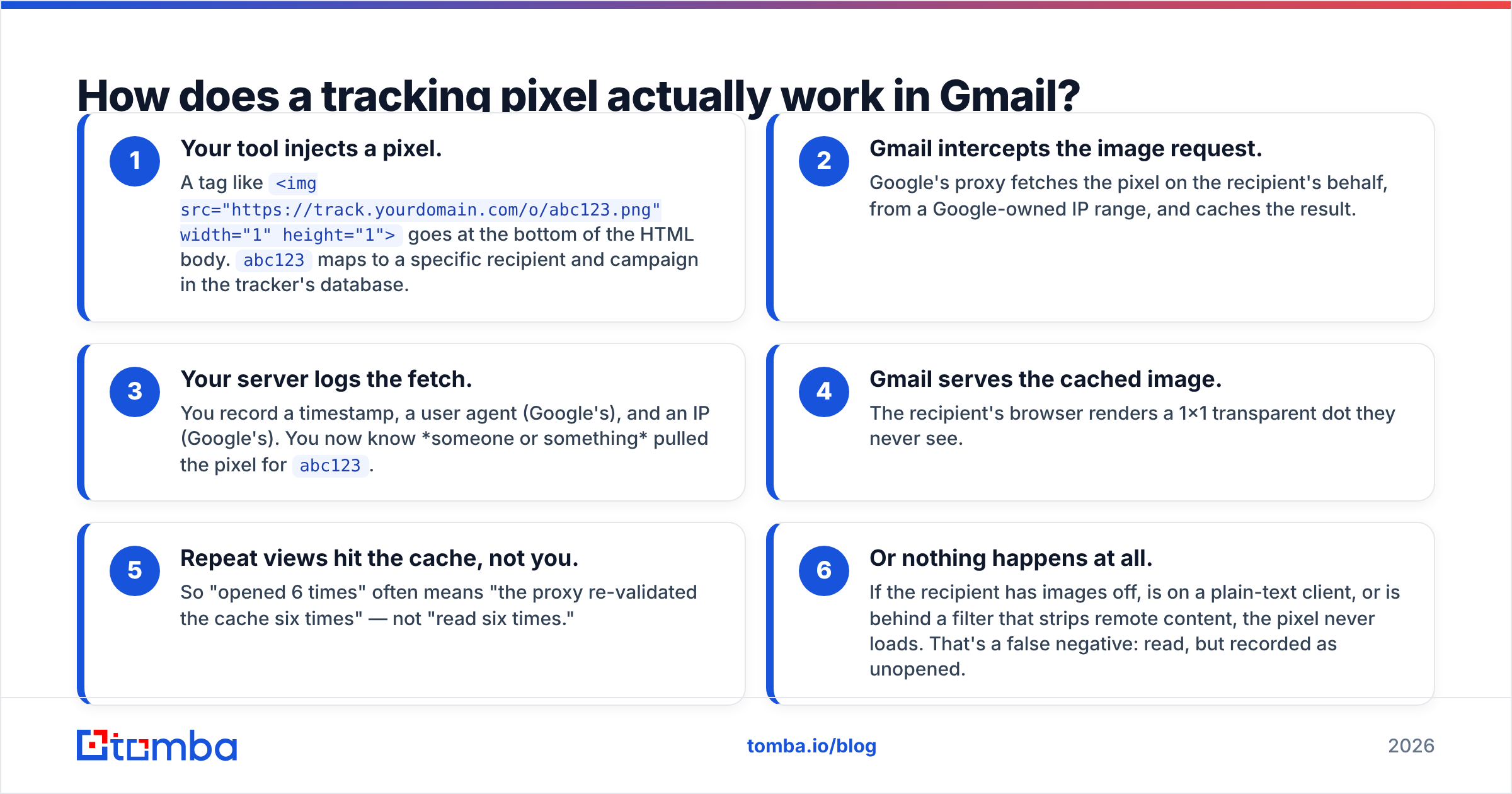
- Your tool injects a pixel. A tag like
<img src="https://track.yourdomain.com/o/abc123.png" width="1" height="1">goes at the bottom of the HTML body.abc123maps to a specific recipient and campaign in the tracker's database. - Gmail intercepts the image request. Google's proxy fetches the pixel on the recipient's behalf, from a Google-owned IP range, and caches the result.
- Your server logs the fetch. You record a timestamp, a user agent (Google's), and an IP (Google's). You now know someone or something pulled the pixel for
abc123. - Gmail serves the cached image. The recipient's browser renders a 1x1 transparent dot they never see.
- Repeat views hit the cache, not you. So "opened 6 times" often means "the proxy re-validated the cache six times" — not "read six times."
- Or nothing happens at all. If the recipient has images off, is on a plain-text client, or is behind a filter that strips remote content, the pixel never loads. That's a false negative: read, but recorded as unopened.
Steps 3 and 5 are where most sales teams fool themselves. A "hot lead opened your email 14 times" alert is far more likely to be a caching artifact than genuine buying intent.
Which tracking signals still work in 2026?#
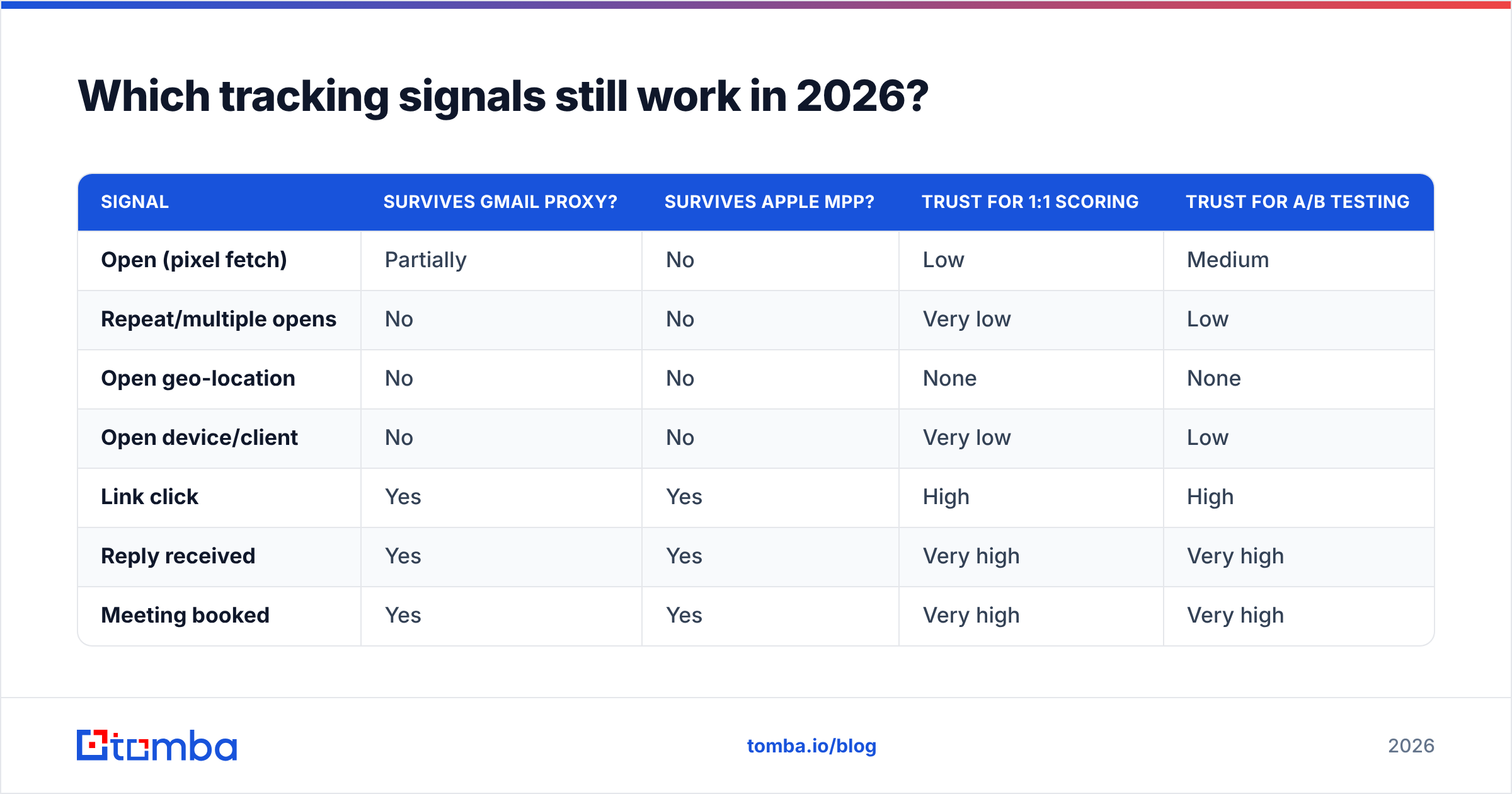
Rank your signals by how much privacy infrastructure sits between the recipient and your server. The shorter that chain, the more trustworthy the data.
| Signal | Survives Gmail proxy? | Survives Apple MPP? | Trust for 1:1 scoring | Trust for A/B testing |
|---|---|---|---|---|
| Open (pixel fetch) | Partially | No | Low | Medium |
| Repeat/multiple opens | No | No | Very low | Low |
| Open geo-location | No | No | None | None |
| Open device/client | No | No | Very low | Low |
| Link click | Yes | Yes | High | High |
| Reply received | Yes | Yes | Very high | Very high |
| Meeting booked | Yes | Yes | Very high | Very high |
| Bounce / hard fail | Yes | Yes | Very high | High |
| Unsubscribe | Yes | Yes | High | High |
The practical rule: use opens only in aggregate, across large samples, comparing two variants sent to the same audience under the same conditions. If Subject A gets 51% and Subject B gets 43% across 400 sends each, the relative difference is probably real even though both absolute numbers are inflated. Never tell a rep "call this one, they opened three times."
Is open tracking hurting your deliverability?#
Yes — but not for the reason most people assume. The pixel itself is small potatoes. The real risk is the tracking domain used for link rewriting.
Three failure modes, in order of how often they bite:
- Shared tracking domains. Many low-cost sequencers default every customer onto one shared redirect domain. When one customer blasts spam, that domain gets flagged and every sender using it inherits the reputation damage. Always use a custom, branded subdomain like
go.yourcompany.com. - Domain mismatch. If your sending domain is
acme.combut every link resolves tot.some-random-tool.io, filters notice. Alignment matters. Keep the tracking subdomain on your own root domain. - Cold tracking domains. A brand-new redirect domain with zero history, appearing in thousands of emails on day one, looks exactly like a throwaway spam domain. Warm it gradually the same way you warm a sending domain.
Beyond the tracking domain, email deliverability in 2026 is dominated by authentication and complaint thresholds. Google's bulk sender requirements mandate SPF, DKIM, and DMARC alignment plus a spam complaint rate under 0.3%. Verify your setup with an SPF checker before you worry about pixel mechanics — a broken SPF record costs you far more opens than any privacy proxy.
One more thing that quietly destroys tracking data: bounces. Every invalid address in your list produces a hard bounce, drags sender reputation down, and skews every rate you calculate. Running your list through an email verifier before a send does more for the quality of your tracking data than switching trackers ever will.
How do the main Gmail tracking tools compare?#
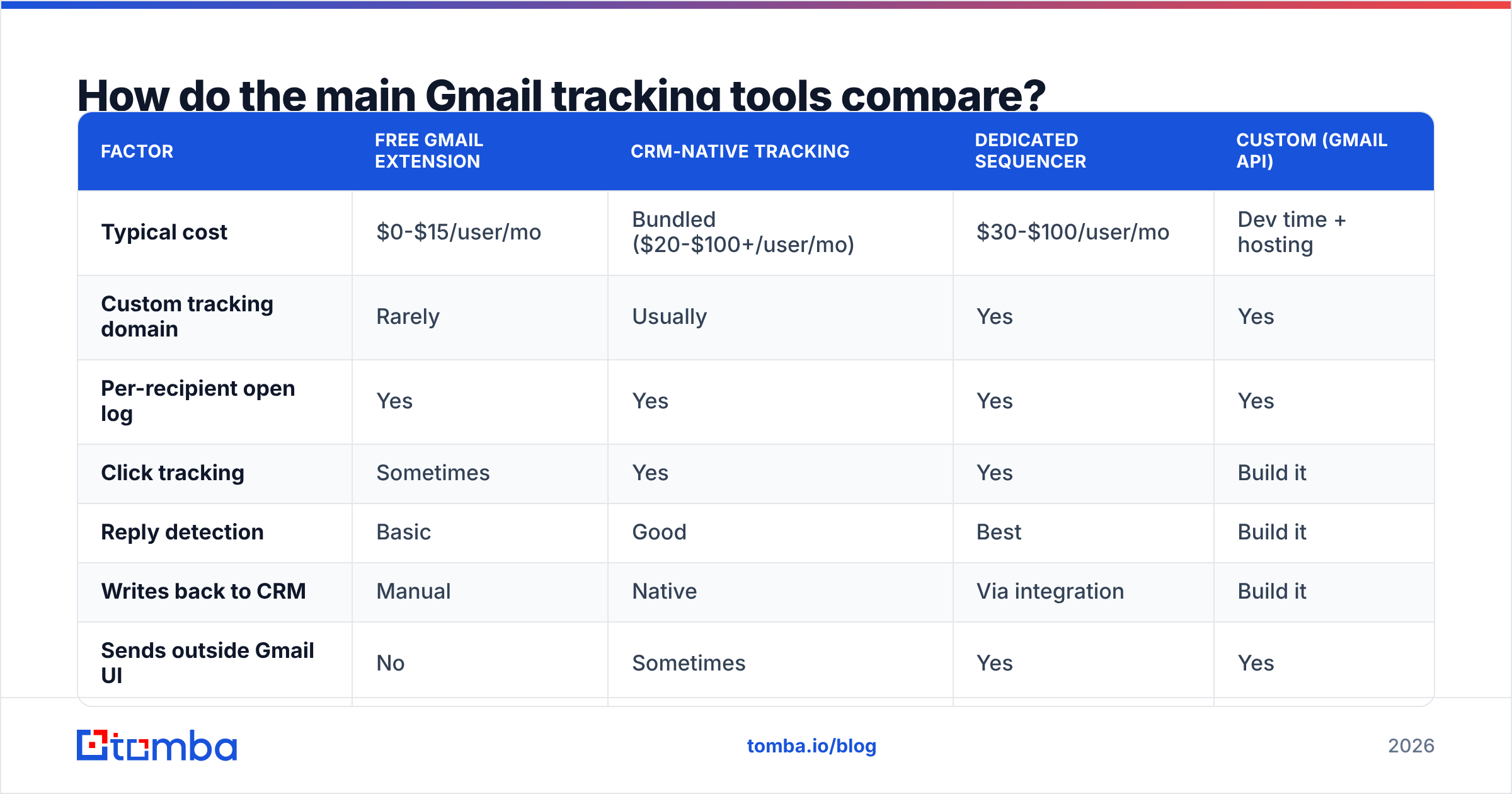
Most teams pick one of four shapes: a free Gmail extension, a CRM-native tracker, a dedicated sequencer, or a hand-rolled setup on top of the Gmail API. Here's the honest trade-off table.
| Factor | Free Gmail extension | CRM-native tracking | Dedicated sequencer | Custom (Gmail API) |
|---|---|---|---|---|
| Typical cost | $0-$15/user/mo | Bundled ($20-$100+/user/mo) | $30-$100/user/mo | Dev time + hosting |
| Custom tracking domain | Rarely | Usually | Yes | Yes |
| Per-recipient open log | Yes | Yes | Yes | Yes |
| Click tracking | Sometimes | Yes | Yes | Build it |
| Reply detection | Basic | Good | Best | Build it |
| Writes back to CRM | Manual | Native | Via integration | Build it |
| Sends outside Gmail UI | No | Sometimes | Yes | Yes |
| Risk of shared domain | High | Low | Low if configured | None |
| Best for | Solo reps, <50 sends/wk | Teams already on the CRM | Outbound teams at scale | Product/ops teams |
A few notes that don't fit in a table:
Free extensions are fine for a founder sending 20 emails a week. They break down the moment you need clean reporting, because most log opens without disclosing proxy filtering — so your dashboard looks fantastic and means nothing.
CRM-native tracking (HubSpot, Salesforce, Pipedrive) wins when attribution matters more than raw send volume. The data lands on the contact record automatically, which is where it actually gets used. HubSpot's sales tools documentation covers the mechanics well. If you're on HubSpot, the HubSpot integration route keeps contact data and tracking in one place.
Dedicated sequencers give you the best reply detection and the cleanest deliverability controls, but you're now running outbound outside the Gmail UI, which changes rep behavior. Check real user reviews on G2 before committing — the deliverability complaints tend to show up there first.
Custom builds on the Gmail API make sense when tracking needs to feed a product, not a rep. You control the pixel, the domain, and the retention policy entirely.
What should you measure instead of open rate?#
Replace the vanity metric with a small set of numbers that privacy filters cannot fake. Here's a working scorecard:
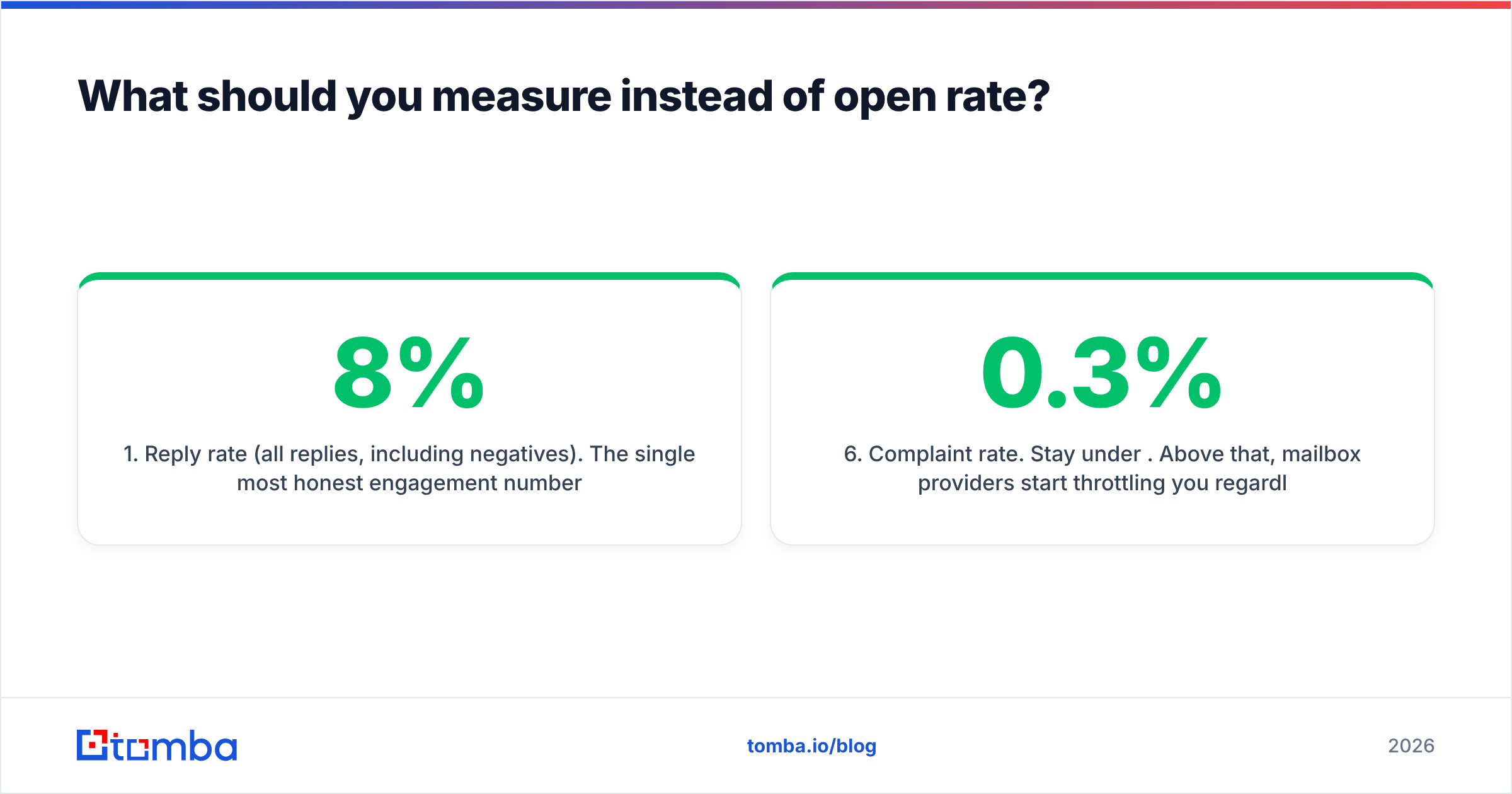
- Reply rate (all replies, including negatives). The single most honest engagement number. A 4-8% reply rate on cold outbound is healthy in most B2B segments; anything under 2% means the list or the offer is wrong, not the subject line.
- Positive reply rate. Replies that request a call, ask a question, or forward you internally. This is the number that actually correlates with pipeline. Track it separately or you'll optimize for angry responses.
- Click-to-reply ratio. High clicks with no replies usually means your CTA is asking for a click when it should be asking for a sentence. Clicks survive privacy filtering, so this ratio is reliable.
- Bounce rate per domain. Segment bounces by recipient domain. A cluster of bounces at one company means your data source has a stale pattern for that org — fix it with a fresh domain search rather than guessing formats.
- Meeting-booked rate per 100 sends. The only metric your CFO cares about. Everything upstream is a leading indicator of this.
- Complaint rate. Stay under 0.3%. Above that, mailbox providers start throttling you regardless of how good your copy is.
Notice that four of the six are downstream of data quality, not copywriting. A response rate problem is more often a targeting problem than a wording problem.
How do you set up Gmail tracking responsibly?#
If you're going to track, do it in a way that stays honest and stays out of the spam folder.
- Use a branded tracking subdomain.
go.yourcompany.comorlink.yourcompany.com, CNAME'd to your provider. Never the shared default. - Warm the tracking domain. Ramp volume over 2-4 weeks alongside your sending domain warmup.
- Turn off click tracking for plain-text-style cold emails. If your email has one link and reads like a human wrote it, rewriting that link to a redirect URL is a visible tell. Consider linking directly.
- Disable per-open notifications for reps. They create false urgency and cause reps to call people who never read the message. Report opens at the campaign level only.
- Respect regional consent rules. Under GDPR, tracking pixels are widely treated as requiring a lawful basis. Include tracking in your privacy notice, honor opt-outs immediately, and don't track after an unsubscribe.
- Clean the list first. Every send against a dead address is a bounce, a reputation hit, and a corrupted denominator on every rate you report.
That last point is where most of the measurable gain lives. If 12% of your list is invalid, your open rate denominator is wrong by 12% before privacy proxies do anything at all. Running addresses through a bulk email finder and verification pass before launch is unglamorous and it moves the numbers more than any tracker swap.
Is Gmail tracking worth it at all in 2026?#
Yes — with a demotion. Open tracking moved from a scoring signal to a rough directional gauge. Use it the way you'd use a car's fuel gauge, not a fuel-flow meter: good enough to tell you empty from full, useless for measuring the last 0.1 gallon.
The teams getting real value from tracking in 2026 share three habits:
- They report opens only in aggregate, with a stated caveat about inflation.
- They act exclusively on clicks, replies, and bookings.
- They spend the time they used to spend staring at open dashboards on list quality and message relevance instead.
The teams that struggle are still running "opened 3x" alerts into a rep's Slack and wondering why the calls go nowhere.
Where should you start?#
Start upstream. Tracking tells you what happened after the send; data quality determines whether the send had a chance in the first place. Before you evaluate another tracker, audit what percentage of your list is verified, correctly formatted, and matched to a real person at a real company.
That's the job Tomba is built for. Use the Tomba Email Finder to source verified business addresses by domain, name, or company, then verify the whole list before it enters your sequencer — so the numbers coming out of your tracking dashboard are at least measuring real inboxes. The free tier includes 25 searches per month, and paid plans start at $49/mo; full Tomba pricing is on the site. Fix the input, and the output starts telling the truth.
Related guides#
Ready to find emails that actually work?
Join 150,000+ professionals who stopped guessing and started sending. Free credits on signup — no credit card required.
Get the Tomba newsletter
Practical outbound tactics and product updates — once every two weeks.
About the author