Gmail Port for SMTP: 587 vs 465 vs 25 Settings Guide
Port 587 with STARTTLS is the right Gmail SMTP port for almost every setup — but 465, 25 and 2525 still trip people up. Here are the exact settings, the failure modes, and when Gmail SMTP stops being enough.
TL;DR
- Use port 587 with STARTTLS. It is the submission port Gmail expects, it works on almost every network, and it is what
smtp.gmail.comdocuments first. - Port 465 (implicit SSL/TLS) still works and is fine if your library or appliance only speaks SSL-on-connect. It is not deprecated in practice.
- Port 25 is effectively dead for Gmail sending. Residential ISPs, cloud providers, and most office firewalls block outbound 25. Gmail does not accept authenticated user submission on it.
- Port 2525 is not a Gmail port. It is an alternate offered by SendGrid, Mailgun, and Brevo. If a tutorial tells you to use 2525 with
smtp.gmail.com, the tutorial is wrong. - The port is almost never why your mail is failing. App passwords, OAuth scopes, 2FA, and daily send caps cause far more Gmail SMTP errors than a wrong port number.
What is the Gmail port for SMTP, exactly?#
The Gmail port for SMTP is the TCP port your mail client or script opens on smtp.gmail.com to hand Google an outgoing message. Think of it like a loading dock: the warehouse (Gmail) has several doors, each one built for a different kind of truck. Show up at the wrong door and you either get turned away or you sit there waiting for a handshake that never comes.
Technically, SMTP is a plain-text protocol from 1982 that got security bolted on later. That history is why you have more than one port to choose from — each port represents a different era of how encryption got negotiated. SMTP itself has not changed much; the transport wrapper around it has.
Google publishes three usable endpoints:
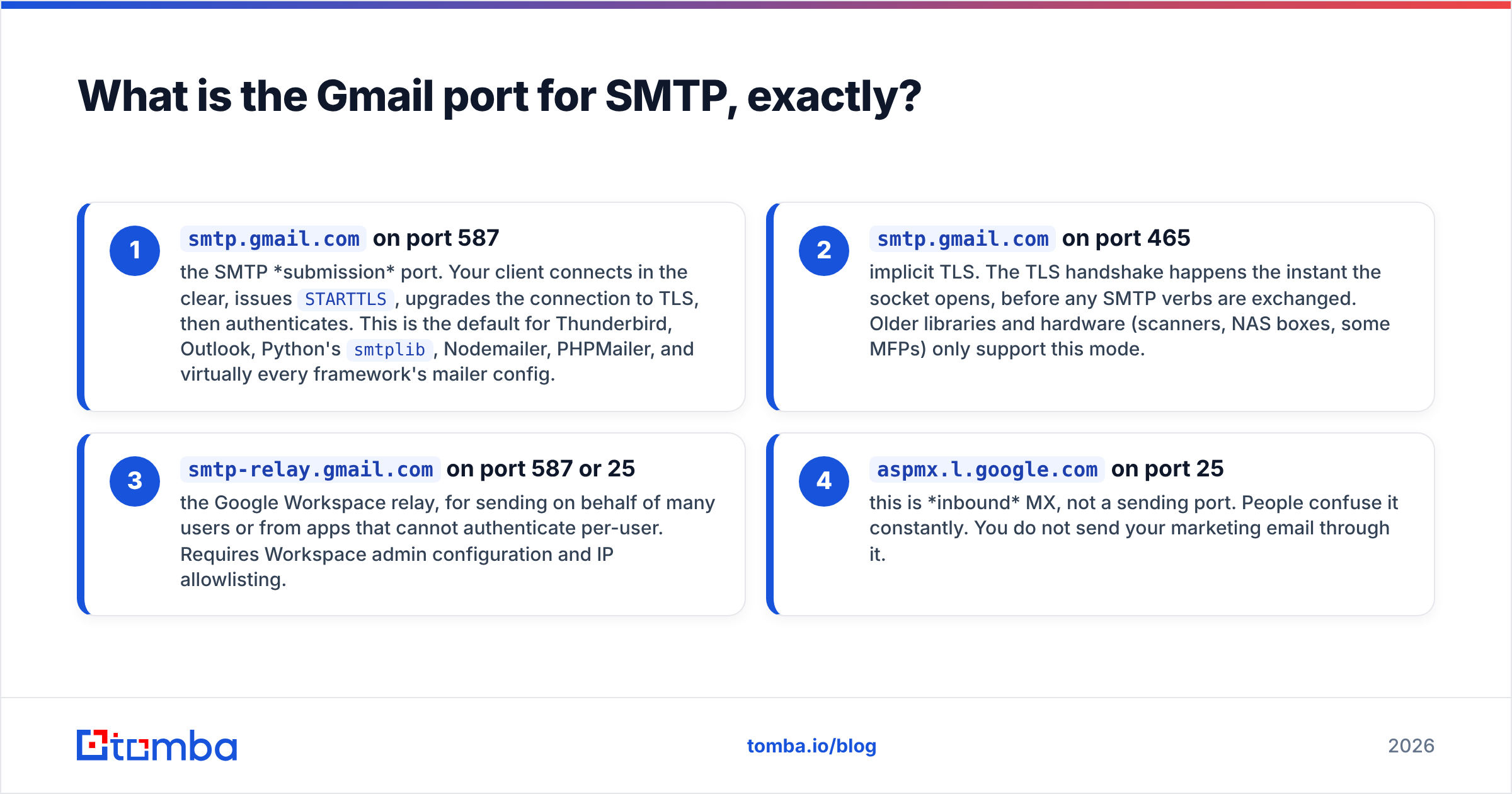
smtp.gmail.comon port 587 — the SMTP submission port. Your client connects in the clear, issuesSTARTTLS, upgrades the connection to TLS, then authenticates. This is the default for Thunderbird, Outlook, Python'ssmtplib, Nodemailer, PHPMailer, and virtually every framework's mailer config.smtp.gmail.comon port 465 — implicit TLS. The TLS handshake happens the instant the socket opens, before any SMTP verbs are exchanged. Older libraries and hardware (scanners, NAS boxes, some MFPs) only support this mode.smtp-relay.gmail.comon port 587 or 25 — the Google Workspace relay, for sending on behalf of many users or from apps that cannot authenticate per-user. Requires Workspace admin configuration and IP allowlisting.aspmx.l.google.comon port 25 — this is inbound MX, not a sending port. People confuse it constantly. You do not send your marketing email through it.
Which Gmail SMTP port should you use: 587, 465, or 25?#
Short answer: 587. Longer answer depends on what your client library can negotiate.
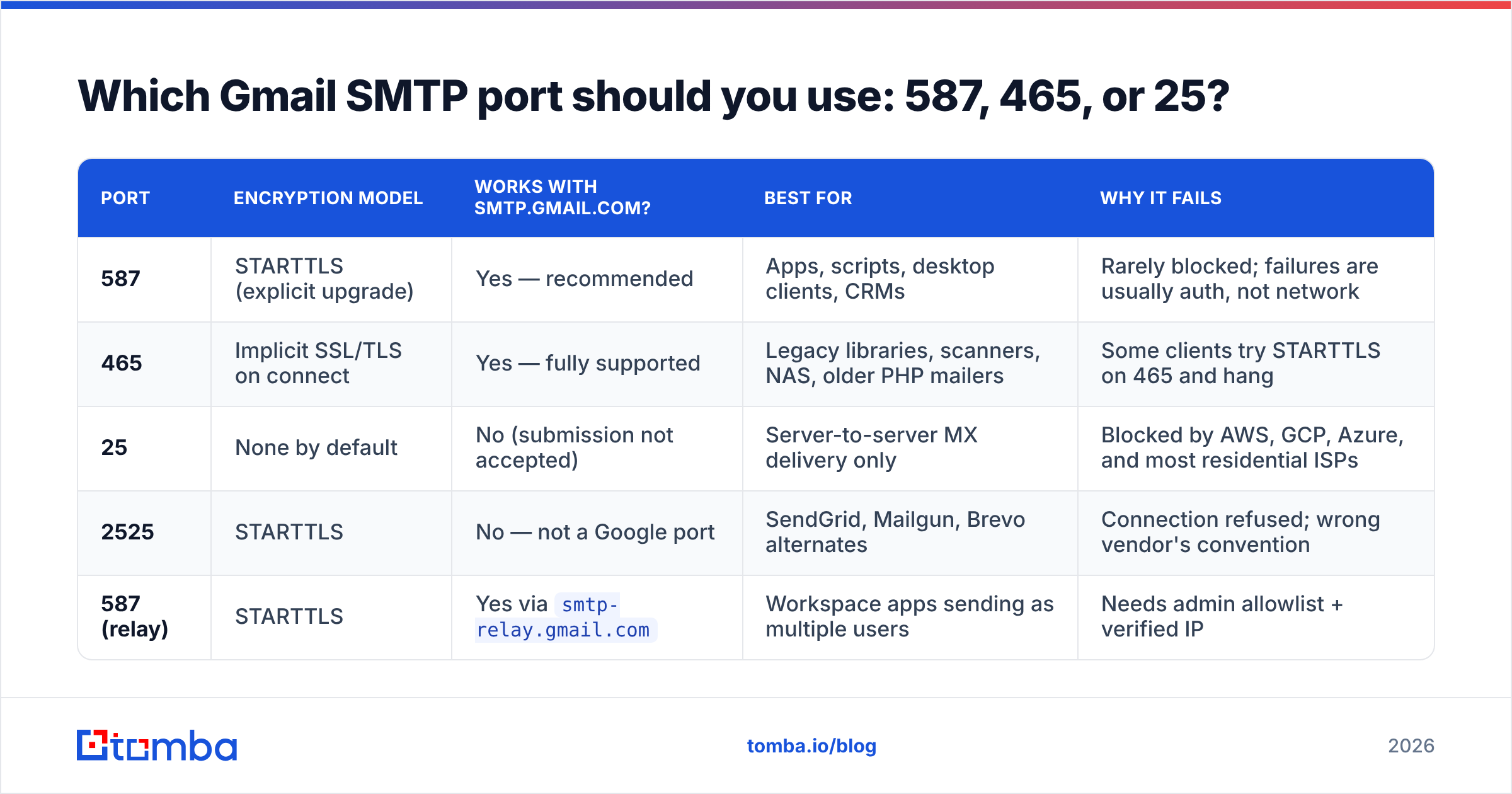
| Port | Encryption model | Works with smtp.gmail.com? | Best for | Why it fails |
|---|---|---|---|---|
| 587 | STARTTLS (explicit upgrade) | Yes — recommended | Apps, scripts, desktop clients, CRMs | Rarely blocked; failures are usually auth, not network |
| 465 | Implicit SSL/TLS on connect | Yes — fully supported | Legacy libraries, scanners, NAS, older PHP mailers | Some clients try STARTTLS on 465 and hang |
| 25 | None by default | No (submission not accepted) | Server-to-server MX delivery only | Blocked by AWS, GCP, Azure, and most residential ISPs |
| 2525 | STARTTLS | No — not a Google port | SendGrid, Mailgun, Brevo alternates | Connection refused; wrong vendor's convention |
| 587 (relay) | STARTTLS | Yes via smtp-relay.gmail.com |
Workspace apps sending as multiple users | Needs admin allowlist + verified IP |
The practical decision tree is short:
- Your library supports STARTTLS? Use 587. Done.
- Your device only offers an "SSL" checkbox with no STARTTLS option? Use 465.
- You are on a Google Workspace domain and need to send as
noreply@yourdomain.comfrom a server? Use the relay host, notsmtp.gmail.com. - A vendor doc told you 2525? That doc was written for a different provider. Ignore it for Gmail.
What are the full Gmail SMTP settings for 2026?#
Getting the port right and everything else wrong is the most common failure pattern. Here is the complete configuration block.
| Setting | Value |
|---|---|
| SMTP server | smtp.gmail.com |
| Port (recommended) | 587 |
| Port (alternate) | 465 |
| Encryption | STARTTLS on 587, SSL/TLS on 465 |
| Authentication | Required — always |
| Username | Your full address, e.g. you@gmail.com |
| Password | A 16-character app password, not your account password |
| Requires 2FA | Yes, to generate app passwords |
| Daily send limit (free Gmail) | ~500 recipients/day |
| Daily send limit (Workspace) | ~2,000 recipients/day |
Two settings deserve emphasis because they break more integrations than the port ever will:
- App password, not account password. Google turned off "less secure app access" for consumer accounts, so plain password auth returns
535-5.7.8 Username and Password not accepted. You must enable 2-step verification and generate a dedicated app password. Google's own Gmail SMTP documentation walks through it. - Username must be the full address.
youfails.you@gmail.comworks. For Workspace, use the full domain address, and confirm the account is not restricted by an admin policy in the Google Workspace admin console.
If you want to sanity-check a handshake before blaming your code, run the connection through a SMTP tester and read the raw server response. A 250 mail.google.com at your service banner means the port and TLS are fine and your problem is downstream.
Why does port 465 still exist if 587 is the standard?#
Because deprecation on the internet is a rumor, not an event.
Port 465 was originally registered for SMTPS, then un-registered in 1998 when STARTTLS became the recommended approach, then quietly re-blessed in RFC 8314 in 2018 as a legitimate implicit-TLS submission port. In between, an enormous installed base of printers, scanners, PBX systems, and PHP applications shipped with 465 hardcoded.
Google never turned it off, and there is no signal it plans to. If your Ricoh multifunction printer has exactly two options — "SSL" and "None" — pick SSL on 465 and stop worrying. Security-wise, implicit TLS is arguably safer than STARTTLS, because STARTTLS begins in plaintext and is theoretically strippable by an active network attacker. In practice, with a client that enforces TLS, both are fine.
The real risk with 465 is misconfiguration: a library set to secure: false with requireTLS: true pointed at 465 will open a plaintext socket into a TLS-expecting server and hang until timeout. In Nodemailer terms, secure: true means 465, secure: false plus requireTLS: true means 587. Mixing them produces a silent stall that looks like a firewall problem and is not.
Why is your Gmail SMTP connection failing?#
Run through these in order. The port is item six, not item one.
535-5.7.8auth rejected — you used your login password instead of an app password, or 2FA is off. Regenerate an app password.534-5.7.9application-specific password required — same root cause, different code path. Same fix.- Connection timeout on 587 — your host blocks outbound submission. Common on shared hosting and some university networks. Try 465; if both hang, it is the network, not Gmail.
- Connection refused on 25 — expected behavior. AWS EC2, Google Compute Engine, DigitalOcean, and most ISPs block outbound 25 by default to suppress spam. Do not open a support ticket; move to 587.
550-5.4.5 Daily user sending limit exceeded— you hit the cap. Waiting 24 hours resets it. Sending harder does not.- TLS handshake failure — outdated OpenSSL, or a client pinned to TLS 1.0/1.1. Google requires TLS 1.2 or higher.
- Mail sends but lands in spam — nothing to do with the port. That is an authentication and reputation problem, covered next.
Does the Gmail SMTP port affect deliverability?#
No. Not even a little.
The port determines how your message reaches Google. Whether the recipient's inbox accepts it is decided by SPF, DKIM, DMARC, sending domain reputation, list hygiene, content, and engagement history. A message submitted on 465 and a message submitted on 587 arrive at the recipient's MX in exactly the same shape.
What actually moves the needle on email deliverability:
- SPF alignment. If you send from a custom domain through Gmail, your SPF record needs
include:_spf.google.com. Verify it with an SPF checker rather than eyeballing the TXT record. - DKIM signing. Workspace signs outbound mail once you publish the DKIM key. Consumer Gmail signs with
gmail.com— which is why sending "as" a custom domain through a free Gmail account produces alignment failures. - DMARC policy. Since the 2024 bulk-sender rules from Google and Yahoo, a published DMARC record is table stakes for anyone sending volume.
- List quality. Bounces are the fastest way to torch a sending reputation. Running addresses through an email verifier before a campaign removes the invalid ones that generate hard bounces.
That last point matters more than people expect. A 12% bounce rate on a 400-address send will damage your domain's standing faster than any TLS misconfiguration ever could, and Gmail's abuse thresholds do not care that the list was "just an export from an old CRM."
When should you stop using Gmail SMTP entirely?#
Gmail SMTP is a personal mailbox with a programmatic door on it. It is excellent for transactional volume in the low hundreds and terrible for anything resembling a campaign.
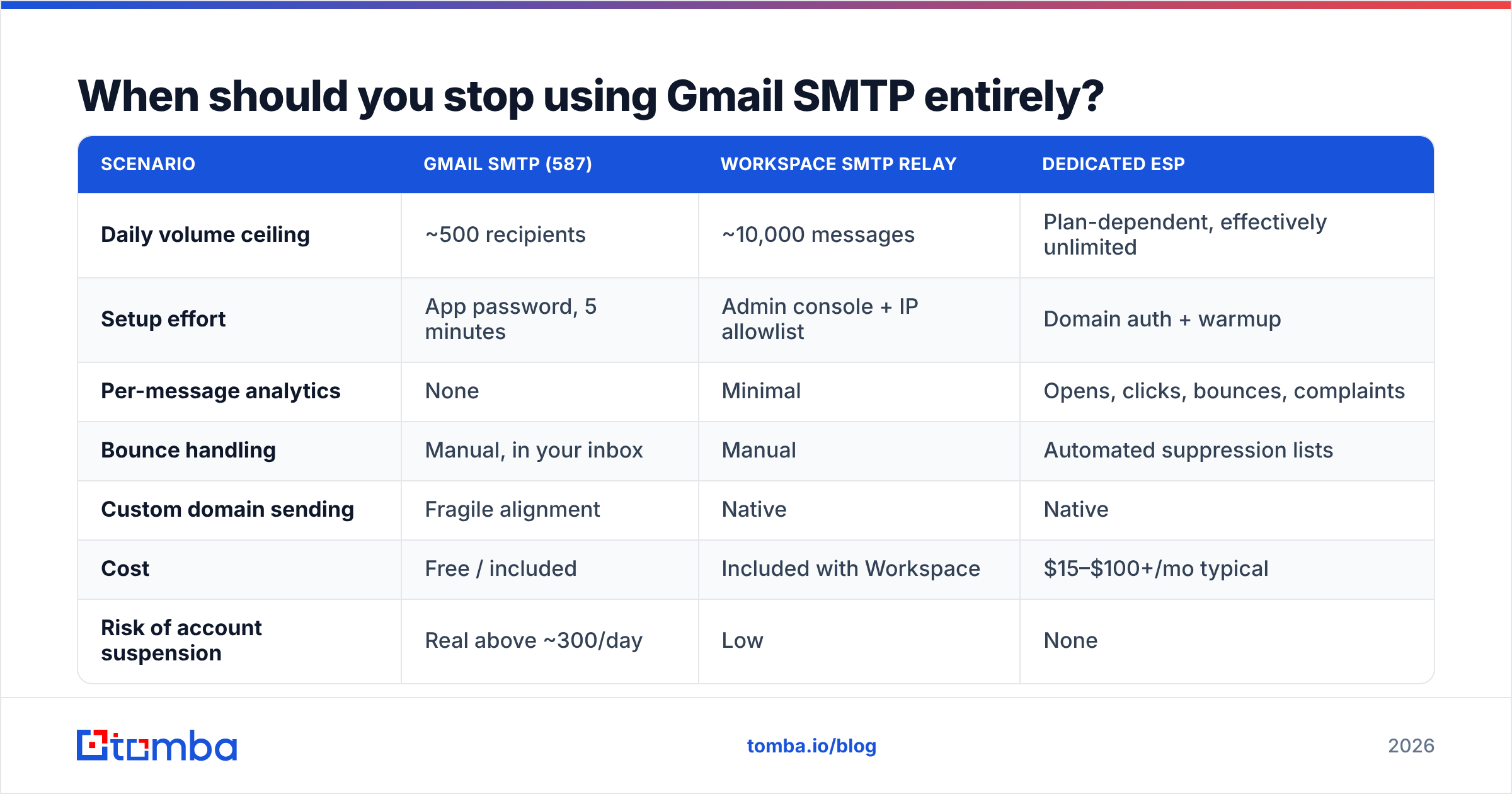
| Scenario | Gmail SMTP (587) | Workspace SMTP relay | Dedicated ESP |
|---|---|---|---|
| Daily volume ceiling | ~500 recipients | ~10,000 messages | Plan-dependent, effectively unlimited |
| Setup effort | App password, 5 minutes | Admin console + IP allowlist | Domain auth + warmup |
| Per-message analytics | None | Minimal | Opens, clicks, bounces, complaints |
| Bounce handling | Manual, in your inbox | Manual | Automated suppression lists |
| Custom domain sending | Fragile alignment | Native | Native |
| Cost | Free / included | Included with Workspace | $15–$100+/mo typical |
| Risk of account suspension | Real above ~300/day | Low | None |
The migration triggers are clear:
- You are sending more than roughly 300 messages a day and want headroom.
- You need bounce and complaint webhooks instead of reading NDRs by hand.
- You are sending to a list you did not personally build, one recipient at a time.
- Multiple applications need to send as the same domain.
Cross that line and keep Gmail SMTP for genuine one-to-one replies, not bulk. Getting a Google account suspended for sending policy violations locks you out of Drive, Calendar, and Docs at the same time — the blast radius is much wider than a suspended ESP account.
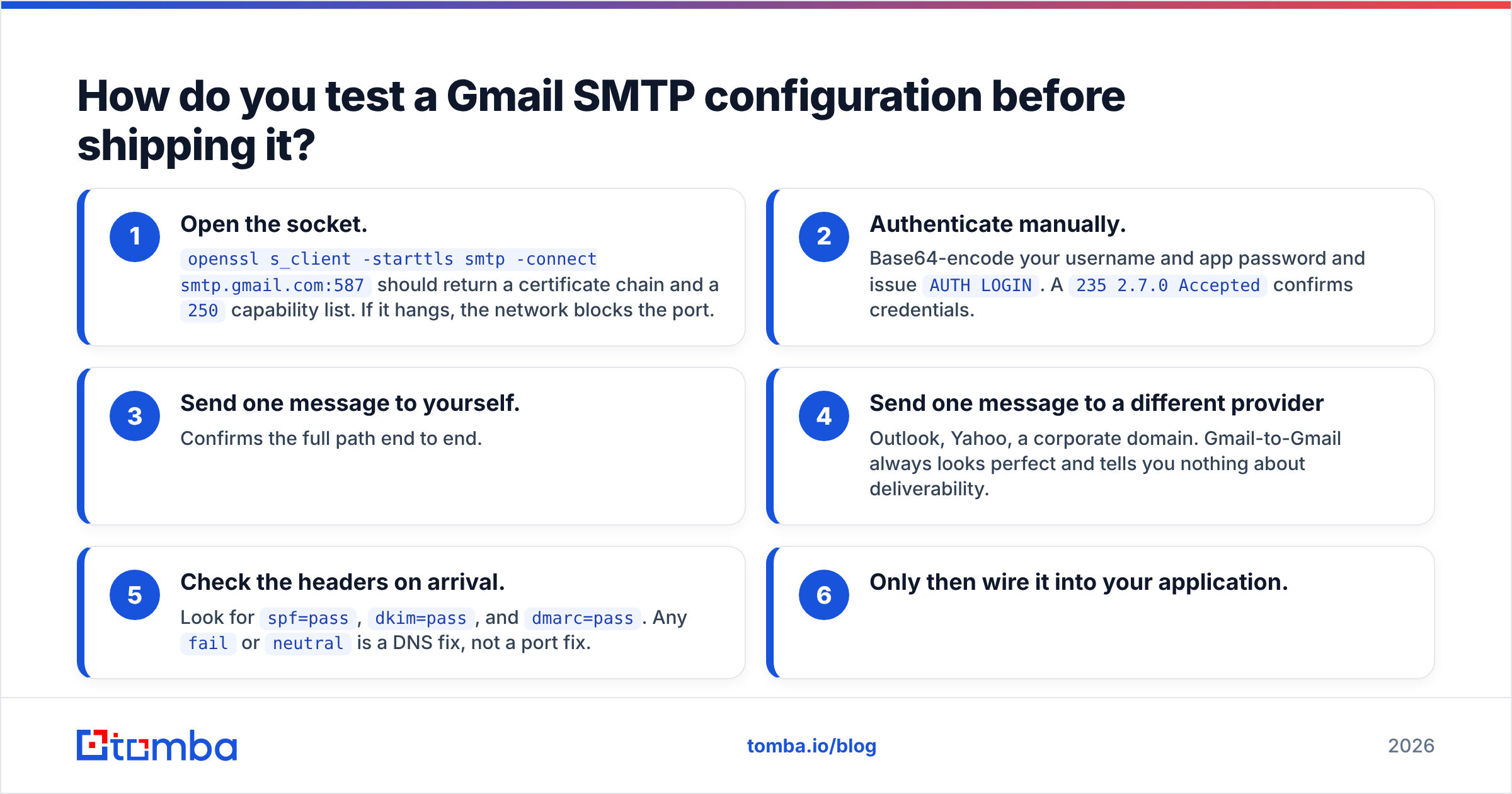
How do you test a Gmail SMTP configuration before shipping it?#
Do it in this order, and stop at the first failure:
- Open the socket.
openssl s_client -starttls smtp -connect smtp.gmail.com:587should return a certificate chain and a250capability list. If it hangs, the network blocks the port. - Authenticate manually. Base64-encode your username and app password and issue
AUTH LOGIN. A235 2.7.0 Acceptedconfirms credentials. - Send one message to yourself. Confirms the full path end to end.
- Send one message to a different provider — Outlook, Yahoo, a corporate domain. Gmail-to-Gmail always looks perfect and tells you nothing about deliverability.
- Check the headers on arrival. Look for
spf=pass,dkim=pass, anddmarc=pass. Anyfailorneutralis a DNS fix, not a port fix. - Only then wire it into your application.
Most teams skip step four and ship a config that works flawlessly inside Google and lands in Junk everywhere else.
What is the one-line answer?#
Use smtp.gmail.com on port 587 with STARTTLS, authenticate with a full email address and a 16-character app password, and use 465 only when your client cannot negotiate STARTTLS. Port 25 is not an option for Gmail submission, and port 2525 belongs to other vendors.
Everything else that goes wrong — bounces, spam placement, throttling — happens after the port has already done its job.
Sending to a list you actually verified? The fastest way to keep your Gmail or ESP reputation intact is to only mail addresses that exist and belong to real people at real companies. Tomba Email Finder locates verified professional addresses by domain, name, or company, with confidence scoring and source attribution on every result — so your bounce rate stays low regardless of which port you send from. Start on the free tier with 25 searches a month, or check Tomba pricing if you need bulk volume at $49/mo.
Related guides#
Ready to find emails that actually work?
Join 150,000+ professionals who stopped guessing and started sending. Free credits on signup — no credit card required.
Get the Tomba newsletter
Practical outbound tactics and product updates — once every two weeks.
About the author