Gmail Promotions Tab: Why Emails Land There and How to Escape
The Gmail Promotions tab is a sorting decision, not a punishment. Here's what actually triggers it, when it helps you, and the changes that reliably move cold email back to Primary.
TL;DR
- The Gmail Promotions tab is a sorting decision, not a filtering decision. Mail there is delivered, indexed, and searchable — it is not spam.
- Gmail decides the tab primarily on content signals (HTML structure, image-to-text ratio, tracked links, unsubscribe headers, bulk-send patterns) plus per-recipient engagement history.
- For cold 1:1 outbound, Promotions genuinely costs replies. For newsletters and offers, Promotions often outperforms Primary because that's where buyers go to shop.
- The fixes that move the needle are boring: plain-text-ish HTML, one link or none, no tracking pixel on first touch, clean verified lists, and a sending domain with real reputation.
- No tool can guarantee Primary placement. Anyone selling you "Primary tab guaranteed" is selling you a coin flip.
What is the Gmail Promotions tab?#
Think of Gmail's tabs like the mail sorting table in a shared apartment. Nothing gets thrown away — but bills and handwritten letters go on the counter where everyone looks, and the supermarket flyers go in the pile by the door that gets checked on Sunday. The Promotions tab is that second pile.
Technically, Gmail's tabbed inbox (Primary, Promotions, Social, Updates, Forums) launched in 2013 and is a classification layer that runs after spam filtering. Your message has already passed authentication, reputation, and content-spam checks by the time tabbing happens. Promotions is a shelf inside the inbox, not a trash can.
That distinction matters because most panicked "help, I landed in Promotions" posts treat it as a deliverability failure. It isn't. Real email deliverability failures look like bounces, spam-folder placement, or silent blocking. Tab placement is a UX decision Google makes on the recipient's behalf.
How does Gmail decide which tab you land in?#
Google has never published the full model, but the observable inputs cluster into five buckets:
- Message structure — multipart HTML with heavy templating, table layouts, hosted CSS, and a footer block reads as bulk mail. A short text/plain-dominant message reads as correspondence.
- Link and image density — one image and three tracked CTAs is a promotion. Zero images and one bare link is a note from a human.
- List-Unsubscribe headers — required by Google's bulk-sender rules and a strong tabbing signal. Including it on a genuine 1:1 cold email is a self-inflicted Promotions ticket.
- Sending pattern — thousands of near-identical messages from one domain in one hour is a campaign, regardless of merge tags.
- Recipient behavior — if that specific person has replied to you, starred you, or added you to contacts, Gmail will drag you toward Primary and keep you there.
The fifth bucket outranks the other four over time. Gmail is personalized. Two recipients can get byte-identical messages and see them in different tabs.
Is the Promotions tab actually bad?#
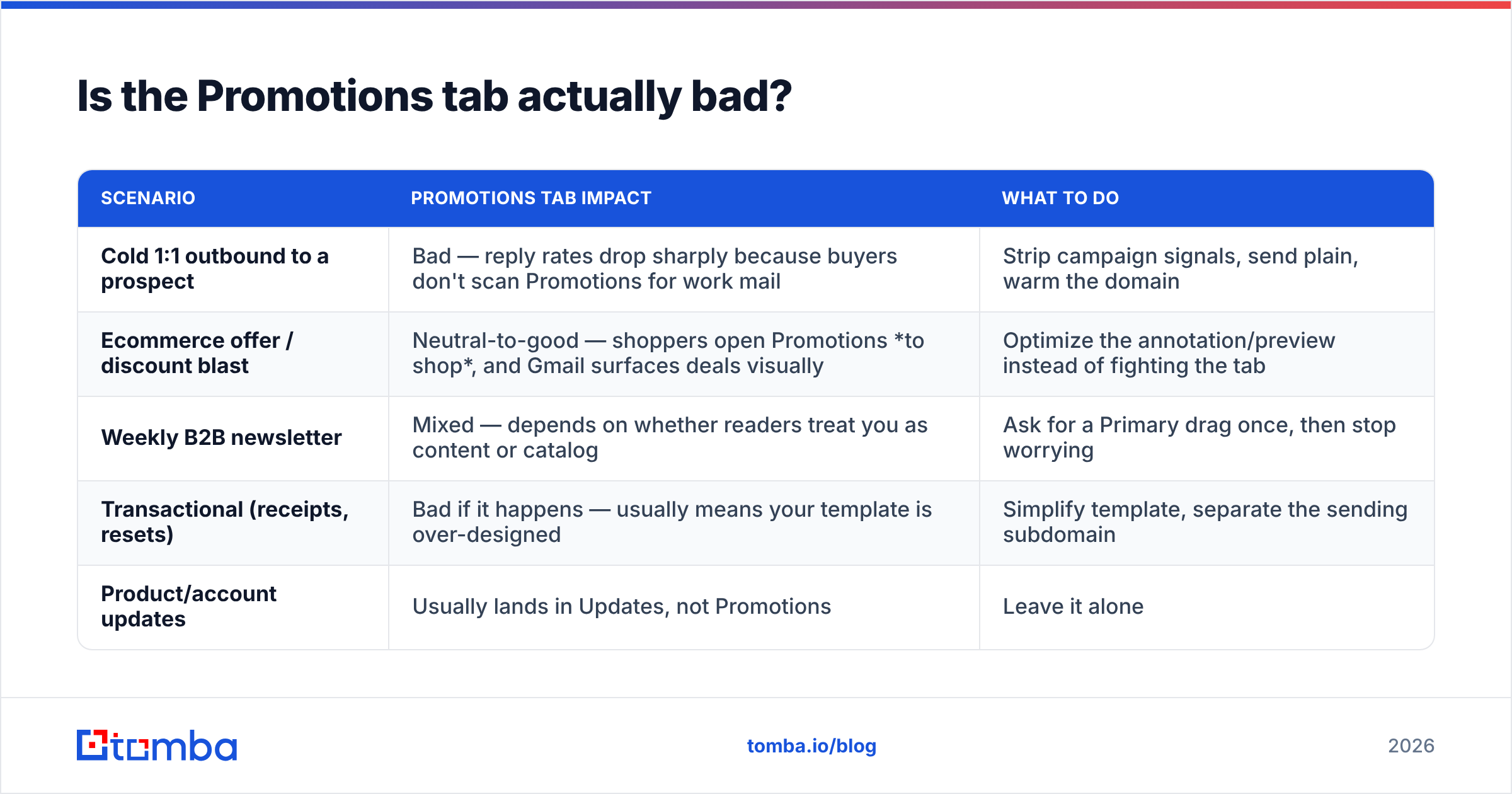
Depends entirely on what you sent. Here's the honest split.
| Scenario | Promotions tab impact | What to do |
|---|---|---|
| Cold 1:1 outbound to a prospect | Bad — reply rates drop sharply because buyers don't scan Promotions for work mail | Strip campaign signals, send plain, warm the domain |
| Ecommerce offer / discount blast | Neutral-to-good — shoppers open Promotions to shop, and Gmail surfaces deals visually | Optimize the annotation/preview instead of fighting the tab |
| Weekly B2B newsletter | Mixed — depends on whether readers treat you as content or catalog | Ask for a Primary drag once, then stop worrying |
| Transactional (receipts, resets) | Bad if it happens — usually means your template is over-designed | Simplify template, separate the sending subdomain |
| Product/account updates | Usually lands in Updates, not Promotions | Leave it alone |
Two data points worth internalizing. First, Google's own guidance to senders in Email sender guidelines says nothing about tab placement — the entire document is about authentication, spam rate, and unsubscribe. Google does not consider Promotions a penalty, so there is no "fix" documented anywhere. Second, retail marketers who ran Primary-forcing experiments repeatedly reported flat or lower revenue: intent-driven shoppers browse the Promotions tab deliberately.
So the correct question isn't "how do I always hit Primary." It's "does the reader I want treat this tab as work or as shopping?"
Why do your cold emails land in Promotions?#
If you're doing outbound and consistently landing in Promotions, run through this list before touching anything exotic.
- You're sending HTML that looks like a template. Even a "simple" signature block with a logo image, social icons, and a colored divider is enough. A tracked logo image plus a styled button is a near-guaranteed Promotions classification.
- You added a tracking pixel to the first touch. A 1x1 transparent GIF hosted on a shared tracking domain is one of the loudest bulk signals in existence, and shared open-tracking domains carry other senders' reputation baggage.
- Every link is wrapped by your sequencer. Link-wrapping rewrites your clean domain into
track.somesender.io/xyz123. To Gmail that's a redirect chain owned by a known bulk platform. - You included List-Unsubscribe on a personal email. It's the right call for marketing. On genuine 1:1 prospecting it declares "this is a campaign."
- Your domain has no history. A domain registered six weeks ago that suddenly sends 400 emails a day has no reputation to lean on, so Gmail falls back on content signals — and content signals say "bulk."
- Your list is dirty. Bounces and spam-trap hits degrade domain reputation, which pushes borderline messages down. Running a email verifier pass before send is the cheapest fix on this list.
That last point is underrated. Tab placement and inbox placement share the same reputation substrate. You cannot content-hack your way past a 12% bounce rate.
How do you check where your email actually lands?#
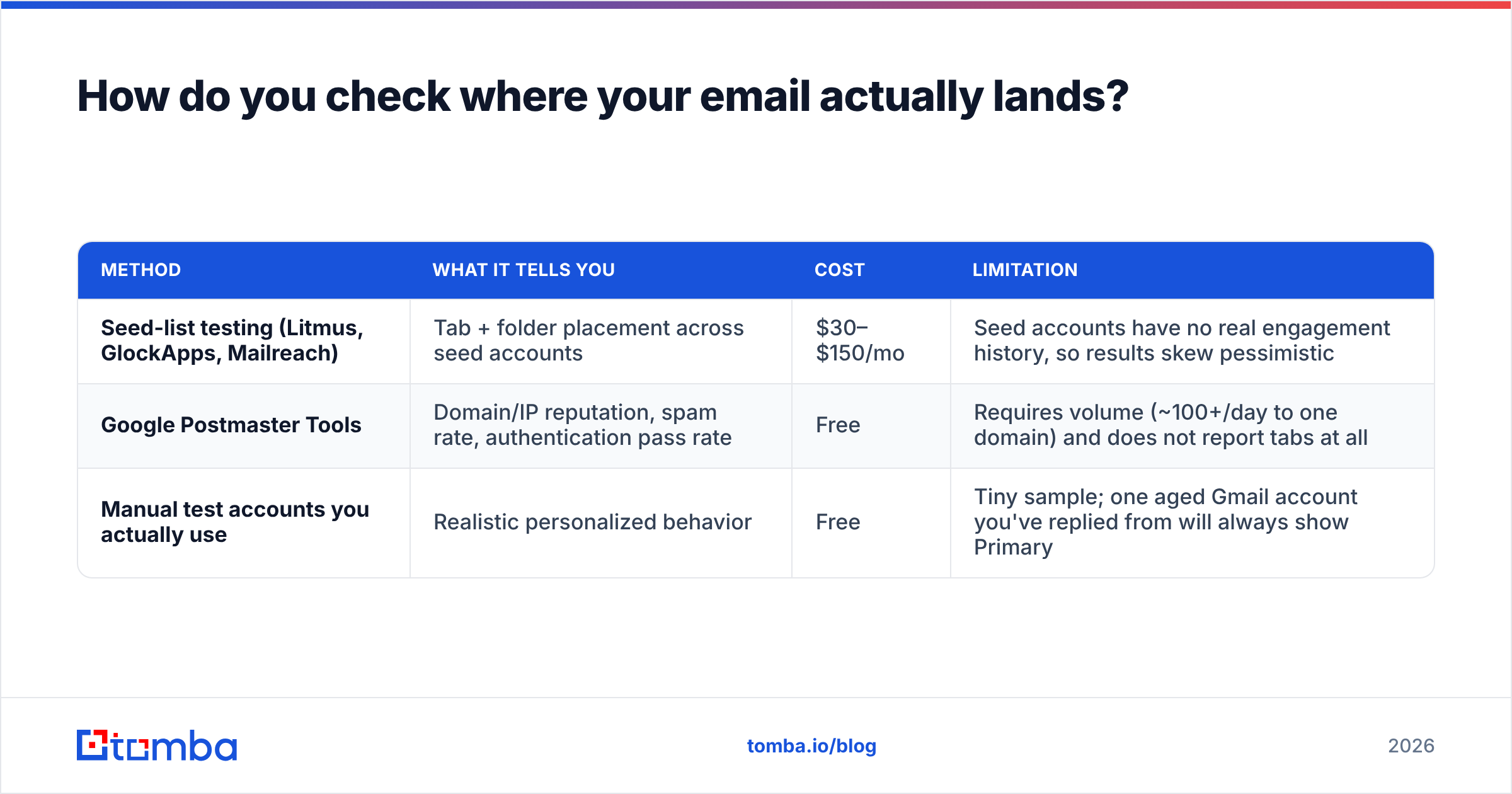
Guessing is the most common mistake. Three practical methods, in order of reliability:
| Method | What it tells you | Cost | Limitation |
|---|---|---|---|
| Seed-list testing (Litmus, GlockApps, Mailreach) | Tab + folder placement across seed accounts | $30–$150/mo | Seed accounts have no real engagement history, so results skew pessimistic |
| Google Postmaster Tools | Domain/IP reputation, spam rate, authentication pass rate | Free | Requires volume (~100+/day to one domain) and does not report tabs at all |
| Manual test accounts you actually use | Realistic personalized behavior | Free | Tiny sample; one aged Gmail account you've replied from will always show Primary |
Set up Google Postmaster Tools regardless. It won't tell you about tabs, but if your spam rate creeps above 0.10% or your domain reputation drops to "Low," the tab conversation is moot — you have a bigger problem. Before you send, run copy through a spam checker and confirm your SPF record, DKIM, and DMARC all pass.
How do you move cold email from Promotions to Primary?#
There's no switch. There is a stack of changes that shift probability, ordered by impact-per-effort:
- Send text/plain or minimal HTML. No tables, no inline CSS beyond basic paragraph spacing, no hosted images. If your email would still render fine as a text file, you're in good shape.
- Kill the image signature. Replace the logo, headshot, and social icons with three lines of plain text. This single change flips more messages to Primary than any other.
- Disable open tracking on first touch. You lose open-rate reporting — which was already unreliable after Apple Mail Privacy Protection. You gain placement. Turn click tracking off too, or at least use a custom tracking domain on your own root.
- Use one link maximum, unwrapped. Zero links in the first email is even better. Ask a question that requires a reply, not a click.
- Drop List-Unsubscribe from genuine 1:1 mail and put a plain-English opt-out line in the body instead ("tell me to stop and I will").
- Warm the domain and throttle volume. New domain, 5–10 sends/day, ramp over 4–6 weeks. Use an email warmup calculator to build the ramp instead of guessing.
And the honest caveat: the "ask recipients to drag you to Primary" tactic works, but only per-recipient and only after they do it. Putting "drag this to your Primary tab!" in a cold email to a stranger is a Promotions signal in itself — it's language only marketers use. Save it for opted-in newsletter subscribers, where it's both credible and effective.
What about volume — does personalization actually help?#
Yes, but not the way most sequencers implement it. Swapping {{first_name}} and {{company}} into an otherwise identical body produces thousands of messages with a ~95% identical shingle profile. Gmail's near-duplicate detection sees that easily.
What actually breaks the pattern:
- Variable structure, not variable tokens. Different opening lines, different lengths, different paragraph counts across your list.
- Smaller batches from more mailboxes. 30/day across four mailboxes beats 120/day from one, and it caps the blast radius when one mailbox gets flagged.
- Genuinely researched first lines that reference something specific — a job posting, a recent funding round, a conference talk.
This is where data quality quietly determines placement. Personalization requires accurate role, company, and contact data; guessed emails produce bounces and generic copy at the same time. Pulling verified contacts from a domain search and enriching them properly gives you both the deliverability floor and the raw material for non-templated writing.
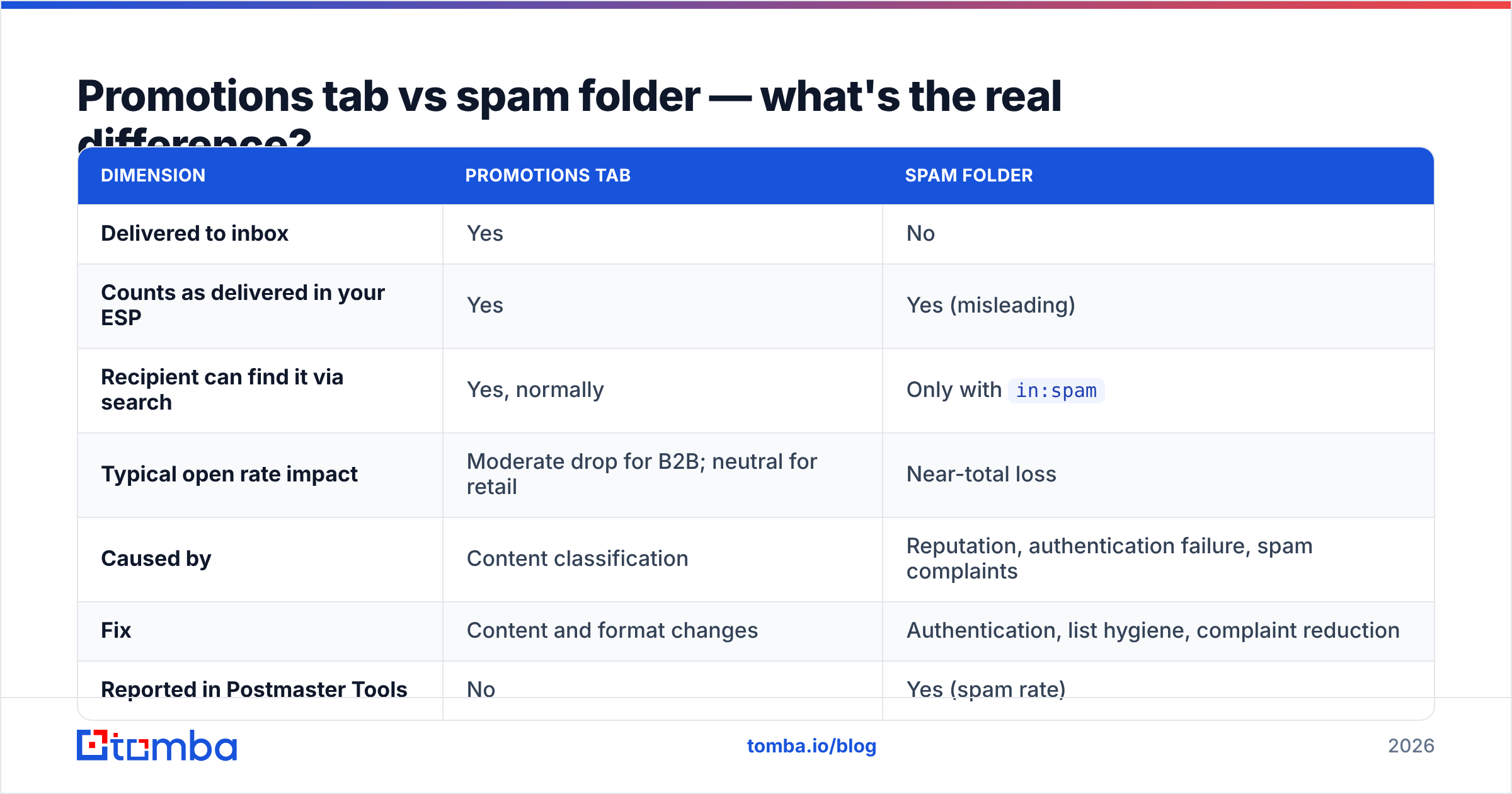
Promotions tab vs spam folder — what's the real difference?#
| Dimension | Promotions tab | Spam folder |
|---|---|---|
| Delivered to inbox | Yes | No |
| Counts as delivered in your ESP | Yes | Yes (misleading) |
| Recipient can find it via search | Yes, normally | Only with in:spam |
| Typical open rate impact | Moderate drop for B2B; neutral for retail | Near-total loss |
| Caused by | Content classification | Reputation, authentication failure, spam complaints |
| Fix | Content and format changes | Authentication, list hygiene, complaint reduction |
| Reported in Postmaster Tools | No | Yes (spam rate) |
If you only remember one row: Promotions is a content problem, spam is a reputation problem. Applying spam-folder fixes (more DMARC, more warmup) to a tab problem wastes weeks, and applying tab fixes (plainer HTML) to a reputation problem wastes even more.
Should marketers fight the Promotions tab at all?#
For most marketing programs — no, and the case against fighting it is stronger than the case for.
Gmail actively invests in the Promotions tab as a shopping surface: annotations, deal badges, expiry dates, product images, and bundling in the mobile app. Google is building a destination, not a dumping ground. Fighting that means opting out of every feature designed to make your mail more clickable in the place shoppers already look.
The exception is B2B where the recipient is at work with a task-oriented inbox. A VP of Engineering does not browse Promotions. There, Primary placement is genuinely worth a plainer template and lost open-tracking data.
Practical rule: segment by intent. Send transactional and 1:1 sales mail from a plain-text-first setup on one subdomain; send marketing and lifecycle mail from a designed template on another. Separate reputations, separate expectations, no compromise template trying to serve both. Check where you stand today with a sender reputation checker before you split domains, so you know which side inherits the history.
What doesn't work (stop doing these)#
- Zero-width characters and Unicode tricks in subject lines. These were partially effective in 2016. Today they read as evasion and are a spam signal in their own right.
- "Re:" or "Fwd:" prefixes on first contact. Deceptive, doesn't change classification meaningfully, and torches trust when the reader notices.
- Removing your unsubscribe from actual marketing mail. For bulk senders this violates Google's requirements and puts you at risk of far worse than a tab.
- Buying "Primary tab placement" services. Placement is per-recipient and personalized. Nobody controls it externally. What these services actually sell is warmup networks that inflate engagement metrics — which Google has been demoting for years.
- Obsessing over a single subject-line word. "Free" in your subject is not what put you in Promotions. Your image-heavy signature and three wrapped links did.
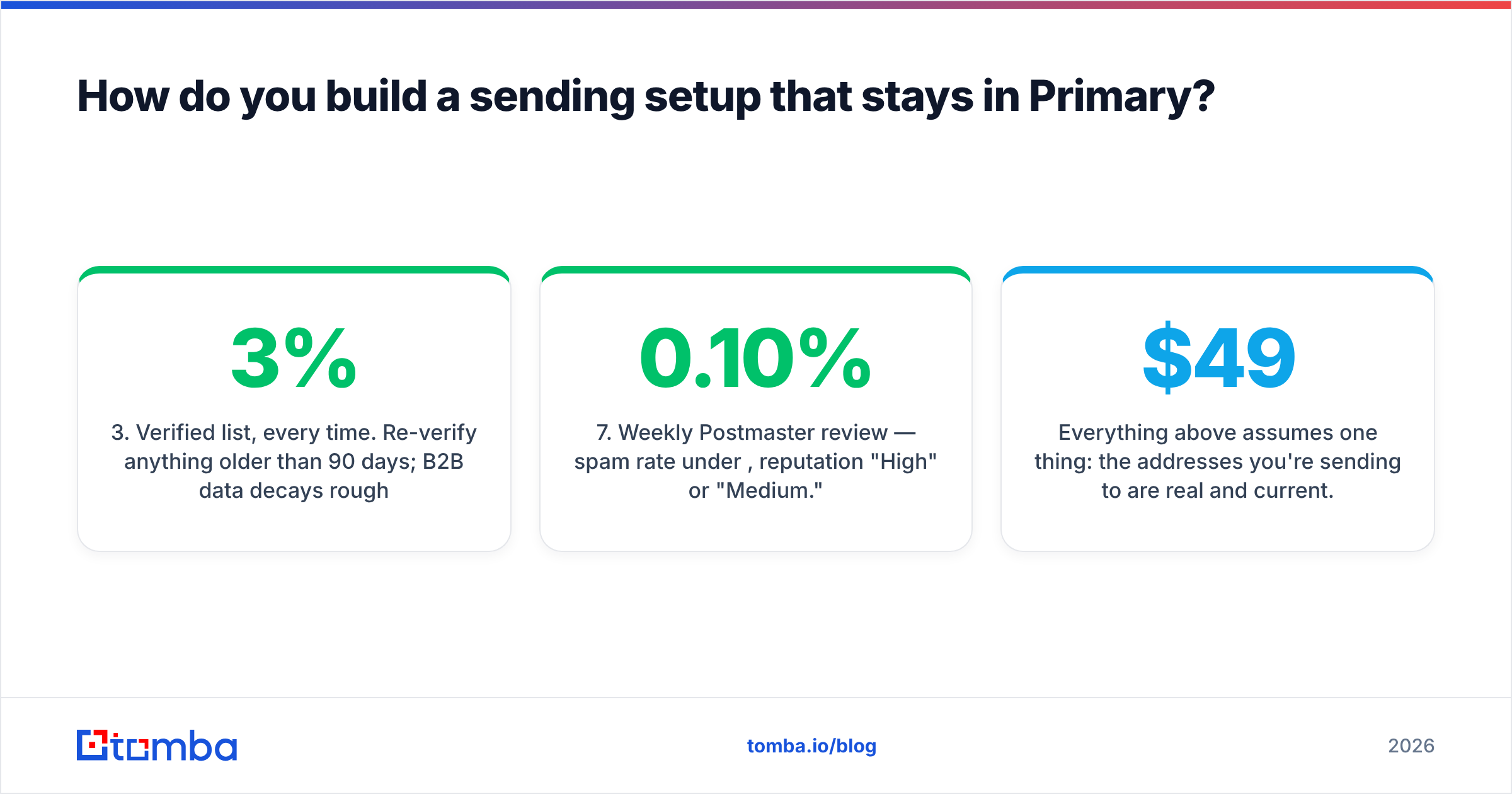
How do you build a sending setup that stays in Primary?#
Working checklist for a cold outbound program in 2026:
- Separate domain (not your main corporate domain), aged 4+ weeks before real sending.
- Full authentication — SPF, DKIM, DMARC at
p=noneminimum, moving to quarantine once aligned. - Verified list, every time. Re-verify anything older than 90 days; B2B data decays roughly 2–3% per month.
- Plain-text-first templates with a text signature and at most one unwrapped link.
- Tracking off on first touch, custom tracking domain on later touches if you need it at all.
- Volume caps — 30–50/day per mailbox after ramp, never a Monday-morning spike.
- Weekly Postmaster review — spam rate under 0.10%, reputation "High" or "Medium."
None of that is glamorous. All of it compounds. The senders who consistently sit in Primary are the ones who fixed the boring layer and stopped hunting for tricks.
Everything above assumes one thing: the addresses you're sending to are real and current. Bounces sink domain reputation, and a sunk reputation drags borderline messages out of Primary faster than any HTML change can pull them back. The Tomba Email Finder sources professional addresses by name, domain, or company and returns a confidence score with each result, so you can send to verified contacts instead of permutated guesses. Start on the free tier (25 searches/month) and step up to Starter at $49/month when your volume justifies it — see Tomba pricing for the full breakdown.
Related guides#
Ready to find emails that actually work?
Join 150,000+ professionals who stopped guessing and started sending. Free credits on signup — no credit card required.
Get the Tomba newsletter
Practical outbound tactics and product updates — once every two weeks.
About the author