Gmail Validator: How to Verify Gmail Addresses in 2026
Gmail rejects bad addresses quietly and dots don't matter — so most validators guess. Here's how Gmail validation actually works, which checks are real, and what a Gmail validator can and can't prove.
TL;DR
- Gmail is the hardest mailbox provider to validate because Google's SMTP servers stopped giving reliable per-address answers — most "gmail validator" tools that claim 99% accuracy on
@gmail.comare inferring, not confirming. - Dots and
+tagsare ignored by Gmail, sojohn.smith@gmail.com,johnsmith@gmail.com, andjohnsmith+news@gmail.comall land in the same inbox. A validator that treats them as different records will inflate your list. - Syntax and MX checks are cheap and definitive for invalid; SMTP-level checks are the only thing that can suggest valid, and on Gmail they're weak.
- Google Workspace addresses on custom domains (
name@company.comrouted through Google) validate far better than consumer@gmail.com— that distinction matters more than the tool you pick. - For B2B outbound, the real fix is not validating consumer Gmail harder — it's sourcing corporate addresses in the first place.
What is a Gmail validator?#
A gmail validator is a tool that checks whether a @gmail.com (or @googlemail.com) address is real, deliverable, and safe to send to — before you put it in a campaign and eat a bounce.
Think of it like checking whether a house number exists on a street. You can confirm the street exists (the domain), confirm the address is formatted like a real address (syntax), and confirm mail carriers deliver there (MX records). But knocking on the door to see if anyone lives at unit 4B? Google stopped answering the door. That last step — the one that actually proves the mailbox exists — is where Gmail validation gets genuinely hard, and where most vendor accuracy claims quietly fall apart.
Standard email verification runs a chain of checks. On most domains the chain terminates in a clear yes or no. On Gmail it terminates in a shrug that gets dressed up as a yes.
How does Gmail validation actually work, step by step?#
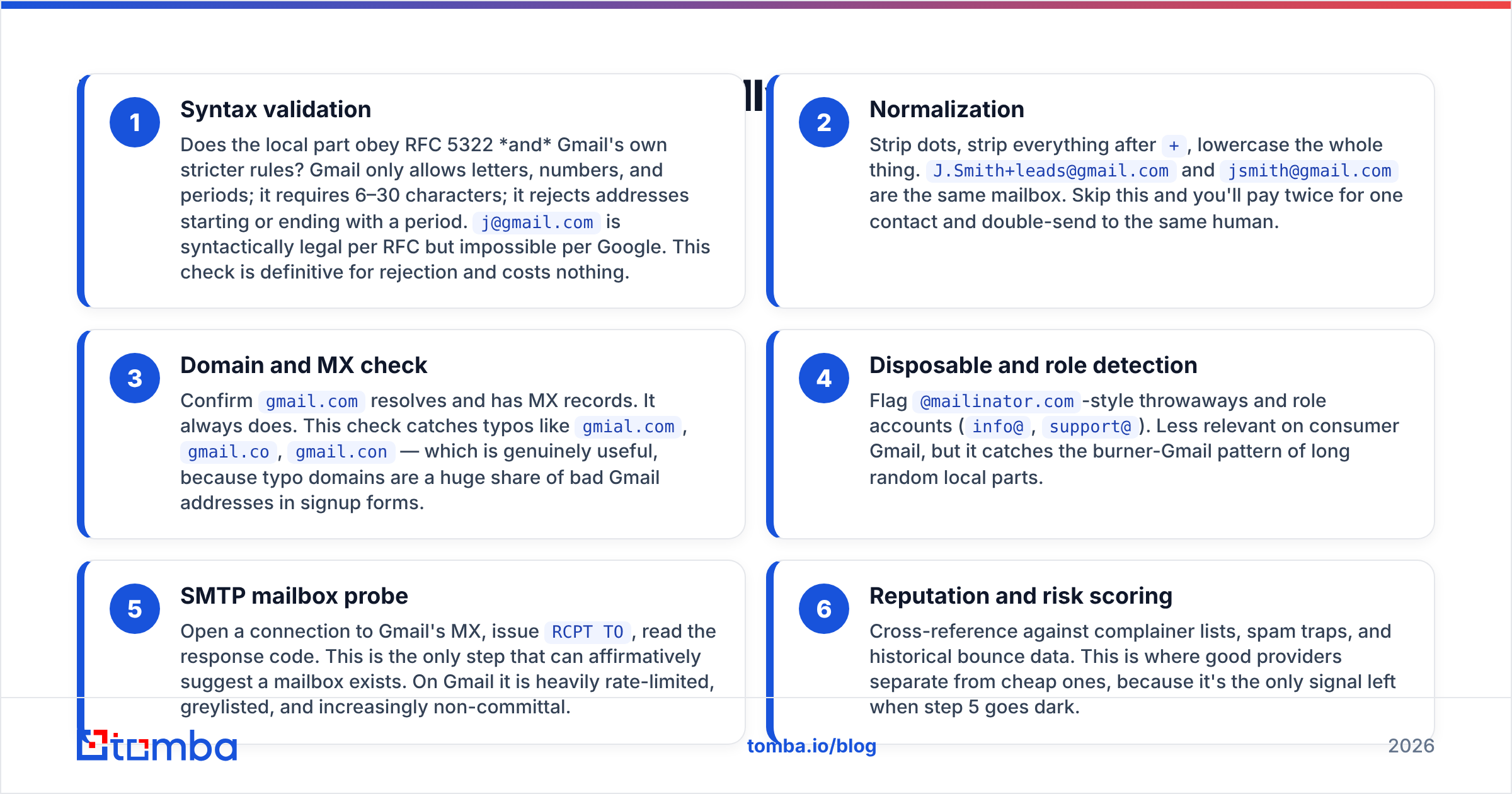
Here is the real chain, in the order any competent validator runs it, with what each step can and cannot prove on Gmail specifically.
- Syntax validation — Does the local part obey RFC 5322 and Gmail's own stricter rules? Gmail only allows letters, numbers, and periods; it requires 6–30 characters; it rejects addresses starting or ending with a period.
j@gmail.comis syntactically legal per RFC but impossible per Google. This check is definitive for rejection and costs nothing. - Normalization — Strip dots, strip everything after
+, lowercase the whole thing.J.Smith+leads@gmail.comandjsmith@gmail.comare the same mailbox. Skip this and you'll pay twice for one contact and double-send to the same human. - Domain and MX check — Confirm
gmail.comresolves and has MX records. It always does. This check catches typos likegmial.com,gmail.co,gmail.con— which is genuinely useful, because typo domains are a huge share of bad Gmail addresses in signup forms. - Disposable and role detection — Flag
@mailinator.com-style throwaways and role accounts (info@,support@). Less relevant on consumer Gmail, but it catches the burner-Gmail pattern of long random local parts. - SMTP mailbox probe — Open a connection to Gmail's MX, issue
RCPT TO, read the response code. This is the only step that can affirmatively suggest a mailbox exists. On Gmail it is heavily rate-limited, greylisted, and increasingly non-committal. - Reputation and risk scoring — Cross-reference against complainer lists, spam traps, and historical bounce data. This is where good providers separate from cheap ones, because it's the only signal left when step 5 goes dark.

The important thing to internalize: steps 1–4 are cheap, fast, and reliable. They tell you an address is definitely bad. They can never tell you an address is definitely good. Step 5 is the only one that tries, and Gmail is the domain where it tries hardest and succeeds least.
Why is Gmail harder to validate than other domains?#
Because Google deliberately made per-address probing useless as an anti-harvesting measure.
On a typical corporate domain running Microsoft 365 or a self-hosted server, an SMTP RCPT TO for a nonexistent user returns a 550 5.1.1 User unknown and you have your answer. Google's inbound servers behave differently:
- They accept-then-bounce. Gmail frequently returns a
250 OKat the SMTP transaction stage and only generates a bounce later, asynchronously. Your validator sees250and calls it valid. The bounce arrives three days later in your campaign stats. - They greylist aggressively. Repeated probes from the same IP get
421deferrals. A validator that interprets a deferral as "unknown" is honest. One that retries from a rotating pool and eventually gets a250is manufacturing confidence. - They rate-limit by IP reputation. The more Gmail addresses you validate from one pool of IPs, the less informative the answers get. Bulk Gmail validation degrades as it scales, which is the opposite of what you want.
- Dot-blindness inflates the address space. Every mailbox has effectively infinite aliases. There's no such thing as an "invalid dot placement," so syntax gives you almost no discriminating power on the local part.
The practical consequence: when a vendor advertises "99.9% accuracy," ask what percentage of their test set was @gmail.com. Most public accuracy benchmarks lean heavily on corporate domains, where SMTP still works. Google's own Postmaster Tools documentation is where you go for aggregate deliverability signals — not per-address confirmation, which Google simply does not offer as a service.

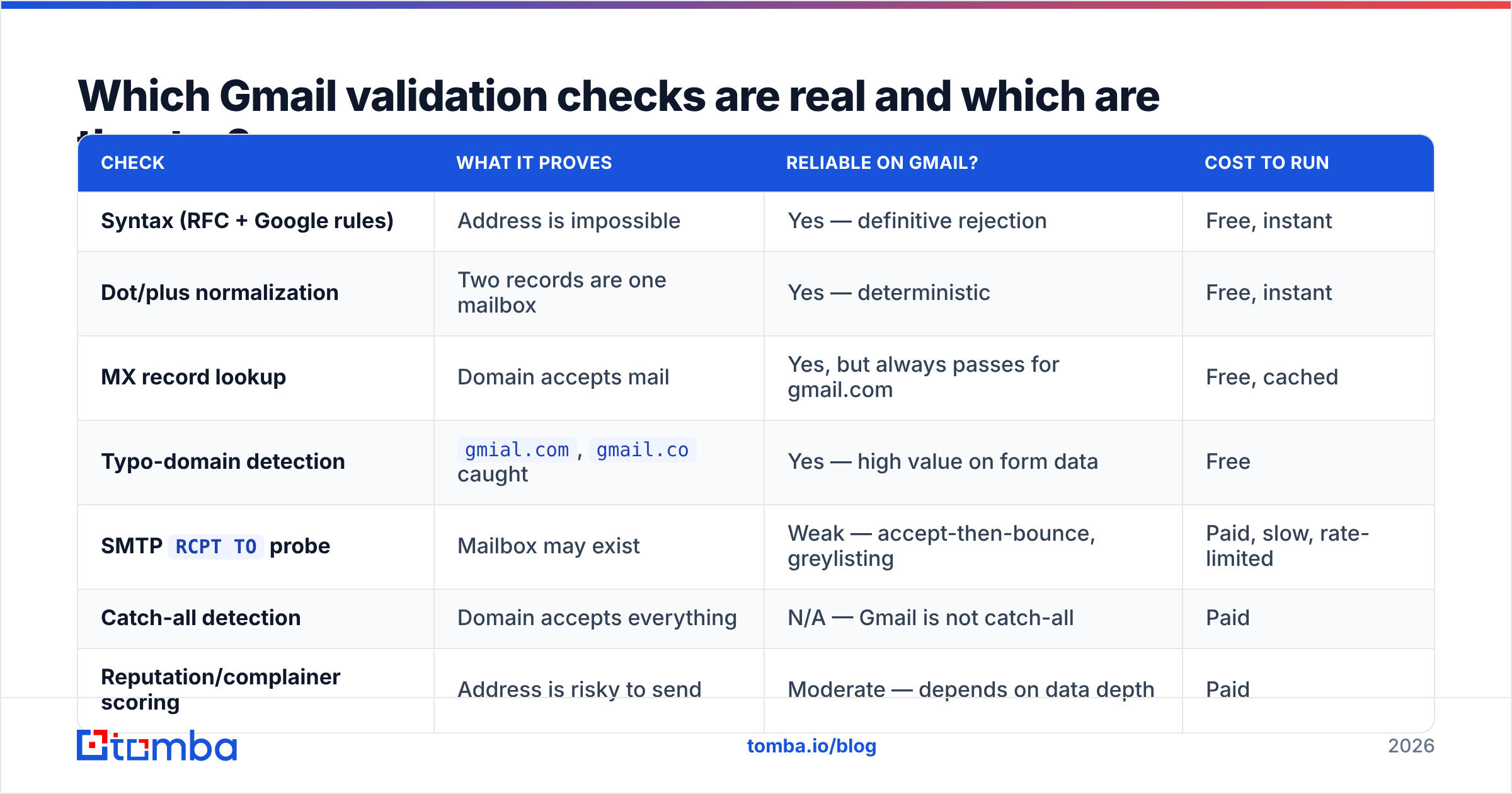
Which Gmail validation checks are real and which are theater?#
| Check | What it proves | Reliable on Gmail? | Cost to run |
|---|---|---|---|
| Syntax (RFC + Google rules) | Address is impossible | Yes — definitive rejection | Free, instant |
| Dot/plus normalization | Two records are one mailbox | Yes — deterministic | Free, instant |
| MX record lookup | Domain accepts mail | Yes, but always passes for gmail.com | Free, cached |
| Typo-domain detection | gmial.com, gmail.co caught |
Yes — high value on form data | Free |
SMTP RCPT TO probe |
Mailbox may exist | Weak — accept-then-bounce, greylisting | Paid, slow, rate-limited |
| Catch-all detection | Domain accepts everything | N/A — Gmail is not catch-all | Paid |
| Reputation/complainer scoring | Address is risky to send | Moderate — depends on data depth | Paid |
| "AI-powered" existence prediction | Vendor has a model | Unverifiable — treat as a hint | Paid |
Read that table as a hierarchy of trust. The free checks are the ones you can rely on. The expensive checks are the ones vendors market hardest. That inversion is the single most useful thing to know about Gmail validation.
If you're validating form signups, a free email checker covering syntax, typo domains, and MX will catch the overwhelming majority of bad Gmail entries — because most bad Gmail entries in forms are typos and fake-but-plausible strings, not carefully-crafted nonexistent mailboxes.
Is a Gmail validator worth paying for?#
It depends entirely on which Gmail you mean.
Consumer @gmail.com, B2C list hygiene: Yes, but set expectations. You're buying typo correction, disposable detection, complainer-list screening, and duplicate collapsing via normalization. You are not buying mailbox existence proof. Priced correctly (fractions of a cent per address), that's still worth it — a 3% bounce reduction on a 200k list protects your sender reputation at Google, which is the whole game.
Google Workspace on a custom domain, B2B outbound: Yes, and here it works properly. Workspace domains often expose usable SMTP responses, and you get catch-all detection, role-account flagging, and pattern inference that genuinely apply. This is the case where validation accuracy claims hold up.
Building a B2B prospect list out of consumer Gmail addresses: No. Fix the input, not the filter. A @gmail.com address for a VP of Engineering is a personal address you probably shouldn't be cold-emailing anyway — it's outside the business-context expectation that keeps outreach compliant and welcome. Sourcing firstname@company.com via domain search gives you an address that's both validatable and appropriate.
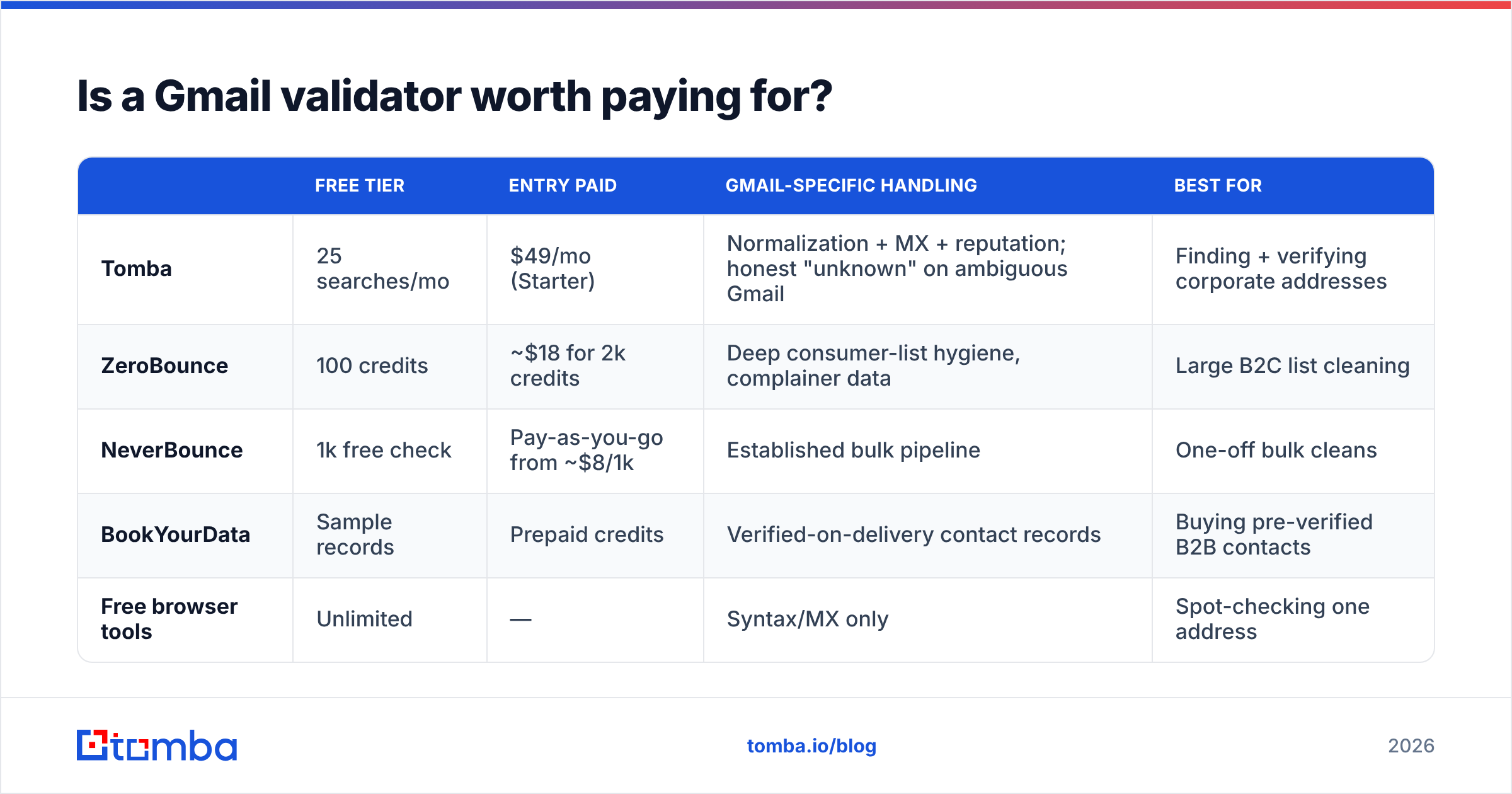
Here's the pricing reality across the category:
| Free tier | Entry paid | Gmail-specific handling | Best for | |
|---|---|---|---|---|
| Tomba | 25 searches/mo | $49/mo (Starter) | Normalization + MX + reputation; honest "unknown" on ambiguous Gmail | Finding + verifying corporate addresses |
| ZeroBounce | 100 credits | ~$18 for 2k credits | Deep consumer-list hygiene, complainer data | Large B2C list cleaning |
| NeverBounce | 1k free check | Pay-as-you-go from ~$8/1k | Established bulk pipeline | One-off bulk cleans |
| BookYourData | Sample records | Prepaid credits | Verified-on-delivery contact records | Buying pre-verified B2B contacts |
| Free browser tools | Unlimited | — | Syntax/MX only | Spot-checking one address |
Note the pattern: the tools that specialize in consumer list hygiene charge per-record and lean on reputation data. The tools that specialize in B2B lean on finding better addresses to begin with. BookYourData sits in a genuinely different lane — it sells contact records that arrive pre-verified rather than validating a list you already have, which is the right call if your bottleneck is sourcing rather than cleaning. Full Tomba pricing runs Free (25 searches/mo), Starter $49/mo, Growth $99/mo, Pro $249/mo, and Enterprise custom.

How do you validate Gmail addresses without burning your domain?#
The failure mode people don't anticipate: DIY validation damages the thing you're trying to protect.
If you write a script that opens SMTP connections to Gmail's MX servers from your own sending IP, you are doing exactly what a harvester does. Google notices. Your IP's reputation degrades, and now your actual campaigns land in spam — you've traded a bounce-rate problem for a deliverability problem, which is strictly worse because it's slower to detect and slower to repair.

Rules that keep you safe:
- Never probe from your sending IP. Validation traffic and campaign traffic must originate from different infrastructure. This is the entire reason validation services exist as a separate product category.
- Treat "unknown" as a real answer, not a failure. A validator that returns
unknownon 8% of your Gmail list is being honest. One that returnsvalidon 99% is either using better data or telling you what you want to hear. Segment unknowns into a low-volume, high-relevance send and let the actual bounce data classify them. - Validate at capture, not at send. Real-time validation on your signup form kills typos at the source. Validating a two-year-old list is damage control; validating at capture is prevention. Hook it in via the email verification API so the check runs before the record ever hits your CRM.
- Re-validate on a cadence, not once. Gmail accounts do get abandoned and eventually recycled into a bounce state. Anything older than six months deserves a re-check before a big send.
- Watch bounce codes, don't just count bounces. A
550 5.1.1from Gmail means the mailbox is genuinely gone — suppress immediately. A421or a reputation-based block means the address is probably fine and you are the problem.
For scale, run it in batches rather than address-by-address — a bulk verify job handles rate limiting and retry logic that a naive loop won't, and it does so from infrastructure that isn't yours.
What should you do instead for B2B prospecting?#
Reframe the question. "How do I validate this Gmail address?" usually means "I have a contact and only a personal email for them." The higher-leverage move is finding their work address.
Corporate email follows patterns — first.last@, flast@, first@ — and those patterns are discoverable per company. Once you know a company's pattern and an employee's name, you can construct and verify a corporate address with far more confidence than any consumer Gmail probe will ever give you. That's what an email finder does: pattern inference plus verification against a domain that still answers SMTP honestly.
The workflow that actually works:
- Start from the company domain, not the person's personal inbox. Run a domain search to see the company's live email pattern and known contacts.
- Resolve the person to that pattern. Name plus confirmed pattern beats scraped-personal-address every time.
- Verify against the corporate domain — where SMTP responses are informative and catch-all detection actually means something.
- Enrich the record with role, seniority, and company data so you can write something worth reading, using data enrichment rather than sending to a thin name-and-email row.
- Keep consumer Gmail out of cold outbound entirely. Use it for warm follow-up with people who gave it to you, and nothing else.
Independent review sites like G2's email verification category are useful for narrowing vendors, but read the reviews for what kind of list the reviewer was cleaning. A glowing review from a B2C ecommerce marketer tells you very little about B2B corporate-domain accuracy, and vice versa.
What does a realistic Gmail validation result look like?#
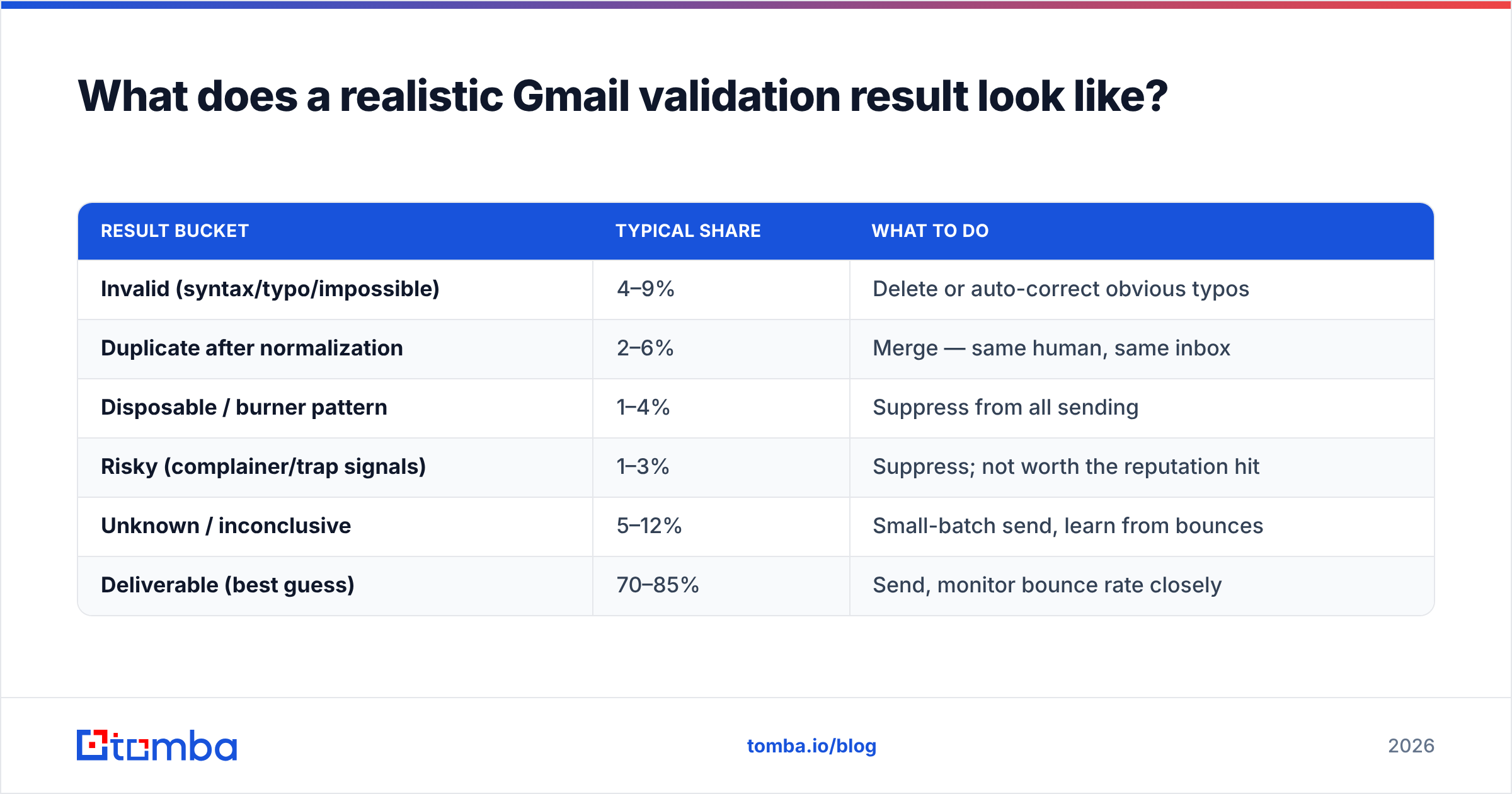
If your validator is honest, a run against a mixed list of consumer Gmail addresses should come back roughly like this:
| Result bucket | Typical share | What to do |
|---|---|---|
| Invalid (syntax/typo/impossible) | 4–9% | Delete or auto-correct obvious typos |
| Duplicate after normalization | 2–6% | Merge — same human, same inbox |
| Disposable / burner pattern | 1–4% | Suppress from all sending |
| Risky (complainer/trap signals) | 1–3% | Suppress; not worth the reputation hit |
| Unknown / inconclusive | 5–12% | Small-batch send, learn from bounces |
| Deliverable (best guess) | 70–85% | Send, monitor bounce rate closely |
If a vendor returns 97% deliverable and 0% unknown on a consumer Gmail list, that's not a better product — that's a product that has decided ambiguity is bad for conversion rates. The unknown bucket is a feature. It's the tool telling you where its knowledge ends, which is exactly the information you need to size your risk before a send.
Track your actual bounce rate against the predicted one after every campaign. That feedback loop tells you more about your validator's real accuracy than any vendor benchmark, and it costs you nothing but attention.
Where should you start?#
Start by sorting your list into consumer Gmail and corporate addresses, because they need completely different treatment. Run the free checks on everything — syntax, typo domains, normalization, MX — and you'll clear the bulk of the junk before spending a credit. Then decide whether the remaining consumer Gmail addresses are worth paid validation, or whether they should be replaced with corporate addresses entirely.
For B2B teams, that second path is almost always the right one. If you're trying to reach someone at a company, find their company address: Tomba Email Finder resolves names against live company email patterns and verifies them on domains where verification still means something. The free tier gives you 25 searches a month to test it against contacts you can independently confirm — which is the only benchmark that matters.
Related guides#
Ready to find emails that actually work?
Join 150,000+ professionals who stopped guessing and started sending. Free credits on signup — no credit card required.
Get the Tomba newsletter
Practical outbound tactics and product updates — once every two weeks.
About the author