Gmail Warm Up in 2026: The Complete Inbox-Placement Guide
Most Gmail warm-up advice is recycled myth. Here's what actually moves a new Google Workspace sending domain from spam to primary inbox in 2026 — with a real 4-week schedule, tool comparison, and the metrics that matter.

TL;DR
- Gmail warm up is not a volume ramp — it's a reputation-building exercise. Google scores engagement (replies, stars, "not spam"), not how many emails you sent yesterday.
- A new Google Workspace domain needs roughly 3–4 weeks before it can safely handle 40–50 cold sends per mailbox per day. Skipping to 100/day on week one is the single most common way domains get burned.
- Authentication comes first. Without SPF, DKIM, and DMARC aligned, no amount of warm-up traffic saves you — Google's 2024 bulk-sender rules made that permanent.
- Warm-up tools (Instantly, Warmbox, Mailreach, Lemwarm) help you build a baseline, but they plateau. Real engagement from real prospects is what carries you past the plateau.
- Your list quality is a deliverability input, not a separate concern. A 6% bounce rate undoes four weeks of warm-up in two days.
What is Gmail warm up, and what is it actually doing?#
Gmail warm up is the process of gradually establishing sending reputation for a new domain, subdomain, or mailbox so that Google's filters route your mail to the primary inbox instead of spam or the promotions tab.
Think of it like opening a line of credit. A bank doesn't hand a stranger a $50,000 limit on day one — it gives you $500, watches how you repay, then raises the ceiling. Google works the same way. A brand-new sending domain has no repayment history. Every message you send is a data point: did the recipient open it, reply, star it, delete it unread, or hit "report spam"? Google aggregates those signals into a reputation score attached to your domain, your IP, and increasingly to the content patterns you send.
Technically, the warm-up period is when Google's spam models have insufficient historical data on your sending identity and default to a conservative posture. Your job during that window is to feed the model clean signals: low bounce rates, low complaint rates, and above all, reply rates.
Two things people get wrong immediately:
- Warm-up is not a fixed calendar. There's no rule that says "day 14 = 30 emails." Google raises your ceiling based on how your traffic performs, not how long you've been at it. Bad signals extend the ramp indefinitely.
- Warm-up doesn't transfer. Reputation is per-domain and, to a meaningful extent, per-mailbox. Warming
outreach.yourco.comdoes nothing formail.yourco.com.

What has to be in place before you send the first email?#
Warm-up on a misconfigured domain is wasted effort. Google's bulk sender requirements — documented in the Gmail Postmaster guidelines — made authentication non-negotiable for anyone sending meaningful volume.
Here's the pre-flight checklist, in order:
- Buy a separate sending domain. Never warm up your primary company domain for cold outreach. Use a lookalike (
getyourco.com,yourco-team.com) so a burned reputation never touches your transactional or corporate mail. - Set up SPF, DKIM, and DMARC. All three. DMARC should start at
p=nonefor monitoring, then move top=quarantineonce you confirm alignment. Run an SPF checker before you trust your DNS panel. - Configure a custom tracking domain — or turn tracking off entirely during warm-up. Shared tracking domains from cheap sequencers are a known reputation liability.
- Age the domain 2–3 weeks before sending anything. Domains registered yesterday get extra scrutiny. Register, configure DNS, build a real one-page site, then start.
- Create no more than 2–3 mailboxes per domain. Ten inboxes on a fresh domain is a pattern Google recognizes and penalizes.
- Fill out the profile. Real name, real photo, real signature with a physical address and an unsubscribe path. Empty profiles correlate with throwaway spam accounts.
If you skip step 2, nothing else on this page matters. Aligned authentication is the entry ticket; everything after it is optimization.
What does a realistic 4-week Gmail warm up schedule look like?#
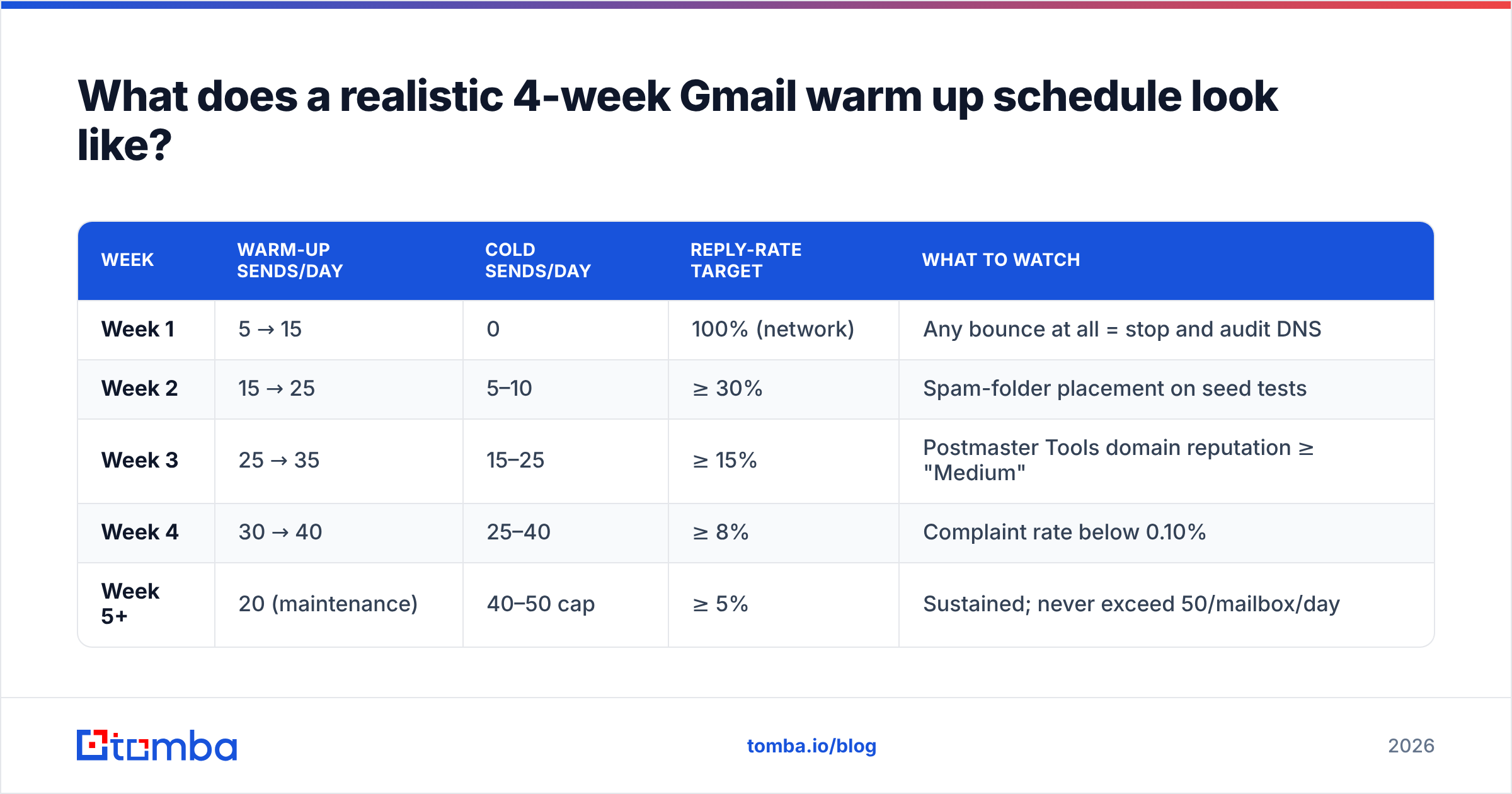
Below is a conservative ramp for a single Google Workspace mailbox. "Warm-up sends" are automated peer-network or internal emails. "Cold sends" are real prospects. Ratios matter more than raw counts.
| Week | Warm-up sends/day | Cold sends/day | Reply-rate target | What to watch |
|---|---|---|---|---|
| Week 1 | 5 → 15 | 0 | 100% (network) | Any bounce at all = stop and audit DNS |
| Week 2 | 15 → 25 | 5–10 | ≥ 30% | Spam-folder placement on seed tests |
| Week 3 | 25 → 35 | 15–25 | ≥ 15% | Postmaster Tools domain reputation ≥ "Medium" |
| Week 4 | 30 → 40 | 25–40 | ≥ 8% | Complaint rate below 0.10% |
| Week 5+ | 20 (maintenance) | 40–50 cap | ≥ 5% | Sustained; never exceed 50/mailbox/day |
Three notes on this table.
The 50/day ceiling is not arbitrary. Google Workspace allows far higher limits technically, but cold outreach above ~50 per mailbox per day reliably degrades reputation for most senders. Scale horizontally — more mailboxes, more domains — not vertically.
The reply-rate targets are the actual gate. If week 3 replies are running at 4%, do not advance to week 4 volume. Hold, fix your targeting or your copy, and re-attempt. Volume without engagement is how you teach Google you're a spammer.
Never send on a straight ramp. Real humans send irregular volumes. 22, 31, 18, 29 looks human. 20, 25, 30, 35 looks like a script.
Do Gmail warm-up tools actually work, or are they theater?#
They work, with a hard ceiling. Warm-up tools operate peer networks: your mailbox sends to thousands of other participating mailboxes, which open, reply, star, and drag your messages out of spam. Those are genuine positive engagement signals and Google does count them.
The limitation is that Google has gotten better at recognizing network traffic — near-identical send/reply cadence, generic body copy, closed-loop reciprocity across the same address pool. In 2026, warm-up networks build a floor under your reputation. They do not build a ceiling.
Practical rule: use a warm-up tool for weeks 1–4, then keep it running at low maintenance volume while real prospect engagement takes over as your dominant signal.
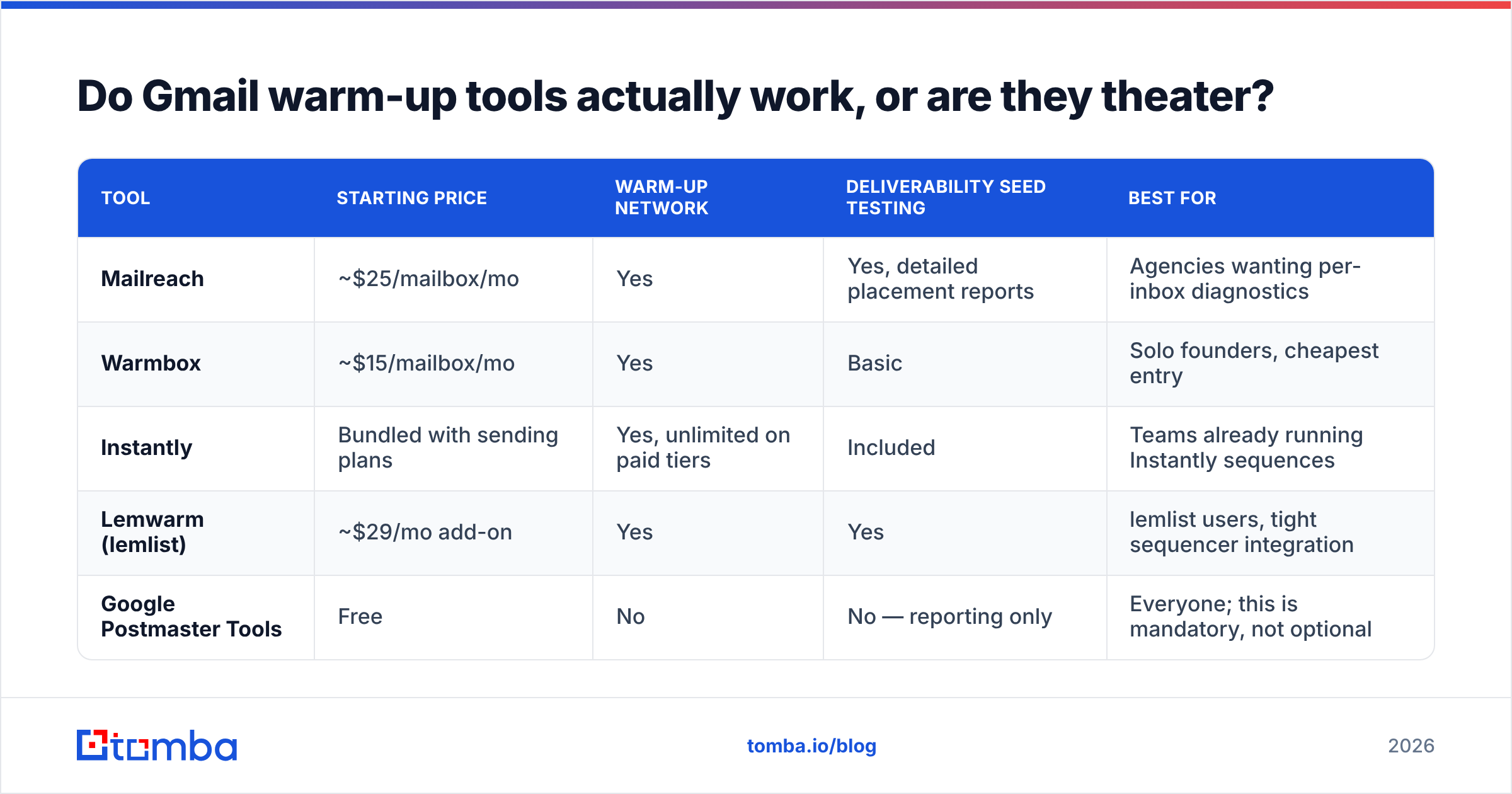
| Tool | Starting price | Warm-up network | Deliverability seed testing | Best for |
|---|---|---|---|---|
| Mailreach | ~$25/mailbox/mo | Yes | Yes, detailed placement reports | Agencies wanting per-inbox diagnostics |
| Warmbox | ~$15/mailbox/mo | Yes | Basic | Solo founders, cheapest entry |
| Instantly | Bundled with sending plans | Yes, unlimited on paid tiers | Included | Teams already running Instantly sequences |
| Lemwarm (lemlist) | ~$29/mo add-on | Yes | Yes | lemlist users, tight sequencer integration |
| Google Postmaster Tools | Free | No | No — reporting only | Everyone; this is mandatory, not optional |
Postmaster Tools belongs in that table because it's the only source of truth Google gives you. Domain reputation, spam-complaint rate, authentication pass rates, and encryption — straight from the filter that judges you. Verify your domain there on day one. If you're weighing sequencer options more broadly, our Instantly alternative breakdown covers where warm-up sits inside each platform's pricing.
Why does list quality destroy warm-up faster than volume?#
Because bounces and complaints are weighted far more heavily than sends.
Google's tolerance for hard bounces during warm-up is close to zero. A new domain sending 20 emails a day with three bounces is showing a 15% invalid rate — the exact fingerprint of scraped, unverified list. Established senders survive that; a two-week-old domain does not.
The math is unforgiving. Say you've spent 21 days building a clean reputation. You import a 2,000-contact list you bought or scraped, blast 300 over two days, and 8% bounce. That's 24 hard bounces in 48 hours against a domain with almost no positive history to offset them. Domain reputation drops to "Low," placement collapses, and you're restarting the ramp — except now you're restarting from a negative baseline, which takes longer than starting from neutral.
The fix is boring and it works: verify every address before it enters a sequence.
- Verify at import. Run the full list through an email verifier before it touches a sequencer. Target a bounce rate under 2%.
- Handle catch-all domains separately. Catch-all servers accept everything and tell you nothing. A catch-all verifier gives you a confidence score instead of a coin flip.
- Re-verify anything older than 90 days. B2B contact data decays at roughly 25–30% per year as people change jobs.
- Suppress role accounts during warm-up.
info@,support@,sales@— these generate complaints at a much higher rate and rarely reply. - Find addresses from a verified source rather than guessing patterns. Permutator-generated guesses produce exactly the bounce profile that kills new domains; a real email finder returns a confidence score with each result.

What signals should you actually be watching?#
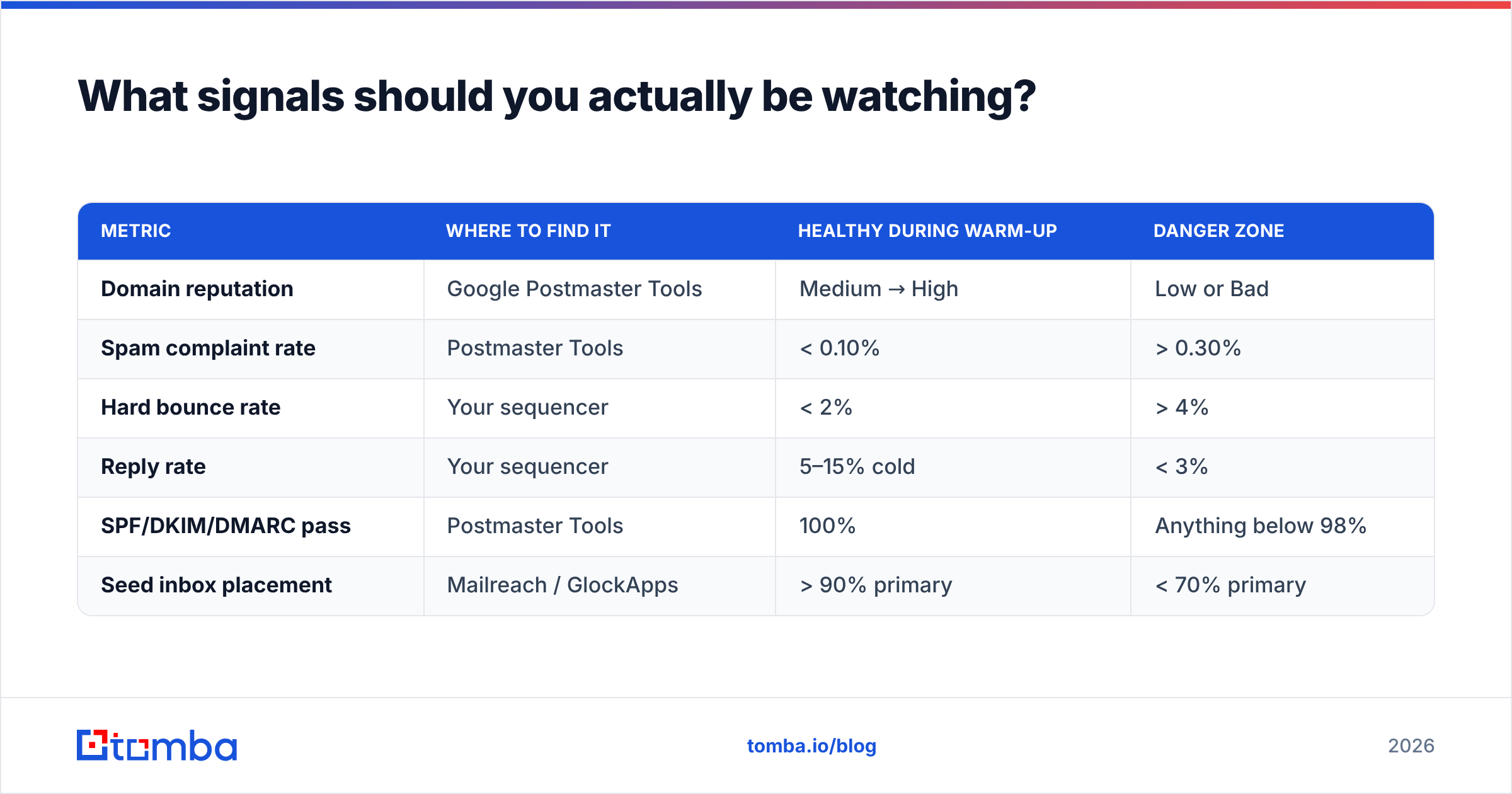
Forget open rates. Apple Mail Privacy Protection and Gmail's image proxying inflated opens into noise years ago. These are the metrics that correlate with inbox placement:
| Metric | Where to find it | Healthy during warm-up | Danger zone |
|---|---|---|---|
| Domain reputation | Google Postmaster Tools | Medium → High | Low or Bad |
| Spam complaint rate | Postmaster Tools | < 0.10% | > 0.30% |
| Hard bounce rate | Your sequencer | < 2% | > 4% |
| Reply rate | Your sequencer | 5–15% cold | < 3% |
| SPF/DKIM/DMARC pass | Postmaster Tools | 100% | Anything below 98% |
| Seed inbox placement | Mailreach / GlockApps | > 90% primary | < 70% primary |
The one to obsess over is reply rate. It's the strongest positive signal available to you and the one warm-up networks fake least convincingly. Two real replies from real prospects are worth more than forty automated network replies.
This is also why warm-up and prospecting quality are the same problem wearing different hats. Precise targeting produces replies; replies produce reputation; reputation produces placement. If you want a deeper grounding in the underlying concepts, the email deliverability and sender reputation entries in the glossary are a useful reference.
Is a subdomain better than a separate domain for warm-up?#
It depends on what you're protecting.
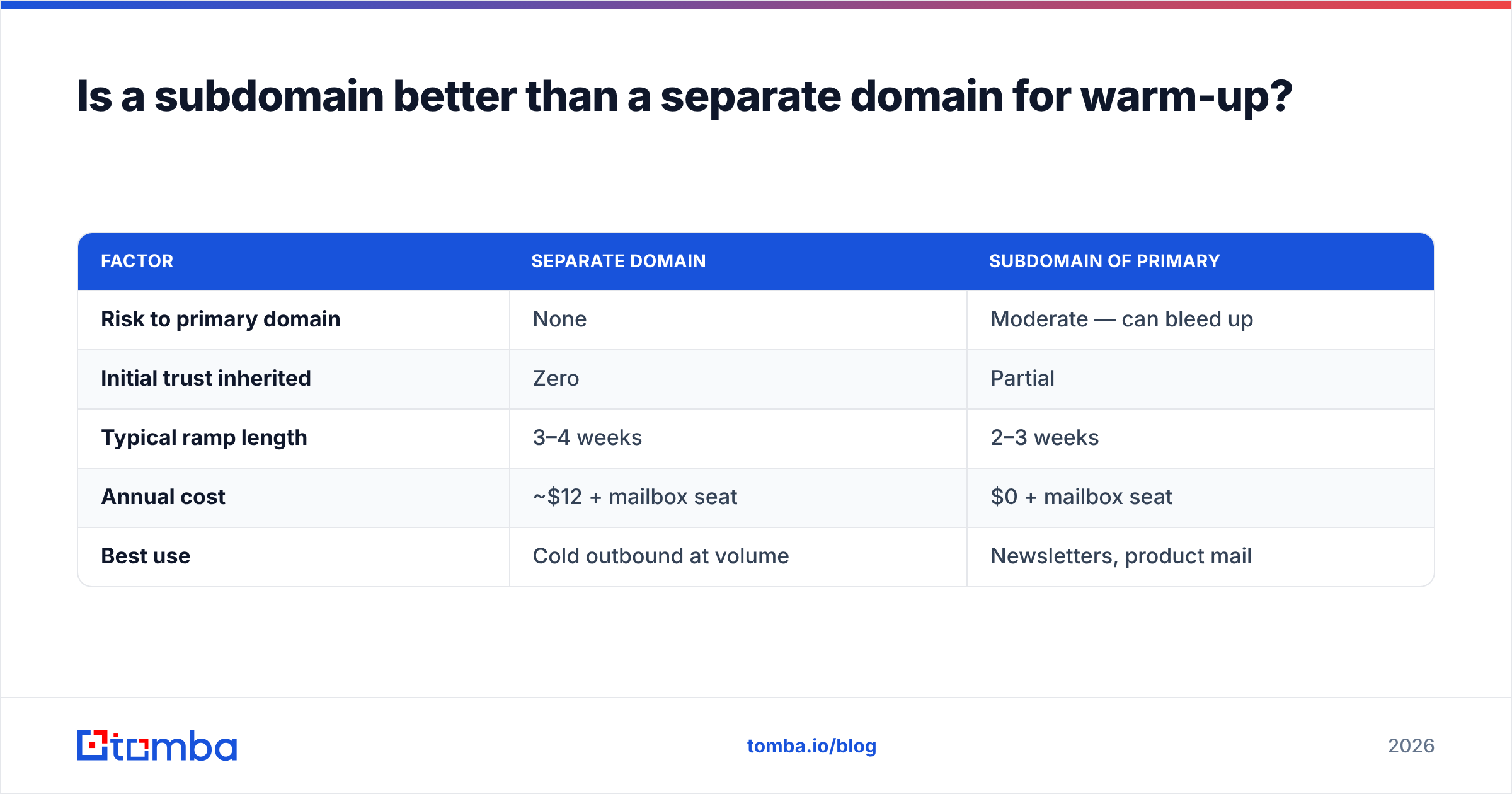
Separate domain (getyourco.com): full isolation. If cold outreach reputation collapses, your primary domain is untouched. Costs ~$12/year plus a Workspace seat. This is the right default for cold outbound.
Subdomain (outreach.yourco.com): inherits some parent-domain trust, which shortens the initial ramp slightly. But reputation damage can bleed upward to the root domain in some filtering scenarios. Reasonable for newsletters and lifecycle mail where you control list quality tightly. Risky for cold.
| Factor | Separate domain | Subdomain of primary |
|---|---|---|
| Risk to primary domain | None | Moderate — can bleed up |
| Initial trust inherited | Zero | Partial |
| Typical ramp length | 3–4 weeks | 2–3 weeks |
| Annual cost | ~$12 + mailbox seat | $0 + mailbox seat |
| Best use | Cold outbound at volume | Newsletters, product mail |
For most B2B teams running cold sequences, separate domains win. Buy three, warm them in parallel, rotate sends across them, and keep the corporate domain clean.
How long until Gmail warm up is "done"?#
It never fully is — but the intensive phase ends around day 28–35 for a well-configured domain sending to verified lists with decent copy.
Signals you've cleared the ramp:
- Postmaster domain reputation reads "High" and has held there for 7+ consecutive days.
- Seed tests land above 90% in primary, not promotions.
- Reply rate on cold sequences holds above 5% at your target volume.
- Complaint rate stays under 0.10% across a full week of maximum-volume sending.
- You can pause the warm-up tool for a week without placement degrading.
After that, shift to maintenance: keep the warm-up tool running at ~20 sends/day, keep verifying lists, and audit Postmaster Tools weekly. Reputation is a rolling 30-day window in practice — it decays if you stop feeding it and it recovers slowly if you damage it.
The teams that never have deliverability problems aren't the ones with the cleverest warm-up scripts. They're the ones sending relevant messages to verified, correctly-targeted people, consistently, at sane volumes. Warm-up buys you the entry ticket. Targeting keeps the seat.
Getting started#
Warm-up protects your ability to reach the inbox. Data quality determines whether reaching it is worth anything. If your ramp keeps stalling on bounces, the problem isn't your schedule — it's the list.
Start with verified contacts. Tomba's Email Finder returns professional email addresses with a confidence score attached, so unverifiable guesses never enter your sequencer in the first place. The free tier includes 25 searches per month to test the data against a domain you already know; paid plans start at $49/mo, with full Tomba pricing covering bulk lookups, verification, and API access for teams warming multiple domains at once.
Fix the list, then the warm-up schedule does what it's supposed to.
Related guides#
Ready to find emails that actually work?
Join 150,000+ professionals who stopped guessing and started sending. Free credits on signup — no credit card required.
Get the Tomba newsletter
Practical outbound tactics and product updates — once every two weeks.
About the author