Gmail Whitelist Domain: How to Safelist Senders in 2026
Whitelisting a domain in Gmail works differently for personal accounts and Google Workspace admins. Here's what each method actually does, where it fails, and how senders should think about it.
TL;DR
- "Whitelisting" in Gmail is not one feature. Personal Gmail users create a filter with "Never send it to Spam"; Google Workspace admins use an Email Allowlist, Spam bypass settings, or a Content compliance rule.
- A Workspace allowlist tells Gmail to treat an IP as trusted, but it does not guarantee inbox placement — Google still applies phishing, malware, and some spam checks on top.
- Senders cannot whitelist themselves. Only the recipient or their admin can, which makes allowlisting a support tactic for transactional email, not a cold-outreach shortcut.
- The blast radius matters: bypassing spam filters for a whole domain opens a spoofing hole unless you pair it with SPF, DKIM, and DMARC enforcement.
- If your mail keeps landing in spam across many recipients, the fix is authentication, list hygiene, and sending reputation — not asking 400 people to build a filter.
What does "Gmail whitelist domain" actually mean?#
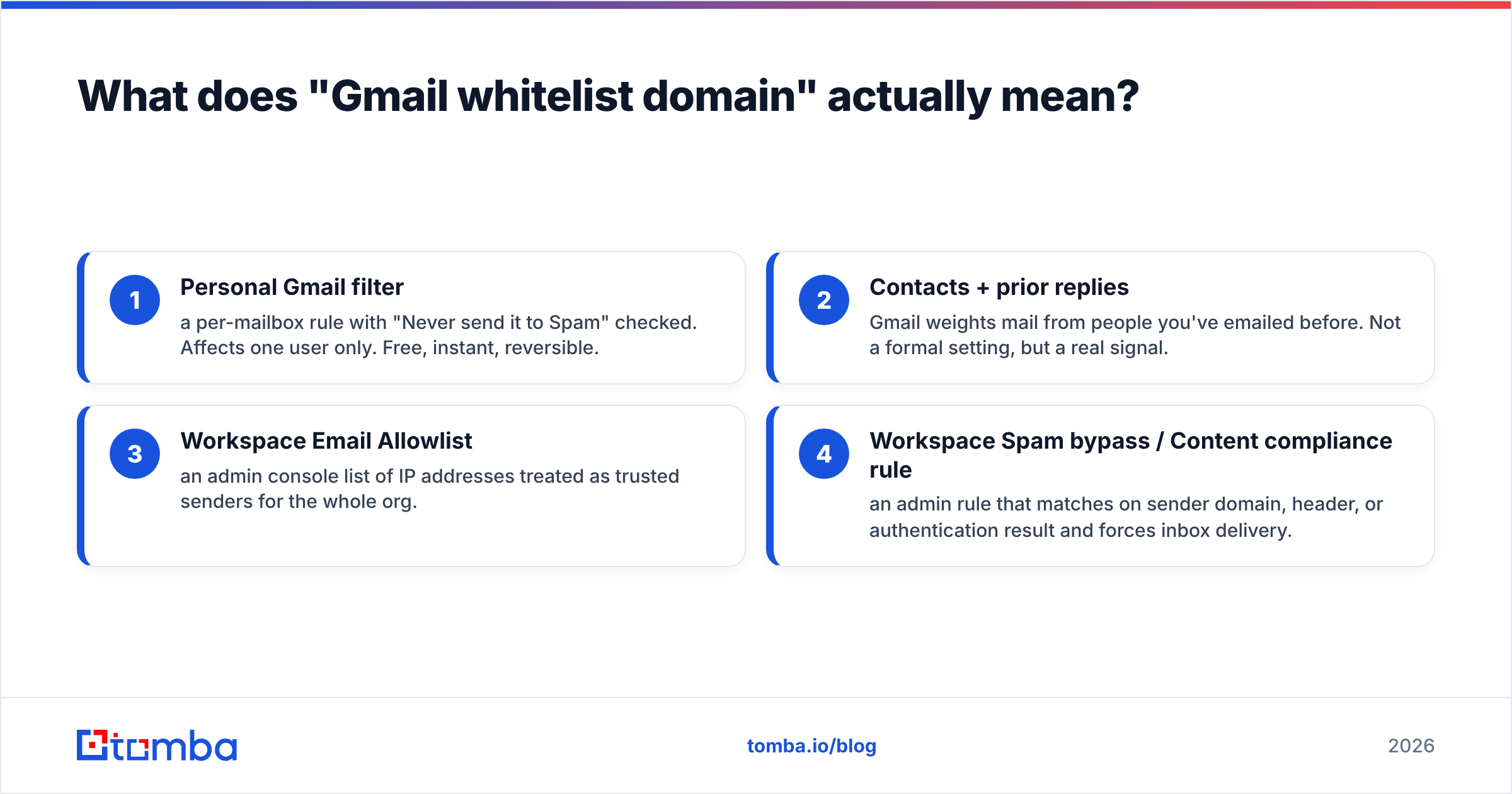
It means telling Gmail to trust mail from a specific sending domain so it skips the spam folder. But that single phrase covers at least four different mechanisms, and picking the wrong one is why most people say "I whitelisted them and it still went to spam."
Think of Gmail's filtering like airport security. A personal Gmail filter is a note you leave with one specific screener saying "let my cousin through." A Workspace allowlist is a staff badge that skips the main queue. Neither one disables the bomb scanner — Google always keeps phishing and malware detection running, no matter what rule you write.
Here are the four mechanisms, ranked from narrowest to broadest:
- Personal Gmail filter — a per-mailbox rule with "Never send it to Spam" checked. Affects one user only. Free, instant, reversible.
- Contacts + prior replies — Gmail weights mail from people you've emailed before. Not a formal setting, but a real signal.
- Workspace Email Allowlist — an admin console list of IP addresses treated as trusted senders for the whole org.
- Workspace Spam bypass / Content compliance rule — an admin rule that matches on sender domain, header, or authentication result and forces inbox delivery.
Only options 3 and 4 apply org-wide. Options 1 and 2 are per-user, which is exactly why "just ask them to whitelist us" scales terribly.

How do you whitelist a domain in personal Gmail?#
You build a filter. Gmail has no button labeled "whitelist," so the search-based filter is the workaround everyone uses.
- Open Gmail on desktop and click the filter icon in the search bar (the sliders on the right).
- In the From field, enter the domain with an
@prefix — for example@tomba.io. To cover several, separate withOR:@tomba.io OR @example.com. - Click Create filter.
- Check Never send it to Spam. Optionally also check Always mark it as important and Categorize as: Primary.
- Click Create filter to save.
Two gotchas. First, this only applies going forward — mail already sitting in Spam stays there until you move it manually, and moving it manually is itself a useful reputation signal to Google. Second, the From match is on the visible header address, which a spoofer can forge. That's a real risk if you allowlist a domain that doesn't publish a strict DMARC policy.
Adding the sender to Google Contacts helps too, though it's a soft signal rather than a hard rule. Gmail's documentation is explicit that contact status influences filtering but doesn't override it.
How do Google Workspace admins allowlist a sending domain?#
Admins have three tools, and they are not interchangeable.
Email Allowlist (Apps → Google Workspace → Gmail → Spam, Phishing and Malware) takes IP addresses, not domains. You add the sending IPs of the service you trust. Google explicitly warns that allowlisted IPs still pass through phishing and malware checks, and that a compromised allowlisted IP becomes a direct pipe into your org.
Spam settings with "Bypass spam filters for messages from senders or domains in selected lists" lets you build an address list containing full domains. This is the closest thing to a true domain whitelist, and it's the option most admins actually want.
Content compliance rules are the surgical option. You can match on Authentication results: SPF pass AND DKIM pass AND From domain = vendor.com and only then bypass filtering. That combination is far safer than a naked domain allow because a spoofer without the sender's DKIM key can't satisfy it.
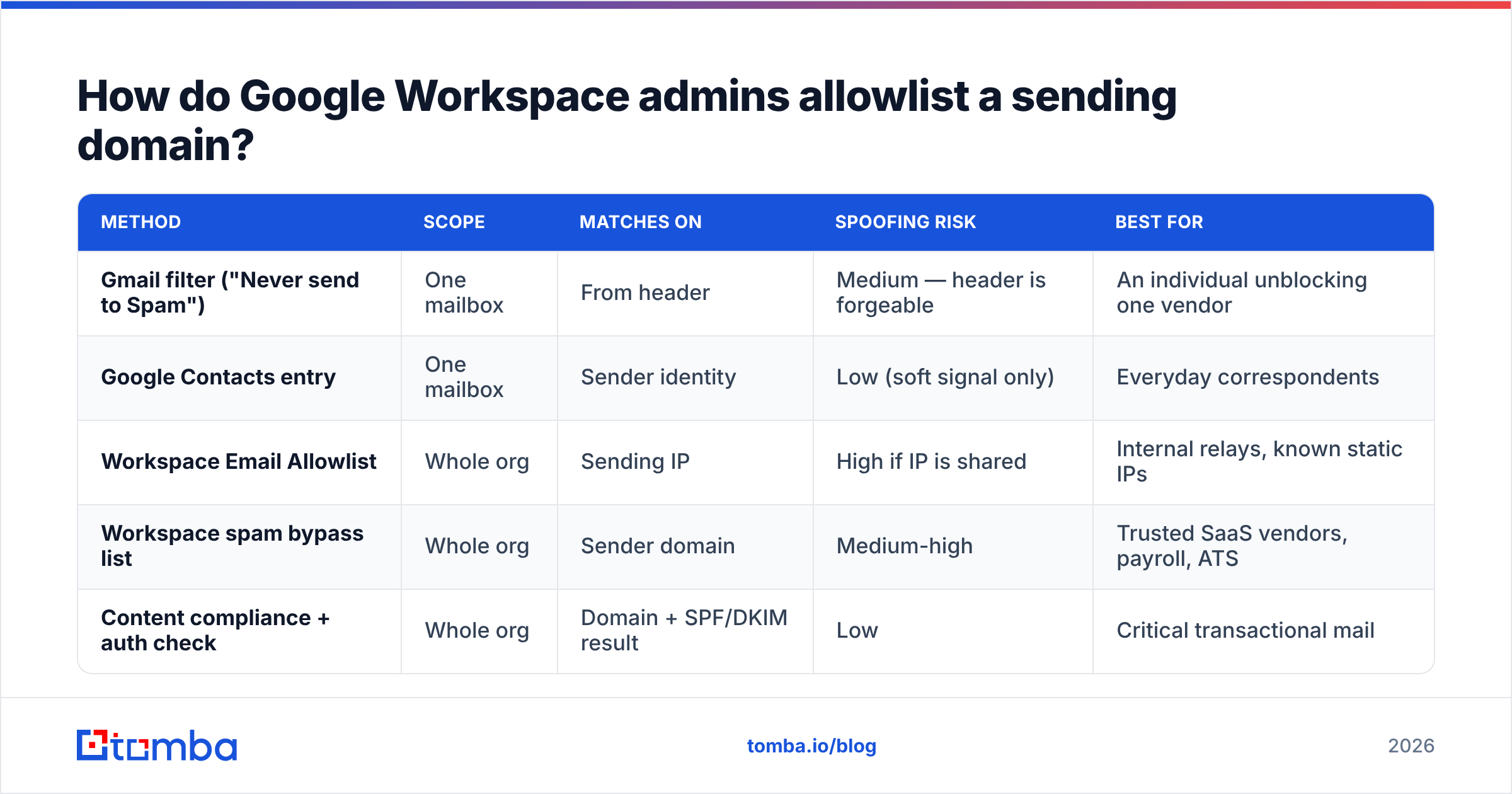
| Method | Scope | Matches on | Spoofing risk | Best for |
|---|---|---|---|---|
| Gmail filter ("Never send to Spam") | One mailbox | From header | Medium — header is forgeable | An individual unblocking one vendor |
| Google Contacts entry | One mailbox | Sender identity | Low (soft signal only) | Everyday correspondents |
| Workspace Email Allowlist | Whole org | Sending IP | High if IP is shared | Internal relays, known static IPs |
| Workspace spam bypass list | Whole org | Sender domain | Medium-high | Trusted SaaS vendors, payroll, ATS |
| Content compliance + auth check | Whole org | Domain + SPF/DKIM result | Low | Critical transactional mail |
A short rule of thumb: if the mail is business-critical and the sender authenticates properly, use a content compliance rule with an authentication condition. If you just need one newsletter to stop bouncing into spam for one person, a personal filter is fine.
Can a sender get their own domain whitelisted?#
No — and this is the part that trips up outbound teams.
Whitelisting is a recipient-side control. You can ask, and for transactional mail (password resets, invoices, order confirmations, ATS notifications) asking often works because there's a support ticket and a named admin on the other end. For cold outreach, asking a stranger to build a Gmail filter before they've read your first email is a non-starter.
What senders can control is everything Gmail measures before a filter ever gets consulted:
- Authentication. SPF, DKIM, and DMARC on the sending domain. Since 2024, Google requires bulk senders (5,000+ messages/day to Gmail) to have all three, plus one-click unsubscribe and a spam complaint rate under 0.3%. Check your setup with an SPF checker before you troubleshoot anything else.
- List quality. Bounces are one of the loudest negative signals. A single verification pass over your list with an email verifier removes the dead addresses that drag reputation down.
- Complaint rate. Monitored in Google Postmaster Tools. Above 0.3% and filters tighten regardless of what any allowlist says.
- Engagement. Replies and opens from real humans move you toward the inbox faster than any admin rule.
Screenshot placeholder: Google Postmaster Tools reputation dashboard showing domain reputation, spam rate, and authentication pass rates over 30 days.
Screenshot placeholder: Google Workspace Admin console — Gmail Spam settings panel with "Bypass spam filters for messages from senders or domains in selected lists" enabled.
Does whitelisting actually guarantee inbox delivery?#
It does not, and Google says so in its own admin documentation.
An allowlist raises the spam threshold; it doesn't remove the filter. Messages carrying malware, matching known phishing patterns, or failing a hard DMARC check can still be quarantined or dropped. Google's Workspace Admin Help is direct about the tradeoff: allowlisting an IP means "you should ensure the IP address is not an open relay," because you've moved trust from Google's model to your own judgment.
There's also a scope trap. A Workspace allowlist affects every user in the domain. If you allow a shared ESP IP range so that one vendor gets through, you may have simultaneously allowed every other customer sending from that same shared pool — including whoever is running a phishing campaign from it today. This is the single strongest argument for domain-plus-authentication rules over raw IP allowlists.
Understanding email deliverability as a reputation system rather than a set of switches is the mental shift that matters here. The allowlist is a local override on a global model, and the global model is doing most of the work.
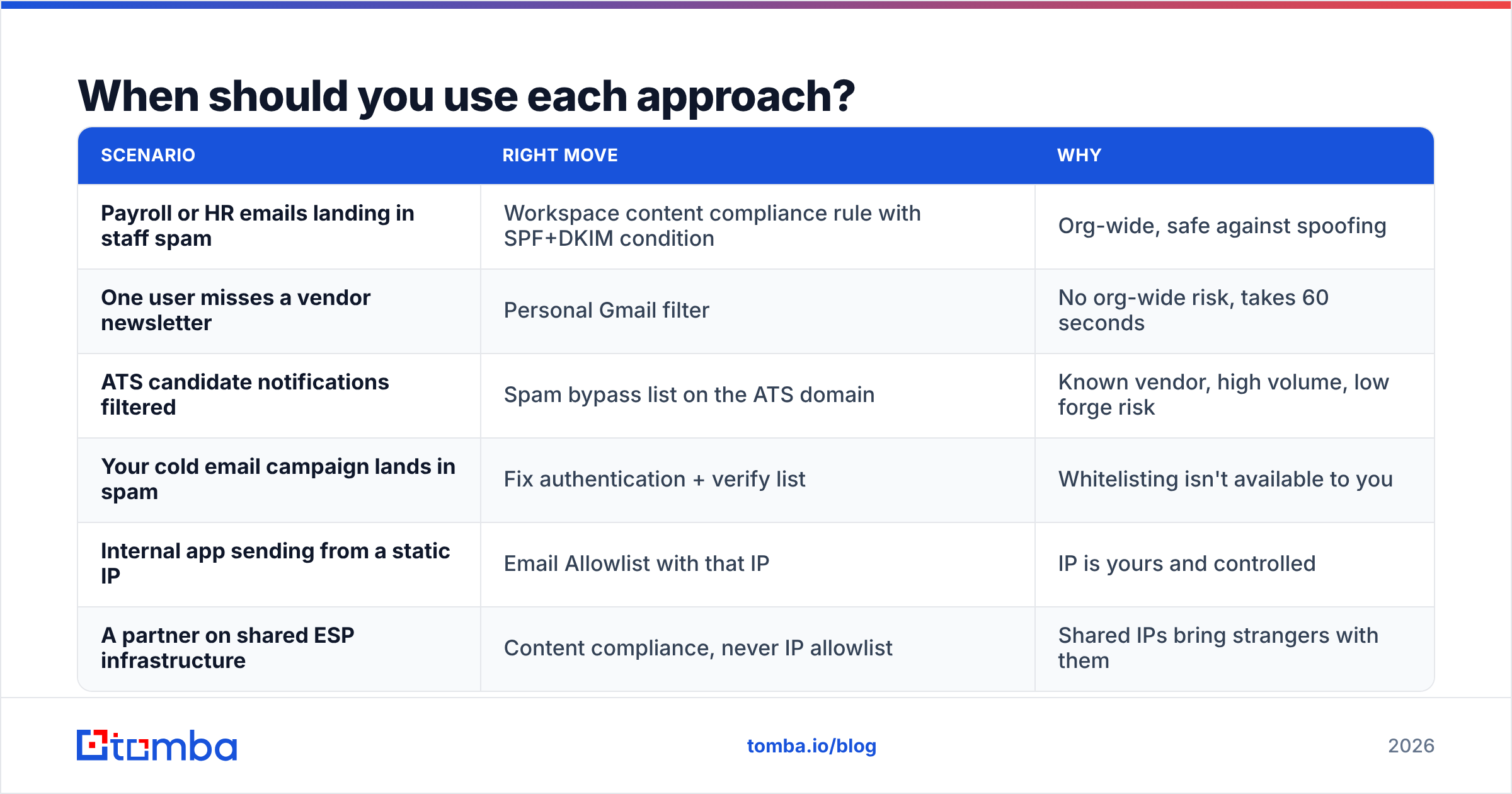
When should you use each approach?#
| Scenario | Right move | Why |
|---|---|---|
| Payroll or HR emails landing in staff spam | Workspace content compliance rule with SPF+DKIM condition | Org-wide, safe against spoofing |
| One user misses a vendor newsletter | Personal Gmail filter | No org-wide risk, takes 60 seconds |
| ATS candidate notifications filtered | Spam bypass list on the ATS domain | Known vendor, high volume, low forge risk |
| Your cold email campaign lands in spam | Fix authentication + verify list | Whitelisting isn't available to you |
| Internal app sending from a static IP | Email Allowlist with that IP | IP is yours and controlled |
| A partner on shared ESP infrastructure | Content compliance, never IP allowlist | Shared IPs bring strangers with them |
Notice the pattern: the more people a rule affects, the more you should demand an authentication condition alongside it.
What should you do instead of chasing whitelists?#
Fix the inputs. Whitelisting is a patch applied at one recipient at a time; deliverability work compounds across every recipient at once.
- Authenticate fully. SPF, DKIM, DMARC. Start with
p=nonefor monitoring, then move top=quarantineonce your reports are clean. Google, Yahoo, and Microsoft have all converged on requiring this. - Warm up new domains and inboxes. New sending domains have no reputation history. Ramp volume gradually over 3-6 weeks rather than blasting from day one.
- Verify before you send. Hard bounces above roughly 2-3% will visibly damage domain reputation. A bulk verification pass is cheaper than a reputation rebuild.
- Watch Postmaster Tools weekly. Sender reputation is a lagging indicator — by the time you notice spam placement anecdotally, the data has been trending for weeks.
- Segment by engagement. Suppress addresses that haven't opened or replied in 90+ days. They contribute nothing and generate complaints.
- Keep sending patterns human. Consistent daily volume, real reply handling, and varied content beat a rigid 500-per-day cadence from a single mailbox.
For teams reviewing tools in this space, G2's email deliverability category is a reasonable neutral starting point for comparing monitoring and warmup vendors, and HubSpot's deliverability guide covers the marketing-side fundamentals in plain language.
What are the most common whitelisting mistakes?#
Allowlisting an ESP's shared IP range. You inherit every other tenant's reputation and every other tenant's abuse. Use domain plus authentication instead.
Assuming it fixes existing spam mail. Filters apply prospectively. Old messages need a manual "Not spam" action, which is also the single best training signal you can give Gmail.
Whitelisting the display name instead of the domain. From: Acme Support is trivially spoofable. Match on the actual sending domain.
Forgetting to review the list. Vendors churn, IPs get reassigned, and a two-year-old allowlist entry can outlive the relationship it was created for. Audit quarterly.
Using it to rescue a bad list. If your bounce rate is 12%, no allowlist saves you — the recipient's admin will never allowlist a sender their users complain about. Clean the list first with a bulk email finder workflow that validates as it enriches.
How do you verify a whitelist actually worked?#
Send a test and read the headers. In Gmail, open the message, click the three-dot menu, and choose Show original. You want to see:
SPF: PASSwith the sending IP matching the domain's SPF recordDKIM: PASSwith the signing domain aligned to the From domainDMARC: PASS- No
X-Gm-SpamorX-Gm-Phishyflag set to 1
If authentication passes and the message still filters, the problem is reputation or content, not the allowlist. If authentication fails, no allowlist will reliably save you on a domain with a strict DMARC policy — Google honors the publishing domain's stated policy.
For a broader pre-send check, run your message through a spam checker and confirm your sending IP isn't listed with a blacklist checker. Those two take five minutes and catch the majority of "why is this going to spam" cases before you start filing support tickets.
Where does this leave outbound teams?#
With a simple division of labor. If you receive mail that matters, whitelisting is a legitimate and fast fix — use the narrowest rule that solves the problem, and attach an authentication condition whenever the rule affects more than one mailbox. If you send mail, whitelisting is not a lever you own, so spend your effort on the levers you do: authentication, list quality, warmup, and engagement.
The teams that consistently reach the inbox aren't the ones with the most allowlist entries. They're the ones sending fewer, better-targeted emails to addresses that actually exist.
That last part starts with the data. If your bounce rate is what's dragging you into spam folders, the Tomba Email Finder finds verified professional addresses by domain, name, or company, with every result checked before it reaches your sequence — so you're not paying a reputation tax on addresses that were never real. Start on the free tier with 25 searches a month, or check Tomba pricing if you need bulk volume: Starter is $49/mo, Growth $99/mo, and Pro $249/mo.
Related guides#
// get started
Find, verify and enrich your first contacts today
Start on the free plan with 25 searches a month, then scale when your team is ready.
Free plan · No credit card required · GDPR & CCPA
// about the author