GMass vs Mailmeteor 2026: Which Gmail Mail Merge Wins?
Both run cold email straight out of Gmail, but they solve different problems. Here is the honest breakdown of pricing, sending limits, automation depth, and which one your list size actually needs.
TL;DR
- GMass is the heavier tool: real multi-step sequences, behavioral triggers, an API, a built-in list builder from Gmail search results, and deliverability tooling. It costs roughly 2-4x more than Mailmeteor.
- Mailmeteor is the lighter, cheaper, privacy-first mail merge. It lives in Google Sheets, sends clean plain-text-looking emails, and has a usable free tier. Automation depth is shallow by design.
- If you send under ~500 emails/month and mostly need personalized one-offs, Mailmeteor wins on price and simplicity.
- If you run multi-touch outbound with follow-ups, reply detection, and reporting, GMass is the safer buy — Mailmeteor will force you into manual work fast.
- Neither tool fixes bad data. Both send through your Gmail account, so a 20% bounce rate torches your domain either way. Verify before you import.
What are GMass and Mailmeteor, exactly?#
Both are Gmail-native mail merge tools. That's the shared DNA: instead of sending from a third-party SMTP relay, they send from your Google account, which means your existing domain reputation and inbox placement carry over. Replies land in your normal inbox. Threads look like threads.
Think of them like two attachments for the same drill. Same motor (Gmail), very different bits.
GMass is a Chrome extension that grafts a full outbound engine onto the Gmail compose window. You build a campaign inside Gmail, pull recipients from a Google Sheet or from a Gmail search, and layer on sequences, A/B tests, open/click tracking, and automatic follow-ups. It has been around since 2015 and is used heavily by solo founders, recruiters, and small agencies who refuse to move to a dedicated sales engagement platform.
Mailmeteor approaches the same job from Google Sheets. Your spreadsheet is the source of truth; the add-on merges each row into a Gmail draft and sends. It markets hard on privacy (it does not read or store your email content) and on simplicity. Setup takes about four minutes. There is a genuinely usable free tier.
The core distinction, stated plainly: GMass is a campaign tool that happens to use Gmail. Mailmeteor is a spreadsheet tool that happens to send email.
How do GMass and Mailmeteor compare feature by feature?#
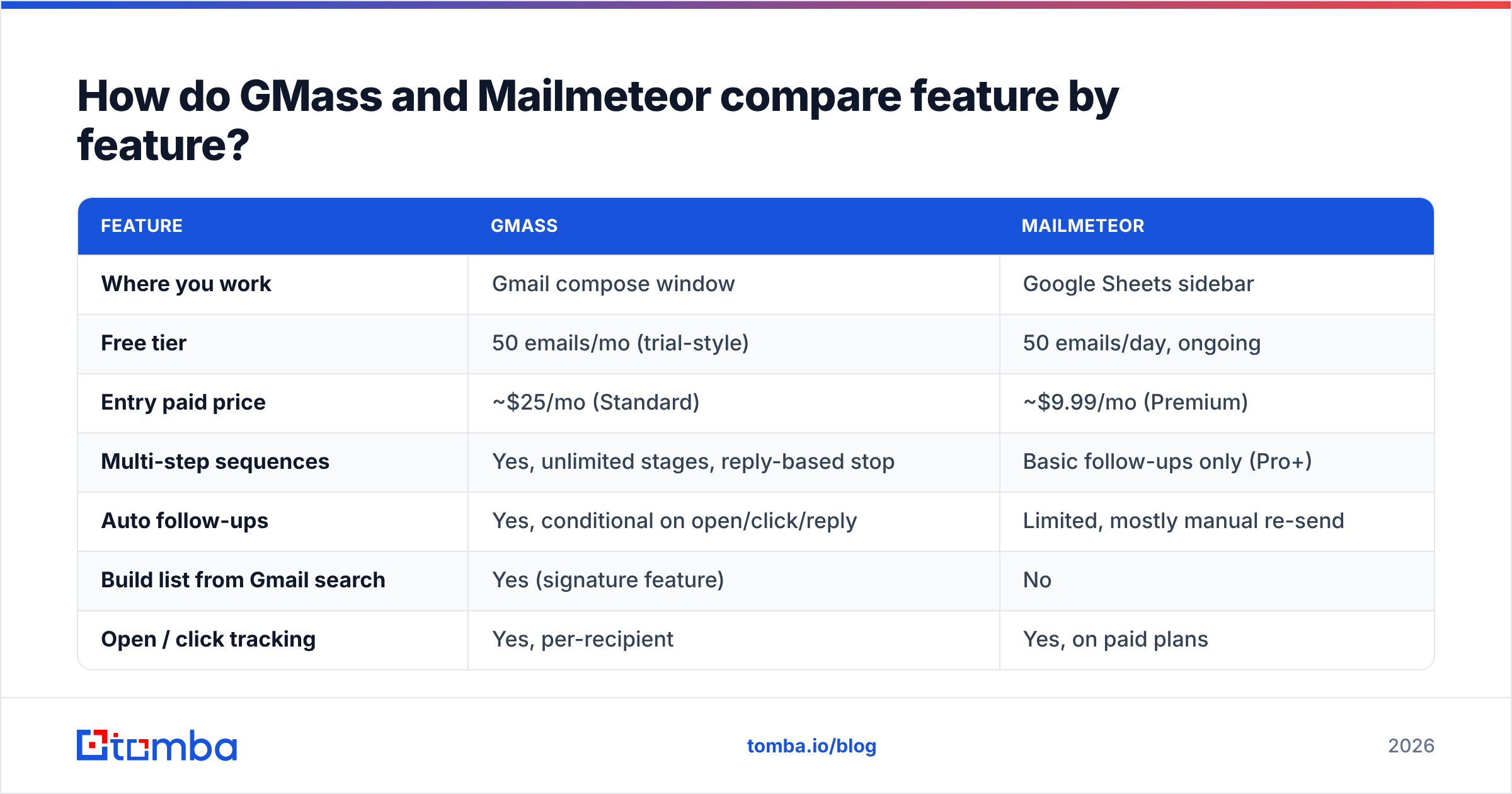
| Feature | GMass | Mailmeteor |
|---|---|---|
| Where you work | Gmail compose window | Google Sheets sidebar |
| Free tier | 50 emails/mo (trial-style) | 50 emails/day, ongoing |
| Entry paid price | ~$25/mo (Standard) | ~$9.99/mo (Premium) |
| Multi-step sequences | Yes, unlimited stages, reply-based stop | Basic follow-ups only (Pro+) |
| Auto follow-ups | Yes, conditional on open/click/reply | Limited, mostly manual re-send |
| Build list from Gmail search | Yes (signature feature) | No |
| Open / click tracking | Yes, per-recipient | Yes, on paid plans |
| A/B testing | Yes, native | No |
| Email verification built in | Yes (paid add-on credits) | No |
| Warmup / deliverability suite | Yes, separate GMass product | No |
| API access | Yes, documented REST API | Limited / via Apps Script |
| Attachments | Yes, per-recipient | Yes |
| Team / shared campaigns | Yes, on team plans | Yes, on Business plan |
| Best for | Multi-touch outbound, 1k+ sends/mo | Personalized one-offs, newsletters, under 500/mo |
Read that table as two different price-to-capability curves rather than a winner and a loser. Mailmeteor is not a stripped-down GMass; it deliberately refuses to become a sequencer. That refusal is why it stays cheap and why its interface never overwhelms a non-technical user.

Which one is cheaper in practice?#
Mailmeteor, by a wide margin — until you need automation.
Here is the realistic cost comparison for a single sender. Prices are what the vendors list publicly at time of writing; both change tiers occasionally, so check the source pages before you commit.
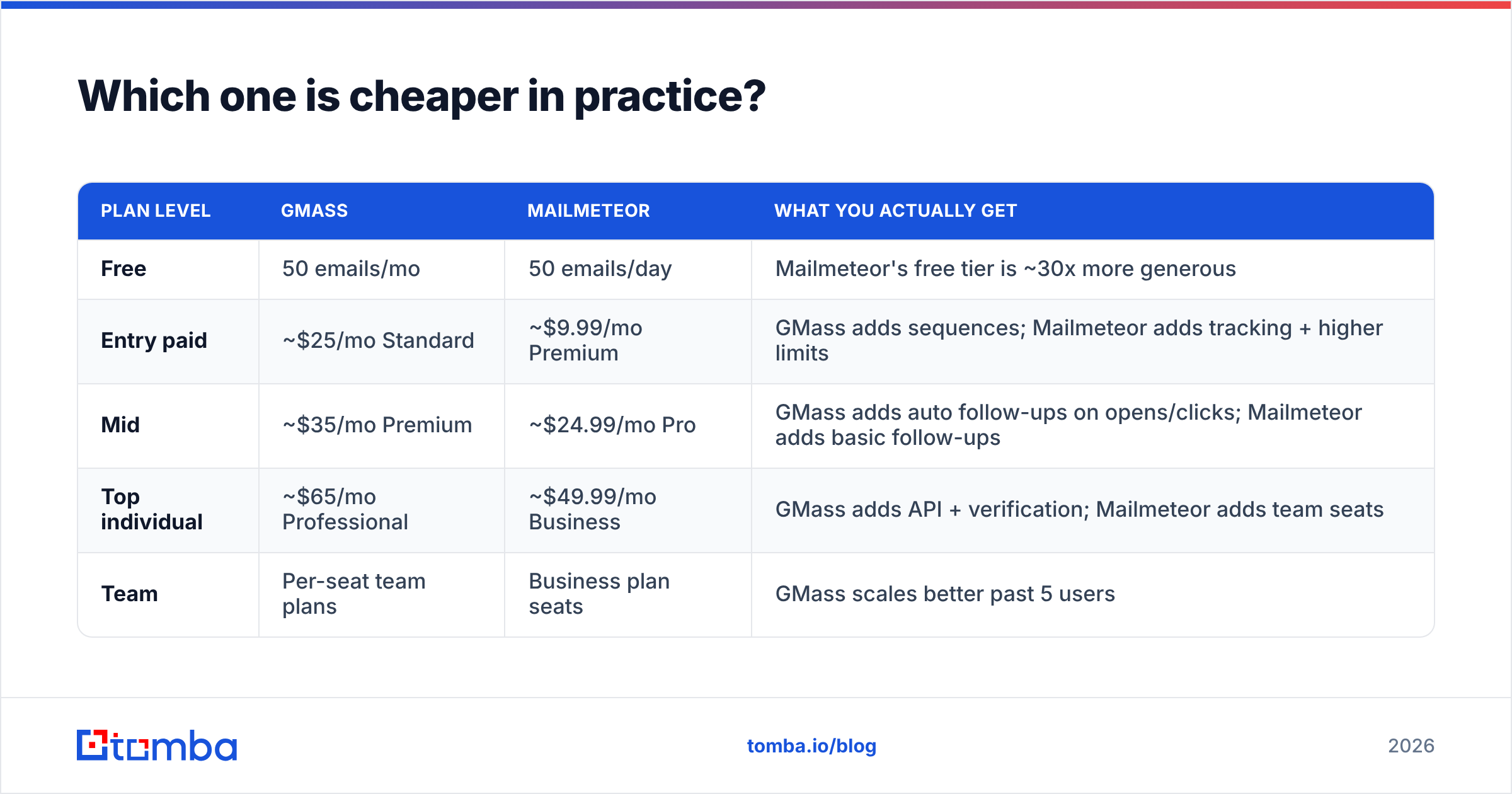
| Plan level | GMass | Mailmeteor | What you actually get |
|---|---|---|---|
| Free | 50 emails/mo | 50 emails/day | Mailmeteor's free tier is ~30x more generous |
| Entry paid | ~$25/mo Standard | ~$9.99/mo Premium | GMass adds sequences; Mailmeteor adds tracking + higher limits |
| Mid | ~$35/mo Premium | ~$24.99/mo Pro | GMass adds auto follow-ups on opens/clicks; Mailmeteor adds basic follow-ups |
| Top individual | ~$65/mo Professional | ~$49.99/mo Business | GMass adds API + verification; Mailmeteor adds team seats |
| Team | Per-seat team plans | Business plan seats | GMass scales better past 5 users |
Two things skew this math.
First, GMass's free tier is a trial, not a plan. Fifty emails per month is a demo. Mailmeteor's 50/day free tier is a real, permanent workflow for someone sending a handful of personalized emails to conference contacts each morning.
Second, GMass bundles things you'd otherwise buy separately. Its email verification and warmup tooling are line items you'd pay another vendor for if you used Mailmeteor. If you're comparing all-in outbound cost rather than mail-merge cost, the gap narrows considerably.
Does either tool actually improve deliverability?#
Neither one improves it. Both inherit it.
This is the single most misunderstood point in every GMass vs Mailmeteor thread on Reddit. Because both send through Gmail's own infrastructure, your inbox placement is a function of your domain age, your authentication records, your sending volume ramp, and — above all — your list quality. The tool is a pipe. It doesn't clean the water.
What each tool does contribute:
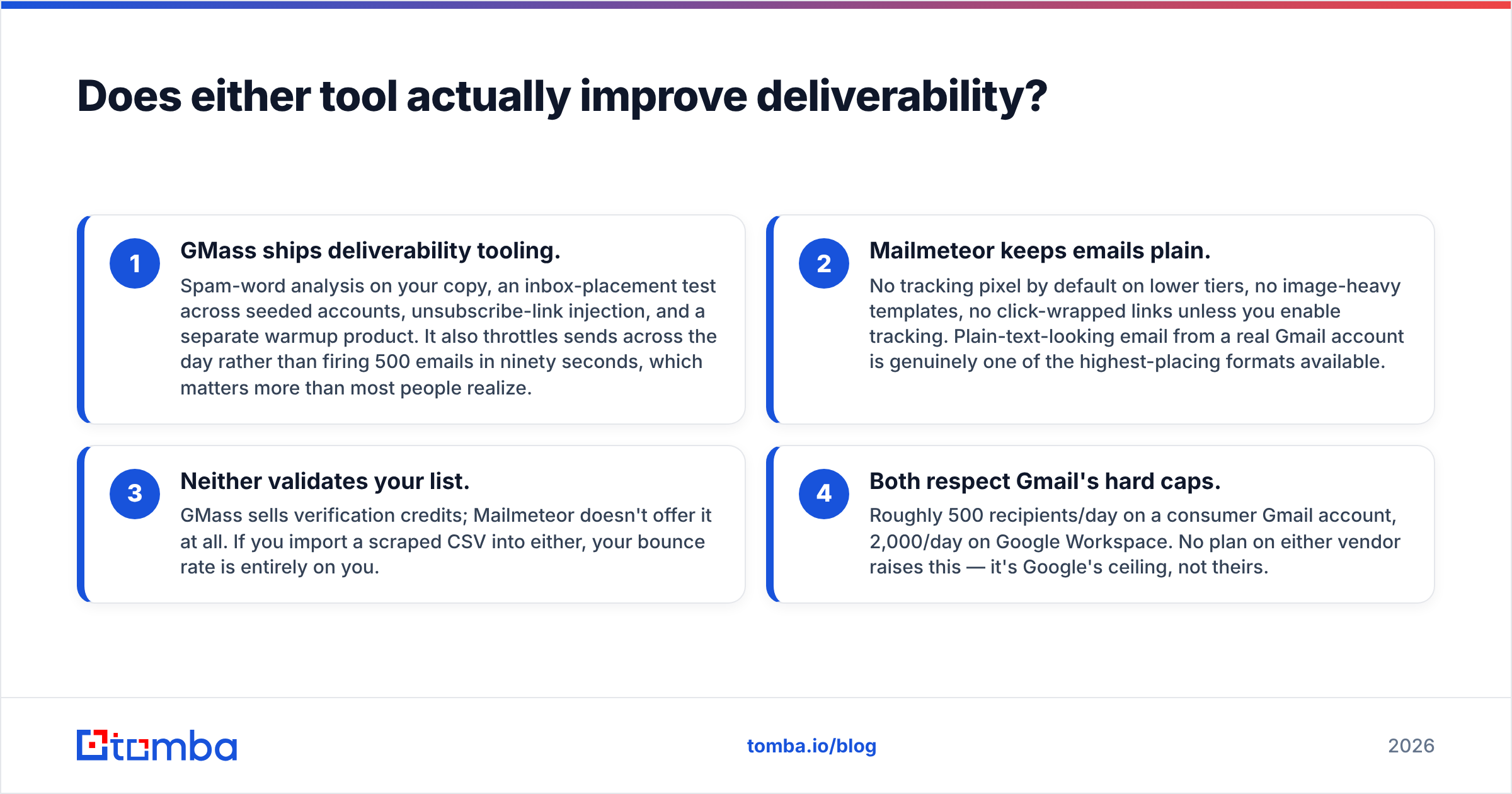
- GMass ships deliverability tooling. Spam-word analysis on your copy, an inbox-placement test across seeded accounts, unsubscribe-link injection, and a separate warmup product. It also throttles sends across the day rather than firing 500 emails in ninety seconds, which matters more than most people realize.
- Mailmeteor keeps emails plain. No tracking pixel by default on lower tiers, no image-heavy templates, no click-wrapped links unless you enable tracking. Plain-text-looking email from a real Gmail account is genuinely one of the highest-placing formats available.
- Neither validates your list. GMass sells verification credits; Mailmeteor doesn't offer it at all. If you import a scraped CSV into either, your bounce rate is entirely on you.
- Both respect Gmail's hard caps. Roughly 500 recipients/day on a consumer Gmail account, 2,000/day on Google Workspace. No plan on either vendor raises this — it's Google's ceiling, not theirs.
That last point kills a lot of upgrade fantasies. Paying GMass $65/mo does not let you send 10,000 emails a day from one Workspace seat. It lets you manage more complex campaigns within the same ceiling.
Before either tool touches your list, run it through an email verifier. Google's spam filters weight bounce rate heavily, and Gmail's own sender guidelines put the practical danger zone below a 0.3% spam-complaint rate. A single dirty import can cost you weeks of sender reputation rebuilding — and neither GMass nor Mailmeteor will warn you before it happens.
Is GMass better than Mailmeteor for cold outreach?#
Yes, for anything past a single touch — and it's not close.
Cold outreach is a sequencing problem. Response rates on first-touch-only campaigns are low; most replies arrive on touches two through four. That means your tool needs to:
- Send follow-up #2 only if no reply arrived
- Stop the entire sequence the instant someone responds
- Thread follow-ups under the original email
- Handle bounces without breaking the sequence for everyone else
- Report per-step reply rates so you know which touch is dead weight
GMass does all five natively. Mailmeteor does a simplified version of follow-ups on higher tiers, but it is not built to run a five-touch cadence with branch logic across a 2,000-contact list. You'd end up managing sequence state in spreadsheet columns — which people genuinely do, and which breaks the moment a teammate sorts the sheet.
The flip side: GMass's power creates its own tax. Campaign settings are dense. The Gmail-search-to-list feature is fantastic for warm re-engagement ("everyone I emailed in 2024 who works at a SaaS company") but confusing for beginners. Expect a real afternoon of learning, not four minutes.
Mailmeteor wins outright on:
- Personalized one-to-many announcements — product updates to 300 existing customers
- Recruiting and academic outreach — high personalization, low volume, no sequence
- Non-technical operators — anyone who lives in Sheets and would be annoyed by a campaign dashboard
- Privacy-sensitive orgs — its no-content-storage stance is a real procurement advantage
- Budget-first testing — validating whether cold email works at all before spending on tooling
What do users actually complain about?#
Both tools have consistent, predictable criticisms in public reviews on G2 and similar directories. Worth knowing before you buy.
GMass, recurring complaints:
- Interface feels bolted onto Gmail — settings panels are cramped and dense
- Pricing jumps sharply between tiers; the useful features cluster on higher plans
- Occasional Chrome extension conflicts after Gmail UI updates
- Reporting is functional but visually dated compared to dedicated sales platforms
- Team management is weaker than a true sales engagement platform
Mailmeteor, recurring complaints:
- Hits its ceiling fast — users outgrow it within a quarter of serious outbound
- Follow-up logic is basic; no branching, no reply-detection sophistication on lower tiers
- Reporting is minimal; you'll export to Sheets for anything real
- Google Sheets dependency means your workflow inherits Sheets' quirks
- No list-building or enrichment features whatsoever
Notice the asymmetry. GMass complaints are about friction. Mailmeteor complaints are about limits. Friction you can learn around. Limits you can only escape by switching tools.
How do you feed either tool with good contacts?#
Neither tool finds email addresses. That's the gap everyone hits on day two.
GMass can build lists from your existing Gmail history — powerful, but limited to people you've already talked to. Mailmeteor expects a finished spreadsheet. Both assume the hard part is already done.
A workable pipeline looks like this:
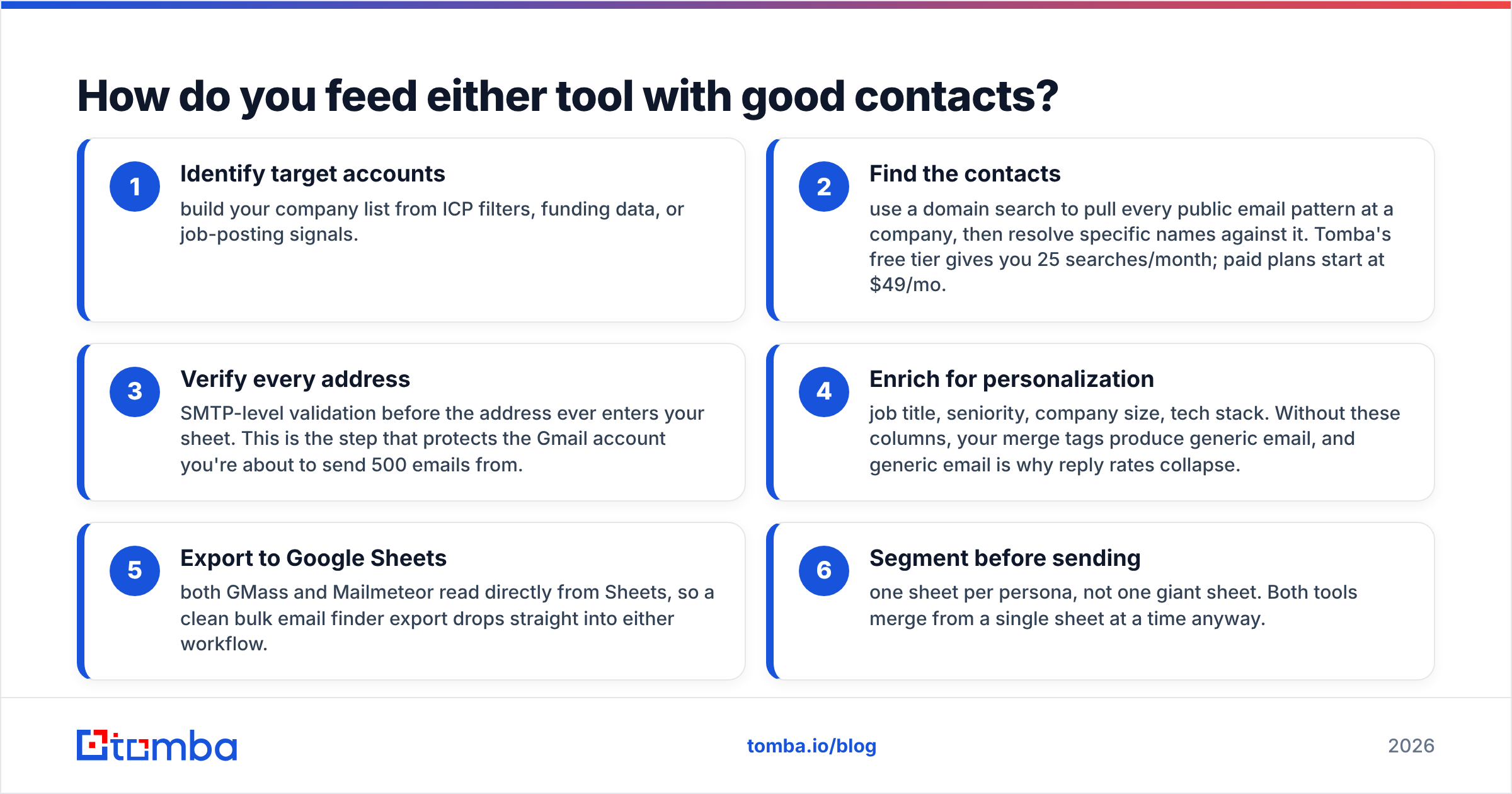
- Identify target accounts — build your company list from ICP filters, funding data, or job-posting signals.
- Find the contacts — use a domain search to pull every public email pattern at a company, then resolve specific names against it. Tomba's free tier gives you 25 searches/month; paid plans start at $49/mo.
- Verify every address — SMTP-level validation before the address ever enters your sheet. This is the step that protects the Gmail account you're about to send 500 emails from.
- Enrich for personalization — job title, seniority, company size, tech stack. Without these columns, your merge tags produce generic email, and generic email is why reply rates collapse.
- Export to Google Sheets — both GMass and Mailmeteor read directly from Sheets, so a clean bulk email finder export drops straight into either workflow.
- Segment before sending — one sheet per persona, not one giant sheet. Both tools merge from a single sheet at a time anyway.
Skip step three and the tool comparison stops mattering. A 15% bounce rate on a fresh domain produces the same outcome in GMass, in Mailmeteor, or in any sequencer you migrate to next quarter.
Which should you pick?#
Decide on volume and sequence depth, not features.
Choose Mailmeteor if: you send fewer than 500 emails per month, your outreach is one-touch or hand-managed, you live in Google Sheets, budget is genuinely tight, or you're validating cold email as a channel before committing. The free tier alone is worth starting with.
Choose GMass if: you run multi-touch sequences, you need reply-based stop conditions, you want A/B testing and per-step reporting, you have more than one sender on the team, or you want the deliverability tooling bundled rather than bought separately.
Choose neither if: you're sending 5,000+ emails a month across multiple domains and inboxes. At that scale you've outgrown Gmail-native mail merge entirely and want a dedicated multi-inbox platform. Both GMass and Mailmeteor will fight you.
One honest note on longevity: because both tools live inside Google's ecosystem, both carry platform risk. Gmail UI changes have broken GMass extensions before. Google Workspace add-on policy shifts affect Mailmeteor. Neither is a reason to avoid them — just a reason to keep your contact data in a system you control, exportable at any time, rather than trapped inside a campaign tool.
Ready to build the list first?#
The tool argument only matters once your data is clean. Both GMass and Mailmeteor send from your real Gmail account, which means a bad list doesn't just waste a campaign — it damages the domain you'll be sending from for years.
Start with the Tomba Email Finder to source verified professional addresses by name, company, or domain, then export straight to Google Sheets for whichever merge tool you land on. The free tier covers 25 searches a month; Tomba pricing starts at $49/mo for Starter when you're ready to scale past testing. Build the list right, and the GMass vs Mailmeteor decision becomes a preference rather than a gamble.
Related guides#
Ready to find emails that actually work?
Join 150,000+ professionals who stopped guessing and started sending. Free credits on signup — no credit card required.
Get the Tomba newsletter
Practical outbound tactics and product updates — once every two weeks.
About the author