GMass vs Mailshake (2026): Which Cold Email Tool Wins?
GMass lives inside Gmail and charges per mailbox owner. Mailshake is a full sales engagement platform priced per seat. Here's the honest breakdown of cost, deliverability, sequencing and where each one falls apart.
TL;DR
- GMass is a Gmail extension, not a platform. It sends from your own Gmail/Workspace mailbox, uses Google Sheets as the list source, and costs roughly $25–$55/month for a single user. It is the cheapest credible way to run mail merge and follow-ups.
- Mailshake is a sales engagement platform. Multi-channel sequences, a shared team inbox (Lead Catcher), phone dialer on higher tiers, and per-seat pricing that typically starts around $29–$59/user/month and climbs to ~$99/user/month.
- Deliverability ceilings are set by your mailbox, not the tool. Google Workspace caps you near 2,000 recipients/day; free Gmail near 500. Neither GMass nor Mailshake can raise that — they just manage throttling around it.
- Both tools assume you already have clean contact data. Neither is a serious data provider, and a bad list will sink your domain regardless of which one you pick.
- Rule of thumb: solo founder or a 1–3 person team living in Gmail → GMass. A funded SDR team that needs shared visibility, CRM sync, and a dialer → Mailshake.
What are GMass and Mailshake, really?#
They solve the same surface problem — send personalized cold email at volume with automatic follow-ups — but they sit at completely different altitudes.
GMass is a Chrome extension that grafts mail-merge machinery onto Gmail's compose window. Your list is a Google Sheet. Your sending identity is your own mailbox. Your sent folder is your source of truth. There is no separate app to log into, which is either the whole point or the fatal flaw depending on how your team works.
Mailshake is a standalone web app that connects to your mailbox (Gmail, Outlook, or generic SMTP) and layers a full engagement workflow on top: campaign builder, A/B tests, reply detection, task queues for LinkedIn and calls, a lead management view, and native CRM push.
The distinction matters more than any feature checklist. GMass optimizes for one person sending a lot of email fast. Mailshake optimizes for several people sending email as part of a documented, measurable process.

How do GMass and Mailshake compare head to head?#
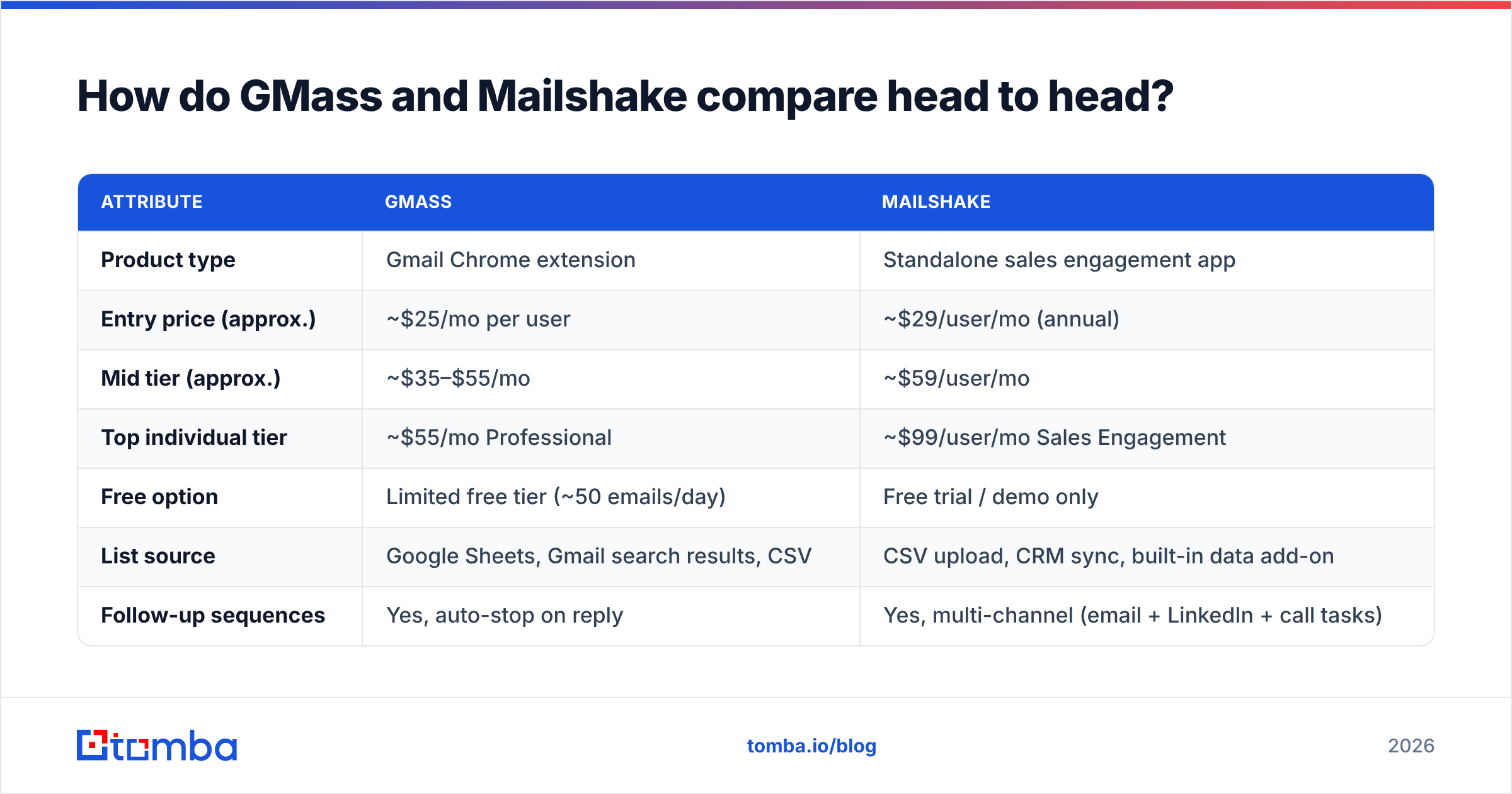
| Attribute | GMass | Mailshake |
|---|---|---|
| Product type | Gmail Chrome extension | Standalone sales engagement app |
| Entry price (approx.) | ~$25/mo per user | ~$29/user/mo (annual) |
| Mid tier (approx.) | ~$35–$55/mo | ~$59/user/mo |
| Top individual tier | ~$55/mo Professional | ~$99/user/mo Sales Engagement |
| Free option | Limited free tier (~50 emails/day) | Free trial / demo only |
| List source | Google Sheets, Gmail search results, CSV | CSV upload, CRM sync, built-in data add-on |
| Follow-up sequences | Yes, auto-stop on reply | Yes, multi-channel (email + LinkedIn + call tasks) |
| Built-in verification | Yes, included on paid plans | Available via data add-on |
| Shared team inbox | No | Yes (Lead Catcher) |
| Phone dialer | No | Yes, top tier |
| Native CRM sync | Via Zapier | Native HubSpot, Salesforce, Pipedrive |
| Deliverability tooling | Spam solver, inbox rotation, throttling | Warmup partner, throttling, domain checks |
| Best for | Solo operators, agencies, Gmail power users | SDR teams, managed outbound processes |
Prices move. Check gmass.co and mailshake.com before you budget — the ranges above reflect published plans at the time of writing and both vendors have repackaged tiers more than once.
Which one is cheaper for the way you actually work?#
Cost comparisons between these two go wrong because people compare list prices instead of total cost for a given headcount.
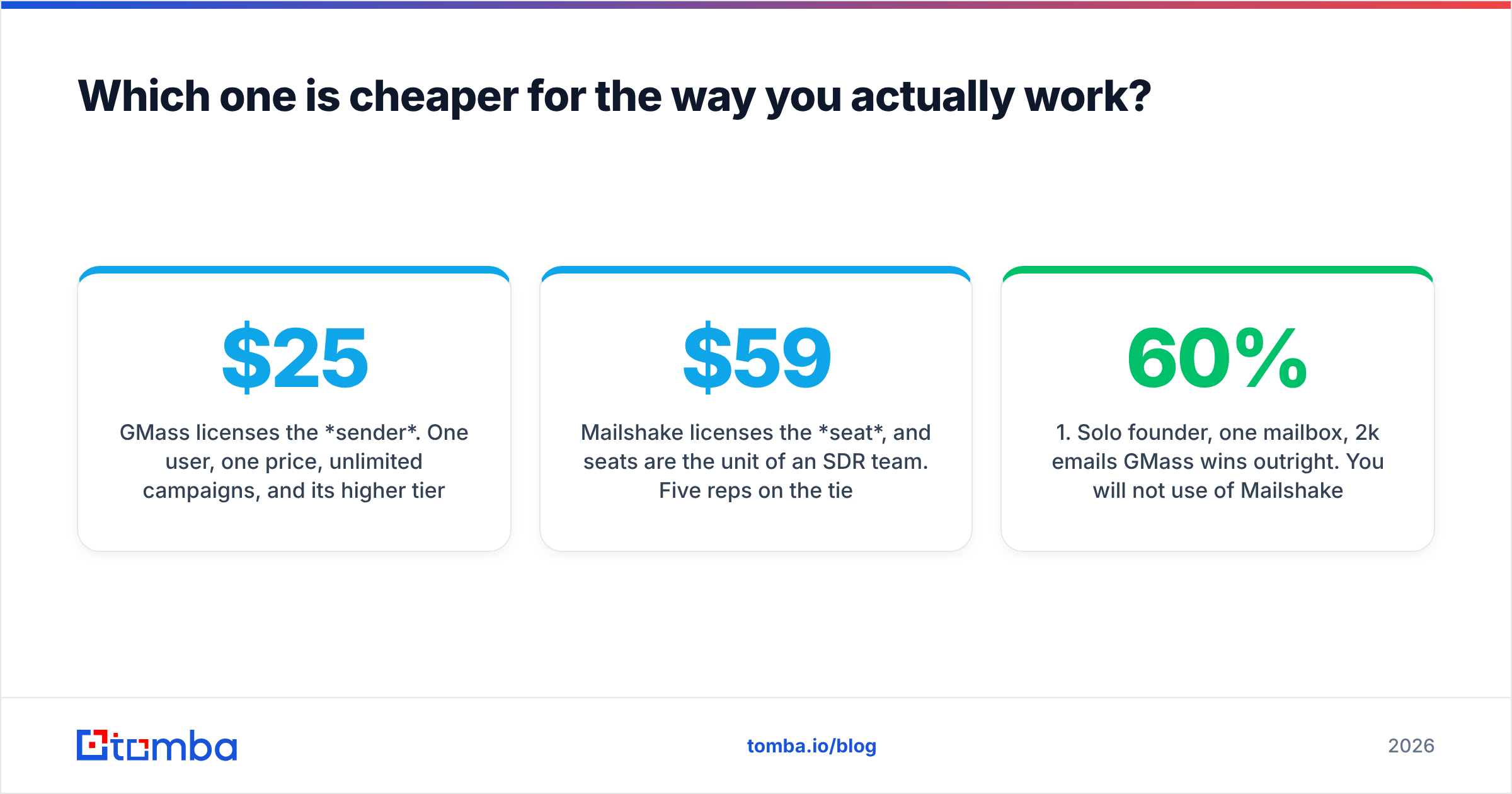
GMass licenses the sender. One user, one price, unlimited campaigns, and its higher tiers add features rather than seats. A solo founder running 1,500 emails a month pays roughly $25–$35 and is done.
Mailshake licenses the seat, and seats are the unit of an SDR team. Five reps on the $59 tier is $295/month before you count data credits, warmup, or a CRM. That is not overpriced for what it does — it is simply a different budget line.
Where it flips: agencies. If you run outbound for eight clients out of eight separate mailboxes, GMass's per-user model gets expensive quickly, and its team plans exist precisely for that. Mailshake's per-seat model can actually be cleaner when one operator manages many campaigns from a single login.
Three concrete scenarios:
- Solo founder, one mailbox, 2k emails/month. GMass wins outright. You will not use 60% of Mailshake's feature set.
- Two-person startup, shared prospecting. Close call. GMass is cheaper; Mailshake gives you a shared reply view so you don't double-email the same account.
- Five-rep SDR pod with a manager. Mailshake. The reporting, task queues and CRM sync are the product — email sending is the commodity part.
- Agency with 10 client domains. Depends on whether clients need to log in and see their own campaigns. If yes, Mailshake. If no, GMass team plans are cheaper per mailbox.
Is GMass or Mailshake better for deliverability?#
Neither tool can beat physics, and you should be suspicious of any vendor page that implies otherwise.
Your inbox placement is decided by five things, in roughly this order of importance:
- List hygiene. Bounce rate above 3–5% is the single fastest way to burn a sending domain. Verify before you send, not after.
- Authentication. SPF, DKIM and DMARC must be correct on the sending domain. Google and Yahoo tightened bulk-sender requirements and enforcement has only gotten stricter since. Run an SPF record check before your first campaign.
- Domain and mailbox age. A domain registered three weeks ago sending 800 cold emails a day will land in spam no matter which tool pushed the send button.
- Volume ramp. Both tools throttle. Both let you set daily caps. Use them.
- Reply and complaint signals. Positive replies raise sender reputation; spam complaints destroy it faster than any other input.
On the tooling itself: GMass ships a spam-solver feature that reroutes sends through its own SMTP relay if your Gmail reputation degrades, plus inbox rotation on higher tiers and built-in verification that runs before the campaign fires. That verification-included model is genuinely useful — it removes a step most people skip.
Mailshake leans on connected-inbox best practices, throttling, and integrations with warmup providers, plus domain-level checks in the campaign setup flow. Its reply detection is more reliable in team contexts because it centralizes replies rather than leaving them scattered across five reps' personal inboxes.
Practical verdict: GMass has slightly better built-in hygiene tooling for a solo sender. Mailshake has better hygiene governance for a team, because a manager can actually see what everyone is sending. If you want a neutral third opinion on either, the review volume on G2 is a better signal than either vendor's own case studies.
Which tool handles personalization and sequences better?#
GMass's personalization is spreadsheet-native. Every column in your Google Sheet becomes a merge tag. You can do conditional content, fallback values, and even inject entire paragraph blocks per row. If you're comfortable in Sheets, this is fast and unusually flexible — you can build logic in the spreadsheet that most sequencers can't express in their UI.
Its follow-up engine is solid: stage-based sequences, auto-stop on reply, behavior triggers (opened but didn't reply, clicked but didn't reply). For pure email, GMass does about 90% of what a mid-market sequencer does.
Mailshake's advantage is that email is only one channel in the sequence. A cadence can be: Day 1 email → Day 3 LinkedIn connect task → Day 5 call task → Day 8 email. The tasks land in a rep's queue with a built-in dialer on the top tier. If your motion involves LinkedIn outreach and phone calls, that orchestration is worth real money.
Mailshake also does A/B testing more cleanly and reports on it at the campaign level rather than making you diff spreadsheets.
One honest knock on both: neither will write good copy for you. AI assist features exist in both camps and both produce the same recognizable cold-email sludge. Write your own opener, or start from a proven structure — our cold email templates library is a faster starting point than any generate button.
Where do your contacts actually come from?#
This is the question most GMass vs Mailshake comparisons dodge, and it's the one that decides whether either tool produces revenue.
Both products are senders. GMass takes whatever is in your Sheet. Mailshake takes whatever is in your CSV or CRM, with an optional data add-on sold by credit. Neither is a primary data source you'd build a serious outbound program on.
That leaves you sourcing contacts somewhere else, and the quality gap between sources is brutal:
- Scraped or purchased lists — cheap, high bounce, high complaint. This is how domains die.
- Manual LinkedIn research — accurate, unusably slow past 50 contacts.
- Enrichment from a verified provider — the only approach that scales without wrecking deliverability.
If you're building lists yourself, run domain-level discovery first: domain search pulls the addresses and email pattern for a target company, then email verification removes the dead ones before they ever reach GMass or Mailshake. For volume work, bulk verify handles the whole file at once, and the Google Sheets add-on drops results straight into the exact sheet GMass reads from — which removes the export/import step entirely.
That last detail is a genuinely underrated workflow: Sheets → enrichment → verification → GMass send, with no CSV ever leaving your browser.
What are the real limitations of each?#
GMass limitations
- Gmail/Workspace daily caps apply. Roughly 2,000 recipients/day on Workspace, ~500 on free Gmail. Inbox rotation helps; it doesn't remove the ceiling.
- No shared team inbox. Replies live in individual mailboxes, so managers are blind by default.
- Reporting is functional but thin next to a real engagement platform.
- Chrome-dependent. If your team lives in Outlook or Safari, this is a non-starter for most of the workflow.
- Google Sheets as a database is fine at 500 rows and painful at 50,000.
Mailshake limitations
- Per-seat cost adds up fast, and the features most people want (dialer, advanced sequencing) sit on the expensive tier.
- Annual billing is where the advertised prices live; monthly costs more.
- It's a heavier tool. A solo operator sending two campaigns a month will feel the overhead.
- Its native data add-on is a convenience layer, not a replacement for a dedicated provider — you'll likely still pay for enrichment separately.
- Fewer deep customization escape hatches than GMass's spreadsheet-logic approach.
Who should choose GMass?#
Pick GMass if three or more of these are true:
- You send from Gmail or Google Workspace and have no plans to change.
- You're one to three people, and everyone manages their own replies anyway.
- You want per-row personalization logic without learning a new UI.
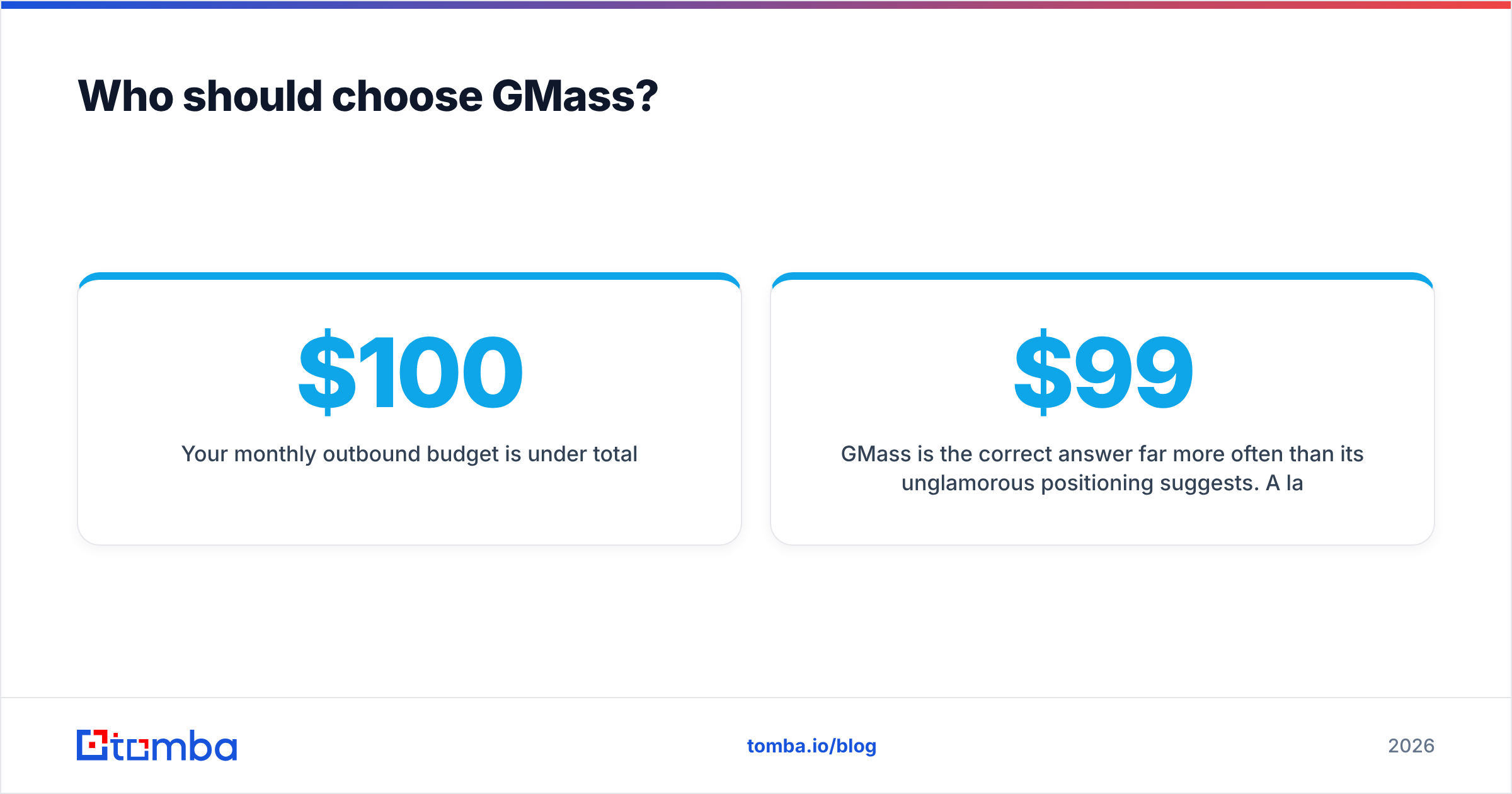
- Your monthly outbound budget is under $100 total.
- You value "it just sends from my real mailbox" over dashboards and rollup reporting.
GMass is the correct answer far more often than its unglamorous positioning suggests. A large share of teams evaluating $99/seat platforms are actually running a workflow a $35 Chrome extension handles completely.
Who should choose Mailshake?#
Pick Mailshake if:
- You have three or more reps and a manager who needs pipeline visibility.
- Your cadence mixes email, LinkedIn and calls rather than email alone.
- CRM sync is a requirement, not a nice-to-have — you need activity logged against records in HubSpot, Salesforce or Pipedrive automatically.
- You need Lead Catcher-style shared reply triage so two reps don't work the same account.
- A/B testing and campaign-level reporting drive real decisions on your team.
Mailshake's value is process enforcement. If nobody on your team is asking for process enforcement, you're paying for something you won't use.
Is there a third option worth considering?#
Yes — and it's not always a different sender.
The most common mistake in this comparison is spending three weeks evaluating sending tools while the actual bottleneck is data. If your reply rate is 0.4%, switching from GMass to Mailshake will move it to roughly 0.4%. Bad targeting and stale contacts don't care which SMTP relay you used.
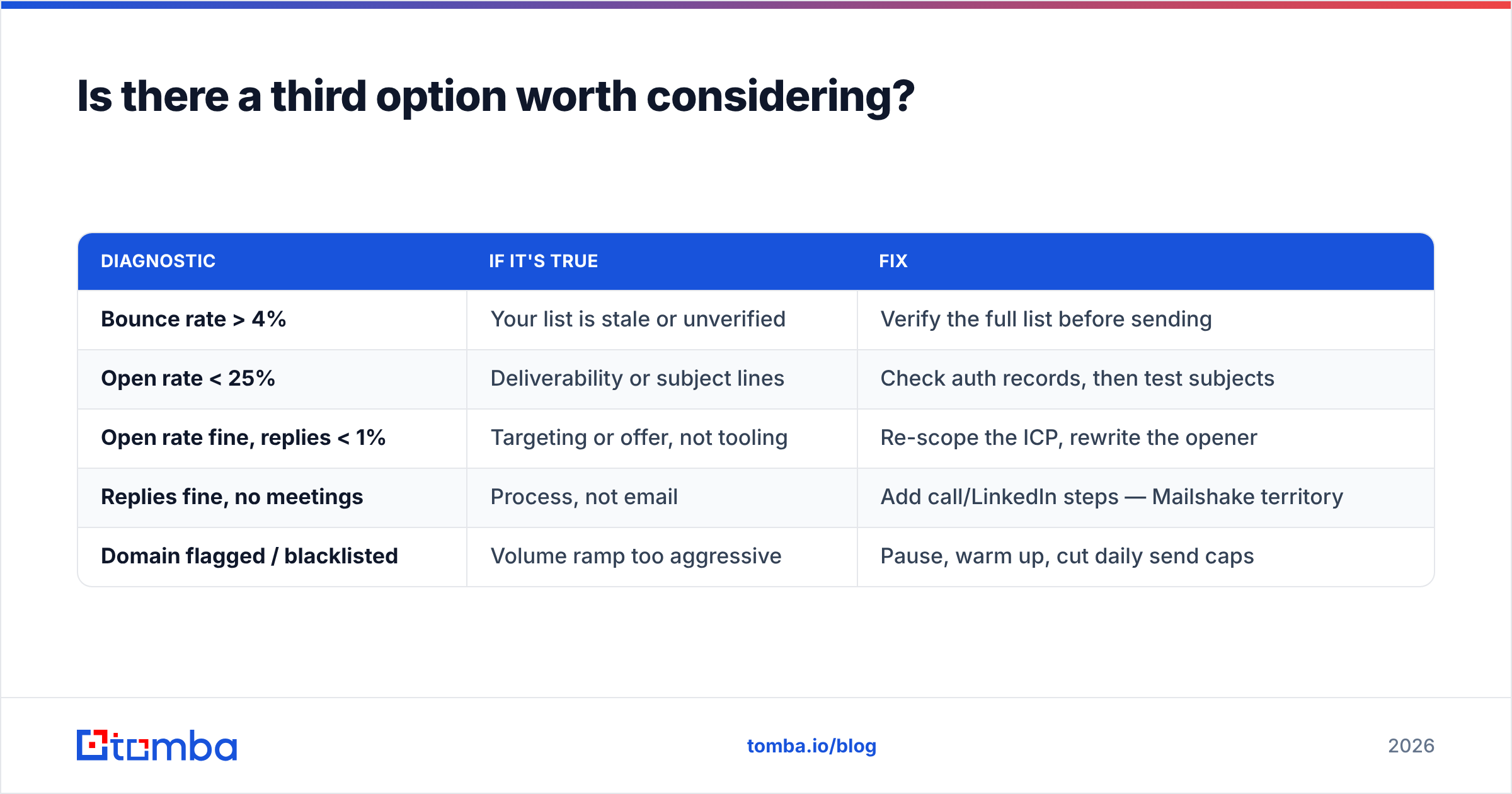
Before you commit to either platform, audit the input side:
| Diagnostic | If it's true | Fix |
|---|---|---|
| Bounce rate > 4% | Your list is stale or unverified | Verify the full list before sending |
| Open rate < 25% | Deliverability or subject lines | Check auth records, then test subjects |
| Open rate fine, replies < 1% | Targeting or offer, not tooling | Re-scope the ICP, rewrite the opener |
| Replies fine, no meetings | Process, not email | Add call/LinkedIn steps — Mailshake territory |
| Domain flagged / blacklisted | Volume ramp too aggressive | Pause, warm up, cut daily send caps |
Work that table top to bottom. Only the fourth row is actually a "which sender should I buy" problem.
The verdict#
GMass wins on price and speed for individuals. Mailshake wins on coordination for teams. There isn't a hidden third answer where one is objectively better — they're aimed at different buyers, and the tell is your org chart, not your feature list.
If you're one person in Gmail, GMass, and spend the saved budget on better data. If you're running a pod with a quota and a manager, Mailshake, and treat the seat cost as the price of visibility.
Either way, the campaign is only as good as the contacts you feed it. Build the list with a verified source: Tomba Email Finder finds professional addresses by domain, name or company, verifies them before they hit your sheet, and pushes straight into Google Sheets or your CRM. The free tier covers 25 searches a month so you can test list quality before committing; paid plans start at $49/month on Tomba pricing. Clean the input, then let GMass or Mailshake do the boring part.
Related guides#
Ready to find emails that actually work?
Join 150,000+ professionals who stopped guessing and started sending. Free credits on signup — no credit card required.
Get the Tomba newsletter
Practical outbound tactics and product updates — once every two weeks.
About the author