GMass vs SignalHire: Which Tool Does Your Outbound Need?
GMass sends email from Gmail. SignalHire finds the contacts you send to. Comparing them head-to-head only makes sense once you know which half of your outbound is actually broken — here is how to decide.
TL;DR
- GMass and SignalHire are not competitors. GMass is a Gmail-based mail merge and cold email sender. SignalHire is a contact database that surfaces emails and phone numbers, mostly for recruiters.
- If your problem is "I have a list and no way to send at scale from Gmail," GMass wins by default. If your problem is "I have company names and no contacts," SignalHire is the relevant tool.
- Neither product is a serious email verification layer. GMass validates syntax and lets you send; SignalHire returns contacts with mixed confidence. Bounces are your problem in both cases.
- Cost-wise they sit in the same monthly band for a solo user, but the credit models are different: GMass charges for the seat, SignalHire charges for each contact you reveal.
- The realistic 2026 stack is finder plus verifier plus sender — three jobs, and the finder is where most bounce problems get solved or created.
What are GMass and SignalHire, exactly?#
Start here, because most "GMass vs SignalHire" comparisons pretend these tools overlap more than they do.
GMass is a Chrome extension that turns Gmail into a cold email platform. You paste or connect a list, write a message in the Gmail compose window, add merge tags, and GMass handles scheduling, throttling, follow-up sequences, reply detection, and reporting. Everything lives inside your existing mailbox. There is no separate sending UI to learn, which is the entire pitch.
SignalHire is a contact search product. You search by person, company, job title, or scrape profiles from LinkedIn and other sources through its extension, and it returns business emails, personal emails, and phone numbers. It also ships a light ATS layer, which tells you who the core buyer is: recruiters and talent sourcers.
So the honest framing is a supply chain, not a duel:
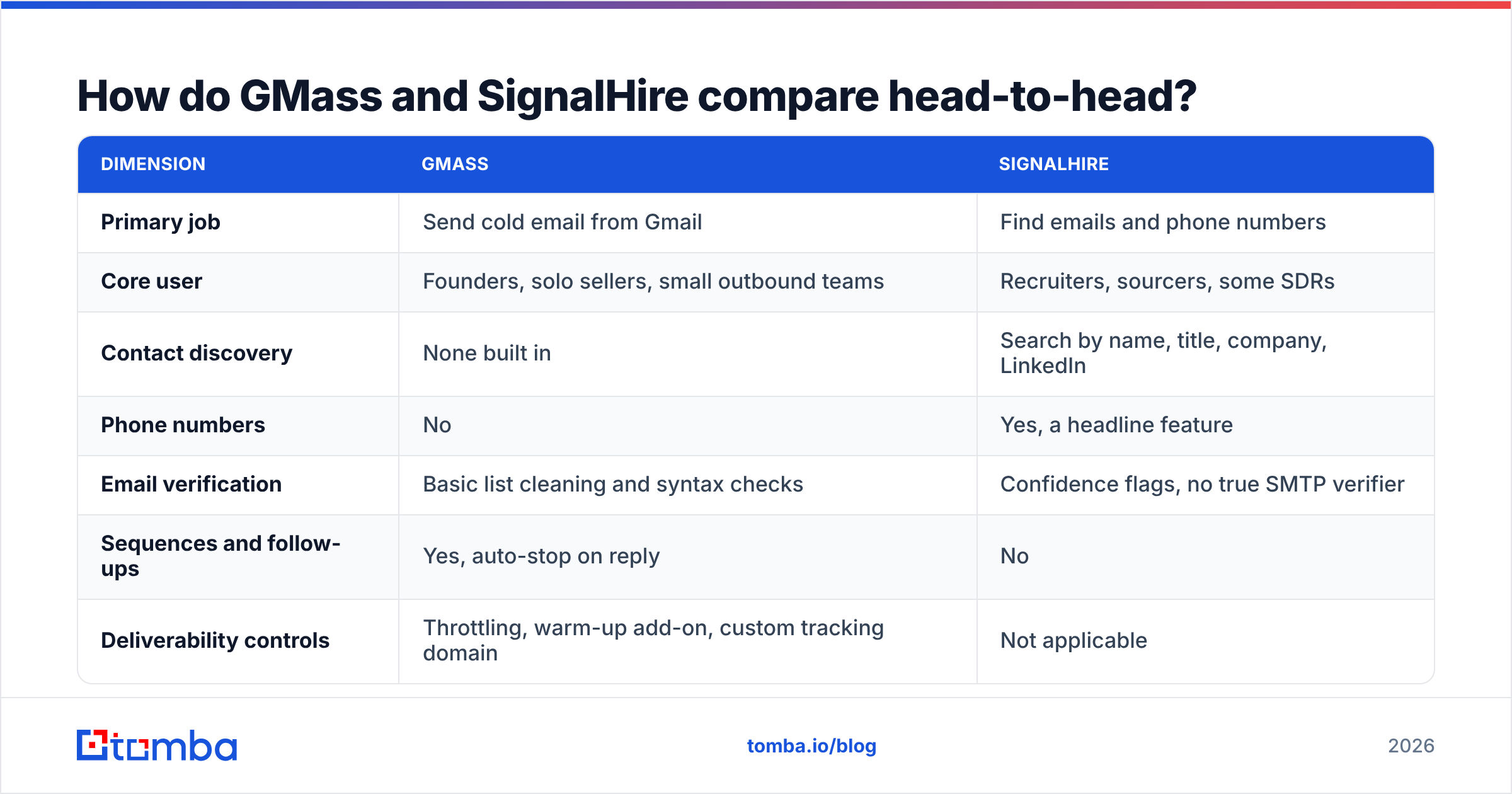
- Find the contact — you need a name, a company, and a working email address. That is SignalHire's lane, and it is where email finder tools compete.
- Verify the contact — a returned address is a hypothesis until an SMTP check confirms it. Neither tool treats this as a first-class product.
- Send the campaign — merge tags, scheduling, throttling, follow-ups. That is GMass's lane.
- Track and reply — opens, clicks, replies, unsubscribes. GMass does this; SignalHire mostly does not.
- Enrich and sync — push the result into a CRM so the next rep does not repeat the work.
If you buy GMass expecting step 1, you will be disappointed. If you buy SignalHire expecting step 3, same result.

How do GMass and SignalHire compare head-to-head?#
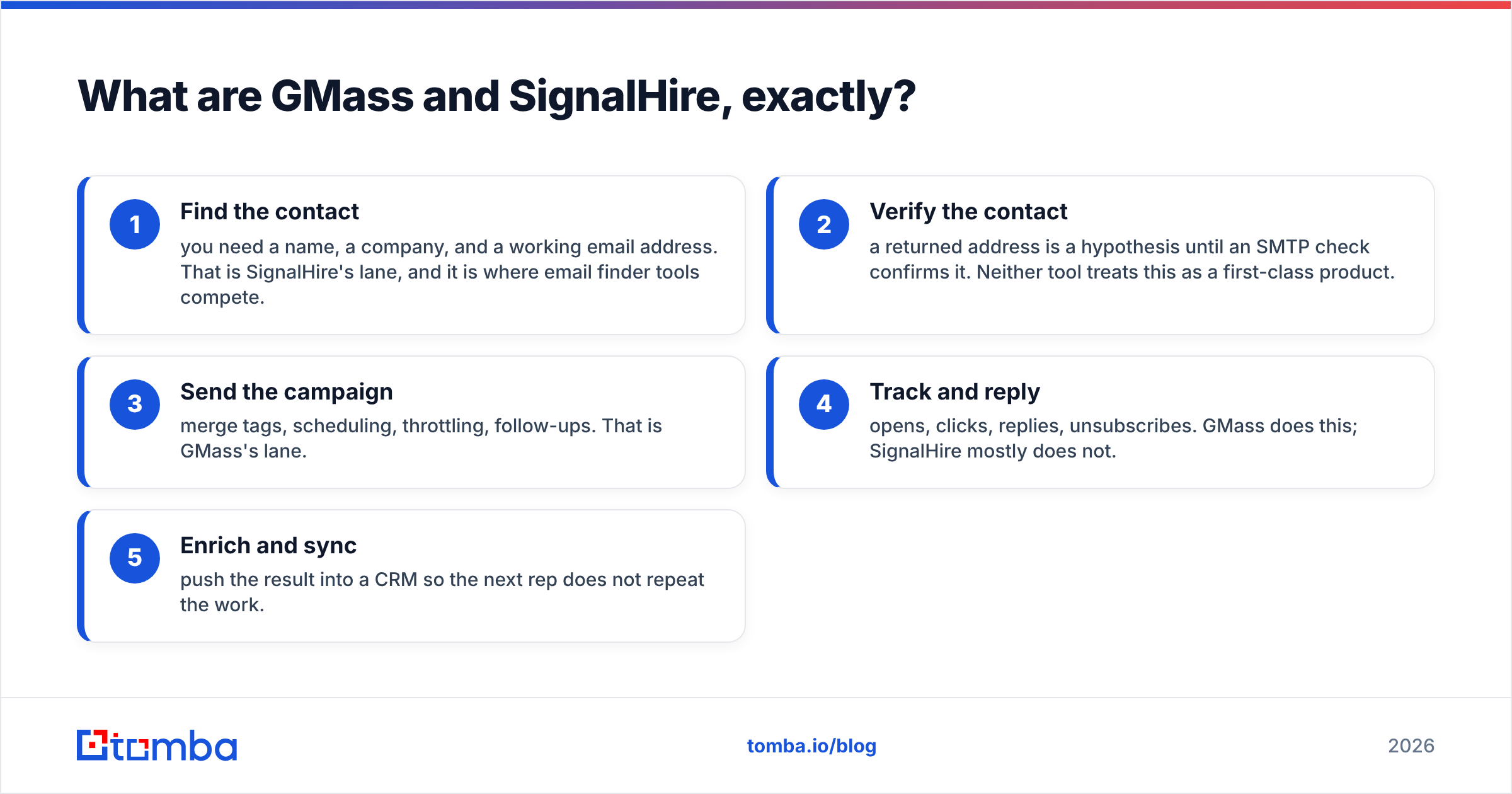
Here is the direct comparison, with the caveat that several rows are "not applicable" by design rather than a failure.
| Dimension | GMass | SignalHire |
|---|---|---|
| Primary job | Send cold email from Gmail | Find emails and phone numbers |
| Core user | Founders, solo sellers, small outbound teams | Recruiters, sourcers, some SDRs |
| Contact discovery | None built in | Search by name, title, company, LinkedIn |
| Phone numbers | No | Yes, a headline feature |
| Email verification | Basic list cleaning and syntax checks | Confidence flags, no true SMTP verifier |
| Sequences and follow-ups | Yes, auto-stop on reply | No |
| Deliverability controls | Throttling, warm-up add-on, custom tracking domain | Not applicable |
| Sending limits | Bound by Gmail or Workspace limits | Not applicable |
| Chrome extension | Yes, works inside Gmail | Yes, works on LinkedIn and web profiles |
| CRM integration | Google Sheets, Zapier, native-ish via Gmail | ATS features, exports, API |
| Learning curve | Very low if you live in Gmail | Low, search-driven |
| Free option | Limited free tier with branding on sends | Small monthly credit allowance |
The row that matters most for cold outbound is deliverability controls. GMass sends through your actual Gmail account, which means your sending reputation is your domain's reputation. That is good for trust and bad for recovery: burn the domain and you have burned your inbox, not a throwaway sending pool. Google's own bulk sender requirements tightened the spam-complaint threshold to 0.3%, and every list you send through GMass runs against that ceiling.
Is GMass a good cold email tool in 2026?#
Yes, with a narrow definition of "good."
GMass wins on friction. There is no data import ritual, no separate dashboard, no sequence builder with fourteen conditional branches. You write an email the way you write every other email, add {FirstName}, connect a Google Sheet, and hit send. For a founder doing 200 sends a week to a hand-built list, that simplicity is worth more than any feature matrix.
Where it strains:
- Volume ceilings are Google's, not GMass's. Workspace caps you at roughly 2,000 recipients per day, and practical cold-email safe limits are far lower — most operators stay under 50 sends per inbox per day on a warmed domain.
- Multi-inbox rotation is not its native model. Dedicated cold email platforms rotate dozens of mailboxes. GMass is one mailbox, one identity, by design.
- List quality is entirely upstream. GMass will happily send to a list where a third of the addresses do not exist, and Gmail will happily record every bounce against your reputation.
That last point is the one that ends most GMass experiments. A 3% bounce rate is tolerable. A 15% bounce rate on a scraped or pattern-guessed list gets your domain flagged inside a week, and no amount of sender-side tuning fixes it. If you want the mechanics, our primer on email deliverability covers how bounce rate feeds into sender reputation.
Is SignalHire worth it for sales prospecting?#
SignalHire is genuinely strong at what it was built for, which is people search. If you need a mobile number for a passive candidate, it belongs in your evaluation set alongside recruiting-first tools.
For B2B sales prospecting the fit is looser, for three reasons.
Credit math punishes exploration. SignalHire's pricing is per-reveal. Every contact you open burns credit whether the address is deliverable or not, which means a bad hit costs the same as a good one. Sales prospecting is inherently exploratory — you check twenty companies to build a list of eight — and a per-reveal model taxes exactly that behavior.
Coverage skews to profiles, not domains. SignalHire is best when you start from a specific person. Sales teams usually start from a company: "get me the head of RevOps at these 300 accounts." That is a domain search problem, and profile-first tools handle it less gracefully than domain-first ones.
Verification is a confidence label, not a check. A "verified" marker in a database means the vendor's last crawl believed the address. It does not mean the mail server accepted it today. Independent buyer reviews on G2 consistently flag the same pattern across every contact database in this category: headline accuracy claims and observed bounce rates rarely match.
None of that makes SignalHire a bad product. It makes it a recruiting tool that sales teams sometimes borrow.
What does neither tool solve?#
The gap between "I have an address" and "the address accepts mail."
This is the middle of the supply chain, and both products treat it as somebody else's job. GMass assumes your list is clean. SignalHire assumes its own confidence score is enough. In practice you need a real verification step that performs an SMTP handshake, detects catch-all domains, flags role accounts and disposables, and returns a hard verdict before a single message goes out.
Catch-all domains are where this gets subtle. A catch-all server accepts everything, so a naive verifier marks every guess as valid — and you find out the truth when the bounce arrives three days later. A dedicated catch-all verifier uses pattern evidence and secondary signals instead of trusting the SMTP response, which is the difference between a 2% and a 12% bounce rate on enterprise domains.
The other thing neither tool does: give you a defensible answer about where the data came from. If you sell into the EU or UK, "the vendor said it was verified" is not a lawful-basis argument. Knowing your provider's data sources is now a procurement question, not a nice-to-have.

How do GMass, SignalHire, and Tomba compare on price?#
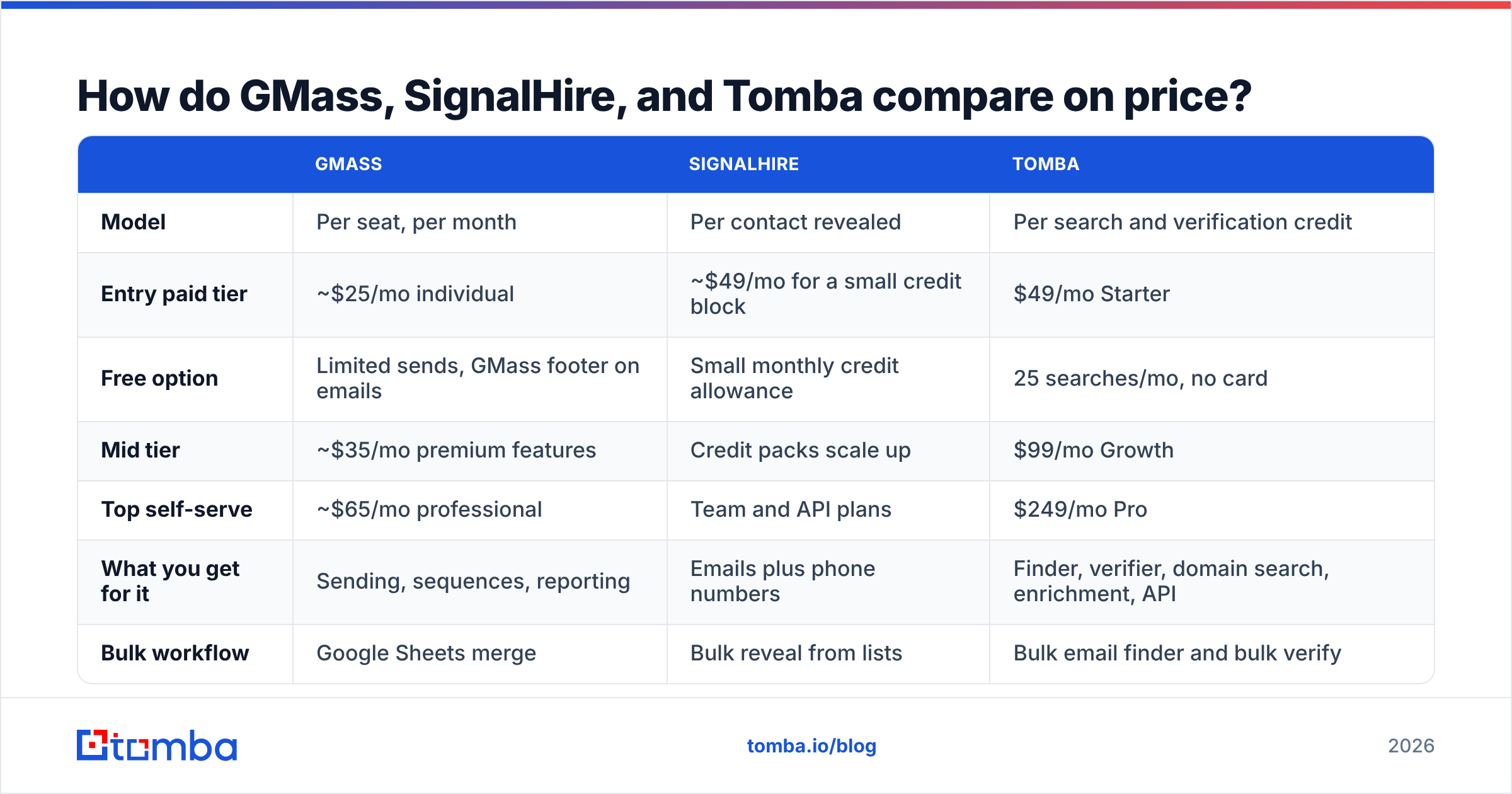
Prices below reflect public list pricing at the time of writing; all three vendors adjust tiers, so confirm on their pages before you buy.
| GMass | SignalHire | Tomba | |
|---|---|---|---|
| Model | Per seat, per month | Per contact revealed | Per search and verification credit |
| Entry paid tier | ~$25/mo individual | ~$49/mo for a small credit block | $49/mo Starter |
| Free option | Limited sends, GMass footer on emails | Small monthly credit allowance | 25 searches/mo, no card |
| Mid tier | ~$35/mo premium features | Credit packs scale up | $99/mo Growth |
| Top self-serve | ~$65/mo professional | Team and API plans | $249/mo Pro |
| What you get for it | Sending, sequences, reporting | Emails plus phone numbers | Finder, verifier, domain search, enrichment, API |
| Bulk workflow | Google Sheets merge | Bulk reveal from lists | Bulk email finder and bulk verify |
| API access | Yes | Yes, on higher tiers | Yes, on all paid tiers |
Read the model row before the price row. A $25 seat that sends to a list with 20% dead addresses is more expensive than a $49 plan that hands you a clean list, once you price in a burned domain and the two weeks of warm-up it takes to recover. See full Tomba pricing for credit breakdowns.
Which should you choose for your use case?#
| Your situation | Pick |
|---|---|
| You already have a clean list and just need to send from Gmail | GMass |
| You are sourcing candidates and need mobile numbers | SignalHire |
| You need emails for 300 target accounts by domain | A domain-first email finder |
| You are getting 10%+ bounces on a list you already own | A verifier, before anything else |
| You want one API for find, verify, and enrich | An email finder platform with API access |
| You run high-volume multi-inbox cold email | A dedicated sending platform, not GMass |
Two of those rows point away from both tools in this comparison, which is the honest answer: GMass vs SignalHire is usually the wrong question. The right question is which stage of your pipeline is actually leaking.
How do you build the stack properly?#
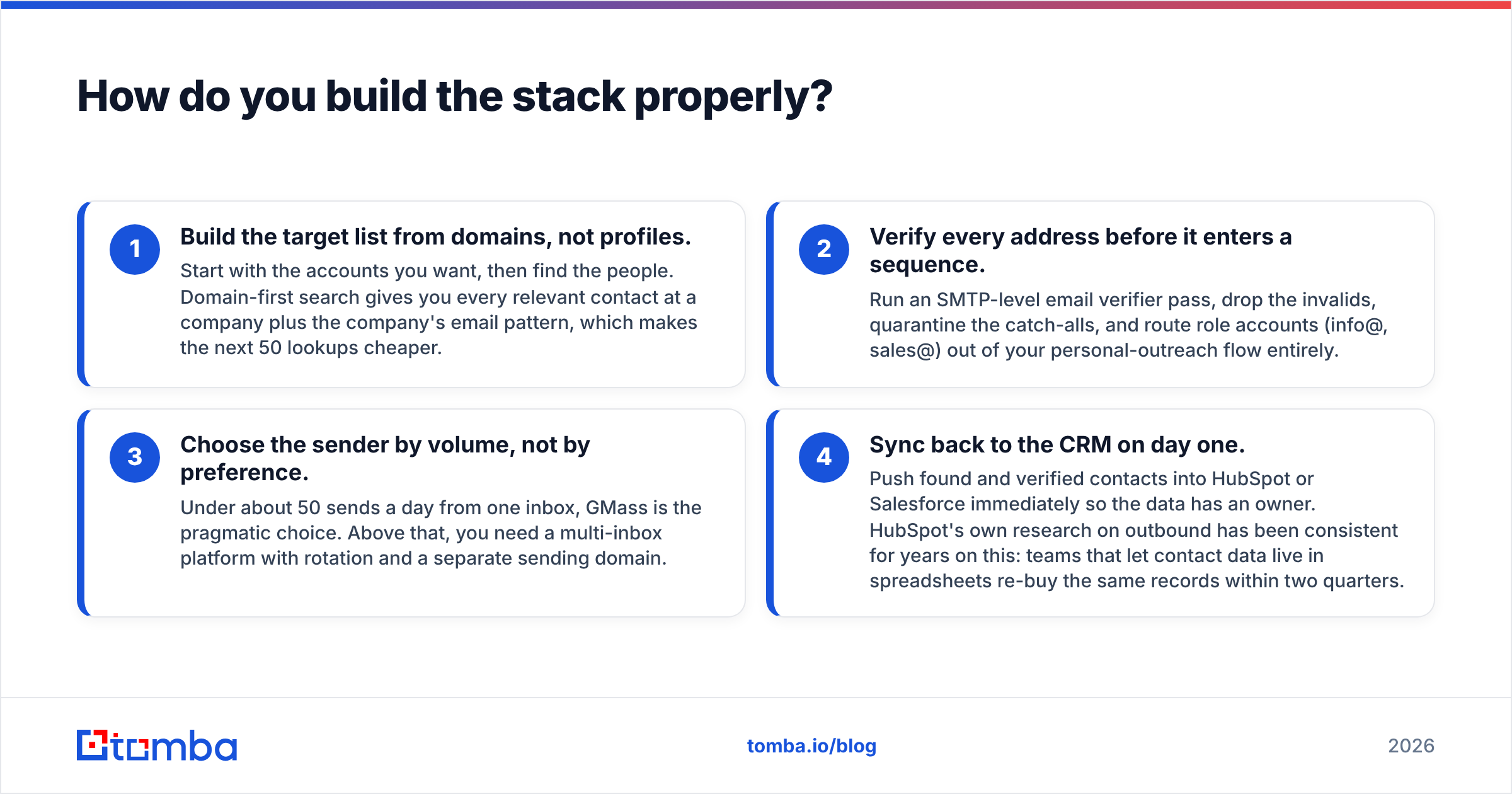
Four steps, in this order. Skipping step two is the single most common reason outbound campaigns underperform.
- Build the target list from domains, not profiles. Start with the accounts you want, then find the people. Domain-first search gives you every relevant contact at a company plus the company's email pattern, which makes the next 50 lookups cheaper.
- Verify every address before it enters a sequence. Run an SMTP-level email verifier pass, drop the invalids, quarantine the catch-alls, and route role accounts (info@, sales@) out of your personal-outreach flow entirely.
- Choose the sender by volume, not by preference. Under about 50 sends a day from one inbox, GMass is the pragmatic choice. Above that, you need a multi-inbox platform with rotation and a separate sending domain.
- Sync back to the CRM on day one. Push found and verified contacts into HubSpot or Salesforce immediately so the data has an owner. HubSpot's own research on outbound has been consistent for years on this: teams that let contact data live in spreadsheets re-buy the same records within two quarters.
If you want it automated, a HubSpot integration or the Tomba API collapses steps one, two, and four into a single call in your enrichment job.
What is the verdict on GMass vs SignalHire?#
GMass wins if the bottleneck is sending. It is the cheapest, fastest way to run a personalized campaign out of a Gmail account, and for solo operators it is hard to beat on time-to-first-send.
SignalHire wins if the bottleneck is finding people, especially with phone numbers, and especially in recruiting. For pure B2B sales prospecting by account, its per-reveal pricing and profile-first search are a worse fit than domain-first alternatives.
Neither wins the middle, and the middle is where campaigns die. Verification, catch-all handling, and data provenance are not optional add-ons in 2026 — they are the reason one team's identical campaign gets 4% replies and another's gets filed as spam.
Fix the input before you optimize the output. Run your target domains through the Tomba Email Finder, let the verifier drop the addresses that would have bounced, and then send with whatever tool fits your volume. The free tier gives you 25 searches a month with no card, which is enough to check your current list against reality before you renew anything.
Related guides#
Ready to find emails that actually work?
Join 150,000+ professionals who stopped guessing and started sending. Free credits on signup — no credit card required.
Get the Tomba newsletter
Practical outbound tactics and product updates — once every two weeks.
About the author