Gmelius Alternatives in 2026: 9 Shared Inbox Tools Compared
Gmelius turns Gmail into a shared inbox and CRM, but per-seat pricing, Gmail lock-in, and automation limits push teams to look elsewhere. Here are 9 alternatives compared on price, features, and fit.
TL;DR
- Gmelius is a Gmail-native shared inbox, kanban, and light automation layer. It is strongest for small teams that live in Gmail and want shared labels, notes, and sequences without leaving the tab.
- The three reasons teams leave: per-seat pricing that scales badly past ~10 users, hard Gmail/Google Workspace dependency, and automation rules that hit a ceiling once workflows get conditional.
- Best swap by job: Front for multi-channel support inboxes, Hiver for a cheaper Gmail-native clone, Missive for chat-plus-email collaboration, Drag for the budget tier, Zendesk when you actually need a helpdesk.
- If what you really wanted from Gmelius was outbound sequencing, you need a prospecting stack, not an inbox skin — a data layer like Tomba plus a dedicated sender beats a shared-inbox tool doing sequences as a side feature.
- Budget honestly: a 10-seat shared inbox runs $150–$400/mo across almost every tool on this list. The differences are in channel coverage, automation depth, and whether you're locked to Gmail.
What is Gmelius and who actually uses it?#
Gmelius is a collaboration layer that installs on top of Gmail and Google Workspace. Instead of forwarding messages or CC-ing colleagues, your team gets shared inboxes built on shared labels, plus internal notes, email assignment, a kanban board view, meeting scheduling, and a rules engine for auto-assignment and canned replies.
The core pitch is "don't make your team learn a new tool." Everything renders inside the Gmail UI your reps and support agents already have open. For a 5-person agency handling hello@, support@, and billing@, that is genuinely enough.
Where it strains:
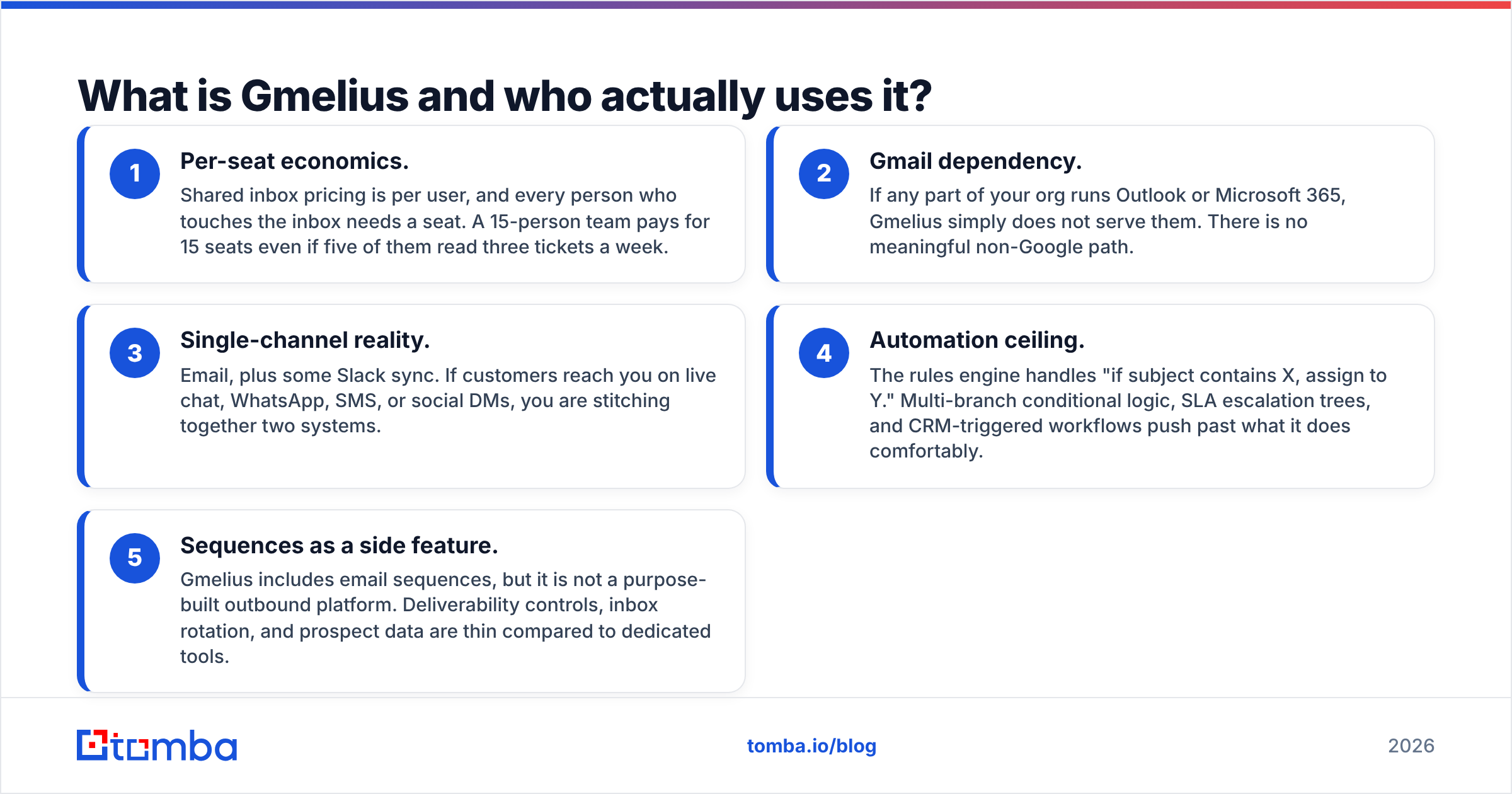
- Per-seat economics. Shared inbox pricing is per user, and every person who touches the inbox needs a seat. A 15-person team pays for 15 seats even if five of them read three tickets a week.
- Gmail dependency. If any part of your org runs Outlook or Microsoft 365, Gmelius simply does not serve them. There is no meaningful non-Google path.
- Single-channel reality. Email, plus some Slack sync. If customers reach you on live chat, WhatsApp, SMS, or social DMs, you are stitching together two systems.
- Automation ceiling. The rules engine handles "if subject contains X, assign to Y." Multi-branch conditional logic, SLA escalation trees, and CRM-triggered workflows push past what it does comfortably.
- Sequences as a side feature. Gmelius includes email sequences, but it is not a purpose-built outbound platform. Deliverability controls, inbox rotation, and prospect data are thin compared to dedicated tools.
None of that makes Gmelius bad. It makes it specific. The question is whether your team is still the team it was built for.

What should you evaluate before switching?#
Before you demo anything, write down which of these five you're actually buying. Most bad migrations happen because a team buys a helpdesk when it needed a shared inbox, or vice versa.
- Channel scope — Is this email-only, or do you need chat, SMS, WhatsApp, and social in one queue? Email-only tools are 40–60% cheaper and simpler. Buying multi-channel "just in case" is the most common overspend.
- Mail provider — Gmail-only, Outlook-only, or both? This alone eliminates half the market. Hiver and Drag are Gmail-native; Front, Missive, and Help Scout are provider-agnostic.
- Automation depth — Round-robin assignment and canned replies (light), versus SLA timers, conditional branching, and CRM write-backs (heavy). Heavy automation usually means helpdesk-tier pricing.
- Reporting requirements — Do you need first-response-time and resolution SLAs reported to a manager, or is "did anyone reply to this" enough? Reporting is the single biggest price step-up between tiers.
- Outbound vs inbound — A shared inbox manages replies to messages people send you. Cold outbound needs verified contact data, sending infrastructure, and reply routing. Those are different products, and conflating them is why teams end up paying for two half-solutions.
- Seat sprawl — Count the people who need write access versus read-only visibility. Some tools charge for both; that difference can be 30% of your bill.
Score your team on those six and the shortlist writes itself.
How do the top Gmelius alternatives compare on price and features?#
Pricing below reflects publicly listed rates as of early 2026, billed annually where a discount exists. Always confirm on the vendor's page — shared-inbox pricing changes often.
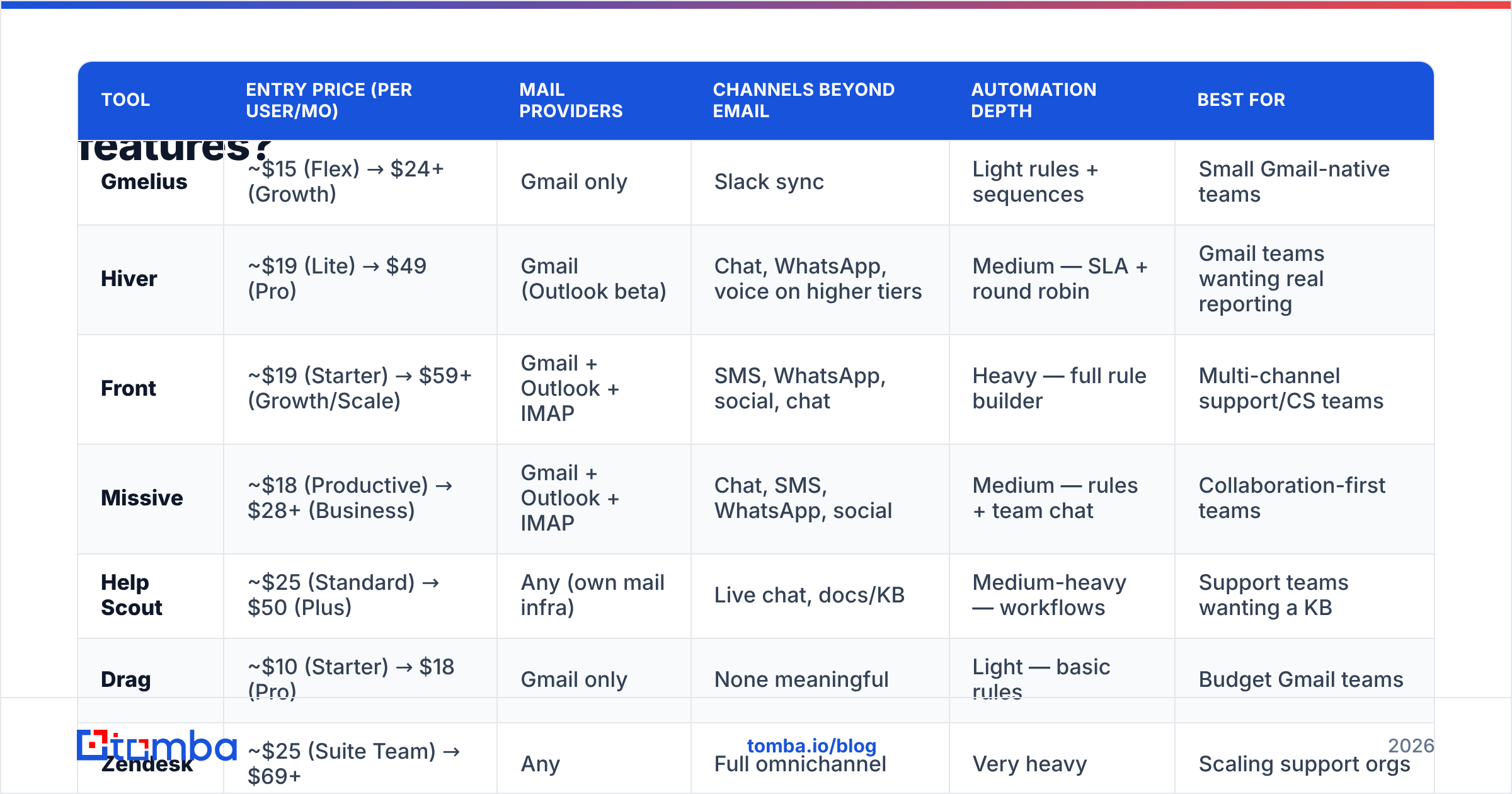
| Tool | Entry price (per user/mo) | Mail providers | Channels beyond email | Automation depth | Best for |
|---|---|---|---|---|---|
| Gmelius | ~$15 (Flex) → $24+ (Growth) | Gmail only | Slack sync | Light rules + sequences | Small Gmail-native teams |
| Hiver | ~$19 (Lite) → $49 (Pro) | Gmail (Outlook beta) | Chat, WhatsApp, voice on higher tiers | Medium — SLA + round robin | Gmail teams wanting real reporting |
| Front | ~$19 (Starter) → $59+ (Growth/Scale) | Gmail + Outlook + IMAP | SMS, WhatsApp, social, chat | Heavy — full rule builder | Multi-channel support/CS teams |
| Missive | ~$18 (Productive) → $28+ (Business) | Gmail + Outlook + IMAP | Chat, SMS, WhatsApp, social | Medium — rules + team chat | Collaboration-first teams |
| Help Scout | ~$25 (Standard) → $50 (Plus) | Any (own mail infra) | Live chat, docs/KB | Medium-heavy — workflows | Support teams wanting a KB |
| Drag | ~$10 (Starter) → $18 (Pro) | Gmail only | None meaningful | Light — basic rules | Budget Gmail teams |
| Zendesk | ~$25 (Suite Team) → $69+ | Any | Full omnichannel | Very heavy | Scaling support orgs |
| Freshdesk | Free tier → ~$15–$49 | Any | Omnichannel on paid | Heavy | Cost-sensitive helpdesks |
| Google Groups Collaborative Inbox | $0 (in Workspace) | Gmail only | None | Almost none | Tiny teams, zero budget |
Two patterns jump out. First, there is no meaningful savings below roughly $15/user/mo unless you drop to Drag or free Google Groups, and both trade away reporting. Second, the jump from "shared inbox" to "helpdesk" (Zendesk, Freshdesk, Help Scout Plus) is where you pay for SLA machinery — worth it only if someone is actually reading those reports.
Hiver — the closest like-for-like swap#
Hiver is the most direct substitute: Gmail-native, shared labels, assignment, notes, SLA reporting, and a cleaner analytics story than Gmelius. If your complaint is "Gmelius works but reporting is thin and it's getting expensive," Hiver is the first demo to book. It also added chat, WhatsApp, and voice channels on upper tiers, which extends its life as you grow. Downside: still fundamentally Google-shaped, so it does not solve mixed Outlook environments.
Front — when email is only one of five channels#
Front is the category leader for teams handling email plus SMS, WhatsApp, social, and live chat in one queue, with a genuinely deep rule builder and strong CRM integrations. It is also the priciest of the "not a helpdesk" options once you need the Growth or Scale tier. Front makes sense when your inbox is a customer-facing operations hub, not just a mailbox. Check current plans on the Front pricing page before budgeting — tiers have shifted more than once.
Missive — collaboration over ticketing#

Missive's differentiator is that team chat and email live in the same thread. Instead of discussing a customer email in Slack and replying in Gmail, the internal conversation is attached to the message. Teams that hate context-switching love it; teams that want a ticket queue with SLAs find it under-structured. Pricing sits in the same band as Gmelius, with better multi-provider support.
Help Scout — support-shaped, not sales-shaped#
Help Scout runs on its own mail infrastructure, so you are not bound to Gmail or Outlook, and it bundles a knowledge base plus live chat. It reads as a real support desk without Zendesk's configuration tax. Its weakness relative to Gmelius is sales workflows — there is no kanban deal board and no sequencing.
Drag — the budget floor#
Drag keeps Gmail as a kanban board with shared inboxes at roughly half Gmelius's price. Automation and reporting are basic. For a 3–6 person team where the actual requirement is "stop two people replying to the same email," Drag does that for the least money.
Zendesk and Freshdesk — when you've outgrown inboxes entirely#
Once you have tiered support, SLAs with contractual teeth, and a queue measured in thousands of tickets a month, a shared inbox is the wrong shape. Both are omnichannel helpdesks with deep automation. Freshdesk's free tier is the most generous starting point in the category; Zendesk is the safer enterprise procurement answer. Neither will feel light. Read independent user reviews on G2 before committing — implementation effort is the variable most demos hide.
Google Groups Collaborative Inbox — free, and it shows#
Included in Google Workspace. You get shared ownership of a group address, assignment, and resolution status. No reporting, no automation, no notes worth the name. It is a legitimate answer for a two-person team with zero budget, and a trap for anyone else.
Is a shared inbox even the right tool for outbound sales?#
No — and this is the most expensive mistake in this category.
Gmelius bundles email sequences, so teams reach for it as an outbound tool. But a shared inbox is designed around messages arriving. Outbound is the opposite motion: you need contact data before there is any message at all, sending infrastructure that protects your domain, and a way to route replies once they land.
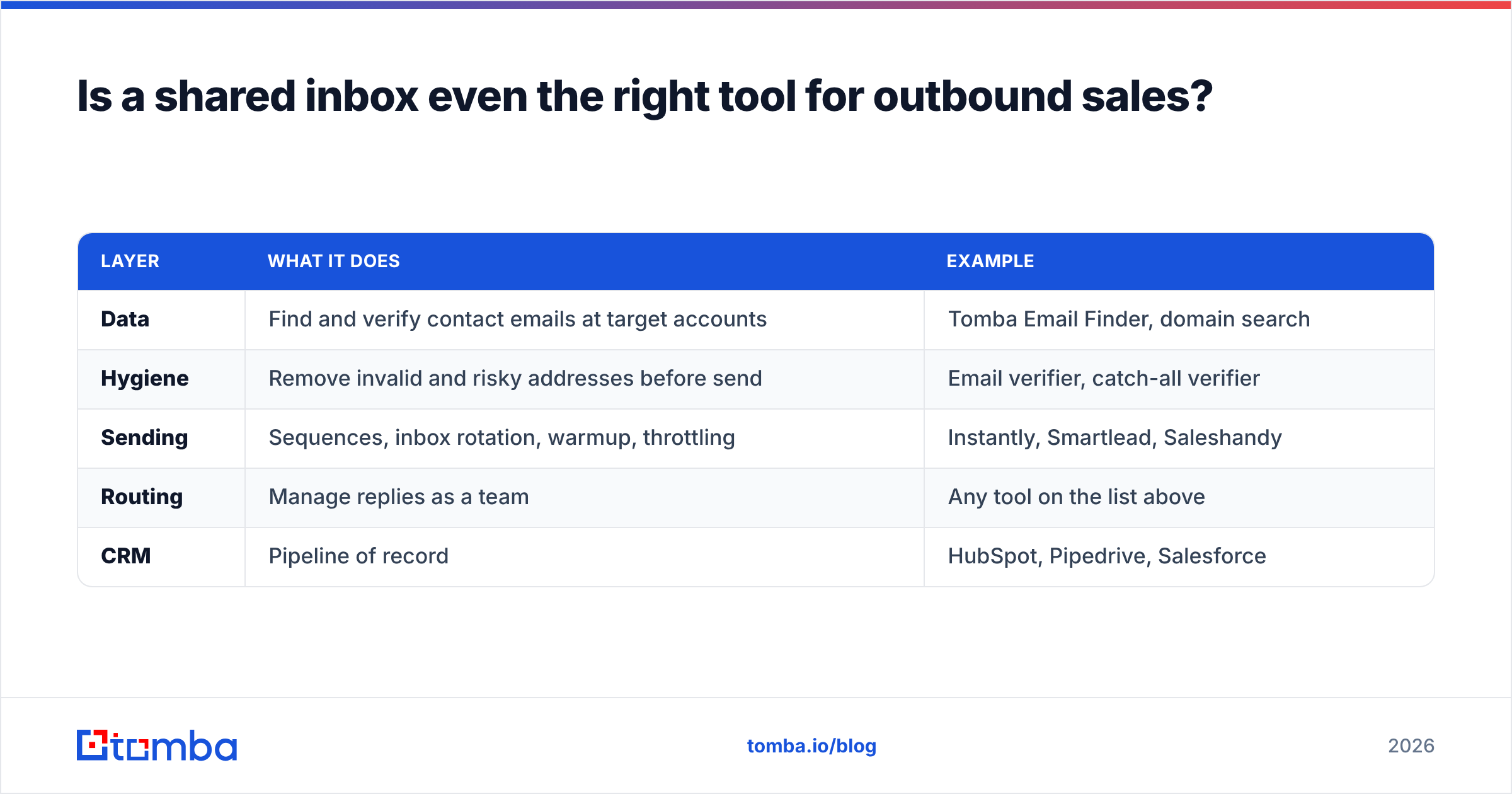
If your Gmelius use case was actually prospecting, the replacement stack looks like this:
| Layer | What it does | Example |
|---|---|---|
| Data | Find and verify contact emails at target accounts | Tomba Email Finder, domain search |
| Hygiene | Remove invalid and risky addresses before send | Email verifier, catch-all verifier |
| Sending | Sequences, inbox rotation, warmup, throttling | Instantly, Smartlead, Saleshandy |
| Routing | Manage replies as a team | Any tool on the list above |
| CRM | Pipeline of record | HubSpot, Pipedrive, Salesforce |
The data layer is where results are actually decided. A perfect sequence sent to a list with 25% invalid addresses produces bounces, a wrecked sender reputation, and no meetings. Verifying before you send is not optional in 2026 — Google and Yahoo's bulk-sender rules put hard bounce thresholds on your domain, and they enforce them.
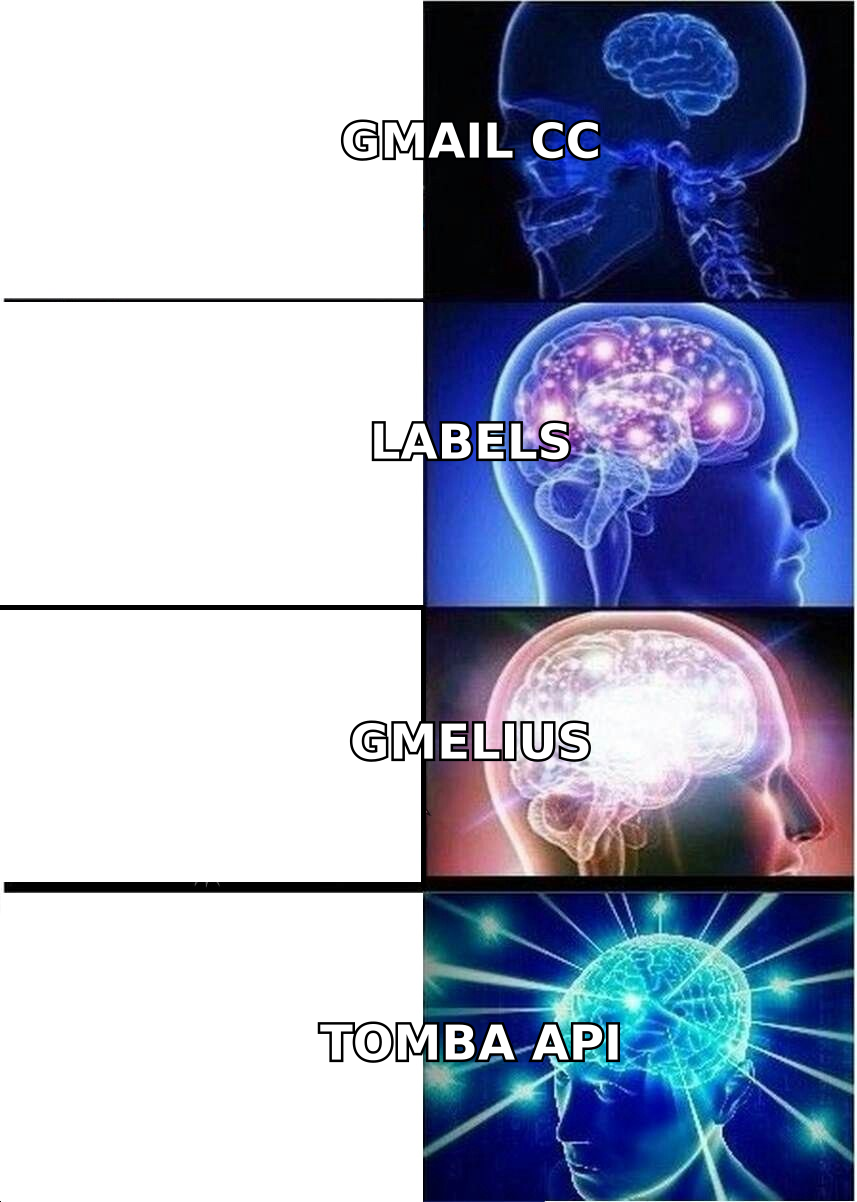
Tomba's pricing for that data layer: Free (25 searches/mo), Starter $49/mo, Growth $99/mo, Pro $249/mo, Enterprise custom. Full details on the Tomba pricing page. That sits alongside — not instead of — whatever shared inbox you pick, and it costs less than adding three seats to Front.
Which Gmelius alternative should you pick?#
Match by situation rather than feature count.
- "Gmelius works, it's just pricey and reporting is weak" → Hiver. Same Gmail-native model, better analytics, comparable or lower cost at scale.
- "We're on Outlook now, or half the company is" → Front, Missive, or Help Scout. Any Gmail-only tool is off the table permanently.
- "Customers message us on five channels" → Front for operations-heavy teams, Missive if collaboration matters more than routing rules.
- "We need SLAs a manager will actually read" → Help Scout Plus, Freshdesk, or Zendesk. Accept the configuration overhead.
- "We just need to stop double-replying, cheaply" → Drag, or Google Groups if the budget is literally zero.
- "We were using it for cold outbound" → Rebuild the stack: verified data, a dedicated sender, and a light inbox for replies. See the Instantly alternative and Saleshandy alternative breakdowns for the sending layer.
One migration warning: shared inboxes built on Gmail labels (Gmelius, Hiver, Drag) store state inside your Google account. Tools with their own infrastructure (Front, Help Scout, Zendesk) import history but restructure it. Export your data and confirm what transfers before you cancel — assignment history and internal notes are the things that most often don't survive.
How much should a 10-person team actually budget?#
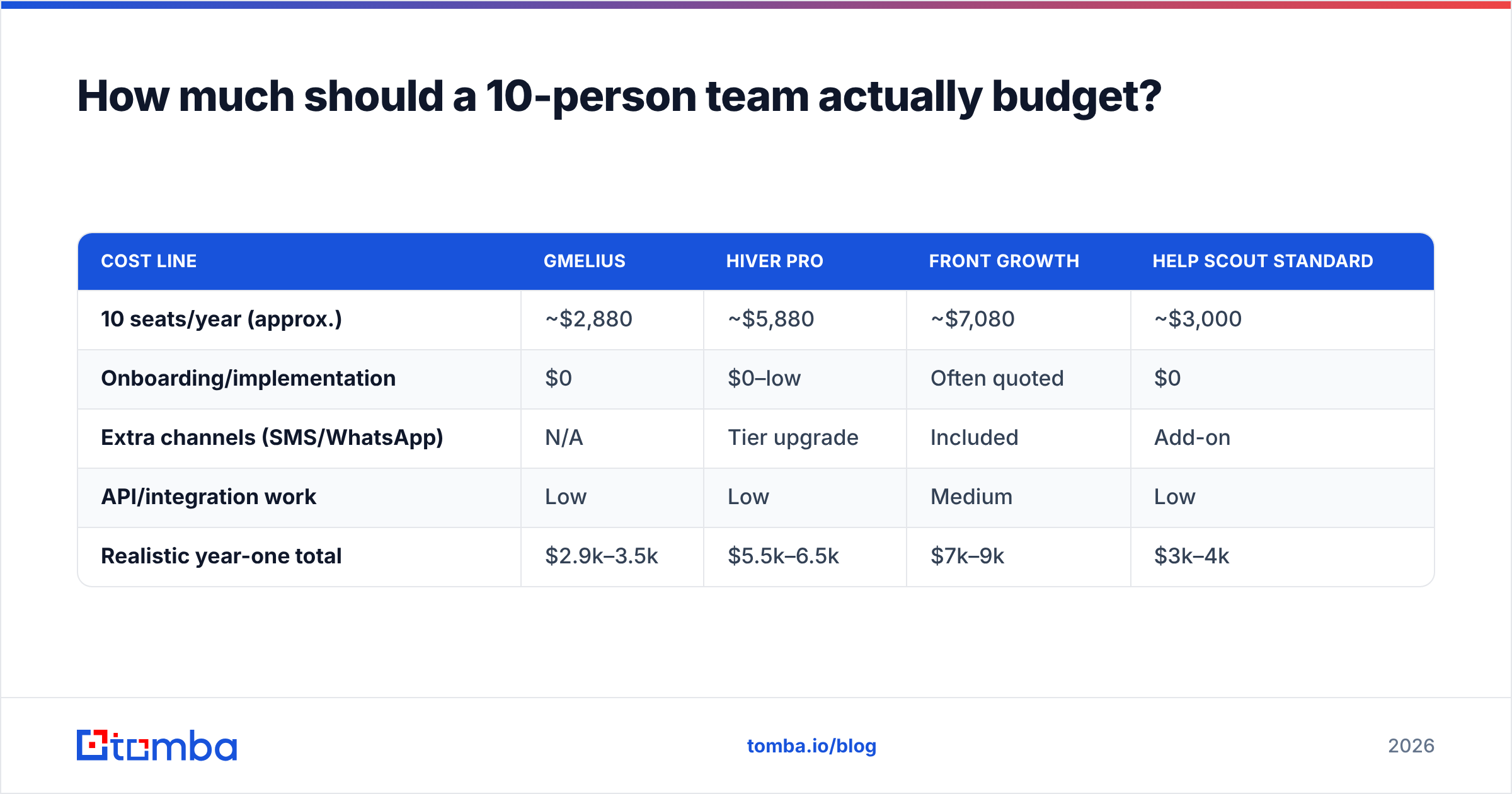
Run the math annually, including the things vendors leave off the pricing page.
| Cost line | Gmelius | Hiver Pro | Front Growth | Help Scout Standard |
|---|---|---|---|---|
| 10 seats/year (approx.) | ~$2,880 | ~$5,880 | ~$7,080 | ~$3,000 |
| Onboarding/implementation | $0 | $0–low | Often quoted | $0 |
| Extra channels (SMS/WhatsApp) | N/A | Tier upgrade | Included | Add-on |
| API/integration work | Low | Low | Medium | Low |
| Realistic year-one total | $2.9k–3.5k | $5.5k–6.5k | $7k–9k | $3k–4k |
The spread between the cheapest and priciest credible option is roughly 3x. That difference is almost entirely channels and automation depth — not shared-inbox quality. If you will not use WhatsApp routing and conditional SLA escalation in year one, do not pay for them in year one.
And keep the two budgets separate. Inbox tooling is an operations cost that scales with headcount. Contact data is a pipeline cost that scales with how many accounts you're working. Mixing them into one line item is how teams end up with an expensive inbox and an empty pipeline.
The bottom line#
Gmelius is a good product with a narrow ideal customer: a small, all-Gmail team that wants collaboration without a new interface. Outgrow any one of those three conditions — size, Gmail, or single-channel — and something on this list serves you better for similar money.
Pick the tool that matches your channel mix and mail provider first, automation depth second, and price third. Reversing that order is how teams end up migrating twice in eighteen months.
And if the reason you were pushing Gmelius past its limits was outbound, fix the input before you shop for a better inbox. Start with Tomba Email Finder — find verified professional emails by domain, name, or company, run them through the email verifier before a single send, and push clean records straight into your CRM through the Tomba API or the HubSpot integration. The free tier gives you 25 searches a month to test accuracy against a list you already know. A shared inbox organizes replies; verified data is what creates them.
Related guides#
Ready to find emails that actually work?
Join 150,000+ professionals who stopped guessing and started sending. Free credits on signup — no credit card required.
Get the Tomba newsletter
Practical outbound tactics and product updates — once every two weeks.
About the author