Gmelius Pricing 2026: Reviews, Pros and Cons Compared
Gmelius turns Gmail into a shared inbox with automation and CRM-lite pipelines. Here is what each plan actually costs per seat in 2026, what reviewers praise, where the limits bite, and when a cheaper stack wins.
TL;DR
- Gmelius is a Gmail-native shared inbox, email automation, and lightweight CRM layer — it lives inside Google Workspace instead of replacing it.
- Pricing is per user, per month, with three published tiers (roughly $15, $24, and $36 per seat on annual billing at the time of writing). Monthly billing costs meaningfully more, and some plans carry a minimum seat count.
- Reviewers consistently praise the Gmail-native UX, shared inbox assignment, and Trello/Slack sync. The recurring complaints: sluggish loading on large mailboxes, per-seat cost that scales badly past ~10 users, and automation that stops short of a real sequencer.
- Gmelius is a collaboration and workflow tool. It does not find, verify, or enrich contact data — you still need a data layer underneath it.
- Best fit: 3–15 person support, ops, or account-management teams already committed to Gmail. Worst fit: outbound SDR teams who need a sequencer plus a contact database.
What is Gmelius, and who is it actually for?#
Gmelius is a browser extension and Google Workspace add-on that turns a Gmail inbox into a team workspace. Think of it like adding a receptionist desk to a house you already own — you are not moving out of Gmail, you are bolting shared trays, sticky notes, and a routing sheet onto the front door.
Concretely, it gives you:
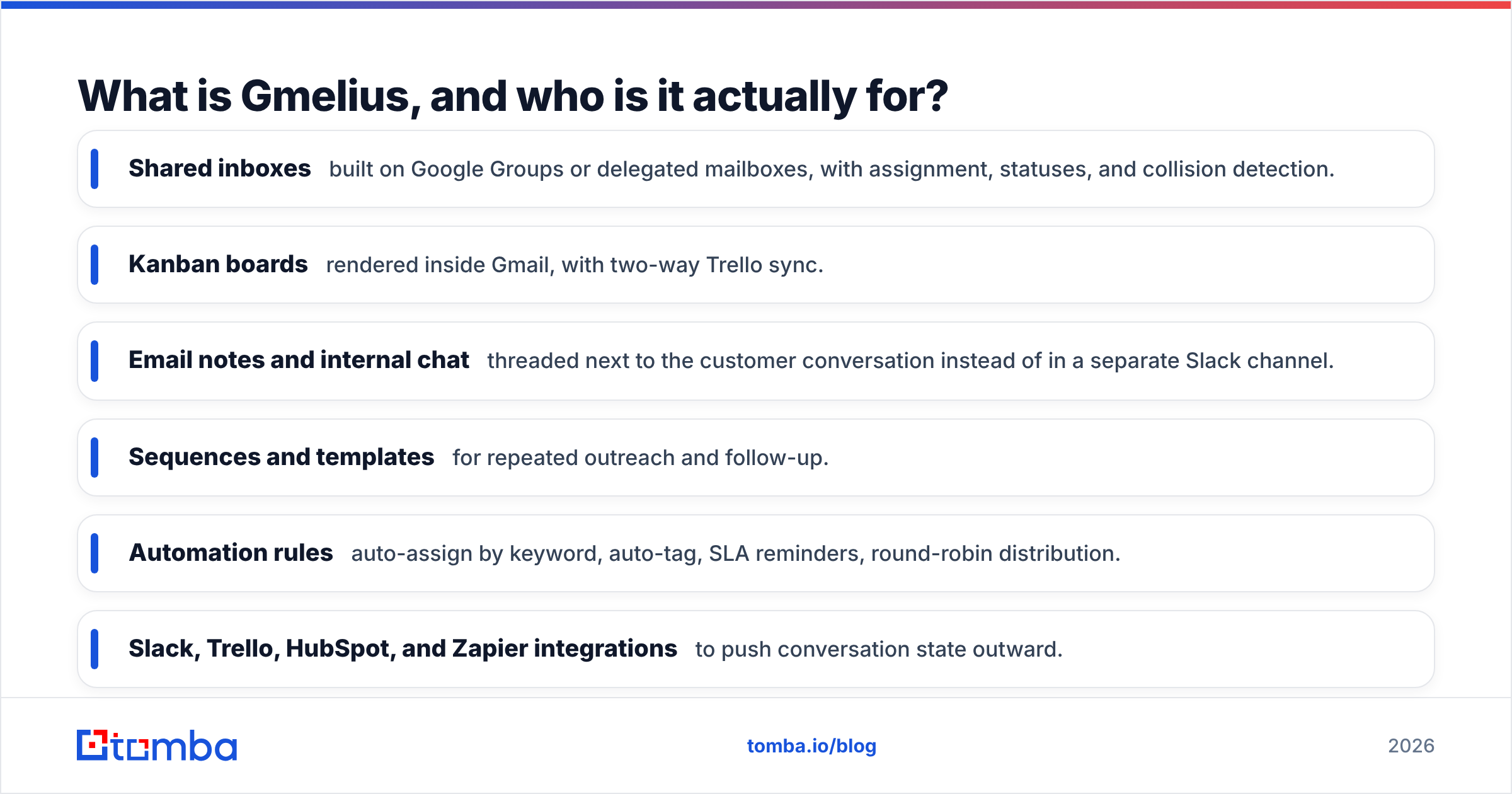
- Shared inboxes built on Google Groups or delegated mailboxes, with assignment, statuses, and collision detection.
- Kanban boards rendered inside Gmail, with two-way Trello sync.
- Email notes and internal chat threaded next to the customer conversation instead of in a separate Slack channel.
- Sequences and templates for repeated outreach and follow-up.
- Automation rules — auto-assign by keyword, auto-tag, SLA reminders, round-robin distribution.
- Slack, Trello, HubSpot, and Zapier integrations to push conversation state outward.
The audience is narrower than the marketing suggests. Gmelius wins with small-to-mid teams who process inbound email as a queue: customer support, ops, recruiting coordinators, agency account managers, and founder-led sales teams handling replies. It is not a replacement for Outreach, Salesloft, or Instantly, and it is not a data provider. Get that framing right and the pricing conversation gets much simpler.

How much does Gmelius cost in 2026?#
Gmelius publishes three self-serve tiers plus custom enterprise arrangements. All are priced per user, per month, and the headline numbers you see on the site assume annual prepayment. Always confirm current numbers on the official Gmelius pricing page before you budget — SaaS list prices move.
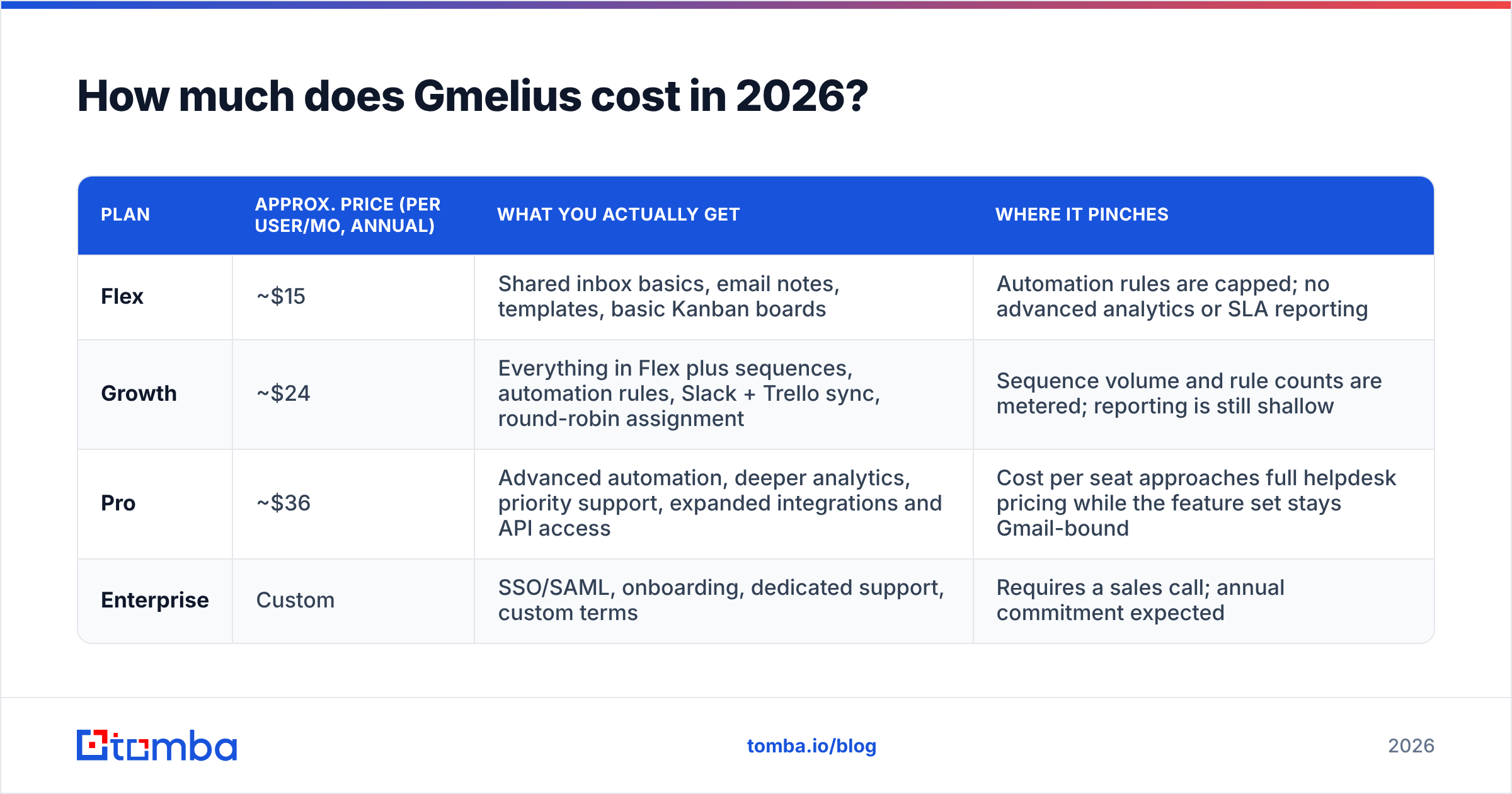
| Plan | Approx. price (per user/mo, annual) | What you actually get | Where it pinches |
|---|---|---|---|
| Flex | ~$15 | Shared inbox basics, email notes, templates, basic Kanban boards | Automation rules are capped; no advanced analytics or SLA reporting |
| Growth | ~$24 | Everything in Flex plus sequences, automation rules, Slack + Trello sync, round-robin assignment | Sequence volume and rule counts are metered; reporting is still shallow |
| Pro | ~$36 | Advanced automation, deeper analytics, priority support, expanded integrations and API access | Cost per seat approaches full helpdesk pricing while the feature set stays Gmail-bound |
| Enterprise | Custom | SSO/SAML, onboarding, dedicated support, custom terms | Requires a sales call; annual commitment expected |
Three things about this table matter more than the numbers themselves.
Monthly billing is a real premium. Like most B2B SaaS, choosing month-to-month typically adds 20–30% versus the annual rate. A 10-seat Growth deployment at ~$24/seat annually is roughly $2,880/year; the same team on monthly billing lands closer to $3,500–$3,700. If you are piloting, budget for the monthly rate and only lock annual once the workflow sticks.
Seat minimums and seat definitions bite. Anyone who needs to see or act on a shared inbox needs a paid seat — including part-time contractors and the ops manager who checks the queue twice a week. Teams routinely underestimate seat count by 20–30% during procurement. Check whether your tier carries a minimum (some plans historically required a small floor) before you compare against a flat-rate competitor.
The Google Workspace bill is separate. Gmelius sits on top of Google Workspace, which is its own per-seat cost. Your true per-user monthly spend is Workspace plus Gmelius, not Gmelius alone. For a 10-person team on Workspace Business Standard plus Gmelius Growth, you are realistically at $38–$42 per seat per month before any data, dialer, or CRM tooling.
What do Gmelius reviews actually say?#
Public review platforms give a consistent picture. On G2's Gmelius listing, the product scores well on ease of use and setup speed, with reviewers repeatedly citing the fact that nobody had to learn a new interface. That is the single most-mentioned strength across every source: adoption friction is near zero because the tool renders inside a mailbox the team already opens 200 times a day.
The critical themes are also consistent:
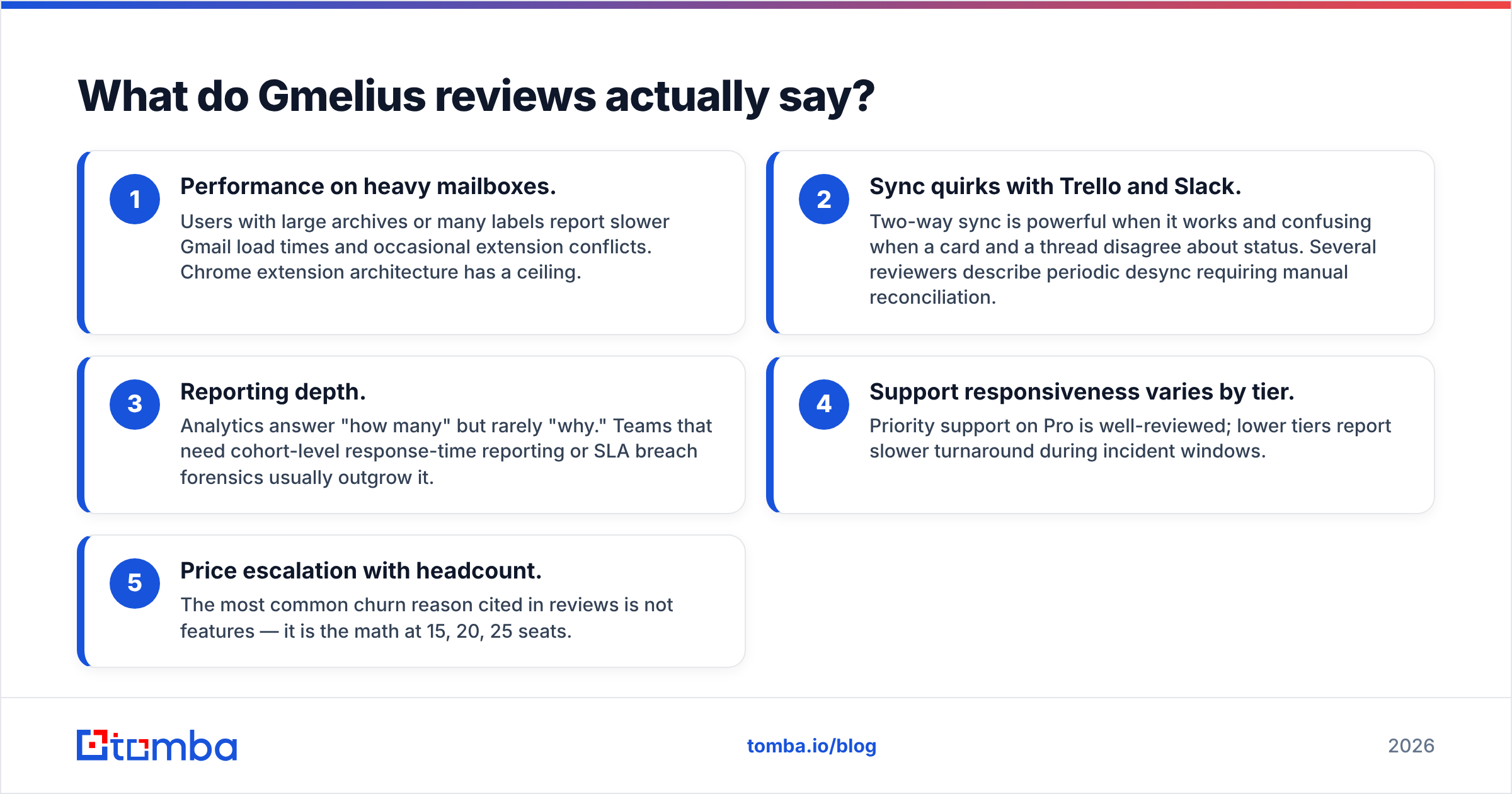
- Performance on heavy mailboxes. Users with large archives or many labels report slower Gmail load times and occasional extension conflicts. Chrome extension architecture has a ceiling.
- Sync quirks with Trello and Slack. Two-way sync is powerful when it works and confusing when a card and a thread disagree about status. Several reviewers describe periodic desync requiring manual reconciliation.
- Reporting depth. Analytics answer "how many" but rarely "why." Teams that need cohort-level response-time reporting or SLA breach forensics usually outgrow it.
- Support responsiveness varies by tier. Priority support on Pro is well-reviewed; lower tiers report slower turnaround during incident windows.
- Price escalation with headcount. The most common churn reason cited in reviews is not features — it is the math at 15, 20, 25 seats.
Read reviews with a filter: a support team of six and an outbound team of thirty will write completely different reviews of the same product. Weight the ones whose team shape matches yours.
What are the pros and cons of Gmelius?#
Here is the honest split, organized by how much it should move your decision.
Pros
- Zero-training adoption. Because it renders inside Gmail, onboarding is measured in minutes, not weeks. This is genuinely the product's moat versus Front or Zendesk.
- Shared inbox done properly. Assignment, collision detection, and internal notes eliminate the "who's replying to this?" Slack message — the core problem it was built for.
- Visual workflow inside email. Kanban boards in Gmail make pipeline state visible without a context switch, which matters for teams that live in the inbox.
- Automation that non-technical staff can configure. Rule building is genuinely approachable; ops managers set up round-robin routing without engineering help.
- Fair entry price for small teams. At three to six seats, the total cost is trivial relative to the coordination overhead it removes.
Cons
- Per-seat economics punish growth. Costs scale linearly with headcount while the value curve flattens — the classic reason teams migrate to a helpdesk at ~20 seats.
- It is not a sequencer. Sequences exist, but deliverability controls, inbox rotation, and warmup are outside its scope. Serious cold outbound needs a dedicated platform.
- No contact data layer. Gmelius manages conversations you already have. It will not tell you who to email or whether an address is valid.
- Gmail dependency is total. Migrating off Google Workspace means migrating off Gmelius. Mixed Outlook/Gmail organizations get a partial solution at best.
- Reporting ceiling. If your board asks for first-response-time distributions by segment, you will be exporting to a spreadsheet.

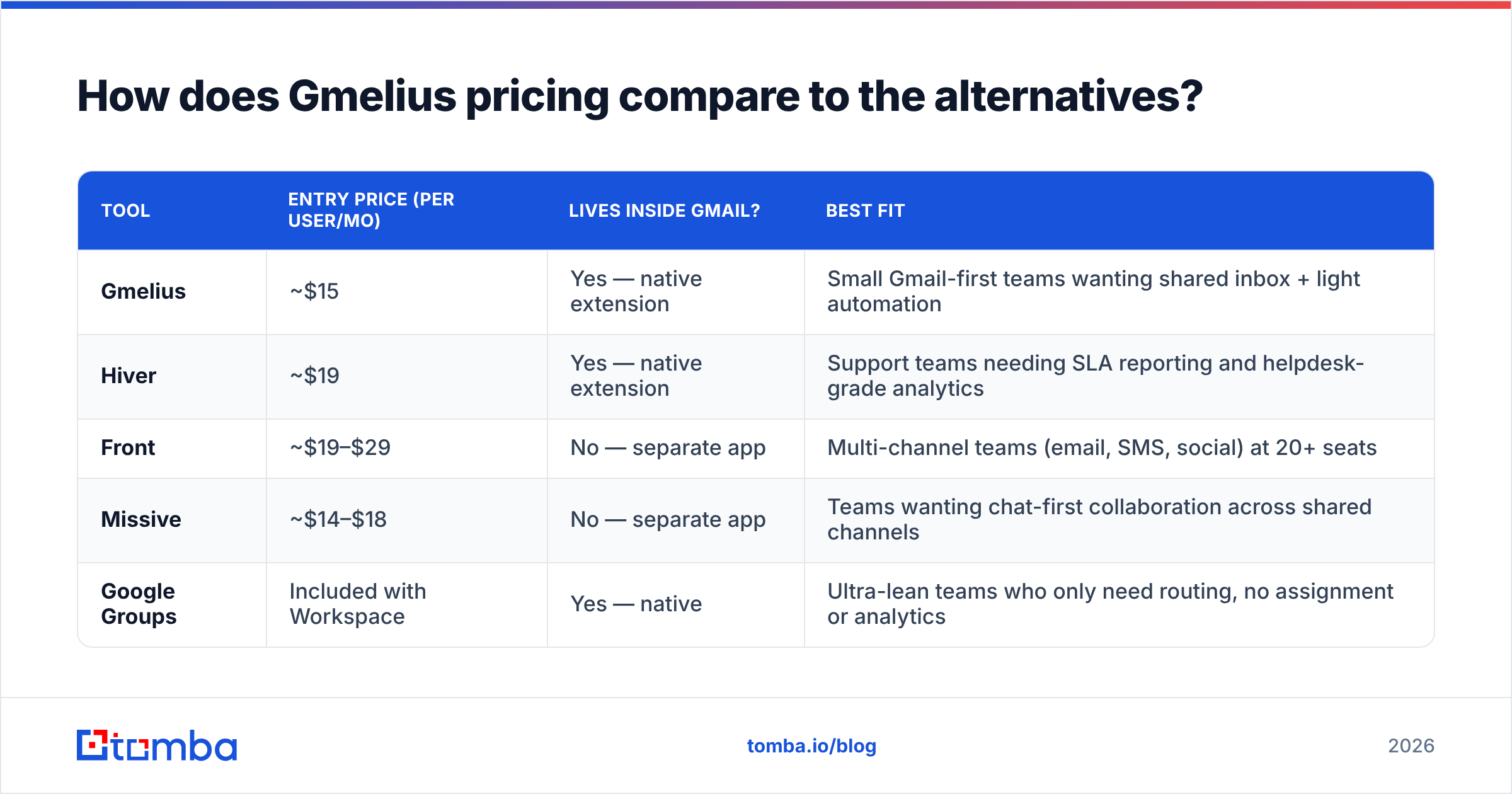
How does Gmelius pricing compare to the alternatives?#
The right comparison set depends on what you are actually buying. If you want a shared inbox, compare against shared inbox tools. If you want outbound, compare against outbound tools — Gmelius will lose that fight, and it should.
| Tool | Entry price (per user/mo) | Lives inside Gmail? | Best fit |
|---|---|---|---|
| Gmelius | ~$15 | Yes — native extension | Small Gmail-first teams wanting shared inbox + light automation |
| Hiver | ~$19 | Yes — native extension | Support teams needing SLA reporting and helpdesk-grade analytics |
| Front | ~$19–$29 | No — separate app | Multi-channel teams (email, SMS, social) at 20+ seats |
| Missive | ~$14–$18 | No — separate app | Teams wanting chat-first collaboration across shared channels |
| Google Groups | Included with Workspace | Yes — native | Ultra-lean teams who only need routing, no assignment or analytics |
The pattern: Gmelius and Hiver compete on Gmail-nativeness, Front and Missive compete on multi-channel depth, and Google Groups is the free floor that teams outgrow within a quarter. Gmelius sits in the value bracket where you want more than Groups but do not want to retrain everyone on a new interface.
One more comparison worth making: if the actual pain is that reps waste hours hunting for contact details rather than coordinating replies, none of these tools fix it. That is a data problem wearing a workflow costume.
Where does Gmelius fit in a real outbound stack?#
Split your stack into three layers and the buying decision resolves itself.
Layer 1 — Data. Who are you contacting, and is the address real? This is where an email finder and an email verifier live. Gmelius does nothing here.
Layer 2 — Sending and sequencing. Warmup, inbox rotation, throttling, reply detection. Gmelius covers the light end of this for follow-ups on existing threads; dedicated cold email platforms cover the heavy end.
Layer 3 — Collaboration and triage. Once replies land, who owns them, what is the SLA, and where does status live? This is Gmelius's actual home turf, and it is good at it.
Teams get burned when they buy a Layer 3 tool expecting Layer 1 outcomes. If reply rates are the problem, a shared inbox will not save you — bad or unverified addresses will bounce regardless of how elegantly you assign them. Run a bulk verification pass on your list before you blame the workflow. For teams building lists at volume, bulk email finding and verification upstream of Gmelius costs a fraction of adding seats downstream.
A pragmatic 8-person stack in 2026 looks like: Google Workspace for mail, a data layer for contacts, a sequencer for cold volume, and Gmelius for inbound triage. Each layer priced independently, each replaceable without ripping out the others.
Is Gmelius worth it in 2026?#
Yes, if you are a 3–15 person Gmail-native team drowning in shared-mailbox coordination, and your primary metric is response time or ownership clarity. At Flex or Growth pricing, the tool pays for itself the first time it prevents two people from replying to the same customer.
No, if any of these are true: you run 20+ seats (the per-seat math favors a real helpdesk), you are primarily doing cold outbound (buy a sequencer), your org is on Outlook (buy something channel-agnostic), or your bottleneck is finding contacts rather than managing replies.
Negotiate, if you are close to Enterprise volume. Annual prepay plus a multi-year term is where per-seat discounts appear, and Gmelius — like most mid-market SaaS — has room on list price for committed deals above roughly 25 seats.
The honest summary: Gmelius is a well-built tool with a clear job and transparent pricing. Its weakness is not the product, it is the boundary. Buy it for what it does, and buy the rest of your stack separately rather than hoping one vendor covers three layers.
Fix the data layer first#
Before you add another seat to any workflow tool, check whether your pipeline problem is actually a data problem. If your team is manually digging for addresses, guessing at formats, or watching bounce rates climb past 3%, no amount of shared-inbox polish will move revenue.
Start with the Tomba Email Finder — find verified professional email addresses by domain, name, or company, then push clean contacts into whatever workflow layer you have chosen. The free tier gives you 25 searches a month to test accuracy on your own target accounts before spending anything, and paid plans start at $49/mo with no per-seat penalty as your team grows. Full Tomba pricing is public, and every plan includes the same verification engine — see the data sources behind it if you want to audit before you buy.
Get the contacts right first. The workflow tool is a lot cheaper to justify when the pipeline underneath it is real.
Related guides#
Ready to find emails that actually work?
Join 150,000+ professionals who stopped guessing and started sending. Free credits on signup — no credit card required.
Get the Tomba newsletter
Practical outbound tactics and product updates — once every two weeks.
About the author