Gmelius vs Mixmax (2026): Which Gmail Sales Tool Wins?
Gmelius runs on shared inboxes and Kanban workflows. Mixmax runs on sequences and rep productivity. Here is the honest breakdown of pricing, features, and which one your team should actually buy in 2026.
TL;DR
- Gmelius is a shared-inbox and workflow tool that happens to do sequences. Mixmax is a sales-engagement tool that happens to live in Gmail. That single distinction decides most purchases.
- Pick Gmelius if support, ops, or founder-led teams need to co-own an inbox (
support@,sales@) with Kanban boards, SLAs, and shared labels — without paying for Zendesk. - Pick Mixmax if you have SDRs or AEs running multi-step outbound, need calendar booking, dialer, CRM sync, and reply attribution inside Gmail.
- Price gap is real. Gmelius sits in the mid-teens to mid-thirties per user/month. Mixmax's genuinely useful sales tiers start around $34/user/month and climb past $65 for sequences plus CRM sync.
- Neither tool finds or verifies contact data. Both send whatever list you hand them. That gap is where most Gmail-native outbound quietly dies.
What are Gmelius and Mixmax, exactly?#
Both bolt onto Gmail. That is where the similarity ends.
Gmelius started as a Gmail collaboration layer. Its core idea: turn a shared mailbox into a workable team surface. You get shared inboxes with assignment, shared labels that sync across teammates, Kanban boards built from email threads, internal notes so people stop CC-ing each other, and automation rules that route or tag incoming mail. Sequences exist, but they are a secondary module — useful for follow-up, not for running a 12-touch outbound machine across five reps.
Mixmax started as an email-productivity extension for salespeople and grew into a full sales-engagement platform. Its core idea: make one rep dramatically faster inside Gmail. You get multi-step sequences with conditional branching, live send/open/click/download tracking, one-click meeting scheduling and round-robin routing, templates with variables, polls and surveys embedded in the email body, a dialer on higher tiers, and deep two-way Salesforce and HubSpot sync.
So the honest framing is not "which is the better Gmail plugin." It is which problem do you have: too many people touching one inbox, or too few touches going out per rep per day.
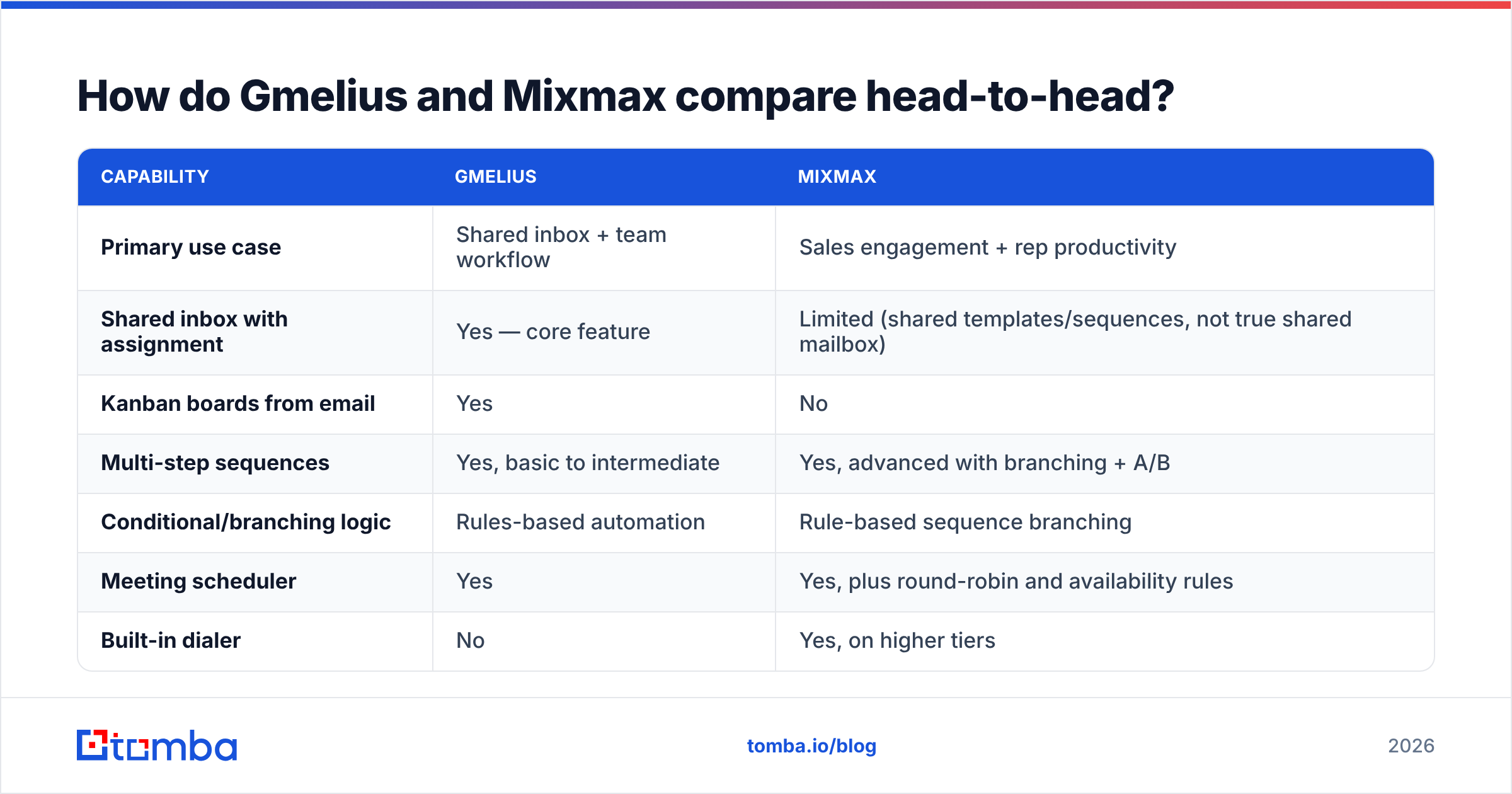
How do Gmelius and Mixmax compare head-to-head?#
| Capability | Gmelius | Mixmax |
|---|---|---|
| Primary use case | Shared inbox + team workflow | Sales engagement + rep productivity |
| Shared inbox with assignment | Yes — core feature | Limited (shared templates/sequences, not true shared mailbox) |
| Kanban boards from email | Yes | No |
| Multi-step sequences | Yes, basic to intermediate | Yes, advanced with branching + A/B |
| Conditional/branching logic | Rules-based automation | Rule-based sequence branching |
| Meeting scheduler | Yes | Yes, plus round-robin and availability rules |
| Built-in dialer | No | Yes, on higher tiers |
| CRM sync | HubSpot, Pipedrive (varies by tier) | Salesforce + HubSpot, bi-directional, field-level |
| Email tracking & analytics | Yes, team-level | Yes, granular rep + sequence level |
| Slack integration | Strong (two-way thread sync) | Yes |
| Best-fit team | Support, ops, agencies, founder-led sales | SDR/AE teams, RevOps-managed orgs |
| Contact data included | No | No |
The last row matters more than most buyers expect. Neither platform ships verified contact data. Both assume you already have a clean list. If you are importing a scraped CSV into either tool, your bounce rate is the variable that decides whether the subscription pays for itself.
Which one is better for shared inboxes and team collaboration?#
Gmelius, without a close second.
A real shared inbox needs four things: unambiguous ownership, visible status, collision prevention, and a path from "email arrived" to "task done." Gmelius does all four natively inside Gmail. Assign a thread to a teammate and it disappears from everyone else's active view. Add an internal note and it stays out of the customer's copy. Drag the thread onto a Kanban column and the whole team sees where the request sits. Set an automation rule so anything containing "invoice" routes to finance.
Mixmax has none of this in a serious form. It shares templates, sequences, and reporting across a team, which is collaboration in the sales sense — but two people cannot cleanly co-own support@yourcompany.com in Mixmax the way they can in Gmelius.
Where Gmelius gets interesting is the middle ground: agencies and 5–20 person companies where the same inbox handles new business, client questions, and billing. Buying a helpdesk for that is overkill. Gmelius is the cheaper, lower-friction answer, and the two-way Slack sync means non-Gmail users can still respond.
The caveat: Gmelius performance depends on Gmail's own limits and on the extension staying healthy in-browser. Teams with heavy label taxonomies and thousands of threads sometimes report sluggishness. Test with your real volume during the trial, not with a demo inbox.
Which one is better for outbound sequences?#
Mixmax, and it is not particularly close either.
If your day looks like "build a list, load 60 prospects, run a five-touch sequence with a call task on step three, book the meeting from the reply," Mixmax is architected for exactly that loop. Sequence branching lets you split behavior on opened/clicked/replied. Task queues give reps a single work surface. The scheduler removes the back-and-forth that kills momentum after a positive reply. Reporting attributes replies and meetings to sequences and to individual steps, so a manager can kill a losing step instead of guessing.
Gmelius sequences work. They are fine for founder-led outbound at 20–50 contacts a week, or for structured client follow-up. They are not built for a sales team where three reps run seven campaigns and RevOps needs step-level conversion data pushed back into Salesforce.
One honest point in Gmelius's favor: because sequences sit next to the shared inbox, replies land where the whole team can see and handle them. In Mixmax, a reply is a rep's reply. For small teams with shared ownership, that difference is not trivial.
Check the current review split on G2 before you commit — both products have loyal, vocal user bases, and the complaint patterns (Gmelius: sync/performance; Mixmax: price, Chrome memory) are consistent enough to be predictive.
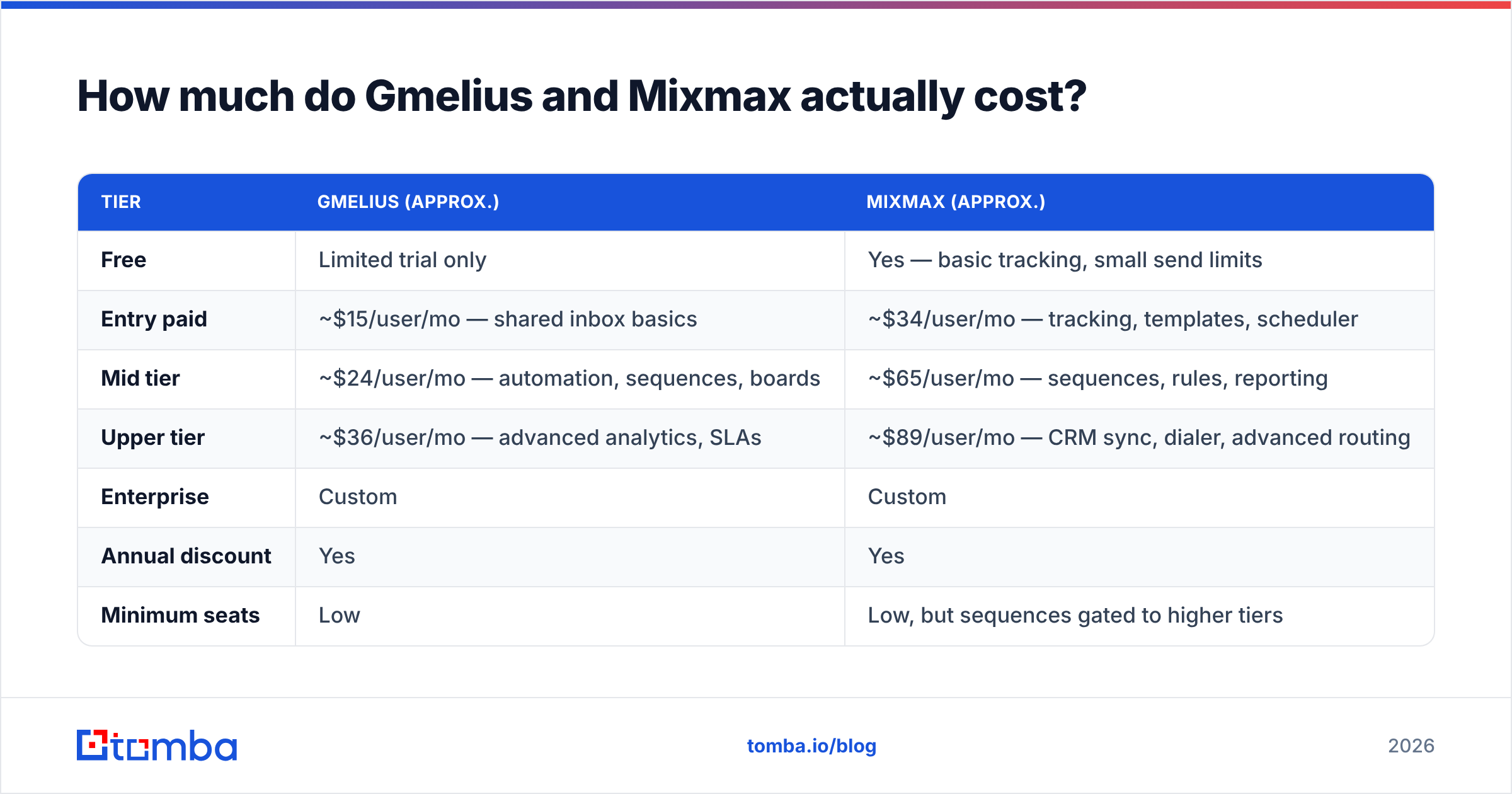
How much do Gmelius and Mixmax actually cost?#
Pricing on both vendors shifts, so treat these as ballpark and confirm on the vendor pages before you sign. The structural difference is what stays true.
| Tier | Gmelius (approx.) | Mixmax (approx.) |
|---|---|---|
| Free | Limited trial only | Yes — basic tracking, small send limits |
| Entry paid | ~$15/user/mo — shared inbox basics | ~$34/user/mo — tracking, templates, scheduler |
| Mid tier | ~$24/user/mo — automation, sequences, boards | ~$65/user/mo — sequences, rules, reporting |
| Upper tier | ~$36/user/mo — advanced analytics, SLAs | ~$89/user/mo — CRM sync, dialer, advanced routing |
| Enterprise | Custom | Custom |
| Annual discount | Yes | Yes |
| Minimum seats | Low | Low, but sequences gated to higher tiers |
The real budget lesson: the features you came for are usually one tier above where you expected. In Mixmax, sequences and Salesforce sync live on the tiers that make the per-seat number sting for a 10-rep team. In Gmelius, automation rules and analytics sit above the entry plan. Price the tier that contains your must-have feature, multiply by headcount, and compare that number — not the advertised starting price.
For a five-person support-plus-sales team, Gmelius at the mid tier lands near $120/month. For five SDRs needing sequences and CRM sync, Mixmax realistically lands north of $325/month. Different products, different budgets, different buyers.
What breaks first when you use either tool?#
Your list. Every time.
Both Gmelius and Mixmax are execution layers. They assume the contact in row 47 is a real, deliverable, correctly-titled human. When that assumption fails, the failure is expensive and silent:
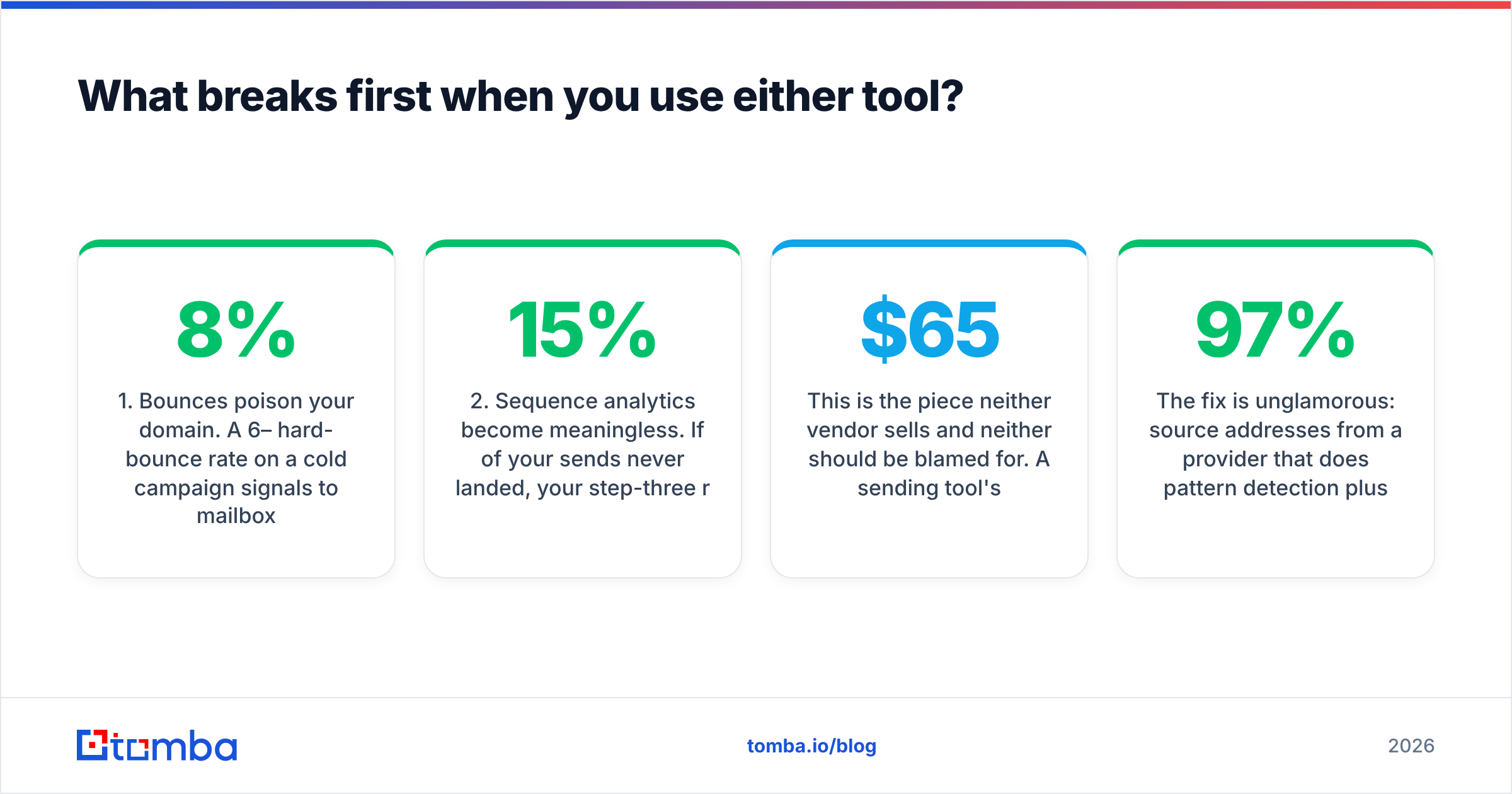
- Bounces poison your domain. A 6–8% hard-bounce rate on a cold campaign signals to mailbox providers that you are working from a purchased or stale list. Recovery takes weeks. Read up on email deliverability before you assume a warmup tool will save you.
- Sequence analytics become meaningless. If 15% of your sends never landed, your step-three reply rate is measuring the wrong denominator. You will kill a good subject line because a bad list made it look weak.
- Reps burn hours on manual lookup. The most common Gmail-native outbound workflow is still: find a company, guess
first.last@, send, hope. Multiply by 60 prospects a day. - Catch-all domains distort everything. A large share of B2B domains accept all mail at the SMTP layer, so naive verification returns "valid" on addresses that route nowhere. You need a catch-all verifier to separate real mailboxes from black holes.
- CRM data rots. Mixmax syncs whatever it has into Salesforce. Bad data in, bad pipeline reporting out, forever.

This is the piece neither vendor sells and neither should be blamed for. A sending tool's job is sending. Sourcing and verification are a separate layer, and skipping that layer is the single most common reason a $65/seat sales-engagement subscription underperforms.
The fix is unglamorous: source addresses from a provider that does pattern detection plus SMTP validation, run the list through an email verifier before it touches a sequence, and re-verify anything older than 90 days. A list at 97% deliverability makes a mediocre sequence look competent. A list at 82% makes a great sequence look broken.
Which should you pick?#
Work through these in order. The first one that matches is your answer.
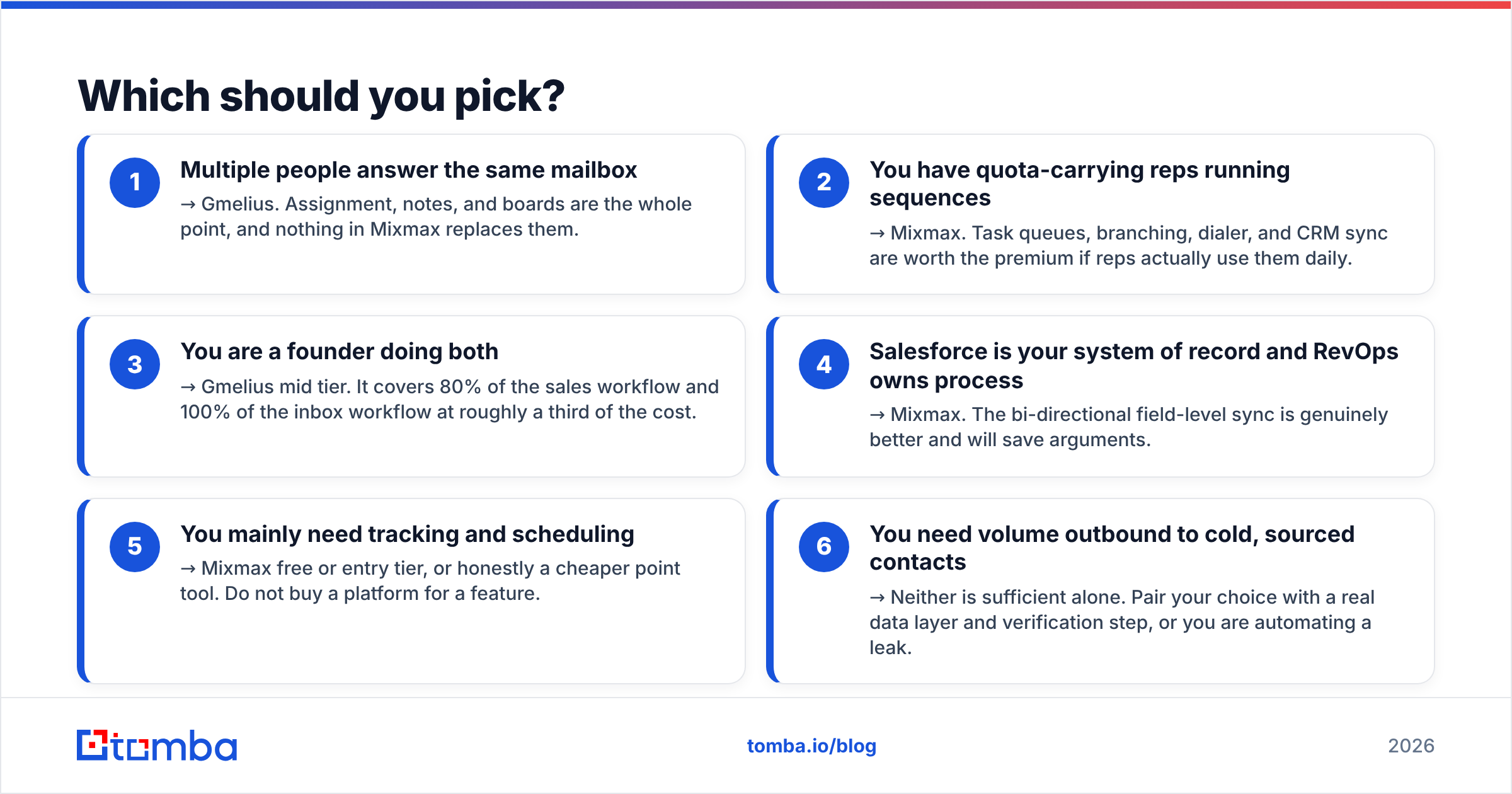
- Multiple people answer the same mailbox → Gmelius. Assignment, notes, and boards are the whole point, and nothing in Mixmax replaces them.
- You have quota-carrying reps running sequences → Mixmax. Task queues, branching, dialer, and CRM sync are worth the premium if reps actually use them daily.
- You are a founder doing both → Gmelius mid tier. It covers 80% of the sales workflow and 100% of the inbox workflow at roughly a third of the cost.
- Salesforce is your system of record and RevOps owns process → Mixmax. The bi-directional field-level sync is genuinely better and will save arguments.
- You mainly need tracking and scheduling → Mixmax free or entry tier, or honestly a cheaper point tool. Do not buy a platform for a feature.
- You need volume outbound to cold, sourced contacts → Neither is sufficient alone. Pair your choice with a real data layer and verification step, or you are automating a leak.
There is also a legitimate "both" answer that some teams land on: Gmelius on the shared inbox for support and inbound, Mixmax on the AE seats for outbound. It is more expensive and adds admin overhead, but it beats forcing one tool to do a job it was not designed for.
What does a clean Gmail outbound stack look like in 2026?#
Four layers, in order, and each one has to work before the next matters:
- Data layer — sourcing verified addresses by domain, name, or company. Use domain search to map a target account's people and email pattern in one pass, then verify before export.
- Enrichment layer — job title, seniority, company size, tech stack. This is what makes personalization non-generic and segmentation possible.
- Execution layer — Gmelius or Mixmax, per the decision list above.
- Measurement layer — reply rate and meeting rate by segment, not by sequence alone. If you cannot tell which segment converts, you cannot scale the winner.
Most teams buy layer three first, skip layers one and two entirely, and then blame layer three when the numbers disappoint. If your current cold campaign is under a 2% reply rate, the problem is far more likely to be the list than the copy.
For a quick self-audit: export 200 contacts from your current sequences, run them through a verifier, and look at the invalid + catch-all percentage. If it clears 10%, fix the data before you renew either subscription. And if you are running lists in the thousands, do it as a bulk verify job rather than one address at a time.
The bottom line#
Gmelius and Mixmax are not really competitors — they are two different answers to two different questions that both happen to be answered inside Gmail. Gmelius wins on shared ownership and workflow at a friendlier price. Mixmax wins on outbound execution, CRM depth, and rep-level analytics, and charges accordingly. Match the tool to the job and either one is a defensible purchase.
What neither will do is hand you people worth emailing.
Before you load a single sequence into either platform, fix the input. Tomba Email Finder finds professional email addresses by domain, name, or company, validates them at the SMTP layer, and flags catch-all domains so you know what you are actually sending to. The free tier gives you 25 searches a month to test the accuracy against your own known-good contacts; paid plans start at $49/month, with Growth at $99/month for teams running real volume — full Tomba pricing is public, no demo call required. Clean the list first, then let Gmelius or Mixmax do what it does well.
Related guides#
Ready to find emails that actually work?
Join 150,000+ professionals who stopped guessing and started sending. Free credits on signup — no credit card required.
Get the Tomba newsletter
Practical outbound tactics and product updates — once every two weeks.
About the author