Go To Market Launch Plan Template: A 2026 Framework
Most GTM launch plans die in a slide deck. This template gives you the eight sections that actually survive contact with a launch — plus the data layer most teams forget.
TL;DR
- A go to market launch plan template is only useful if every row has an owner, a date, and a number attached — everything else is a slide deck.
- The eight sections that matter: positioning, ICP + segments, offer/pricing, channel mix, launch tiers, enablement, measurement, and the 30/60/90 rollout.
- Launch tiering (T1/T2/T3) is the single highest-leverage addition most teams skip — it stops you from running a full press push for a settings toggle.
- The data layer is the part that quietly kills launches: if your target account list is stale or unverified, every downstream channel underperforms and you'll blame the messaging.
- Copy the tables below into Notion, Sheets, or your PM tool. Fill the owner column first — it forces the honest conversation about capacity.
What Is a Go To Market Launch Plan Template?#
A go to market launch plan template is a reusable structure that answers five questions before you ship: who is this for, what problem does it solve, how will they hear about it, who does what by when, and how will you know it worked.
Think of it like a flight plan. The pilot doesn't invent the route during takeoff — they file a document with the destination, the fuel load, the checkpoints, and the abort conditions. A GTM launch plan is that filing for revenue. It's not there to be beautiful. It's there so that when marketing, sales, product, and support all move at once, they move in the same direction.
The difference between a template and a plan: the template is the empty skeleton you reuse every quarter. The plan is one filled-in instance. Teams that treat every launch as a snowflake spend the first two weeks arguing about format instead of substance. Teams with a template spend those two weeks on positioning.
Most GTM frameworks in circulation — including the widely cited ones from HubSpot — agree on roughly the same anatomy. What they disagree on is depth. A seed-stage team shipping weekly does not need the same artifact as an enterprise platform coordinating a global launch across six regions.

What Are the Eight Sections Every GTM Launch Plan Needs?#
Here is the skeleton. Each section should fit on one screen. If it doesn't, you're writing a strategy doc, not a launch plan.
- Positioning statement — one paragraph: for [ICP], who [problem], our [product] is [category] that [key benefit], unlike [alternative]. Rewrite it until a new hire can repeat it without the doc open.
- ICP and target segments — firmographics, tech stack signals, trigger events, and the actual named account list. Not a persona PDF. A list.
- Offer, packaging, and pricing — what's included per tier, what the upgrade path looks like, and what the discount floor is. Sales will ask on day one.
- Channel mix and message per channel — outbound, paid, content, partner, product-led, community. Each channel gets its own angle, not a copy-paste of the press release.
- Launch tier — T1 (company-defining), T2 (meaningful feature), T3 (changelog note). The tier determines the budget, the headcount, and the noise level.
- Enablement assets — battlecard, demo script, objection handling, pricing sheet, FAQ for support. Dated and owned.
- Measurement plan — leading indicators for week one, lagging indicators for day 90, and one primary metric that decides success.
- 30/60/90 rollout — pre-launch, launch week, post-launch. Owner and date on every row.
The reason this ordering works: each section constrains the next. You can't pick channels before you know the segment. You can't size the enablement effort before you've set the tier. Teams that build the plan out of order end up with a beautiful campaign aimed at nobody in particular.
How Do You Choose the Right Launch Tier?#
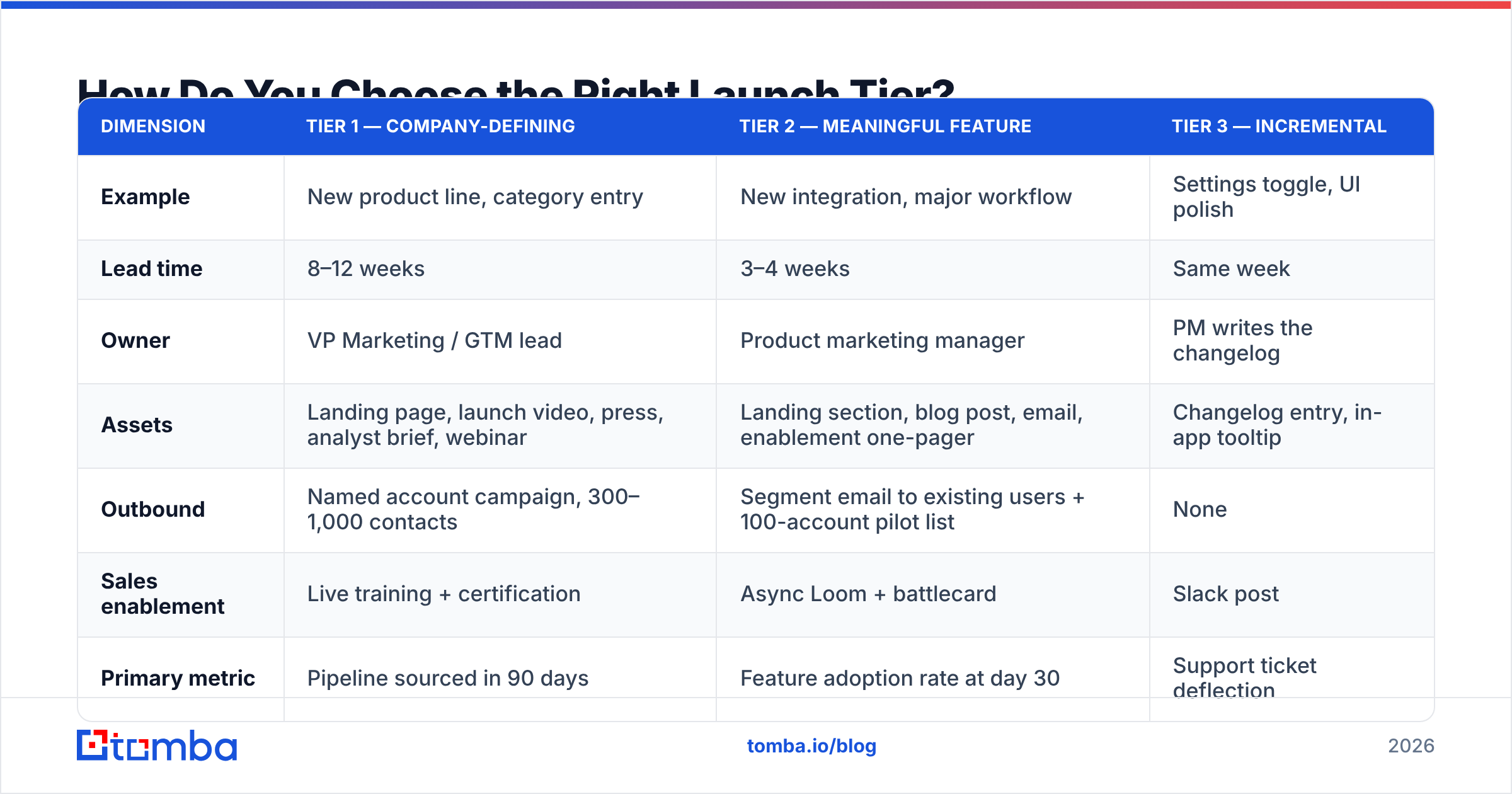
Tiering is where most plans get their leverage. Not every release deserves a launch. Running a T1 motion on a T3 feature burns your audience's attention and your team's weekend.
| Dimension | Tier 1 — Company-defining | Tier 2 — Meaningful feature | Tier 3 — Incremental |
|---|---|---|---|
| Example | New product line, category entry | New integration, major workflow | Settings toggle, UI polish |
| Lead time | 8–12 weeks | 3–4 weeks | Same week |
| Owner | VP Marketing / GTM lead | Product marketing manager | PM writes the changelog |
| Assets | Landing page, launch video, press, analyst brief, webinar | Landing section, blog post, email, enablement one-pager | Changelog entry, in-app tooltip |
| Outbound | Named account campaign, 300–1,000 contacts | Segment email to existing users + 100-account pilot list | None |
| Sales enablement | Live training + certification | Async Loom + battlecard | Slack post |
| Primary metric | Pipeline sourced in 90 days | Feature adoption rate at day 30 | Support ticket deflection |
| Budget range | $25k+ | $2k–$8k | $0 |
Two rules that save arguments. First, the tier is set before work begins, not retroactively when someone gets excited. Second, only one T1 per quarter — if everything is a priority, the T1 machinery loses its meaning and your audience stops paying attention when it actually matters.
What Does the 30/60/90 Rollout Actually Look Like?#
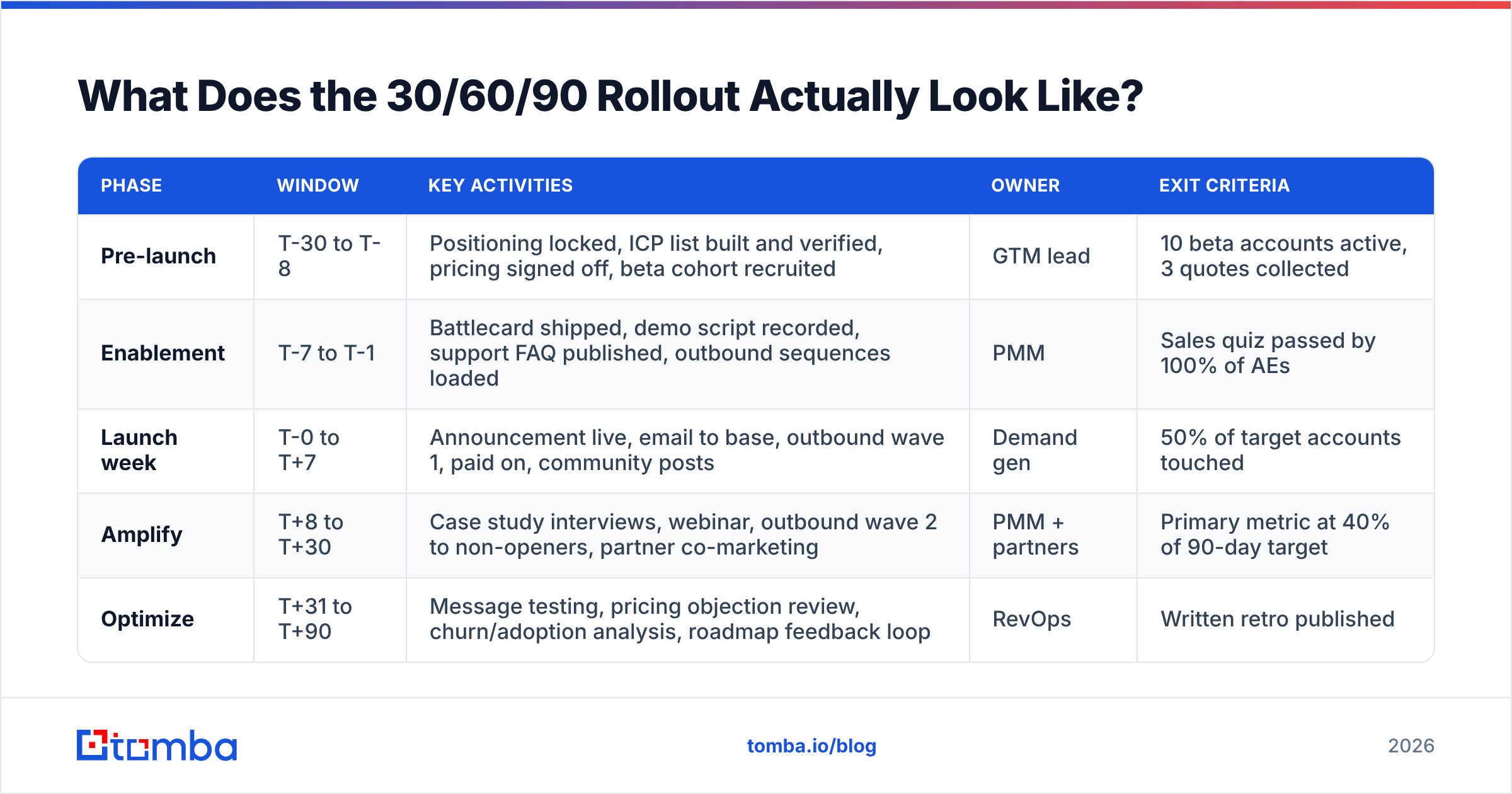
The rollout table is the part your team will look at daily. Keep it boring and specific.
| Phase | Window | Key activities | Owner | Exit criteria |
|---|---|---|---|---|
| Pre-launch | T-30 to T-8 | Positioning locked, ICP list built and verified, pricing signed off, beta cohort recruited | GTM lead | 10 beta accounts active, 3 quotes collected |
| Enablement | T-7 to T-1 | Battlecard shipped, demo script recorded, support FAQ published, outbound sequences loaded | PMM | Sales quiz passed by 100% of AEs |
| Launch week | T-0 to T+7 | Announcement live, email to base, outbound wave 1, paid on, community posts | Demand gen | 50% of target accounts touched |
| Amplify | T+8 to T+30 | Case study interviews, webinar, outbound wave 2 to non-openers, partner co-marketing | PMM + partners | Primary metric at 40% of 90-day target |
| Optimize | T+31 to T+90 | Message testing, pricing objection review, churn/adoption analysis, roadmap feedback loop | RevOps | Written retro published |
Notice the exit criteria column. Without it, phases blur and "launch week" quietly becomes launch month. Exit criteria let you say "we are not moving to amplify yet" with evidence instead of vibes. This is standard practice in mature revenue operations functions, where phase gates are treated as seriously as sprint boundaries.
Why Does the Data Layer Break More Launches Than the Messaging?#
Because a perfect message sent to the wrong inbox produces zero pipeline, and the post-mortem almost always blames the copy.
Here's the mechanism. Your ICP section names 400 target accounts. Someone exports contacts from a CRM that hasn't been cleaned in 18 months. Roughly 25–30% of B2B contact data decays annually as people change jobs — a figure consistently reported across data-quality research from firms like Gartner. So your list has hundreds of dead addresses. You send wave one. Bounce rate spikes past 5%, your domain reputation drops, and the good addresses on the list start landing in spam.
Now the launch underperforms for a reason that has nothing to do with your positioning. But the retro says "the message didn't land."
Three concrete guards to put in the pre-launch phase:
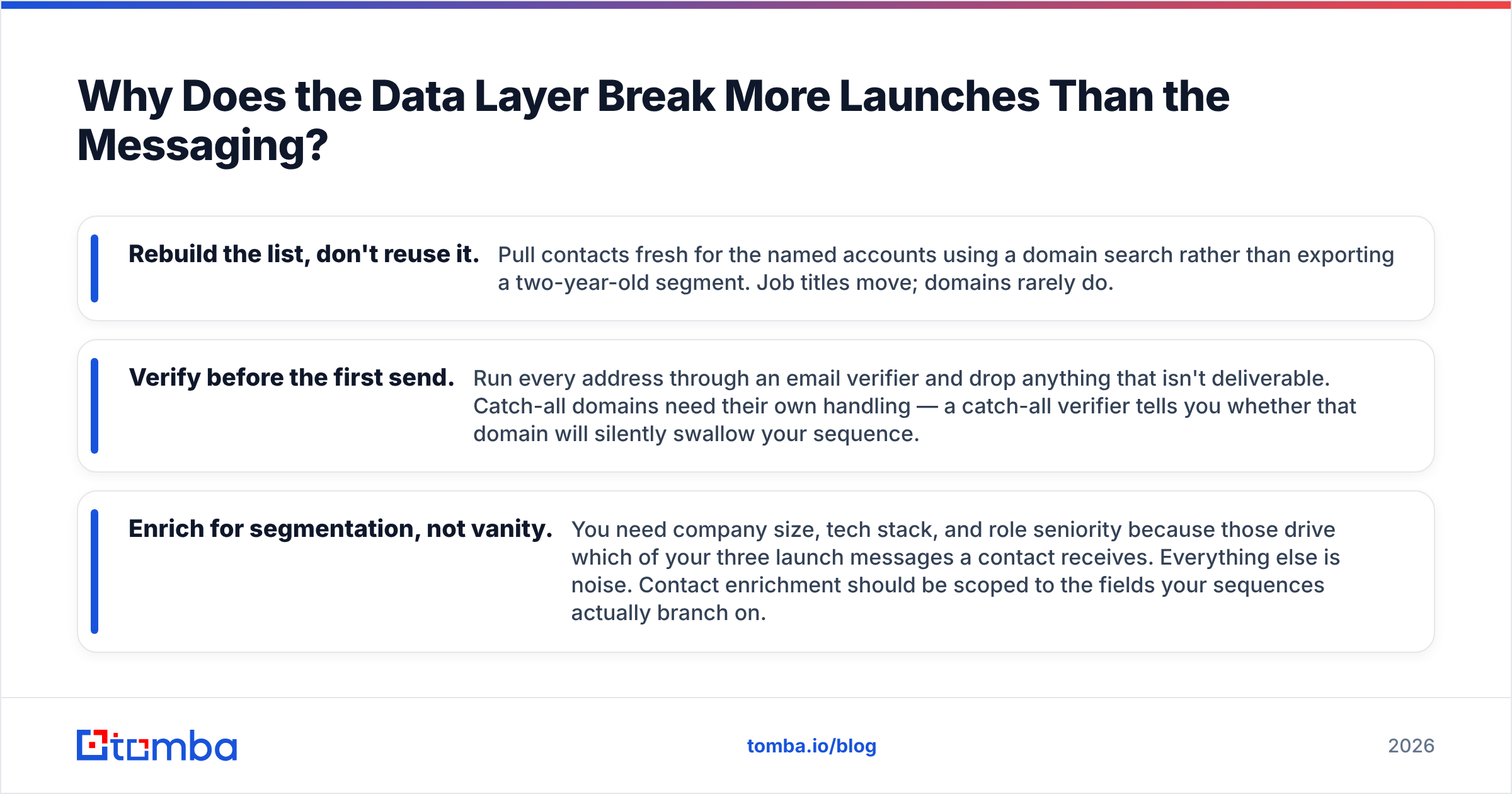
- Rebuild the list, don't reuse it. Pull contacts fresh for the named accounts using a domain search rather than exporting a two-year-old segment. Job titles move; domains rarely do.
- Verify before the first send. Run every address through an email verifier and drop anything that isn't deliverable. Catch-all domains need their own handling — a catch-all verifier tells you whether that domain will silently swallow your sequence.
- Enrich for segmentation, not vanity. You need company size, tech stack, and role seniority because those drive which of your three launch messages a contact receives. Everything else is noise. Contact enrichment should be scoped to the fields your sequences actually branch on.
Budget a full week for this in the T-30 to T-8 window. It is unglamorous and it is the difference between a launch that produces meetings and one that produces a bounce report.
How Do You Pick a Format: Doc, Spreadsheet, or PM Tool?#
The format matters less than the discipline, but the wrong one adds friction every single day of the launch.
| Format | Best for | Strength | Weakness |
|---|---|---|---|
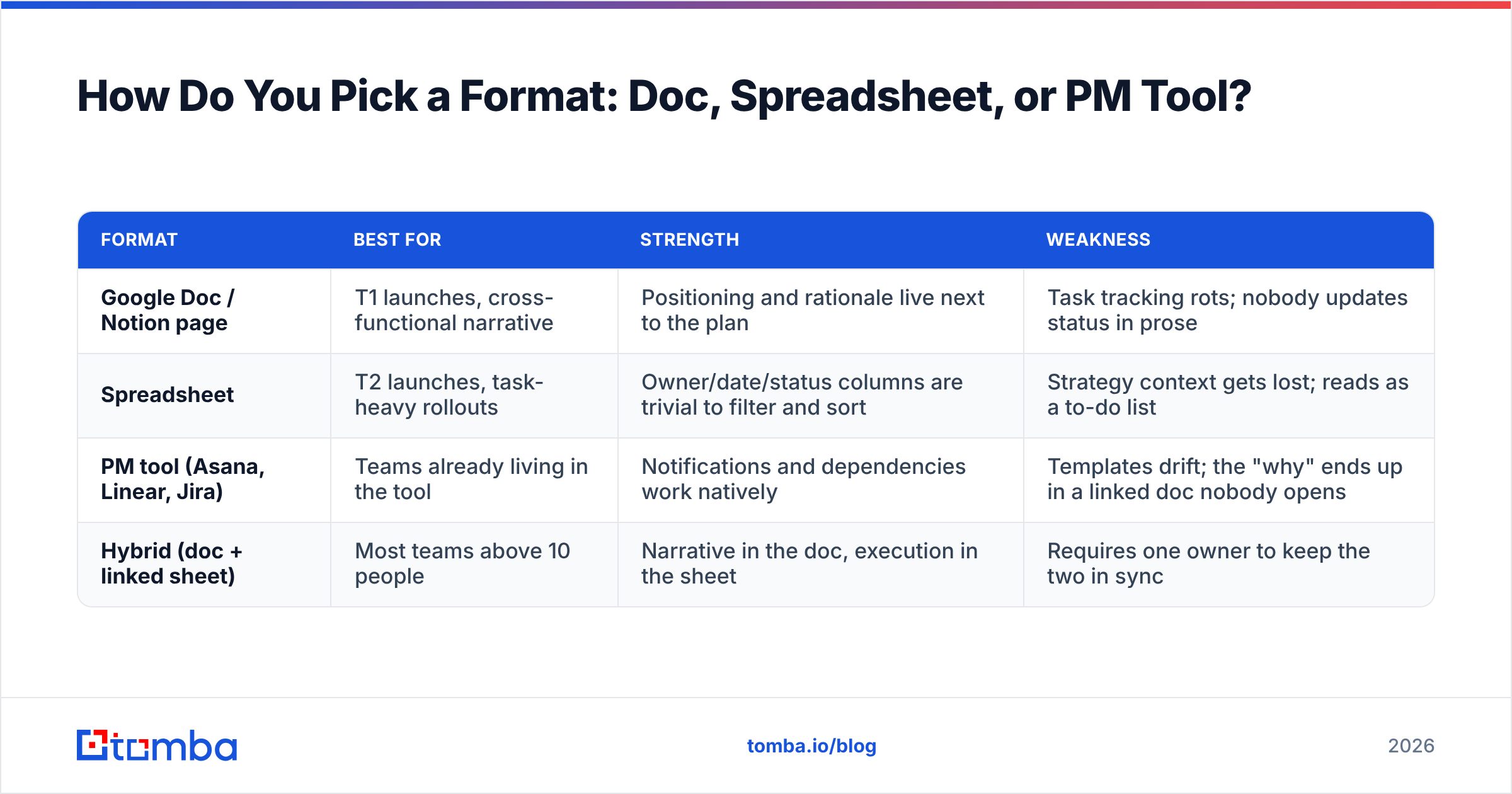
| Google Doc / Notion page | T1 launches, cross-functional narrative | Positioning and rationale live next to the plan | Task tracking rots; nobody updates status in prose |
| Spreadsheet | T2 launches, task-heavy rollouts | Owner/date/status columns are trivial to filter and sort | Strategy context gets lost; reads as a to-do list |
| PM tool (Asana, Linear, Jira) | Teams already living in the tool | Notifications and dependencies work natively | Templates drift; the "why" ends up in a linked doc nobody opens |
| Hybrid (doc + linked sheet) | Most teams above 10 people | Narrative in the doc, execution in the sheet | Requires one owner to keep the two in sync |
The hybrid is what most functioning GTM teams converge on. One page of narrative — positioning, ICP, tier, primary metric. One sheet of execution — the 30/60/90 rows with owners and dates. Link them in both directions. Review the sheet weekly, revise the doc only when strategy changes.
Whatever you pick, version it. A launch plan that's been edited by nine people with no history is a document nobody trusts by week three. Peer reviews on G2 consistently flag version drift as the top complaint about launch documentation across every tool category — it's a process problem, not a tooling one.
What Metrics Belong in the Measurement Section?#
Split them into three horizons so nobody panics on day four.
Week one — leading indicators. Email delivery rate above 97%, open rate against your baseline, landing page conversion, demo requests, in-app feature activation for existing users. These tell you the machine is running, not that it's working.
Day 30 — engagement and qualification. Meetings booked from launch-sourced contacts, marketing qualified lead volume against forecast, feature adoption among the installed base, sales-reported objection themes.
Day 90 — the number that decides it. Pipeline sourced, closed-won revenue attributed, net-new logos in the target segment, or retention lift — pick one. A launch with three primary metrics has none.
Two habits that separate teams who learn from launches and teams who repeat them. First, write down the forecast before launch — an unfalsifiable "we hope it goes well" can never be wrong. Second, run the retro on a calendar invite booked at T-30, so it happens whether or not the launch went well. The failed launches teach more, and they're the ones teams quietly skip.
One caveat on attribution: launch-sourced pipeline is directionally useful and precisely wrong. Multi-touch attribution across a 90-day B2B cycle will never be clean. Use it to compare launches against each other, not to defend a budget line to finance.
What Are the Most Common Ways This Template Fails?#
- No owner column. "The team" owns nothing. Every row gets one name, not a function.
- The plan is written after the build. If GTM sees the feature in the last sprint, the plan is a press release, not a strategy.
- Positioning by committee. Six stakeholders each add a clause and the statement becomes unrepeatable. One writer, others comment.
- Tier inflation. Everything is T1 because tiering feels like demotion. Set the tier in the spec review, before anyone's ego is attached.
- Stale target list. Covered above, and it remains the most common silent killer.
- No abort condition. Decide in advance what result would make you stop, pivot the message, or kill the feature. Write it in the doc.
- Support finds out on launch day. Your ticket queue is a GTM channel. Brief it in the enablement phase, not after.
If you only fix two of these, fix the owner column and the stale list. They cost the least and prevent the most.
Where Should You Start This Week?#
Copy the tier table and the 30/60/90 table into whatever tool your team already opens daily. Fill in the owner column for your next launch before you write a single line of positioning — the capacity conversation is the one everyone avoids and the one that determines whether the plan is real.
Then handle the data layer while you still have runway. Build the named account list from scratch, pull contacts at the roles your sequences branch on, and verify every address before wave one goes out. Tomba Email Finder does the first two in one pass: search by domain or company, get role-mapped professional addresses with confidence scores, and export straight into the sheet your rollout table already lives in. The free tier gives you 25 searches a month to sanity-check a segment, and the Starter plan runs $49/mo when you're building a full launch list — see Tomba pricing for the Growth and Pro tiers if you're coordinating multiple launches a quarter.
A launch plan is a bet with the details written down. Make the details specific enough that you'd know, ninety days out, whether you were right.
Related guides#
Ready to find emails that actually work?
Join 150,000+ professionals who stopped guessing and started sending. Free credits on signup — no credit card required.
Get the Tomba newsletter
Practical outbound tactics and product updates — once every two weeks.
About the author