Go To Market Plan Checklist: 9 Steps for a 2026 Launch
Most GTM plans fail on execution, not strategy. This checklist walks through the nine decisions — ICP, segmentation, channel math, data, pricing, and launch metrics — that decide whether your 2026 launch lands.
TL;DR
- A go to market plan checklist is not a slide deck. It is nine decisions — ICP, segment, offer, pricing, channel, data, motion, enablement, and metrics — each with an owner and a date.
- Most launches fail at step 6 (data) and step 9 (metrics), not at step 1. Teams nail the positioning workshop, then send 4,000 emails to a list with a 31% bounce rate.
- Pick one primary channel and one experimental channel. Three channels at 30% effort each beats nothing; it just beats it slowly.
- Define your "kill criteria" before launch. If you cannot say what result would make you stop, you will run a dead motion for two quarters.
- Budget roughly 15-20% of GTM spend on contact data and verification. It is the cheapest lever on pipeline you have.
What is a go-to-market plan, and what is it not?#
A go-to-market (GTM) plan is the operating document that connects a product to a specific buyer through a specific channel at a specific price. That is the whole definition. Everything else — the brand deck, the messaging matrix, the launch-day Slack emoji — is support material.
Here is the useful analogy: a GTM plan is a flight plan, not a travel brochure. A brochure says the destination is beautiful. A flight plan says which runway, which fuel load, which altitude, and what you do if an engine fails. Most teams write brochures and call them strategy.
What a GTM plan is not:
- A product launch checklist. Launch is one event inside the plan. The plan governs the twelve months after.
- A marketing plan. Marketing owns demand; the GTM plan also covers pricing, sales motion, onboarding, and expansion.
- A one-time artifact. If nobody has edited it in 90 days, it is not being used.
- A budget spreadsheet. Budget follows the plan. When budget leads, you buy channels instead of choosing them.
The single most common failure mode is what Gartner research on B2B buying has documented repeatedly: teams design their GTM around how they want to sell, not around how the buying group actually decides. Six to ten stakeholders now sit in a typical enterprise purchase. A plan built for one champion collapses on contact.
Wait — that syntax is wrong. Here it is correctly:
What are the 9 steps in a go to market plan checklist?#
Work these in order. Each step's output is the next step's input, so skipping ahead produces a plan that looks complete and behaves like fog.
- Define the ICP with exclusions. Not "B2B SaaS companies, 50-500 employees." That is a segment, not an ICP. A real ICP names the trigger ("just hired a first RevOps lead"), the pain ("attribution is spread across four tools"), and the exclusions ("not agencies, not sub-$2M ARR"). Exclusions are the part everyone skips and the part that saves the most money.
- Pick one beachhead segment. From the ICP, choose the narrowest slice where you can credibly claim to be the obvious choice. If your answer to "why us" takes more than one sentence, the segment is too broad.
- Write the offer, not the feature list. The offer is what the buyer gets, what it costs, and what happens if it does not work. Features are evidence for the offer, not a substitute.
- Set pricing and packaging. Decide the entry price, the expansion trigger, and the discount floor. Write the floor down or your reps will discover it for you.
- Choose channels with math, not taste. Estimate reachable accounts, expected reply/response rate, and cost per meeting for each candidate channel. Then pick one primary and one experiment.
- Build the data layer. Source, enrich, and verify the contact records that the channel depends on. This is where most plans quietly die.
- Design the sales motion. Self-serve, PLG-assisted, inside sales, or field. Match the motion to ACV — a $400 ACV cannot fund a two-call demo cycle.
- Enable the team. Battlecards, objection handling, a call recording library, and a single source of truth for pricing. Enablement is not a training day; it is a maintained asset.
- Instrument the metrics and kill criteria. Define leading indicators (reply rate, meetings booked), lagging indicators (pipeline, closed-won), and the threshold at which you stop.
How do you choose the right GTM motion for your ACV?#
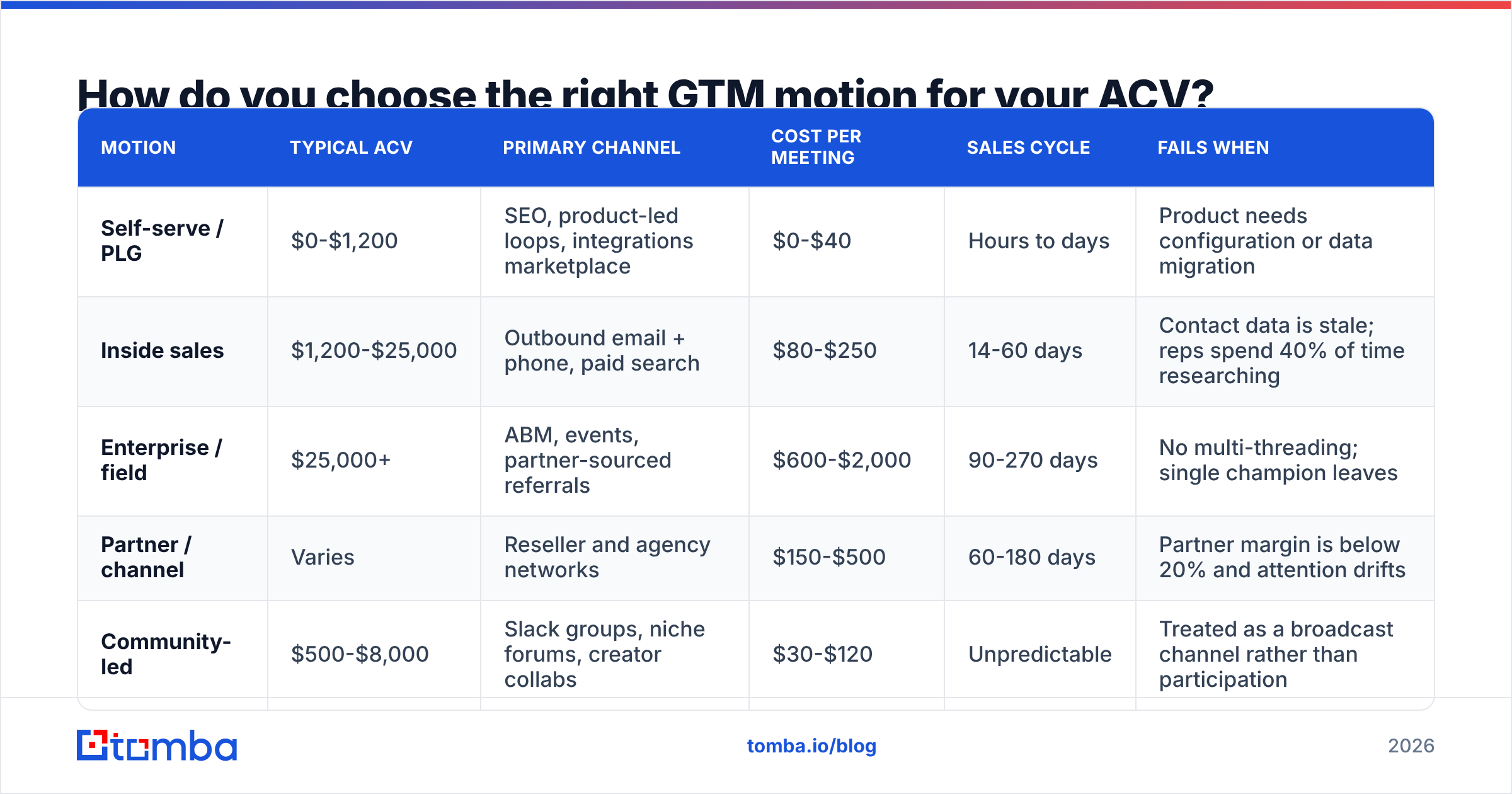
Match motion to deal size or you will burn cash on process the deal cannot pay for. The table below is the rough calibration most B2B teams converge on after a year of trial and error.
| Motion | Typical ACV | Primary channel | Cost per meeting | Sales cycle | Fails when |
|---|---|---|---|---|---|
| Self-serve / PLG | $0-$1,200 | SEO, product-led loops, integrations marketplace | $0-$40 | Hours to days | Product needs configuration or data migration |
| Inside sales | $1,200-$25,000 | Outbound email + phone, paid search | $80-$250 | 14-60 days | Contact data is stale; reps spend 40% of time researching |
| Enterprise / field | $25,000+ | ABM, events, partner-sourced referrals | $600-$2,000 | 90-270 days | No multi-threading; single champion leaves |
| Partner / channel | Varies | Reseller and agency networks | $150-$500 | 60-180 days | Partner margin is below 20% and attention drifts |
| Community-led | $500-$8,000 | Slack groups, niche forums, creator collabs | $30-$120 | Unpredictable | Treated as a broadcast channel rather than participation |
The row that ruins most plans is inside sales. Teams pick it because it feels controllable, then discover the cost per meeting is triple their model — almost always because the contact data underneath the sequence is wrong. A 20% bounce rate does not just waste 20% of sends; it damages sender reputation and suppresses inbox placement for the other 80%.
[Suggested visual: screenshot of a CRM pipeline dashboard segmented by motion, showing cost-per-meeting by channel]
Why does the data layer break more GTM plans than the strategy?#
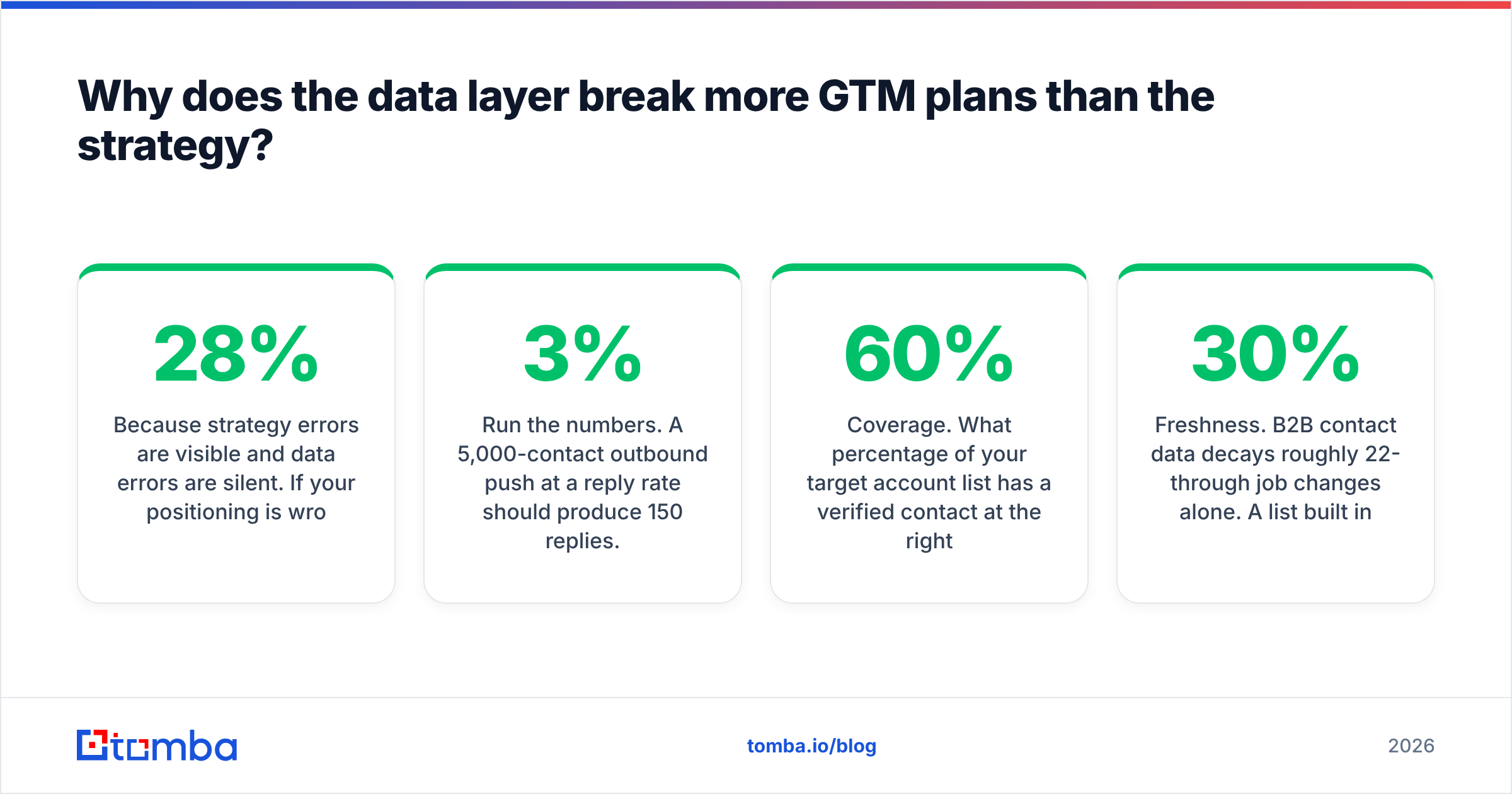
Because strategy errors are visible and data errors are silent. If your positioning is wrong, prospects tell you on calls. If 28% of your email list is invalid, nothing tells you — you just see a low reply rate and blame the copy.
Run the numbers. A 5,000-contact outbound push at a 3% reply rate should produce 150 replies. Strip out a 22% invalid rate and you are sending to 3,900 real inboxes. Then subtract the deliverability penalty from the bounces themselves — bounce rates above 5% trigger filtering at the major mailbox providers, so your effective delivered rate on the remaining list drops too. You end up near 80 replies. The copy did not get worse. The list did.
Three checks belong in every GTM plan before a single sequence goes live:
- Coverage. What percentage of your target account list has a verified contact at the right title? Below 60% and your TAM math is fiction.
- Validity. Run every address through an email verifier before import, not after the campaign underperforms. Catch-all domains need their own handling — a catch-all verifier tells you which ones are safe to send to rather than forcing a blanket yes/no.
- Freshness. B2B contact data decays roughly 22-30% per year through job changes alone. A list built in Q1 is materially different by Q4.
For building the list in the first place, a domain search against your target account list is faster than manual research — you feed in company domains and get back the contacts and email patterns for each. That collapses step 6 from weeks of SDR research into an afternoon.
One more thing worth saying plainly: buying a static list and running an email finder against your own account research are not the same activity. The first gives you volume with unknown provenance. The second gives you contacts tied to accounts you already qualified. Vendors like BookYourData do the prebuilt-list job well when you need immediate volume in a defined geography, and pairing a purchased list with independent verification is a reasonable pattern. What is not reasonable is skipping the verification step in either case.
How should you sequence channels in the first 90 days?#
Sequence, do not parallelize. Running four channels simultaneously at launch guarantees you cannot attribute what worked.
Days 1-30 — one channel, one segment. Pick the channel where you have the strongest existing signal. Send to a controlled volume (200-400 contacts/week for outbound). The goal is not pipeline; it is learning which message earns replies.
Days 31-60 — double down or pivot. If reply rate is above your threshold, scale volume 2-3x and hold the message constant. If it is below, change one variable: the segment, the offer, or the subject line. Never two at once.
Days 61-90 — add the second channel. Now layer the experimental channel on the segment you have validated. This is where LinkedIn, paid, or events earn their place — against a message you already know converts.
The discipline here is the whole point. Teams that add channels because a competitor launched one end up with five half-instrumented motions and no idea which produces revenue. That is how a revenue operations function ends up spending its first year on data cleanup instead of forecasting.
What metrics belong on a GTM dashboard?#
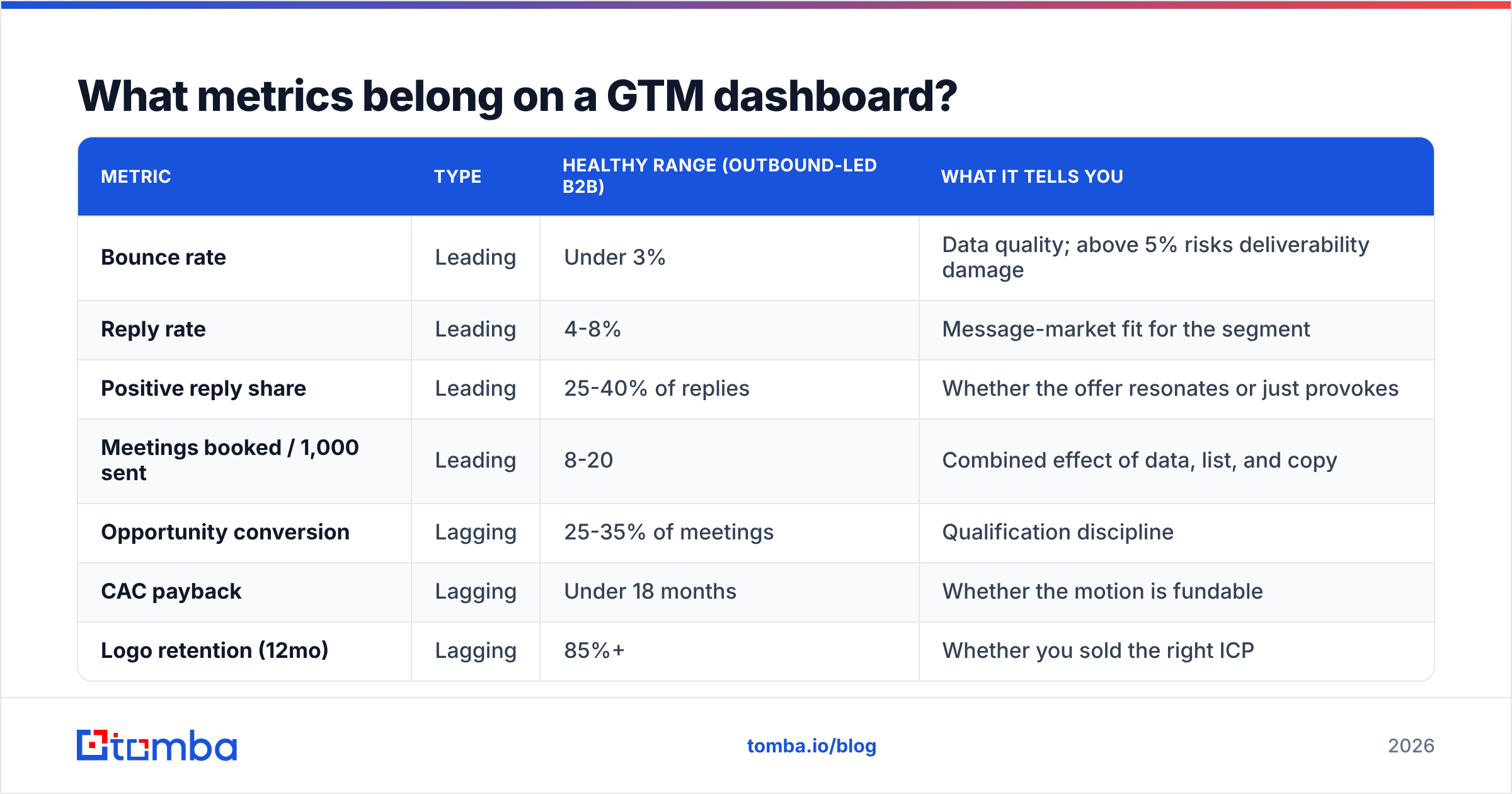
Split them into leading and lagging, and put the kill criteria next to each. A dashboard without thresholds is decoration.
| Metric | Type | Healthy range (outbound-led B2B) | What it tells you |
|---|---|---|---|
| Bounce rate | Leading | Under 3% | Data quality; above 5% risks deliverability damage |
| Reply rate | Leading | 4-8% | Message-market fit for the segment |
| Positive reply share | Leading | 25-40% of replies | Whether the offer resonates or just provokes |
| Meetings booked / 1,000 sent | Leading | 8-20 | Combined effect of data, list, and copy |
| Opportunity conversion | Lagging | 25-35% of meetings | Qualification discipline |
| CAC payback | Lagging | Under 18 months | Whether the motion is fundable |
| Logo retention (12mo) | Lagging | 85%+ | Whether you sold the right ICP |
The most under-used metric on that list is positive reply share. A 9% reply rate that is 80% "unsubscribe" is a worse result than a 4% reply rate that is 40% "tell me more." Raw reply rate flatters bad targeting.
Set kill criteria per channel, in writing, before launch. Something like: "If after 3,000 sends across two message variants we are below 3 meetings per 1,000, we stop outbound for this segment and reallocate to partner sourcing." That sentence, written in advance, is worth more than any positioning workshop.
[Suggested visual: annotated screenshot of a GTM dashboard showing leading vs lagging metric panels side by side]
What does a completed go to market plan checklist look like?#
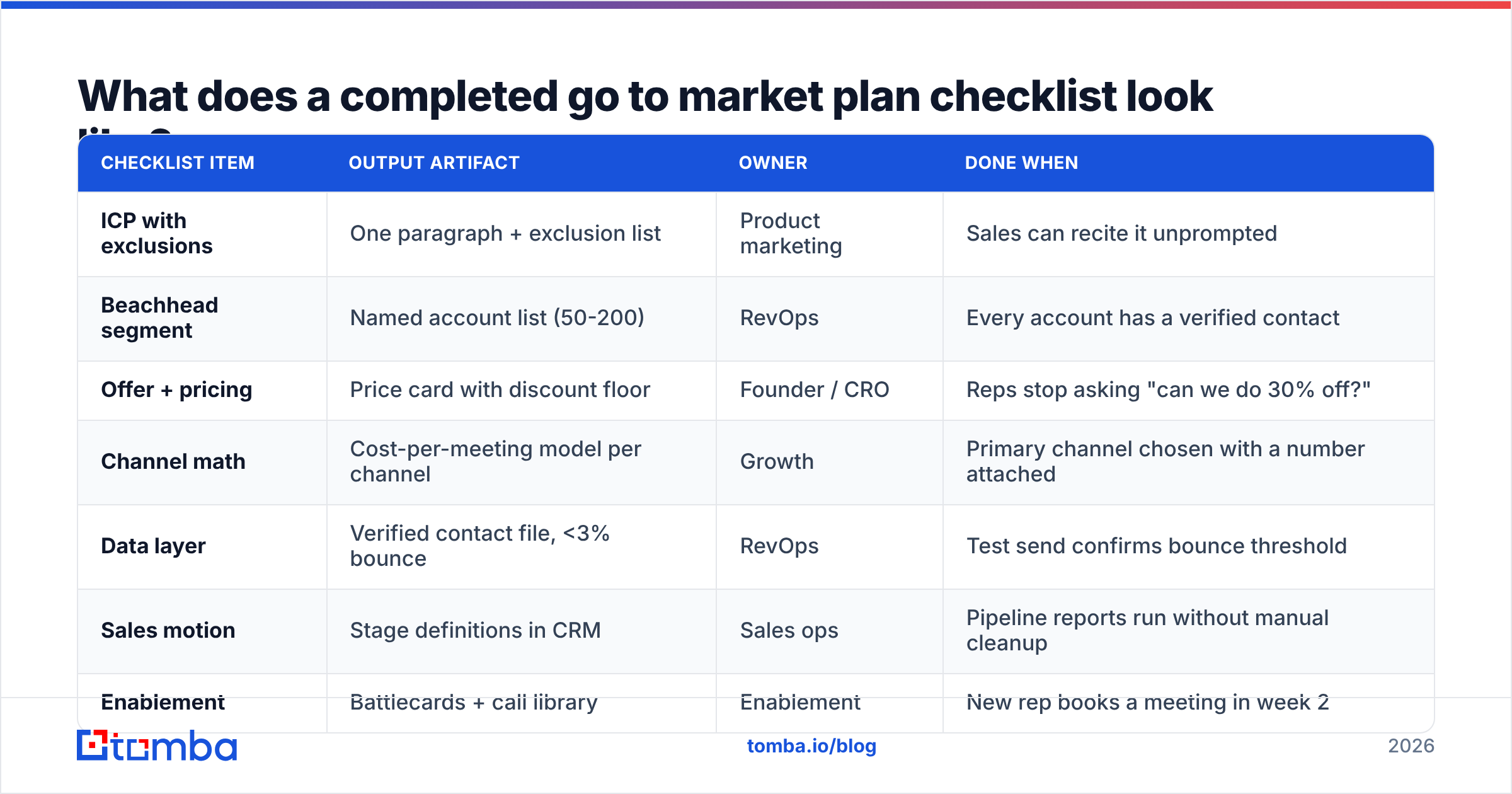
One page. Owner and date on every line. If it needs a second page, you have added narrative that belongs somewhere else.
| Checklist item | Output artifact | Owner | Done when |
|---|---|---|---|
| ICP with exclusions | One paragraph + exclusion list | Product marketing | Sales can recite it unprompted |
| Beachhead segment | Named account list (50-200) | RevOps | Every account has a verified contact |
| Offer + pricing | Price card with discount floor | Founder / CRO | Reps stop asking "can we do 30% off?" |
| Channel math | Cost-per-meeting model per channel | Growth | Primary channel chosen with a number attached |
| Data layer | Verified contact file, <3% bounce | RevOps | Test send confirms bounce threshold |
| Sales motion | Stage definitions in CRM | Sales ops | Pipeline reports run without manual cleanup |
| Enablement | Battlecards + call library | Enablement | New rep books a meeting in week 2 |
| Metrics + kill criteria | Dashboard with thresholds | RevOps | Every metric has a number that triggers action |
Two extra notes on the operational side. First, connect your enrichment directly to the CRM rather than moving CSVs by hand — a HubSpot integration or Salesforce integration removes the copy-paste step where most data quality is lost. HubSpot's own research on sales data consistently shows CRM hygiene as a top-three drag on rep productivity. Second, if your plan involves scaling contact research, do the bulk verify pass on the full list before segmentation, not after — segmenting bad data just gives you smaller piles of bad data.
What are the most common GTM plan mistakes in 2026?#
- Treating AI-generated personalization as a substitute for targeting. A perfectly personalized email to the wrong persona is still the wrong email. Personalization multiplies a good list; it does not rescue a bad one.
- Skipping the exclusion list. Every account you should not sell to and do anyway costs a rep 6-10 hours and produces a churn risk. Write the exclusions.
- Confusing intent data with buying intent. Third-party intent signals are directional. Treating a content-consumption spike as a qualified buying signal inflates pipeline forecasts that later collapse.
- No owner on the data layer. When "keeping the list clean" is everyone's job, it is nobody's job. Assign it.
- Launching without kill criteria. The sunk-cost pull on a GTM motion is brutal. Predefine the exit.
- Building for a buying committee of one. Reviews on G2 and analyst research both point the same direction: modern B2B purchases are group decisions. Multi-thread from the first meeting or expect the deal to stall when your champion goes quiet.
How do you keep the plan alive after launch?#
Review it monthly with the same three questions: What did we learn about the ICP? Which metric moved and why? What are we stopping?
That third question is the one teams avoid. A GTM plan that only ever adds initiatives becomes a list of everything anyone has ever suggested. The plans that work are aggressive about subtraction — one channel, one segment, one message, until the numbers justify a second.
Re-verify your contact data quarterly. Re-check pricing against actual discount behavior every six months. And rewrite the ICP paragraph once a year using only the traits of your ten best customers, not the ten you wish you had.
Get the data layer right before you launch. Steps 1-5 of this checklist are strategy work you can do in a room. Step 6 is not — it needs verified, current contact records for every account on your target list. Tomba Email Finder finds professional email addresses by domain, name, or company, with verification built into the same workflow so your bounce rate stays under threshold from the first send. The free tier gives you 25 searches a month to test coverage against your own account list; paid plans start at $49/mo for Starter and $99/mo for Growth. Check the full Tomba pricing breakdown, or run your beachhead account list through domain search and see how much of your target segment you can actually reach before you commit the quarter's budget to a channel.
Related guides#
Ready to find emails that actually work?
Join 150,000+ professionals who stopped guessing and started sending. Free credits on signup — no credit card required.
Get the Tomba newsletter
Practical outbound tactics and product updates — once every two weeks.
About the author