Go To Market Plan Template: The 2026 Framework That Ships
Most go-to-market plans die in a slide deck. This template gives you the eight sections that actually drive pipeline — ICP, channels, budget math, and a 90-day launch sequence you can copy today.
TL;DR
- A go to market plan template is not a slide deck. It is a one-page operating contract: who you sell to, what you say, where you reach them, what it costs, and what proves it worked.
- Eight sections cover everything that matters: ICP, problem/value, positioning, pricing, channel mix, sales motion, budget model, and the 90-day sequence.
- The section teams skip most often is the one that decides the outcome — a quantified ICP with a countable target list. If you cannot count your market, you cannot forecast it.
- Budget math beats budget vibes. Model CAC per channel before you spend, not after.
- Copy the template below, fill it in a single working session, and pressure-test it against the failure checklist at the end.
What Is a Go To Market Plan, Really?#
A go to market plan is the document that connects a product to revenue. It answers five questions in order: who has the problem, why they'd pay you specifically, how they find out, who closes them, and what it costs to acquire each one.
Think of it like a flight plan. A pilot does not file "we'll head west and see how it goes." They file altitude, waypoints, fuel load, and alternates. The plan does not eliminate turbulence — it makes deviation obvious within minutes instead of quarters. A GTM plan does the same for launches: when week six looks nothing like the model, you know immediately, and you know which assumption broke.
The failure mode is universal. Teams write a beautiful narrative deck, present it to leadership, get applause, and then execute from Slack messages for the next six months. Nobody opens the deck again. The plan was theater.
A working go to market plan template forces numbers into every section. Not "enterprise SaaS companies" but "1,847 companies, 200–2,000 employees, US and UK, using Salesforce, that raised a round in the last 18 months." That second version is executable. Someone can build that list on Monday.

What Are the 8 Sections of a Go To Market Plan Template?#
Here is the full skeleton. Each section has a hard output — something concrete you produce, not a paragraph you write.
- Ideal Customer Profile (ICP) — Output: a countable list with firmographic, technographic, and trigger filters. Target size, industry, geography, tech stack, and buying signal. If the count is under 200 accounts, your ICP is too narrow to sustain a channel; over 50,000 and it is too broad to message.
- Problem and Value Hypothesis — Output: one sentence in the customer's own words describing the pain, plus a quantified cost of that pain (hours lost, dollars leaked, deals missed). Pull the phrasing from actual call recordings or support tickets, not a whiteboard.
- Positioning and Messaging — Output: a positioning statement, three proof points, and the named alternative you displace. "We're better" is not positioning. "For RevOps leads who already own Salesforce but can't trust their contact data, we replace manual list-building with verified enrichment" is.
- Pricing and Packaging — Output: tiers, the value metric you charge on (seats, credits, volume, outcomes), and your expected mix across tiers. Price before launch, not after the first ten deals negotiate you down.
- Channel Mix — Output: two to three primary channels with a CAC estimate and a volume ceiling for each. Nothing is more expensive than running five channels at half attention.
- Sales Motion — Output: self-serve, sales-assisted, or enterprise — plus the exact handoff triggers between them. Define what a marketing qualified lead means numerically here, or your funnel becomes an argument.
- Budget and Unit Economics — Output: total spend, blended CAC target, payback period in months, and the LTV:CAC ratio you need to justify a second round of spend.
- 90-Day Launch Sequence — Output: week-by-week owners and gates. Not a Gantt chart. A list of "by Friday of week 3, X exists, owned by Y."
Every section should fit on one page total. If your template runs longer than a page, you have written a book report, not a plan.
How Do You Build the ICP Section Without Guessing?#
Start with the customers you already win fastest, then reverse-engineer the pattern.
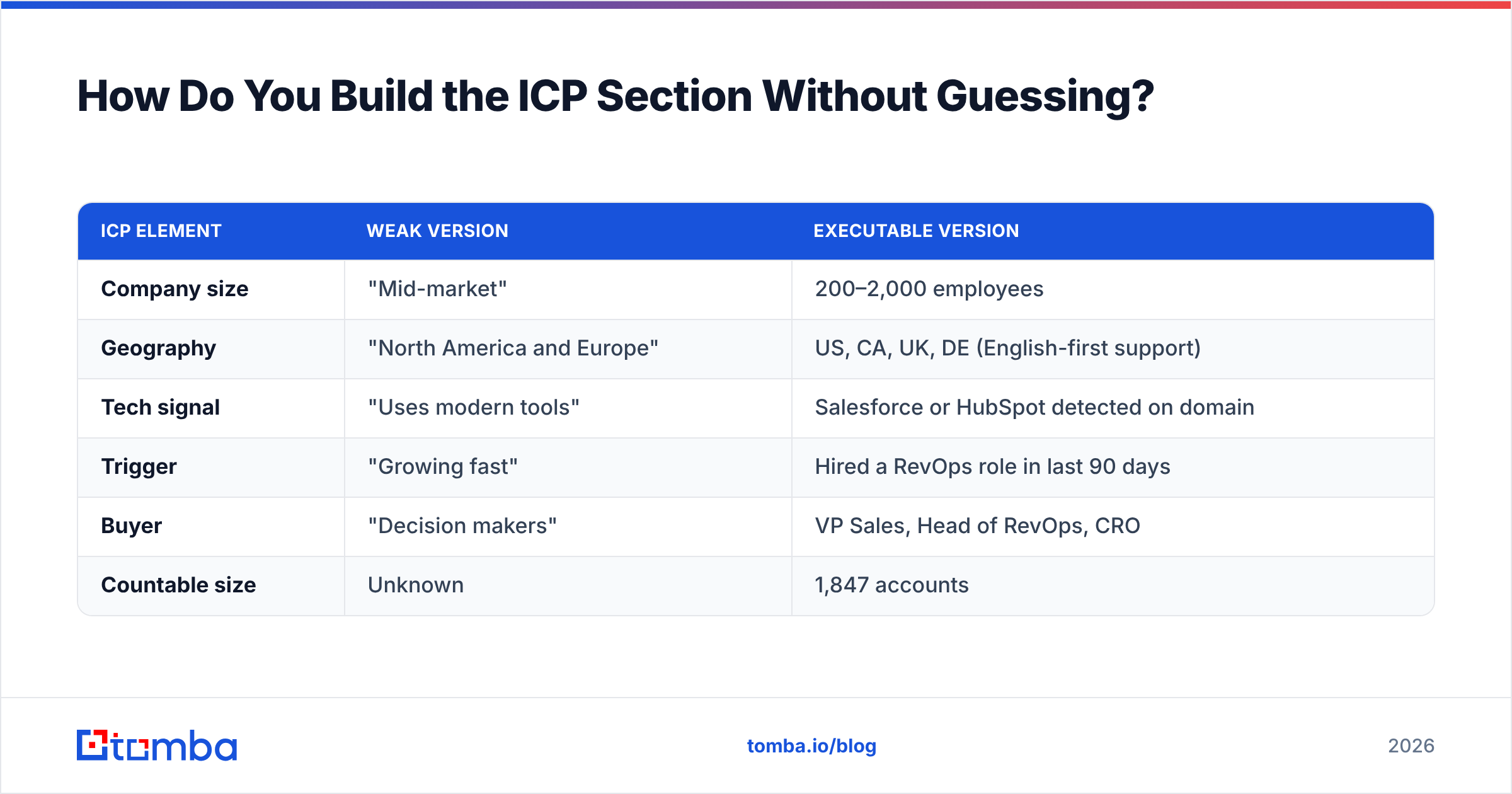
Pull your last 20 closed-won deals and your last 20 closed-lost. Tag each on five axes: headcount, industry, tech stack, who championed it, and what triggered the search. The pattern usually appears in the first ten rows. Companies between 50 and 500 employees who already run a CRM close in half the time. Companies over 2,000 stall in procurement.
Then convert the pattern into filters you can actually query. This is where most GTM plans collapse — the ICP exists as an adjective ("mid-market, tech-forward") instead of a query. Adjectives cannot be turned into a list.
Once you have filters, build the list. Run a domain search against the target companies to map the departments and job titles that appear at each account, then enrich the rows with a data enrichment pass so every record carries headcount, tech stack, and role. A target list without contact-level data is a spreadsheet of logos, not a pipeline.
The gate for this section: can you state the exact number of accounts in your ICP, and can someone on your team produce that list within 48 hours? If no, the section is not finished.
| ICP element | Weak version | Executable version |
|---|---|---|
| Company size | "Mid-market" | 200–2,000 employees |
| Geography | "North America and Europe" | US, CA, UK, DE (English-first support) |
| Tech signal | "Uses modern tools" | Salesforce or HubSpot detected on domain |
| Trigger | "Growing fast" | Hired a RevOps role in last 90 days |
| Buyer | "Decision makers" | VP Sales, Head of RevOps, CRO |
| Countable size | Unknown | 1,847 accounts |
Which Channels Belong in Your GTM Plan?#
Pick two, resource them fully, and add a third only when the first two hit their volume ceiling.
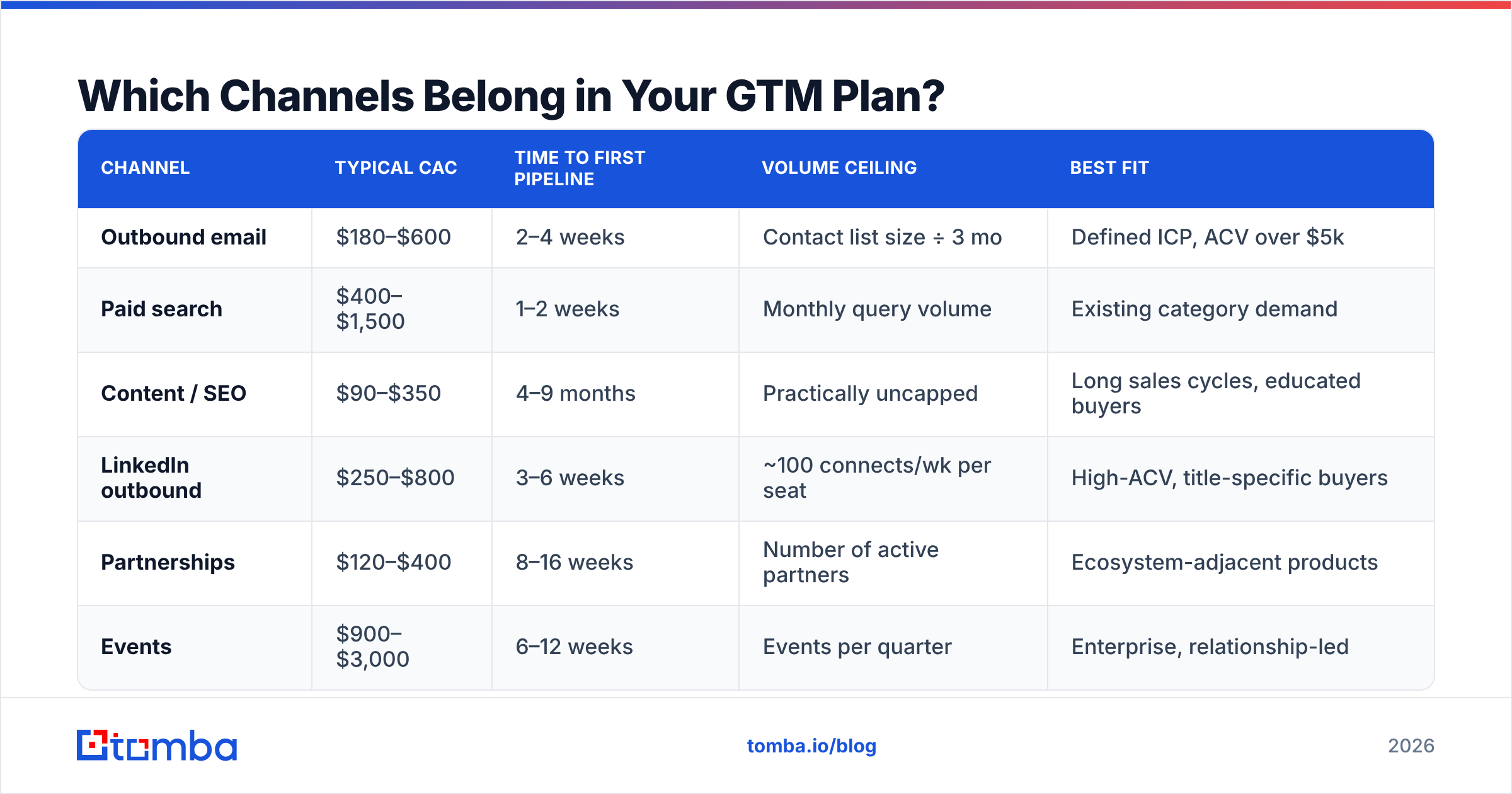
Every channel has a ceiling. Outbound email caps at how many verified contacts you can reach without wrecking deliverability. Paid search caps at monthly query volume for your keywords. Partnerships cap at how many partners will actually co-sell. Founders routinely plan for growth that exceeds the physical ceiling of the channel they chose, then blame execution.
Here is a realistic comparison for an early B2B motion:
| Channel | Typical CAC | Time to first pipeline | Volume ceiling | Best fit |
|---|---|---|---|---|
| Outbound email | $180–$600 | 2–4 weeks | Contact list size ÷ 3 mo | Defined ICP, ACV over $5k |
| Paid search | $400–$1,500 | 1–2 weeks | Monthly query volume | Existing category demand |
| Content / SEO | $90–$350 | 4–9 months | Practically uncapped | Long sales cycles, educated buyers |
| LinkedIn outbound | $250–$800 | 3–6 weeks | ~100 connects/wk per seat | High-ACV, title-specific buyers |
| Partnerships | $120–$400 | 8–16 weeks | Number of active partners | Ecosystem-adjacent products |
| Events | $900–$3,000 | 6–12 weeks | Events per quarter | Enterprise, relationship-led |
Read the second column carefully. If your runway is nine months, an SEO-only plan is a bet you cannot settle in time. Most early teams pair one fast channel (outbound or paid) with one compounding channel (content or partnerships) so that near-term pipeline funds the slow asset.
For the outbound line specifically, the CAC number is entirely governed by data quality. A 30% bounce rate does not just waste sends — it damages sender reputation and drags down the deliverability of every message you send afterward, including the good ones. Run every list through an email verifier before the first send, and keep bounce rate under 3%. That single control changes outbound CAC more than any subject-line experiment you will run this quarter.
For a broader view of how channel strategy fits with revenue planning, Gartner's go-to-market research and HubSpot's GTM strategy guide are both reasonable outside references — they diverge from each other on sequencing, which is itself useful.
How Do You Model the Budget Section?#
Work backward from a revenue target, not forward from an available budget.
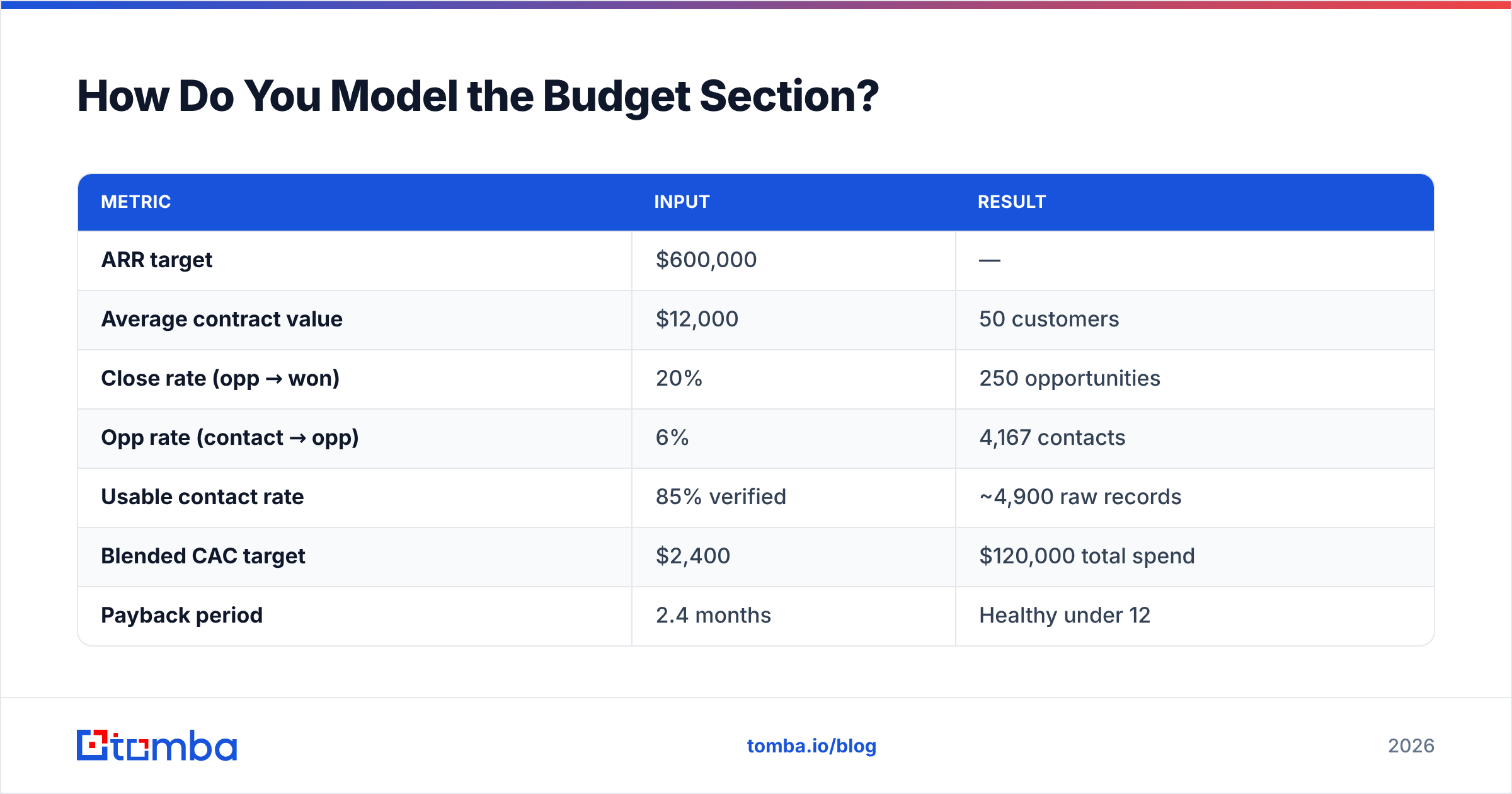
The arithmetic is short. Say you need $600k in new ARR over 12 months and your average contract value is $12k. That is 50 new customers. At a 20% close rate from qualified opportunity, you need 250 opportunities. At a 6% opportunity rate from a contacted prospect, you need roughly 4,200 contacted prospects. Now you know the data volume your plan requires — before you have spent anything.
| Metric | Input | Result |
|---|---|---|
| ARR target | $600,000 | — |
| Average contract value | $12,000 | 50 customers |
| Close rate (opp → won) | 20% | 250 opportunities |
| Opp rate (contact → opp) | 6% | 4,167 contacts |
| Usable contact rate | 85% verified | ~4,900 raw records |
| Blended CAC target | $2,400 | $120,000 total spend |
| Payback period | 2.4 months | Healthy under 12 |
Two things fall out of this table immediately. First, the plan needs about 4,900 raw records to produce 4,167 usable ones — that gap is your verification loss, and pretending it does not exist is how quarterly targets get missed in month two. Second, a $120k budget against a $600k target implies a 5:1 return, which most boards will fund.
If your model produces a CAC payback beyond 18 months, the plan is not wrong — but it requires a different funding conversation than a launch memo. Say that out loud in the document.

What Does the 90-Day Launch Sequence Look Like?#
Weeks, owners, and gates. Nothing else belongs in this section.
Weeks 1–2 — Foundation. Finalize ICP filters and produce the account list. Lock positioning and the three proof points. Set up tracking so every channel is attributable from day one. Gate: the target list exists as a file, with a row count.
Weeks 3–4 — Data and infrastructure. Enrich the account list to contact level. Verify every email. Configure sending domains, SPF, DKIM, DMARC. Warm up new inboxes — this takes real calendar time and cannot be compressed. Gate: verified contact list at under 3% expected bounce, domains authenticated.
Weeks 5–6 — Pilot. Run a small-batch send or campaign to 10% of the list. Measure reply rate, positive reply rate, and meeting rate. Do not optimize yet. Gate: a statistically meaningful sample, roughly 300–500 touches minimum.
Weeks 7–9 — Iterate. Change one variable at a time. Messaging first, then targeting, then offer. Most teams change three things at once and learn nothing. Gate: one messaging variant beats control by a margin you would bet on.
Weeks 10–12 — Scale and codify. Push volume on the winning variant, document the playbook, and hand it to whoever runs it next. Gate: a written playbook someone else could execute without you in the room.
The reason data work sits in weeks 3–4 rather than week 1 is sequencing discipline: enriching a list before the ICP is locked means enriching the wrong accounts. The reason it must be done before week 5 is that no amount of copy testing rescues a list of dead addresses.
What Kills a Go To Market Plan?#
Six failure modes account for nearly every GTM plan that quietly stops being used:
- The unfalsifiable ICP. "Companies that value efficiency" cannot be listed, so it cannot be tested. Every ICP needs a row count.
- Channel spray. Five channels at 20% attention each loses to two channels at 100%. Half-run channels produce data too noisy to learn from.
- Untested pricing. Launching without a price test means your first ten customers set your price permanently, usually low.
- No definition of qualified. If marketing and sales disagree on what qualifies, the funnel becomes a monthly argument instead of a measurement.
- Dirty data. Bounces, wrong titles, and stale companies inflate CAC invisibly. You blame the message when the problem is the list.
- No owner per section. A plan where "the team" owns everything is a plan nobody owns. Put a name next to each of the eight sections.
Add a review cadence too. The plan should be revisited at day 30, 60, and 90 with the actual numbers written next to the projected ones. Not to assign blame — to find the broken assumption while it is still cheap.
How Does Data Quality Change the Whole Plan?#
It changes the denominator of every calculation in it.
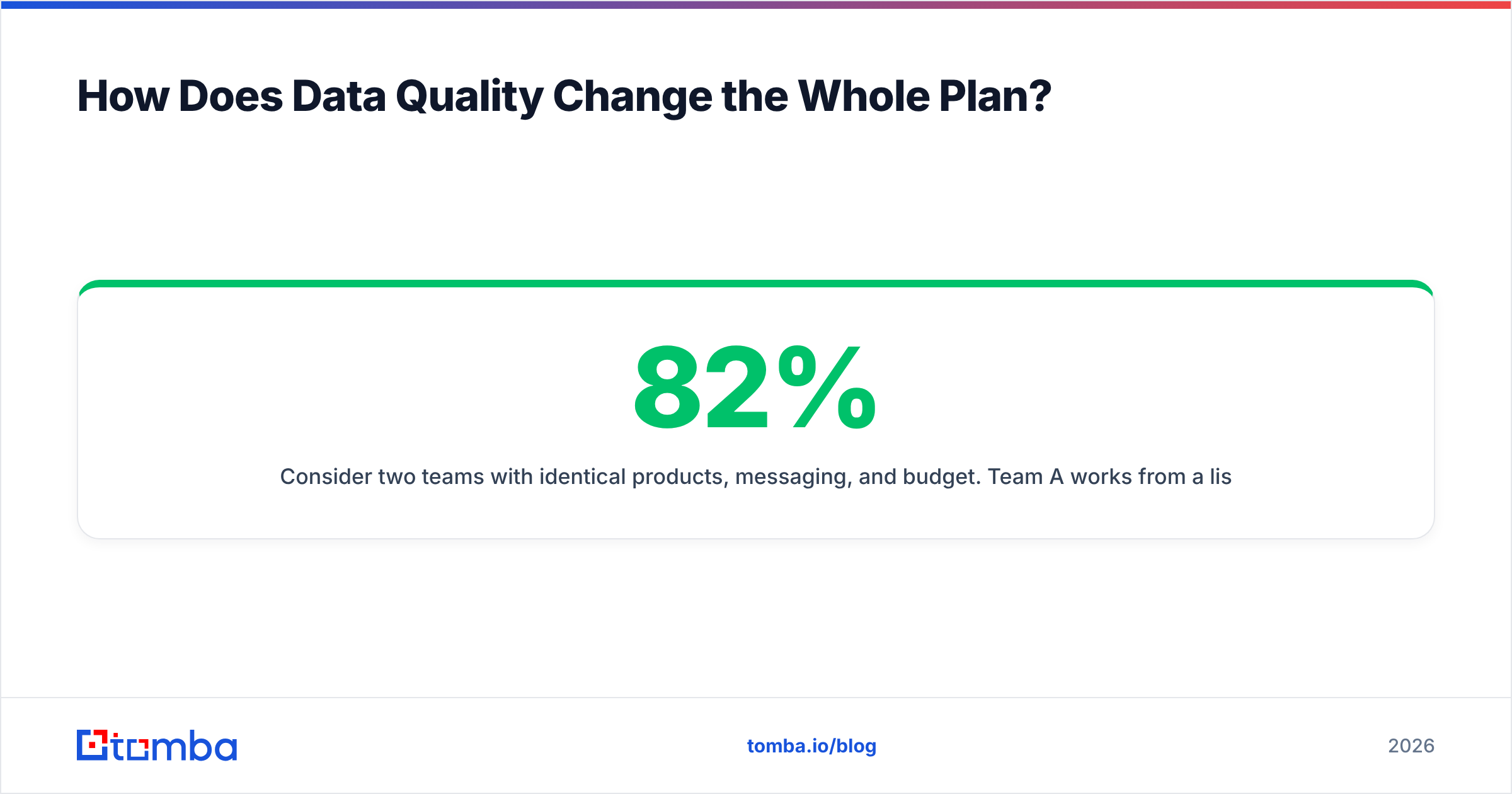
Consider two teams with identical products, messaging, and budget. Team A works from a list with 82% deliverable addresses. Team B works from 96%. Over 5,000 contacts, that gap is 700 prospects who never receive anything — roughly 42 lost opportunities at a 6% opportunity rate, and 8 lost customers at a 20% close rate. At a $12k ACV, that is nearly $100k of ARR that vanishes because of a spreadsheet, not a strategy.
The compounding damage is worse. High bounce rates train mailbox providers to route your domain to spam, so the addresses that were valid also stop landing. You lose the bad contacts and then you lose the good ones. Fixing email deliverability after the fact takes weeks of reduced sending volume — time your 90-day plan does not have.
This is why the data step is a gate in the sequence, not a task. Verified contact data is infrastructure, the same way authenticated sending domains are infrastructure. You do not launch without it and expect the rest of the plan to hold.
Ready to Fill In Section One?#
The eight-section template above is only as good as the account list underneath it. Section one — the countable ICP with real contacts — is where most plans stall, because building and verifying that list by hand is the least glamorous work in the entire launch.
The Tomba Email Finder is built for exactly that step: turn a list of target domains into verified, contact-level records you can actually send to, with verification built into the same workflow. Start on the free tier with 25 searches to test your ICP hypothesis before committing budget, then move to Starter at $49/mo or Growth at $99/mo once the list count is real. Full Tomba pricing is public, so you can drop the exact line item into your budget section today.
Fill in section one this week. The other seven get much easier once you know exactly who you are selling to — and can prove they exist.
Related guides#
Ready to find emails that actually work?
Join 150,000+ professionals who stopped guessing and started sending. Free credits on signup — no credit card required.
Get the Tomba newsletter
Practical outbound tactics and product updates — once every two weeks.
About the author