Go To Market Strategy Software: The 2026 Buyer's Guide
GTM software is now four overlapping layers — planning, data, orchestration, and signal. Here's how the categories actually differ, what each layer costs, and which parts you can skip.
TL;DR
- "Go to market strategy software" is not one category. It's four layers — planning, data, orchestration, and signal — and vendors deliberately blur the lines so you buy all four from one logo.
- Most teams under 50 reps only need two of the four layers. The planning layer is usually a spreadsheet plus your CRM, and it works fine until roughly $20M ARR.
- The data layer is where GTM stacks quietly die. Bad contact records break every downstream tool, so buy accuracy first and features second.
- Realistic annual spend: $6K–$18K for a lean stack, $60K–$250K+ for an all-in-one GTM platform with seat minimums and annual contracts.
- Start with a stack audit: list every tool, its renewal date, its per-seat cost, and the one metric it moves. Anything without a metric gets cut at renewal.
What is go to market strategy software, actually?#
Go to market strategy software is any tool that helps you decide who to sell to, find them, reach them, and measure whether it worked. That's a deliberately wide definition, because the market is deliberately wide — vendors from six different original categories (CRM, sales engagement, data providers, intent platforms, RevOps analytics, PLG tooling) all now describe themselves as GTM platforms.
The useful way to think about it is as a layered stack. Each layer answers a different question:
- Planning layer — Who are we selling to and what's the number? ICP definition, territory and quota planning, segmentation, TAM modeling, forecast. Tools: spreadsheets, Clari, Gong Forecast, native CRM forecasting.
- Data layer — Do we actually have contactable records for those accounts? Company firmographics, contact discovery, email verification, phone numbers, enrichment, dedupe. Tools: Tomba, BookYourData, Clearbit, ZoomInfo, Apollo.
- Orchestration layer — How do we reach them repeatedly without manual work? Sequences, multichannel cadences, routing, task automation, workflow builders. Tools: Outreach, Salesloft, Instantly, HubSpot Sequences.
- Signal layer — Who's showing intent right now? Website visitor identification, intent data, job-change alerts, product usage triggers, technographics. Tools: 6sense, Demandbase, Common Room, website reveal tools.
Every GTM platform pitch you will hear in 2026 is some claim about covering three or four of these layers in one contract. Sometimes that's true. More often, one layer is genuinely strong and the others are thin features bolted on to justify a platform price.
How do the four GTM layers actually compare?#
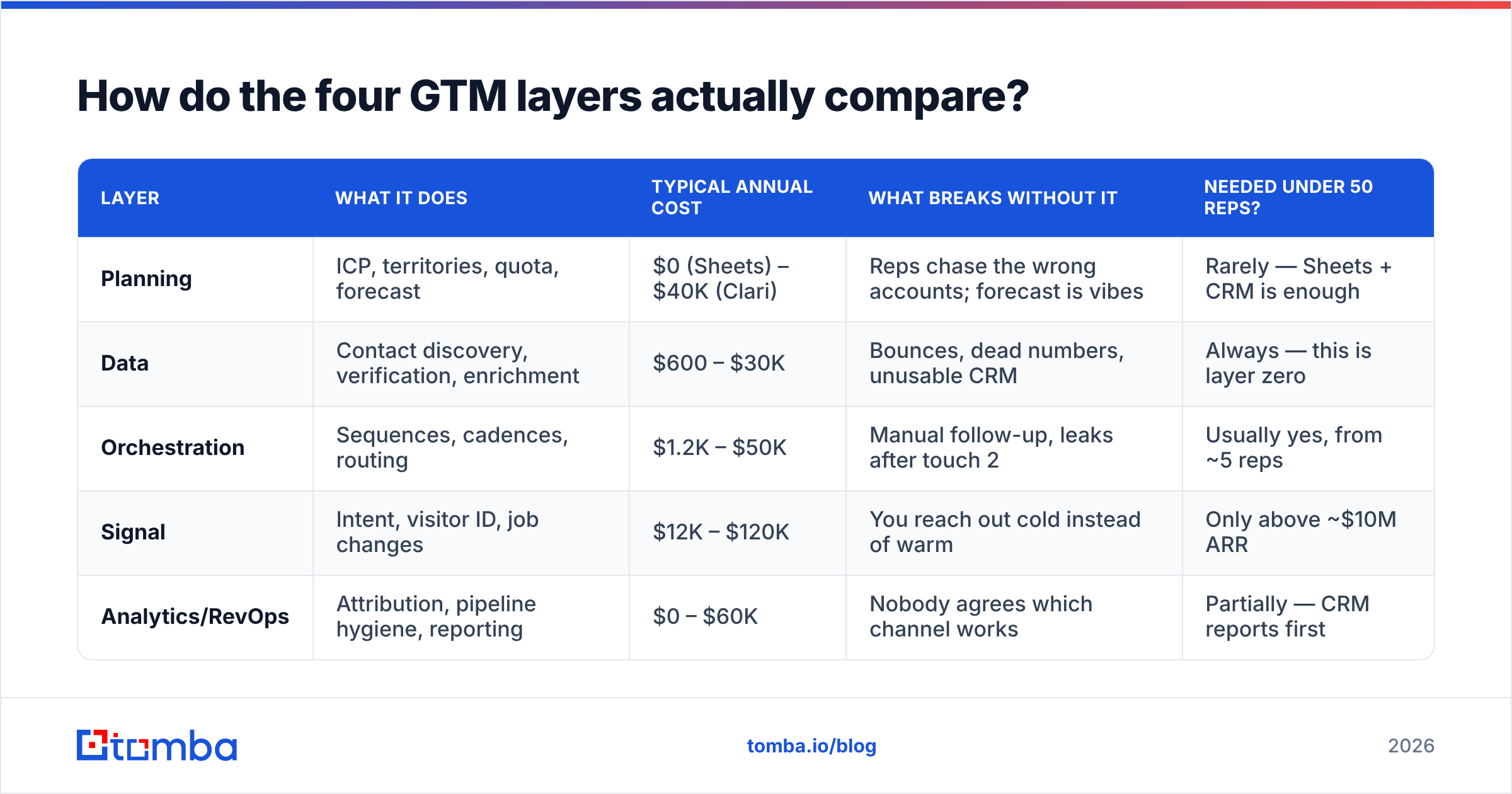
Here's the honest breakdown of what each layer costs, what breaks when it's missing, and whether an early-stage team needs it.
| Layer | What it does | Typical annual cost | What breaks without it | Needed under 50 reps? |
|---|---|---|---|---|
| Planning | ICP, territories, quota, forecast | $0 (Sheets) – $40K (Clari) | Reps chase the wrong accounts; forecast is vibes | Rarely — Sheets + CRM is enough |
| Data | Contact discovery, verification, enrichment | $600 – $30K | Bounces, dead numbers, unusable CRM | Always — this is layer zero |
| Orchestration | Sequences, cadences, routing | $1.2K – $50K | Manual follow-up, leaks after touch 2 | Usually yes, from ~5 reps |
| Signal | Intent, visitor ID, job changes | $12K – $120K | You reach out cold instead of warm | Only above ~$10M ARR |
| Analytics/RevOps | Attribution, pipeline hygiene, reporting | $0 – $60K | Nobody agrees which channel works | Partially — CRM reports first |
Two things jump out of that table. First, the cost range within a single layer is 50x — which means "we need intent data" tells you almost nothing about budget. Second, the layer with the lowest cost floor (data) is the one with the highest downstream blast radius. A $600/year data problem can invalidate a $50K/year orchestration investment, because sequences sent to unverified addresses damage your email deliverability and take the whole domain down with them.
Which layer should you buy first?#
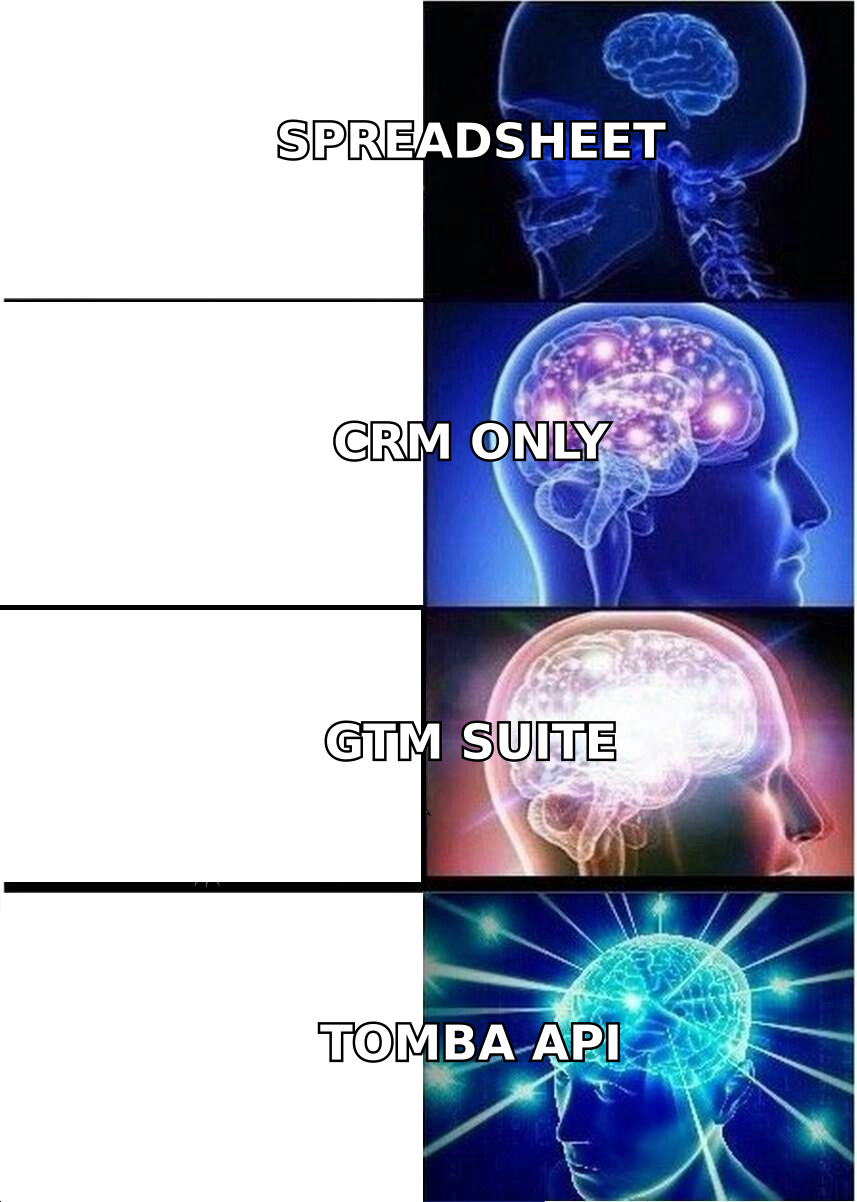
Buy the data layer first. Always. Here's the reasoning in order of dependency:
- Data feeds everything. Your orchestration tool sends to records. Your signal tool enriches records. Your planning tool counts records. If 22% of those records are wrong, every layer above inherits that error rate and compounds it.
- Data is the cheapest layer to fix. Contact discovery and verification start in the hundreds of dollars per year. Fixing the same problem at the orchestration layer means paying for wasted sends, burned domains, and rep time.
- Orchestration is the second dependency. Once records are trustworthy, automation multiplies them. Before that, automation multiplies the mistake.
- Signal is a scale unlock, not a starting point. Intent data tells you when to reach an account you already know how to contact. If you can't contact them, timing is irrelevant.
- Planning tooling is the last purchase. Dedicated forecast and territory software solves a coordination problem that only exists once you have enough reps to coordinate.
- Analytics can lag by a quarter. Native CRM reporting is unglamorous but honest. Buy dedicated attribution when the CRM reports start contradicting each other, not before.
This ordering is unpopular with vendors because the data layer is the least profitable thing to sell. It's a commodity-feeling purchase that quietly determines whether the rest of the stack works.
What does a real GTM stack cost at each stage?#
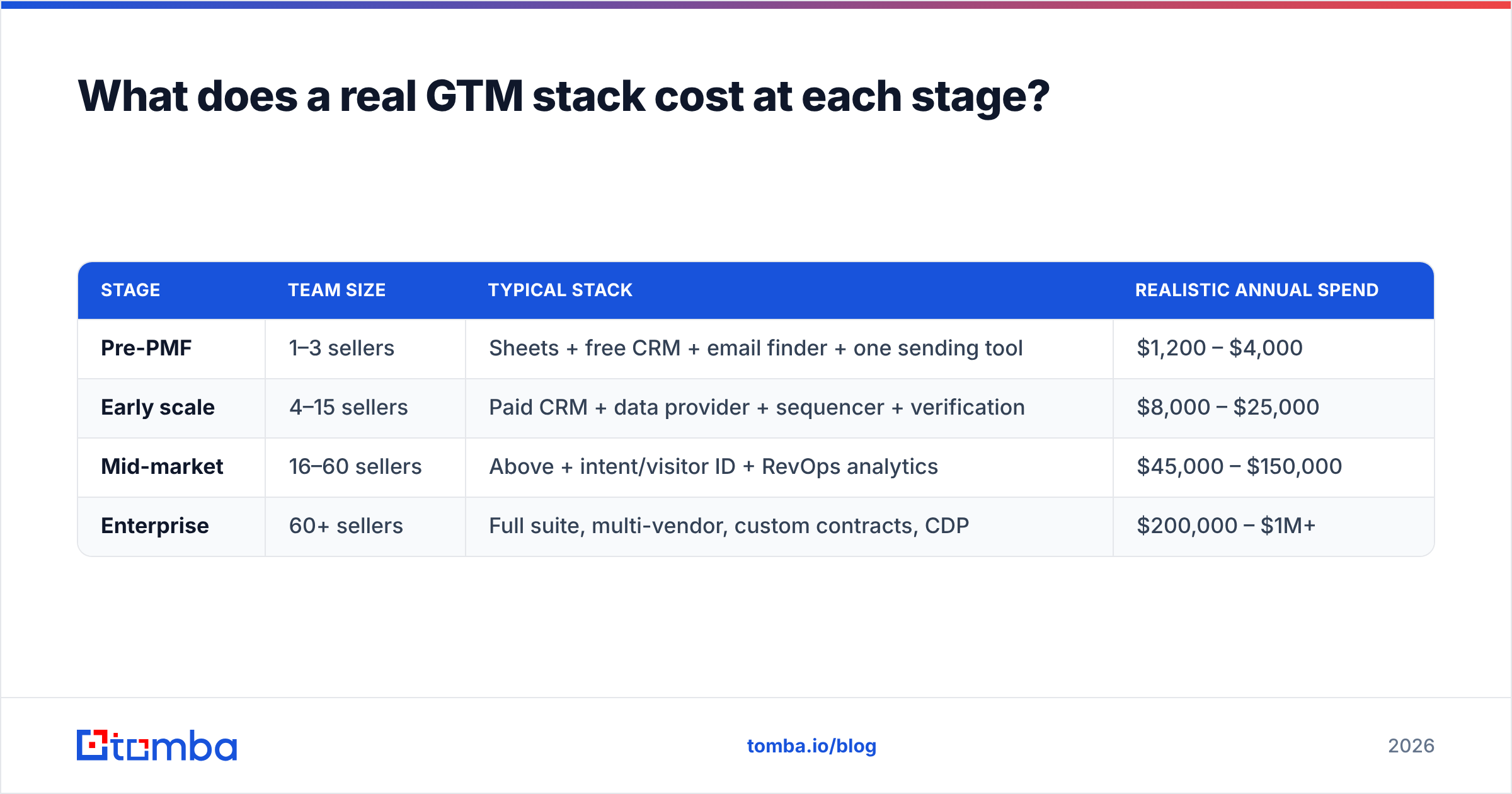
Vendor pricing pages are aspirational. Here's what teams actually pay, based on published list pricing and common seat minimums.
| Stage | Team size | Typical stack | Realistic annual spend |
|---|---|---|---|
| Pre-PMF | 1–3 sellers | Sheets + free CRM + email finder + one sending tool | $1,200 – $4,000 |
| Early scale | 4–15 sellers | Paid CRM + data provider + sequencer + verification | $8,000 – $25,000 |
| Mid-market | 16–60 sellers | Above + intent/visitor ID + RevOps analytics | $45,000 – $150,000 |
| Enterprise | 60+ sellers | Full suite, multi-vendor, custom contracts, CDP | $200,000 – $1M+ |
The jump from early scale to mid-market is where most budget waste happens. Teams add the signal layer because a competitor mentioned it on LinkedIn, not because their data and orchestration layers are saturated. A good test: if your reps aren't working every ICP account you already have contact data for, you don't have a signal problem — you have a capacity problem, and intent data will not fix capacity.
For reference on how per-credit data pricing scales, Tomba pricing runs a free tier at 25 searches/month, Starter at $49/mo, Growth at $99/mo, and Pro at $249/mo — which puts a fully functional data layer inside the budget of a two-person team. BookYourData takes a different and equally valid approach with prepaid, non-expiring credits, which suits teams doing occasional large list pulls rather than continuous prospecting. Neither model is universally better; it depends on whether your volume is steady or spiky.
How do you evaluate a GTM platform without getting demo-blinded?#
Vendor demos are optimized to show the strongest layer and skip past the weak ones. Four checks cut through that:
- Ask for the coverage number on your ICP, not globally. "300M contacts" is meaningless. Hand them 100 domains from your actual target list and ask what percentage they return a verified contact for. The gap between global coverage and your-segment coverage is often 40 points.
- Separate "found" from "verified." Many tools count a guessed pattern as a find. Ask what the bounce rate is on records they return as valid, and whether catch-all domains are counted as deliverable. Catch-alls are where accuracy claims go to hide — this is why a dedicated catch-all verifier matters more than an extra 50M records.
- Price the exit, not just the entry. Can you export your data? Is it a 12-month contract with auto-renew? Are credits use-it-or-lose-it monthly? A cheap year-one price with locked data is more expensive than a slightly pricier tool you can leave.
- Check the API before the UI. If the plan is to eventually automate, a clean email finder API matters far more than the dashboard your reps will use twice a week. UIs get replaced. Integrations don't.
- Run one real campaign in the trial. Not a sample export — an actual 200-contact send with tracked bounces. Two weeks of real usage beats any G2 grid.
Speaking of which, third-party review data on G2 is useful for spotting support and billing complaints, which vendors never surface, but treat the accuracy ratings skeptically — they're self-reported by users who never verified against a control set.
Is an all-in-one GTM platform better than a best-of-breed stack?#
It depends on one variable: whether you have a RevOps person.
All-in-one wins when you don't. One contract, one support channel, one data model, no integration debt. If nobody on the team owns tooling, consolidation is worth paying a premium for — a half-configured best-of-breed stack performs worse than a fully-configured mediocre suite.
Best-of-breed wins when you do. A dedicated revenue operations owner can wire APIs, dedupe across sources, and swap a weak component without renegotiating everything. That flexibility compounds: you replace the worst layer each year instead of being stuck with a suite's weakest module for three.
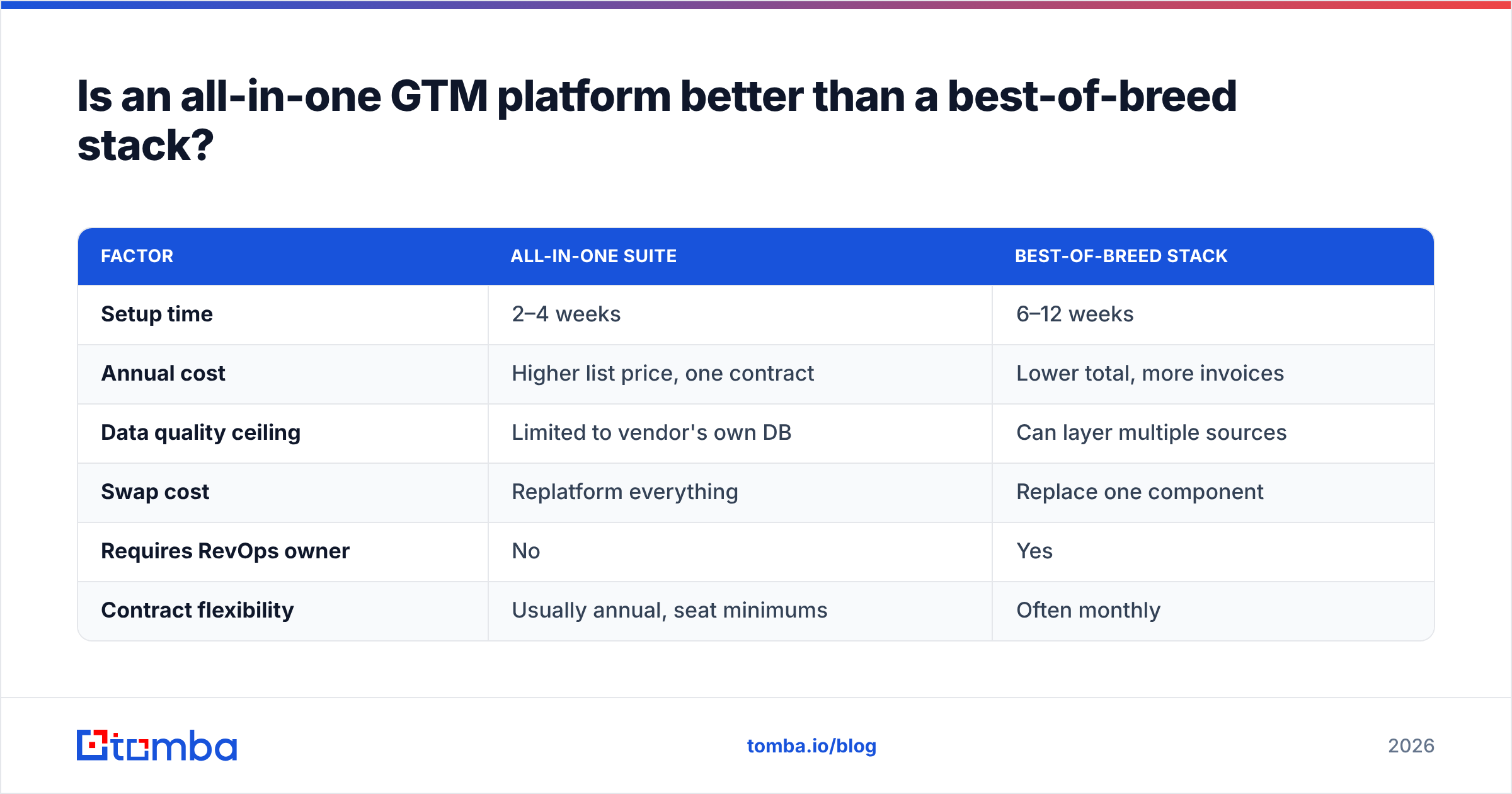
| Factor | All-in-one suite | Best-of-breed stack |
|---|---|---|
| Setup time | 2–4 weeks | 6–12 weeks |
| Annual cost | Higher list price, one contract | Lower total, more invoices |
| Data quality ceiling | Limited to vendor's own DB | Can layer multiple sources |
| Swap cost | Replatform everything | Replace one component |
| Requires RevOps owner | No | Yes |
| Contract flexibility | Usually annual, seat minimums | Often monthly |
The hybrid most mid-market teams land on: a suite for CRM and orchestration, a specialist for data. That's not fence-sitting — it reflects that CRM switching costs are enormous while data provider switching costs are near zero, so you want to lock in the former and stay liquid on the latter.
What are the most common GTM software mistakes?#
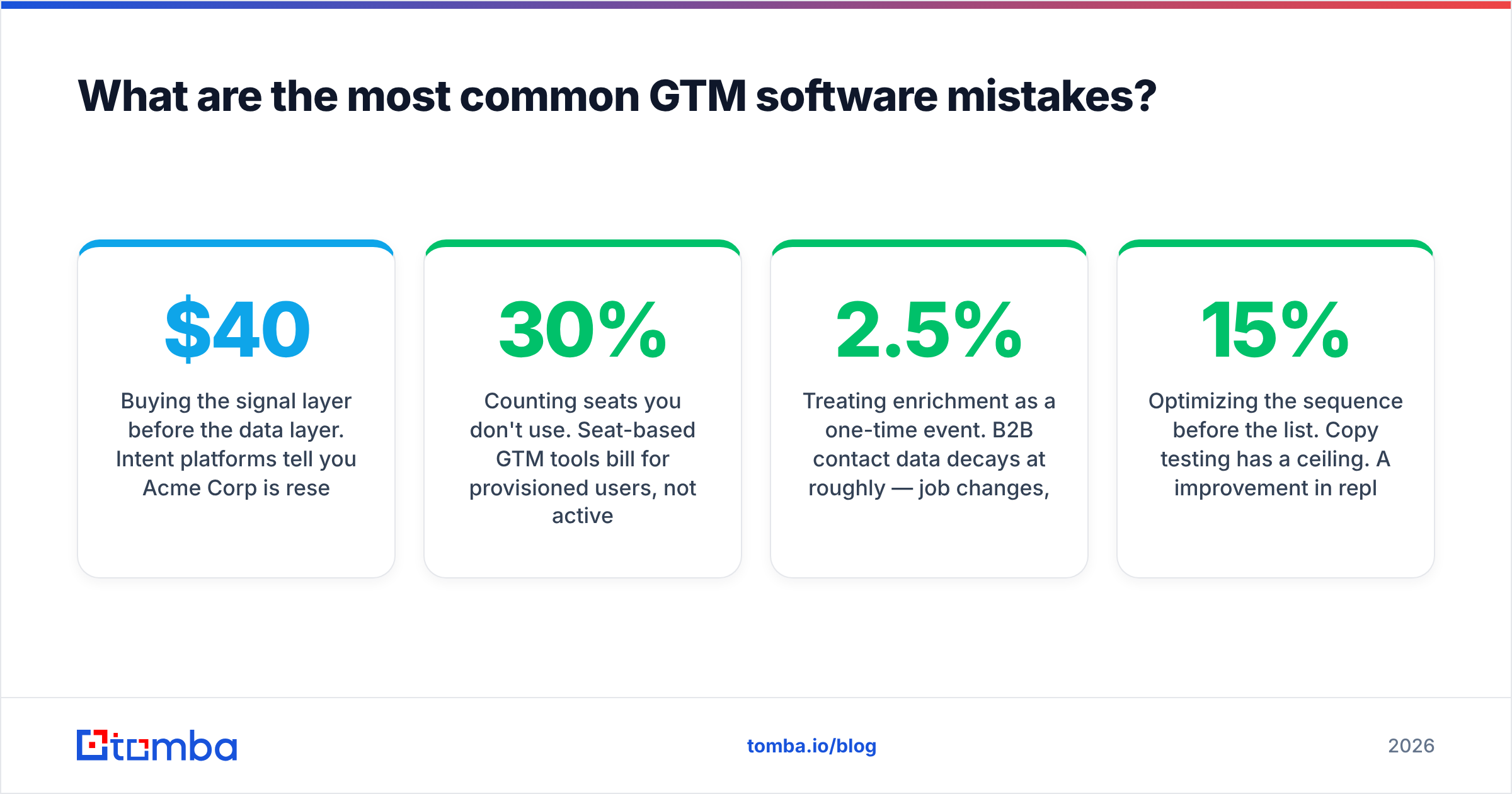
Buying the signal layer before the data layer. Intent platforms tell you Acme Corp is researching your category. If you can't find a verified contact at Acme, that's a $40,000 notification.
Counting seats you don't use. Seat-based GTM tools bill for provisioned users, not active ones. Audit your license count against last-30-day logins before every renewal. Teams routinely find 20–30% dead seats.
Treating enrichment as a one-time event. B2B contact data decays at roughly 2.5% per month — job changes, domain migrations, title changes. A list enriched 18 months ago is closer to fiction than data. Continuous re-verification through a bulk email finder workflow beats an annual cleanse.
Letting each team buy its own data source. Marketing buys one enrichment tool, sales buys another, RevOps buys a third for the CRM. Now you have three conflicting versions of the same account and no agreed source of truth. Pick one primary, use others as fallback only.
Optimizing the sequence before the list. Copy testing has a ceiling. A 15% improvement in reply rate from better copy is real but small next to the 300% improvement from targeting the right segment. Fix the list, then the message.
Ignoring deliverability as a GTM constraint. Your sending infrastructure is part of the GTM stack whether you budget for it or not. Bounces above 3% start throttling your entire domain, which caps every campaign downstream. Verification is not a nice-to-have line item; it's the thing keeping your orchestration layer functional. Run addresses through an email verifier before they ever touch a sequence.
Buying for the org you'll have in two years. Enterprise tools sold to 8-person teams sit unused. You can always upgrade; you can rarely get a refund on an annual contract signed in optimism. HubSpot's own sales enablement guidance is decent on this point: tooling should trail process maturity, not lead it.
How do you audit the GTM stack you already have?#
Run this once a quarter. It takes about 90 minutes and usually pays for itself.
- List every tool with its renewal date and annual cost. Include the ones on someone's personal card. Sort by cost descending.
- Assign each tool exactly one metric it moves. Not three. One. If nobody can name it in ten seconds, that's the answer.
- Pull actual usage. Logins in the last 30 days, credits consumed vs. purchased, records created. Compare to what you're paying for.
- Map overlaps. Draw the four layers and place each tool. Any layer with two tools needs a justification stronger than "we grandfathered it in."
- Rank by cost-per-outcome. Divide annual cost by the metric from step 2. The worst performer is your next cancellation.
- Set the cancellation calendar. Auto-renew clauses need 30–60 days notice. Put the notice deadline, not the renewal date, on the calendar.
Most teams running this for the first time find one redundant data source, one orchestration tool nobody's used since a departed rep set it up, and at least $8K of dead seats.
Where should you start if you're building the stack from scratch?#
Start narrow and prove the motion works before you buy anything with a platform price tag.
A functional starting stack for a team under ten people: a CRM (free tier is fine), a verified contact data source, one sending tool, and a spreadsheet for planning. That's it. You can run a legitimate outbound motion on under $400/month, and the constraint will be your reps' time, not your tooling.
Add layers when a specific bottleneck forces it — not on a schedule, not because a competitor announced a stack. If reps are manually copying contacts, you need better data enrichment. If follow-ups are leaking, you need orchestration. If reps are working the right accounts at the wrong time, then and only then does the signal layer earn its cost.
The stack that wins isn't the one with the most logos. It's the one where every tool has a named owner, a measured outcome, and a renewal date somebody's watching.
Start with the layer everything else depends on. Before you evaluate a single platform demo, make sure the contact data underneath it holds up. Tomba Email Finder gives you verified professional email addresses by domain, name, or company — with a free tier at 25 searches per month to test coverage against your own ICP list before you commit a dollar. Run 100 target domains through it, measure the verified-contact rate, and use that number as the baseline every other vendor has to beat.
Related guides#
Ready to find emails that actually work?
Join 150,000+ professionals who stopped guessing and started sending. Free credits on signup — no credit card required.
Get the Tomba newsletter
Practical outbound tactics and product updates — once every two weeks.
About the author