Go To Market Strategy Timeline: A 90-Day Launch Plan
Most GTM plans fail on sequencing, not strategy. Here is a week-by-week go to market strategy timeline for the 12 weeks before launch, with owners, gates, and the data work that has to happen first.
TL;DR
- A realistic go to market strategy timeline for a B2B software launch runs about 12 weeks, split into four phases: positioning (weeks 1–3), enablement and data (weeks 4–7), pilot (weeks 8–10), and full launch (weeks 11–12).
- The single most common cause of slipped launch dates is not messaging. It is the target list — teams discover in week 9 that the contact data they assumed existed does not.
- Every phase needs an exit gate with a measurable pass condition, not a status meeting. "Positioning is done" means the one-liner survived five customer calls, not that a doc exists.
- Budget 2–3 weeks of the timeline purely to list building, verification, and CRM hygiene. It is invisible work that determines whether the launch has anyone to talk to.
- Timelines compress for feature launches (4–6 weeks) and stretch for new-category or enterprise launches (16–24 weeks). Pick the shape before you pick the dates.
What is a go to market strategy timeline?#
A go to market strategy timeline is the dated, owner-assigned sequence of work that has to finish before and around a launch: research, positioning, pricing, enablement, list building, campaign build, pilot, and full release.
Think of it like a restaurant opening. The menu (positioning) has to be settled before the kitchen orders ingredients (list building), and the ingredients have to be in the walk-in before you let food critics in (pilot). Do it out of order and you get a beautifully designed menu with nothing to serve.
The distinction that matters: a GTM strategy answers who you sell to, what you say, and how you charge. A GTM timeline answers when each of those decisions locks, who owns the lock, and what breaks downstream if it slips. Most teams write the first document and skip the second, then spend the last three weeks before launch discovering dependencies.
A workable timeline has four properties:
- Phases have exit gates, not end dates. A phase ends when its pass condition is met. If week 3 ends and positioning has not survived customer validation, week 4 does not start on schedule — you renegotiate the launch date immediately instead of silently absorbing the delay in the pilot phase.
- Every task has one accountable owner. Not a team. One name. "Marketing owns messaging" produces three competing drafts.
- Data work starts in parallel, not at the end. List building, enrichment, and verification take longer than anyone plans and cannot be compressed by adding people at the last minute.
- The pilot is real, not theatrical. Ten to twenty actual prospects, actual sequences, actual objections — before you spend the full budget.
Why do go-to-market timelines slip?#
They slip for four repeatable reasons, and only one of them is about the product.
Positioning gets re-litigated late. A stakeholder who was not in the week-2 workshop reads the launch email in week 10 and reopens the value prop. This is a governance failure. Fix it by naming a single decider up front and circulating the positioning doc for objection before the gate closes, not after.
The target list does not exist. This is the quiet killer. The plan says "target 2,000 mid-market ops leaders." In week 9 someone actually tries to build that list and finds 600 companies match the firmographic filter, of which 340 have a reachable decision-maker with a verified email. The campaign math collapses and the launch either shrinks or delays.
Enablement is treated as a deck. Sales gets a 40-slide deck two days before launch and no practice reps. Call quality in weeks 1–4 of launch is then blamed on the market.
No one owns the handoff between phases. Product finishes, marketing assumes sales is ready, sales assumes marketing is running demand. Two weeks evaporate in the seam.
The pattern across all four: the timeline had dates but no dependencies. A date tells you when something should be done. A dependency tells you what stops if it is not.
What does a 90-day go to market timeline look like?#
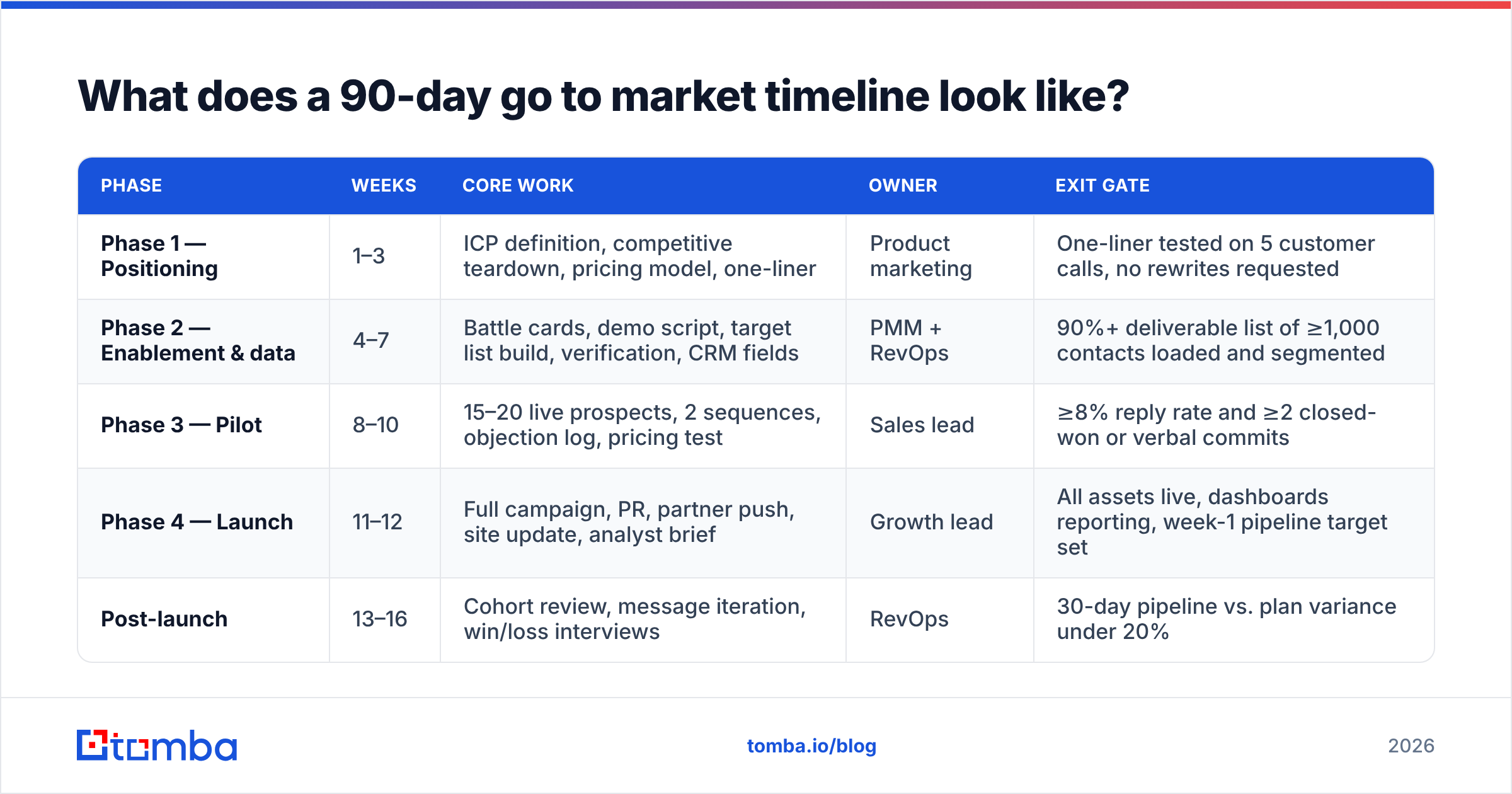
Here is the week-by-week shape for a standard B2B software launch with an existing sales motion. Adjust the absolute length for your launch type — the sequence holds regardless.
| Phase | Weeks | Core work | Owner | Exit gate |
|---|---|---|---|---|
| Phase 1 — Positioning | 1–3 | ICP definition, competitive teardown, pricing model, one-liner | Product marketing | One-liner tested on 5 customer calls, no rewrites requested |
| Phase 2 — Enablement & data | 4–7 | Battle cards, demo script, target list build, verification, CRM fields | PMM + RevOps | 90%+ deliverable list of ≥1,000 contacts loaded and segmented |
| Phase 3 — Pilot | 8–10 | 15–20 live prospects, 2 sequences, objection log, pricing test | Sales lead | ≥8% reply rate and ≥2 closed-won or verbal commits |
| Phase 4 — Launch | 11–12 | Full campaign, PR, partner push, site update, analyst brief | Growth lead | All assets live, dashboards reporting, week-1 pipeline target set |
| Post-launch | 13–16 | Cohort review, message iteration, win/loss interviews | RevOps | 30-day pipeline vs. plan variance under 20% |
Phase 1 (weeks 1–3): decide, do not document. The deliverables are short. One page of ICP definition with firmographic and technographic filters you can actually query. One competitive teardown. One pricing model with a floor. One positioning statement. If your positioning doc is 30 slides, you have not decided anything — you have surveyed.
The validation step is non-negotiable. Take the one-liner to five current customers or five qualified prospects. If three of them ask "so what does it actually do," you failed the gate. Rewrite and retest. This is the cheapest week to be wrong.
Phase 2 (weeks 4–7): enablement and data run in parallel. Two independent tracks that must not be sequenced.
Track A is enablement: battle cards for the top three competitors, a 12-minute demo script, an objection-handling doc seeded from sales calls, and two practice sessions with recorded role-play. Not a deck. Reps.
Track B is data, and it is the track that determines whether launch has fuel. In order:
- Define the account universe. Firmographics, tech stack, headcount band, geography. Write it as a query, not a paragraph.
- Build the account list. Pull from your B2B database, enrich from existing CRM records, and dedupe. Expect 30–50% attrition between "matches the filter" and "worth contacting."
- Find the contacts. Map 2–4 personas per account and resolve names to business emails using a domain search or email finder workflow rather than guessing at patterns.
- Verify before you load. Run the full list through an email verifier and route catch-all domains to a separate treatment. A list you verified in week 5 is materially better than one you verify the night before launch.
- Load and segment in CRM. Fields, owners, sequence assignment, suppression list. If this is not done by end of week 7, phase 3 slips.
Phase 3 (weeks 8–10): the pilot is a real campaign at small scale. Fifteen to twenty prospects, two sequence variants, live calls. You are looking for three signals: does the message earn a reply, do reps handle the top objection without escalating, and does the pricing survive contact with a buyer. Log every objection verbatim. Pilot data beats internal opinion in every argument you will have in week 11.
Phase 4 (weeks 11–12): launch is execution, not decision-making. If you are still debating positioning here, phase 1 failed. This phase is asset shipping, campaign activation, and instrumentation. Set a week-1 pipeline target before launch so you have something to measure against on day 8.
How long should each launch type take?#
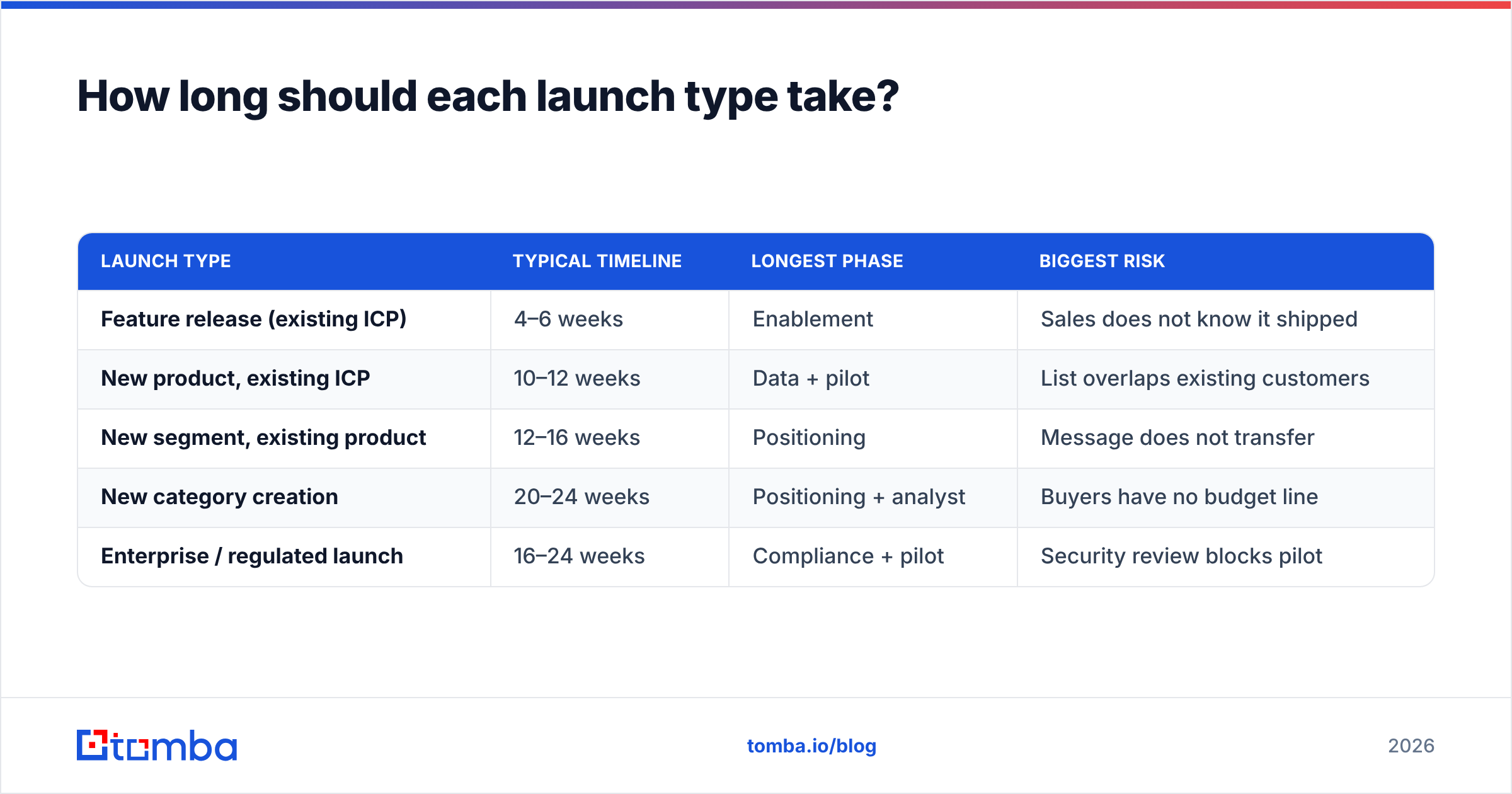
Not every launch deserves 90 days. Match the timeline to the risk and the newness.
| Launch type | Typical timeline | Longest phase | Biggest risk |
|---|---|---|---|
| Feature release (existing ICP) | 4–6 weeks | Enablement | Sales does not know it shipped |
| New product, existing ICP | 10–12 weeks | Data + pilot | List overlaps existing customers |
| New segment, existing product | 12–16 weeks | Positioning | Message does not transfer |
| New category creation | 20–24 weeks | Positioning + analyst | Buyers have no budget line |
| Enterprise / regulated launch | 16–24 weeks | Compliance + pilot | Security review blocks pilot |
Two rules of thumb. First, if you are changing who you sell to, positioning gets longer. If you are changing what you sell to the same people, enablement gets longer. Second, any launch that requires a new buyer persona needs a 3-week data phase minimum — you are building a contact universe from zero, not filtering an existing one.
Analyst firms are worth reading here rather than guessing: both Gartner and Forrester publish B2B buying-cycle research showing that buying groups have grown to 6–10 people, which is the practical reason the data phase keeps expanding. You are not finding one contact per account anymore.
Who owns each phase of the GTM timeline?#
Ownership confusion causes more slippage than capacity does. Assign it explicitly.
- Product marketing owns phases 1 and the enablement half of 2. They are accountable for the positioning gate and the battle cards. They are not accountable for pipeline.
- RevOps owns the data half of phase 2 and all instrumentation. This includes the list, the verification standard, the CRM fields, and the reporting. If your revenue operations function is thin, this is the role to borrow or contract first.
- Sales leadership owns phase 3. The pilot lives or dies on whether reps actually run it instead of returning to their existing pipeline.
- Growth or demand gen owns phase 4 execution and the week-1 through week-4 measurement.
- One executive sponsor owns the gates. Their only job is to say "this gate did not pass, we move the date" out loud. Without that person, gates become ceremonies.
A practical governance pattern: a 30-minute gate review at the end of each phase where the only agenda item is the pass condition. Not a status update. Pass or fail, and if fail, what the new date is.
What data work has to happen before launch?#
More than teams plan for, and earlier. This is the section most GTM timelines under-specify.
The failure mode is treating list building as a week-10 task. It is a week-4 task, because everything downstream depends on knowing the real size of your addressable universe. If your plan assumes 2,000 reachable contacts and the actual number is 700, you need to know that in week 5 while you can still adjust targets — not in week 11 while the campaign is live.
Work through it in this order:
- Account universe sizing. Run the filter and count. Compare to plan. If the gap is over 30%, escalate immediately.
- Persona mapping. For each account, which 2–4 titles matter? Enterprise launches need more; SMB launches need fewer and rely on a single decision-maker.
- Contact resolution. Turn names and domains into verified business emails. A bulk email finder workflow handles this at list scale rather than one lookup at a time.
- Verification and catch-all handling. Catch-all domains accept everything at SMTP time and tell you nothing. Segment them and either treat them as a lower-confidence tier or run them through dedicated catch-all verification.
- Deduplication and suppression. Existing customers, open opportunities, competitors, and anyone who unsubscribed in the last 12 months. Skipping this is how a launch email reaches a customer who churned last quarter.
- Deliverability prep. New sending domains need warmup weeks before launch, not days. Check SPF records and authentication early — this is infrastructure work with a hard lead time.
The compounding effect is real. A list with 15% invalid addresses does not just waste 15% of sends. It damages sender reputation, which suppresses inbox placement for the valid 85%, which makes the whole campaign look like a messaging failure when it was a data failure. You will then spend week 14 rewriting copy that was fine.
How do you know the timeline is working?#
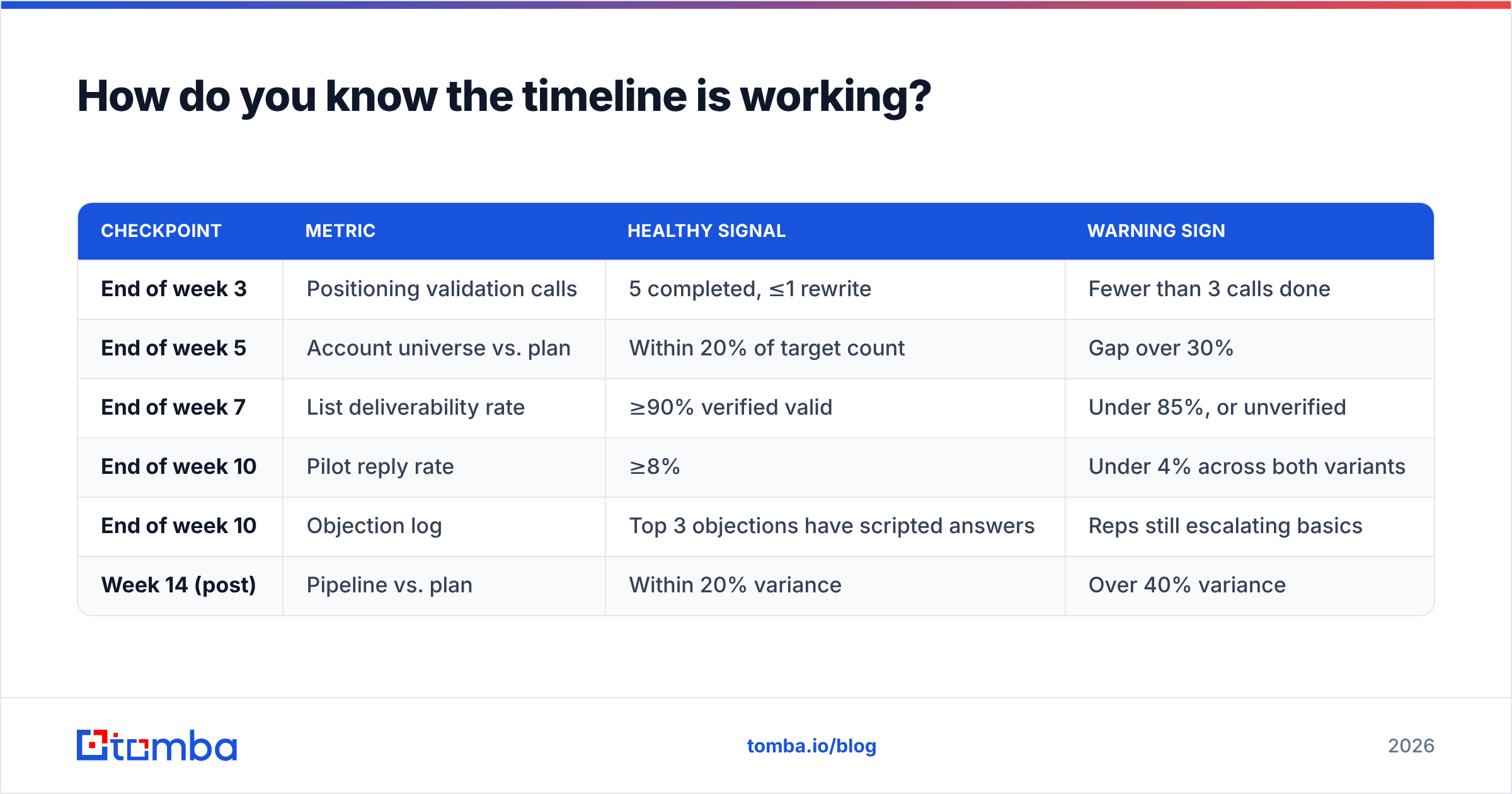
Measure leading indicators inside the timeline, not just outcomes after it.
| Checkpoint | Metric | Healthy signal | Warning sign |
|---|---|---|---|
| End of week 3 | Positioning validation calls | 5 completed, ≤1 rewrite | Fewer than 3 calls done |
| End of week 5 | Account universe vs. plan | Within 20% of target count | Gap over 30% |
| End of week 7 | List deliverability rate | ≥90% verified valid | Under 85%, or unverified |
| End of week 10 | Pilot reply rate | ≥8% | Under 4% across both variants |
| End of week 10 | Objection log | Top 3 objections have scripted answers | Reps still escalating basics |
| Week 14 (post) | Pipeline vs. plan | Within 20% variance | Over 40% variance |
Two of these deserve emphasis. The week-5 universe check is your earliest honest read on whether the plan is achievable, and it is the cheapest place to change scope. The week-10 pilot reply rate is your last chance to fix messaging before you spend the launch budget. If the pilot response rate is under 4% across both sequence variants, do not launch on schedule. Rewrite, retest with 15 more prospects, and move the date by two weeks. That decision costs two weeks. Launching on a broken message costs a quarter.
One caution on measurement: do not judge the pilot on closed-won alone. Ten prospects is too small a sample for deal outcomes but plenty for reply rates, objection patterns, and whether the demo lands. Judge phase 3 on signal quality, not revenue.
What tools support each phase?#
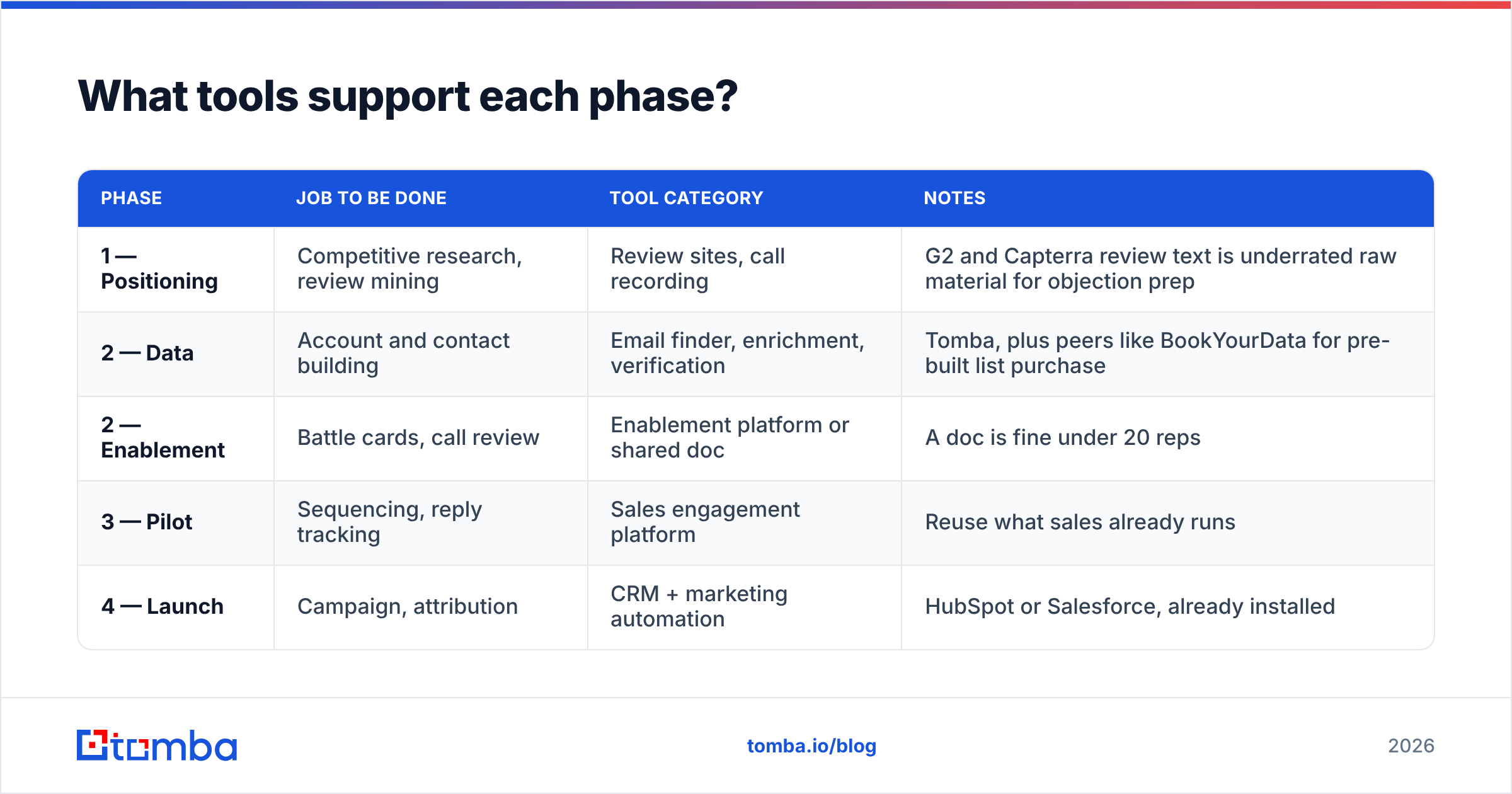
Keep the stack thin. Every tool added mid-timeline costs a week of setup and integration that nobody budgeted.
| Phase | Job to be done | Tool category | Notes |
|---|---|---|---|
| 1 — Positioning | Competitive research, review mining | Review sites, call recording | G2 and Capterra review text is underrated raw material for objection prep |
| 2 — Data | Account and contact building | Email finder, enrichment, verification | Tomba, plus peers like BookYourData for pre-built list purchase |
| 2 — Enablement | Battle cards, call review | Enablement platform or shared doc | A doc is fine under 20 reps |
| 3 — Pilot | Sequencing, reply tracking | Sales engagement platform | Reuse what sales already runs |
| 4 — Launch | Campaign, attribution | CRM + marketing automation | HubSpot or Salesforce, already installed |
On the data phase specifically, there are two viable paths and they suit different situations. Build means you define the filter and resolve contacts yourself — slower up front, but the list matches your ICP exactly and stays current. Buy means purchasing a pre-built list from a provider like BookYourData, which is faster and sensible when you are entering a segment you have no existing data on and need volume quickly. Many teams do both: buy for coverage in a new segment, build for the accounts that matter most.
If you build, the workflow that fits a 4-week data phase is straightforward: enrich accounts, resolve contacts by domain, verify in bulk, then push to CRM through an integration rather than CSV round-trips. If your team lives in spreadsheets, a Google Sheets add-on keeps the workflow where the analysts already are. For engineering-led teams, doing it through the Tomba API during the enrichment sprint is usually less work than any manual process.
What should you do in the first week?#
Start with the three decisions that unblock everything else, and do them in one working session rather than across three meetings.
- Name the decider. One person who closes the positioning gate. Write the name down.
- Write the ICP as a query. Not "mid-market SaaS companies with growth pain." Something like: "US and Canada, 200–2,000 employees, software or fintech, using a CRM, with a named RevOps or Sales Ops role." You must be able to run it.
- Size the universe immediately. Run the query in week 1, not week 9. The answer changes the entire plan, and it is the single highest-leverage hour in the whole timeline.
- Book the five validation calls. Calendars are the real constraint. Book them in week 1 for week 3.
- Set the launch date and the two dates it depends on. Launch date, plus the week-7 data gate and the week-10 pilot gate. Those two gates are the only ones that should ever move the launch date.
Everything else in the timeline is execution against these five decisions. Teams that spend week 1 building a project plan template instead of making these five calls typically lose two weeks and never recover them.
Build the target list before you build the deck#
The pattern across every launch that lands on time: the data work started early, the gates were real, and someone had authority to move the date when a gate failed.
If the list is the constraint on your timeline — and for most B2B launches it is — start there. Tomba's Email Finder resolves names and company domains into verified business emails at list scale, with a free tier of 25 searches per month to test your ICP query before committing, then $49/mo on Starter and $99/mo on Growth as the volume grows. Full Tomba pricing runs through Pro at $249/mo and Enterprise for larger data programs.
Run your week-1 universe sizing against real data instead of an assumption. It is the cheapest hour in the entire 90 days, and it is the one that tells you whether the launch date you just committed to is honest.
Related guides#
Ready to find emails that actually work?
Join 150,000+ professionals who stopped guessing and started sending. Free credits on signup — no credit card required.
Get the Tomba newsletter
Practical outbound tactics and product updates — once every two weeks.
About the author